

Le Guide Ultime des Canaux WiFi : 2.4GHz vs 5GHz Expliqué
Ce guide faisant autorité détaille les différences cruciales entre les canaux WiFi 2.4GHz et 5GHz pour les environnements d'entreprise. Il fournit aux responsables informatiques et aux architectes réseau des stratégies concrètes pour la planification des canaux, l'atténuation des interférences et l'optimisation des déploiements dans les lieux à forte densité afin de maximiser le retour sur investissement.
Écouter ce guide
Voir la transcription du podcast
Résumé Exécutif
Pour les responsables informatiques et les architectes réseau déployant une infrastructure sans fil à haute densité, le choix entre 2.4GHz et 5GHz n'est plus une simple dichotomie entre portée et vitesse. Dans les environnements d'entreprise modernes — des hôtels de 500 chambres aux vastes domaines commerciaux — la sélection des canaux est la décision architecturale fondamentale qui dicte le débit du réseau, l'expérience client et la posture de sécurité. Ce guide offre une analyse technique approfondie et définitive du meilleur canal pour le WiFi 5GHz, de l'atténuation des interférences co-canal sur le 2.4GHz et de la structuration d'un plan de canaux évolutif.
En standardisant le 5GHz pour l'accès client principal tout en limitant le 2.4GHz aux appareils IoT hérités, les opérateurs de sites peuvent augmenter considérablement la capacité globale du réseau. Associé à un Guest WiFi et à des WiFi Analytics robustes, un plan de canaux propre transforme un centre de coûts en un moteur fiable pour la capture de données et l'engagement client.
Analyse Technique Approfondie : Comprendre les Bandes de Fréquences et les Canaux
Pour architecturer un réseau résilient, nous devons distinguer les bandes de fréquences des canaux qu'elles contiennent. Une bande de fréquences représente le large spectre radio alloué à la communication sans fil, tandis que les canaux sont les subdivisions spécifiques où les points d'accès (AP) et les appareils clients négocient les connexions.
La Bande 2.4GHz : Contraintes Héritées et Interférences
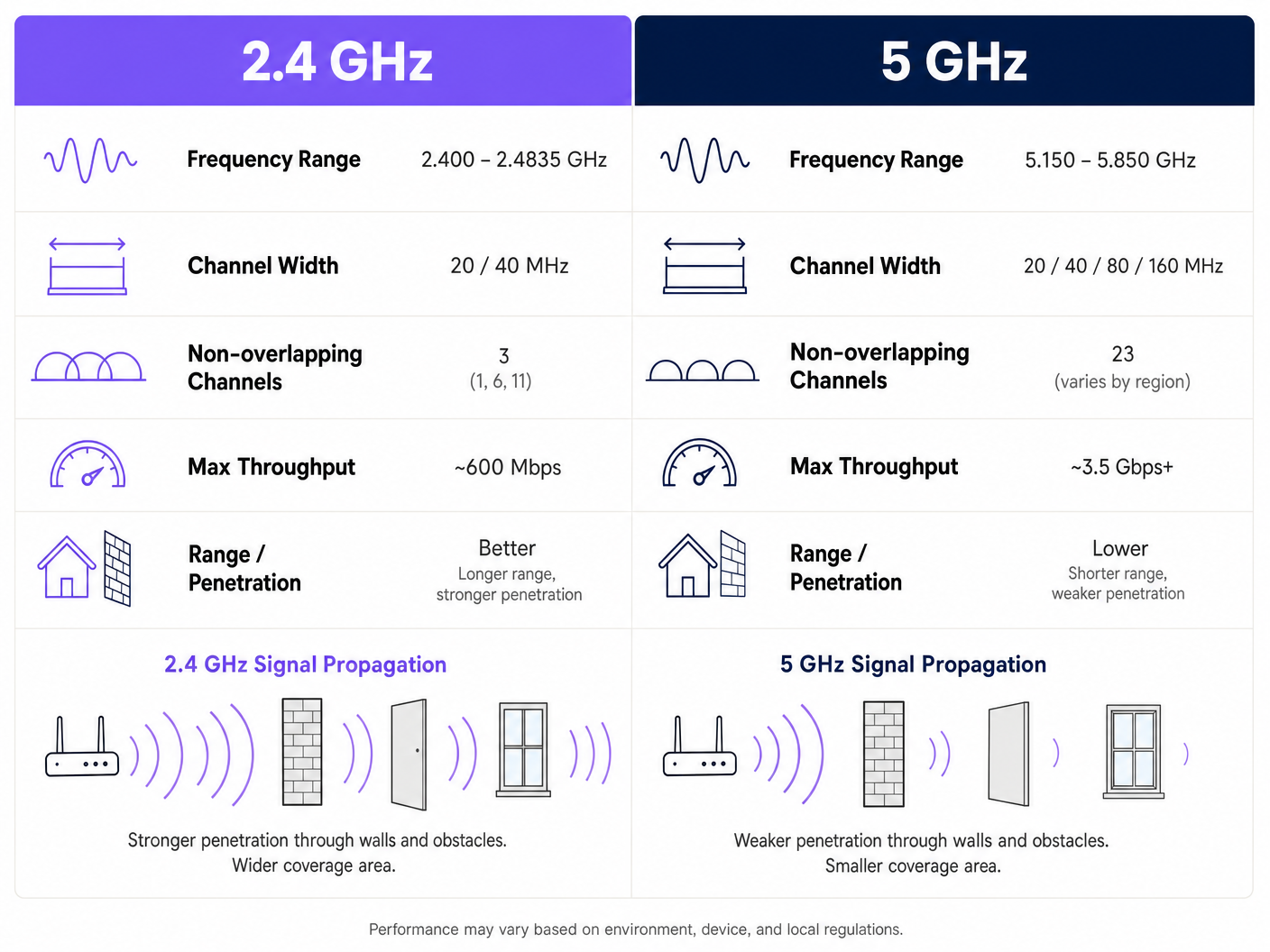
La bande 2.4GHz (2.400 – 2.4835 GHz) est le cheval de bataille historique des réseaux sans fil. Son principal avantage est la propagation du signal ; les ondes de basse fréquence pénètrent les murs, les portes et les sols plus efficacement que les hautes fréquences. Cependant, cette portée s'accompagne d'une pénalité architecturale sévère dans les déploiements à haute densité.
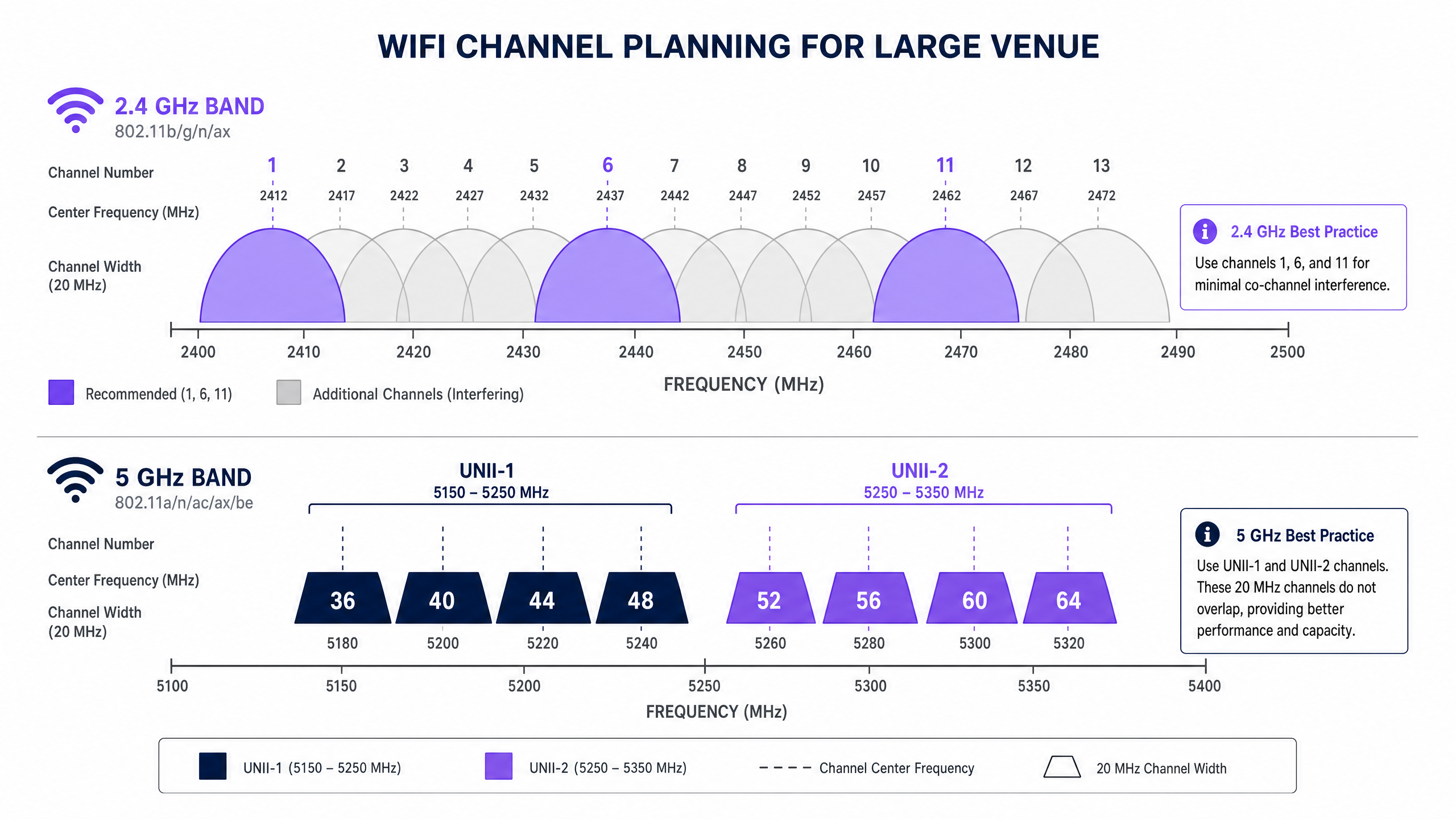
Au Royaume-Uni et en Europe, la bande 2.4GHz offre 13 canaux. Chaque canal a une largeur de 20MHz, mais ils ne sont espacés que de 5MHz. Ce chevauchement structurel signifie que seuls trois canaux — 1, 6 et 11 — sont véritablement non chevauchants. Dans un environnement dense, tel qu'un site Hospitality avec des AP déployés dans une pièce sur deux, forcer des centaines d'appareils sur trois canaux conduit inévitablement à de graves interférences co-canal (CCI). De plus, le spectre 2.4GHz est fortement pollué par des interféreurs non-WiFi, y compris les fours à micro-ondes, les appareils Bluetooth et les téléphones DECT.
La Bande 5GHz : Capacité et le Défi DFS
La bande 5GHz (5.150 – 5.850 GHz) modifie fondamentalement l'équation de la capacité. Elle offre un spectre utilisable considérablement plus large, permettant des canaux plus larges et des débits de données plus élevés. Au Royaume-Uni, la bande 5GHz est segmentée en sous-bandes UNII (Unlicensed National Information Infrastructure), offrant jusqu'à 19 canaux 20MHz non chevauchants.
Lors de la détermination du meilleur canal pour le WiFi 5GHz, les architectes réseau doivent gérer la sélection dynamique de fréquence (DFS). Le DFS est une exigence réglementaire conçue pour empêcher les réseaux WiFi d'interférer avec les systèmes radar existants, tels que les radars météorologiques et militaires.
- UNII-1 (Canaux 36, 40, 44, 48) : Ces canaux ne nécessitent pas de DFS. Ils sont la référence pour les déploiements d'entreprise car les AP ne changeront pas soudainement de canal si un radar est détecté, assurant une connectivité client stable.
- UNII-2A et UNII-2C (Canaux 52-144) : Ce sont des canaux DFS. Si un AP détecte une signature radar sur son canal de fonctionnement, il doit immédiatement quitter ce canal et passer à un autre, ce qui peut entraîner la perte de sessions client actives.
- UNII-3 (Canaux 149-165) : La disponibilité varie selon la région, mais ce sont généralement des canaux non-DFS là où cela est autorisé.
Guide d'Implémentation : Élaborer le Plan de Canaux
Un déploiement réussi exige une approche de planification des canaux neutre vis-à-vis des fournisseurs et basée sur les données. Que vous déployiez dans un environnement Retail ou que vous mettiez à niveau un hub de Transport , ces étapes constituent la base d'un réseau haute performance.
1. Réaliser une Étude de Site RF Active
Ne vous fiez jamais uniquement à la modélisation prédictive. Menez une étude active à l'aide d'un analyseur de spectre pour cartographier l'environnement RF existant. Identifiez les APs non autorisés, les interférences non-WiFi et les réseaux voisins. Ces données empiriques sont essentielles pour attribuer des canaux qui évitent la congestion existante.
2. Définir les Largeurs de Canaux de Manière Conservative
L'instinct de maximiser le débit en regroupant les canaux (par exemple, en utilisant des largeurs de 80MHz ou 160MHz) est une erreur architecturale courante dans les lieux denses.
- Sur 5GHz : Standardisez sur des largeurs de canal de 20MHz ou 40MHz. Bien que les vitesses de pointe par client soient inférieures à celles des canaux 80MHz, le débit agrégé du réseau augmente car vous préservez davantage de canaux non chevauchants, réduisant ainsi le CCI.
- Sur 2.4GHz : Appliquez strictement des largeurs de canal de 20MHz. L'utilisation de 40MHz sur 2.4GHz dans un environnement d'entreprise garantit de graves interférences.
3. Mettre en Œuvre le Band Steering
Les AP d'entreprise modernes prennent en charge le band steering, une fonctionnalité qui encourage les clients compatibles double bande à se connecter à la bande 5GHz. Cela libère le spectre 2.4GHz pour les appareils hérités et les capteurs IoT, tels que ceux abordés dans notre guide sur BLE Low Energy Explained for Enterprise .
4. Optimiser la Puissance d'Émission
Une puissance d'émission élevée n'équivaut pas à de meilleures performances ; elle équivaut à un domaine d'interférence plus grand. Dans un déploiement à haute densité, réduisez la puissance d'émission sur les radios 2.4GHz (par exemple, 8-11 dBm) pour réduire la taille des cellules et limiter les CCI. Les radios 5 GHz peuvent fonctionner à une puissance légèrement supérieure (par exemple, 14-17 dBm) pour compenser leurs capacités de pénétration réduites.
Bonnes pratiques et normes de l'industrie
Pour maintenir la conformité et l'excellence opérationnelle, respectez ces recommandations standard de l'industrie :
- Standardisez sur UNII-1 pour les infrastructures critiques : Utilisez les canaux 36, 40, 44 et 48 pour les zones nécessitant une stabilité absolue, telles que les salles de réunion de direction ou les groupes de points de vente (POS).
- Tirez parti de l'analyse pour l'optimisation dynamique : Utilisez des plateformes comme Purple pour surveiller en permanence l'environnement RF. Si un locataire voisin déploie un AP non autorisé, vos analyses devraient détecter l'augmentation de l'utilisation du canal et déclencher un ajustement automatique ou manuel du canal. Pour des informations sur l'optimisation des environnements de bureau, consultez Office Wi Fi: Optimize Your Modern Office Wi-Fi Network .
- Auditez le comportement DFS avant la mise en service : Si vous utilisez les canaux UNII-2, effectuez des tests rigoureux pour surveiller la fréquence à laquelle les AP déclenchent des événements DFS. Si la détection radar est fréquente (par exemple, près d'un aéroport), supprimez ces canaux spécifiques de la liste des canaux autorisés de l'AP.
- Préparez-vous au Wi-Fi 6E : Si vous entreprenez une mise à niveau matérielle, évaluez le Wi-Fi 6E (802.11ax fonctionnant dans la bande 6 GHz). Le spectre 6 GHz offre jusqu'à 500 MHz de bande passante supplémentaire et sans interférence au Royaume-Uni, résolvant efficacement le problème de capacité en haute densité. Pour en savoir plus, consultez Wi Fi Frequencies: A Guide to Wi-Fi Frequencies in 2026 .
Dépannage et atténuation des risques
Même avec une planification méticuleuse, les environnements RF sont dynamiques. Les modes de défaillance courants incluent :
- Le problème du « client collant » : Les clients refusent de se déplacer vers un AP plus proche, maintenant une connexion faible qui réduit les performances globales de la cellule. Atténuation : Implémentez des seuils RSSI minimums et utilisez les protocoles 802.11k/v/r pour faciliter l'itinérance transparente.
- Catastrophes de canaux automatiques : Les algorithmes de canaux automatiques basés sur le contrôleur convergent souvent sur les mêmes quelques canaux, provoquant une CCI généralisée. Atténuation : Utilisez les fonctions de canaux automatiques uniquement lors du déploiement initial ou des fenêtres de maintenance planifiées. Pour un fonctionnement continu, fiez-vous à une carte de canaux statique, méticuleusement planifiée et validée par des analyses.
- Dégradation de la posture de sécurité : Une mauvaise planification des canaux peut masquer la présence d'AP non autorisés ou d'attaques de type « evil twin ». Atténuation : Un environnement RF propre rend la détection d'anomalies beaucoup plus fiable. Assurez-vous que votre architecture s'aligne sur les cadres de sécurité modernes, comme discuté dans La lista de verificación para migrar de NAC heredado a NAC nativo de la nube et A Lista de Verificação para Migrar de NAC Legado para NAC Nativo da Nuvem .
ROI et impact commercial
L'impact commercial d'un réseau sans fil correctement conçu s'étend bien au-delà de la réduction des tickets de support informatique. Dans le commerce de détail et l'hôtellerie, le réseau WiFi est le principal canal d'engagement des clients et d'acquisition de données.
Lorsque les interférences de co-canal sont éliminées et que les clients sont dirigés avec succès vers des canaux 5 GHz propres, le réseau peut prendre en charge des densités de clients plus élevées sans dégradation. Cette fiabilité garantit que les captive portals se chargent instantanément, augmentant le taux de conversion des connexions Guest WiFi. La capture de données de première partie qui en résulte alimente des campagnes de marketing ciblées, impactant directement le résultat net.
Écoutez notre exposé technique complet sur ce sujet :
Définitions clés
Co-Channel Interference (CCI)
Interference caused when two or more access points operate on the exact same channel and their coverage areas overlap.
CCI forces devices to wait their turn to transmit, drastically reducing network throughput in dense deployments.
Dynamic Frequency Selection (DFS)
A regulatory mandate requiring WiFi devices operating in certain 5GHz bands to detect and avoid incumbent radar systems.
If an AP detects radar on a DFS channel, it must immediately switch channels, causing brief connectivity drops for connected clients.
Band Steering
A feature on enterprise APs that detects dual-band capable clients and actively encourages them to connect to the 5GHz band rather than 2.4GHz.
Essential for preserving the limited 2.4GHz spectrum for legacy IoT devices and ensuring high-performance clients get optimal speeds.
Channel Bonding
The practice of combining two or more adjacent 20MHz channels into a single wider channel (e.g., 40MHz, 80MHz) to increase data throughput.
While it increases speed, it reduces the total number of non-overlapping channels available, making it dangerous in high-density environments.
UNII-1 Band
The lower segment of the 5GHz spectrum (channels 36, 40, 44, 48) that does not require DFS compliance.
The most stable and reliable channels for mission-critical enterprise wireless traffic.
Adjacent Channel Interference (ACI)
Interference caused by transmissions on overlapping but not identical frequencies (e.g., using channel 3 and channel 6 in 2.4GHz).
ACI is more destructive than CCI because devices cannot properly decode the overlapping signals, leading to high packet loss.
RSSI (Received Signal Strength Indicator)
A measurement of the power present in a received radio signal.
Used by network administrators to set minimum connection thresholds, forcing 'sticky clients' to roam to closer access points.
BSS Coloring
A feature introduced in Wi-Fi 6 (802.11ax) that adds a 'color' identifier to transmissions, allowing APs on the same channel to ignore each other's traffic if the color doesn't match.
Significantly mitigates the impact of co-channel interference in extremely dense deployments like stadiums.
Exemples concrets
A 400-room hotel in a dense urban environment is experiencing widespread guest complaints regarding WiFi speeds during the evening peak (7 PM - 10 PM). The current deployment uses dual-band APs in every other room, with auto-channel selection enabled and 80MHz channel widths on 5GHz.
- Disable auto-channel selection to prevent continuous channel thrashing. 2. Reduce 5GHz channel width from 80MHz to 20MHz to increase the number of available non-overlapping channels and eliminate co-channel interference. 3. Statically assign 5GHz channels, prioritizing UNII-1 (36, 40, 44, 48) and clean UNII-2 channels. 4. Reduce 2.4GHz transmit power to 8dBm and restrict to channels 1, 6, and 11 to minimize cell overlap.
A large retail chain is deploying a new point-of-sale (POS) system that relies on wireless connectivity. The store is located in a shopping centre with dozens of neighboring retail WiFi networks visible. The POS vendor recommends using 2.4GHz for 'better range'.
- Reject the vendor's 2.4GHz recommendation for critical infrastructure. 2. Configure a dedicated SSID for the POS system operating exclusively on the 5GHz band. 3. Assign this SSID to UNII-1 channels (36, 40, 44, 48) to avoid any potential DFS radar disruptions. 4. Implement band steering on the public Guest WiFi SSID to keep consumer devices off the 2.4GHz spectrum as much as possible.
Questions d'entraînement
Q1. You are deploying WiFi in a hospital where life-critical telemetry equipment operates on 2.4GHz. The hospital also wants to offer high-speed Guest WiFi in the waiting areas. How do you architect the channel plan?
Conseil : Consider physical separation and band dedication.
Voir la réponse type
- Dedicate the 2.4GHz band entirely to the telemetry equipment, statically assigning channels 1, 6, and 11. 2. Disable the Guest WiFi SSID on the 2.4GHz radios completely. 3. Broadcast the Guest WiFi exclusively on the 5GHz band using UNII-1 and UNII-2 channels. This ensures the life-critical 2.4GHz spectrum remains uncontended while providing high capacity for guests.
Q2. A stadium deployment is suffering from massive interference on 5GHz, despite using 20MHz channels. The APs are mounted very high up and are 'hearing' each other across the bowl. What configuration change is required?
Conseil : Think about how far the signal is traveling and how APs decide when the channel is clear.
Voir la réponse type
- Significantly reduce the transmit (Tx) power on the 5GHz radios to shrink the cell size. 2. Increase the RX-SOP (Receive Start of Packet) threshold, which makes the AP 'deaf' to weak signals from distant APs across the stadium bowl, allowing it to transmit simultaneously without triggering carrier sense mechanisms.
Q3. Your corporate office is located less than 2 miles from a major commercial airport. You are currently using channels 36, 40, 44, 48, 52, 56, 60, and 64. Users are complaining of random, brief disconnects. What is the likely cause and solution?
Conseil : Consider the regulatory requirements for specific 5GHz channels.
Voir la réponse type
The disconnects are caused by DFS (Dynamic Frequency Selection) events. The APs on channels 52-64 are detecting airport radar and vacating the channel. The solution is to remove the UNII-2 DFS channels (52-64) from the allowed channel list and rely solely on the non-DFS UNII-1 channels (36-48), or upgrade to Wi-Fi 6E to utilize the non-DFS 6GHz band.