
Le WiFi dans les magasins de détail : Créer des profils clients à partir des données de fréquentation
Ce guide de référence détaille comment les équipes informatiques du commerce de détail peuvent transformer l'infrastructure WiFi existante en un moteur robuste de collecte de données de première partie. Il couvre l'architecture technique, les normes de conformité et les stratégies de déploiement actionnables pour la création de profils clients à partir de l'analyse de la fréquentation.
Écouter ce guide
Voir la transcription du podcast
Résumé Exécutif
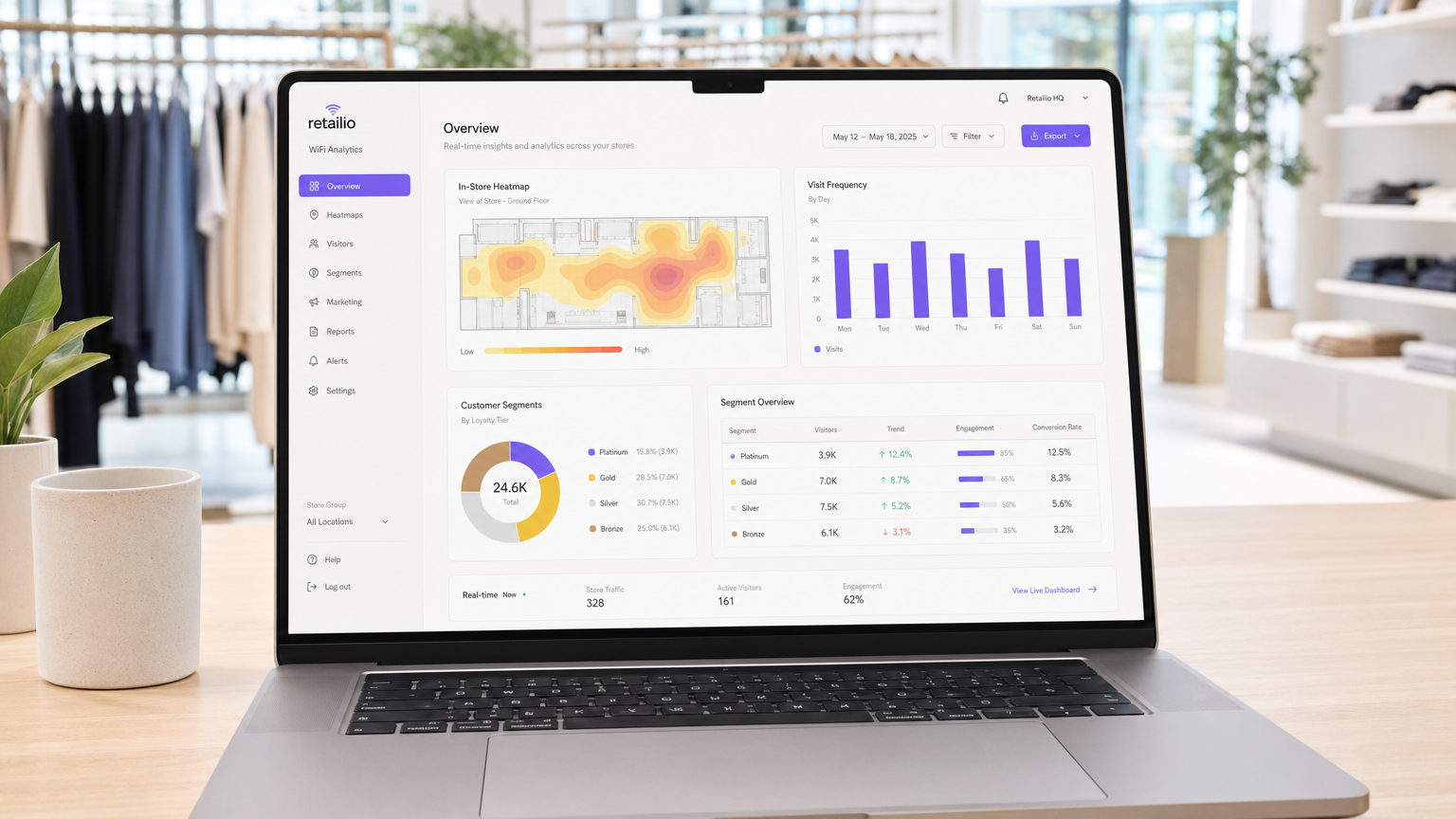
Pour les opérations de vente au détail modernes, l'environnement physique du magasin reste un point de contact essentiel, mais il manque souvent des analyses granulaires inhérentes au commerce électronique. Ce guide fournit un cadre technique complet pour transformer l'infrastructure sans fil standard en un moteur d'analyse de niveau entreprise. En tirant parti des connexions Guest WiFi authentifiées, les responsables informatiques et les directeurs d'exploitation de sites peuvent collecter passivement des données de première partie de haute fidélité, y compris la fréquence des visites, le temps de présence et l'analyse des parcours.
Le déploiement de WiFi Analytics transforme le réseau d'un simple centre de coûts en un atout commercial stratégique. Ce document détaille l'architecture technique nécessaire, le passage de la détection passive des adresses MAC aux sessions authentifiées, et les normes de conformité critiques (GDPR, PCI DSS, WPA3) requises pour une implémentation sécurisée dans les environnements de Retail et de Hospitality .
Approfondissement Technique
La Mécanique de la Collecte de Données
Lorsqu'un appareil client entre dans un espace de vente au détail, il diffuse des requêtes de sondage contenant une adresse MAC (Media Access Control). Historiquement, cela permettait un suivi passif. Cependant, les systèmes d'exploitation modernes appliquent la randomisation des adresses MAC pour protéger la vie privée des utilisateurs. Pour surmonter cette limitation et garantir une haute fidélité des données, les déploiements d'entreprise doivent s'appuyer sur des connexions authentifiées.
Lorsqu'un utilisateur se connecte via un Captive Portal, le système capture une identité vérifiée et consentie. Cette identité est associée à un identifiant d'appareil persistant, formant la base d'un profilage client robuste.
Flux de Données Principaux
- Fréquence des Visites : En suivant les événements de reconnexion, le système construit un profil longitudinal de la fidélité client.
- Temps de Présence : La mesure de la durée des sessions actives fournit des informations sur l'engagement client et est fortement corrélée à la probabilité de conversion.
- Analyse des Parcours : L'utilisation de la trilatération à travers plusieurs points d'accès (APs) permet de cartographier les parcours physiques des clients dans le magasin.
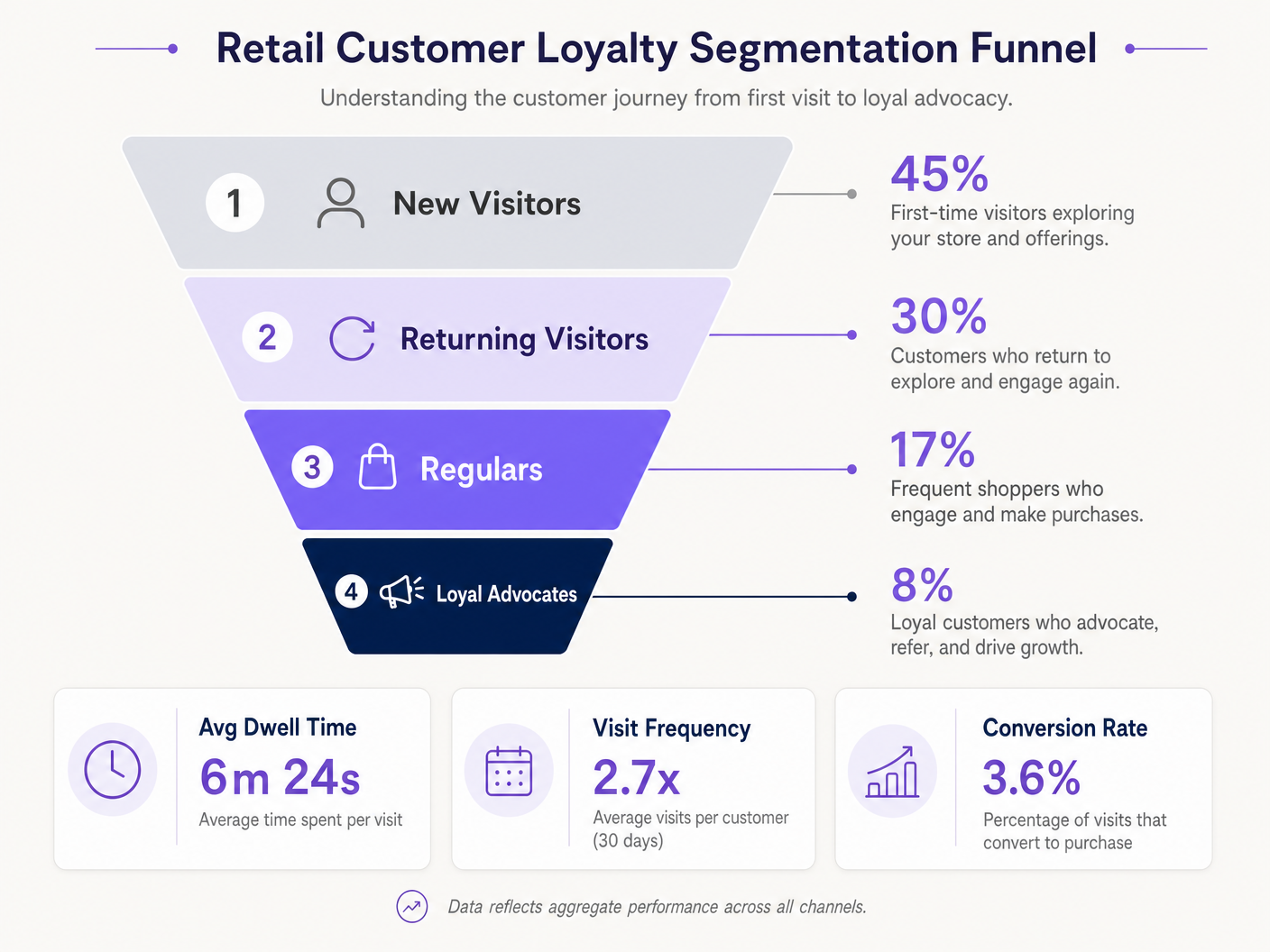
- Segmentation de la Fidélité : L'agrégation de la fréquence et du temps de présence permet une segmentation automatisée (par exemple, nouveaux visiteurs vs. ambassadeurs fidèles).
Architecture d'Entreprise
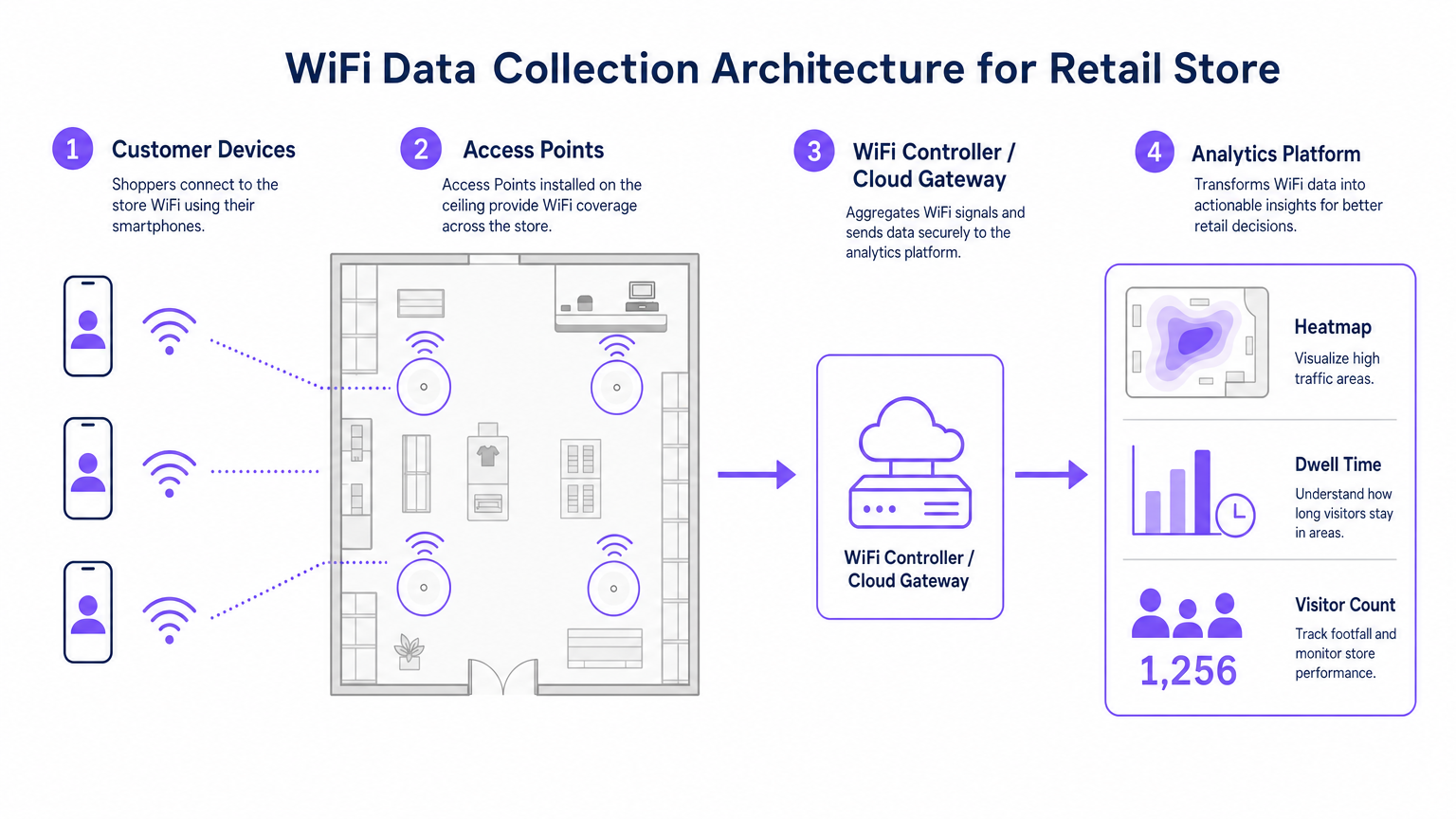
Un déploiement robuste d'analyse WiFi pour le commerce de détail se compose de quatre couches principales :
- Infrastructure Radiofréquence : Les déploiements à haute densité nécessitent des points d'accès 802.11ac Wave 2 ou 802.11ax (WiFi 6). La recommandation standard est un AP par 1 500 à 2 000 pieds carrés, ajusté pour les zones à fort trafic.
- Plan de Contrôle/Gestion Cloud : Agrège la télémétrie de la couche RF et gère l'itinérance des clients.
- Plateforme d'Analyse : Ingeste la télémétrie réseau brute (événements d'association, force du signal) et la transforme en intelligence exploitable.
- Couche d'Engagement : S'intègre via des APIs ou des webhooks avec les systèmes CRM pour déclencher des flux de travail marketing automatisés basés sur des données spatiales en temps réel.
Écoutez notre exposé technique complet sur le déploiement de ces architectures :
Guide d'Implémentation
Un déploiement réussi nécessite un alignement entre l'ingénierie réseau et les opérations commerciales.
- Optimiser le Flux d'Authentification : Mettre en œuvre un Captive Portal fluide. Minimiser les champs de saisie pour maximiser les taux d'adhésion tout en assurant des mécanismes de consentement clairs. Envisager l'intégration des identifiants de programmes de fidélité existants.
- Concevoir pour la Triangulation : Les conceptions de couverture standard sont insuffisantes pour l'analyse des parcours. Assurer qu'au moins trois points d'accès offrent une couverture superposée dans les zones de suivi clés pour permettre une trilatération précise.
- Définir les Indicateurs Clés de Performance (KPIs) : Établir des métriques de référence avant le lancement. Les KPIs courants incluent le temps de présence moyen par zone, les ratios de nouveaux visiteurs par rapport aux visiteurs récurrents, et les heures de pointe de fréquentation.
Bonnes Pratiques
- Standardiser le Matériel : Assurer une cohérence du matériel AP sur tous les sites pour maintenir une télémétrie de signal uniforme, simplifiant la normalisation des données au niveau de la couche d'analyse.
- Isoler les Réseaux : Séparer strictement le trafic invité des réseaux d'entreprise et de Point de Vente (POS) en utilisant des VLANs et des SSIDs dédiés pour maintenir la conformité PCI DSS.
- Automatiser la Rétention des Données : Configurer la plateforme d'analyse pour purger automatiquement les données de session brutes après une période définie (par exemple, 12 mois) afin de minimiser les risques de conformité au titre du GDPR.
Pour un contexte d'implémentation plus large dans différents secteurs, consultez nos guides sur Hospitality WiFi Solutions: What to Look for in a Provider et Wi Fi in Auto: The Complete 2026 Enterprise Guide .
Dépannage et Atténuation des Risques
| Mode de Défaillance | Symptôme | Stratégie d'Atténuation |
|---|---|---|
| Précision de Triangulation Faible | Les données de localisation sautent de manière erratique sur le plan d'étage. | Effectuer une étude de site RF prédictive ; augmenter la densité des AP dans les zones critiques ; s'assurer que les AP sont montés à des hauteurs uniformes. |
| Taux d'Authentification Faibles | Forte fréquentation passive mais faible nombre d'utilisateurs enregistrés. | Simplifier l'interface utilisateur du Captive Portal ; proposer des options de connexion sociale ; s'assurer que la page d'accueil est entièrement réactive. |
| Silos de Données | Les données d'analyse n'atteignent pas le CRM. | Vérifier la connectivité des points de terminaison API ; vérifier les journaux de livraison des webhooks ; s'assurer que les formats de charge utile des données correspondent aux exigences du schéma CRM. |
ROI et impact commercial
La transition vers un déploiement WiFi axé sur l'analyse produit des résultats commerciaux mesurables. Les détaillants rapportent constamment :
- Augmentation des taux de conversion : Directement corrélée aux stratégies d'engagement ciblées basées sur le temps de présence.
- Optimisation de l'agencement des magasins : Décisions basées sur les données concernant le placement des produits, dérivées de l'analyse des parcours.
- Amélioration de la fidélisation client : Campagnes de réengagement automatisées déclenchées par des seuils de visiteurs inactifs.
En comblant le fossé entre les opérations physiques et l'intelligence numérique, l'analyse WiFi d'entreprise offre un avantage concurrentiel décisif dans le paysage du commerce de détail moderne.
Définitions clés
MAC Address Randomisation
A privacy feature in modern operating systems that broadcasts a fake MAC address during network probing, preventing passive tracking.
Forces IT teams to rely on authenticated connections rather than passive listening for accurate footfall analytics.
Trilateration
The process of determining absolute or relative locations of points by measurement of distances, using the geometry of circles, spheres or triangles.
Used by the analytics platform to calculate a device's physical location based on signal strength received by multiple APs.
Captive Portal
A web page that the user of a public-access network is obliged to view and interact with before access is granted.
The primary mechanism for capturing user consent and identity to build first-party data profiles.
Dwell Time
The total duration a customer's device remains continuously associated with the WiFi network during a single visit.
A critical metric for marketing teams to gauge customer engagement and intent.
802.11ax (WiFi 6)
The latest standard for wireless networks, offering higher throughput, better performance in dense environments, and improved power efficiency.
The recommended hardware standard for enterprise retail environments requiring high-density analytics.
PCI DSS
Payment Card Industry Data Security Standard; a set of security standards designed to ensure that all companies that accept, process, store or transmit credit card information maintain a secure environment.
Mandates strict network segregation between guest WiFi and point-of-sale systems.
VLAN (Virtual Local Area Network)
A logical subnetwork that groups a collection of devices from different physical LANs.
Used to securely isolate guest WiFi traffic from internal corporate networks.
First-Party Data
Information a company collects directly from its customers and owns entirely.
The ultimate output of a successful retail WiFi analytics deployment, highly valuable for targeted marketing.
Exemples concrets
A 50-store retail chain needs to implement footfall tracking to optimize staffing, but their current network only provides passive MAC detection, resulting in highly inaccurate data due to MAC randomization.
Deploy a captive portal authentication system integrated with the existing WiFi controllers. Configure the portal to require a simple email or social login in exchange for free WiFi access. Map the authenticated identity to the device's persistent identifier, bypassing the randomized MAC issue. Integrate this data feed via API into the central workforce management system to align staffing levels with verified peak footfall hours.
A large conference centre wants to track attendee flow between different exhibition halls to justify premium pricing for certain vendor booths.
Redesign the RF layout specifically for location analytics rather than just coverage. Deploy additional 802.11ax access points to ensure at least three APs overlap in key transition corridors, enabling accurate trilateration. Feed the signal strength telemetry into the analytics platform to generate real-time heatmaps and path analysis reports for the events team.
Questions d'entraînement
Q1. Your marketing team wants to implement path analysis to track customer movement around a new product display. The store currently has two access points providing adequate signal coverage for connectivity. What is the necessary technical recommendation?
Conseil : Consider the requirements for spatial calculation.
Voir la réponse type
You must advise the marketing team that path analysis requires trilateration. Therefore, you need to deploy at least one additional access point to ensure the target area is covered by overlapping signals from a minimum of three APs.
Q2. During a security audit, it is discovered that the guest WiFi network and the POS terminals are operating on the same physical switch without logical separation. What is the immediate compliance risk and remediation?
Conseil : Think about payment security standards.
Voir la réponse type
This configuration violates PCI DSS requirements. The immediate remediation is to configure separate VLANs on the switch to logically isolate the guest traffic from the POS network, ensuring no lateral movement is possible.
Q3. The operations director notes that while the system reports 1,000 visitors per day based on passive MAC detection, the authenticated user count is only 150. How do you explain this discrepancy?
Conseil : Consider modern mobile OS features.
Voir la réponse type
Explain that modern smartphones use MAC address randomisation when probing for networks, which artificially inflates passive counts as a single device may broadcast multiple fake MACs. The authenticated count of 150 represents the true, high-fidelity data of users who actively engaged with the captive portal.
Continuer la lecture de cette série
Confidentialité dès la conception : Anonymisation des données WiFi pour la conformité au GDPR
Ce guide de référence détaille l'architecture technique et les stratégies de mise en œuvre pour anonymiser les données WiFi afin d'assurer la conformité au GDPR. Il fournit aux leaders informatiques et aux architectes réseau des cadres d'action pour équilibrer des analyses de site robustes avec des exigences strictes en matière de confidentialité des données.
Cartographie thermique vs Analyse de présence : Différences techniques
Ce guide technique de référence détaille les différences architecturales et opérationnelles cruciales entre la cartographie thermique WiFi et l'analyse de présence pour les opérateurs de sites d'entreprise. Il fournit aux responsables informatiques, aux architectes réseau et aux directeurs des opérations des cadres de déploiement exploitables, des scénarios de mise en œuvre réels et des meilleures pratiques indépendantes des fournisseurs pour maximiser le retour sur investissement de leur infrastructure sans fil existante.
Comment calculer le temps de présence à l'aide de WiFi Location Analytics
Ce guide fournit une référence technique complète pour le calcul du temps de présence WiFi à l'aide de WiFi location analytics, couvrant l'architecture complète de la capture des requêtes de sondage 802.11 en passant par la trilatération basée sur le RSSI jusqu'à l'analyse des zones géorepérées. Il est destiné aux responsables informatiques, aux architectes réseau et aux directeurs des opérations de site qui doivent déployer une intelligence de localisation précise et évolutive dans les environnements de la vente au détail, de l'hôtellerie, de la santé et du secteur public. Les lecteurs obtiendront des conseils de mise en œuvre exploitables, des études de cas réelles et un cadre clair pour traduire les données spatiales brutes en résultats commerciaux mesurables.