
Marketing WiFi pour restaurants : Comment transformer le WiFi gratuit en clients fidèles
Ce guide de référence technique et faisant autorité explore l'architecture et la mise en œuvre du marketing WiFi pour restaurants — la pratique consistant à utiliser l'accès au réseau invité comme un canal structuré d'acquisition de données et d'automatisation marketing. Il fournit aux responsables informatiques, aux architectes réseau et aux directeurs d'exploitation de sites un plan tactique pour déployer des captive portals, s'intégrer aux plateformes CRM et déclencher des campagnes automatisées qui génèrent des affaires récurrentes mesurables. De la capture de données conforme au GDPR aux flux de travail d'e-mails basés sur des événements, ce guide couvre le cycle de vie complet du déploiement avec des métriques de ROI concrètes.
Écouter ce guide
Voir la transcription du podcast
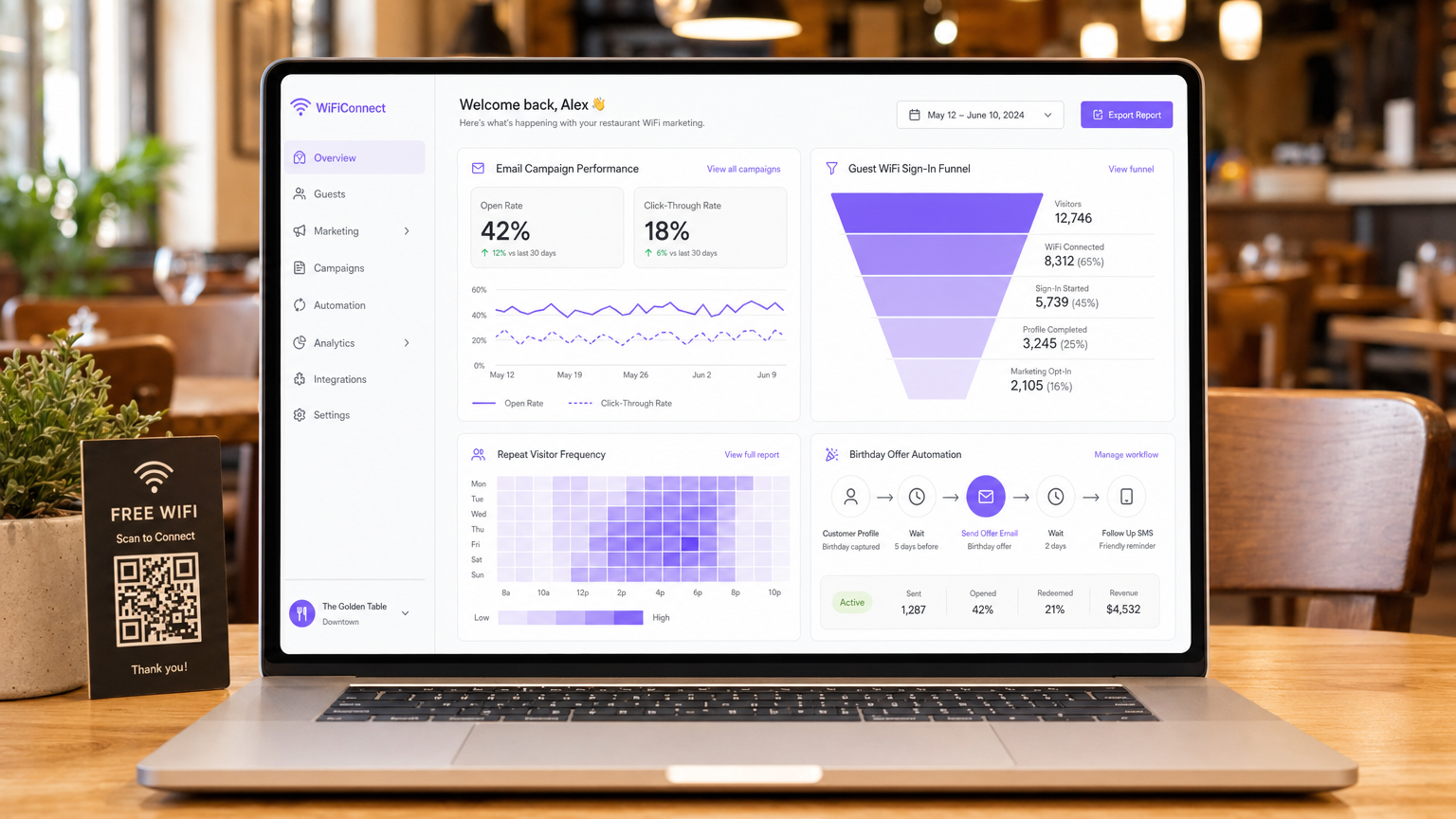
Résumé Exécutif
Pour les responsables informatiques, les architectes réseau et les CTO opérant dans les environnements de l'hôtellerie, du commerce de détail et du secteur public, la fourniture d'un accès au réseau invité est passée d'une utilité de base à un canal d'acquisition de données critique. Comprendre ce qu'est le marketing WiFi pour restaurants est fondamental pour extraire un ROI des investissements dans l'infrastructure réseau. Ce guide décrit l'architecture technique, les stratégies de déploiement et les protocoles d'atténuation des risques nécessaires pour transformer un centre de coûts — le WiFi invité gratuit — en un moteur mesurable d'affaires récurrentes et de fidélisation de la clientèle.
Le déploiement d'une solution Guest WiFi de niveau entreprise exige plus que la simple diffusion d'un SSID. Il demande une architecture robuste qui s'intègre parfaitement aux plateformes CRM, aux outils d'automatisation marketing et aux moteurs d'analyse, tout en respectant des normes de conformité strictes, notamment le GDPR et le PCI DSS. En mettant en œuvre une capture de données structurée via des captive portals, les établissements peuvent segmenter les utilisateurs, déclencher des campagnes marketing automatisées (e-mails post-visite, offres d'anniversaire et promotions d'événements) et générer des avis précieux. Ce guide fournit un plan tactique pour configurer et optimiser les flux de travail de marketing WiFi afin de maximiser le débit, d'assurer la sécurité et de générer un impact commercial mesurable.
Approfondissement Technique : Architecture et Normes
La base d'un marketing WiFi invité efficace réside dans une architecture réseau évolutive et sécurisée. En son cœur, le système repose sur un mécanisme de captive portal qui intercepte les requêtes HTTP/HTTPS des appareils non authentifiés, les redirigeant vers une page d'authentification hébergée. Ce processus utilise généralement RADIUS (Remote Authentication Dial-In User Service) pour l'authentification, l'autorisation et la comptabilité (AAA) centralisées.
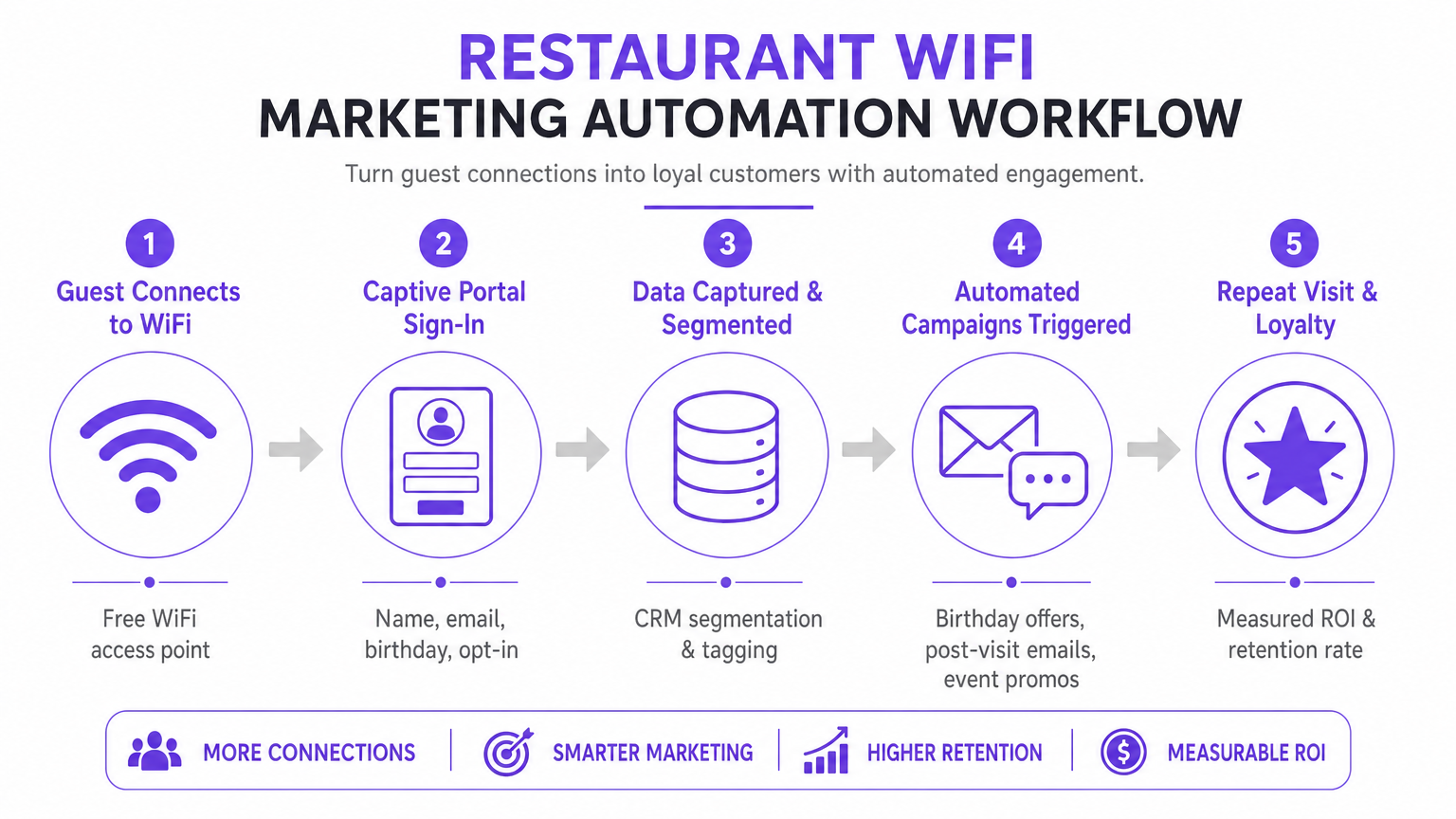
Flux de Travail d'Authentification et Capture de Données
Lorsqu'un appareil se connecte au SSID invité, le contrôleur de réseau local sans fil (WLC) ou le point d'accès restreint l'accès au réseau, plaçant l'appareil dans un jardin clos. L'utilisateur se voit présenter un captive portal, qui sert d'interface principale d'acquisition de données. Pour optimiser les taux de conversion, le portail doit prendre en charge plusieurs méthodes d'authentification :
| Méthode d'Authentification | Niveau de Friction | Qualité des Données | Complexité de l'Implémentation |
|---|---|---|---|
| Social Login (OAuth 2.0) | Faible | Élevée (riche en données démographiques) | Moyenne |
| Form-Based (Email + Opt-In) | Moyenne | Contrôlée | Faible |
| SMS Verification | Moyenne-Élevée | Élevée (mobile vérifié) | Moyenne |
| Passpoint / Hotspot 2.0 | Très Faible | Moyenne | Élevée |
Les intégrations de Social Login (OAuth 2.0) avec Google ou Facebook offrent un accès à faible friction tout en capturant des données démographiques riches. Cette méthode repose sur un échange de jetons sécurisé, éliminant le besoin pour les utilisateurs de créer de nouvelles informations d'identification. L'Authentification Basée sur Formulaire permet aux utilisateurs de fournir leur nom, leur adresse e-mail, et éventuellement leur date de naissance ou leur numéro de téléphone. Ces données sont validées et transmises en toute sécurité à la base de données centralisée. La Réauthentification Transparente (Mise en Cache MAC) met en cache l'adresse MAC d'un appareil pour une durée configurable (par exemple, 30 jours), permettant un accès sans friction et un suivi précis de la fréquence lors des visites ultérieures.
Protocoles de Sécurité et de Conformité
Le déploiement du WiFi pour le marketing nécessite une stricte adhésion aux normes de sécurité et de confidentialité. L'architecture doit séparer le trafic invité des réseaux d'entreprise à l'aide de VLAN pour empêcher les mouvements latéraux. La mise en œuvre doit être conforme à :
- GDPR / CCPA : Des mécanismes de consentement explicites et non groupés doivent être intégrés au captive portal. Les utilisateurs doivent activement accepter de recevoir des communications marketing, et la plateforme doit fournir des capacités robustes de demande d'accès aux données par les personnes concernées (DSAR). Le consentement marketing ne peut pas être regroupé avec les conditions d'utilisation de l'accès au réseau.
- PCI DSS : Si l'établissement traite les paiements sur la même infrastructure physique, la segmentation du réseau et les règles de pare-feu doivent isoler l'environnement de données des titulaires de carte (CDE) du réseau invité.
- WPA3-Enhanced Open (OWE) : La transition vers des protocoles d'intégration sécurisés offre un chiffrement opportuniste pour le trafic non authentifié, atténuant les risques d'écoute clandestine sur les réseaux ouverts sans nécessiter d'identifiants utilisateur.
Guide d'Implémentation : Stratégies de Déploiement
Un déploiement réussi nécessite une approche par étapes, axée sur l'intégration et l'automatisation. L'objectif est d'établir un flux de données transparent du point d'accès à la plateforme d'automatisation marketing.
Étape 1 : Évaluation et Dimensionnement de l'Infrastructure
Avant de déployer un captive portal, assurez-vous que l'infrastructure RF sous-jacente peut gérer la densité de clients prévue. Effectuez une étude de site prédictive et active pour identifier les lacunes de couverture et optimiser le placement des points d'accès. Tenez compte de l'utilisation des canaux, des interférences co-canal et du débit requis par appareil. Pour les déploiements d'entreprise, l'utilisation d'une connexion internet professionnelle dédiée — telle qu'une ligne louée — garantit une bande passante et des vitesses symétriques, empêchant le trafic invité d'affecter les systèmes opérationnels critiques.
Étape 2 : Configuration du Captive Portal
Concevez le captive portal en mettant l'accent sur l'optimisation de la conversion. L'interface utilisateur doit être réactive et se charger rapidement sur les appareils mobiles, car la majorité des connexions proviendront de smartphones. Mettez en œuvre le profilage progressif : demandez des informations de base (adresse e-mail, opt-in) lors de la visite initiale, et demandez des données supplémentaires (date d'anniversaire, numéro de téléphone) lors des connexions ultérieures. Cela minimise la friction tout en enrichissant le profil client au fil du temps.
Étape 3 : CRM etd'intégration d'automatisation
La véritable valeur d'une plateforme de WiFi Analytics se réalise par l'intégration. Configurez des webhooks API ou des connecteurs natifs pour synchroniser les données capturées avec le CRM du lieu (par exemple, Salesforce, HubSpot) et les outils d'automatisation du marketing. Établissez des règles claires de mappage des données pour garantir que des champs tels que Last Visit Date et Total Visits sont mis à jour en temps réel à chaque événement d'authentification.
Étape 4 : Configuration de l'automatisation des campagnes
Configurez des workflows automatisés déclenchés par des événements réseau spécifiques. Les trois campagnes principales que chaque déploiement devrait inclure sont :
- La campagne de bienvenue : Déclenchée immédiatement après la première authentification réussie. Elle délivre un message de bienvenue et une offre à faible barrière pour inciter à une visite de retour dans un délai défini.
- La campagne « Vous nous manquez » : Déclenchée lorsqu'un appareil n'a pas été détecté sur le réseau pendant une durée spécifiée (par exemple, 45 jours). Elle offre une réduction ciblée pour réengager les clients inactifs au moment précis.
- La campagne de génération d'avis : Déclenchée 2 heures après la déconnexion d'un utilisateur du réseau, en tirant parti des événements RADIUS Accounting-Stop ou des webhooks API de localisation. Elle sollicite des commentaires via TripAdvisor ou Google My Business tant que l'expérience est encore fraîche.
Bonnes pratiques pour les établissements d'entreprise
Pour maximiser l'efficacité de comment améliorer l'expérience client dans un restaurant grâce au marketing WiFi, les bonnes pratiques suivantes, indépendantes des fournisseurs, s'appliquent aux environnements de l' hôtellerie , du commerce de détail et du transport .
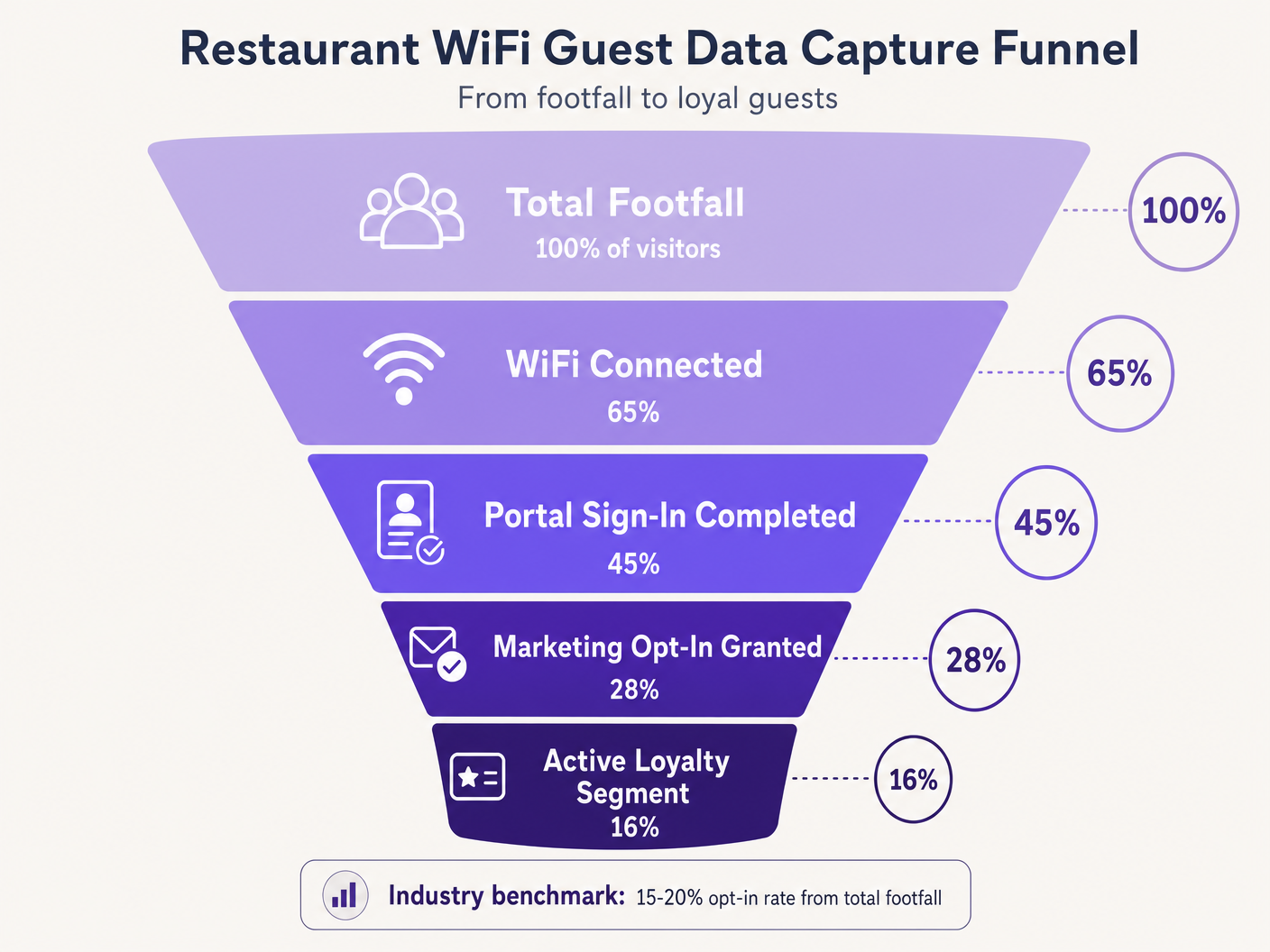
Priorisez l'Opt-In. L'objectif principal du Captive Portal est d'obtenir le consentement marketing. Assurez-vous que la proposition de valeur — par exemple, 'Connectez-vous à notre WiFi pour des offres exclusives et une surprise d'anniversaire' — est affichée de manière proéminente. Les références de l'industrie suggèrent qu'un taux d'opt-in de 15 à 20 % de la fréquentation totale est réalisable avec des portails optimisés. Les établissements dotés de portails mal conçus affichent souvent des taux inférieurs à 5 %.
Exploitez l'analyse de localisation. Utilisez les services de localisation de l'infrastructure sans fil (triangulation RSSI) pour comprendre les temps de présence et les schémas de mouvement. Ces données éclairent les décisions opérationnelles — niveaux de personnel, optimisation de l'agencement, gestion des heures de pointe — bien au-delà des applications marketing pures. La plateforme WiFi Analytics fournit les tableaux de bord et la couche de reporting pour cette intelligence.
Mettez en œuvre la limitation de bande passante. Empêchez un petit nombre d'utilisateurs de monopoliser les ressources réseau en appliquant des limites de bande passante par appareil et des délais d'expiration de session. Cela garantit une Qualité d'Expérience (QoE) constante pour tous les invités et protège les systèmes opérationnels de la saturation de la bande passante.
Application intersectorielle. Les principes du marketing WiFi s'étendent directement aux secteurs adjacents. Pour les opérateurs gérant des établissements sous licence, le WiFi pour bars et pubs : un guide complet de configuration et de marketing fournit une référence tactique parallèle. Pour les déploiements dans les secteurs de la santé et du public, les exigences de conformité sont plus strictes, mais l'architecture de capture de données reste fondamentalement similaire.
Dépannage et atténuation des risques
Le déploiement du WiFi invité introduit des risques spécifiques qui doivent être gérés de manière proactive avant la mise en service.
Modes de défaillance courants et résolutions
| Mode de défaillance | Cause première | Résolution |
|---|---|---|
| Le Captive Portal n'apparaît pas | Mauvaise configuration du walled garden, erreur de certificat SSL | Auditer les domaines de la liste blanche ; déployer un certificat SSL valide sur le portail |
| La connexion sociale échoue silencieusement | Domaines du fournisseur OAuth non listés en blanc | Ajouter les domaines d'authentification du fournisseur au walled garden |
| Les invités de retour sont invités à se réauthentifier | Randomisation MAC (iOS 14+, Android 10+) | Mettre en œuvre des profils Passpoint ou une application de lieu |
| Retards de synchronisation des données CRM | Limites de débit API ou échecs de webhook | Mettre en œuvre un backoff exponentiel, des files d'attente de lettres mortes |
| Faible taux d'opt-in | Champs de formulaire excessifs, proposition de valeur médiocre | Réduire à e-mail + opt-in ; améliorer le texte du portail |
La randomisation des adresses MAC mérite une attention particulière. Les systèmes d'exploitation mobiles modernes génèrent des adresses MAC aléatoires pour améliorer la confidentialité, perturbant directement la mise en cache MAC et le suivi de fréquence. Les invités de retour peuvent être traités comme de nouveaux visiteurs, faussant les analyses et déclenchant des séquences de campagne incorrectes. L'atténuation à long terme consiste à passer à Passpoint (Hotspot 2.0), qui utilise des profils d'appareils persistants indépendants de l'adresse MAC. Comme le démontre la stratégie de plateforme en expansion de Purple — y compris les développements discutés dans le contexte de Purple Signals Higher Education Ambitions with Appointment of VP Education Tim Peers — l'adaptation aux normes de confidentialité en évolution est essentielle pour une stratégie de données durable dans tous les secteurs verticaux.
ROI et impact commercial
L'objectif ultime du déploiement d'une solution de marketing WiFi est de générer un retour sur investissement mesurable. Le succès doit être quantifié à l'aide d'un ensemble défini de KPI suivis dès le premier jour.
| KPI | Définition | Référence de l'industrie |
|---|---|---|
| Taux de capture de données | % de la fréquentation totale qui s'authentifie | 40–65% |
| Taux d'opt-in marketing | % d'utilisateurs authentifiés accordant leur consentement | 15–28% |
| Taux d'ouverture de campagne | % d'e-mails de campagne ouverts | 35–45% |
| Taux de conversion de campagne | % de destinataires qui utilisent une offre | 8–15% |
| Augmentation des visites répétées | Augmentation des visites de retour par rapport au groupe de contrôle | 12–22% |
En capturant systématiquement des données, en segmentant les audiences et en automatisant des campagnes ciblées, les équipes informatiques et marketing peuvent transformer leur infrastructure sans fil d'une dépense nécessaire en un atout stratégique. Pour des informations sur les tendances de connectivité plus larges ayant un impact sur les opérations des sites en 2026, incIncluant la convergence des stratégies WiFi embarquées et sur site, consultez Wi Fi in Auto: The Complete 2026 Enterprise Guide .
Briefing audio : Un briefing de consultant de 10 minutes sur l'architecture WiFi pour le ROI marketing — couvrant l'architecture, l'intégration, l'atténuation des risques et une séance de questions-réponses rapide.
Définitions clés
Captive Portal
A web page that a user of a public-access network is obliged to view and interact with before full internet access is granted. It serves as the primary data acquisition and consent interface in a guest WiFi deployment.
The captive portal is the single most important component in a WiFi marketing architecture. Its design directly determines data capture rates and marketing opt-in rates.
MAC Caching
The process of storing a device's Media Access Control (MAC) address in a database after initial authentication, allowing for automatic network access on subsequent visits without re-presenting the captive portal.
Essential for reducing friction for repeat customers and accurately tracking visit frequency. Increasingly challenged by MAC address randomization in modern mobile operating systems.
Walled Garden
A restricted network environment that controls which IP addresses or domains a device can access before completing authentication. In guest WiFi, it defines the resources accessible prior to captive portal sign-in.
Critical configuration required to allow devices to reach the captive portal, social login providers, and necessary backend services before full internet access is granted. Misconfiguration is the leading cause of portal non-appearance.
Progressive Profiling
The technique of gradually gathering customer information across multiple interactions or visits, rather than requesting all details at once during the initial interaction.
Used to maximise initial opt-in rates by keeping the first captive portal interaction brief (email + opt-in only), while building richer customer profiles over subsequent visits.
RADIUS (Remote Authentication Dial-In User Service)
A networking protocol providing centralised Authentication, Authorization, and Accounting (AAA) management for users connecting to a network service.
The underlying protocol used by most enterprise WLC infrastructure to communicate with the central database managing guest access. RADIUS Accounting-Stop messages are used to detect guest departures for event-driven campaign triggers.
OAuth 2.0
An industry-standard authorisation protocol allowing third-party applications to grant limited access to an HTTP service via secure token exchange, without sharing user passwords.
The protocol underlying Social Login options (Log in with Google, Log in with Facebook). Provides low-friction authentication for captive portals while capturing verified demographic data from the identity provider.
Passpoint (Hotspot 2.0)
A Wi-Fi Alliance standard enabling automatic, secure network discovery and connection using WPA2/WPA3 enterprise-grade encryption, without requiring manual captive portal interaction.
The strategic long-term alternative to open captive portals, providing persistent device identification that is not affected by MAC address randomization. Higher implementation complexity but superior user experience and data accuracy.
MAC Address Randomization
A privacy feature in modern mobile operating systems (iOS 14+, Android 10+) that generates a unique, randomized MAC address for each network connection, or rotates it periodically.
Directly disrupts MAC caching and frequency tracking in WiFi marketing deployments. Returning guests may be treated as new visitors, skewing analytics and triggering incorrect campaign sequences. Requires Passpoint or app-based identification as a mitigation strategy.
Exemples concrets
A national restaurant chain with 150 locations is experiencing low data capture rates — under 5% of total footfall — on their existing guest WiFi network. The current setup requires users to fill out a lengthy 6-field form before granting access. The IT team has been asked to improve this to at least 20% capture rate without replacing the underlying WLC infrastructure. How should the architecture be reconfigured?
The implementation requires a shift to progressive profiling and low-friction authentication, achievable without replacing WLC hardware. Step 1: Reconfigure the captive portal application layer to present OAuth 2.0 social login buttons (Google, Facebook) as the primary authentication option. This requires adding the OAuth provider authentication domains to the walled garden whitelist on the WLC. Step 2: For users who prefer form-based authentication, reduce the initial form to two fields only: Email Address and a clearly labelled Marketing Opt-In checkbox. Remove all other fields from the initial interaction. Step 3: Implement MAC caching with a 30-day expiry on the portal backend. Authenticated MAC addresses are stored in the portal database; the WLC checks this list before presenting the portal. Step 4: Configure the portal to present a secondary data capture prompt (birthday, phone number) on the second or third visit, after trust has been established. Step 5: Integrate the portal database with the central CRM via REST API webhooks, ensuring the 'Visit Count' field is incremented on each authentication event to drive the progressive profiling logic.
A large conference centre hosting 200+ events per year wants to implement an automated Review Generation campaign. They need the system to send an email to delegates exactly 2 hours after they leave the venue, with the email content personalised to the specific event they attended. What technical components and configurations are required?
This requires integration between the WLC, the Location Analytics engine, the event management system, and the Marketing Automation platform. Step 1: Configure the WLC to generate RADIUS Accounting-Stop messages when a client device disassociates. Alternatively, configure the location analytics engine to trigger a 'departure' event when a device's RSSI drops below the venue's geofence threshold for a sustained period (e.g., 5 minutes). Step 2: Configure a webhook in the WiFi Analytics platform that fires upon receiving the departure event. The webhook payload must include the user's email address, the venue zone ID, and the timestamp. Step 3: In the event management system, maintain a lookup table mapping venue zone IDs and time windows to specific event names. The marketing automation platform queries this table to enrich the webhook payload with the event name. Step 4: In the Marketing Automation platform, create a workflow that receives the enriched webhook, initiates a 2-hour delay timer, and then dispatches a personalised review request email using the event name as a dynamic content variable. Step 5: Configure suppression lists to prevent the email from sending if the delegate has already submitted a review or if they are flagged as a VIP requiring a personal follow-up.
Questions d'entraînement
Q1. A venue reports that iOS users are repeatedly asked to sign in every time they visit, despite MAC caching being enabled with a 30-day expiry. Android users are not experiencing this issue to the same extent. The WLC logs show new MAC addresses for each iOS connection from the same physical device. What is the root cause and what are the available mitigation strategies?
Conseil : Consider privacy features introduced in iOS 14 and later regarding hardware identifiers on a per-network basis.
Voir la réponse type
The root cause is MAC Address Randomization (Private Wi-Fi Address feature in iOS 14+). iOS devices generate a unique, randomized MAC address for each SSID, and may rotate it periodically. Because the cached MAC address no longer matches the device's current randomized address, the WLC treats each connection as a new device and presents the captive portal. Short-term mitigation: instruct users to disable Private Wi-Fi Address for the venue's specific SSID in their iOS network settings. Long-term mitigation: deploy Passpoint (Hotspot 2.0) profiles that provide persistent, certificate-based device identification independent of the MAC address, or develop a venue-specific mobile app that maintains a persistent user session identifier.
Q2. You are designing the walled garden configuration for a new captive portal deployment that utilises Facebook and Google for social login, and hosts the portal UI on a CDN. The portal also uses an external font library. What specific categories of resources must be whitelisted to ensure the authentication process completes successfully?
Conseil : Map out the complete sequence of HTTP requests a client device makes from the moment it connects to the SSID to the moment it receives the OAuth callback token.
Voir la réponse type
The walled garden must whitelist the following resource categories: 1. The captive portal server's own IP range or domain. 2. The CDN domains hosting the portal's HTML, CSS, and JavaScript assets. 3. The external font library domain (e.g., fonts.googleapis.com). 4. The OAuth authentication domains for Facebook (e.g., graph.facebook.com, www.facebook.com ) and Google (e.g., accounts.google.com, oauth2.googleapis.com). 5. Any image or asset CDNs used by the OAuth providers' login buttons. 6. Certificate Revocation List (CRL) or OCSP endpoints to allow the client device to validate the portal's SSL certificate. Missing any of these categories will cause the authentication flow to fail silently or present a broken UI.
Q3. A marketing team wants to trigger an SMS campaign to guests exactly when they walk past a specific dessert counter inside the restaurant. The current infrastructure uses standard 802.11ac access points with RSSI-based location analytics. Is this feasible with the required accuracy and latency? What infrastructure changes, if any, would be required?
Conseil : Evaluate the spatial resolution and update latency of standard RSSI-based triangulation versus the precision required for a counter-level trigger.
Voir la réponse type
No, this is not feasible with standard RSSI-based location analytics. RSSI triangulation typically provides a positional accuracy of 5–10 metres, which is insufficient for distinguishing a specific counter within a restaurant. Furthermore, the polling interval for RSSI updates introduces latency of several seconds, meaning the guest may have already moved past the target area before the trigger fires. To achieve counter-level accuracy with low latency, the infrastructure would need to be augmented with BLE (Bluetooth Low Energy) beacons placed at the dessert counter, or Ultra-Wideband (UWB) technology. The venue app or a BLE-capable device would detect the beacon's proximity signal and trigger the SMS via the marketing automation platform. This requires a venue-specific mobile application and a BLE beacon management system, representing a significant increase in deployment complexity and cost.
Continuer la lecture de cette série
Comment se connecter avec les clients : Stratégies numériques pour les entreprises physiques
This authoritative technical reference guide details how physical-location businesses — hotels, retail chains, stadiums, and public-sector venues — can deploy enterprise WiFi infrastructure as a first-party data capture and customer engagement engine. It covers the full architecture from captive portal design and seamless authentication (IEEE 802.11u/Passpoint) through to CRM integration, GDPR compliance, and measurable ROI. IT leaders and venue operators will find actionable deployment guidance, real-world case studies, and a compliance-first risk mitigation framework.
Comment utiliser les données de première partie dans les campagnes marketing
Ce guide de référence explique comment les équipes informatiques et marketing des entreprises peuvent transformer leur infrastructure WiFi invité en un puissant moteur de données de première partie. Il couvre l'architecture technique de la capture de données, la gestion du consentement conforme au GDPR, les stratégies de segmentation et l'activation concrète via l'e-mail, les SMS, la publicité sociale et l'affichage programmatique. Les exploitants de sites et les équipes informatiques y trouveront des conseils de mise en œuvre concrets, des exemples pratiques issus de l'hôtellerie et du commerce de détail, ainsi que des cadres de mesure du retour sur investissement.
Pourquoi utiliser le marketing WiFi ? L'analyse de rentabilité avec des données réelles
Ce guide de référence technique présente l'analyse de rentabilité basée sur des preuves pour le marketing WiFi. Il fournit aux responsables informatiques et aux opérateurs de sites des données exploitables sur le ROI, le temps de présence et les métriques de visites répétées, issues de déploiements réels.