
Musées et galeries WiFi : Créer une expérience visiteur connectée
Ce guide fournit un plan technique complet pour le déploiement de réseaux WiFi haute densité dans les musées et galeries. Il couvre l'architecture réseau, les stratégies d'engagement des visiteurs et la manière de tirer parti de l'analyse WiFi pour optimiser le retour sur investissement et l'efficacité opérationnelle.
Écouter ce guide
Voir la transcription du podcast
Résumé Exécutif
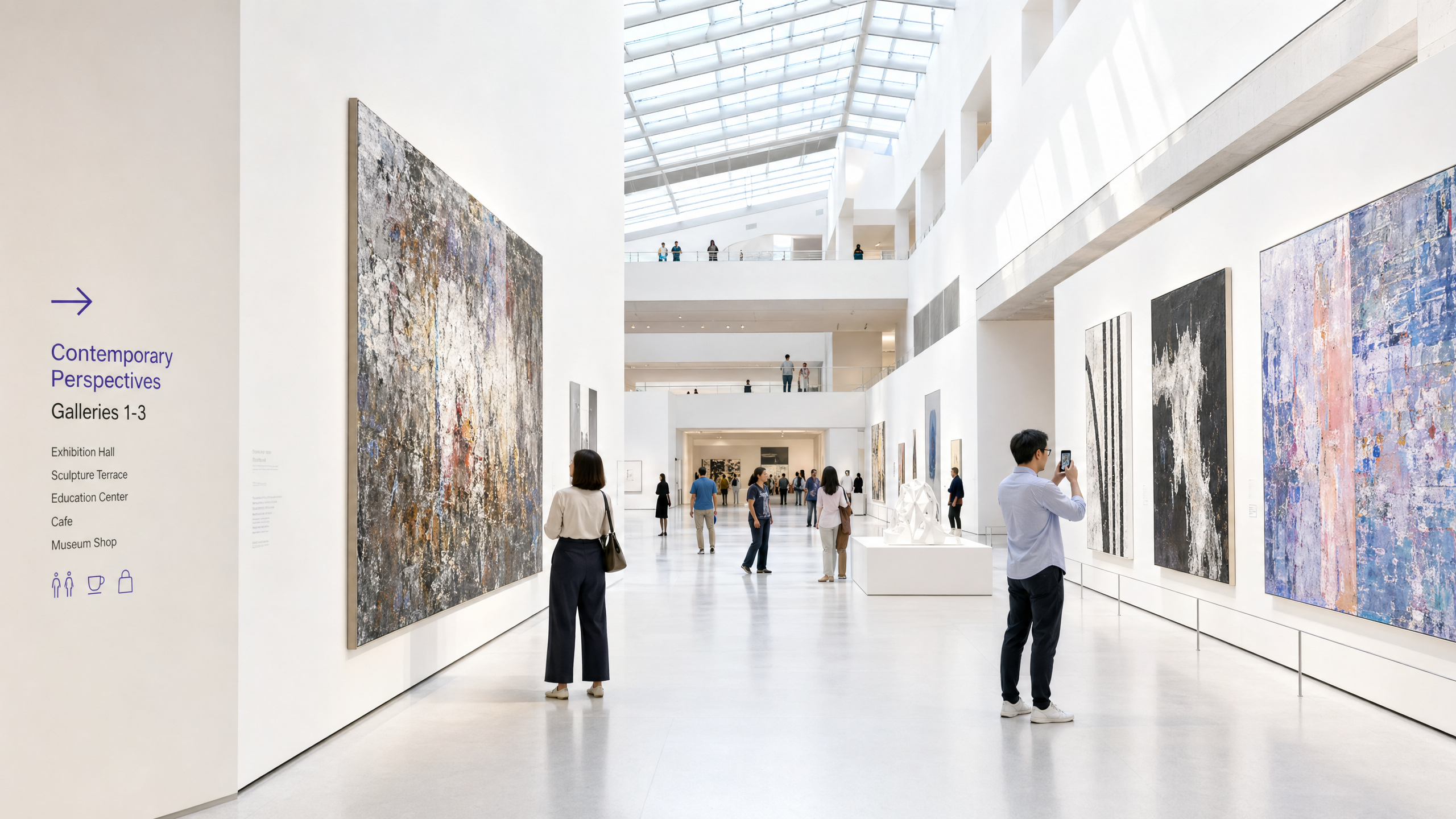
Pour les musées et galeries modernes, le WiFi n'est plus une simple utilité passive ; c'est l'infrastructure fondamentale du parcours numérique du visiteur. À mesure que les institutions culturelles passent des expositions statiques à des environnements interactifs et riches en multimédia, la demande sur les réseaux sans fil a augmenté de manière exponentielle. Ce guide fournit aux responsables informatiques, aux architectes réseau et aux directeurs des opérations des sites un plan pratique pour la conception et le déploiement de réseaux WiFi haute densité dans des lieux culturels complexes.
Nous explorerons les défis RF spécifiques posés par les bâtiments historiques et la forte affluence, les exigences architecturales pour une connectivité transparente, et comment des plateformes comme Purple peuvent transformer un centre de coûts en un atout stratégique grâce à l'intégration du Guest WiFi et à l'analyse WiFi Analytics avancée. En mettant en œuvre les stratégies décrites ici, les sites peuvent offrir une connectivité fiable pour la billetterie numérique, l'orientation et les expositions interactives tout en capturant des données de première partie exploitables pour stimuler l'adhésion et les revenus.
Approfondissement Technique
Le Défi RF dans les Institutions Culturelles
Les musées présentent des environnements RF (Radio Fréquence) uniques. Contrairement aux bureaux standards, ces lieux comportent souvent d'épais murs en pierre, une vaste structure métallique et des agencements étendus sur plusieurs niveaux. Ces caractéristiques physiques entraînent une atténuation significative du signal et des interférences multipath.
De plus, la densité d'utilisateurs peut fluctuer considérablement. Une exposition spéciale peut attirer des milliers de visiteurs dans un espace confiné, submergeant un réseau mal conçu. Pour atténuer ces problèmes, une architecture réseau robuste et haute densité est nécessaire.
Architecture Réseau Haute Densité
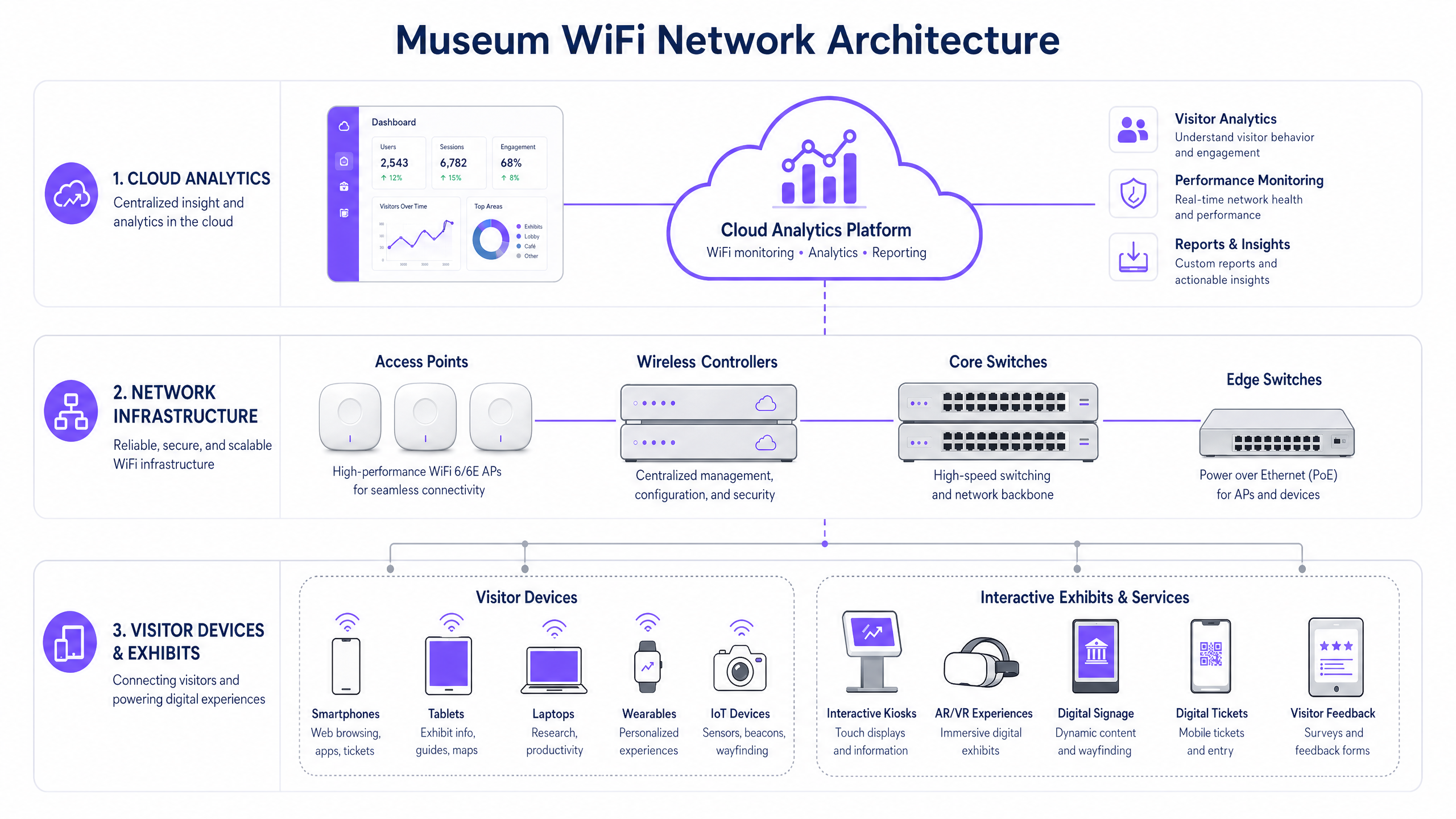
Pour soutenir une expérience visiteur connectée, l'infrastructure sous-jacente doit être résiliente et évolutive.
- Standard WiFi 6/6E : Le déploiement de l'IEEE 802.11ax (WiFi 6) ou du WiFi 6E est essentiel. Ces standards introduisent l'OFDMA (Orthogonal Frequency-Division Multiple Access) et le MU-MIMO (Multi-User, Multiple Input, Multiple Output), qui améliorent considérablement l'efficacité du réseau dans les environnements haute densité en permettant aux points d'accès de communiquer simultanément avec plusieurs appareils.
- Densité et Placement des Points d'Accès (AP) : Une étude de site prédictive est non négociable. Les AP doivent être placés stratégiquement pour fournir une couverture superposée sans provoquer d'interférences de co-canal. Dans les bâtiments historiques où le câblage est restreint, le maillage réseau ou les ponts sans fil point à point peuvent être nécessaires, bien que les connexions câblées soient toujours préférables pour l'infrastructure principale.
- Ségrégation Réseau : Le trafic des visiteurs doit être strictement séparé des réseaux d'entreprise, des systèmes de point de vente (POS) et des systèmes de gestion de bâtiment (BMS). Ceci est généralement réalisé à l'aide de VLAN (Virtual Local Area Networks) et de politiques de pare-feu robustes pour garantir la sécurité et la conformité.
Guide d'Implémentation
Le déploiement d'un réseau WiFi de musée nécessite une planification minutieuse pour équilibrer performance, esthétique et expérience utilisateur.
Étape 1 : L'Expérience d'Intégration Numérique
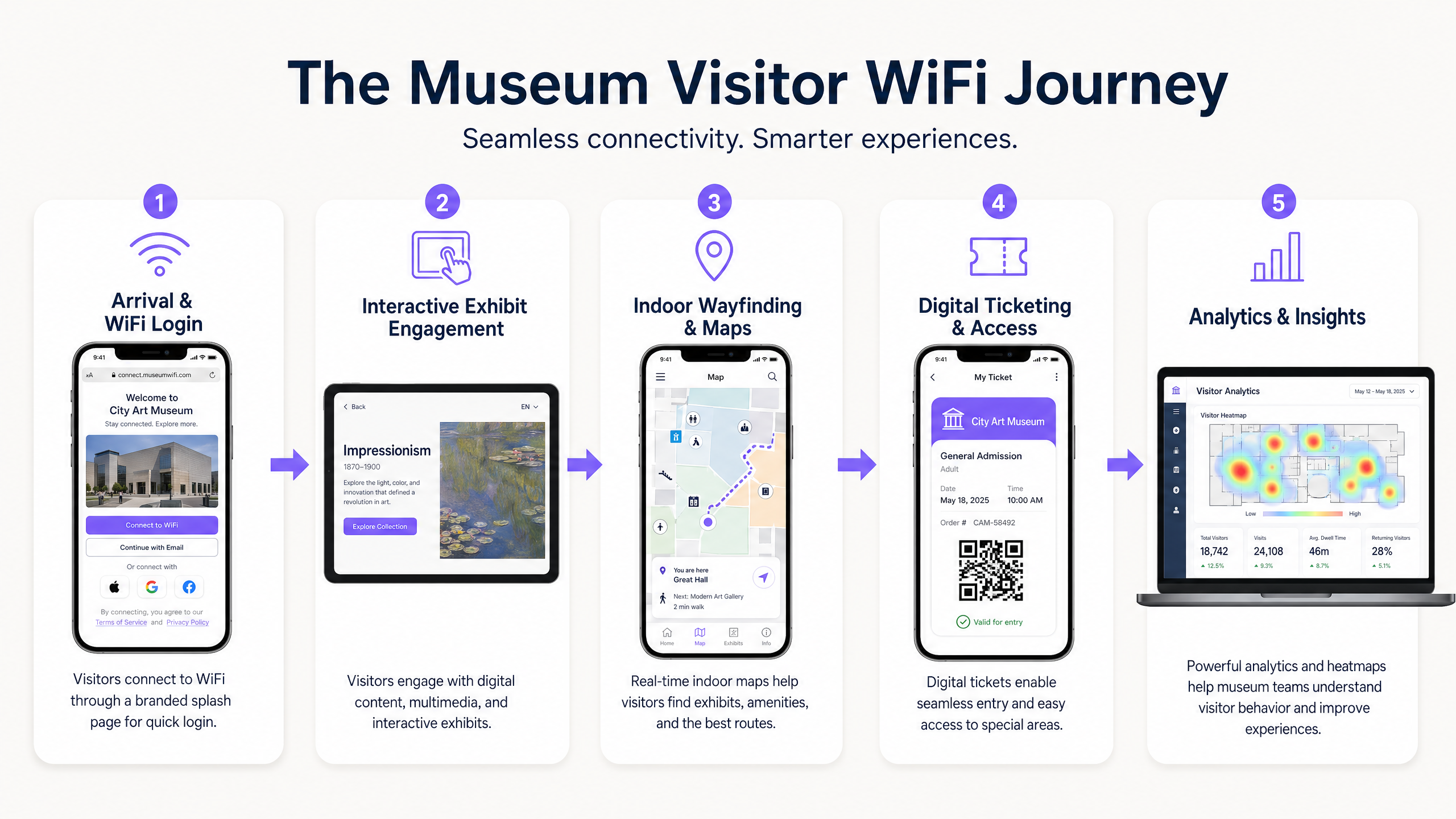
Le Captive Portal est le premier point de contact numérique. Il doit être fluide mais sécurisé. L'intégration d'une solution comme le Guest WiFi de Purple permet une authentification basée sur le profil. Les visiteurs peuvent s'authentifier via les médias sociaux, le courrier électronique ou des protocoles transparents comme OpenRoaming. Cela réduit les frictions et encourage l'adoption du réseau, ce qui est crucial pour la collecte de données.
Étape 2 : Faciliter le Parcours Visiteur
Une fois connecté, le réseau doit prendre en charge l'ensemble du parcours visiteur :
- Billetterie Numérique et Accès : Une haute disponibilité aux points d'entrée est essentielle pour scanner les billets numériques sans délai.
- Expositions Interactives : Une bande passante dédiée doit être allouée pour le streaming multimédia et les expériences AR/VR associées aux expositions.
- Orientation Intérieure : En utilisant le réseau WiFi conjointement avec des balises BLE (Bluetooth Low Energy), les sites peuvent offrir une navigation intérieure précise, guidant les visiteurs à travers des agencements de galeries complexes.
Étape 3 : Capture de Données et Analyse
La véritable valeur du réseau réside dans les données qu'il génère. La mise en œuvre de WiFi Analytics permet aux équipes informatiques et marketing de visualiser le comportement des visiteurs. Les cartes thermiques peuvent révéler les expositions populaires, les temps de séjour et les schémas de circulation. Ces données sont inestimables pour optimiser l'agencement des lieux, la planification du personnel et l'adaptation des campagnes marketing.
Bonnes Pratiques
- Prioriser la Sécurité et la Conformité : Assurez-vous que le réseau est conforme aux réglementations de protection des données telles que le GDPR. Lors de la capture de données visiteurs, les mécanismes d'opt-in doivent être transparents et clairement communiqués. Sécurisez le réseau en utilisant le chiffrement WPA3 si possible, et appliquez une isolation stricte entre le trafic invité et le trafic d'entreprise.
- Mettre en Œuvre la Gestion de la Bande Passante : Utilisez les protocoles de Qualité de Service (QoS) pour prioriser le trafic critique (par exemple, les scanners de billetterie) par rapport à la navigation générale des invités. Mettez en œuvre des limites de bande passante par utilisateur pour éviter qu'un seul utilisateur ne dégrade l'expérience des autres.
- Surveillance Continue : La performance du réseau n'est pas statique. Utilisez des tableaux de bord de gestion basés sur le cloud pour surveiller la santé des AP, les taux de connexion des clients et le débit global du réseau en temps réel.
Dépannage et Atténuation des Risques
Même les réseaux les mieux conçus rencontrent des problèmes. Les modes de défaillance courants include :
- Interférence Co-Canal (CCI) : Dans les déploiements denses, les points d'accès sur le même canal peuvent interférer les uns avec les autres. Atténuation : Mettre en œuvre une attribution dynamique des canaux et ajuster soigneusement les niveaux de puissance de transmission.
- Défaillances du Captive Portal : Si le Captive Portal ne parvient pas à se charger, les visiteurs ne peuvent pas se connecter. Atténuation : Assurer la robustesse de l'infrastructure DNS et envisager la mise en œuvre d'un accès de type 'jardin clos' pour les services essentiels avant même l'authentification complète. (Voir : Protégez votre réseau avec un DNS et une sécurité robustes ).
- Incompatibilité des appareils : Le réseau doit prendre en charge une vaste gamme d'appareils clients, y compris le matériel hérité plus ancien. Atténuation : Maintenir la prise en charge des normes plus anciennes (par exemple, 802.11ac) tout en optimisant pour les appareils modernes, en veillant à ce que le plus petit dénominateur commun ne réduise pas les performances globales du réseau.
ROI et impact commercial
Le déploiement d'un réseau WiFi de qualité professionnelle représente un investissement significatif. Cependant, le ROI est mesurable selon plusieurs dimensions :
- Efficacité opérationnelle : La collecte automatisée de données réduit le besoin d'enquêtes manuelles auprès des visiteurs. L'orientation intérieure réduit la charge du personnel pour fournir des directions.
- Augmentation des revenus : Les campagnes de marketing ciblées, alimentées par les données de première partie capturées via le Guest WiFi , peuvent stimuler les mises à niveau d'adhésion, les ventes de billets d'expositions spéciales et les achats en magasin/café.
- Satisfaction accrue des visiteurs : Une expérience numérique fluide est directement corrélée à des scores de satisfaction des visiteurs plus élevés et à des avis en ligne positifs, stimulant la fréquentation future.
En considérant le réseau WiFi non seulement comme une dépense informatique, mais comme une plateforme stratégique pour l'engagement et l'analyse, les musées et galeries peuvent améliorer considérablement leur succès opérationnel et commercial.
Définitions clés
High-Density Environment
A physical space where a large number of client devices are connecting to the network simultaneously, requiring specialized RF design and AP configuration.
Museum atriums, special exhibition halls, and auditoriums are prime examples where standard office WiFi designs will fail.
Captive Portal
A web page that the user of a public-access network is obliged to view and interact with before access is granted.
This is the primary tool for visitor onboarding and data capture in a museum setting, often integrated with CRM systems.
WiFi 6 (802.11ax)
The current standard for wireless networks, designed specifically to improve efficiency and capacity in high-density environments.
Essential for modern museum deployments to handle the multitude of visitor smartphones and interactive exhibit devices.
VLAN (Virtual Local Area Network)
A logical grouping of devices on a network, allowing for the segmentation of traffic even if devices share the same physical infrastructure.
Used to separate visitor WiFi traffic from sensitive corporate or ticketing data, ensuring security.
Band Steering
A feature that encourages dual-band capable clients to connect to the less congested 5GHz or 6GHz bands rather than the crowded 2.4GHz band.
Crucial for optimizing performance in crowded museum spaces.
First-Party Data
Information a company collects directly from its customers and owns.
Gathered via the WiFi captive portal, this data is highly valuable for targeted marketing and understanding the visitor demographic.
RSSI (Received Signal Strength Indicator)
A measurement of the power present in a received radio signal.
Used during site surveys and troubleshooting to determine if a visitor has sufficient signal strength to maintain a reliable connection.
OpenRoaming
A roaming federation service enabling an automatic and secure WiFi experience globally.
Allows visitors to seamlessly connect to the museum WiFi without manually interacting with a captive portal, improving the user experience.
Exemples concrets
A historic gallery with strict preservation orders needs to deploy WiFi to support a new AR (Augmented Reality) exhibit. Running new CAT6 cabling to the exhibit space is prohibited. How should the network architect proceed?
The architect should design a wireless mesh network or utilize point-to-point wireless bridges. High-capacity APs (WiFi 6) should be placed at the perimeter where cabling is permitted. These edge APs will wirelessly backhaul traffic from mesh APs located near the AR exhibit. The mesh APs should be housed in aesthetically appropriate, non-metallic enclosures to comply with preservation orders.
A large science museum is experiencing network congestion in its main atrium during peak weekend hours, leading to slow captive portal load times and visitor complaints.
The IT team should implement several optimization steps: 1) Enable band steering to force capable devices onto the less congested 5GHz band. 2) Implement strict per-user bandwidth limits (e.g., 5 Mbps down/up) to prevent bandwidth hogging. 3) Review the AP deployment in the atrium; if APs are maxed out on client connections, additional APs with directional antennas may be required to sectorize the coverage area and increase overall capacity.
Questions d'entraînement
Q1. A museum is planning a temporary outdoor exhibit in an adjacent courtyard. The exhibit will require reliable WiFi for digital interactive kiosks. Running cabling to the courtyard is not feasible. What is the most appropriate wireless architecture?
Conseil : Consider the need for reliable backhaul for the kiosks without physical cabling.
Voir la réponse type
Deploy a point-to-multipoint wireless bridge from the main building to the courtyard. Use outdoor-rated, directional antennas on the building to establish a strong backhaul link to outdoor APs in the courtyard. These outdoor APs will then provide localized WiFi coverage for the kiosks.
Q2. The marketing director wants to use WiFi analytics to track how many visitors enter a specific, small gallery room (5m x 5m). Currently, there is one AP in the adjacent hallway providing coverage to the room. Will this setup provide accurate location data for that specific room?
Conseil : Think about how location tracking works using WiFi and the requirements for accuracy.
Voir la réponse type
No, it will likely not provide accurate data. WiFi location analytics generally require trilateration, meaning a client device needs to be heard by at least three APs to accurately determine its position. A single AP in an adjacent hallway can only determine that the device is nearby, not its precise location within a small 5x5m room. Additional APs or BLE beacons would be required for precise indoor location tracking.
Q3. During a busy weekend, the IT dashboard shows that the 2.4GHz band is heavily congested, while the 5GHz band has plenty of capacity. However, many dual-band capable devices are still connecting to 2.4GHz. What configuration change should be implemented?
Conseil : What feature forces or encourages capable devices to use a specific frequency band?
Voir la réponse type
Enable and aggressively configure 'Band Steering' on the wireless controller. This feature will actively encourage dual-band capable clients to connect to the 5GHz band, freeing up airtime on the 2.4GHz band for legacy devices that only support 2.4GHz.
Continuer la lecture de cette série
Qu'est-ce qu'une requête de sonde (Probe Request) ? Comprendre comment les appareils découvrent les réseaux
Ce guide de référence technique offre une analyse approfondie des requêtes de sonde IEEE 802.11, de la distinction entre balayage actif et passif, et de l'impact de la randomisation MAC sur l'analyse des lieux. Il fournit des stratégies de mise en œuvre concrètes pour les architectes réseau afin d'optimiser les déploiements à haute densité, d'atténuer les tempêtes de sondes et d'assurer une collecte de données précise et conforme au GDPR en utilisant des couches d'identité authentifiées.
Comment réparer un WiFi lent sans améliorer votre forfait Internet
Un guide de référence technique complet pour les responsables informatiques et les architectes réseau sur l'optimisation des performances WiFi d'entreprise sans augmenter la bande passante de l'ISP. Couvre le réglage RF, la gestion de la densité des clients, la mise en œuvre de la QoS et comment exploiter les analyses WiFi pour diagnostiquer et résoudre les goulots d'étranglement.
La Checklist pour la Migration d'un NAC Hérité vers un NAC Cloud-Natif
Ce guide de référence technique faisant autorité fournit une checklist structurée en trois phases pour la migration d'un système de contrôle d'accès réseau (NAC) hérité vers une architecture cloud-native. Il dote les responsables informatiques et les architectes réseau de stratégies concrètes pour gérer l'intégration des identités, la parité des politiques et la conformité sans perturber les opérations des sites.