
NHS Staff WiFi : comment déployer des réseaux sans fil sécurisés dans le secteur de la santé
Ce guide de référence technique détaille l'architecture, les protocoles de sécurité et les stratégies de déploiement pour le NHS Staff WiFi, couvrant l'authentification 802.1X, la segmentation VLAN, les politiques BYOD et la conformité au DSP Toolkit. Il fournit des conseils pratiques aux responsables informatiques pour déployer des réseaux sans fil de classe entreprise desservant les utilisateurs cliniques, administratifs et invités sur une infrastructure physique partagée sans compromettre la sécurité. Que vous planifiez un nouveau déploiement ou que vous sécurisiez un parc existant, ce guide fournit les cadres de décision et les étapes de mise en œuvre nécessaires pour agir dès ce trimestre.
Video overview
Écouter ce guide
Voir la transcription du podcast
Fait partie de notre série principale : Guide de sécurité Enterprise WiFi →

Synthèse opérationnelle
Déployer un réseau WiFi sécurisé et fiable au sein des infrastructures du NHS n'est plus une option - c'est une infrastructure clinique essentielle. La transition vers des soins axés sur la mobilité, les dossiers de santé électroniques (DSE) et les dispositifs médicaux connectés exige une architecture sans fil qui concilie un roaming fluide et des contrôles de sécurité rigoureux.
Pour les responsables informatiques, les architectes réseau et les directeurs technologiques, le défi principal consiste à accueillir différents groupes d'utilisateurs - personnel clinique, personnel administratif, patients et visiteurs - sur une infrastructure physique partagée sans compromettre la sécurité, tout en respectant les exigences du NHS Data Security and Protection (DSP) Toolkit. Ce guide détaille les spécifications techniques du WiFi pour le personnel du NHS, en mettant l'accent sur des frameworks d'authentification robustes comme la norme IEEE 802.1X, la segmentation logique du réseau via des VLAN et l'intégration sécurisée des appareils personnels (BYOD).
En abandonnant les clés prépartagées (PSK) obsolètes au profit de politiques d'accès basées sur l'identité, les établissements de santé peuvent limiter les risques de violation de données, réduire les frictions opérationnelles et offrir un socle sans fil adapté aux programmes de transformation numérique. L'intérêt économique est tout aussi évident : réduction de la charge de travail du support technique, conformité certifiée au DSP Toolkit et obtention d'un réseau capable de soutenir les futures innovations cliniques sans nécessiter une refonte complète de l'infrastructure.
Analyse technique approfondie
Contrôle d'accès et authentification
Le fondement d'un réseau WiFi hospitalier sécurisé repose sur le contrôle d'accès basé sur l'identité. Les réseaux hérités WPA2-Personal utilisant des clés prépartagées ne sont fondamentalement pas adaptés aux environnements cliniques. Ils n'offrent aucune responsabilité individuelle, compliquent le processus de départ lorsque le personnel s'en va, et introduisent un point de défaillance unique si les identifiants sont compromis ou partagés en dehors du groupe prévu.
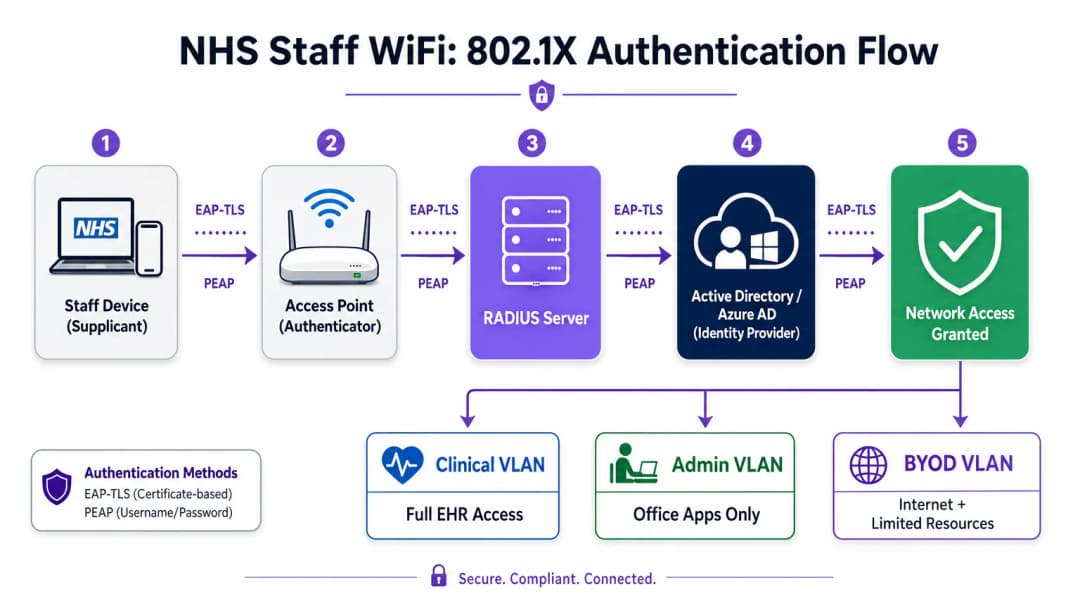
Les déploiements modernes du NHS doivent imposer le WPA3-Enterprise (ou le WPA2-Enterprise comme état de transition minimal) en utilisant l'authentification 802.1X. Ce framework exige que chaque utilisateur ou appareil présente des identifiants uniques avant que l'accès au réseau ne soit accordé, et le résultat de cette authentification détermine sur quel segment de réseau logique l'appareil est placé.
Deux méthodes EAP prédominent dans les déploiements du secteur de la santé :
| Méthode EAP | Mécanisme d'authentification | Idéal pour | Niveau de sécurité |
|---|---|---|---|
| EAP-TLS | Certificats numériques côté client | Appareils cliniques gérés par l'entreprise | Le plus élevé - aucun mot de passe à hameçonner |
| PEAP-MSCHAPv2 | Nom d'utilisateur/mot de passe dans un tunnel chiffré | BYOD, personnel administratif, appareils hérités | Élevé - identifiants sécurisés par TLS |
L'EAP-TLS est la référence absolue pour les appareils d'entreprise. Les certificats sont distribués via des plateformes de gestion des appareils mobiles (MDM), permettant une authentification sans contact - l'appareil s'authentifie silencieusement en arrière-plan. Le PEAP-MSCHAPv2 tunnelise en toute sécurité les identifiants Active Directory ou Azure AD au sein d'une session TLS chiffrée, ce qui le rend adapté aux scénarios BYOD où la gestion des certificats n'est pas pratique.
L'intégration de l'infrastructure WiFi avec le fournisseur d'identité (IdP) central de l'organisation garantit que l'accès est automatiquement révoqué lorsque le compte AD d'un membre du personnel est désactivé, répondant ainsi directement aux exigences du DSP Toolkit en matière de gestion du cycle de vie des accès.
Segmentation du réseau et zones de confiance
Les points d'accès physiques émettent dans tout l'hôpital, mais la segmentation logique garantit que le trafic reste isolé selon le principe du moindre privilège. Une architecture de réseau plate dans un environnement de santé constitue une vulnérabilité de sécurité majeure, permettant potentiellement à un appareil invité compromis ou à un capteur IoT vulnérable d'accéder aux systèmes cliniques.
Les bonnes pratiques imposent la création de réseaux locaux virtuels séparés (VLANs) associés à des SSIDs spécifiques, avec des règles de pare-feu appliquant des limites de trafic entre eux :
| Zone | SSID | Authentification | Accès | Priorité QoS |
|---|---|---|---|---|
| Clinique | NHS-Clinical | EAP-TLS (Certificat) | EHR, PACS, messagerie clinique | Maximale |
| Administrative | NHS-Staff | PEAP (Identifiants AD) | Applications de bureau, Internet | Moyenne |
| Medical IoT | Hidden/MAB | MAC Authentication Bypass | Contrôleur d'appareil uniquement | Élevé |
| Invité / Patient | NHS-Guest | Captive Portal | Internet uniquement | Faible |
| BYOD | NHS-BYOD | PEAP (identifiants AD) | Internet, VDI limité | Faible |
Le VLAN des objets connectés médicaux (Medical IoT) mérite une attention particulière. De nombreux dispositifs médicaux connectés - pompes à perfusion, moniteurs patients, systèmes d'appel sans fil - ne peuvent pas prendre en charge le protocole 802.1X. Le protocole MAC Authentication Bypass (MAB) constitue l'alternative, mais il doit impérativement être associé à des listes de contrôle d'accès (ACL) de pare-feu strictes qui limitent les communications de ces appareils à leurs seuls serveurs de gestion désignés.
Le défi du BYOD
Les politiques de BYOD (Apportez votre propre appareil) sont de plus en plus courantes pour le personnel administratif et les cliniciens de passage. Cependant, les appareils personnels non gérés représentent un risque important s'ils sont autorisés à accéder aux segments de réseau sécurisés.
Un déploiement BYOD sécurisé implique l'intégration de ces appareils sur un VLAN BYOD dédié. Cette zone fournit un accès Internet et éventuellement un accès limité à des ressources internes spécifiques et non sensibles via une passerelle sécurisée ou une infrastructure de bureau virtuel (VDI). Le routage direct vers les systèmes cliniques ou les bases de données des patients doit être strictement interdit.

Vous avez des questions sur votre configuration spécifique ?
Notre équipe collabore avec des exploitants de sites, des responsables informatiques et des ingénieurs réseau au sein de 80 000 sites. Réservez un appel de 20 minutes et nous vous montrerons comment d'autres professionnels comme vous ont résolu ce problème.
Guide d'implémentation
Le déploiement d'une architecture WiFi sécurisée pour le personnel du NHS nécessite une approche progressive afin de minimiser les perturbations des opérations cliniques en cours.
Étape 1 : Évaluation et conception
Commencez par une étude de site sans fil complète. Les environnements de santé sont particulièrement difficiles pour la propagation des radiofréquences (RF) en raison des murs plombés, des machines lourdes et de la densité de population. La conception doit répondre aux besoins de capacité, et non pas seulement de couverture, en garantissant une densité de points d'accès adéquate dans les zones à fort trafic telles que les services d'urgence et les cliniques externes.
Définissez les SSID requis et associez-les aux VLAN et politiques de sécurité correspondants. Limitez le nombre de SSID diffusés au minimum - idéalement pas plus de quatre - pour réduire la charge de gestion et minimiser l'encombrement des trames de balise (beacon), qui dégrade les performances globales du réseau.
Étape 2 : Configuration de l'infrastructure
Configurez l'infrastructure de commutation et de routage centrale pour prendre en charge les VLAN définis. Appliquez des règles de pare-feu aux frontières entre les segments pour faire respecter le principe du moindre privilège. Configurez le serveur RADIUS (par exemple, Cisco ISE, Aruba ClearPass ou un service cloud RADIUS-as-a-Service) et intégrez-le au fournisseur d'identité central. Dans les environnements où la plateforme de Purple est déployée, l'intégration de WiFi Analytics à cette étape offre une visibilité sur l'utilisation du réseau, les modèles d'itinérance et les points de saturation de capacité.
Étape 3 : Application des politiques et intégration
Déployez des politiques d'authentification. Pour les appareils d'entreprise, utilisez la solution MDM pour pousser les profils sans fil requis et les certificats clients (pour EAP-TLS). Cela garantit que les appareils gérés se connectent automatiquement et de manière sécurisée sans intervention de l'utilisateur.
Pour le BYOD, établissez un flux de travail d'intégration clair - généralement un portail d'intégration qui guide l'utilisateur à travers l'authentification avec ses identifiants d'entreprise, l'acceptation de la charte d'utilisation informatique, et la transition de l'appareil vers le VLAN BYOD sécurisé. La plateforme Guest WiFi de Purple peut être déployée en tant que couche de Captive Portal pour l'SSID patient et invité, gérant la capture de données conforme au GDPR et l'acceptation des conditions d'utilisation à grande échelle.
Phase 4 : Tests et validation
Avant la mise en service, testez chaque chemin d'authentification, affectation de VLAN et règle de pare-feu de bout en bout. Validez le comportement d'itinérance en parcourant les services cliniques avec un appareil de test, en surveillant spécifiquement les événements de réauthentification. Confirmez que les protocoles d'itinérance rapide (802.11r et 802.11k) fonctionnent correctement et que les sessions d'application persistent lors des transitions entre les points d'accès.
Bonnes pratiques
Éliminez les clés pré-partagées. Migrez tous les réseaux du personnel et cliniques vers l'authentification 802.1X pour garantir la responsabilité individuelle et un contrôle d'accès centralisé. Il s'agit d'une exigence non négociable pour la conformité au DSP Toolkit.
Imponez une segmentation stricte. Ne permettez jamais que le trafic invité, BYOD ou IoT se trouve sur le même segment logique que les données cliniques. Utilisez des pare-feux à inspection d'état pour contrôler le routage inter-VLAN, avec des règles de refus explicites comme politique par défaut.
Priorisez le trafic clinique. Implémentez des politiques de QoS sur les contrôleurs sans fil et les commutateurs pour prioriser les applications cliniques - la voix sur WLAN, l'accès au dossier de santé informatisé - par rapport au trafic invité ou administratif, en particulier pendant les périodes de forte congestion.
Activez l'itinérance rapide. Déployez 802.11r (Fast BSS Transition) et 802.11k (Radio Resource Measurement) pour garantir que le personnel clinique peut se déplacer dans l'établissement sans subir de déconnexions ou de dépassements de délai d'application.
Surveillance continue. Utilisez des plateformes d'analyse pour surveiller la santé du réseau, identifier les points d'accès non autorisés et suivre le comportement d'itinérance des utilisateurs. Comprendre la fréquentation et les modèles d'utilisation - une technique éprouvée dans les secteurs du Commerce de détail et de l'Hôtellerie - est tout aussi précieux dans un environnement hospitalier pour la planification des capacités et le dépannage.
Audit régulier. Réalisez des évaluations annuelles des risques liés au sans fil pour garantir une conformité continue avec le DSP Toolkit, Cyber Essentials Plus et la norme ISO 27001 le cas échéant.
Dépannage et atténuation des risques
Délais d'attente d'authentification dépassés
Dans les environnements à forte densité de clients, les serveurs RADIUS peuvent être submergés, ce qui entraîne des dépassements de délai d'authentification et des déconnexions. Assurez-vous que l'infrastructure RADIUS est correctement dimensionnée et hautement disponible. Implémentez la répartition de charge sur plusieurs serveurs d'authentification et surveillez les temps de réponse RADIUS comme un indicateur opérationnel clé.
Problèmes de Roaming
Le personnel clinique qui se déplace rapidement d'un service à un autre peut subir des pertes de connexion si l'infrastructure sans fil ne prend pas en charge les protocoles de roaming rapide. Activez les protocoles 802.11r et 802.11k sur les contrôleurs sans fil et assurez-vous que les appareils clients prennent en charge ces normes. Réalisez des enquêtes de roaming après déploiement pour identifier et résoudre les zones d'ombre ou les problèmes de « client collant », où un appareil reste connecté à un AP éloigné et plus faible au lieu de basculer vers un AP plus proche.
Incompatibilité des Appareils Hérités
Les appareils médicaux plus anciens peuvent ne pas prendre en charge les protocoles de sécurité modernes comme le WPA3 ou le 802.1X. Isolez ces appareils sur un VLAN IoT dédié à l'aide du MAB. Appliquez des règles de pare-feu strictes pour limiter leur communication aux seuls serveurs de gestion essentiels. Envisagez des mises à niveau matérielles ou des ponts sans fil pour les appareils critiques qui ne peuvent pas être sécurisés nativement.
Expiration des Certificats
Les déploiements EAP-TLS reposent sur des certificats ayant des périodes de validité définies. Si les certificats expirent sans être renouvelés, les appareils ne parviendront pas à s'authentifier, ce qui entraînera une interruption majeure des activités cliniques. Implémentez le renouvellement automatique des certificats via SCEP (Simple Certificate Enrolment Protocol) par le biais de la plateforme MDM, et surveillez de manière proactive les dates d'expiration des certificats.
ROI et Impact Commercial
Investir dans une architecture sans fil sécurisée et de classe entreprise offre des retours mesurables dans les domaines clinique, opérationnel et informatique.
Efficacité clinique. Une connectivité fiable garantit aux cliniciens un accès instantané aux dossiers des patients sur le lieu de soins, réduisant ainsi le temps passé à rechercher des informations ou à gérer des pertes de connexion. Cela a un impact direct sur le flux de patients et la qualité des soins prodigués.
Réduction des frais généraux informatiques. L'abandon des mots de passe partagés et de l'intégration manuelle au profit d'une authentification automatisée basée sur des certificats réduit considérablement les tickets d'assistance liés aux réinitialisations de mots de passe et aux problèmes de connectivité. Un établissement du NHS a signalé une réduction de 40 % des appels d'assistance liés au WiFi suite à la migration vers le 802.1X.
Atténuation des risques. Une segmentation stricte et une authentification robuste sont fondamentales pour répondre aux exigences du DSP Toolkit, réduisant ainsi les risques financiers et de réputation associés aux violations de données ou aux manquements de conformité. Le coût d'une violation de données dépasse de loin l'investissement dans un réseau WiFi correctement conçu.
Pérennisation. Un réseau WiFi bien conçu constitue le fondement des futures initiatives de santé numérique - services basés sur la localisation, suivi des actifs en temps réel, applications de télésanté avancées - s'alignant ainsi sur les objectifs stratégiques plus larges de secteurs connexes tels que la Santé et le Transport où la connectivité mobile soutient l'efficacité opérationnelle.
Pour les organisations souhaitant comprendre comment la plateforme de Purple s'intègre dans la couche de WiFi pour les visiteurs et les patients de cette architecture, la page dédiée au secteur de la Santé présente de manière détaillée les fonctionnalités de Captive Portal conformes aux normes du NHS, d'analyse de données et de traitement des données conforme au GDPR. Les mêmes principes d'analyse qui optimisent l'engagement client dans le secteur du Commerce de détail se traduisent directement en veille opérationnelle pour les équipes de gestion des parcs hospitaliers.
Définitions clés
IEEE 802.1X
Une norme IEEE pour le contrôle d'accès réseau basé sur les ports (PNAC). Elle fournit un mécanisme d'authentification aux appareils souhaitant se connecter à un réseau local ou à un réseau local sans fil, exigeant que chaque appareil présente des identifiants avant de se voir accorder l'accès.
Il s'agit de la norme obligatoire pour remplacer les mots de passe partagés non sécurisés par des connexions individuelles basées sur l'identité pour le personnel et les appareils cliniques. C'est la pierre angulaire d'une architecture WiFi conforme au DSP Toolkit.
VLAN (Virtual Local Area Network)
Un sous-réseau logique qui regroupe un ensemble d'appareils provenant de différents segments de réseau physique. Les VLANs permettent aux administrateurs réseau de partitionner un réseau commuté unique pour répondre aux exigences fonctionnelles et de sécurité de différents groupes d'utilisateurs.
Les VLANs sont essentiels pour segmenter le trafic clinique du trafic invité et administratif, limitant ainsi la portée d'une faille de sécurité potentielle et appliquant le principe du moindre privilège.
RADIUS (Remote Authentication Dial-In User Service)
Un protocole réseau qui fournit une gestion centralisée de l'authentification, de l'autorisation et de la traçabilité (AAA) pour les utilisateurs qui se connectent et utilisent un service réseau.
Le serveur RADIUS agit comme le moteur de décision entre les points d'accès sans fil et la base de données d'identité centrale (Active Directory), décidant qui obtient l'accès et à quel VLAN il est attribué.
EAP-TLS (Extensible Authentication Protocol - Transport Layer Security)
Une méthode EAP qui s'appuie sur des certificats client et serveur pour établir une connexion sécurisée et mutuellement authentifiée. Aucune des parties ne fait confiance à l'autre sans un certificat valide.
La méthode la plus sécurisée pour authentifier les appareils appartenant à l'hôpital. Les certificats distribués via MDM garantissent que seuls les terminaux gérés et de confiance peuvent accéder au réseau clinique, sans aucun mot de passe susceptible d'être partagé ou hameçonné.
MAB (MAC Authentication Bypass)
Une méthode d'authentification des appareils basée sur leur adresse MAC matérielle, utilisée comme solution de secours pour les appareils qui ne prennent pas en charge la norme 802.1X.
Nécessaire pour les anciens appareils IoT médicaux qui ont besoin d'un accès réseau mais ne peuvent pas gérer des protocoles d'authentification complexes. Doit toujours être associé à des ACL de pare-feu strictes pour confiner l'appareil à ses chemins de communication autorisés.
DSP Toolkit (Data Security and Protection Toolkit)
Un outil d'auto-évaluation en ligne imposé par le NHS England que toutes les organisations doivent remplir si elles ont accès aux données et aux systèmes des patients du NHS. Il correspond aux dix normes de sécurité des données du National Data Guardian.
La conformité avec le DSP Toolkit est obligatoire pour les organisations du NHS et leurs fournisseurs. Une sécurité WiFi robuste - incluant 802.1X, la segmentation et la gestion du cycle de vie des accès - est un élément essentiel pour démontrer cette conformité.
SSID (Service Set Identifier)
Le nom principal associé à un réseau local sans fil 802.11, diffusé par les points d'accès pour permettre aux appareils clients de s'identifier et de se connecter au réseau.
Les hôpitaux doivent minimiser le nombre de SSIDs diffusés (par exemple, NHS-Clinical, NHS-Guest) afin de réduire les coûts de gestion et la surcharge RF. Chaque SSID doit être associé à une politique de sécurité spécifique et à un VLAN.
QoS (Quality of Service)
Technologies qui gèrent le trafic de données afin de réduire la perte de paquets, la latence et la gigue sur un réseau en priorisant certains types de trafic par rapport à d'autres.
Crucial dans le secteur de la santé pour garantir que les applications cliniques critiques et les communications vocales soient toujours prioritaires par rapport au trafic moins important comme le streaming vidéo des invités ou les mises à jour logicielles.
802.11r (Fast BSS Transition)
Un amendement IEEE qui permet une transition rapide entre les points d'accès en pré-authentifiant le client auprès de l'AP cible avant que la transition physique n'ait lieu, réduisant ainsi considérablement la latence d'itinérance.
Indispensable pour les environnements cliniques où le personnel est constamment en mouvement. Sans la norme 802.11r, les appareils doivent effectuer une ré-authentification RADIUS complète à chaque transition d'AP, ce qui peut provoquer l'expiration des sessions applicatives.
Exemples concrets
Un NHS Trust déploie de nouvelles stations de travail mobiles (Workstations on Wheels) dans plusieurs services. L'équipe informatique doit s'assurer que ces appareils maintiennent leur connectivité lorsque les infirmiers se déplacent entre les points d'accès, tout en garantissant que seuls les appareils autorisés peuvent accéder au VLAN clinique contenant le système de dossier de santé électronique.
Le Trust doit mettre en œuvre un cadre d'authentification 802.1X utilisant EAP-TLS. L'équipe informatique utilisera sa solution MDM pour pousser un certificat client unique et le profil sans fil correspondant sur chaque station de travail. Les contrôleurs sans fil seront configurés pour authentifier ces appareils auprès d'un serveur RADIUS, qui vérifie le certificat par rapport à la PKI interne. Une fois l'authentification réussie, le serveur RADIUS attribue dynamiquement la station de travail au VLAN clinique dédié via un attribut RADIUS (par exemple, Tunnel-Private-Group-ID). Pour répondre au besoin de roaming, les protocoles 802.11r (Fast BSS Transition) et 802.11k (Radio Resource Measurement) doivent être activés sur l'infrastructure sans fil pour permettre aux stations de travail de passer de manière transparente d'un point d'accès à un autre sans effectuer un cycle complet de réauthentification auprès du serveur RADIUS à chaque fois.
Un hôpital doit fournir un accès internet aux médecins remplaçants de passage utilisant leurs ordinateurs portables personnels (BYOD). Ces médecins doivent accéder à des outils de référence médicale basés sur le cloud, mais doivent avoir l'interdiction stricte d'accéder aux bases de données internes des patients de l'hôpital.
L'hôpital doit déployer un SSID BYOD dédié associé à un VLAN BYOD isolé. L'authentification doit être gérée via 802.1X en utilisant PEAP-MSCHAPv2, permettant aux médecins remplaçants de se connecter à l'aide d'identifiants Active Directory temporaires fournis par les ressources humaines à leur arrivée. Le pare-feu central doit être configuré avec une ACL qui refuse explicitement tout routage du VLAN BYOD vers les VLAN cliniques ou administratifs, en autorisant uniquement le trafic sortant vers internet. De plus, un Captive Portal peut être utilisé lors de la connexion initiale pour appliquer une charte d'utilisation acceptable avant d'accorder un accès complet à internet. Lorsque le compte AD temporaire du médecin remplaçant est désactivé à la fin de sa mission, son accès sans fil est automatiquement révoqué.
Questions d'entraînement
Q1. Une nouvelle aile est en cours d'ajout à l'hôpital, et l'équipe des installations souhaite déployer des capteurs de température sans fil dans les réfrigérateurs de stockage des médicaments. Ces capteurs prennent uniquement en charge le protocole WPA2-Personal (Pre-Shared Key) et ne peuvent pas utiliser la norme 802.1X. Comment l'architecte réseau doit-il les intégrer de manière sécurisée ?
Conseil : Pensez au principe du moindre privilège et à la manière d'isoler les appareils non conformes des systèmes cliniques.
Voir la réponse type
L'architecte doit créer un SSID dédié et masqué, mappé sur un VLAN "Facilities IoT" spécifique. Les capteurs se connecteront en utilisant la PSK. De plus, des ACL de pare-feu strictes doivent être appliquées à ce VLAN, permettant aux capteurs de communiquer uniquement avec leur serveur de gestion centralisé spécifique et refusant tout autre trafic - en particulier le routage vers le VLAN clinique ou vers Internet. Le contournement de l'authentification MAC (MAB) doit également être configuré pour garantir que seules les adresses MAC spécifiques des capteurs achetés soient autorisées sur ce VLAN, empêchant ainsi des appareils malveillants de se connecter en utilisant la même PSK.
Q2. Lors d'une garde matinale chargée, des infirmiers signalent que leurs tablettes perdent fréquemment la connexion au système de dossier patient informatisé (DPI) lorsqu'ils se déplacent dans le service, les obligeant à se reconnecter. L'étude de couverture du réseau sans fil montre une excellente puissance de signal dans tout le service. Quelle est la cause probable et la solution ?
Conseil : Un signal fort ne garantit pas des transitions fluides entre les points d'accès. Pensez au coût d'authentification lors de chaque transition d'AP.
Voir la réponse type
La cause probable est l'absence de protocoles de transition rapide. Lorsque la tablette sort de la portée d'un AP et se connecte au suivant, elle est contrainte d'effectuer une ré-authentification 802.1X complète auprès du serveur RADIUS, ce qui introduit une latence suffisante pour provoquer l'expiration de la session de l'application de DPI. La solution consiste à activer la norme 802.11r (Fast BSS Transition) sur les contrôleurs WiFi, ce qui permet au client de se déplacer en toute sécurité entre les AP sans la latence d'un cycle d'authentification complet. La norme 802.11k doit également être activée pour aider l'appareil à identifier l'AP cible optimal avant que la transition ne se produise.
Q3. Un Trust de l'NHS se prépare pour son évaluation annuelle du DSP Toolkit. L'auditeur note que le personnel administratif utilise un mot de passe partagé pour accéder au réseau WiFi du personnel. Quel est le principal risque identifié ici, et quelle est la correction recommandée ?
Conseil : Mettez l'accent sur la responsabilité individuelle et sur le cycle de vie des accès lorsque le personnel quitte l'organisation.
Voir la réponse type
Le risque principal est l'absence de responsabilité individuelle et une mauvaise gestion du cycle de vie des accès. Si un membre du personnel administratif quitte le Trust, le mot de passe partagé reste valide, ce qui permet potentiellement un accès non autorisé. De plus, il est impossible d'auditer quel utilisateur spécifique a effectué une action sur le réseau. La correction consiste à supprimer le réseau à mot de passe partagé (PSK) et à migrer le personnel administratif vers un réseau authentifié en 802.1X utilisant PEAP-MSCHAPv2 avec leurs identifiants Active Directory. Cela garantit la responsabilité individuelle et la révocation automatique des accès lorsque leur compte AD est désactivé lors de leur départ, répondant directement aux exigences du DSP Toolkit en matière de contrôle d'accès et de journaux d'audit.
Continuer la lecture de cette série
Comment segmenter de manière sécurisée les réseaux WiFi du personnel et des invités : meilleures pratiques pour les LAN d'entreprise
Ce guide fournit aux responsables informatiques et aux architectes réseau un modèle technique et indépendant des fournisseurs pour sécuriser les réseaux LAN d'entreprise en segmentant correctement le trafic WiFi du personnel et des invités. Il couvre l'authentification 802.1X, le RADIUS dans le cloud, l'isolation VLAN et la gestion du cycle de vie des identifiants nécessaires pour éliminer les phrases de passe partagées et protéger les actifs de l'entreprise.
Le meilleur filtrage DNS : un guide complet pour les entreprises
Ce guide de référence technique explique comment le filtrage DNS d'entreprise sécurise les réseaux publics en bloquant les domaines malveillants au niveau de la couche de résolution - avant même qu'une connexion ne soit établie. Il fournit aux directeurs informatiques, architectes réseau et équipes d'exploitation des sites l'architecture de déploiement, la configuration du pare-feu et le contexte de conformité nécessaires pour protéger le WiFi invité dans les secteurs de l'hôtellerie, du commerce de détail et du secteur public. Purple Shield bloque les logiciels malveillants, les botnets et les contenus inappropriés au niveau DNS sur plus de 80 000 sites actifs.
Comprendre Cisco SUDI : L'identité ancrée dans le matériel pour le contrôle d'accès réseau sécurisé
Ce guide explique comment Cisco SUDI fournit une identité sécurisée par cryptographie et ancrée dans le matériel pour l'infrastructure réseau d'entreprise. Découvrez comment remplacer les adresses MAC falsifiables par des certificats 802.1AR immuables afin de sécuriser le contrôle d'accès réseau de votre site.
Vous avez des questions sur votre configuration spécifique ?
Notre équipe collabore avec des exploitants de sites, des responsables informatiques et des ingénieurs réseau au sein de 80 000 sites. Réservez un appel de 20 minutes et nous vous montrerons comment d'autres professionnels comme vous ont résolu ce problème.