
RadSec : Comment RADIUS sur TLS améliore la sécurité de l'authentification WiFi
Cette référence technique d'autorité explique comment RadSec (RFC 6614) sécurise l'authentification WiFi d'entreprise en encapsulant le trafic RADIUS traditionnel dans un chiffrement TLS. Conçu pour les responsables informatiques et les architectes réseau, ce document couvre l'architecture, les stratégies de déploiement et les étapes pratiques pour atténuer les risques liés au trafic UDP RADIUS non chiffré sur les réseaux d'entreprise et invités.
Video overview
Écouter ce guide
Voir la transcription du podcast
Fait partie de notre série principale : Guide de Sécurité WiFi d'Entreprise →
Synthèse
Le RADIUS traditionnel sur UDP (ports 1812/1813) n'a pas été conçu pour faire face aux menaces qui pèsent aujourd'hui sur l'entreprise. Reposant uniquement sur un secret partagé et un hachage MD5, il laisse les identifiants d'authentification et les attributs de session vulnérables à l'interception, en particulier lors du transit sur des réseaux publics ou de grands parcs distribués tels que les chaînes d'hôtellerie et de vente au détail. RadSec (RADIUS sur TLS, RFC 6614) comble cette faille de sécurité fondamentale en encapsulant le trafic RADIUS dans un tunnel TLS 1.3 basé sur TCP via le port 2083.
Pour les directeurs techniques et les architectes réseau, le déploiement de RadSec n'est plus seulement une bonne pratique - c'est une exigence essentielle pour protéger le WiFi d'entreprise, maintenir la conformité PCI DSS 4.0 et participer aux frameworks de roaming fédérés modernes comme OpenRoaming. Ce guide détaille l'architecture, les modèles d'implémentation et les exigences opérationnelles pour sécuriser votre infrastructure d'authentification.
Analyse technique approfondie : RADIUS vs RadSec
La vulnérabilité du RADIUS traditionnel
Dans un déploiement 802.1X standard, le point d'accès (authentificateur) transmet les identifiants du client au serveur RADIUS (serveur d'authentification). Dans le RADIUS traditionnel, cette charge utile est envoyée sur UDP. La seule protection est une clé pré-partagée (PSK) utilisée pour masquer le mot de passe via MD5.
Cette architecture présente trois risques critiques :
- Absence de chiffrement de transport : Les attributs de l'utilisateur, les adresses MAC et les données de session sont transmis en clair.
- Faiblesse cryptographique : MD5 est vulnérable aux attaques par dictionnaire hors ligne si un attaquant capture le trafic.
- Pas d'authentification mutuelle : Le point d'accès ne peut pas vérifier par voie cryptographique qu'il communique avec le serveur RADIUS légitime, ce qui permet des attaques par serveur malveillant.
L'architecture RadSec (RFC 6614)
RadSec corrige ces failles en faisant passer la couche de transport d'UDP à TCP et en enveloppant l'ensemble de la charge utile dans TLS.
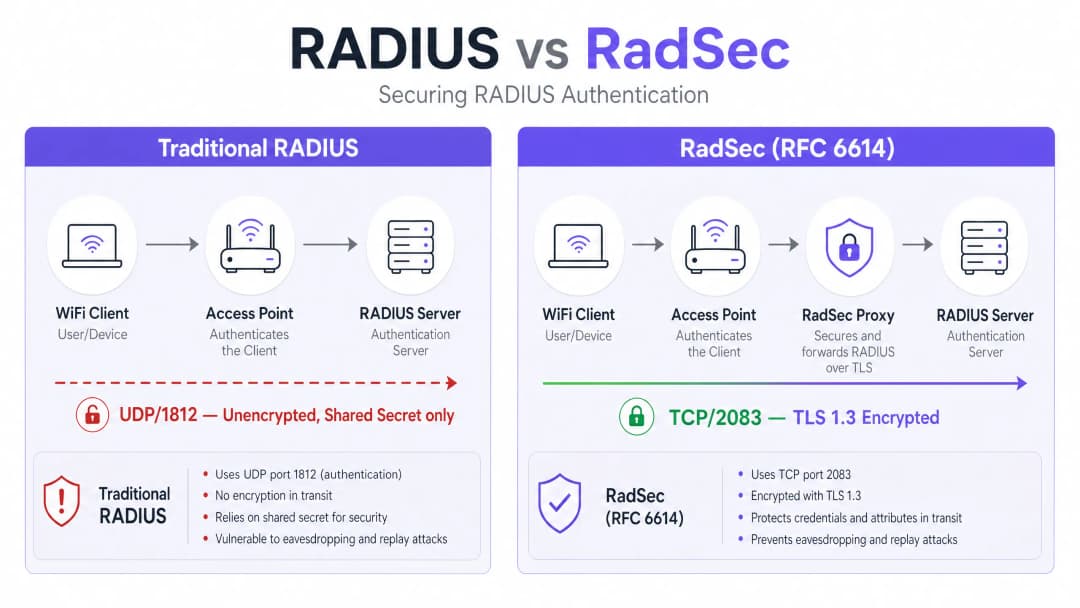
- Transport : Le port TCP 2083 garantit une livraison fiable et des connexions avec suivi d'état, améliorant ainsi les performances dans les environnements à forte latence.
- Chiffrement : TLS 1.2 ou 1.3 fournit un chiffrement robuste et de bout en bout de tous les attributs RADIUS.
- Authentification mutuelle : Le client RADIUS (ou proxy) et le serveur doivent tous deux présenter des certificats X.509 valides délivrés par une autorité de certification (CA) de confiance. Le secret partagé est conservé uniquement pour des raisons de rétrocompatibilité ; TLS assure la sécurité réelle.Cette architecture est essentielle pour les environnements distribués, tels que les chaînes de Retail ou les établissements de l'indutrie Hospitality, où les points d'accès renvoient les requêtes d'authentification via l'Internet public vers un serveur RADIUS central ou hébergé dans le cloud.
Vous avez des questions sur votre configuration spécifique ?
Notre équipe collabore avec des exploitants de sites, des responsables informatiques et des ingénieurs réseau au sein de 80 000 sites. Réservez un appel de 20 minutes et nous vous montrerons comment d'autres professionnels comme vous ont résolu ce problème.
Guide d'implémentation
Le déploiement de RadSec suit généralement l'un des deux modèles suivants : Support natif ou Basé sur un proxy.
Modèle 1 : RadSec natif
Si votre infrastructure le prend en charge nativement (par exemple, FreeRADIUS 3.0+, Cisco ISE, Aruba ClearPass), vous configurez les certificats TLS directement sur le serveur RADIUS et les points d'accès ou contrôleurs. Cela garantit un véritable chiffrement de bout en bout, de la périphérie au cœur du réseau.
Modèle 2 : Le Proxy RadSec
De nombreux serveurs RADIUS existants (notamment Microsoft NPS) ne prennent pas en charge RadSec de manière native. Dans ces environnements, un proxy (tel que radsecproxy) est déployé.
- Segment local : Le point d'accès envoie des requêtes RADIUS UDP standard au proxy local.
- Segment WAN : Le proxy encapsule le trafic dans TLS et l'envoie via TCP 2083 au serveur amont.
Ce modèle vous permet de sécuriser le trafic sur réseau étendu sans remplacer votre infrastructure existante.
Intégration avec Purple
Les plateformes de Guest WiFi et de WiFi Analytics de Purple s'intègrent de manière transparente aux infrastructures RADIUS d'entreprise. Sous la licence Purple Connect, Purple agit en tant que fournisseur d'identité gratuit pour OpenRoaming, où RadSec est une exigence obligatoire pour sécuriser le trafic de fédération entre les sites et le hub central.
Bonnes pratiques
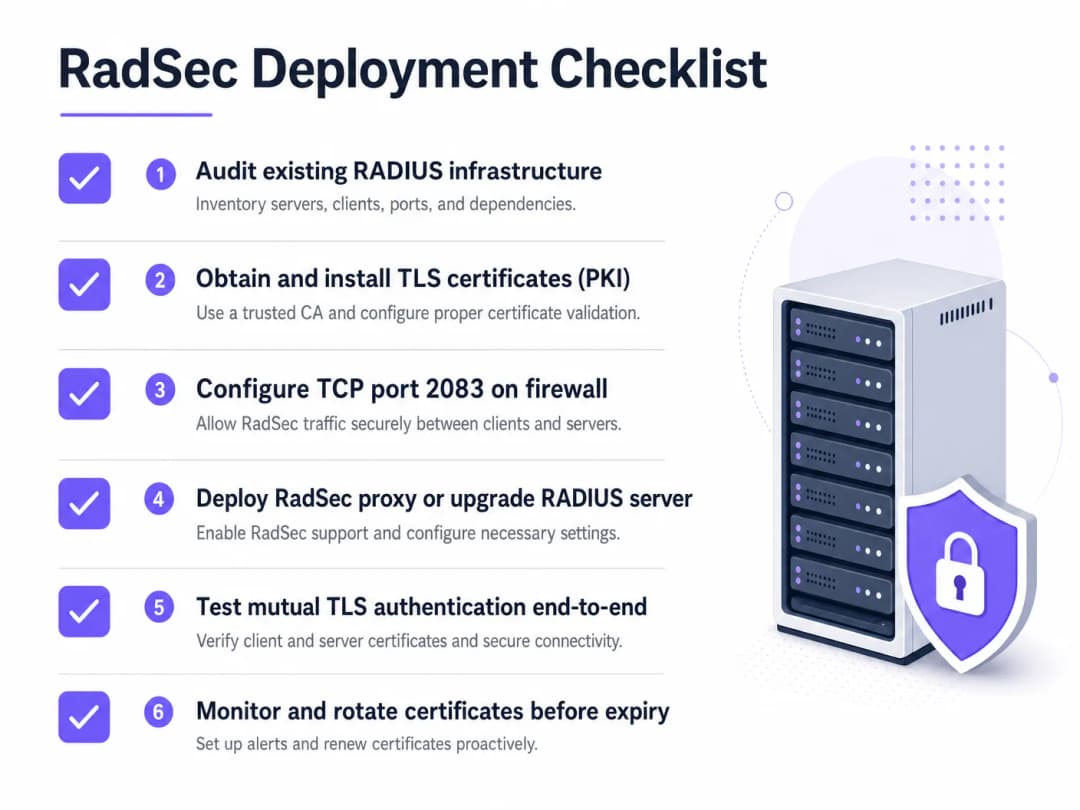
- Gestion du cycle de vie des certificats : Le TLS mutuel repose sur des certificats valides. Implémentez un renouvellement automatisé (par exemple, via ACME) et une surveillance stricte. Un certificat expiré entraînera une interruption totale de l'authentification.
- Configuration du pare-feu : Assurez-vous que le port TCP 2083 est explicitement autorisé en sortie depuis le site et en entrée vers le serveur RADIUS. Ne supposez pas que les règles UDP 1812 existantes s'appliqueront.
- Prioriser le trafic à haut risque : Commencez le déploiement sur les liaisons qui traversent l'Internet public ou des WAN non approuvés avant de passer aux VLAN de gestion locaux.
Pour en savoir plus sur la sécurisation de la périphérie, lisez notre guide sur Sécurité des points d'accès : Votre guide d'entreprise 2026.
Dépannage et atténuation des risques
Lorsque RadSec échoue, il s'agit rarement d'un problème d'authentification ; c'est presque toujours un problème TLS ou TCP.
- Symptôme : Les points d'accès apparaissent déconnectés du serveur RADIUS.
- Vérification : Règles de pare-feu pour le port TCP 2083. Le RADIUS traditionnel utilise UDP ; les équipes réseau oublient fréquemment d'ouvrir le port TCP.
- Symptôme : La connexion TCP s'établit, mais l'authentification échoue immédiatement.
- Vérification : Validation du certificat. Vérifiez que le Common Name (CN) ou le Subject Alternative Name (SAN) correspond, que le certificat n'a pas expiré et que le client fait confiance à l'AC de signature. Utilisez
openssl s_client -connect <server>:2083pour déboguer le handshake.
- Vérification : Validation du certificat. Vérifiez que le Common Name (CN) ou le Subject Alternative Name (SAN) correspond, que le certificat n'a pas expiré et que le client fait confiance à l'AC de signature. Utilisez
Assurez-vous que les bases de votre réseau sont solides. Consultez nos conseils sur la page Protégez votre réseau avec un DNS solide et la sécurité.
ROI et impact commercial
L'implémentation de RadSec est un investissement d'atténuation des risques. Le ROI se mesure par l'évitement des violations de données, des amendes de conformité (PCI-DSS, GDPR) et des atteintes à la réputation. De plus, elle permet de participer à des fédérations de roaming modernes comme OpenRoaming, ce qui peut améliorer considérablement l'expérience des invités dans les secteurs de la Santé et des Transports.
Écoutez le briefing
Pour approfondir les réalités opérationnelles du déploiement de RadSec, écoutez notre briefing technique de 10 minutes :
Pour connaître les étapes de configuration spécifiques sur les appareils clients, reportez-vous à la page Comment configurer le WiFi d'entreprise sur iOS et macOS avec 802.1X ou à la version portugaise Como Configurar WiFi Corporativo em iOS e macOS com 802.1X.
Définitions clés
RadSec
Une extension du protocole RADIUS qui encapsule le trafic RADIUS dans un tunnel TLS sur le port TCP 2083.
Utilisé pour sécuriser le trafic d'authentification lorsqu'il traverse des réseaux non sécurisés, empêchant ainsi l'interception des identifiants.
TLS Mutuel (mTLS)
Un processus de sécurité dans lequel le client et le serveur présentent tous deux des certificats X.509 pour vérifier l'identité de l'un et de l'autre avant d'établir une connexion chiffrée.
Le mécanisme d'authentification central de RadSec, remplaçant la dépendance aux secrets partagés statiques.
802.1X
La norme IEEE pour le contrôle d'accès réseau basé sur les ports, utilisée pour authentifier les appareils qui tentent de se connecter à un réseau LAN ou WLAN.
Le framework qui s'appuie sur RADIUS (et par extension, RadSec) pour valider les identifiants des utilisateurs par rapport à un annuaire.
radsecproxy
Un démon open source qui agit comme un proxy, convertissant le trafic standard UDP RADIUS en RadSec (TLS sur TCP) et inversement.
Déployé lorsque le support natif de RadSec est absent des points d'accès ou des serveurs RADIUS existants comme Microsoft NPS.
OpenRoaming
Une norme de fédération développée par la Wireless Broadband Alliance qui permet aux utilisateurs de se connecter de manière transparente et sécurisée aux réseaux WiFi participants dans le monde entier.
OpenRoaming impose l'utilisation de RadSec pour sécuriser le trafic d'authentification entre les sites et les fournisseurs d'identité.
Secret Partagé
Une chaîne de caractères statique utilisée dans le protocole RADIUS traditionnel pour masquer les mots de passe et vérifier l'origine des requêtes.
Bien que toujours techniquement présent dans les configurations RadSec pour des raisons de rétrocompatibilité, il est remplacé par le chiffrement TLS.
FreeRADIUS
Un serveur RADIUS open source largement déployé qui fournit une prise en charge native pour RadSec.
Souvent utilisé dans les environnements d'entreprise et les fédérations d'itinérance en raison de sa flexibilité et de ses capacités TLS natives.
PKI (Infrastructure à Clés Publiques)
La structure de rôles, de politiques et de logiciels requise pour créer, gérer, distribuer et révoquer des certificats numériques.
Un prérequis pour le déploiement de RadSec, car vous devez émettre et gérer des certificats pour tous les clients et serveurs RADIUS.
Exemples concrets
Un groupe hôtelier de 200 établissements utilise Microsoft NPS de manière centralisée pour l'authentification du personnel. Les points d'accès de chaque hôtel envoient actuellement des requêtes RADIUS sur le réseau internet public via UDP 1812. Le CTO exige le chiffrement de tout le trafic d'authentification, mais le remplacement de NPS n'est pas envisageable cette année.
Déployer un proxy RadSec (par exemple, radsecproxy) sur chaque site hôtelier et un proxy correspondant dans le centre de données central devant les serveurs NPS. Les AP locaux envoient le flux UDP RADIUS au proxy local. Le proxy local établit un tunnel TLS mutuel sur le port TCP 2083 à travers internet vers le proxy central. Le proxy central met fin au tunnel TLS et transfère le flux UDP RADIUS standard au serveur NPS.
Une grande université déploie OpenRoaming sur son campus pour permettre un accès transparent aux universitaires de passage. Elle utilise FreeRADIUS 3.0.
Activer le support natif de RadSec dans FreeRADIUS. Générer des certificats X.509 à partir d'une autorité de certification (CA) approuvée par la fédération OpenRoaming. Configurer le pare-feu du campus pour autoriser le trafic TCP 2083 entrant et sortant vers les hubs de la fédération. Configurer les contrôleurs LAN sans fil pour utiliser RadSec pour toutes les requêtes d'authentification destinées à la fédération.
Questions d'entraînement
Q1. Votre équipe a déployé RadSec de manière native entre les points d'accès de votre succursale distante et votre serveur FreeRADIUS central. Les points d'accès peuvent pinger le serveur, mais les demandes d'authentification expirent complètement, et aucun trafic n'apparaît dans les journaux RADIUS.
Conseil : RadSec utilise un protocole de transport et un port différents de ceux du RADIUS traditionnel.
Voir la réponse type
Le pare-feu bloque probablement le port TCP 2083. Les équipes réseau habituées au RADIUS traditionnel n'autorisent souvent que les ports UDP 1812/1813. Vous devez explicitement autoriser le port TCP 2083 en sortie depuis la succursale et en entrée vers le serveur RADIUS.
Q2. Vous auditez l'architecture WiFi d'un client du secteur de la vente au détail. Ils utilisent Microsoft NPS de manière centralisée. Les points d'accès de leurs magasins envoient les demandes d'authentification sur Internet via un VPN IPsec. RadSec est-il requis ici ?
Conseil : Prenez en compte les couches de chiffrement déjà en place.
Voir la réponse type
Bien que RadSec soit une bonne pratique, le VPN IPsec fournit déjà un chiffrement de la couche de transport pour le trafic UDP RADIUS sur Internet non sécurisé. Déployer RadSec ici offrirait une défense en profondeur mais est moins urgent que si le trafic traversait Internet de manière native.
Q3. Une semaine après le déploiement réussi d'un proxy RadSec, toutes les authentifications WiFi de l'entreprise échouent simultanément un lundi à 09h00. L'équipe réseau confirme que les règles du pare-feu n'ont pas été modifiées.
Conseil : Quel est le mécanisme d'authentification principal pour le tunnel TLS lui-même ?
Voir la réponse type
Les certificats X.509 utilisés pour l'authentification TLS mutuelle ont probablement expiré. Lorsque les certificats expirent, la liaison TLS échoue, la connexion TCP s'interrompt et le trafic RADIUS ne peut plus circuler. Mettez en place une surveillance et une rotation automatisées des certificats pour éviter cela.
Continuer la lecture de cette série
Comment segmenter de manière sécurisée les réseaux WiFi du personnel et des invités : meilleures pratiques pour les LAN d'entreprise
Ce guide fournit aux responsables informatiques et aux architectes réseau un modèle technique et indépendant des fournisseurs pour sécuriser les réseaux LAN d'entreprise en segmentant correctement le trafic WiFi du personnel et des invités. Il couvre l'authentification 802.1X, le RADIUS dans le cloud, l'isolation VLAN et la gestion du cycle de vie des identifiants nécessaires pour éliminer les phrases de passe partagées et protéger les actifs de l'entreprise.
Le meilleur filtrage DNS : un guide complet pour les entreprises
Ce guide de référence technique explique comment le filtrage DNS d'entreprise sécurise les réseaux publics en bloquant les domaines malveillants au niveau de la couche de résolution - avant même qu'une connexion ne soit établie. Il fournit aux directeurs informatiques, architectes réseau et équipes d'exploitation des sites l'architecture de déploiement, la configuration du pare-feu et le contexte de conformité nécessaires pour protéger le WiFi invité dans les secteurs de l'hôtellerie, du commerce de détail et du secteur public. Purple Shield bloque les logiciels malveillants, les botnets et les contenus inappropriés au niveau DNS sur plus de 80 000 sites actifs.
Comprendre Cisco SUDI : L'identité ancrée dans le matériel pour le contrôle d'accès réseau sécurisé
Ce guide explique comment Cisco SUDI fournit une identité sécurisée par cryptographie et ancrée dans le matériel pour l'infrastructure réseau d'entreprise. Découvrez comment remplacer les adresses MAC falsifiables par des certificats 802.1AR immuables afin de sécuriser le contrôle d'accès réseau de votre site.
Vous avez des questions sur votre configuration spécifique ?
Notre équipe collabore avec des exploitants de sites, des responsables informatiques et des ingénieurs réseau au sein de 80 000 sites. Réservez un appel de 20 minutes et nous vous montrerons comment d'autres professionnels comme vous ont résolu ce problème.