

Résoudre les interférences WiFi dans les bâtiments MDU à haute densité
Ce guide de référence technique fournit aux responsables informatiques et aux exploitants immobiliers des stratégies concrètes pour éliminer les interférences WiFi dans les bâtiments multi-logements (MDU) à haute densité. Il couvre les causes profondes des interférences co-canal et canal adjacent, le passage architectural à une infrastructure WLAN gérée de manière centralisée, et les techniques sécurisées d'isolation des locataires. La mise en œuvre de ces stratégies réduit les frais de support, améliore la satisfaction des locataires et transforme la connectivité en un service générateur de revenus.
Écouter ce guide
Voir la transcription du podcast
Résumé Exécutif
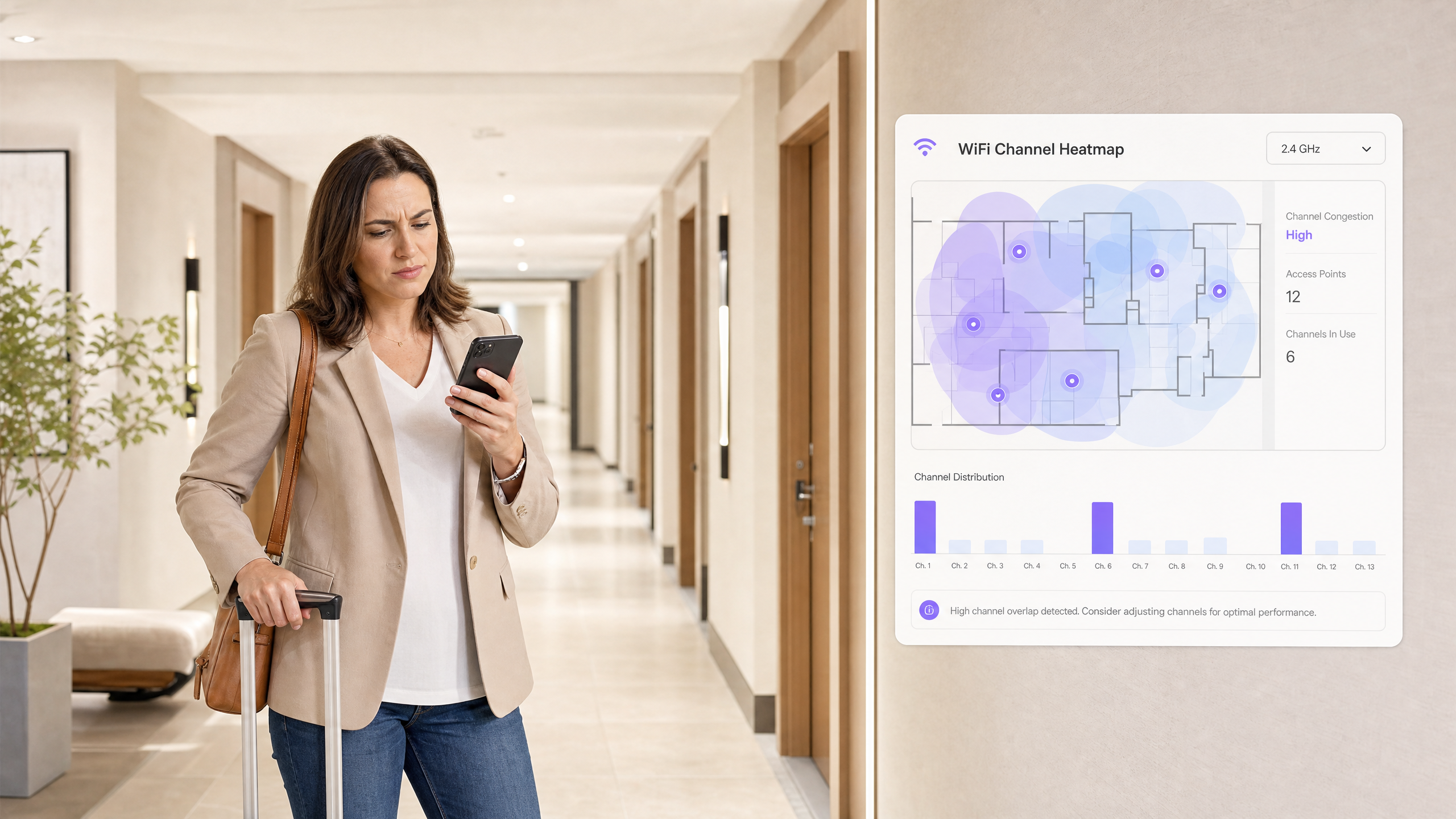
Pour les responsables informatiques et les directeurs des opérations de sites gérant des unités multi-logements (MDU) à haute densité — complexes d'appartements, résidences étudiantes, complexes hôteliers de luxe — le WiFi non géré est une responsabilité opérationnelle critique. Lorsque des centaines de locataires déploient des routeurs grand public à proximité, les interférences co-canal et canal adjacent qui en résultent dégradent les performances sur l'ensemble de la propriété. Ce guide décrit l'architecture technique nécessaire pour passer de réseaux chaotiques gérés par les locataires à une infrastructure WiFi de qualité entreprise, contrôlée de manière centralisée. En mettant en œuvre une gestion RF dynamique, une direction de bande agressive et une micro-segmentation sécurisée via des clés pré-partagées privées (PPSK), les opérateurs peuvent atténuer les interférences, réduire les frais de support et transformer le WiFi d'une plainte persistante en un service à valeur ajoutée. Cette approche s'aligne sur des stratégies de connectivité plus larges dans l' Hôtellerie et le Commerce de détail où une connectivité fluide et fiable est fondamentale pour l'expérience client et a un impact direct sur les revenus.
Approfondissement Technique
Le défi fondamental dans les environnements MDU à haute densité est l'intersection de la physique de la propagation RF et des limitations du protocole 802.11. Comprendre cela est le prérequis pour le résoudre.
Le Problème du 2.4GHz : Un Spectre Assiégé
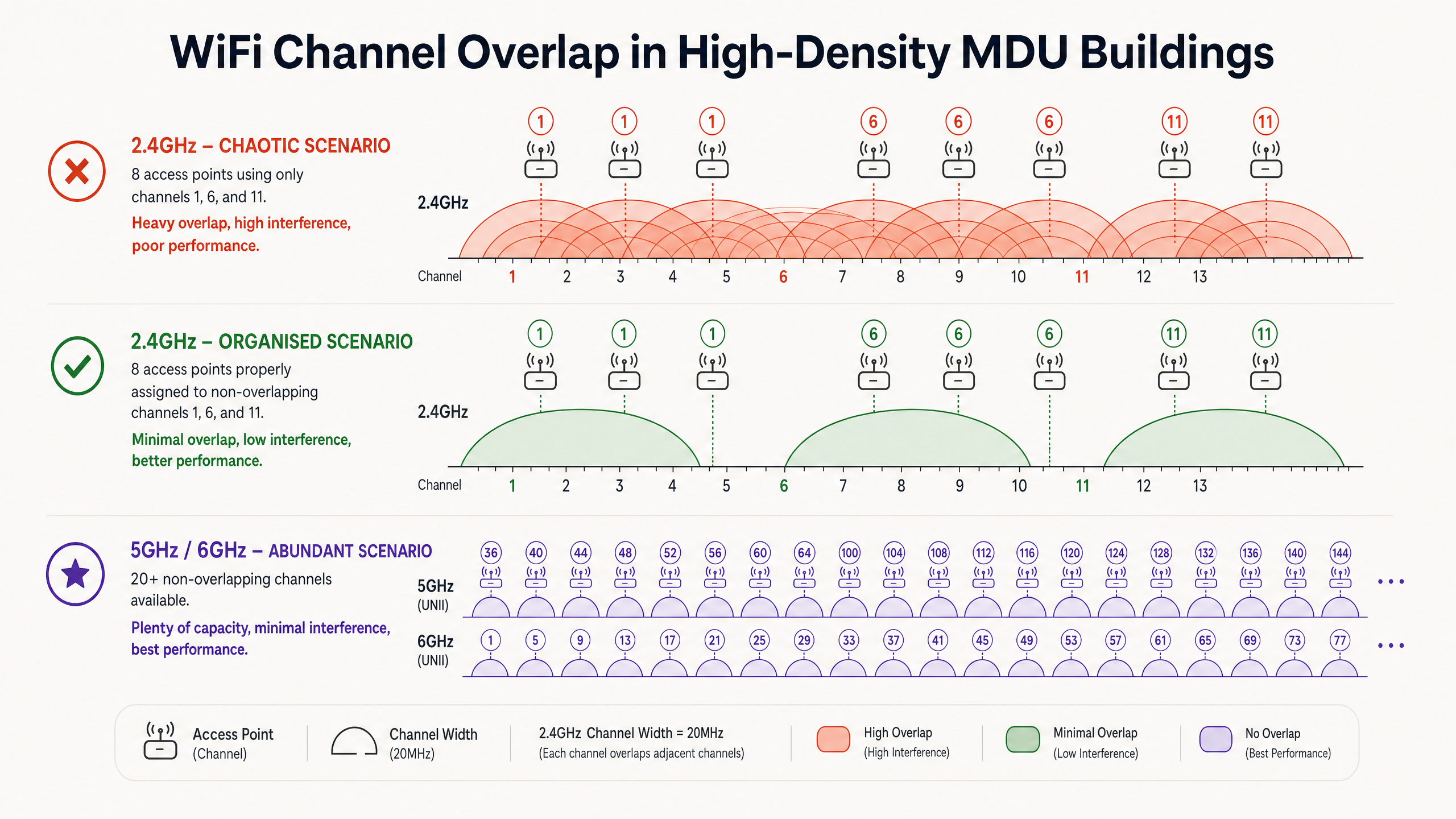
Dans les scénarios non gérés, les routeurs des locataires utilisent généralement par défaut la puissance de transmission maximale sur la bande 2.4GHz. Avec seulement trois canaux non superposés disponibles — les canaux 1, 6 et 11 — les points d'accès partagent inévitablement le spectre. Lorsque plusieurs points d'accès fonctionnent sur le même canal à portée radio les uns des autres, ils créent des Interférences Co-Canal (CCI).
Parce que le WiFi utilise le CSMA/CA (Carrier Sense Multiple Access with Collision Avoidance) — un protocole "écouter avant de parler" — les appareils doivent attendre que le canal soit libre avant de transmettre. Dans un bâtiment où soixante routeurs se disputent tous le temps d'antenne sur le canal 6, les appareils passent beaucoup plus de temps à attendre qu'à transmettre. Cette contention, et non un simple bruit de signal, est le principal facteur de dégradation du débit dans les scénarios d'interférences WiFi dans les immeubles d'appartements.
Pour une exploration plus approfondie de la façon dont les bandes de fréquences interagissent, consultez notre guide sur les Fréquences Wi-Fi : Un Guide des Fréquences Wi-Fi en 2026 .
Pourquoi Ajouter Plus de Points d'Accès Empire la Situation
Un réflexe courant est d'ajouter plus de points d'accès pour améliorer la couverture. Dans les MDU à haute densité, cela est souvent contre-productif. Chaque point d'accès supplémentaire diffusant sur un canal déjà encombré augmente le niveau d'interférence total. La solution n'est pas la densité du matériel ; c'est le contrôle de l'environnement RF.
Le Changement Architectural : Du Non Géré au Contrôlé Centralement
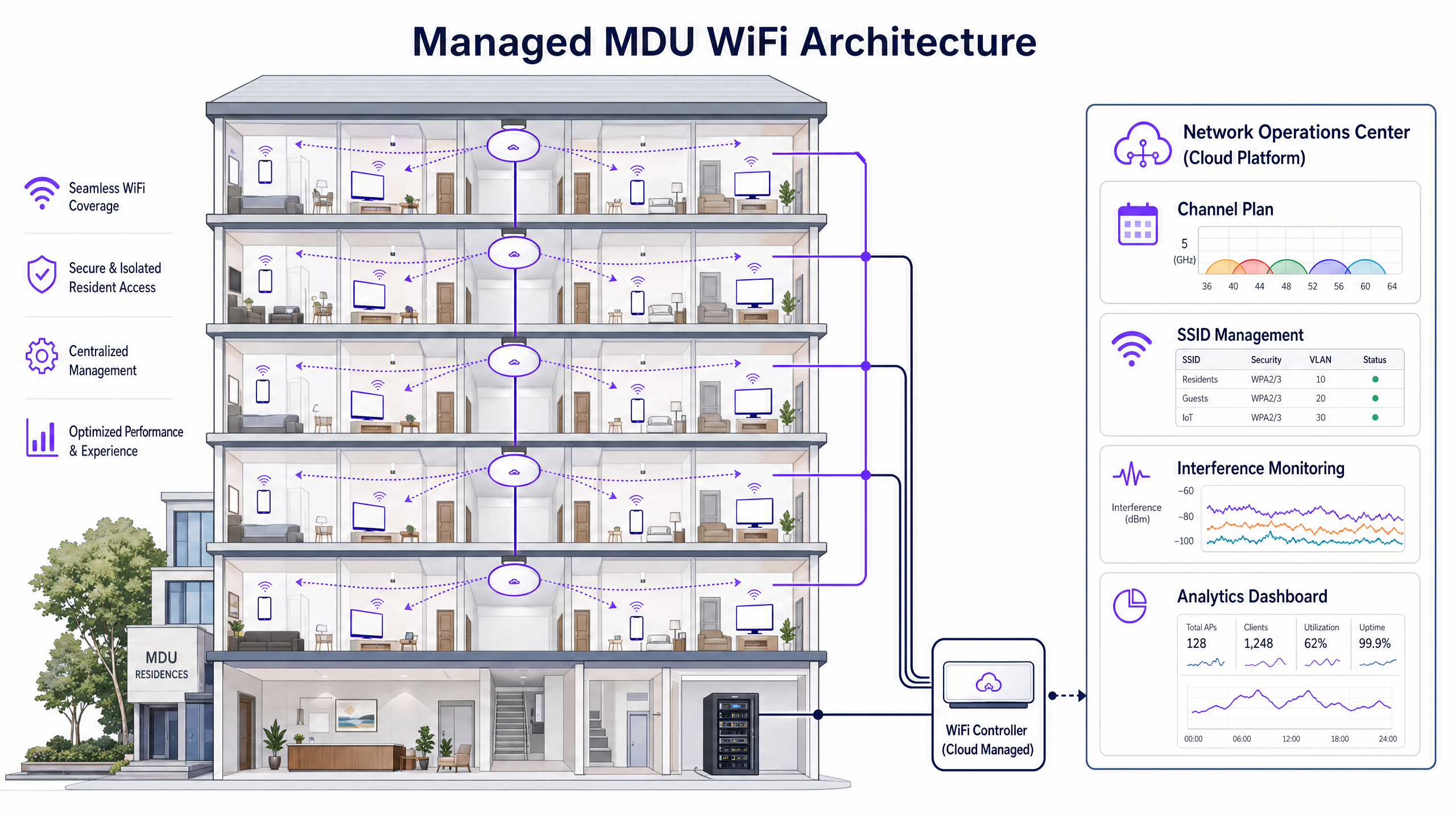
L'approche correcte nécessite de déprécier les routeurs individuels des locataires au profit d'une architecture WLAN unifiée et gérée de manière centralisée. Le déploiement de points d'accès de qualité entreprise — généralement un par unité ou une unité sur deux selon l'atténuation des murs — permet à un contrôleur central d'orchestrer l'ensemble de l'environnement RF.
Les composants architecturaux clés d'un déploiement MDU géré incluent les éléments suivants.
| Composant | Fonction | Impact |
|---|---|---|
| Gestion Radio Dynamique (DRM) | Surveille continuellement la RF et ajuste les attributions de canaux et la puissance de transmission | Élimine les CCI en garantissant que les points d'accès adjacents ne partagent jamais de canaux |
| Direction de Bande | Pousse les clients bi-bande vers le 5GHz/6GHz | Réduit la congestion sur la bande 2.4GHz saturée |
| Élagage en Damier 2.4GHz | Désactive la radio 2.4GHz sur les points d'accès alternés | Prévient les CCI 2.4GHz tout en maintenant la couverture des appareils IoT |
| Clés Pré-Partagées Privées (PPSK) | Attribue une phrase secrète unique par locataire, mappée à un VLAN isolé | Offre une expérience de "réseau domestique" sécurisée sur une infrastructure partagée |
| Réglage du Débit de Base Minimum | Augmente le débit de données de connexion minimum (par exemple, à 12 ou 24 Mbps) | Force les clients "collants" à se déplacer vers des points d'accès plus proches, libérant du temps d'antenne |
5GHz et 6GHz : La Voie à Suivre
La bande 5GHz offre beaucoup plus de canaux non superposés — jusqu'à 25 dans les bandes UNII-1, UNII-2 et UNII-3. Le WiFi 6E et le WiFi 7 étendent cela davantage dans la bande 6GHz, offrant jusqu'à 59 canaux supplémentaires de 20MHz de spectre propre et largement exempt d'interférences. Cependant, les fréquences plus élevées s'atténuent plus rapidement à travers les murs et les sols, c'est pourquoi une étude de site prédictive modélisant les matériaux de construction spécifiques du MDU est non négociable avant le déploiement.
Guide d'Implémentation
Étape 1 : Audit RF et Conception Prédictive
Avant de monter un seul point d'accès, effectuez un audit RF complet de l'espace aérien existant à l'aide d'un analyseur de spectre. Documentez chaque SSID, canal et force du signal. Utilisez ensuite des outils d'étude de site prédictive (Ekahau, Hamina) pour modéliser le placement des points d'accès, en tenant compte des valeurs d'atténuation des murs spécifiques à la construction du bâtiment. Concevez pour la capacité, pas seulement pour la couverture.
Étape 2 : Micro-Segmentation des Locataires avec PPSK
Les locataires s'attendent à ce que leurs appareils — téléviseurs intelligents, haut-parleurs sans fil, gadgets IoT — communiquent localement, comme ils le feraient sur un routeur domestique. La mise en œuvre de PPSK ou de PSK multiples (MPSK) est essentielle. Chaque locataire reçoit une phrase secrète unique ; le contrôleur l'utilise pour attribuer dynamiquement tous ses appareils à un VLAN isolé. Cela offre l'expérience de réseau domestique sur une infrastructure partagée sans diffuser des centaines de SSID séparés, ce qui créerait en soi une surcharge de gestion significative. Cette approche prend également en charge cconsidérations de conformité abordées dans Explication de ce qu'est une piste d'audit pour la sécurité informatique en 2026 .
Étape 3 : Placement des points d'accès et configuration radio
Pour les bâtiments aux murs en béton, déployez les points d'accès à l'intérieur des unités plutôt que dans les couloirs. Placer les points d'accès là où se trouvent les clients minimise le chemin du signal à travers les matériaux atténuants. Configurez les éléments suivants.
- Largeurs de canal : 20 MHz sur 2,4 GHz ; 40 MHz sur 5 GHz en densité standard ; 20 MHz sur 5 GHz en densité extrême pour maximiser le nombre de canaux non superposés.
- Puissance de transmission : Réglez sur auto ou moyen. Une puissance élevée augmente la portée des interférences ; une puissance plus faible favorise un bon roaming des clients.
- 802.11k/v/r : Activez ces protocoles d'assistance au roaming pour assurer une transition fluide des clients entre les points d'accès sans perte de connexion.
Étape 4 : Surveillance et optimisation continues
Déployez une surveillance RF continue via les outils intégrés du contrôleur ou une plateforme dédiée. Les métriques clés à suivre incluent l'utilisation du temps d'antenne par canal (seuil d'alerte : >70 %), la distribution du SNR client et le nombre de points d'accès non autorisés. Les plateformes offrant des WiFi Analytics peuvent faire apparaître ces informations ainsi que les données de comportement des invités, offrant une vue opérationnelle unifiée.
Bonnes pratiques
Utilisez la bande 6 GHz pour l'avenir. Lorsque le budget le permet, déployez des points d'accès WiFi 6E ou WiFi 7. La bande 6 GHz est actuellement exempte d'interférences des appareils hérités, ce qui la rend idéale pour les applications à large bande passante et sensibles à la latence.
Auditez les canaux DFS avant utilisation. Les canaux de sélection dynamique de fréquence (DFS) dans la bande 5 GHz offrent une capacité supplémentaire mais exigent que les points d'accès libèrent immédiatement le canal si une activité radar est détectée. Dans les environnements urbains proches des aéroports ou des stations météorologiques, les détections DFS peuvent entraîner des déconnexions fréquentes des clients. Surveillez toujours le radar avant d'activer les canaux DFS en production.
Appliquez les politiques d'utilisation acceptable. Même avec un réseau géré, les locataires peuvent tenter de brancher leurs propres routeurs. Utilisez les capacités du système de prévention des intrusions sans fil (WIPS) pour identifier et classer les points d'accès non autorisés. Bien que la désauthentification active des appareils des locataires soulève des considérations juridiques, les données fournissent des motifs pour l'application des politiques.
Alignez-vous sur les normes de conformité. Pour les MDU du secteur public ou ceux offrant un accès invité partagé, assurez-vous que l'architecture réseau est conforme à IWF Compliance for Public WiFi Networks in the UK et aux obligations pertinentes de traitement des données GDPR. Pour les marchés hispanophones, voir Cumplimiento IWF para redes WiFi públicas en el Reino Unido .
Dépannage et atténuation des risques
Le problème du client "collant". Si les clients ne se déplacent pas vers des points d'accès plus proches, la cause principale est généralement une puissance de transmission trop élevée. Un client restera associé à un point d'accès distant tant qu'il pourra l'entendre, même à un faible débit de données. Réduisez la puissance de transmission du point d'accès et vérifiez que la gestion de la transition BSS 802.11v est activée.
Utilisation élevée du temps d'antenne avec peu de clients. Si un canal affiche une utilisation de plus de 80 % avec seulement une poignée de clients connectés, le coupable est presque certainement le CCI provenant de points d'accès non autorisés ou de réseaux gérés voisins. Utilisez un analyseur de spectre pour identifier la source d'interférence et ajustez les attributions de canaux en conséquence.
Défaillances de connectivité des appareils IoT. De nombreux appareils domestiques intelligents sont uniquement 2,4 GHz et ne prennent pas en charge WPA3. Maintenez un SSID 2,4 GHz dédié avec le mode de compatibilité WPA2 activé, mais assurez-vous que ce SSID n'est diffusé que depuis les points d'accès en damier élagués pour limiter son empreinte d'interférence. Pour des considérations plus larges sur l'architecture de sécurité réseau, les principes décrits dans Office Wi Fi: Optimize Your Modern Office Wi-Fi Network s'appliquent également aux environnements MDU.
ROI et impact commercial
La transition vers une solution WiFi MDU gérée transforme la connectivité d'un centre de coûts en un service générateur de revenus. Le cas financier repose sur trois piliers.
| Facteur de valeur | Métrique | Résultat typique |
|---|---|---|
| Réduction des OpEx de support | Plaintes mensuelles de connectivité | Réduction de 80-94 % après déploiement |
| Rétention des locataires | Taux de renouvellement de bail | La qualité du WiFi est un facteur de rétention parmi les 3 premiers dans les enquêtes résidentielles |
| Génération de revenus | Forfaits de bande passante échelonnés | Taux d'adoption des forfaits premium de 5 à 15 £/mois de 20 à 35 % |
| Valeur de la propriété | Certification de bâtiment intelligent | La connectivité gérée prend en charge les crédits BREEAM et WELL Building Standard |
Pour les opérateurs de Santé et de Transport gérant des environnements de type MDU tels que les services hospitaliers ou les pôles de transit, les avantages en termes de conformité et opérationnels sont tout aussi convaincants. Un réseau géré fournit la piste d'audit et le contrôle d'accès nécessaires à la conformité réglementaire, tandis que les plateformes Guest WiFi ajoutent les capacités de capture de données et d'engagement qui génèrent des retours commerciaux mesurables.
Définitions clés
Co-Channel Interference (CCI)
Interference caused when multiple access points and clients operate on the exact same frequency channel, forcing them to contend for airtime via CSMA/CA.
The primary cause of slow WiFi in unmanaged MDUs where dozens of routers default to channel 6. High CCI is identified by high airtime utilisation with few connected clients.
Adjacent-Channel Interference (ACI)
Interference caused by overlapping signals from channels that are not fully separated in frequency (e.g., using channel 4 and channel 6 simultaneously in 2.4GHz).
Often caused by tenants manually selecting channels they believe are 'un-crowded' but which actually partially overlap with the standard non-overlapping channels.
Private Pre-Shared Key (PPSK)
A security mechanism where multiple unique passphrases are configured on a single SSID. The controller uses the specific passphrase entered by a user to dynamically assign their devices to a pre-defined VLAN.
Essential for MDU deployments to provide secure, isolated per-tenant networks on shared infrastructure without broadcasting hundreds of separate SSIDs.
CSMA/CA (Carrier Sense Multiple Access with Collision Avoidance)
The fundamental medium access protocol of 802.11 WiFi. A device listens to the channel; if it hears another transmission, it waits a random backoff period before attempting to transmit.
Explains why high AP density on a shared channel causes slowness: devices spend more time waiting for clear airtime than actually transmitting data.
Band Steering
A controller or AP feature that discourages dual-band capable clients from connecting to the 2.4GHz band by delaying or withholding probe responses, encouraging them to associate with the less congested 5GHz or 6GHz radio instead.
A key tool for reducing 2.4GHz congestion in MDUs. Must be implemented carefully to avoid breaking connectivity for 2.4GHz-only IoT devices.
Dynamic Frequency Selection (DFS)
A regulatory requirement for 802.11 devices operating in certain 5GHz channels (UNII-2 and UNII-2 Extended) to detect radar signals and vacate the channel within 10 seconds, switching to an alternative channel.
Provides access to additional 5GHz channels for capacity, but can cause client disconnects if deployed near airports, military installations, or weather radar stations.
Minimum Basic Rate
The lowest data rate at which an AP will accept a client association or transmit management frames. Raising this value (e.g., from 1 Mbps to 12 or 24 Mbps) forces clients operating at low data rates to disconnect and roam to a closer AP.
A critical tuning parameter for high-density deployments. Low-rate clients consume airtime disproportionately, degrading performance for all other users on the channel.
Airtime Utilisation
The percentage of time a specific WiFi channel is occupied by transmissions (data, management frames, or interference). Measured per radio on each AP.
The most important metric for diagnosing MDU interference. Utilisation above 70% on any channel indicates severe congestion. Utilisation above 90% renders the channel effectively unusable.
Dynamic Radio Management (DRM)
A controller feature that automatically and continuously adjusts the channel assignments and transmit power levels of managed APs based on real-time RF environment monitoring.
The engine of a managed MDU deployment. DRM eliminates the need for manual channel planning and adapts to changes in the RF environment (e.g., new rogue APs appearing).
Wireless Intrusion Prevention System (WIPS)
A system that monitors the wireless airspace for unauthorised or rogue access points and clients, classifying them and generating alerts for network administrators.
Used in MDU environments to detect tenant-deployed rogue routers that undermine the managed channel plan and create interference.
Exemples concrets
A 300-unit luxury apartment building is experiencing severe connectivity issues during evening peak hours (6pm-10pm). Tenants are using ISP-provided routers, most defaulting to 2.4GHz. An RF audit reveals 47 unique SSIDs on channel 6 alone. The property manager wants to deploy a managed solution without requiring tenants to change their devices.
Phase 1 — RF Design: Commission a predictive site survey using Ekahau, modelling the specific wall attenuation of the building (drywall vs. concrete). Design for one AP per unit, placed inside the unit near the main living area. Phase 2 — Hardware Deployment: Deploy dual-band WiFi 6 APs. Connect all APs to a central cloud-managed controller. Phase 3 — Radio Configuration: Disable the 2.4GHz radio on 50% of APs in a staggered checkerboard pattern. Set 5GHz channel widths to 40MHz. Configure the controller's Dynamic Radio Management to auto-assign channels and power levels. Phase 4 — Tenant Segmentation: Implement PPSK. Issue each tenant a unique passphrase. All tenant devices authenticate to a single SSID but are dynamically assigned to isolated VLANs. Phase 5 — Transition: Communicate to tenants that the building WiFi is now included in service charges. Provide a simple guide for connecting their devices. Phase 6 — Monitoring: Set alerts for airtime utilisation exceeding 70% on any channel. Review rogue AP reports weekly for the first month.
A 450-bed student accommodation provider is receiving complaints that WiFi speeds are acceptable during the day but unusable after 9pm. The existing infrastructure uses hallway-mounted APs on a flat-rate channel plan. The building has concrete walls between rooms.
The hallway AP placement is the primary architectural flaw. Concrete walls are attenuating the signal between the AP and the student's device, forcing connections at low data rates. Low data rate connections consume disproportionate airtime, degrading performance for all users on the channel. Recommended remediation: 1. Relocate APs to inside the rooms (one per room or one per two rooms depending on room size). 2. Increase the minimum basic rate to 24 Mbps to force clients onto higher data rates. 3. Implement band steering to push 5GHz-capable devices off the congested 2.4GHz band. 4. Enable 802.11k/v to assist roaming between in-room APs. 5. Introduce a PPSK-based per-room VLAN structure to prevent cross-room device discovery.
Questions d'entraînement
Q1. You are deploying WiFi in a 10-storey student accommodation block with thick concrete walls between rooms. Your initial design places APs in the corridors, one per floor. Residents are complaining of poor speeds inside their rooms. What is the root cause and what is the correct remediation?
Conseil : Consider the impact of concrete wall attenuation on signal strength and data rate, and how low data rates affect shared airtime.
Voir la réponse type
The root cause is that concrete walls are severely attenuating the signal between the corridor AP and the student's device. Devices inside rooms are connecting at very low data rates (e.g., 6 Mbps or lower). Because WiFi is a shared medium, a device transmitting at 6 Mbps consumes far more airtime than a device at 300 Mbps, degrading performance for all users on that AP. The correct remediation is to relocate APs inside the rooms (in-room deployment), placing the AP where the clients are and eliminating the concrete wall from the primary signal path. Additionally, raise the minimum basic rate to 24 Mbps to prevent low-rate associations, and enable band steering to push 5GHz-capable devices off the 2.4GHz band.
Q2. A property manager wants to offer a 'Home Network' experience where a tenant can cast from their phone to their Apple TV and control their smart plug, but Tenant A must not be able to see or access Tenant B's devices. The property has a single managed SSID. What technology must be implemented and how does it work?
Conseil : Think about how to segment users on a single shared wireless infrastructure without creating hundreds of separate SSIDs.
Voir la réponse type
Implement Private Pre-Shared Keys (PPSK) or Multiple PSK (MPSK). The property broadcasts a single SSID. Each tenant is issued a unique passphrase. When a tenant's device connects and enters their passphrase, the controller validates it and dynamically assigns all devices using that passphrase to a dedicated, isolated VLAN. Devices within the same VLAN can communicate locally (enabling casting and smart home control), while devices in different VLANs are isolated from each other at Layer 2. This provides the home network experience without the management overhead of hundreds of separate SSIDs and without the security risk of a single shared passphrase.
Q3. Your controller dashboard shows 87% airtime utilisation on Channel 6 in the east wing of a 200-unit apartment building, despite only 8 clients being actively connected to your managed APs on that channel. What is the most likely cause and what are your next two diagnostic steps?
Conseil : Airtime utilisation reflects all 802.11 activity on the channel, not just traffic from your managed clients.
Voir la réponse type
The most likely cause is severe Co-Channel Interference (CCI) from rogue APs — tenant-owned routers — operating on Channel 6 in the east wing. Your managed APs are hearing these rogue transmissions and deferring their own transmissions via CSMA/CA, driving up utilisation even with few active managed clients. Diagnostic step 1: Use the controller's WIPS or a spectrum analyser to identify and count rogue APs operating on Channel 6 in the east wing. Diagnostic step 2: Instruct the controller's Dynamic Radio Management to reassign your managed APs in the east wing to Channel 1 or Channel 11 to escape the interference. Monitor airtime utilisation after the channel change to confirm improvement.
Q4. You are advising a property manager on whether to enable DFS channels in the 5GHz band to increase capacity in a 180-unit apartment complex located 2km from a regional airport. What is your recommendation and why?
Conseil : Consider the regulatory requirements of DFS and the operational impact of radar-triggered channel changes.
Voir la réponse type
Recommend against enabling DFS channels without first conducting a 48-72 hour passive radar monitoring scan of the airspace. DFS channels (UNII-2 and UNII-2 Extended) require APs to vacate the channel within 10 seconds of detecting radar activity. A regional airport 2km away is highly likely to generate radar returns that trigger DFS events. Each DFS hit forces all clients on that channel to disconnect and reconnect on a new channel, creating a poor user experience. The recommendation is to first maximise the use of non-DFS 5GHz channels (UNII-1: channels 36, 40, 44, 48) and the 6GHz band if WiFi 6E APs are deployed. Only enable DFS channels if the radar monitoring confirms the airspace is clean.