
Solutions WiFi pour l'hôtellerie : Ce qu'il faut rechercher chez un fournisseur
Ce guide faisant autorité détaille les considérations techniques et commerciales essentielles pour choisir un fournisseur de WiFi pour l'hôtellerie. Il couvre l'architecture réseau, les normes de sécurité, la conception du Captive Portal et l'analyse de données conforme au GDPR pour aider les responsables informatiques à déployer des solutions qui génèrent des revenus et améliorent l'efficacité opérationnelle.
Écouter ce guide
Voir la transcription du podcast
Résumé Exécutif
Pour les opérateurs de lieux modernes, le WiFi invité n'est plus un centre de coûts ; c'est un actif de données essentiel et un moteur de revenus. Alors que les responsables informatiques, les architectes réseau et les CTO évaluent les solutions WiFi pour l'hôtellerie, l'accent doit passer de la connectivité de base à l'analyse, la conformité et l'intégration de niveau entreprise. Ce guide fournit un cadre neutre vis-à-vis des fournisseurs pour évaluer les fournisseurs de WiFi invité, détaillant l'architecture réseau essentielle, les exigences du Captive Portal et les capacités d'analyse de données nécessaires à un déploiement réussi dans les environnements de l'hôtellerie, du commerce de détail et du secteur public.
Le déploiement d'une solution WiFi invité robuste nécessite d'équilibrer les performances haute densité avec des normes de sécurité strictes comme WPA3 et PCI DSS. De plus, la capacité à capturer des données de première partie via une plateforme WiFi Analytics transforme le réseau en un moteur marketing. Ce guide de référence décrit les spécifications techniques et les considérations d'impact commercial nécessaires pour sélectionner un fournisseur capable de fournir à la fois une connectivité sécurisée et des informations exploitables.
Approfondissement Technique
Architecture Réseau et Normes Radio
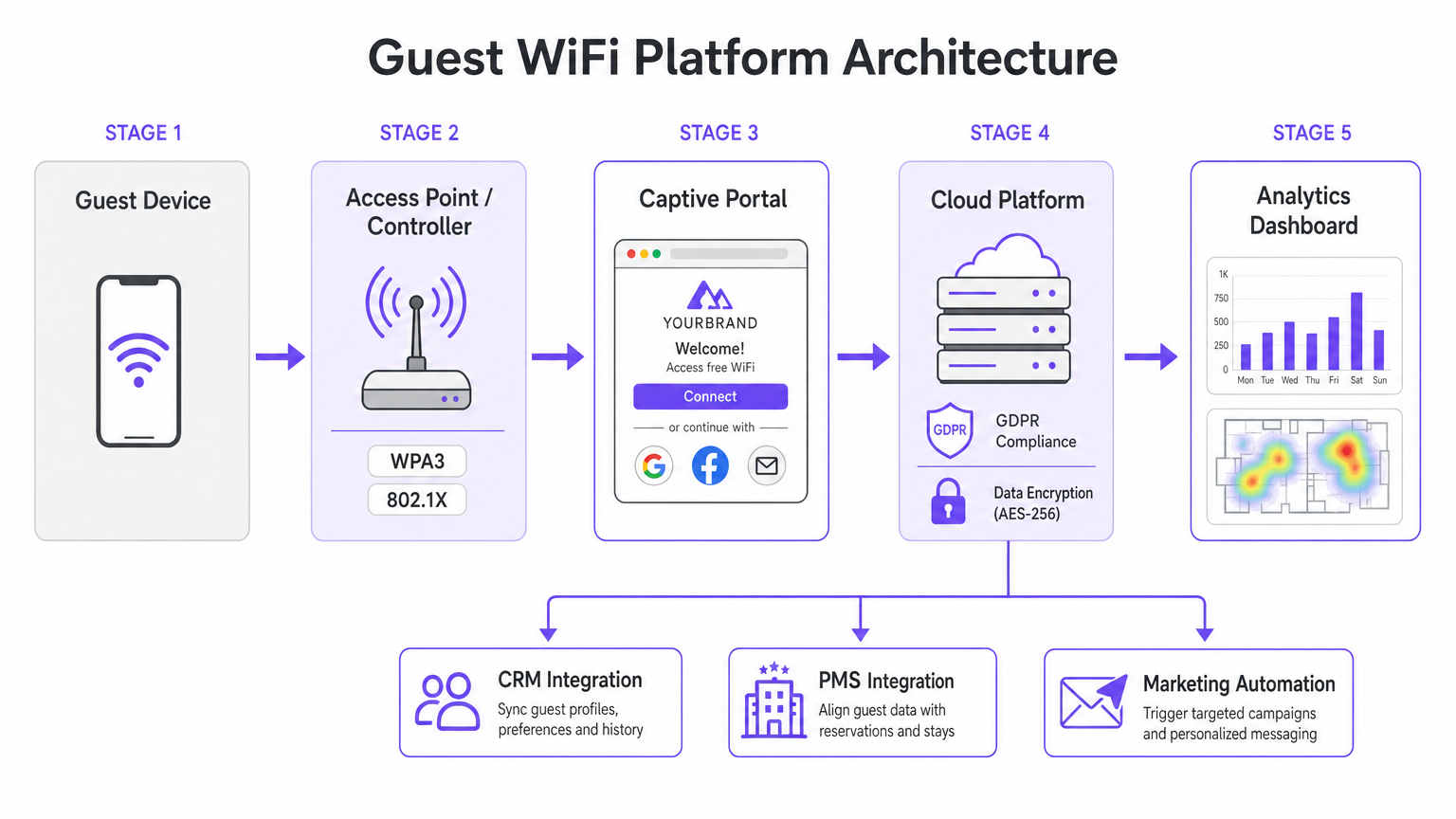
La base de tout déploiement WiFi d'entreprise est l'architecture réseau sous-jacente. Pour les opérateurs multisites, une architecture gérée dans le cloud est largement supérieure aux contrôleurs sur site traditionnels. La gestion dans le cloud permet un provisionnement sans intervention, une application centralisée des politiques et des mises à jour de firmware transparentes sur des centaines de sites sans nécessiter de ressources informatiques locales.
Lors de l'évaluation des spécifications des points d'accès (AP), le Wi-Fi 6 (802.11ax) doit être la norme de référence. Le Wi-Fi 6 introduit l'Accès Multiple par Répartition Orthogonale de la Fréquence (OFDMA), qui permet à un seul AP de communiquer simultanément avec plusieurs clients sur différents sous-canaux. Dans les environnements à haute densité — tels que les centres de conférence ou les concourses de stades — cela réduit considérablement la latence et améliore le débit par rapport à l'ancienne norme Wi-Fi 5 (802.11ac). Pour les lieux anticipant une densité d'appareils extrême, le Wi-Fi 6E étend ces capacités au spectre non encombré de 6 GHz.
Sécurité et Segmentation Réseau
L'architecture de sécurité dans le WiFi hôtelier doit répondre à la fois à la sécurité des invités et à la conformité de l'entreprise. La segmentation réseau est une exigence non négociable ; le trafic invité doit être logiquement isolé des réseaux d'entreprise et des points de vente (POS). Ceci est généralement réalisé en utilisant le marquage VLAN au niveau de l'AP, appliqué par des règles de pare-feu strictes au niveau de la passerelle. Cette isolation est une exigence fondamentale pour la conformité PCI DSS si les terminaux de paiement partagent l'infrastructure réseau physique.
Les normes d'authentification sont tout aussi critiques. WPA3 devrait être la norme par défaut pour tous les nouveaux réseaux invités, atténuant les vulnérabilités inhérentes à WPA2 (telles que les attaques KRACK). Pour les réseaux internes du personnel fonctionnant sur le même matériel, l'authentification IEEE 802.1X soutenue par un serveur RADIUS offre une sécurité robuste basée sur des certificats qui dépasse de loin la protection des clés pré-partagées.
Guide d'Implémentation
Le Captive Portal et la Capture de Données
Le Captive Portal sert de passerelle entre le point d'accès et Internet, agissant comme l'interface principale pour l'interaction des invités et la capture de données. Une page HTML statique de base est insuffisante pour les déploiements d'entreprise. Les opérateurs ont besoin d'un portail dynamique, entièrement personnalisé, prenant en charge plusieurs méthodes d'authentification, y compris la connexion sociale (Google, Facebook), l'enregistrement par e-mail et la vérification par SMS.
Chaque méthode d'authentification produit des actifs de données différents. La connexion sociale fournit des données démographiques vérifiées, tandis que l'enregistrement par e-mail est crucial pour construire une base de données marketing. Cependant, cette capture de données doit être strictement régie par des protocoles de gestion du consentement. En vertu du GDPR, le consentement marketing doit être explicite, éclairé et librement donné. Les fournisseurs doivent prendre en charge des cases à cocher distinctes et non pré-cochées pour l'accès au réseau et les communications marketing, ainsi que des mécanismes transparents pour les demandes d'accès aux données (DSARs).
Intégration et Analyse
La véritable valeur d'une solution WiFi hôtelière moderne réside dans ses capacités d'analyse. Les simples décomptes de connexions sont insuffisants ; les équipes informatiques et marketing ont besoin d'informations exploitables dérivées de l'analyse du temps de présence, de l'identification des visiteurs récurrents et des cartes thermiques de fréquentation.
Pour maximiser le ROI, la plateforme WiFi doit s'intégrer de manière transparente à la pile technologique existante du lieu. Recherchez des fournisseurs offrant des APIs robustes et un support webhook pour la synchronisation des données en temps réel avec les systèmes CRM, les plateformes d'automatisation marketing et les systèmes de gestion immobilière (PMS). Cette intégration permet des campagnes automatisées et ciblées basées sur le comportement des invités en temps réel.
Bonnes Pratiques
- Effectuer des Études de Site RF Rigoureuses : Ne jamais estimer le placement des AP uniquement sur la base des plans d'étage. Effectuez des études de site RF complètes pour tenir compte de l'atténuation due aux murs, à l'acier structurel et aux grappes d'utilisateurs à haute densité. Une règle générale pour les zones à haute densité est un AP pour 25-30 utilisateurs simultanés.
- Assurer une Liaison Montante Adéquate : Le réseau Wi-Fi 6 le plus rapide échouera si la liaison montante Internet est un goulot d'étranglement. Pour les lieux accueillant plus de 100 utilisateurs simultanés, investissez dans des lignes louées dédiées pour garantir une bande passante non contredite. Pour en savoir plus, consultez notre guide : Qu'est-ce qu'une Ligne Louée ? Internet Professionnel Dédié .
- ContinuoOptimisez le portail : Traitez le Captive Portal comme un canal marketing dynamique. Mettez à jour l'image de marque, les promotions et les messages de fidélisation de manière saisonnière afin de maximiser l'engagement et les taux de capture de données.
Dépannage et atténuation des risques
Modes de défaillance courants
- Segmentation réseau inadéquate : Ne pas isoler le trafic invité des systèmes de point de vente (POS) expose l'établissement à des risques importants de conformité PCI DSS et à d'éventuelles violations de données. Vérifiez toujours les configurations VLAN et les règles de pare-feu lors du déploiement.
- Capture de données non conforme : Regrouper l'acceptation des conditions d'utilisation avec le consentement marketing enfreint le GDPR. Assurez-vous que le Captive Portal utilise des mécanismes d'opt-in explicites et distincts pour éviter les mesures d'exécution réglementaires et les atteintes à la réputation.
- Densité de points d'accès (AP) insuffisante : Le déploiement d'un nombre insuffisant de points d'accès dans les zones à fort trafic entraîne une contention des canaux, des déconnexions et une mauvaise expérience client. Concevez pour la capacité, pas seulement pour la couverture.
ROI et impact commercial
Le retour sur investissement d'une solution WiFi d'entreprise pour l'hôtellerie va au-delà de la simple connectivité. En tirant parti d'une plateforme de WiFi Analytics , les établissements peuvent transformer le trafic piétonnier anonyme en profils clients connus. Ces données de première partie alimentent des campagnes marketing ciblées, augmentant les taux de visites répétées et les dépenses moyennes par client.
De plus, des gains d'efficacité opérationnelle sont réalisés grâce à la gestion centralisée dans le cloud et aux intégrations CRM automatisées, réduisant ainsi la charge informatique. En fin de compte, une solution WiFi bien conçue améliore l'expérience client tout en fournissant des informations commerciales mesurables aux équipes opérationnelles et marketing, en particulier dans des secteurs clés comme l' Hôtellerie et le Commerce de détail .
Définitions clés
Wi-Fi 6 (802.11ax)
The current standard for wireless networking that significantly improves performance in high-density environments through technologies like OFDMA.
Essential for venues with large numbers of simultaneous users, such as conference centres and stadiums, to prevent network congestion.
OFDMA (Orthogonal Frequency Division Multiple Access)
A technology that allows a single wireless channel to be divided into smaller sub-channels, enabling an access point to communicate with multiple clients simultaneously.
Crucial for reducing latency and improving throughput when many guests are trying to access the network at the same time.
Network Segmentation
The practice of dividing a computer network into multiple logical subnets (VLANs) to improve performance and security.
Mandatory for isolating untrusted guest traffic from sensitive corporate data and payment processing systems.
Captive Portal
A web page that a user of a public-access network is obliged to view and interact with before access is granted.
The primary touchpoint for guest interaction, branding, and GDPR-compliant data capture.
WPA3
The latest Wi-Fi security certification program, providing stronger encryption and better protection against offline dictionary attacks compared to WPA2.
The baseline security standard that should be deployed on all new guest and corporate wireless networks.
PCI DSS (Payment Card Industry Data Security Standard)
An information security standard for organizations that handle branded credit cards from the major card schemes.
Relevant when a venue processes payments; requires strict isolation of the payment network from the guest WiFi network.
Webhook
A method of augmenting or altering the behaviour of a web page or web application with custom callbacks, allowing real-time data transfer between applications.
Used to instantly sync guest data captured on the WiFi portal with a venue's CRM or marketing automation platform.
Dwell Time
The length of time a visitor spends in a specific physical location, measured by tracking the presence of their mobile device's MAC address.
A key analytics metric used by operations teams to understand venue utilization and by marketing teams to gauge engagement.
Exemples concrets
A 200-room hotel needs to upgrade its legacy Wi-Fi 4 network to support high-density conference facilities and seamless guest roaming, while ensuring PCI DSS compliance for its new mobile point-of-sale terminals.
Deploy a cloud-managed Wi-Fi 6 architecture with access points configured for OFDMA to handle the high client density in the conference rooms. Implement strict network segmentation using VLANs to isolate guest traffic from the mobile POS devices, enforcing the separation at the gateway firewall. Configure the captive portal to require explicit GDPR-compliant consent for marketing data capture.
A national pub chain wants to use guest WiFi to build a marketing database and understand customer dwell times across its 50 locations.
Implement an enterprise guest WiFi platform featuring a branded captive portal with social login and email registration options. Ensure the portal includes separate, un-ticked checkboxes for marketing consent. Utilize the platform's analytics dashboard to track MAC addresses (hashed for privacy) to calculate dwell times and repeat visit frequencies. Set up webhook integrations to push verified email addresses directly to the chain's CRM system in real-time.
Questions d'entraînement
Q1. Your marketing director wants to automatically add every guest who connects to the WiFi to the weekly promotional email blast to increase F&B revenue. How do you configure the captive portal to support this?
Conseil : Consider GDPR requirements regarding consent for marketing communications.
Voir la réponse type
You cannot automatically add guests to a marketing list just because they connected to the WiFi. The captive portal must be configured with a clear privacy notice and a separate, un-ticked checkbox explicitly requesting consent for marketing communications. Only guests who actively check this box can be synced to the CRM via API or webhook for the email blast.
Q2. A stadium IT director is evaluating a vendor who proposes deploying 802.11ac (Wi-Fi 5) access points, arguing it will save 30% on hardware costs while providing sufficient coverage. How should the director respond?
Conseil : Consider the difference between coverage and capacity in a stadium environment.
Voir la réponse type
The director should reject the proposal. While Wi-Fi 5 might provide adequate physical coverage, it lacks the capacity management features required for a stadium. Wi-Fi 6 (802.11ax) is essential in this environment because OFDMA allows the APs to handle many simultaneous connections efficiently, preventing the network from collapsing under high client density.
Q3. During a network upgrade at a retail chain, the deployment team suggests running the new guest WiFi and the staff inventory scanners on the same VLAN to simplify IP address management. What is the risk, and what is the correct approach?
Conseil : Think about security best practices and compliance requirements.
Voir la réponse type
Running guest and corporate traffic on the same VLAN is a severe security risk and violates best practices (and potentially PCI DSS if payment data is involved). It exposes internal systems to untrusted guest devices. The correct approach is strict network segmentation: configure separate SSIDs mapped to separate VLANs, and use firewall rules to block all traffic between the guest VLAN and the corporate VLAN.
Continuer la lecture de cette série
Qu'est-ce qu'une requête de sonde (Probe Request) ? Comprendre comment les appareils découvrent les réseaux
Ce guide de référence technique offre une analyse approfondie des requêtes de sonde IEEE 802.11, de la distinction entre balayage actif et passif, et de l'impact de la randomisation MAC sur l'analyse des lieux. Il fournit des stratégies de mise en œuvre concrètes pour les architectes réseau afin d'optimiser les déploiements à haute densité, d'atténuer les tempêtes de sondes et d'assurer une collecte de données précise et conforme au GDPR en utilisant des couches d'identité authentifiées.
Comment réparer un WiFi lent sans améliorer votre forfait Internet
Un guide de référence technique complet pour les responsables informatiques et les architectes réseau sur l'optimisation des performances WiFi d'entreprise sans augmenter la bande passante de l'ISP. Couvre le réglage RF, la gestion de la densité des clients, la mise en œuvre de la QoS et comment exploiter les analyses WiFi pour diagnostiquer et résoudre les goulots d'étranglement.
La Checklist pour la Migration d'un NAC Hérité vers un NAC Cloud-Natif
Ce guide de référence technique faisant autorité fournit une checklist structurée en trois phases pour la migration d'un système de contrôle d'accès réseau (NAC) hérité vers une architecture cloud-native. Il dote les responsables informatiques et les architectes réseau de stratégies concrètes pour gérer l'intégration des identités, la parité des politiques et la conformité sans perturber les opérations des sites.