
University WiFi : Comment construire un réseau sans fil à l'échelle du campus
Ce guide complet fournit aux professionnels de l'informatique des stratégies concrètes pour concevoir, déployer et gérer un réseau sans fil robuste à l'échelle du campus. Il couvre l'architecture réseau hiérarchique, les normes de sécurité (IEEE 802.1X, WPA3, GDPR) et la manière de tirer parti de l'analyse pour générer un retour sur investissement dans les environnements d'enseignement supérieur. Que vous mettiez à niveau une infrastructure existante ou que vous construisiez à partir de zéro, ce guide détaille chaque point de décision, de l'étude de site à l'optimisation continue.
Écouter ce guide
Voir la transcription du podcast
Résumé Exécutif
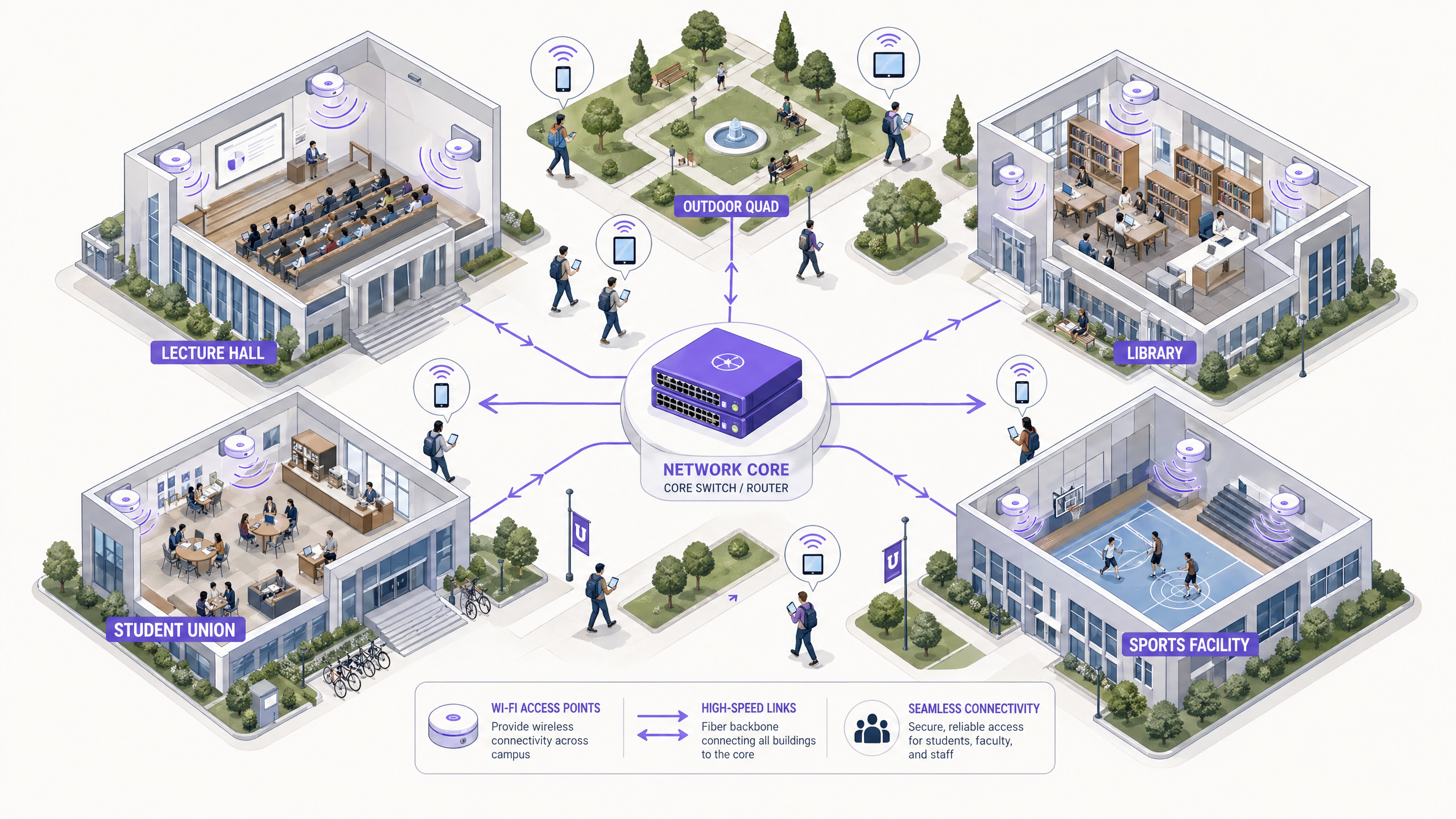
Pour les établissements d'enseignement supérieur, un réseau sans fil fiable à l'échelle du campus n'est plus un simple agrément — c'est une infrastructure critique au même titre que l'électricité et l'eau. Les universités modernes doivent prendre en charge des environnements à haute densité, une itinérance transparente sur de vastes empreintes physiques et un accès sécurisé pour une base d'utilisateurs diversifiée comprenant étudiants, professeurs, chercheurs et invités. Ce guide fournit aux responsables informatiques, aux architectes réseau et aux CTO un plan directeur faisant autorité pour le déploiement et la gestion d'un réseau WiFi universitaire haute performance. En se concentrant sur une architecture hiérarchique robuste, des protocoles de sécurité rigoureux, y compris IEEE 802.1X et WPA3 Enterprise, et une intégration stratégique de l'analyse, les institutions peuvent assurer une connectivité optimale tout en atténuant les risques et en prouvant un retour sur investissement mesurable. Nous explorons les phases de déploiement pratiques, des études de site initiales à l'optimisation continue, en utilisant des plateformes comme Guest WiFi et WiFi Analytics de Purple.
Approfondissement Technique
Architecture et Topologie du Réseau
La construction d'un réseau sans fil à l'échelle du campus nécessite une architecture évolutive et hiérarchique. L'approche standard implique trois couches distinctes : les couches Cœur, Distribution et Accès.
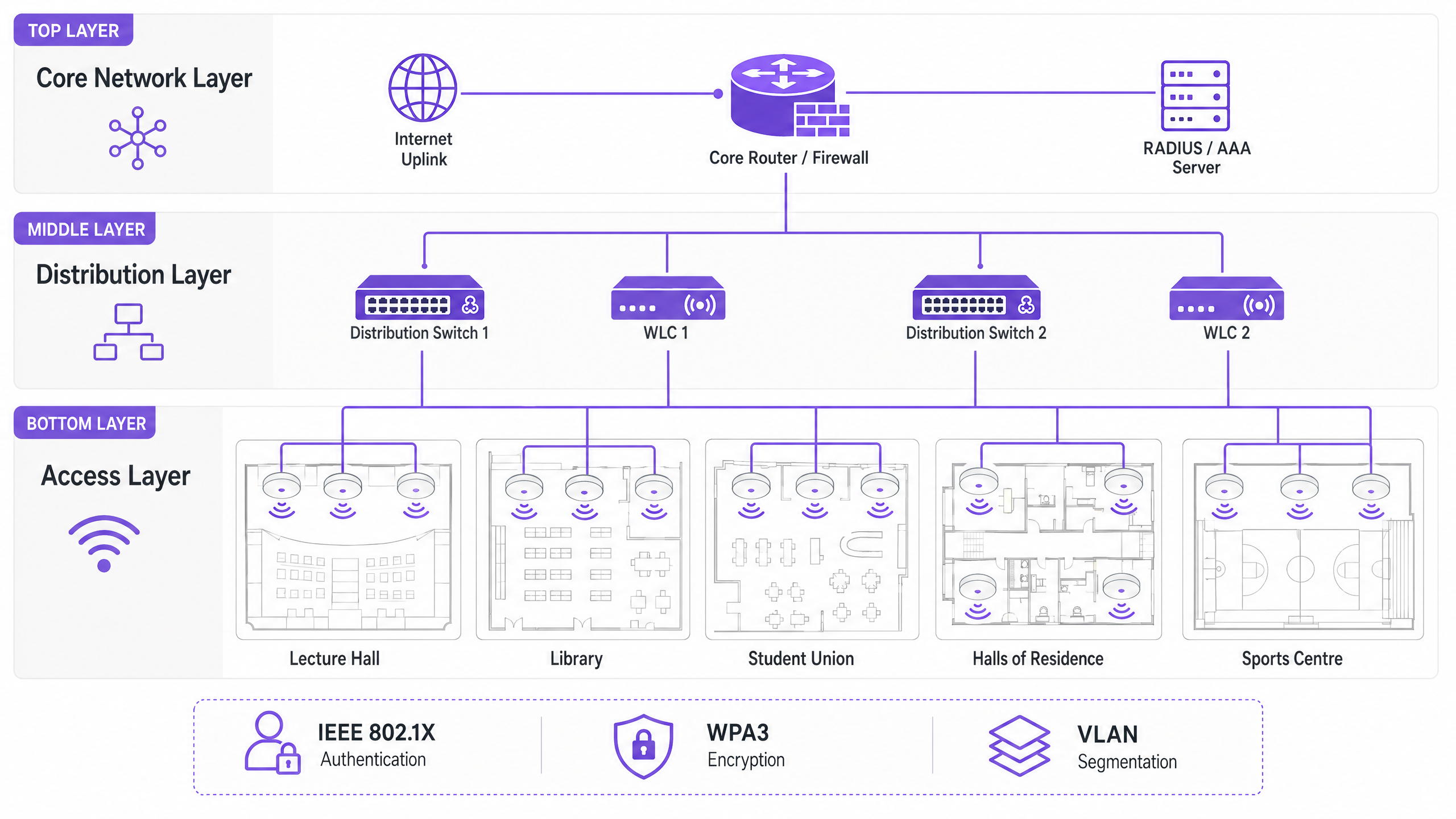
La couche Cœur constitue l'épine dorsale haute vitesse du réseau. Elle gère le routage du trafic entre les différentes parties du campus et vers Internet. La haute disponibilité et la redondance sont primordiales ici — les routeurs et pare-feu centraux doivent être capables de gérer un débit massif sans introduire de latence. Les liaisons montantes à double rattachement et les alimentations redondantes sont des pratiques courantes.
La couche de Distribution agit comme un intermédiaire, agrégeant le trafic des commutateurs d'accès et appliquant les politiques réseau. Les contrôleurs de réseau local sans fil (WLC) résident généralement ici, gérant le parc de points d'accès (AP), gérant la gestion RF et assurant une itinérance transparente pour les utilisateurs se déplaçant entre les bâtiments. C'est également à cette couche que les politiques de Qualité de Service (QoS) sont appliquées.
La couche d'Accès est la périphérie du réseau où les appareils clients se connectent. Elle se compose de commutateurs PoE (Power over Ethernet) et des AP physiques déployés dans les amphithéâtres, les bibliothèques, les syndicats étudiants et les quads extérieurs. Les AP haute densité prenant en charge le Wi-Fi 6 (802.11ax) ou le Wi-Fi 6E sont essentiels pour les zones avec un nombre élevé d'appareils simultanés.
Normes de Sécurité et Authentification
Sécuriser un réseau universitaire implique d'équilibrer une protection robuste avec l'accessibilité des utilisateurs dans un environnement complexe et multi-locataire.
WPA3 Enterprise et IEEE 802.1X sont non négociables pour sécuriser les connexions du personnel et des étudiants. 802.1X fournit un contrôle d'accès réseau (NAC) basé sur les ports, garantissant que seuls les utilisateurs et appareils authentifiés peuvent accéder au réseau. Il s'intègre à un serveur RADIUS central (tel que FreeRADIUS ou Microsoft NPS) lié à l'Active Directory ou au répertoire LDAP de l'université. Cela signifie que les identifiants réseau d'un étudiant sont les mêmes que ses identifiants universitaires — réduisant considérablement la charge de travail du support technique.
L'accès Invité et les Captive Portals servent les visiteurs, les participants aux conférences et les futurs étudiants. Un captive portal sécurisé assure la conformité avec le GDPR tout en offrant une expérience d'intégration contrôlée. L'intégration avec des solutions comme Purple permet un accès invité transparent tout en capturant des données de première partie précieuses pour le marketing et l'utilisation opérationnelle. Pour un examen plus approfondi de la sécurisation des fondations du réseau, consultez Protégez votre réseau avec un DNS et une sécurité robustes .
La segmentation VLAN est essentielle pour isoler les types de trafic. Le trafic des étudiants, les ressources des professeurs, les appareils IoT (capteurs de bâtiments intelligents, contrôleurs CVC) et l'accès invité doivent résider sur des VLAN séparés. Cela permet de contenir les potentielles failles de sécurité, d'éviter les tempêtes de diffusion et de permettre une gestion granulaire de la bande passante par classe d'utilisateurs.
Guide d'Implémentation
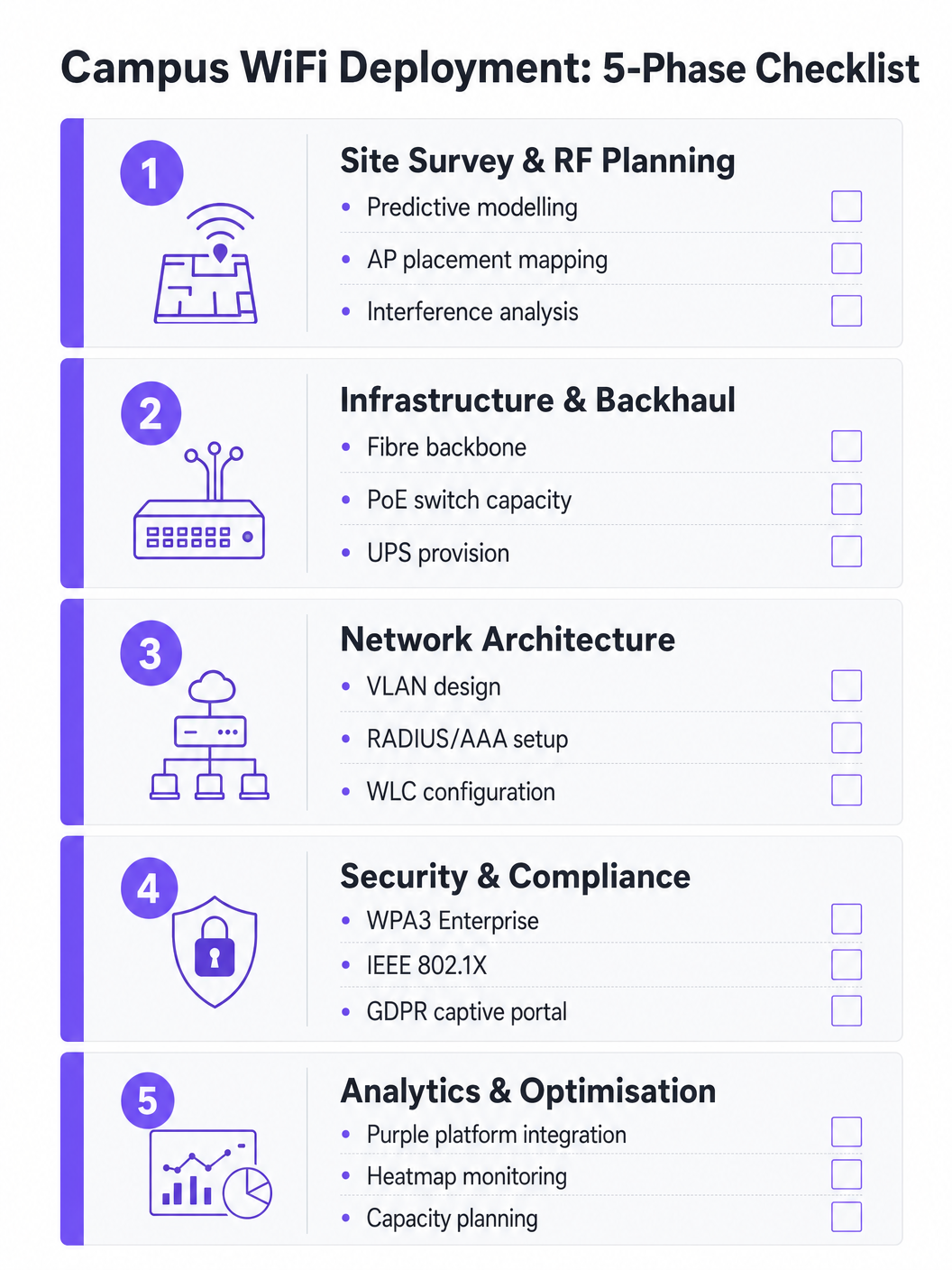
Phase 1 : Étude de Site et Planification RF
Ne devinez jamais l'emplacement des AP. Une étude de site prédictive et active complète est l'investissement le plus important du projet. Des outils tels qu'Ekahau ou AirMagnet doivent être utilisés pour cartographier l'environnement physique, en tenant compte des matériaux de construction (béton, verre, métal), des sources d'interférence (anciens appareils Bluetooth, fours à micro-ondes, réseaux voisins) et de la densité d'utilisateurs attendue par zone. L'objectif est d'assurer une couverture et une capacité adéquates sans provoquer d'interférences de co-canal. Les modèles prédictifs doivent être validés par des études actives une fois les AP initiaux déployés.
Phase 2 : Mises à Niveau de l'Infrastructure et du Backhaul
Avant de déployer de nouveaux AP, l'infrastructure filaire sous-jacente doit être évaluée et mise à niveau si nécessaire. Assurez-vous que le câblage CAT6A est déployé pour prendre en charge l'Ethernet Multi-Gigabit (mGig) requis par les AP Wi-Fi 6/6E modernes. Vérifiez que les commutateurs de périphérie peuvent fournir une alimentation PoE+ ou PoE++ suffisante aux nouveaux modèles d'AP. Le réseau central doit disposer d'une bande passante suffisante — envisagez des connexions Internet professionnelles dédiées pour la résilience. Pour plus de contexte sur les options de backhaul, consultez Qu'est-ce qu'une ligne louée ? Internet professionnel dédié .
Phase 3 : Configuration de l'Architecture Réseau
Configurez les WLC et les AP selon le darchitecture conçue. Mettez en œuvre des politiques QoS pour prioriser le trafic critique (VoIP, vidéoconférence, transferts de données de recherche) par rapport aux téléchargements en masse et au streaming. Assurez-vous que les protocoles d'itinérance transparente (802.11r pour une transition BSS rapide, 802.11k pour les rapports de voisinage et 802.11v pour la gestion de la transition BSS) sont configurés correctement, permettant aux appareils de passer d'un point d'accès à l'autre sans perdre de connexion.
Phase 4: Renforcement de la sécurité et de la conformité
Déployez WPA3 Enterprise sur les SSIDs du personnel et des étudiants. Configurez IEEE 802.1X avec EAP-TLS ou PEAP-MSCHAPv2 en fonction des capacités de gestion des appareils. Mettez en œuvre un captive portal conforme au GDPR pour les SSIDs invités. Assurez-vous que toutes les interfaces de gestion sont sécurisées avec des identifiants forts et une authentification basée sur des certificats. Effectuez un test d'intrusion avant la mise en service.
Phase 5: Intégration des analyses et optimisation continue
Intégrez le réseau à une plateforme d'analyse pour obtenir une visibilité sur la santé des points d'accès, la densité des clients, les modèles d'itinérance et l'utilisation de la bande passante. La plateforme WiFi Analytics de Purple fournit des tableaux de bord opérationnels qui profitent à la fois à l'équipe IT et aux opérations du site. Il ne s'agit pas d'un exercice ponctuel — les environnements RF changent à mesure que les bâtiments sont rénovés et que les types d'appareils évoluent.
Bonnes pratiques
Concevez pour la capacité, pas seulement la couverture. Dans l'enseignement supérieur, la couverture est facile ; la capacité est difficile. Un amphithéâtre peut avoir un signal fort partout, mais si 300 étudiants se connectent simultanément à un seul point d'accès, le réseau échouera. Déployez des points d'accès haute densité et utilisez des fonctionnalités comme le band steering pour diriger les clients compatibles vers les bandes 5 GHz ou 6 GHz moins encombrées. Désactivez les débits de données hérités (1, 2, 5.5 et 11 Mbps) pour forcer les clients 'sticky' à se déplacer vers des points d'accès plus proches.
Mettez en œuvre une surveillance continue. Le réseau n'est pas un déploiement "installez et oubliez". Utilisez des plateformes d'analyse pour surveiller la santé des points d'accès, la densité des clients et les modèles d'itinérance en temps réel. Les analyses de Purple peuvent fournir des informations sur la façon dont les espaces sont utilisés, éclairant les futures décisions d'infrastructure et les stratégies d'utilisation de l'espace.
Tirez parti d'OpenRoaming pour un onboarding fluide. Pour les universitaires et étudiants invités des institutions partenaires, la mise en œuvre d'OpenRoaming élimine la friction de la connexion manuelle au réseau. Purple agit comme un fournisseur d'identité gratuit pour OpenRoaming sous la licence Connect, permettant aux utilisateurs des institutions participantes de se connecter automatiquement et en toute sécurité — une amélioration significative de l'expérience visiteur.
Segmentez tout. Ne permettez jamais le trafic invité sur le même VLAN que les ressources internes. Utilisez des SSIDs, des VLANs et des règles de pare-feu séparés pour chaque classe d'utilisateurs. Appliquez des limites de bande passante aux VLANs invités pour empêcher un seul utilisateur de saturer la liaison montante pendant les périodes de pointe.
Dépannage et atténuation des risques
L'interférence co-canal (CCI) se produit lorsque plusieurs points d'accès sur le même canal peuvent s'entendre, ce qui les amène à transmettre à tour de rôle et à dégrader gravement les performances. C'est la cause la plus fréquente d'un mauvais WiFi dans les déploiements denses. L'atténuation implique une planification RF appropriée, l'utilisation des fonctionnalités d'attribution dynamique de canaux (DCA) sur le WLC et la réduction de la puissance de transmission sur les points d'accès dans les zones denses.
Les clients 'sticky' sont des appareils qui refusent de se déplacer vers un point d'accès plus proche, maintenant une connexion faible à un point d'accès distant. C'est particulièrement courant avec les smartphones et ordinateurs portables plus anciens. L'atténuation implique l'ajustement des débits de données minimaux obligatoires — la désactivation des débits inférieurs force le pilote du client à rechercher une meilleure connexion.
L'épuisement DHCP est un mode de défaillance étonnamment courant dans les zones à fort roulement comme les quads extérieurs et les syndicats étudiants. Lorsque le pool DHCP est à court d'adresses IP, les nouveaux appareils ne peuvent pas se connecter malgré un signal fort. L'atténuation implique la mise en œuvre de durées de bail DHCP plus courtes (une à deux heures) pour les VLANs invités et étudiants, et la garantie que les étendues DHCP sont correctement dimensionnées pour les pics de nombre d'appareils simultanés.
Les points d'accès non autorisés (Rogue Access Points) posent un risque de sécurité important. Un employé ou un étudiant branchant un routeur grand public crée un point d'entrée non sécurisé. L'atténuation implique l'activation de la détection des points d'accès non autorisés sur le WLC et la réalisation d'audits physiques périodiques.
ROI et impact commercial
Un réseau WiFi de campus robuste offre des retours mesurables au-delà de la connectivité de base. En intégrant des plateformes comme Purple, les universités peuvent quantifier les résultats suivants :
| Métrique | Approche de mesure | Résultat typique |
|---|---|---|
| Satisfaction des étudiants | Enquêtes NPS, volume de tickets du support IT | Réduction des plaintes liées au WiFi |
| Utilisation de l'espace | Analyse par carte thermique, données de temps de présence | Allocation optimisée des bibliothèques et espaces d'étude |
| Efficacité opérationnelle IT | Volume de tickets du support, temps d'intégration | Réduction des frais généraux de provisionnement manuel |
| Capture de données invités | Enregistrements du captive portal | Croissance de la base de données marketing de première partie |
| Disponibilité du réseau | Surveillance des SLA, rapports d'incidents | Amélioration du respect des SLA |
Les capacités d'analyse et de données invités de la plateforme Purple ouvrent également des opportunités de revenus — en particulier lors de grands événements publics sur le campus, où des modèles d'accès échelonnés peuvent être déployés. Des cadres de ROI similaires s'appliquent aux environnements Retail , Hospitality , Healthcare et Transport où Purple opère. Pour une perspective plus large sur les déploiements WiFi dans les grands sites, consultez Airport WiFi: How Operators Deliver Connectivity Across Terminals et WiFi Aeroportuale: Come gli Operatori Forniscono Connettività tra i Terminal .
Définitions clés
IEEE 802.1X
A standard for port-based Network Access Control (NAC) that provides an authentication mechanism for devices wishing to connect to a LAN or WLAN. It requires a supplicant (client device), an authenticator (the AP or switch), and an authentication server (RADIUS).
Used to authenticate students and staff before they are allowed onto the network, integrating with a RADIUS server and Active Directory for credential validation. Eliminates shared PSK passwords and enables per-user policy enforcement.
WLC (Wireless LAN Controller)
A centralised hardware or software appliance that manages and configures multiple Access Points from a single point of control. It handles RF management, roaming, firmware updates, and policy enforcement across the AP fleet.
Essential for large deployments to ensure consistent policy enforcement, dynamic channel assignment, and seamless roaming across the campus. Can be physical hardware or a cloud-managed virtual instance.
Co-Channel Interference (CCI)
Interference that occurs when two or more APs operating on the same frequency channel are within range of each other. Both APs must wait for the channel to be clear before transmitting, severely reducing throughput.
The primary cause of poor performance in dense deployments. Mitigated by careful channel planning, dynamic channel assignment (DCA) on the WLC, and reducing AP transmit power.
Band Steering
A technique used by APs to encourage dual-band capable client devices to connect to the 5 GHz or 6 GHz band rather than the more congested 2.4 GHz band, by delaying or suppressing probe responses on 2.4 GHz.
Critical for maximising capacity and throughput in high-density areas. The 5 GHz and 6 GHz bands offer more non-overlapping channels and higher throughput, but shorter range.
Captive Portal
A web page that users are redirected to before gaining full network access. It typically requires acceptance of terms of service, authentication, or data capture before the user's MAC address is permitted through the firewall.
Used for guest access management, GDPR-compliant data collection, and branded onboarding experiences. Platforms like Purple provide customisable captive portal solutions with analytics integration.
VLAN (Virtual Local Area Network)
A logical grouping of network devices that behave as if they are on the same physical network, regardless of their actual physical location. VLANs are defined at Layer 2 and are used to segment broadcast domains.
Used to isolate different user classes (students, staff, guests, IoT devices) for security and performance. Prevents guest traffic from reaching internal resources and allows per-VLAN bandwidth policies.
PoE (Power over Ethernet)
A technology that passes electrical power along with data on twisted-pair Ethernet cabling, allowing a single cable to provide both data connection and electrical power to devices such as APs.
Allows APs to be installed in locations without dedicated power outlets. IT teams must verify that edge switches have sufficient PoE budget (total watts) to power all connected APs, particularly with power-hungry Wi-Fi 6E models requiring PoE++ (802.3bt).
OpenRoaming
A global WiFi roaming federation built on the Hotspot 2.0 (Passpoint) standard, allowing users to automatically and securely connect to participating networks without manual login, using their existing identity credentials.
Improves the experience for visiting academics and students from partner institutions. Purple can act as an identity provider for OpenRoaming under the Connect licence, enabling automatic secure connections for eligible users.
WPA3 Enterprise
The latest generation of the Wi-Fi Protected Access security protocol for enterprise networks. It uses 192-bit minimum-strength security protocols and mandates the use of Protected Management Frames (PMF), providing stronger protection against offline dictionary attacks.
The recommended security standard for all staff and student SSIDs. Replaces WPA2 Enterprise and provides significantly stronger protection for sensitive research and personal data transmitted over the wireless network.
RADIUS (Remote Authentication Dial-In User Service)
A networking protocol that provides centralised Authentication, Authorisation, and Accounting (AAA) management for users who connect and use a network service.
The backbone of 802.1X authentication on campus networks. The RADIUS server validates credentials against Active Directory and returns the appropriate VLAN assignment and access policy for each authenticated user.
Exemples concrets
A large university is upgrading its main lecture theatre (capacity 500) to Wi-Fi 6. The previous deployment used 4 APs mounted on the high ceiling, resulting in poor performance and frequent disconnects during peak times. What is the correct approach?
The IT team must shift from a coverage-centric design to a capacity-centric one. First, conduct a new site survey specifically for the lecture theatre, modelling the expected device count (assume 1,000+ devices given 2+ devices per student). Replace the ceiling-mounted omni-directional APs with either under-seat AP deployments or directional (patch) antenna arrays mounted on the side walls, creating smaller, focused micro-cells. Increase the AP count to 8-12 Wi-Fi 6 APs, each serving a defined section of seating. Disable 2.4 GHz radios on alternating APs to reduce co-channel interference, relying primarily on 5 GHz and 6 GHz bands. Implement strict band steering and disable legacy data rates below 12 Mbps. Configure the WLC to use 20 MHz channel widths in the 5 GHz band (rather than 40 or 80 MHz) to allow more non-overlapping channels and reduce interference.
A campus network is experiencing intermittent connectivity issues in the outdoor quad area. Users report strong signal but inability to load web pages during the lunch period (12:00-13:30). What is the diagnostic approach?
Strong signal with no connectivity is a Layer 2/3 issue, not an RF problem. The diagnostic sequence should be: (1) Check the DHCP scope for the outdoor VLAN — query the DHCP server for scope utilisation. If it is above 80%, DHCP exhaustion is the likely cause. Reduce lease times to 1 hour and expand the scope if possible. (2) If DHCP is healthy, check the uplink capacity of the outdoor distribution switch. If the APs are connected via a congested uplink, the bottleneck is wired, not wireless. (3) Analyse the RF environment for external interference using a spectrum analyser — municipal WiFi networks or nearby businesses may be causing noise floor elevation. (4) Review the firewall and NAT table for session exhaustion during peak periods.
Questions d'entraînement
Q1. A university is planning to deploy WiFi in a newly constructed outdoor sports stadium with a capacity of 8,000 spectators. The stadium has no roof and an open bowl design. What is the most critical RF consideration and how should AP placement be approached?
Conseil : Consider the lack of physical boundaries, signal propagation in an open environment, and the extreme device density during events.
Voir la réponse type
The most critical consideration is controlling signal propagation and minimising Co-Channel Interference in an environment with no natural RF attenuation. Unlike indoor environments, the open bowl means signals travel freely, causing APs to interfere with each other across the entire space. The correct approach is to use directional (sector) antennas mounted under the seating tiers, pointing downward into the seating rows to create highly focused micro-cells. Transmit power must be carefully tuned to limit cell size. Wi-Fi 6 APs with OFDMA and BSS Colouring features should be specified to handle the extreme device density. Separate SSIDs and VLANs should be configured for event staff, media, and public attendees.
Q2. During a network upgrade, the IT team notices that older IoT devices (legacy HVAC sensors and door access controllers) are failing to connect to the new campus WiFi network after the security upgrade to WPA3 Enterprise.
Conseil : Consider the security protocol compatibility of legacy embedded devices and the need to maintain security for other user classes.
Voir la réponse type
The new network enforcing WPA3 Enterprise is incompatible with older IoT devices that only support WPA2 or earlier protocols. The solution is to create a dedicated, isolated SSID and VLAN specifically for legacy IoT devices, utilising WPA2-PSK with a strong, rotated passphrase, or MAC Authentication Bypass (MAB) for devices that cannot support any EAP method. This VLAN must be tightly firewalled — IoT devices should only be able to communicate with their specific management servers, not the broader campus network. The main student and staff SSIDs remain on WPA3 Enterprise, maintaining security for the primary user population.
Q3. The university wants to monetise its guest WiFi network during large public events (open days, graduation ceremonies, public lectures) while remaining GDPR-compliant. What is the recommended architecture?
Conseil : Consider data capture requirements, consent mechanisms, and the difference between free and premium access tiers.
Voir la réponse type
Deploy a captive portal solution such as Purple integrated with the guest VLAN. Configure a tiered access model: a free tier offering basic internet access (with bandwidth caps) in exchange for email address and explicit GDPR-compliant marketing consent, and an optional premium tier offering higher bandwidth for a fee (processed via a payment gateway integration). The captive portal must display a clear privacy notice and record consent timestamps to satisfy GDPR Article 7 requirements. Captured first-party data feeds into the university's CRM for post-event marketing. All guest traffic must be isolated from internal university systems via firewall rules, and data retention policies must be documented and enforced.
Q4. The IT team receives complaints that WiFi performance in the main library is poor between 10:00 and 14:00 on weekdays, despite the network showing healthy AP status in the management console. How should the team approach diagnosis?
Conseil : Consider time-based patterns and what changes between off-peak and peak hours.
Voir la réponse type
The time-based pattern is the key diagnostic clue — the issue only occurs during peak occupancy hours, suggesting a capacity problem rather than a hardware or configuration fault. The diagnostic sequence should be: (1) Check per-AP client association counts during the problem window — if any AP is serving more than 30-40 clients simultaneously, it is overloaded. (2) Review DHCP scope utilisation for the library VLAN. (3) Check uplink utilisation on the distribution switch serving the library — the wired backhaul may be saturated. (4) Review the channel utilisation and retry rates on the APs using the WLC's RF statistics. The likely resolution is either deploying additional APs to distribute the client load, or implementing stricter band steering and minimum data rate policies to improve per-client throughput.
Continuer la lecture de cette série
Qu'est-ce qu'une requête de sonde (Probe Request) ? Comprendre comment les appareils découvrent les réseaux
Ce guide de référence technique offre une analyse approfondie des requêtes de sonde IEEE 802.11, de la distinction entre balayage actif et passif, et de l'impact de la randomisation MAC sur l'analyse des lieux. Il fournit des stratégies de mise en œuvre concrètes pour les architectes réseau afin d'optimiser les déploiements à haute densité, d'atténuer les tempêtes de sondes et d'assurer une collecte de données précise et conforme au GDPR en utilisant des couches d'identité authentifiées.
Comment réparer un WiFi lent sans améliorer votre forfait Internet
Un guide de référence technique complet pour les responsables informatiques et les architectes réseau sur l'optimisation des performances WiFi d'entreprise sans augmenter la bande passante de l'ISP. Couvre le réglage RF, la gestion de la densité des clients, la mise en œuvre de la QoS et comment exploiter les analyses WiFi pour diagnostiquer et résoudre les goulots d'étranglement.
La Checklist pour la Migration d'un NAC Hérité vers un NAC Cloud-Natif
Ce guide de référence technique faisant autorité fournit une checklist structurée en trois phases pour la migration d'un système de contrôle d'accès réseau (NAC) hérité vers une architecture cloud-native. Il dote les responsables informatiques et les architectes réseau de stratégies concrètes pour gérer l'intégration des identités, la parité des politiques et la conformité sans perturber les opérations des sites.