
WiFi d'hôtel : Le Guide Complet pour les Hôteliers
Ce guide complet fournit aux dirigeants informatiques et opérationnels des stratégies concrètes pour concevoir, déployer et monétiser des réseaux WiFi d'hôtel de qualité entreprise. Il couvre l'architecture technique, la conformité en matière de sécurité et la manière de tirer parti de la connectivité des clients comme un puissant atout de données de première partie.
Écouter ce guide
Voir la transcription du podcast
Résumé Exécutif
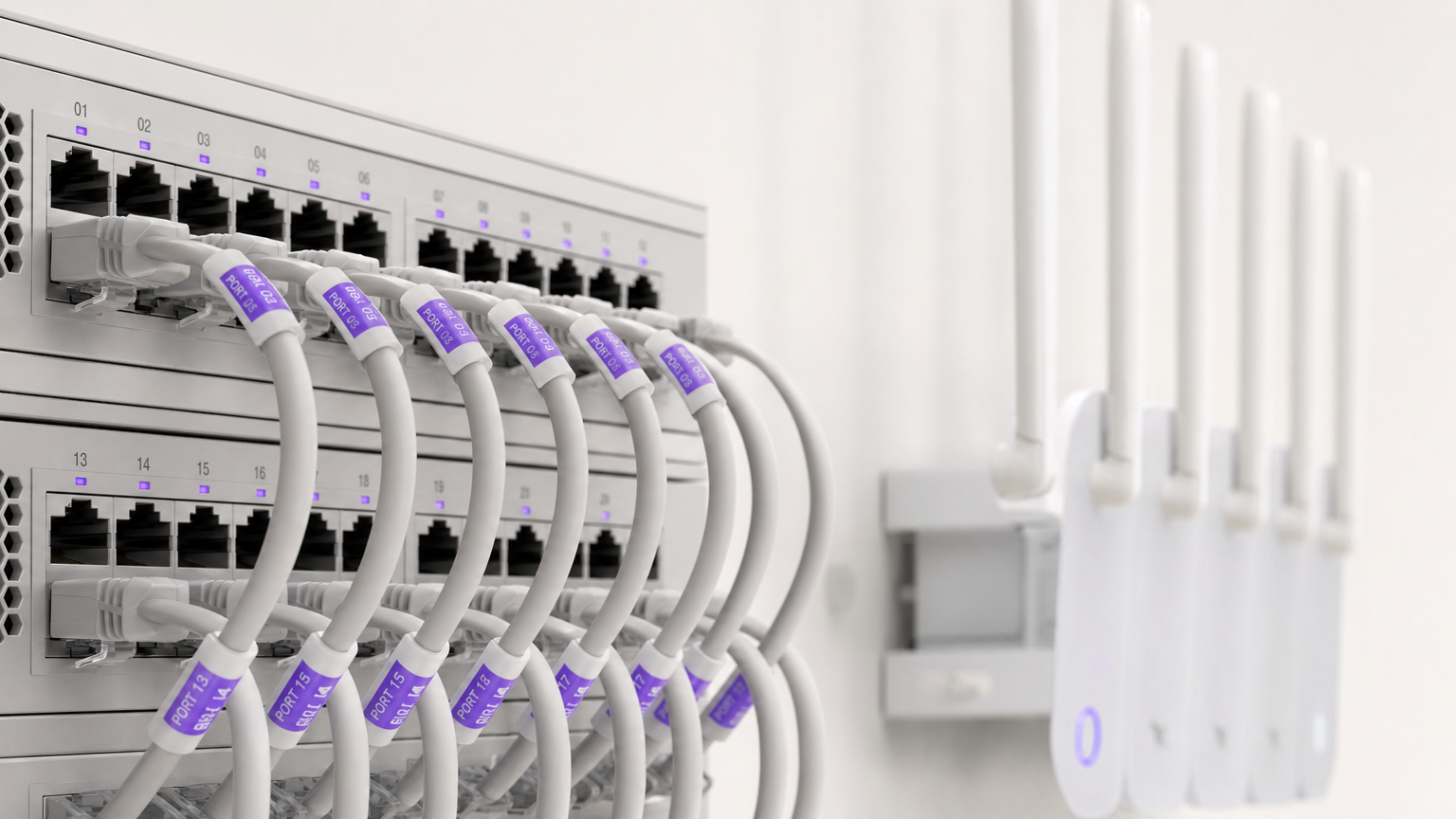
Pour les hôteliers modernes, le WiFi n'est plus seulement un coût utilitaire – c'est un facteur essentiel de satisfaction des clients et un atout de données stratégique. Ce guide fournit aux responsables informatiques, aux architectes réseau et aux directeurs des opérations des établissements un cadre pratique et neutre vis-à-vis des fournisseurs pour le déploiement de réseaux sans fil de qualité entreprise dans les environnements hôteliers. Nous explorerons l'architecture technique requise pour prendre en charge des connexions simultanées à haute densité, les protocoles de sécurité nécessaires à la conformité PCI DSS et GDPR, et l'intégration de Captive Portals pour transformer l'infrastructure réseau en un moteur de revenus mesurable. Que vous gériez un hôtel-boutique ou un grand centre de conférence, ce guide décrit les décisions que vous devez prendre ce trimestre pour garantir que votre réseau offre à la fois performance et ROI.
Écoutez notre exposé complémentaire sur les concepts fondamentaux du WiFi d'hôtel :
Approfondissement Technique
Architecture Réseau et Segmentation
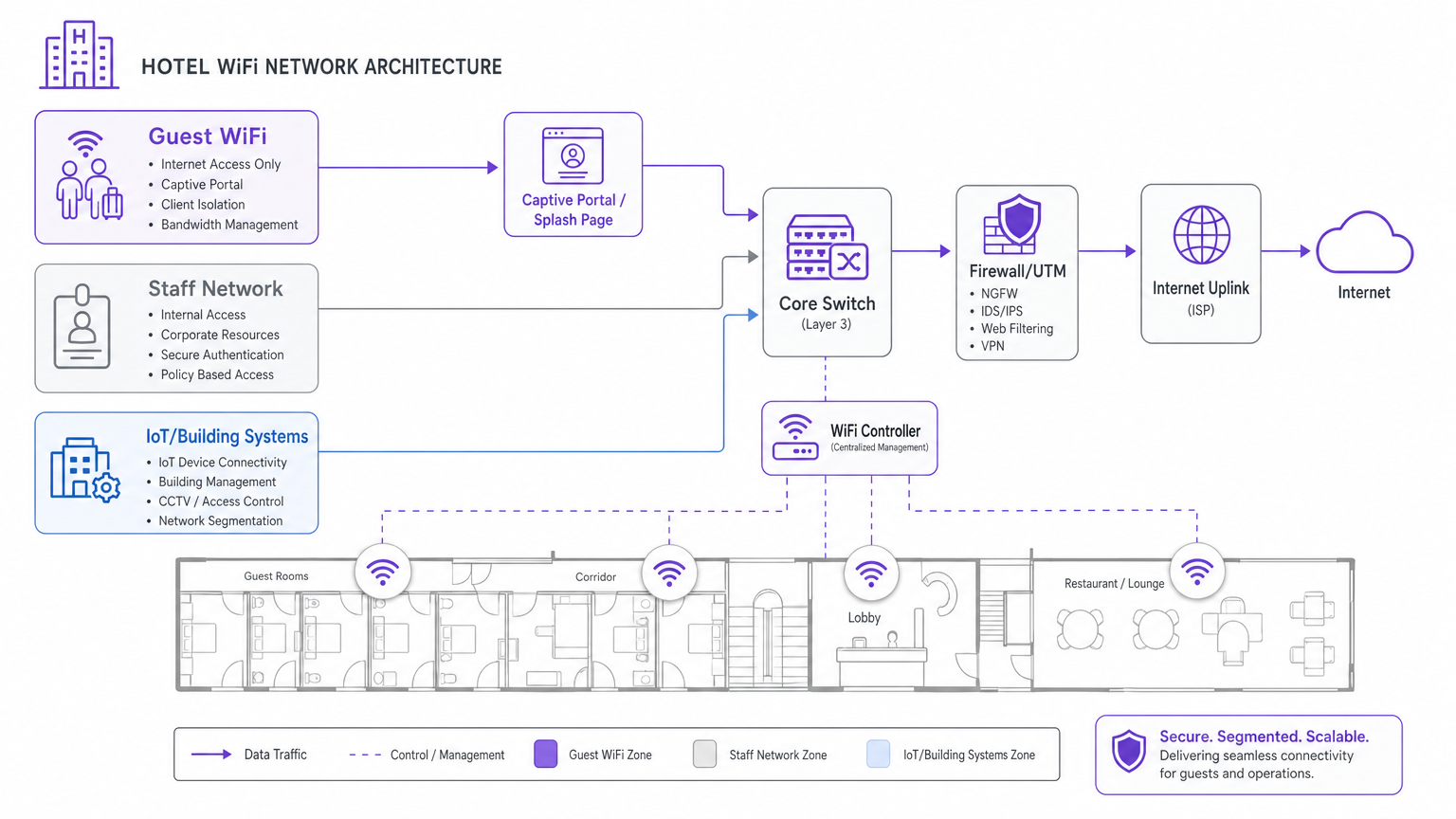
Le principe fondamental de tout réseau hôtelier d'entreprise est la segmentation logique. Un environnement hôtelier doit servir des populations d'utilisateurs distinctes – clients, personnel et systèmes IoT/bâtiment – sur la même infrastructure physique. Ne pas segmenter ces populations introduit de graves vulnérabilités de sécurité et des goulots d'étranglement de performance.
L'approche standard consiste à déployer des Réseaux Locaux Virtuels (VLANs) séparés. Le trafic des clients doit être isolé des systèmes de gestion immobilière (PMS), des terminaux de point de vente (POS) et des communications du personnel. Cette isolation est une exigence obligatoire pour la conformité PCI DSS si les données de paiement traversent le réseau physique. De plus, les réseaux clients doivent implémenter l'isolation des clients, empêchant les appareils individuels des clients de communiquer entre eux, atténuant ainsi le risque de mouvement latéral par des acteurs malveillants.
Normes Sans Fil et Planification de la Capacité
Lors du déploiement de nouvelles infrastructures, le Wi-Fi 6 (IEEE 802.11ax) est la norme de référence. Pour les zones à haute densité telles que les salles de bal ou les centres de conférence, le Wi-Fi 6E (qui utilise la bande des 6 GHz) fournit le spectre nécessaire pour gérer des centaines de clients simultanés. Les avancées critiques du Wi-Fi 6 – en particulier l'Accès Multiple par Répartition Orthogonale de la Fréquence (OFDMA) et le BSS Colouring – permettent aux points d'accès de servir plusieurs clients simultanément et de réduire les interférences de co-canal dans les déploiements denses.
Le placement des points d'accès (AP) est tout aussi critique. La pratique obsolète de déployer des AP dans les couloirs entraîne une mauvaise couverture dans les chambres en raison de l'atténuation du signal à travers les murs et les portes. La meilleure pratique actuelle est un modèle de déploiement en chambre : un AP par chambre, ou au minimum, un AP pour deux chambres. Pour les espaces publics, une étude de site RF complète utilisant des outils de modélisation prédictive est essentielle avant de tirer tout câble.
Rétro-transmission et Liaison Montante Internet
La performance sans fil dépend entièrement de la rétro-transmission câblée et de la liaison montante Internet. Chaque point d'accès doit être câblé en Cat 6A à un commutateur PoE. Plus important encore, la connexion Internet de l'établissement doit être dimensionnée pour l'utilisation simultanée maximale, et non pour la demande moyenne. Une règle générale courante est de prévoir 5 à 10 Mbps par chambre pour prendre en charge le streaming vidéo 4K. Pour les établissements de plus de 100 chambres, une ligne louée dédiée est fortement recommandée par rapport au haut débit standard, offrant une bande passante symétrique et des SLA garantis. Pour plus de détails sur la connectivité dédiée, consultez notre guide sur Qu'est-ce qu'une Ligne Louée ? Internet Professionnel Dédié .
Guide d'Implémentation
Le déploiement d'un réseau WiFi d'hôtel robuste nécessite une approche structurée et progressive :
- Étude de Site RF et Planification des Canaux : Menez une étude de site physique pour identifier les sources d'interférences (par exemple, micro-ondes, réseaux voisins) et concevez un plan de canaux qui minimise le chevauchement.
- Conception VLAN et Politique de Sécurité : Documentez et configurez l'architecture VLAN (Clients, Personnel, IoT, Gestion) et les règles de pare-feu avant de déployer les AP.
- Déploiement de l'Infrastructure : Installez le câblage Cat 6A et montez les AP selon le modèle en chambre. Assurez-vous que l'infrastructure de commutation centrale peut gérer le budget PoE agrégé.
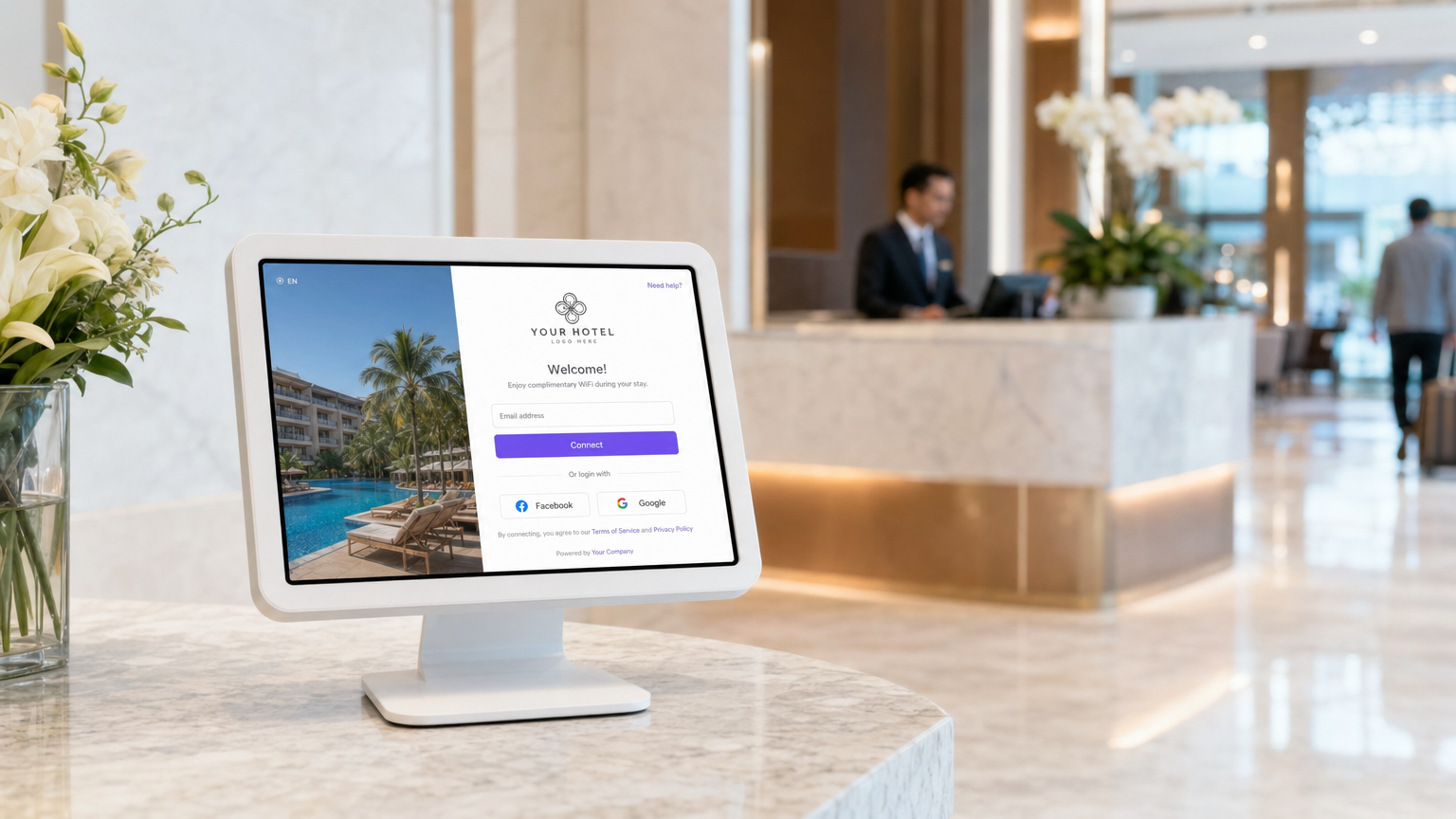
- Intégration du Captive Portal : Déployez la passerelle d'authentification. C'est là que le réseau s'intègre à l'entreprise. Le Captive Portal doit être testé sur tous les principaux systèmes d'exploitation (iOS, Android, Windows) pour assurer une redirection et une authentification fluides.
Bonnes Pratiques
- Prioriser la Capture de Données de Première Partie : Utilisez un Captive Portal robuste pour authentifier les clients via e-mail ou connexion sociale. Cela transforme le trafic anonyme en profils connus, créant une base de données conforme au GDPR pour le marketing. En savoir plus sur nos solutions Guest WiFi .
- Implémenter la Ré-authentification Transparente : Tirez parti de l'authentification basée sur le profil (comme OpenRoaming) pour permettre aux clients récurrents de se connecter automatiquement sans ressaisir leurs identifiants, améliorant considérablement l'expérience client.
- Surveiller et Optimiser en Continu : Le WiFi n'est pas un déploiement statique. Utilisez la gestion centralisée dans le cloud pour surveiller le nombre d'associations d'AP, la santé des clients et l'utilisation de la liaison montante. Un ajustement régulier est nécessaire à mesure que l'environnement RF évolue.
Dépannage et Atténuation des RisquesAtténuation
- La plainte concernant le "WiFi lent" : Lorsque les clients signalent des vitesses lentes, le problème est rarement lié à l'environnement RF ; il s'agit presque toujours d'une saturation de la liaison montante. Surveillez attentivement l'utilisation de votre circuit internet. Si la liaison montante est saturée, mettez en œuvre une gestion de la bande passante par client sur le VLAN invité.
- Points d'accès non autorisés : Mettez en œuvre des systèmes de prévention des intrusions sans fil (WIPS) pour détecter et atténuer les points d'accès non autorisés déployés par des clients ou des acteurs malveillants, qui peuvent causer de graves interférences et des risques de sécurité.
- Défaillances du Captive Portal : Assurez-vous que votre Captive Portal dispose d'un certificat SSL valide et que la configuration du jardin clos permet l'accès aux domaines d'authentification nécessaires (par exemple, les serveurs de connexion Facebook ou Google) avant que le client ne soit entièrement authentifié.
ROI et impact commercial
Le retour sur investissement du WiFi d'entreprise va bien au-delà de la réduction des plaintes des clients. En intégrant le réseau à une plateforme comme WiFi Analytics de Purple, les opérateurs de sites peuvent :
- Stimuler les réservations directes : Utilisez les données d'e-mail capturées pour mener des campagnes ciblées avant et après le séjour, réduisant ainsi la dépendance aux OTA.
- Augmenter les dépenses sur place : Déclenchez des offres SMS ou e-mail automatisées basées sur la localisation du client et son temps de présence (par exemple, une réduction au spa lorsqu'un client se connecte près de la piscine).
- Mesurer l'utilisation du site : Analysez les données de fréquentation pour optimiser les niveaux de personnel dans les restaurants et les halls d'entrée en fonction des schémas d'occupation réels. Pour des stratégies plus larges sur l'engagement numérique, consultez Comment se connecter avec les clients : Stratégies numériques pour les entreprises physiques .
Définitions clés
VLAN (Virtual Local Area Network)
A logical subnetwork that groups a collection of devices from different physical LAN segments.
Used to isolate guest traffic from staff and payment systems for security and PCI compliance.
Captive Portal
A web page that a user of a public-access network is obliged to view and interact with before access is granted.
The primary mechanism for capturing first-party guest data and securing marketing consent.
Client Isolation
A security feature that prevents devices connected to the same wireless network from communicating directly with each other.
Essential on guest networks to prevent guests from scanning or accessing other guests' devices.
BSS Colouring
A Wi-Fi 6 feature that adds a 'colour' identifier to transmissions, allowing APs to ignore traffic from overlapping networks.
Crucial for maintaining performance in high-density environments like conference centres where multiple APs operate on the same channel.
OFDMA
Orthogonal Frequency Division Multiple Access; a technology that allows a single AP to communicate with multiple devices simultaneously.
Dramatically reduces latency and improves throughput when hundreds of guests are connected in a concentrated area.
PoE (Power over Ethernet)
A standard that passes electrical power along with data on twisted-pair Ethernet cabling.
Used to power wireless access points, eliminating the need for separate electrical wiring to ceiling locations.
Leased Line
A dedicated, fixed-bandwidth, symmetric data connection connecting a business directly to the internet.
The recommended internet uplink for hotels over 100 rooms to guarantee performance and SLA.
WPA3-Enterprise
The highest level of Wi-Fi security, requiring each user to authenticate with unique credentials via an 802.1X server.
The mandatory security standard for hotel staff and corporate networks.
Exemples concrets
A 250-room business hotel is experiencing severe guest complaints regarding WiFi speeds during the evening hours (7 PM - 10 PM). The hotel currently has a 500 Mbps broadband connection and APs deployed in the corridors.
- Upgrade the internet uplink to a 1 Gbps dedicated leased line to handle the peak concurrent streaming demand. 2. Redesign the wireless architecture to an in-room AP model (1 AP per room or per 2 rooms) to eliminate corridor signal attenuation. 3. Implement bandwidth throttling on the guest VLAN (e.g., 10 Mbps per client) to ensure fair distribution of the available uplink.
A stadium hotel needs to capture guest data for marketing purposes but must ensure strict compliance with GDPR regarding consent and data retention.
Deploy a captive portal integrated with a centralized analytics platform. Configure the splash page to require explicit, granular opt-in checkboxes for marketing communications, separate from the terms of service acceptance. Ensure the platform automatically logs the consent timestamp, IP address, and MAC address, and provides an automated mechanism for guests to request data deletion.
Questions d'entraînement
Q1. Your venue operations director wants to deploy a new wireless point-of-sale (POS) system on the outdoor terrace. They suggest connecting the POS tablets to the existing Guest WiFi network to save time. How should you respond?
Conseil : Consider PCI DSS compliance and network segmentation.
Voir la réponse type
You must refuse this request. Connecting POS terminals to the Guest WiFi violates PCI DSS compliance and exposes payment data to severe security risks. The POS tablets must be connected to a dedicated, encrypted Staff/POS VLAN with WPA3-Enterprise security, completely isolated from guest traffic.
Q2. A boutique hotel is planning a refit and the interior designer insists that access points must be hidden inside metal ceiling enclosures to maintain the aesthetic. What is the technical implication?
Conseil : Consider how RF signals interact with different materials.
Voir la réponse type
Metal enclosures will act as a Faraday cage, severely attenuating or completely blocking the RF signal. This will result in dead zones and poor performance. The APs must be mounted below the ceiling or behind RF-transparent materials (like plastic or drywall). If aesthetics are critical, APs can be painted or covered with vendor-approved vinyl skins.
Q3. The marketing team wants to automatically subscribe every guest who connects to the WiFi to the daily promotional newsletter. How should the captive portal be configured to handle this?
Conseil : Consider GDPR and explicit consent requirements.
Voir la réponse type
The captive portal cannot automatically subscribe guests. Under GDPR, marketing consent must be explicit, unbundled, and opt-in. The splash page must include a separate, unticked checkbox for marketing communications, distinct from the acceptance of the network Terms of Service.
Continuer la lecture de cette série
Qu'est-ce qu'une requête de sonde (Probe Request) ? Comprendre comment les appareils découvrent les réseaux
Ce guide de référence technique offre une analyse approfondie des requêtes de sonde IEEE 802.11, de la distinction entre balayage actif et passif, et de l'impact de la randomisation MAC sur l'analyse des lieux. Il fournit des stratégies de mise en œuvre concrètes pour les architectes réseau afin d'optimiser les déploiements à haute densité, d'atténuer les tempêtes de sondes et d'assurer une collecte de données précise et conforme au GDPR en utilisant des couches d'identité authentifiées.
Comment réparer un WiFi lent sans améliorer votre forfait Internet
Un guide de référence technique complet pour les responsables informatiques et les architectes réseau sur l'optimisation des performances WiFi d'entreprise sans augmenter la bande passante de l'ISP. Couvre le réglage RF, la gestion de la densité des clients, la mise en œuvre de la QoS et comment exploiter les analyses WiFi pour diagnostiquer et résoudre les goulots d'étranglement.
La Checklist pour la Migration d'un NAC Hérité vers un NAC Cloud-Natif
Ce guide de référence technique faisant autorité fournit une checklist structurée en trois phases pour la migration d'un système de contrôle d'accès réseau (NAC) hérité vers une architecture cloud-native. Il dote les responsables informatiques et les architectes réseau de stratégies concrètes pour gérer l'intégration des identités, la parité des politiques et la conformité sans perturber les opérations des sites.