
WiFi Patient : Un Guide Complet pour les NHS Trusts et les Opérateurs Hospitaliers
Un guide technique et commercial définitif pour les NHS Trusts et les opérateurs hospitaliers sur le déploiement, la sécurisation et la monétisation du WiFi patient. Couvre la segmentation réseau, la conformité DSPT, le filtrage de contenu et l'exploitation des analyses pour améliorer les résultats pour les patients.
Écouter ce guide
Voir la transcription du podcast
Résumé Exécutif
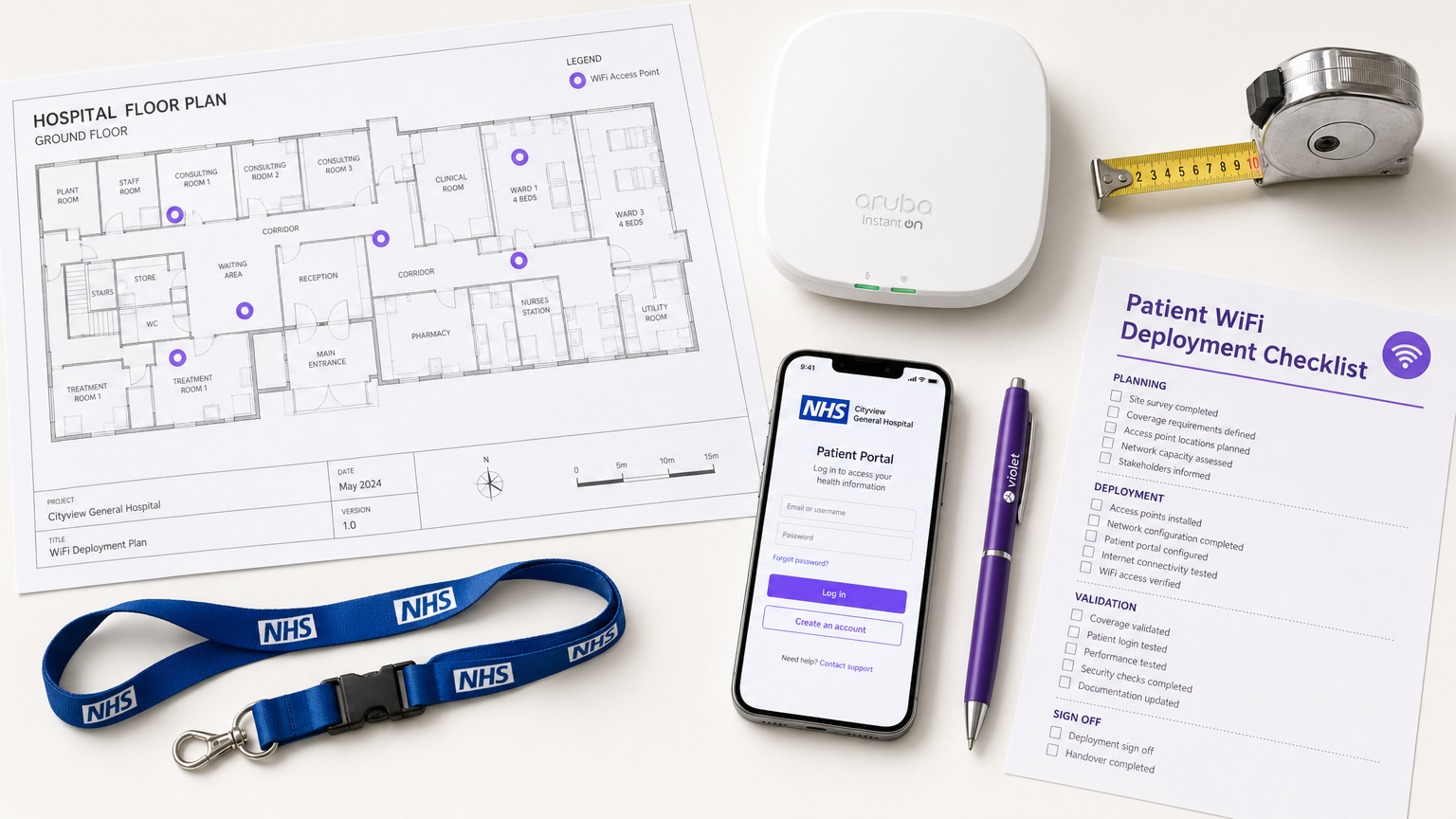
Fournir un WiFi patient robuste, sécurisé et conforme n'est plus un simple "plus" pour les NHS Trusts et les opérateurs d'hôpitaux privés, c'est une exigence d'infrastructure critique. Les patients s'attendent à une connectivité pour gérer leur vie, communiquer avec leur famille et accéder aux services de santé numériques pendant leur séjour. Cependant, offrir cette connectivité dans un environnement clinique introduit des défis techniques et de gouvernance significatifs.
Ce guide fournit un cadre complet aux responsables informatiques, architectes réseau et CTO pour concevoir, déployer et gérer des réseaux WiFi pour les patients. Nous explorons la nécessité d'une segmentation réseau stricte, les complexités de la conformité au Data Security and Protection Toolkit (DSPT), la mise en œuvre d'un filtrage de contenu rigoureux et les modèles commerciaux qui soutiennent ces déploiements. En traitant le WiFi patient comme un service de niveau entreprise plutôt qu'une surcouche de bande passante grand public, les Trusts peuvent atténuer les risques, assurer l'intégrité des systèmes cliniques et tirer parti de plateformes comme Guest WiFi pour obtenir des informations exploitables et améliorer la satisfaction des patients.
Approfondissement Technique : Architecture et Normes
La base de tout déploiement WiFi hospitalier est la ségrégation absolue entre le trafic des patients et les systèmes cliniques. Un hôpital est un environnement RF à haute densité et à forte interférence où des appareils vitaux fonctionnent à proximité de smartphones grand public.
Segmentation Réseau et Conception VLAN
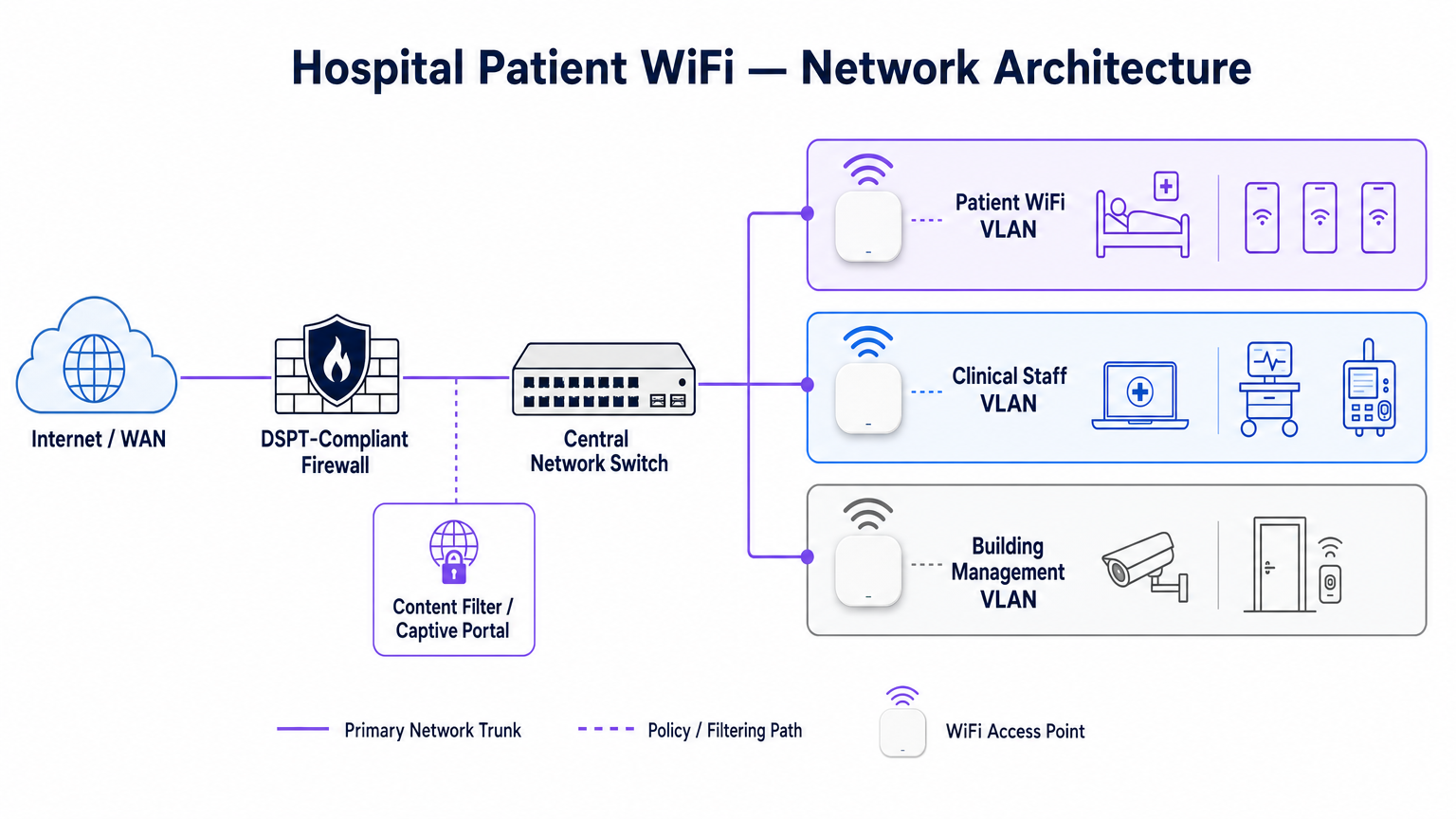
Pour protéger l'intégrité clinique, le WiFi patient doit fonctionner sur un Réseau Local Virtuel (VLAN) dédié. L'architecture d'entreprise standard dicte un minimum de trois segments distincts :
- VLAN Patient/Invité : Acheminement via un Captive Portal, application d'un filtrage de contenu strict et fourniture d'un accès uniquement à Internet.
- VLAN Clinique : Dédié aux appareils du personnel et aux équipements médicaux (par exemple, pompes à perfusion, postes de travail mobiles). Contourne le Captive Portal et s'achemine via un chemin sécurisé et surveillé.
- VLAN de Gestion du Bâtiment : Prend en charge les appareils IoT, la vidéosurveillance et les contrôles environnementaux.
Le trafic sur le VLAN Patient doit être isolé au niveau du commutateur et restreint par des règles de pare-feu qui refusent explicitement le routage vers les sous-réseaux internes.
Densité des Points d'Accès et Planification RF
Le déploiement du WiFi dans un hôpital nécessite de surmonter des barrières physiques importantes : murs doublés de plomb, machines lourdes et béton dense. Se fier à une "couverture de couloir" est un mode de défaillance courant. Une étude RF prédictive, suivie d'une validation active post-installation, est obligatoire.
Pour les nouveaux déploiements, la norme de base est l'IEEE 802.11ax (Wi-Fi 6). Son implémentation de l'Orthogonal Frequency-Division Multiple Access (OFDMA) et du BSS Colouring est cruciale pour gérer la haute densité d'appareils typique des services hospitaliers modernes, réduisant la latence et atténuant les interférences des systèmes de télémétrie médicale fonctionnant dans la bande des 2,4 GHz.
Exigences de Raccordement et de Débit
Un piège courant est de provisionner des points d'accès de qualité entreprise mais de les sous-alimenter avec un raccordement insuffisant. Un hôpital de 500 lits peut facilement générer 1 Gbps de demande concurrente pendant les heures de pointe du soir. Les opérateurs doivent provisionner des lignes louées dédiées et non contraintes plutôt que des circuits haut débit partagés pour garantir le débit et éviter d'engorger le réseau central. Pour plus de contexte sur la connectivité dédiée, consultez Qu'est-ce qu'une ligne louée ? Internet d'entreprise dédié .
Guide d'Implémentation : Conformité et Filtrage
Le déploiement de l'infrastructure physique n'est que la moitié du défi ; la surcouche de gouvernance et de conformité est tout aussi critique.
Conformité DSPT
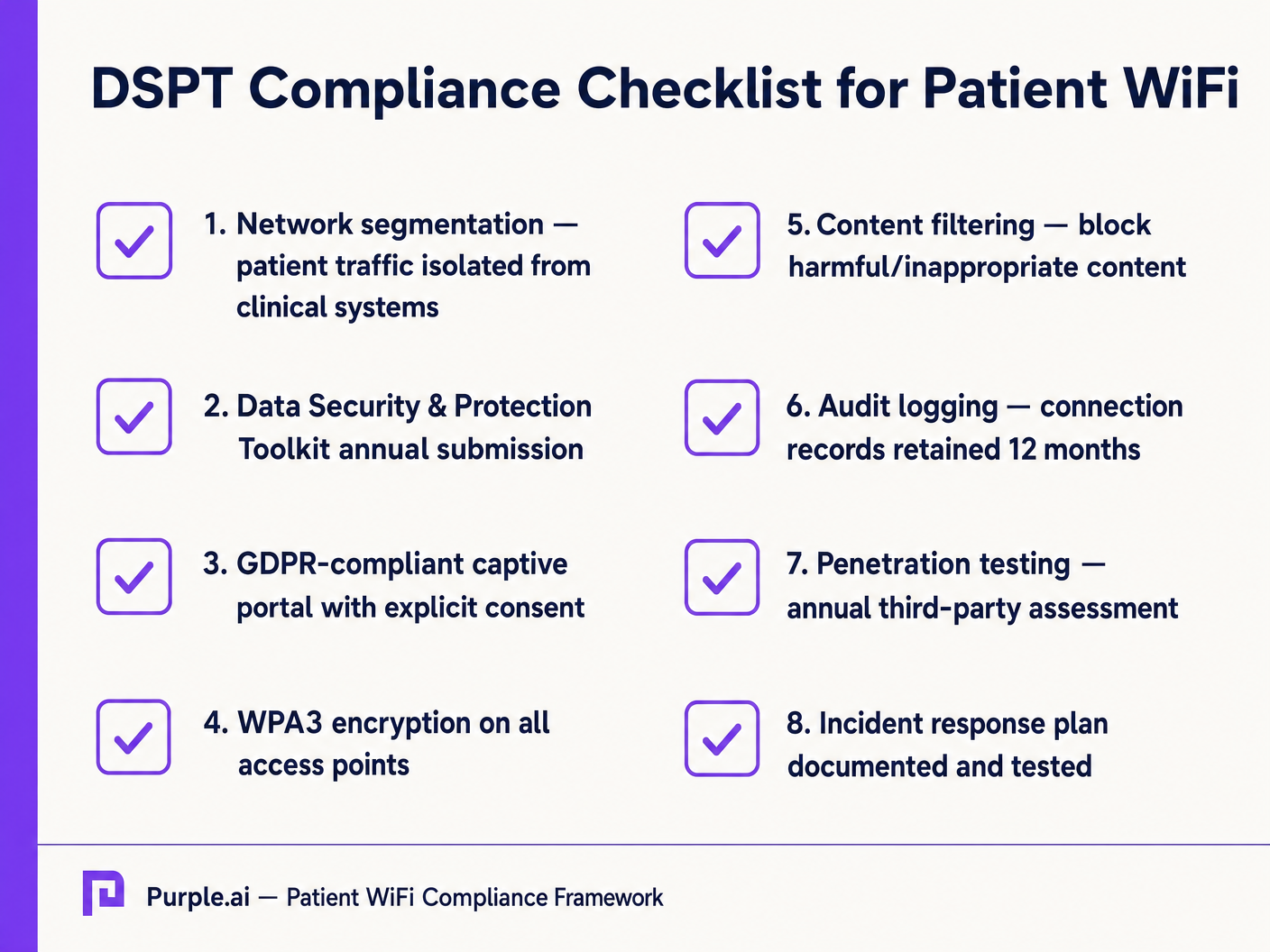
Pour les NHS Trusts, l'adhésion au Data Security and Protection Toolkit (DSPT) est non négociable. Les déploiements de WiFi patient doivent prouver :
- Une segmentation réseau stricte.
- Des contrôles d'accès robustes et une journalisation d'audit (journaux de connexion conservés pendant un minimum de 12 mois).
- Des tests d'intrusion annuels par des tiers.
Filtrage de Contenu
Les directives du NHS exigent que le WiFi patient bloque l'accès aux contenus inappropriés ou nuisibles, y compris le matériel pour adultes, les sites extrémistes et les plateformes de jeux d'argent. Ceci est généralement réalisé via un filtrage basé sur DNS ou proxy appliqué directement au VLAN Patient. La solution de filtrage doit ingérer des flux d'informations sur les menaces en temps réel pour bloquer dynamiquement les domaines malveillants nouvellement identifiés.
Captive Portals et GDPR
Le Captive Portal est la passerelle vers le réseau et le mécanisme principal pour recueillir le consentement de l'utilisateur. En vertu du GDPR, les Trusts doivent obtenir un consentement explicite et éclairé avant de traiter des données personnelles (telles que les adresses MAC ou les adresses e-mail). Le portail doit présenter une politique de confidentialité claire et des opt-ins explicites. L'utilisation d'une plateforme robuste assure la conformité tout en permettant la collecte de données démographiques précieuses.
ROI et Impact Commercial : Modèles Gratuits vs. Payants
La stratégie commerciale derrière le WiFi patient définit sa durabilité à long terme.
Le Modèle WiFi Gratuit
La grande majorité des NHS Trusts offrent le WiFi patient gratuitement au point d'utilisation. Ce modèle est généralement financé par des dépenses d'investissement ou des budgets opérationnels. Le ROI est mesuré en satisfaction patient (souvent reflétée dans Friends et les scores des tests Amis et Famille) et la réduction de la charge administrative du personnel clinique, qui n'a plus besoin de gérer les plaintes de connectivité.
Le modèle de concessionnaire
Certains trusts plus importants emploient un modèle de concessionnaire, où un fournisseur de services gérés tiers (MSP) finance l'infrastructure en échange de droits de monétisation. Cela peut impliquer la diffusion de publicités ciblées via le Captive Portal ou l'offre d'un service à plusieurs niveaux (navigation de base gratuite, streaming premium payant). Si ce modèle est adopté, les trusts doivent s'assurer que le contenu publicitaire est strictement vérifié pour s'aligner sur les valeurs du NHS et que les pratiques de monétisation des données sont conformes au GDPR.
En intégrant WiFi Analytics , les trusts peuvent surveiller l'utilisation du réseau, suivre les temps de séjour des patients et déclencher des enquêtes de feedback automatisées après la connexion, transformant un centre de coûts en un atout stratégique pour l'amélioration opérationnelle. Cette approche axée sur les données reflète les déploiements réussis dans d'autres secteurs, tels que la Santé et le Commerce de détail .
Définitions clés
VLAN (Virtual Local Area Network)
A logical subnetwork that groups a collection of devices from different physical LANs. Essential for isolating patient traffic from clinical systems.
Used by network architects to ensure that a compromised patient device cannot access sensitive medical equipment or electronic health records.
DSPT (Data Security and Protection Toolkit)
An online self-assessment tool that allows NHS organisations to measure their performance against the National Data Guardian's 10 data security standards.
Mandatory for all NHS Trusts; failure to properly segment patient WiFi or log access can result in a failed DSPT submission.
Captive Portal
A web page that a user of a public-access network is obliged to view and interact with before access is granted.
The primary interface for capturing user consent, presenting terms of use, and applying brand identity to the WiFi experience.
802.11ax (Wi-Fi 6)
The sixth generation of the Wi-Fi standard, designed specifically to improve performance in high-density environments.
Crucial for hospital wards where dozens of patients, visitors, and staff devices are competing for airtime simultaneously.
OFDMA (Orthogonal Frequency-Division Multiple Access)
A feature of Wi-Fi 6 that allows a single transmission to deliver data to multiple devices simultaneously.
Reduces latency and improves efficiency in crowded hospital environments, preventing the network from grinding to a halt during peak hours.
Content Filtering
The use of software or hardware to restrict the content that a reader is authorised to access over the network.
Required by NHS guidance to prevent access to illegal, extremist, or adult content on patient networks.
Leased Line
A dedicated, fixed-bandwidth, symmetric data connection connecting a business directly to the internet exchange.
Necessary for hospital WiFi backhaul to ensure guaranteed throughput, avoiding the contention issues of shared broadband.
MAC Address
A unique identifier assigned to a network interface controller (NIC) for use as a network address in communications.
Considered personal data under GDPR; its collection and storage by the WiFi analytics platform requires explicit user consent.
Exemples concrets
A 400-bed NHS Trust is experiencing severe network congestion on its legacy patient WiFi during the hours of 6 PM to 9 PM, leading to patient complaints and staff distraction. The current setup uses a shared 500 Mbps broadband connection and Wi-Fi 4 (802.11n) access points in the corridors.
- Upgrade backhaul to a dedicated 1 Gbps symmetrical leased line to guarantee peak-hour throughput. 2. Replace corridor-based Wi-Fi 4 APs with in-room Wi-Fi 6 (802.11ax) APs to improve RF penetration and handle high device density via OFDMA. 3. Implement traffic shaping on the firewall to cap individual user bandwidth at 5 Mbps, preventing single users from monopolising the connection with 4K streaming.
A private hospital group wants to deploy a new patient WiFi network but is concerned about the DSPT compliance implications of capturing patient data on the captive portal.
Deploy a GDPR-compliant captive portal solution (like Purple) that separates authentication data from clinical data. Configure the portal to require explicit opt-in for any data processing beyond the minimum required for network access. Ensure the Patient VLAN is strictly isolated from the Clinical VLAN via the core firewall. Implement DNS-based content filtering to block malicious and inappropriate categories.
Questions d'entraînement
Q1. An NHS Trust wants to implement a single SSID for both staff and patients to 'simplify the user experience'. They plan to use a captive portal to differentiate user types. Is this approach recommended?
Conseil : Consider the DSPT requirements for network segmentation and the risk of a compromised patient device.
Voir la réponse type
No, this approach is highly discouraged and introduces significant security risks. Patient and clinical staff traffic must be segregated at the VLAN level with separate SSIDs. Relying solely on a captive portal for differentiation does not provide adequate Layer 2 isolation, putting clinical systems at risk from malware or lateral movement originating from untrusted patient devices.
Q2. A hospital is planning to upgrade its patient WiFi and wants to ensure adequate coverage. The IT manager suggests placing access points in the main corridors to cover the adjacent patient rooms and save on hardware costs. What is the flaw in this plan?
Conseil : Think about the physical construction of hospital environments and RF attenuation.
Voir la réponse type
Corridor placement is a flawed strategy in hospitals. Hospital walls often contain lead lining (for X-ray rooms), heavy concrete, and dense infrastructure that severely attenuates RF signals. This results in poor in-room coverage, high latency, and dropped connections. Access points should be deployed inside patient rooms or wards based on a professional predictive RF survey.
Q3. A Trust has deployed patient WiFi but is receiving complaints about slow speeds during the evening. The APs are Wi-Fi 6, and the core switches are 10G capable. The internet connection is a 1 Gbps shared broadband line. What is the likely bottleneck?
Conseil : Differentiate between local network capacity and WAN backhaul.
Voir la réponse type
The bottleneck is the shared broadband internet connection. Even with high-capacity local infrastructure (Wi-Fi 6 and 10G switches), a shared broadband line suffers from contention ratios, meaning the bandwidth is shared with other premises in the area. During evening peak hours, this contention severely degrades throughput. The Trust should upgrade to a dedicated, uncontended leased line.
Continuer la lecture de cette série
Qu'est-ce qu'une requête de sonde (Probe Request) ? Comprendre comment les appareils découvrent les réseaux
Ce guide de référence technique offre une analyse approfondie des requêtes de sonde IEEE 802.11, de la distinction entre balayage actif et passif, et de l'impact de la randomisation MAC sur l'analyse des lieux. Il fournit des stratégies de mise en œuvre concrètes pour les architectes réseau afin d'optimiser les déploiements à haute densité, d'atténuer les tempêtes de sondes et d'assurer une collecte de données précise et conforme au GDPR en utilisant des couches d'identité authentifiées.
Comment réparer un WiFi lent sans améliorer votre forfait Internet
Un guide de référence technique complet pour les responsables informatiques et les architectes réseau sur l'optimisation des performances WiFi d'entreprise sans augmenter la bande passante de l'ISP. Couvre le réglage RF, la gestion de la densité des clients, la mise en œuvre de la QoS et comment exploiter les analyses WiFi pour diagnostiquer et résoudre les goulots d'étranglement.
La Checklist pour la Migration d'un NAC Hérité vers un NAC Cloud-Natif
Ce guide de référence technique faisant autorité fournit une checklist structurée en trois phases pour la migration d'un système de contrôle d'accès réseau (NAC) hérité vers une architecture cloud-native. Il dote les responsables informatiques et les architectes réseau de stratégies concrètes pour gérer l'intégration des identités, la parité des politiques et la conformité sans perturber les opérations des sites.