
WPA, WPA2 et WPA3 : Quelles sont les différences et lequel devriez-vous utiliser ?
Ce guide de référence technique faisant autorité explore les différences architecturales entre les protocoles de sécurité WPA, WPA2 et WPA3. Il fournit des recommandations de déploiement concrètes aux responsables informatiques et aux architectes réseau pour sécuriser les environnements WiFi d'entreprise et invités tout en garantissant la conformité et des performances optimales.
Écouter ce guide
Voir la transcription du podcast
Résumé Exécutif
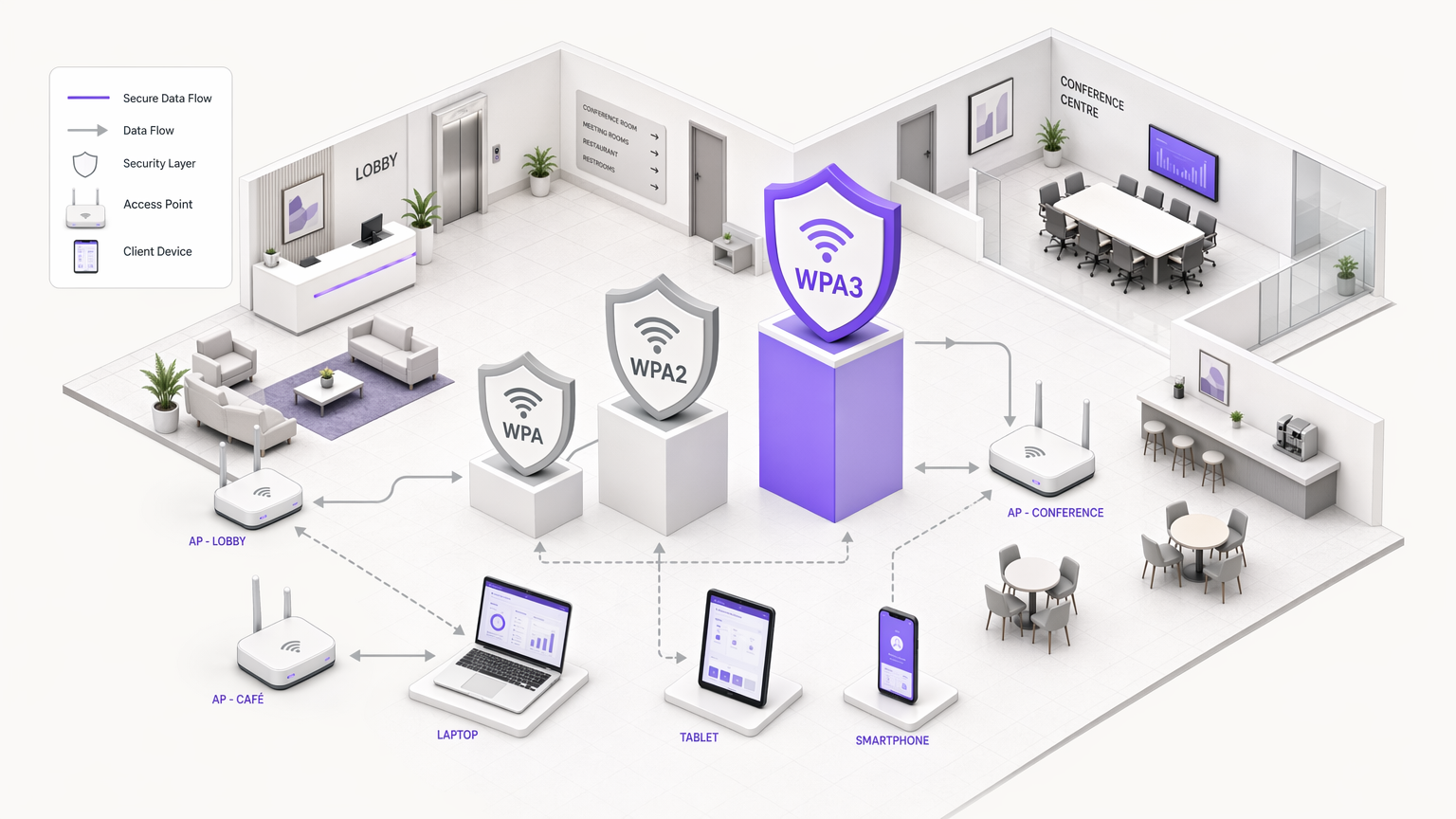
Pour les responsables informatiques, les architectes réseau et les CTO opérant dans des environnements d'entreprise, le choix du protocole de sécurité WiFi est une décision critique en matière de gestion des risques. Alors que les établissements des secteurs de l' Hôtellerie , du Commerce de détail , de la Santé et du Transport étendent leur couverture sans fil, la dépendance à l'égard de normes de sécurité obsolètes introduit des vulnérabilités importantes. Ce guide de référence technique offre une comparaison définitive des architectures WPA, WPA2 et WPA3, détaillant leurs fondations cryptographiques et leurs implications opérationnelles.
Bien que WPA2 ait servi de norme industrielle pendant près de deux décennies, ses vulnérabilités structurelles — en particulier les attaques par dictionnaire hors ligne contre le four-way handshake — ont rendu nécessaire la transition vers WPA3. WPA3 introduit l'Authentification Simultanée des Égaux (SAE) pour éliminer ces risques, ainsi que l'Enhanced Open (OWE) pour sécuriser les réseaux invités non authentifiés. Pour les opérateurs d'entreprise, le mandat est clair : WPA doit être éradiqué de l'environnement, WPA2-Enterprise reste une base viable pour l'accès d'entreprise, et WPA3 doit être progressivement mis en œuvre pour assurer une conformité à long terme avec les exigences PCI DSS et GDPR. Ce guide décrit les mécanismes techniques derrière ces protocoles et fournit une stratégie de déploiement neutre vis-à-vis des fournisseurs pour moderniser votre infrastructure sans fil.
Plongée Technique : Évolution Architecturale
L'évolution du WiFi Protected Access (WPA) reflète la course à l'armement continue entre la sécurité cryptographique et la puissance de calcul. Comprendre les mécanismes sous-jacents de chaque protocole est essentiel pour concevoir des architectures réseau résilientes.
WPA : Le Correctif d'Urgence
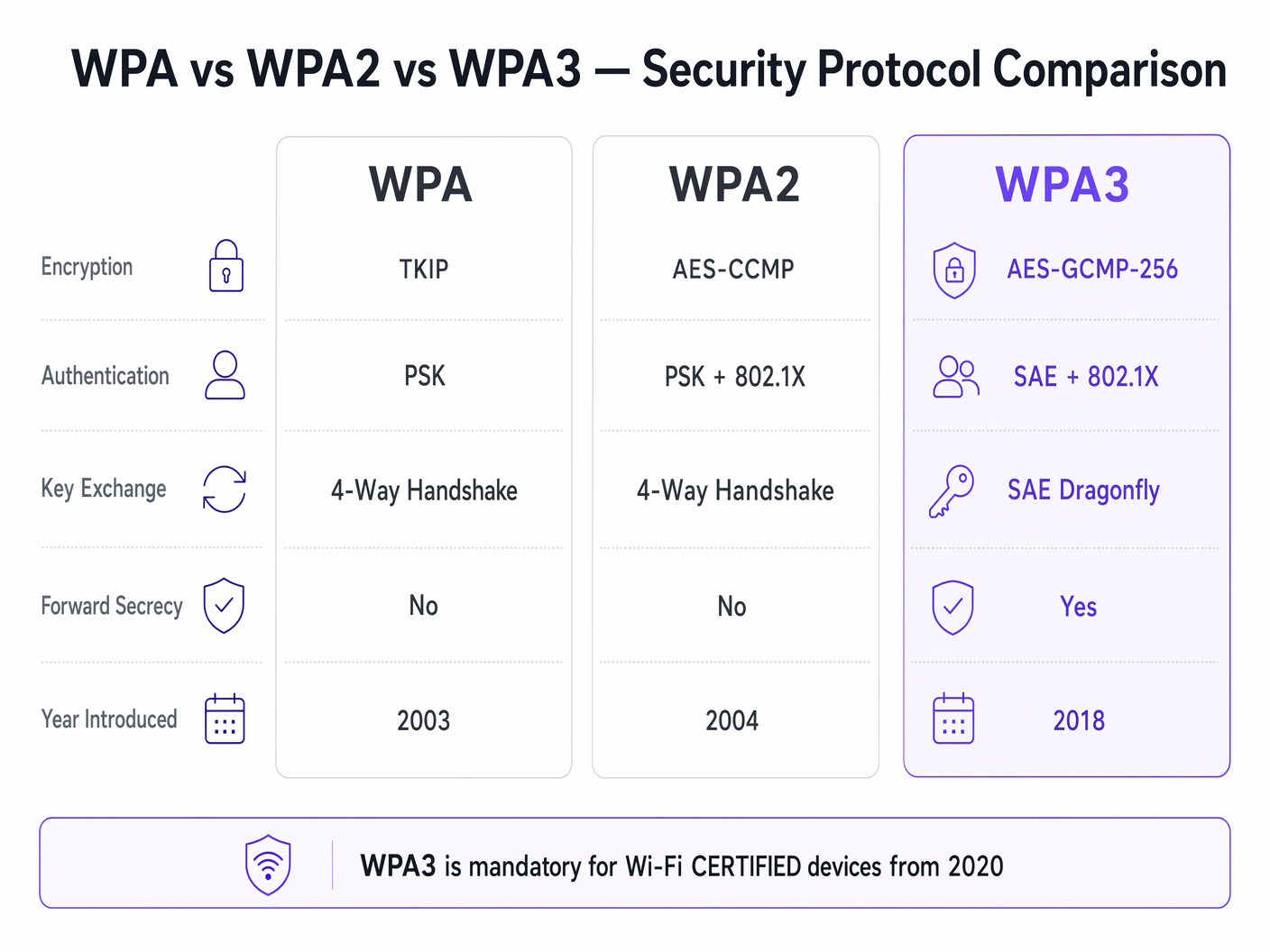
Introduit en 2003, WPA a été conçu comme une réponse rapide à l'échec catastrophique du Wired Equivalent Privacy (WEP). L'innovation principale de WPA était le Temporal Key Integrity Protocol (TKIP), qui générait dynamiquement une nouvelle clé de chiffrement de 128 bits pour chaque paquet. Cela a résolu la vulnérabilité de réutilisation de clé statique de WEP. Cependant, comme WPA devait fonctionner sur du matériel WEP existant, TKIP a été construit sur le même chiffrement de flux RC4. En 2009, la recherche cryptographique avait démontré des attaques pratiques contre TKIP, rendant WPA fondamentalement non sécurisé. Dans les environnements d'entreprise modernes, WPA représente une vulnérabilité de sécurité critique et doit être activement déprécié.
WPA2 : La Référence d'Entreprise
Ratifié en 2004, WPA2 a introduit un changement structurel en remplaçant TKIP par l'Advanced Encryption Standard (AES) fonctionnant en mode compteur avec le Cipher Block Chaining Message Authentication Code Protocol (CCMP). AES est un chiffrement par blocs robuste, et CCMP fournit un chiffrement et une validation de l'intégrité des données simultanés. Cette architecture a établi WPA2 comme la norme dominante pour les réseaux d'entreprise.
Cependant, WPA2 est bifurqué en deux modes de fonctionnement distincts :
WPA2-Personnel (PSK) : Ce mode repose sur une clé pré-partagée (PSK). Chaque appareil sur le Service Set Identifier (SSID) utilise la même phrase secrète pour dériver les clés de session pendant le four-way handshake. La vulnérabilité critique ici est que le four-way handshake peut être capturé passivement. Les attaquants peuvent ensuite soumettre le handshake capturé à des attaques par dictionnaire hors ligne en utilisant des clusters GPU haute performance. Par conséquent, WPA2-Personnel offre une sécurité minimale contre les attaques ciblées si la phrase secrète manque d'entropie suffisante.
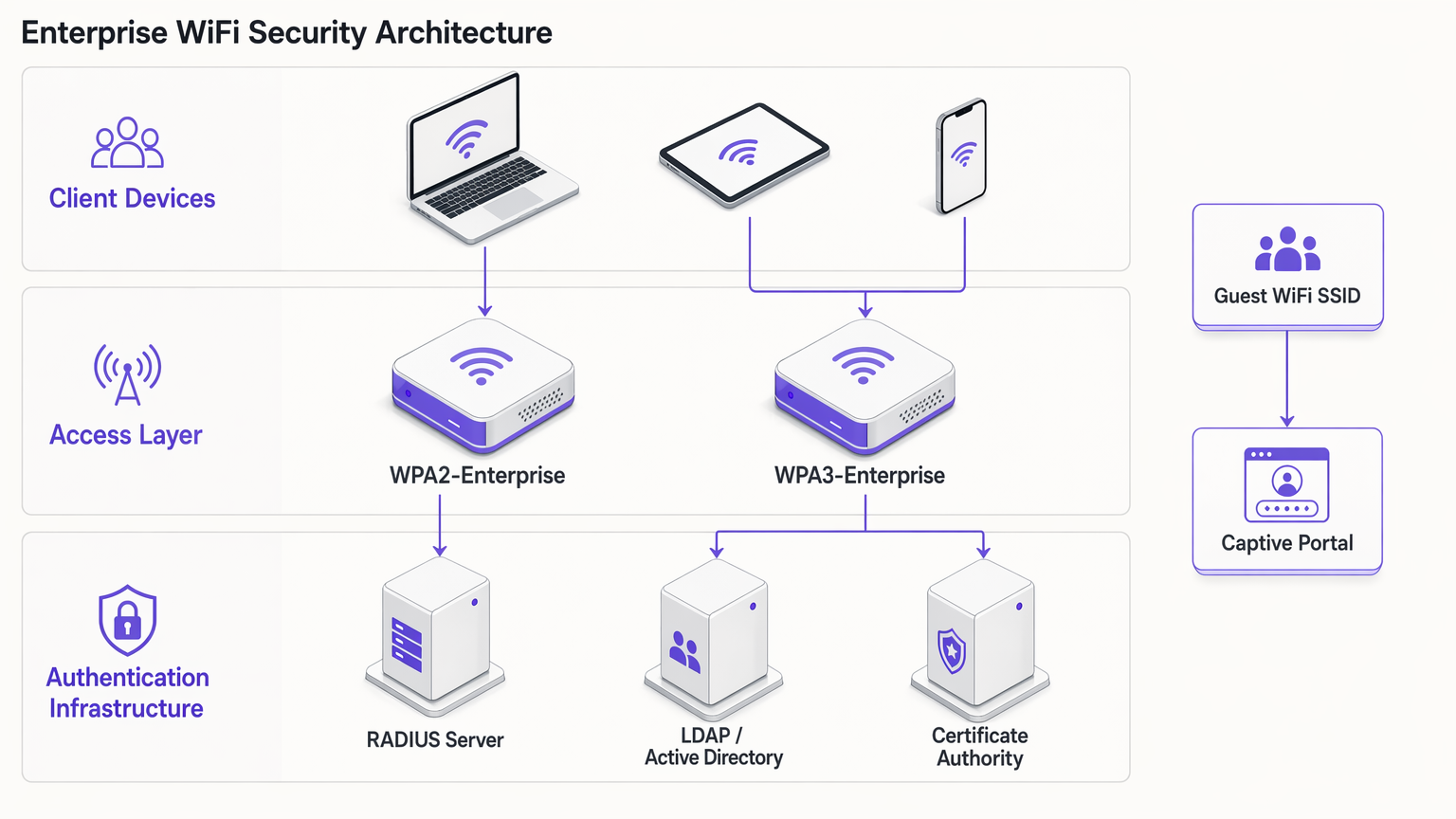
WPA2-Entreprise (802.1X) : En revanche, WPA2-Entreprise utilise la norme IEEE 802.1X pour le contrôle d'accès réseau basé sur les ports. Les appareils ne partagent pas de phrase secrète commune ; au lieu de cela, ils s'authentifient individuellement en utilisant le Extensible Authentication Protocol (EAP). L'authentification est gérée par un serveur RADIUS communiquant avec un service d'annuaire (par exemple, Active Directory ou LDAP). Chaque session authentifiée reçoit un matériel de clé cryptographique unique. Cette architecture atténue les risques associés aux phrases secrètes partagées et reste la norme de référence pour l'accès aux réseaux d'entreprise.
WPA3 : La Norme Moderne
Obligatoire pour les appareils Wi-Fi CERTIFIED depuis juillet 2020, WPA3 corrige les vulnérabilités cryptographiques exposées dans WPA2 au cours de sa durée de vie.
WPA3-Personnel (SAE) : La caractéristique distinctive de WPA3-Personnel est le remplacement du four-way handshake vulnérable par l'Authentification Simultanée des Égaux (SAE), également connue sous le nom de Dragonfly handshake. SAE est un protocole de preuve à divulgation nulle de connaissance. Il nécessite une interaction active avec le point d'accès pour chaque tentative d'authentification, rendant les attaques par dictionnaire hors ligne infaisables sur le plan computationnel. Cela neutralise efficacement la classe de vulnérabilités KRACK (Key Reinstallation Attacks).
WPA3-Entreprise : WPA3-Entreprise améliore la sécurité d'entreprise en introduisant une suite de sécurité optionnelle de 192 bits. Ce mode utilise AES-GCMP-256 pour le chiffrement et HMAC-SHA-384 pour l'intégrité des messages, s'alignant sur la suite Commercial National Security Algorithm (CNSA) requise pour les déploiements gouvernementaux et financiers à haute sécurité.
Secret de session persistant : WPA3 implémente le secret de session persistant en générant des clés de session éphémères via le handshake SAE. Si un attaquant enregistre le trafic chiffré et compromet ultérieurement les identifiants réseau, il ne peut pas déchiffrer rétroactivement le trafic historique. C'est un mécanisme crucial de réduction des risques pour les établissements traitant des données sensibles.
Enhanced Open (OWE) : Pour les réseaux invités, WPA3 introduit l'Opportunistic Wireless Encryption (OWE). OWE fournit un chiffrement non authentifié — les appareils se connectent sans mot de passe, mais le trafic entre l'appareil et le point d'accès est chiffré individuellement. Ceci élimine l'écoute passive sur les réseaux invités ouverts sans introduisant des frictions de connexion.
Guide d'implémentation : Sécuriser l'environnement d'entreprise
Le déploiement d'une sécurité WiFi moderne exige une approche segmentée, équilibrant les exigences strictes d'accès d'entreprise avec les réalités opérationnelles des réseaux invités et des appareils IoT hérités.
Réseaux d'entreprise et du personnel
Pour les réseaux internes, l'objectif est une validation d'identité forte et un chiffrement robuste.
- Exiger l'authentification 802.1X : Déployez WPA2-Enterprise ou WPA3-Enterprise. N'utilisez jamais WPA2-Personal pour les réseaux du personnel.
- Mettre en œuvre des méthodes EAP robustes : Utilisez EAP-TLS (Transport Layer Security) chaque fois que possible, car il nécessite des certificats client et serveur, offrant le plus haut niveau d'assurance. Si le déploiement de certificats est impraticable, PEAP-MSCHAPv2 peut être utilisé, à condition que le certificat du serveur RADIUS soit strictement validé par les clients.
- Activer le mode de transition WPA3 : Si vos points d'accès prennent en charge WPA3, activez le mode de transition. Cela permet aux clients compatibles WPA3 de bénéficier de SAE et de la confidentialité persistante tout en maintenant la connectivité pour les clients WPA2 hérités. Surveillez les journaux RADIUS pour suivre le taux de migration des appareils clients.
WiFi invité et accès public
Les réseaux invités présentent un défi unique : équilibrer sécurité, conformité et expérience utilisateur. L'approche traditionnelle consistant à diffuser un mot de passe WPA2-Personal partagé est à la fois non sécurisée et non conforme aux réglementations sur la confidentialité des données, car elle n'offre aucune visibilité sur l'identité de l'utilisateur.
- Déployer des Captive Portals : Implémentez un SSID ouvert ou un SSID WPA2/WPA3-Personal intégré à un Captive Portal. Cela garantit que les utilisateurs doivent s'authentifier et accepter les termes et conditions avant d'obtenir l'accès au réseau.
- Tirer parti des fournisseurs d'identité : Utilisez des plateformes comme Purple pour gérer l'authentification des invités. Purple peut agir comme un fournisseur d'identité gratuit pour des services comme OpenRoaming sous la licence Connect, simplifiant l'accès tout en capturant des données de première partie consenties pour WiFi Analytics .
- Activer OWE : Si votre infrastructure le prend en charge, activez l'Opportunistic Wireless Encryption (OWE) sur le SSID invité ouvert. Cela chiffre le trafic invité contre l'écoute passive sans exiger des utilisateurs qu'ils saisissent un mot de passe, améliorant considérablement la posture de sécurité de l'environnement Guest WiFi .
Segmentation des appareils IoT et hérités
De nombreux appareils IoT — tels que les terminaux de point de vente hérités, les systèmes de gestion de bâtiment et les caméras IP — ne prennent pas en charge WPA3 ou l'authentification 802.1X.
- Isoler les appareils hérités : Ne dégradez pas la sécurité de vos réseaux primaires pour accueillir des appareils hérités. Créez plutôt des VLAN et des SSID dédiés spécifiquement pour le matériel IoT.
- Implémenter MPSK/PPSK : Lorsque pris en charge par votre fournisseur, utilisez une clé pré-partagée multiple (MPSK) ou une clé pré-partagée privée (PPSK) pour les réseaux IoT. Cela attribue une phrase secrète WPA2 unique à chaque appareil IoT individuel, limitant le rayon d'impact si un seul appareil est compromis.
- Restreindre les mouvements latéraux : Appliquez des règles de pare-feu strictes aux VLAN IoT, n'autorisant que les communications sortantes nécessaires et bloquant les mouvements latéraux vers les sous-réseaux d'entreprise.
Bonnes pratiques et conformité
Le maintien d'un environnement sans fil sécurisé exige une discipline opérationnelle continue.
- Gestion du cycle de vie des certificats : Dans les déploiements WPA2/WPA3-Enterprise, les certificats RADIUS expirés sont une cause principale de pannes réseau. Mettez en œuvre un renouvellement automatique des certificats et surveillez rigoureusement les dates d'expiration.
- Détection des points d'accès non autorisés : Utilisez les capacités du système de prévention des intrusions sans fil (WIPS) de vos points d'accès pour détecter et neutraliser les points d'accès non autorisés diffusant vos SSID d'entreprise.
- Conformité PCI DSS 4.0 : Pour les environnements traitant des données de cartes de paiement, WPA2-Personal est généralement insuffisant. PCI DSS exige une cryptographie forte et un contrôle d'accès. WPA2-Enterprise ou WPA3-Enterprise avec des méthodes EAP robustes est requis pour maintenir la conformité.
- Audits réguliers : Effectuez des audits trimestriels de votre infrastructure sans fil, en vérifiant les versions de firmware, les configurations cryptographiques et la segmentation des appareils IoT.
Dépannage et atténuation des risques
Lors de la transition vers WPA3 ou de la gestion d'environnements mixtes, des modes de défaillance spécifiques surviennent couramment :
- Problèmes de compatibilité client : Certains clients hérités peuvent échouer à se connecter à un SSID fonctionnant en mode de transition WPA3 en raison d'une mauvaise implémentation du pilote. Si cela se produit, vous devrez peut-être maintenir un SSID WPA2-only séparé pour les appareils hérités jusqu'à ce qu'ils puissent être mis hors service.
- Erreurs de délai d'attente 802.1X : Les délais d'authentification dans WPA2/WPA3-Enterprise sont souvent causés par la latence entre le serveur RADIUS et le service d'annuaire, ou par des supplicants clients mal configurés qui ne parviennent pas à valider le certificat du serveur. Assurez-vous que les serveurs RADIUS sont géographiquement proches des points d'accès et que les magasins de confiance des clients sont correctement configurés.
- Incompatibilité PMF : Les Protected Management Frames (PMF) sont obligatoires en WPA3 et fortement recommandées en WPA2 pour prévenir les attaques de désauthentification. Cependant, certains clients WPA2 plus anciens ne prennent pas en charge PMF et échoueront à s'associer si PMF est défini sur 'Required'. Définissez PMF sur 'Optional' pendant la phase de transition.
ROI et impact commercial
La mise à niveau des protocoles de sécurité sans fil n'est pas seulement un exercice technique ; elle apporte une valeur commerciale tangible :
- Atténuation des risques : La transition vers WPA3 et WPA2-Enterprise réduit considérablement la probabilité d'une violation sans fil réussie, atténuant les dommages financiers et de réputation associés à l'exfiltration de données.
- Assurance de conformité : L'alignement avec les normes cryptographiques modernes assure la conformité avec PCI DSS, GDPR et les réglementations spécifiques à l'industrie, évitant les amendes réglementaires et simplisimplifiant les processus d'audit.
- Efficacité Opérationnelle : La mise en œuvre d'une gestion automatisée des certificats et de l'authentification 802.1X réduit la charge opérationnelle associée à la gestion des mots de passe partagés et au dépannage des problèmes de connectivité.
- Expérience Client Améliorée : Le déploiement d'OWE et d'une authentification transparente via un Captive Portal via des plateformes comme Purple améliore l'expérience client en offrant une connectivité sécurisée et fluide, favorisant des taux d'adoption plus élevés et une capture de données plus riche pour les initiatives marketing. Consultez Les 10 meilleurs exemples de pages d'accueil WiFi (et ce qui les rend efficaces) pour des informations sur l'optimisation du flux d'authentification.
Écoutez notre exposé complet sur WPA, WPA2 et WPA3 pour plus d'informations :
Définitions clés
802.1X
An IEEE standard for port-based network access control that provides an authentication mechanism to devices wishing to attach to a LAN or WLAN.
The foundation of WPA2/WPA3-Enterprise, requiring a RADIUS server to validate individual user or device credentials before granting network access.
AES-CCMP
Advanced Encryption Standard with Counter Mode CBC-MAC Protocol. A robust encryption protocol introduced in WPA2.
The standard encryption mechanism that replaced the vulnerable TKIP, providing both data confidentiality and integrity.
EAP-TLS
Extensible Authentication Protocol - Transport Layer Security. An authentication method that requires both client and server certificates.
Considered the gold standard for enterprise WiFi authentication, as it eliminates reliance on passwords and prevents credential theft.
Four-Way Handshake
The process used in WPA2-Personal to derive encryption keys from the Pre-Shared Key (PSK) and establish a secure session.
The primary vulnerability point in WPA2-Personal, as it can be captured and subjected to offline dictionary attacks.
Opportunistic Wireless Encryption (OWE)
A WPA3 feature that provides unauthenticated encryption for open WiFi networks.
Crucial for securing guest WiFi environments, preventing passive eavesdropping without requiring users to enter a password.
RADIUS
Remote Authentication Dial-In User Service. A networking protocol that provides centralised Authentication, Authorization, and Accounting (AAA) management.
The core infrastructure component required to deploy WPA2-Enterprise or WPA3-Enterprise, brokering authentication between the access point and the directory service.
Simultaneous Authentication of Equals (SAE)
A secure key establishment protocol used in WPA3-Personal, replacing the four-way handshake.
Prevents offline dictionary attacks by requiring active interaction for every authentication attempt, securing networks even with weak passwords.
TKIP
Temporal Key Integrity Protocol. An older encryption protocol introduced with WPA to replace WEP.
Now considered highly vulnerable and deprecated. Its presence on a network indicates a severe security risk.
Exemples concrets
A 200-room hotel needs to upgrade its wireless infrastructure. The current setup uses a single WPA2-Personal SSID for both guests and hotel staff (housekeeping tablets, maintenance devices). Guests are given a password printed on their keycard sleeve. How should the IT manager redesign this architecture for security and compliance?
The IT manager must segment the network into distinct SSIDs mapped to separate VLANs.
- Staff Network: Create a hidden SSID for staff devices using WPA2-Enterprise or WPA3-Enterprise (802.1X). Housekeeping tablets and maintenance devices should authenticate using client certificates (EAP-TLS) managed via a Mobile Device Management (MDM) solution. This eliminates shared passwords and allows individual device revocation.
- Guest Network: Create an open SSID utilising WPA3 Enhanced Open (OWE) if hardware permits, ensuring encrypted transit without a password. Integrate this with a captive portal via a platform like Purple to handle terms of service acceptance and capture consented identity data for marketing analytics.
- IoT Network: Create a dedicated SSID for legacy hotel systems (e.g., smart thermostats) using WPA2-Personal with Multi Pre-Shared Key (MPSK), assigning a unique password to each device type, and restricting this VLAN from accessing the internet or corporate subnets.
A large retail chain is deploying new point-of-sale (POS) terminals across 50 locations. The network architect must ensure the wireless deployment complies with PCI DSS 4.0 requirements. The existing network uses WPA2-Personal with a complex, frequently rotated passphrase. Is this sufficient?
No, relying on WPA2-Personal is insufficient for PCI DSS compliance in a modern retail environment, regardless of password complexity or rotation frequency. The network architect must deploy WPA2-Enterprise or WPA3-Enterprise for the POS network.
- Authentication: Implement 802.1X authentication using a RADIUS server. Each POS terminal must be provisioned with a unique client certificate (EAP-TLS) to authenticate to the network.
- Encryption: Ensure the network is configured to use AES-CCMP (WPA2) or AES-GCMP (WPA3). TKIP must be explicitly disabled on the wireless controller.
- Segmentation: The POS SSID must be mapped to a highly restricted VLAN that only permits traffic to the payment processing gateways. It must be completely isolated from the store's corporate and guest networks.
Questions d'entraînement
Q1. Your organisation is migrating from WPA2-Personal to WPA3-Enterprise for the corporate network. During the rollout, several older laptops running outdated wireless drivers are unable to connect to the new SSID, even when configured with the correct certificates. What is the most secure interim solution?
Conseil : Consider the impact of downgrading the primary corporate network versus isolating the problem devices.
Voir la réponse type
Create a temporary, hidden WPA2-Enterprise SSID specifically for the legacy laptops, mapped to the same corporate VLAN. Do not downgrade the primary SSID to WPA2-Personal or disable WPA3. Prioritise updating the wireless drivers or replacing the network cards on the legacy laptops to fully decommission the temporary WPA2-Enterprise SSID as quickly as possible.
Q2. A hospital IT director wants to secure the public guest WiFi network. They propose implementing WPA2-Personal with a password displayed on digital signage in the waiting areas to prevent drive-by eavesdropping. Why is this approach flawed, and what is the recommended alternative?
Conseil : Evaluate the security value of a publicly broadcast password and the compliance requirements for guest identity.
Voir la réponse type
Broadcasting a WPA2-Personal password provides negligible security, as anyone in range can capture the four-way handshake and decrypt traffic if they know the password (which is publicly displayed). Furthermore, it provides no visibility into user identity, complicating incident response and compliance. The recommended alternative is to deploy an open SSID with WPA3 Enhanced Open (OWE) to encrypt transit traffic without a password, integrated with a captive portal to authenticate users, accept terms of service, and capture identity data.
Q3. You are auditing a retail environment and discover that the wireless barcode scanners in the warehouse are connecting via WPA (TKIP) because their firmware cannot be updated to support WPA2. The warehouse manager refuses to replace the scanners due to budget constraints. How do you mitigate this risk?
Conseil : Focus on network segmentation and access control when dealing with insecure legacy hardware.
Voir la réponse type
The risk must be contained through strict network segmentation. Move the barcode scanners to a dedicated, isolated VLAN with its own hidden SSID. Implement stringent firewall rules on the router/firewall that only permit the scanners to communicate with the specific inventory management server on the required ports. Block all internet access and all lateral movement to other corporate subnets from the scanner VLAN.
Continuer la lecture de cette série
Wi-Fi 7 (802.11be) expliqué : Ce qui change pour le WiFi d'entreprise
Ce guide fournit une référence technique définitive sur le Wi-Fi 7 (IEEE 802.11be) pour les responsables informatiques, les architectes réseau et les CTO qui planifient des mises à jour d'infrastructure en 2026-2027. Il couvre les quatre avancées architecturales fondamentales — Multi-Link Operation (MLO), canaux de 320 MHz, modulation 4K-QAM et Multi-RU — avec une comparaison lucide par rapport au Wi-Fi 6E, des scénarios de déploiement réels dans l'hôtellerie et le commerce de détail, et une évaluation franche des mises à niveau matérielles et de commutation requises. Purple est indépendant du matériel et prend en charge tout déploiement Wi-Fi 7, faisant de ce guide un point d'entrée naturel pour les équipes évaluant leur stack de Guest WiFi et d'analyse en parallèle d'une mise à jour des AP.
Wi-Fi 6E vs Wi-Fi 7 : Faut-il ignorer le 6E et passer directement au 7 ?
Un guide décisionnel complet pour les directeurs informatiques et les architectes réseau évaluant une mise à jour matérielle sans fil en 2026. Il propose une comparaison technique du Wi-Fi 6E et du Wi-Fi 7, une matrice de prix des fournisseurs actuelle et des recommandations de déploiement concrètes pour les sites à forte densité dans les secteurs de l'hôtellerie, du commerce de détail et public — aidant les équipes à déterminer si le surcoût du Wi-Fi 7 est justifié pour leurs exigences opérationnelles spécifiques.
Wi-Fi 7 pour les lieux à haute densité : Stades, salles de conférence et terminaux
Ce guide de référence technique fournit aux responsables informatiques et aux architectes réseau des stratégies concrètes pour le déploiement du Wi-Fi 7 dans des lieux à haute densité comme les stades et les terminaux de transport. Il explore comment l'opération multi-lien (MLO), le 4K-QAM et la conception d'AP sous les sièges améliorent considérablement la capacité, réduisent les exigences matérielles et génèrent un retour sur investissement mesurable.