

Quali Tipi di Dati del Cliente Può Acquisire il WiFi?
Questa guida autorevole descrive in dettaglio le quattro categorie principali di dati del cliente acquisiti dalle piattaforme WiFi aziendali: identità, comportamentali, dichiarati e metadati del dispositivo. Fornisce indicazioni pratiche su architettura, conformità e implementazione per i leader IT al fine di trasformare l'infrastruttura di rete guest in una risorsa di dati first-party sicura.
🎧 Ascolta questa guida
Visualizza trascrizione
Riepilogo Esecutivo
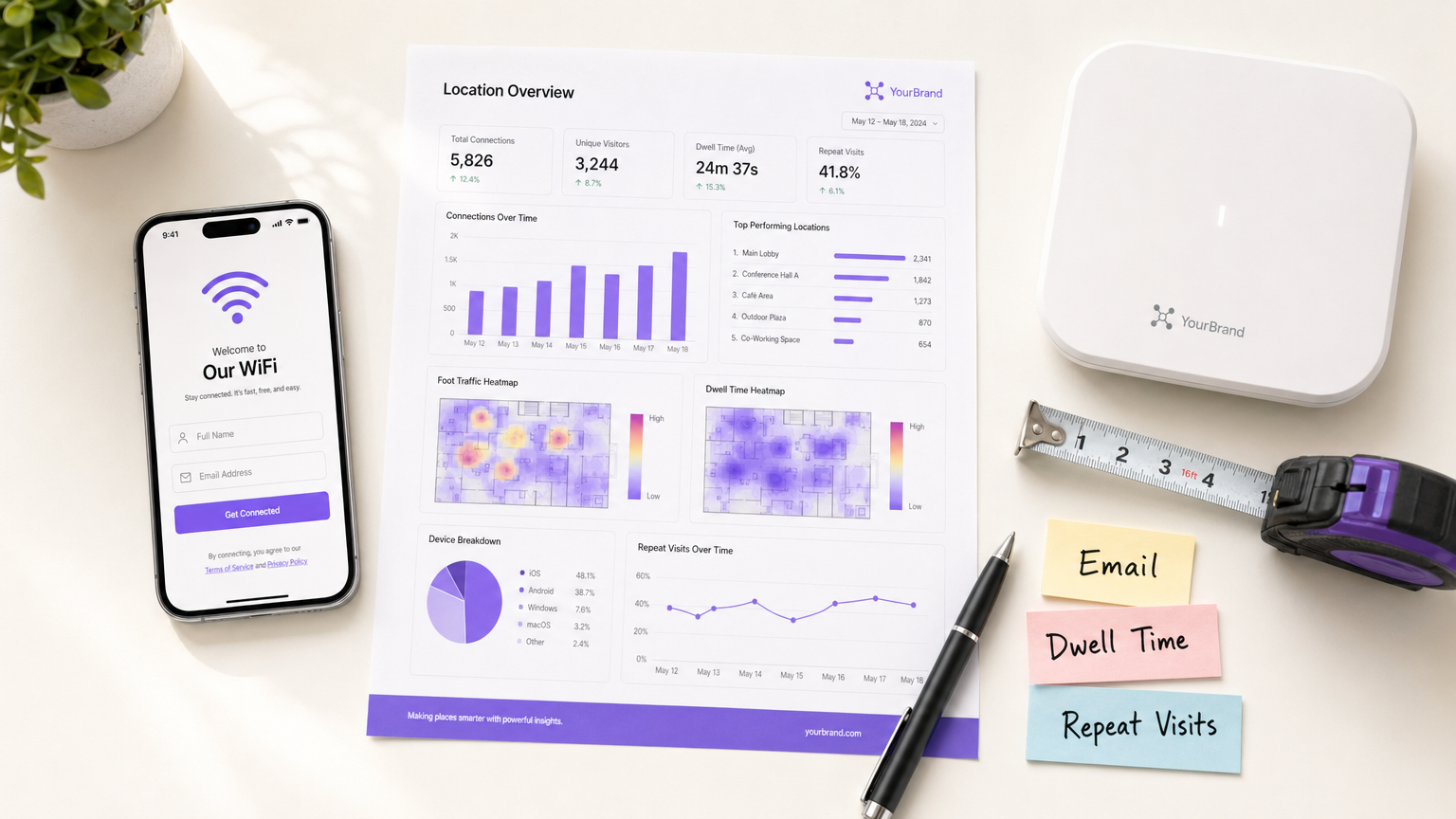
Per le sedi aziendali—dalle proprietà Retail ai gruppi Hospitality —il WiFi guest si è evoluto da un servizio di base a un canale critico di acquisizione dati. Tuttavia, molte organizzazioni implementano ancora reti wireless come pura infrastruttura IT, perdendo l'opportunità di acquisire intelligence sui clienti first-party ad alto segnale. Questa guida descrive in dettaglio i tipi esatti di dati del cliente che una piattaforma Guest WiFi aziendale può acquisire, l'architettura tecnica necessaria per farlo in modo sicuro e i framework di conformità necessari per proteggerli. Esploriamo le quattro categorie di dati principali: identità, comportamentali, dichiarati e metadati del dispositivo. Per i CTO e gli architetti di rete, l'obiettivo è chiaro: implementare un robusto livello di WiFi Analytics che offra un ROI misurabile attraverso l'arricchimento del CRM, aderendo rigorosamente ai principi di minimizzazione dei dati e GDPR.
Approfondimento Tecnico: Le Quattro Categorie di Dati WiFi
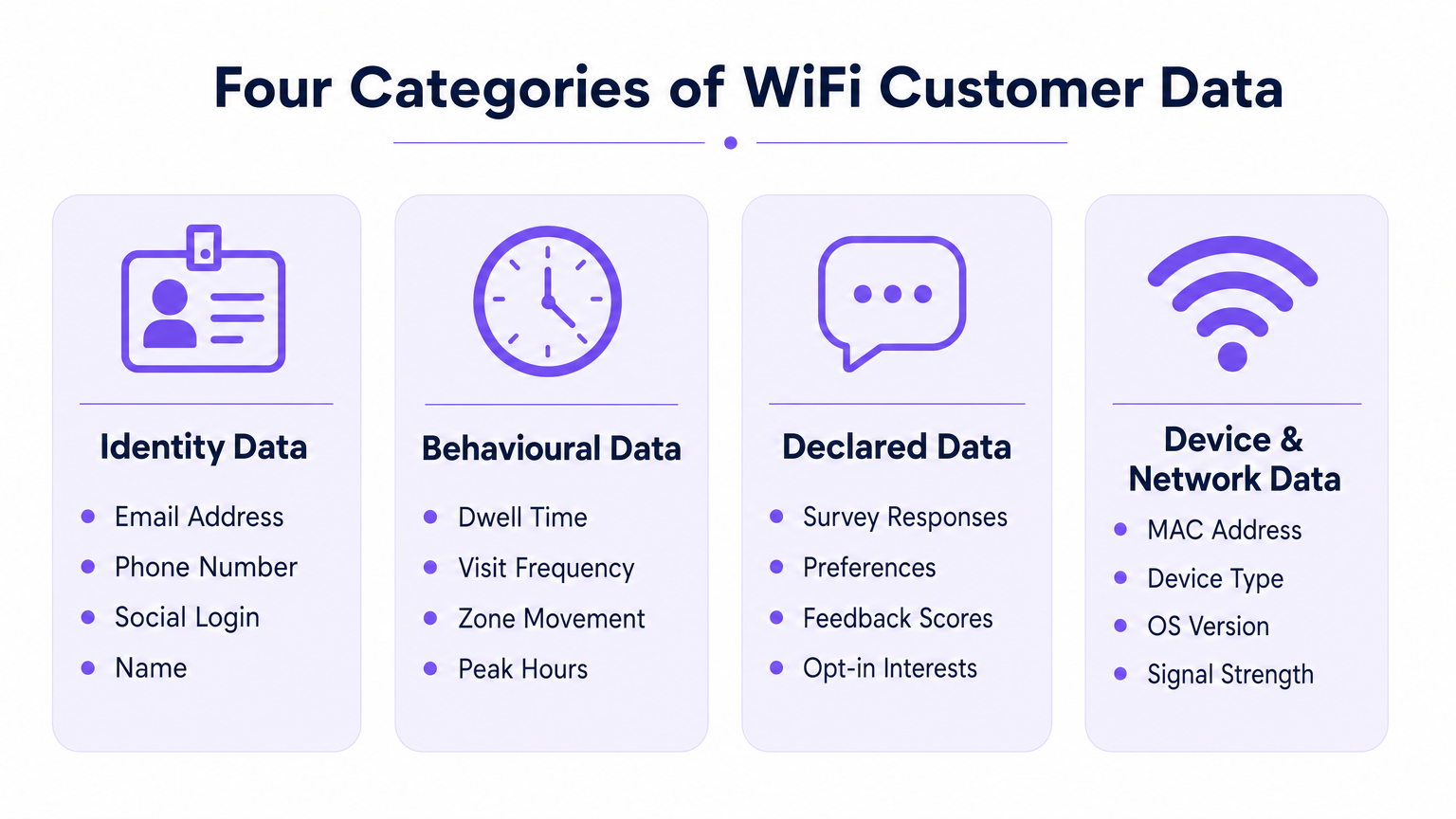
Quando un utente si associa a una rete wireless aziendale, la piattaforma può acquisire dati attraverso quattro categorie distinte. Comprendere i meccanismi tecnici e le limitazioni di ciascuna è essenziale per un'implementazione efficace.
1. Dati di Identità (Identificatori Dichiarati)
I dati di identità sono forniti esplicitamente dall'utente durante il processo di autenticazione sul captive portal (splash page). Questa è la base della vostra strategia di dati first-party.
- Email Address & Phone Number: Acquisiti tramite campi modulo standard. Questi servono come identificatori persistenti primari per l'integrazione CRM.
- Social Login Profile: Acquisiti tramite integrazione OAuth (es. Facebook, Google, Apple). A seconda del consenso dell'utente, questo può fornire dati di profilo ricchi, inclusi nome, fascia d'età ed email verificata.
Nota sull'Architettura Tecnica: L'acquisizione dei dati di identità deve essere abbinata a un registro di consenso verificabile. La piattaforma deve registrare il timestamp, l'IP address, il MAC address e i Termini e Condizioni specifici presentati all'utente. L'architettura di Purple automatizza questa registrazione per garantire la conformità all'Articolo 7 GDPR.
2. Dati Comportamentali (Network Analytics)
I dati comportamentali sono derivati passivamente dall'interazione del dispositivo con l'infrastruttura di rete. Non richiedono un input attivo dell'utente oltre al mantenimento di una connessione.
- Presenza e Tempo di Permanenza: La durata in cui un dispositivo rimane associato alla rete. Tempi di permanenza elevati in zone specifiche (es. un hotel bar o un'esposizione retail) correlano fortemente con l'intento di conversione.
- Frequenza e Recenza delle Visite: Tracciare il delta tra le visite per distinguere i visitatori per la prima volta dai clienti fedeli che ritornano.
- Movimento a Livello di Zona: Triangolando i dati del Received Signal Strength Indicator (RSSI) attraverso più access points, le piattaforme possono mappare i percorsi degli utenti attraverso uno spazio fisico. Per un approfondimento sulla tecnologia sottostante, consulta la nostra guida su Indoor Positioning System: UWB, BLE, & WiFi Guide .
3. Dati Dichiarati (Progressive Profiling)
I dati dichiarati vanno oltre l'identità di base, acquisendo preferenze esplicite direttamente dall'utente. Questi dati hanno la massima qualità del segnale perché si basano su input diretti piuttosto che su inferenze.
- Risposte a Sondaggi: Sondaggi post-autenticazione o post-visita (es. Net Promoter Score, feedback sulla struttura).
- Acquisizione delle Preferenze: Richieste in-sessione che raccolgono interessi specifici (es. requisiti dietetici in Healthcare o interessi di prodotto nel retail).
4. Metadati del Dispositivo e della Rete
Questi dati sono generati dall'hardware del dispositivo e dal sistema operativo durante il processo di associazione 802.11.
- MAC Address: L'identificatore hardware. Vincolo cruciale: Da iOS 14 e Android 10, la randomizzazione del MAC per rete è l'impostazione predefinita. I MAC addresses non possono più essere utilizzati in modo affidabile come identificatori persistenti tra le visite senza un record utente autenticato.
- Device Type & OS Version: Estratti dalla stringa HTTP User-Agent durante il rendering del portale o tramite DHCP fingerprinting.
- Data Usage: Metriche di throughput (volume di upload/download), che aiutano nella pianificazione della capacità e nell'identificazione degli utenti con elevato consumo di banda.
Guida all'Implementazione: Architettare per l'Acquisizione dei Dati
L'implementazione di una rete WiFi data-centrica richiede decisioni architettoniche che bilancino l'esperienza utente con il rendimento dei dati.
Superare la Randomizzazione del MAC
Il cambiamento architettonico più significativo negli ultimi anni è la deprecazione del MAC address come identificatore persistente. Per tracciare accuratamente le visite ripetute, l'architettura deve ancorare il profilo utente alla credenziale autenticata (email/phone) piuttosto che all'hardware del dispositivo.
- Inizio Sessione: Il dispositivo si connette con un MAC randomizzato.
- Autenticazione: L'utente fornisce l'email tramite il captive portal.
- Associazione del Profilo: La piattaforma associa la sessione MAC randomizzata corrente al profilo email persistente.
- Visite Successive: Se il dispositivo presenta un nuovo MAC randomizzato, l'utente deve riautenticarsi (spesso senza interruzioni tramite un flusso utente di ritorno o un'autenticazione basata su profilo come OpenRoaming) per riassociare la sessione al proprio profilo.
Profilazione Progressiva vs. Attrito
Non richiedere ogni data point alla prima connessione. I captive portals ad alto attrito soffrono di elevati tassi di abbandono. Implementare la profilazione progressiva: man mano chek per un indirizzo email alla prima visita, un numero di telefono alla terza visita e un sondaggio sulle preferenze alla quinta visita.
Per indicazioni specifiche sulla sicurezza di questi dati una volta acquisiti, fare riferimento a Come proteggere i dati dei clienti raccolti tramite WiFi .
Migliori Pratiche e Conformità
Tratta il WiFi per gli ospiti come un progetto di strategia dei dati, non solo come un'implementazione IT. La conformità deve essere integrata nell'architettura fin dal primo giorno.
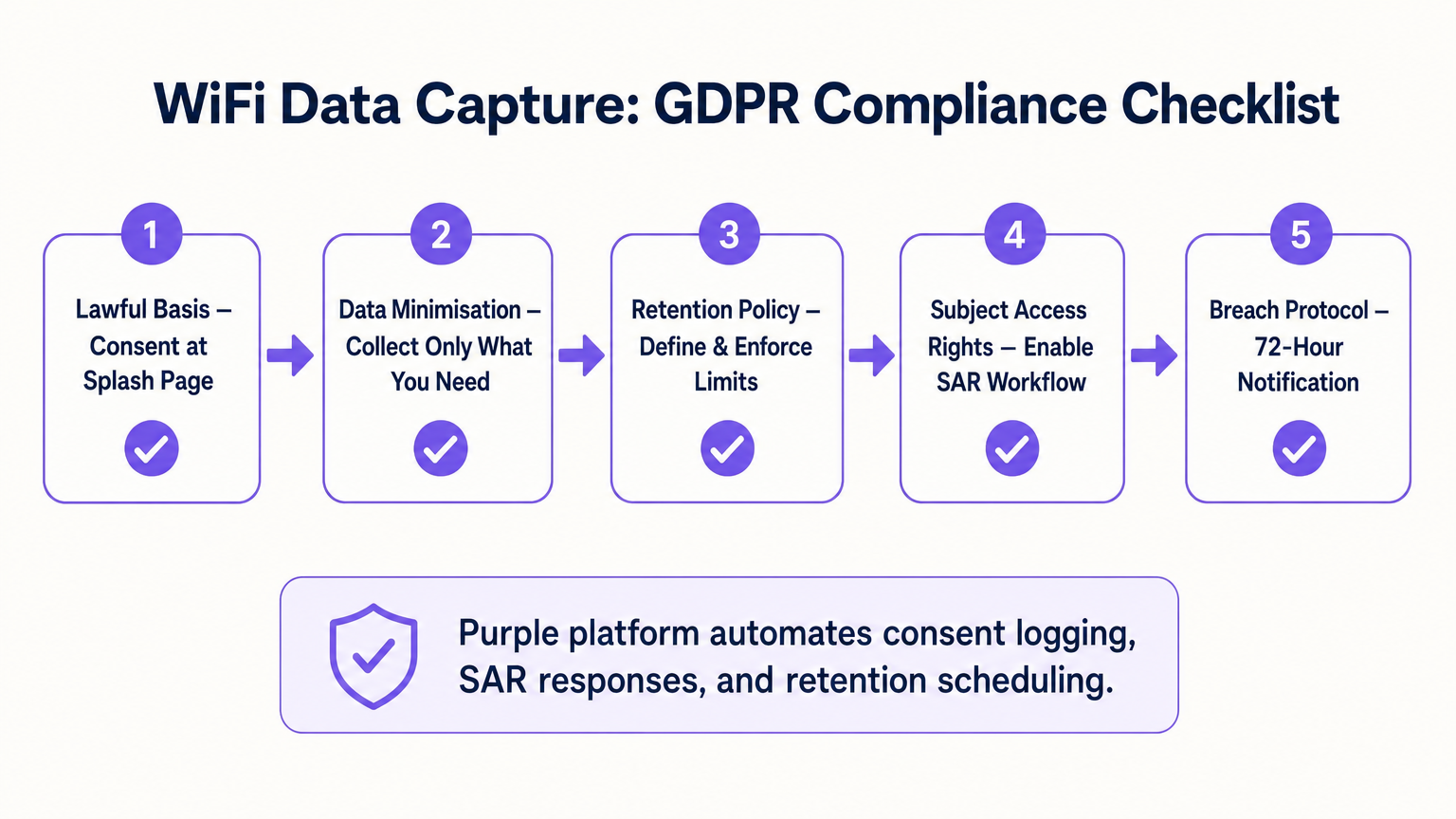
- Base Giuridica e Consenso: Assicurati che il captive portal separi esplicitamente l'accettazione dei Termini di Servizio dal Consenso Marketing. Le caselle preselezionate non sono conformi al GDPR.
- Minimizzazione dei Dati: Raccogli solo i dati per i quali hai un caso d'uso commerciale. Se non hai una strategia di SMS marketing, non rendere obbligatoria la raccolta del numero di telefono.
- Conservazione Automatica: Configura la piattaforma per eliminare automaticamente i profili inattivi dopo un periodo definito (es. 24 mesi) per conformarsi ai principi di limitazione della conservazione.
- Richieste di Accesso dell'Interessato (SAR): Assicurati che la tua piattaforma disponga di un flusso di lavoro automatizzato per esportare o eliminare i dati di un utente entro la finestra legale di 30 giorni su richiesta.
ROI e Impatto sul Business
Il ROI di una piattaforma di analisi WiFi è misurato dalla sua integrazione con lo stack martech più ampio. Spingendo dati di identità, comportamentali e dichiarati tramite API in piattaforme come Salesforce o HubSpot, le sedi possono attivare flussi di lavoro automatizzati. Ad esempio, un hub Trasporti può inviare automaticamente via email uno sconto per la lounge a un passeggero il cui tempo di permanenza supera i 45 minuti. L'impatto aziendale finale è la conversione del traffico pedonale anonimo in un database segmentato e commercializzabile.
Termini chiave e definizioni
Captive Portal
A web page that a user of a public-access network is obliged to view and interact with before access is granted. It is the primary mechanism for capturing identity data and consent.
IT teams configure this to balance security, branding, and data capture requirements.
MAC Randomisation
A privacy feature in modern OSs (iOS, Android) where the device generates a temporary, random MAC address for each specific WiFi network it joins, preventing cross-network tracking.
This forces network architects to rely on authenticated user profiles rather than hardware identifiers for repeat visit tracking.
Dwell Time
The total duration a device remains continuously associated with the WiFi network or a specific zone within the network.
Used by operations and marketing to gauge engagement, queue lengths, or intent to purchase.
Progressive Profiling
The practice of collecting user data incrementally over multiple sessions rather than demanding all information during the initial interaction.
Crucial for maintaining high WiFi connection rates while still building rich customer profiles over time.
First-Party Data
Information a company collects directly from its customers and owns entirely, typically gathered via direct interactions like WiFi authentication.
Highly valuable as third-party cookies deprecate; it provides the most accurate and compliant foundation for marketing.
Received Signal Strength Indicator (RSSI)
A measurement of the power present in a received radio signal. Used in WiFi analytics to estimate the distance between a device and an access point.
The technical metric underlying zone-level movement tracking and indoor positioning.
Subject Access Request (SAR)
A mechanism under GDPR allowing individuals to request a copy of their personal data, or request its deletion.
IT must ensure the WiFi platform can easily query and export or purge specific user records to meet the 30-day compliance window.
Data Minimisation
The principle that a data controller should limit the collection of personal information to what is directly relevant and necessary to accomplish a specified purpose.
A core compliance requirement; prevents venues from hoarding unnecessary data that increases breach liability.
Casi di studio
A 200-room hotel needs to increase direct bookings and reduce OTA (Online Travel Agency) commissions. They currently offer open, unauthenticated WiFi.
The hotel deploys a captive portal requiring email or social authentication. They implement progressive profiling: on the first connection, they capture email and marketing consent. On the third connection during the stay, a micro-survey captures the reason for travel (Business/Leisure). Post-checkout, the CRM uses the WiFi identity data to send a targeted 'Book Direct' offer for their next stay, bypassing the OTA.
A large retail chain wants to measure the impact of a new store layout on customer engagement, but their current WiFi only tracks total daily connections.
The IT team upgrades the network to support zone-level analytics by calibrating multiple access points. They define virtual zones within the analytics platform corresponding to key departments. They can now measure not just presence, but 'Zone Dwell Time'. By comparing dwell times in the newly laid-out zones against historical benchmarks, they quantify the layout's impact on engagement.
Analisi degli scenari
Q1. Your marketing team wants to track how often specific customers return to your stadium over a season. The current network uses open access (no portal) and tracks MAC addresses. Why will this fail, and what must you change?
💡 Suggerimento:Consider recent changes in mobile operating system privacy features.
Mostra l'approccio consigliato
It will fail due to MAC randomisation; modern devices present a different MAC address on subsequent visits, breaking the tracking. You must implement a captive portal to force authentication (e.g., via email or ticketing integration) and anchor the repeat visit tracking to that persistent user credential rather than the hardware MAC.
Q2. A venue director requests that the new WiFi splash page collects Name, Email, Phone, Date of Birth, Postcode, and Dietary Preferences to build a comprehensive CRM database immediately. How should the IT architect respond?
💡 Suggerimento:Balance data yield against the user experience and connection drop-off rates.
Mostra l'approccio consigliato
The architect should advise against this due to the Friction vs. Yield trade-off. A 6-field form will cause massive connection abandonment. Instead, recommend progressive profiling: capture Name and Email on the first visit, and use subsequent visits to prompt for Phone or Dietary Preferences. Furthermore, under data minimisation principles, Date of Birth should not be collected unless there is a strict legal requirement (e.g., age-gated venues).
Q3. During a security audit, the compliance team asks how the WiFi platform proves that a user opted into marketing communications. What specific data points must the system be able to produce?
💡 Suggerimento:Think about the requirements of GDPR Article 7 regarding the demonstration of consent.
Mostra l'approccio consigliato
The system must produce a definitive audit trail for that specific user. This includes the timestamp of the consent action, the IP address and MAC address used during the session, the exact version of the Terms & Conditions/Privacy Policy presented at that time, and the specific checkbox (which must have been actively opted-in, not pre-ticked) that the user interacted with.




