

Quels types de données client le WiFi peut-il capturer ?
Ce guide faisant autorité détaille les quatre catégories principales de données client capturées par les plateformes WiFi d'entreprise : identité, comportementales, déclarées et métadonnées d'appareil. Il fournit des conseils pratiques en matière d'architecture, de conformité et de déploiement pour les leaders informatiques afin de transformer l'infrastructure de réseau invité en un actif de données de première partie sécurisé.
🎧 Écouter ce guide
Voir la transcription
Résumé Exécutif
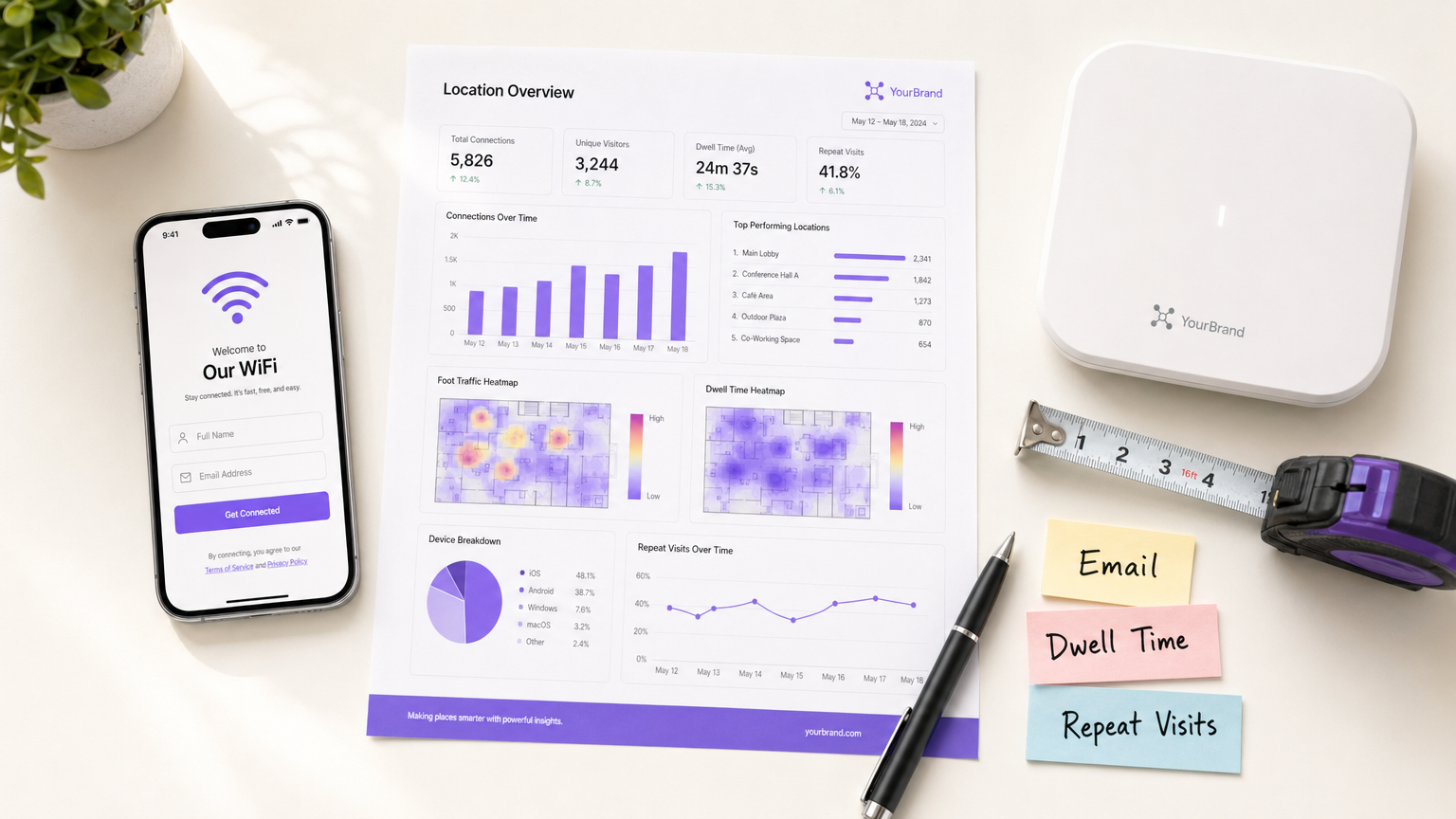
Pour les sites d'entreprise — des domaines de Retail aux groupes d' Hospitality — le WiFi invité est passé d'un service de base à un canal d'acquisition de données essentiel. Cependant, de nombreuses organisations déploient encore des réseaux sans fil comme de pures infrastructures informatiques, manquant l'opportunité de capturer des informations client de première partie à haute valeur ajoutée. Ce guide détaille les types exacts de données client qu'une plateforme Guest WiFi d'entreprise peut capturer, l'architecture technique requise pour le faire en toute sécurité, et les cadres de conformité nécessaires pour les protéger. Nous explorons les quatre catégories de données principales : identité, comportementales, déclarées et métadonnées d'appareil. Pour les CTO et les architectes réseau, l'objectif est clair : implémenter une couche WiFi Analytics robuste qui génère un ROI mesurable grâce à l'enrichissement du CRM, tout en adhérant strictement aux principes de minimisation des données et du GDPR.
Approfondissement Technique : Les Quatre Catégories de Données WiFi
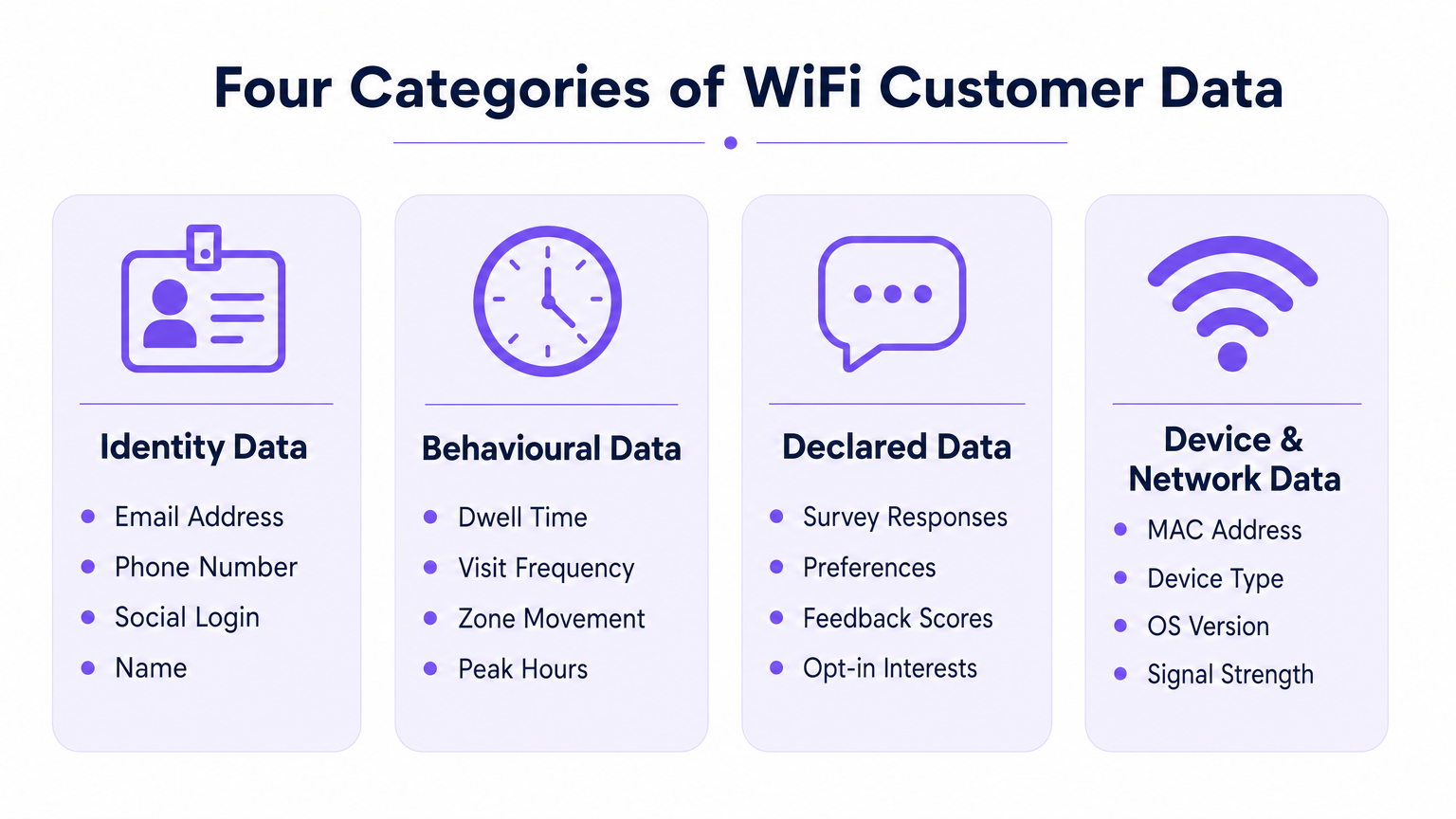
Lorsqu'un utilisateur s'associe à un réseau sans fil d'entreprise, la plateforme peut capturer des données dans quatre catégories distinctes. Comprendre les mécanismes techniques et les limitations de chacune est essentiel pour un déploiement efficace.
1. Données d'Identité (Identifiants Déclarés)
Les données d'identité sont explicitement fournies par l'utilisateur pendant le processus d'authentification sur le Captive Portal (page de connexion). C'est le fondement de votre stratégie de données de première partie.
- Adresse E-mail & Numéro de Téléphone : Capturés via des champs de formulaire standard. Ceux-ci servent d'identifiants persistants principaux pour l'intégration CRM.
- Profil de Connexion Sociale : Capturé via l'intégration OAuth (par exemple, Facebook, Google, Apple). Selon le consentement de l'utilisateur, cela peut fournir des données de profil riches incluant le nom, la tranche d'âge et l'e-mail vérifié.
Note d'Architecture Technique : La capture des données d'identité doit être associée à un journal de consentement auditable. La plateforme doit enregistrer l'horodatage, l'adresse IP, l'adresse MAC et les Conditions Générales spécifiques présentées à l'utilisateur. L'architecture de Purple automatise cette journalisation pour assurer la conformité à l'Article 7 du GDPR.
2. Données Comportementales (Analyse Réseau)
Les données comportementales sont dérivées passivement de l'interaction de l'appareil avec l'infrastructure réseau. Elles ne nécessitent aucune saisie active de l'utilisateur au-delà du maintien d'une connexion.
- Présence & Temps de Permanence : La durée pendant laquelle un appareil reste associé au réseau. Des temps de permanence élevés dans des zones spécifiques (par exemple, un bar d'hôtel ou un présentoir de vente au détail) sont fortement corrélés à l'intention de conversion.
- Fréquence & Récence des Visites : Suivi de l'écart entre les visites pour distinguer les nouveaux visiteurs des clients fidèles.
- Mouvement au Niveau de la Zone : En triangulant les données de l'Indicateur de Force du Signal Reçu (RSSI) à travers plusieurs points d'accès, les plateformes peuvent cartographier les parcours des utilisateurs dans un espace physique. Pour une exploration plus approfondie de la technologie sous-jacente, consultez notre guide sur Système de Positionnement Intérieur : Guide UWB, BLE, & WiFi .
3. Données Déclarées (Profilage Progressif)
Les données déclarées vont au-delà de l'identité de base, capturant les préférences explicites directement de l'utilisateur. Ces données ont la plus haute qualité de signal car elles reposent sur une saisie directe plutôt que sur une inférence.
- Réponses aux Enquêtes : Enquêtes post-authentification ou post-visite (par exemple, Net Promoter Score, commentaires sur les installations).
- Capture des Préférences : Invites en session recueillant des intérêts spécifiques (par exemple, exigences alimentaires dans le Healthcare ou intérêts produits dans le commerce de détail).
4. Métadonnées d'Appareil et de Réseau
Ces données sont générées par le matériel et le système d'exploitation de l'appareil pendant le processus d'association 802.11.
- Adresse MAC : L'identifiant matériel. Contrainte cruciale : Depuis iOS 14 et Android 10, la randomisation MAC par réseau est la valeur par défaut. Les adresses MAC ne peuvent plus être utilisées de manière fiable comme identifiants persistants entre les visites sans un enregistrement utilisateur authentifié.
- Type d'Appareil & Version d'OS : Extraits de la chaîne HTTP User-Agent lors du rendu du portail ou via le fingerprinting DHCP.
- Utilisation des Données : Métriques de débit (volume d'upload/download), qui aident à la planification de la capacité et à l'identification des utilisateurs gourmands en bande passante.
Guide d'Implémentation : Architecture pour la Capture de Données
Le déploiement d'un réseau WiFi axé sur les données nécessite des décisions architecturales qui équilibrent l'expérience utilisateur et le rendement des données.
Surmonter la Randomisation MAC
Le changement architectural le plus significatif de ces dernières années est la dépréciation de l'adresse MAC en tant qu'identifiant persistant. Pour suivre précisément les visites répétées, l'architecture doit ancrer le profil utilisateur à l'identifiant authentifié (e-mail/téléphone) plutôt qu'au matériel de l'appareil.
- Initiation de Session : L'appareil se connecte avec une MAC randomisée.
- Authentification : L'utilisateur fournit son e-mail via le Captive Portal.
- Liaison de Profil : La plateforme lie la session MAC randomisée actuelle au profil e-mail persistant.
- Visites Ultérieures : Si l'appareil présente une nouvelle MAC randomisée, l'utilisateur doit se réauthentifier (souvent de manière transparente via un flux utilisateur de retour ou une authentification basée sur le profil comme OpenRoaming) pour relier la session à son profil.
Profilage Progressif vs. Friction
Ne demandez pas chaque point de données lors de la première connexion. Les Captive Portals à forte friction souffrent de taux d'abandon élevés. Implémentez le profilage progressif : à mesure quek pour une adresse e-mail lors de la première visite, un numéro de téléphone lors de la troisième visite et une enquête de préférence lors de la cinquième visite.
Pour des conseils spécifiques sur la sécurisation de ces données une fois capturées, consultez Comment protéger les données clients collectées via le WiFi .
Bonnes pratiques et conformité
Considérez le WiFi invité comme un projet de stratégie de données, et non comme un simple déploiement informatique. La conformité doit être intégrée à l'architecture dès le premier jour.
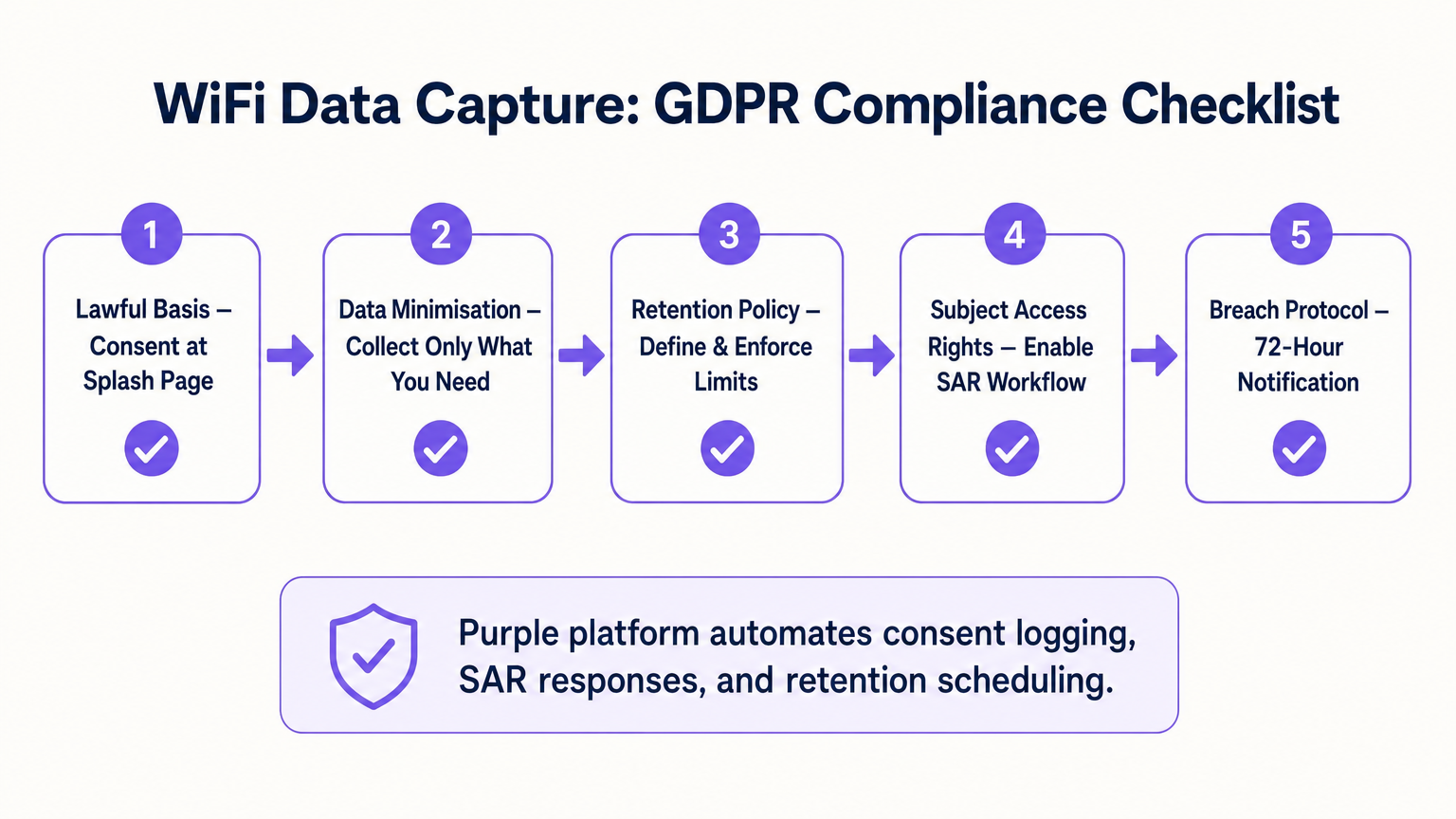
- Base légale et consentement : Assurez-vous que le Captive Portal sépare explicitement l'acceptation des conditions d'utilisation du consentement marketing. Les cases pré-cochées ne sont pas conformes au GDPR.
- Minimisation des données : Ne collectez que les données pour lesquelles vous avez un cas d'utilisation commercial. Si vous n'avez pas de stratégie de marketing par SMS, ne rendez pas obligatoire la collecte de numéros de téléphone.
- Rétention automatisée : Configurez la plateforme pour purger automatiquement les profils inactifs après une période définie (par exemple, 24 mois) afin de respecter les principes de limitation du stockage.
- Demandes d'accès des personnes concernées (SAR) : Assurez-vous que votre plateforme dispose d'un flux de travail automatisé pour exporter ou supprimer les données d'un utilisateur dans le délai légal de 30 jours sur demande.
ROI et impact commercial
Le ROI d'une plateforme d'analyse WiFi est mesuré par son intégration avec l'ensemble de la pile martech. En poussant les données d'identité, comportementales et déclarées via l'API vers des plateformes comme Salesforce ou HubSpot, les lieux peuvent déclencher des flux de travail automatisés. Par exemple, un pôle Transport peut automatiquement envoyer par e-mail une réduction pour le salon à un passager dont le temps de présence dépasse 45 minutes. L'impact commercial ultime est la conversion du trafic piéton anonyme en une base de données commercialisable et segmentée.
Termes clés et définitions
Captive Portal
A web page that a user of a public-access network is obliged to view and interact with before access is granted. It is the primary mechanism for capturing identity data and consent.
IT teams configure this to balance security, branding, and data capture requirements.
MAC Randomisation
A privacy feature in modern OSs (iOS, Android) where the device generates a temporary, random MAC address for each specific WiFi network it joins, preventing cross-network tracking.
This forces network architects to rely on authenticated user profiles rather than hardware identifiers for repeat visit tracking.
Dwell Time
The total duration a device remains continuously associated with the WiFi network or a specific zone within the network.
Used by operations and marketing to gauge engagement, queue lengths, or intent to purchase.
Progressive Profiling
The practice of collecting user data incrementally over multiple sessions rather than demanding all information during the initial interaction.
Crucial for maintaining high WiFi connection rates while still building rich customer profiles over time.
First-Party Data
Information a company collects directly from its customers and owns entirely, typically gathered via direct interactions like WiFi authentication.
Highly valuable as third-party cookies deprecate; it provides the most accurate and compliant foundation for marketing.
Received Signal Strength Indicator (RSSI)
A measurement of the power present in a received radio signal. Used in WiFi analytics to estimate the distance between a device and an access point.
The technical metric underlying zone-level movement tracking and indoor positioning.
Subject Access Request (SAR)
A mechanism under GDPR allowing individuals to request a copy of their personal data, or request its deletion.
IT must ensure the WiFi platform can easily query and export or purge specific user records to meet the 30-day compliance window.
Data Minimisation
The principle that a data controller should limit the collection of personal information to what is directly relevant and necessary to accomplish a specified purpose.
A core compliance requirement; prevents venues from hoarding unnecessary data that increases breach liability.
Études de cas
A 200-room hotel needs to increase direct bookings and reduce OTA (Online Travel Agency) commissions. They currently offer open, unauthenticated WiFi.
The hotel deploys a captive portal requiring email or social authentication. They implement progressive profiling: on the first connection, they capture email and marketing consent. On the third connection during the stay, a micro-survey captures the reason for travel (Business/Leisure). Post-checkout, the CRM uses the WiFi identity data to send a targeted 'Book Direct' offer for their next stay, bypassing the OTA.
A large retail chain wants to measure the impact of a new store layout on customer engagement, but their current WiFi only tracks total daily connections.
The IT team upgrades the network to support zone-level analytics by calibrating multiple access points. They define virtual zones within the analytics platform corresponding to key departments. They can now measure not just presence, but 'Zone Dwell Time'. By comparing dwell times in the newly laid-out zones against historical benchmarks, they quantify the layout's impact on engagement.
Analyse de scénario
Q1. Your marketing team wants to track how often specific customers return to your stadium over a season. The current network uses open access (no portal) and tracks MAC addresses. Why will this fail, and what must you change?
💡 Astuce :Consider recent changes in mobile operating system privacy features.
Afficher l'approche recommandée
It will fail due to MAC randomisation; modern devices present a different MAC address on subsequent visits, breaking the tracking. You must implement a captive portal to force authentication (e.g., via email or ticketing integration) and anchor the repeat visit tracking to that persistent user credential rather than the hardware MAC.
Q2. A venue director requests that the new WiFi splash page collects Name, Email, Phone, Date of Birth, Postcode, and Dietary Preferences to build a comprehensive CRM database immediately. How should the IT architect respond?
💡 Astuce :Balance data yield against the user experience and connection drop-off rates.
Afficher l'approche recommandée
The architect should advise against this due to the Friction vs. Yield trade-off. A 6-field form will cause massive connection abandonment. Instead, recommend progressive profiling: capture Name and Email on the first visit, and use subsequent visits to prompt for Phone or Dietary Preferences. Furthermore, under data minimisation principles, Date of Birth should not be collected unless there is a strict legal requirement (e.g., age-gated venues).
Q3. During a security audit, the compliance team asks how the WiFi platform proves that a user opted into marketing communications. What specific data points must the system be able to produce?
💡 Astuce :Think about the requirements of GDPR Article 7 regarding the demonstration of consent.
Afficher l'approche recommandée
The system must produce a definitive audit trail for that specific user. This includes the timestamp of the consent action, the IP address and MAC address used during the session, the exact version of the Terms & Conditions/Privacy Policy presented at that time, and the specific checkbox (which must have been actively opted-in, not pre-ticked) that the user interacted with.




