

Welche Arten von Kundendaten kann WiFi erfassen?
Dieser maßgebliche Leitfaden beschreibt die vier Kernkategorien von Kundendaten, die von Unternehmens-WiFi-Plattformen erfasst werden: Identität, Verhalten, deklarierte Daten und Gerätemetadaten. Er bietet umsetzbare Architektur-, Compliance- und Bereitstellungsrichtlinien für IT-Führungskräfte, um die Gastnetzwerkinfrastruktur in ein sicheres, erstklassiges Daten-Asset zu verwandeln.
🎧 Diesen Leitfaden anhören
Transkript anzeigen
Zusammenfassung für Führungskräfte
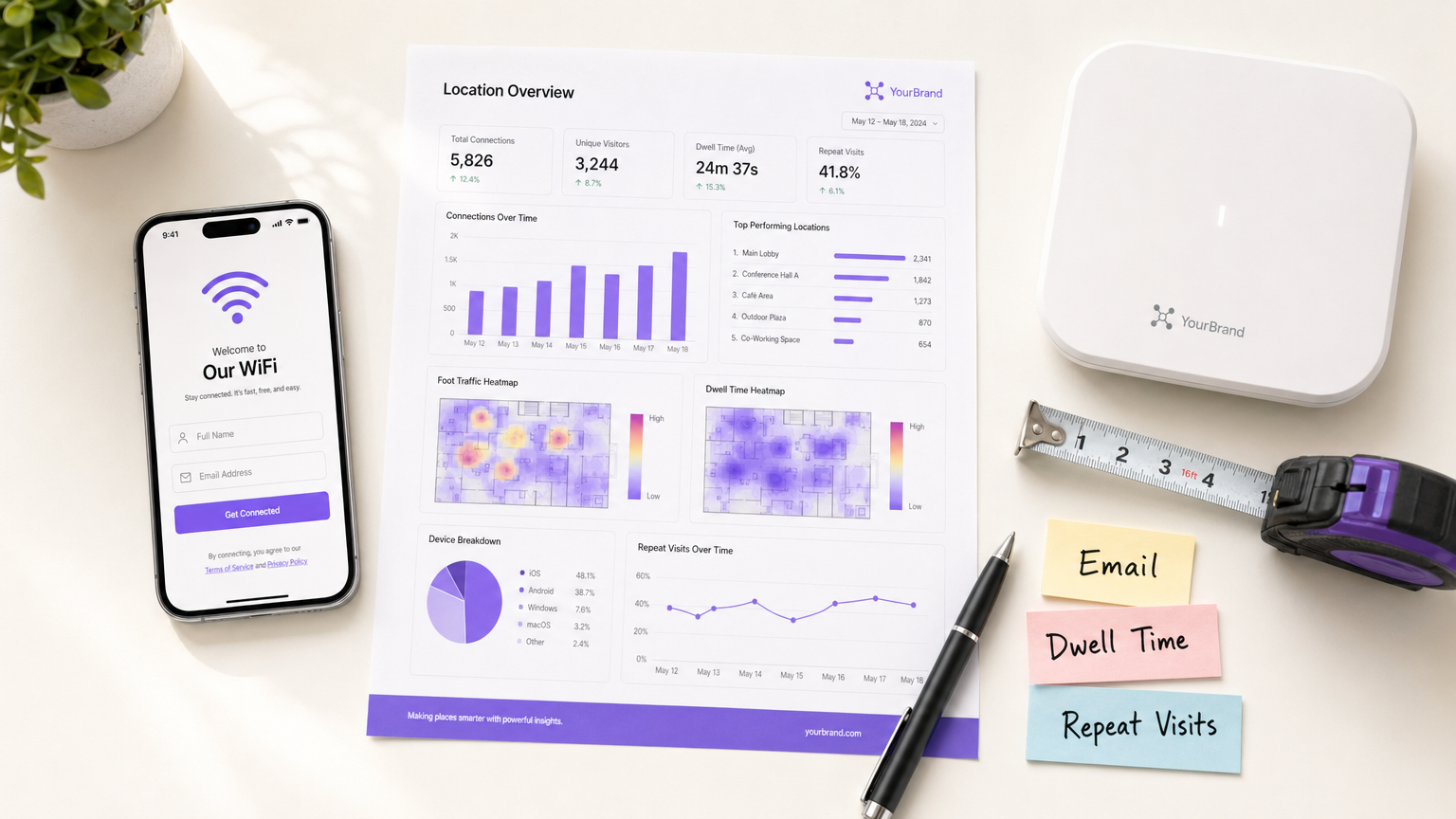
Für Unternehmensstandorte – von Einzelhandels immobilien bis hin zu Gastgewerbe gruppen – hat sich Gast-WiFi von einer grundlegenden Annehmlichkeit zu einem entscheidenden Kanal für die Datenerfassung entwickelt. Viele Organisationen setzen drahtlose Netzwerke jedoch immer noch als reine IT-Infrastruktur ein und verpassen die Gelegenheit, hochwertige, erstklassige Kundeninformationen zu erfassen. Dieser Leitfaden beschreibt die genauen Arten von Kundendaten, die eine Unternehmens- Gast-WiFi -Plattform erfassen kann, die technische Architektur, die für eine sichere Erfassung erforderlich ist, und die Compliance-Frameworks, die zu ihrem Schutz notwendig sind. Wir untersuchen die vier primären Datenkategorien: Identität, Verhalten, deklarierte Daten und Gerätemetadaten. Für CTOs und Netzwerkarchitekten ist das Ziel klar: Implementieren Sie eine robuste WiFi Analytics -Schicht, die durch CRM-Anreicherung einen messbaren ROI liefert, während gleichzeitig die Prinzipien der Datenminimierung und der GDPR strikt eingehalten werden.
Technischer Deep Dive: Die vier Kategorien von WiFi-Daten
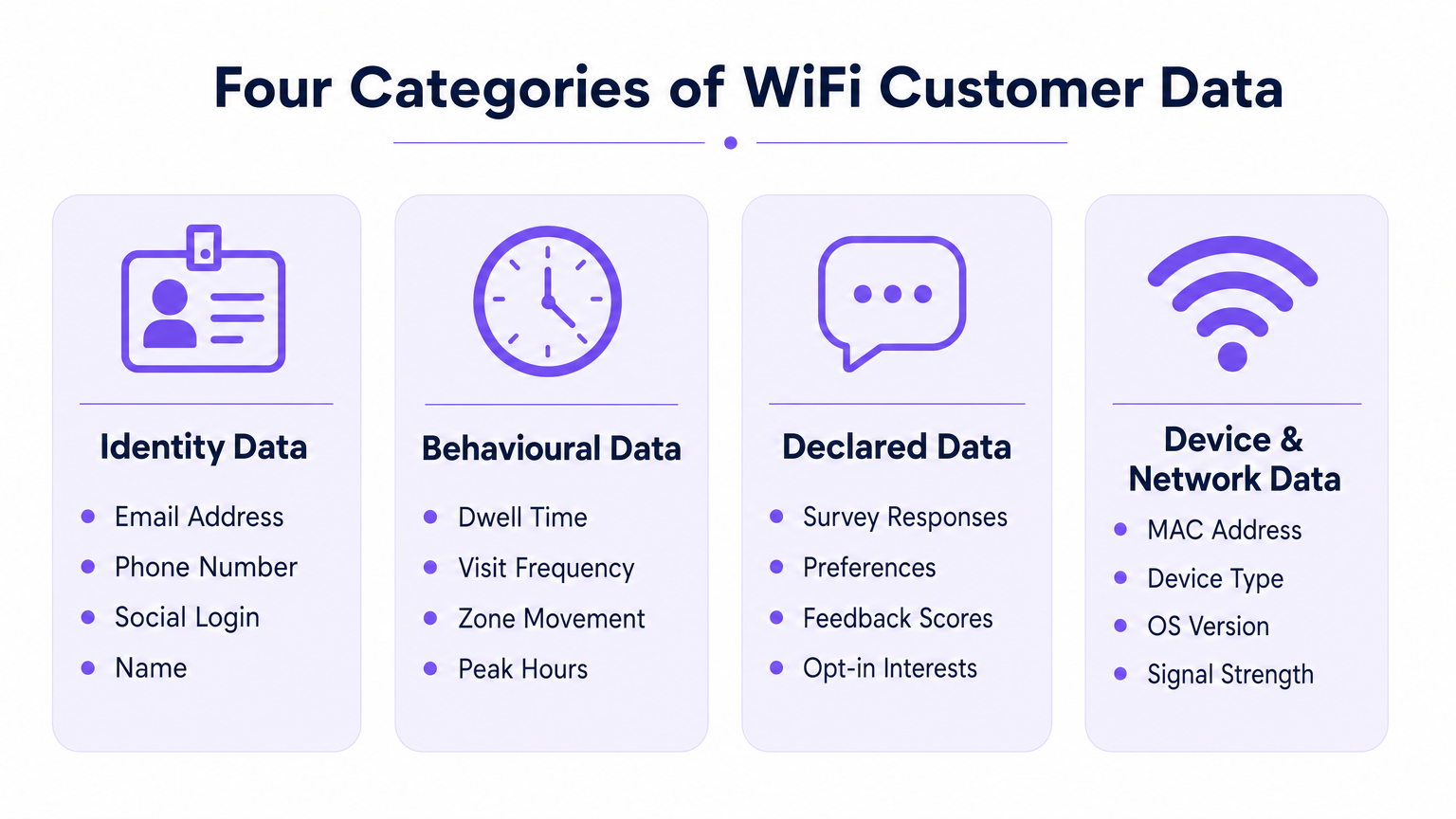
Wenn sich ein Benutzer mit einem drahtlosen Unternehmensnetzwerk verbindet, kann die Plattform Daten in vier verschiedenen Kategorien erfassen. Das Verständnis der technischen Mechanismen und Einschränkungen jeder Kategorie ist für eine effektive Bereitstellung unerlässlich.
1. Identitätsdaten (Deklarierte Identifikatoren)
Identitätsdaten werden vom Benutzer während des Authentifizierungsprozesses am Captive Portal (Splash Page) explizit bereitgestellt. Dies ist die Grundlage Ihrer First-Party-Datenstrategie.
- E-Mail-Adresse & Telefonnummer: Erfasst über Standardformularfelder. Diese dienen als primäre persistente Identifikatoren für die CRM-Integration.
- Social Login Profil: Erfasst über OAuth-Integration (z.B. Facebook, Google, Apple). Abhängig von der Benutzerzustimmung kann dies umfangreiche Profildaten wie Name, Altersgruppe und verifizierte E-Mail-Adresse liefern.
Hinweis zur technischen Architektur: Die Erfassung von Identitätsdaten muss mit einem auditierbaren Einwilligungs-Logbuch gekoppelt sein. Die Plattform muss den Zeitstempel, die IP-Adresse, die MAC-Adresse und die spezifischen Allgemeinen Geschäftsbedingungen, die dem Benutzer präsentiert wurden, aufzeichnen. Die Architektur von Purple automatisiert diese Protokollierung, um die Einhaltung von Artikel 7 GDPR zu gewährleisten.
2. Verhaltensdaten (Netzwerkanalyse)
Verhaltensdaten werden passiv aus der Interaktion des Geräts mit der Netzwerkinfrastruktur abgeleitet. Sie erfordern keine aktive Benutzereingabe über die Aufrechterhaltung einer Verbindung hinaus.
- Anwesenheit & Verweildauer: Die Dauer, die ein Gerät mit dem Netzwerk verbunden bleibt. Lange Verweildauern in bestimmten Zonen (z.B. einer Hotelbar oder einem Verkaufsdisplay) korrelieren stark mit der Konversionsabsicht.
- Besuchsfrequenz & Aktualität: Verfolgung der Zeitspanne zwischen Besuchen, um Erstbesucher von loyalen Wiederkehrern zu unterscheiden.
- Bewegung auf Zonenebene: Durch die Triangulation von Received Signal Strength Indicator (RSSI)-Daten über mehrere Zugangspunkte hinweg können Plattformen Benutzerwege durch einen physischen Raum abbilden. Für einen tieferen Einblick in die zugrunde liegende Technologie siehe unseren Leitfaden zu Indoor-Positionierungssystem: UWB, BLE & WiFi Leitfaden .
3. Deklarierte Daten (Progressive Profilierung)
Deklarierte Daten gehen über die grundlegende Identität hinaus und erfassen explizite Präferenzen direkt vom Benutzer. Diese Daten haben die höchste Signalqualität, da sie auf direkter Eingabe und nicht auf Inferenz basieren.
- Umfrageantworten: Umfragen nach der Authentifizierung oder nach dem Besuch (z.B. Net Promoter Score, Feedback zur Einrichtung).
- Präferenzerfassung: In-Session-Aufforderungen zur Erfassung spezifischer Interessen (z.B. Ernährungsanforderungen im Gesundheitswesen oder Produktinteressen im Einzelhandel).
4. Geräte- & Netzwerkmetadaten
Diese Daten werden von der Gerätehardware und dem Betriebssystem während des 802.11-Assoziationsprozesses generiert.
- MAC-Adresse: Der Hardware-Identifikator. Wichtige Einschränkung: Seit iOS 14 und Android 10 ist die MAC-Randomisierung pro Netzwerk Standard. MAC-Adressen können ohne einen authentifizierten Benutzerdatensatz nicht mehr zuverlässig als persistente, besuchsübergreifende Identifikatoren verwendet werden.
- Gerätetyp & OS-Version: Extrahiert aus dem HTTP User-Agent-String während des Portal-Renderings oder über DHCP-Fingerprinting.
- Datennutzung: Durchsatzmetriken (Upload-/Download-Volumen), die bei der Kapazitätsplanung und der Identifizierung bandbreitenintensiver Benutzer helfen.
Implementierungsleitfaden: Architektur für die Datenerfassung
Die Bereitstellung eines datenzentrierten WiFi-Netzwerks erfordert architektonische Entscheidungen, die das Benutzererlebnis mit dem Datenertrag in Einklang bringen.
Überwindung der MAC-Randomisierung
Die bedeutendste architektonische Veränderung der letzten Jahre ist die Abschaffung der MAC-Adresse als persistenter Identifikator. Um wiederholte Besuche genau zu verfolgen, muss die Architektur das Benutzerprofil an die authentifizierten Anmeldeinformationen (E-Mail/Telefon) und nicht an die Gerätehardware binden.
- Sitzungsinitiierung: Gerät verbindet sich mit einer randomisierten MAC.
- Authentifizierung: Benutzer gibt E-Mail über das Captive Portal an.
- Profilbindung: Die Plattform bindet die aktuelle randomisierte MAC-Sitzung an das persistente E-Mail-Profil.
- Folgebesuche: Wenn das Gerät eine neue randomisierte MAC präsentiert, muss sich der Benutzer erneut authentifizieren (oft nahtlos über einen wiederkehrenden Benutzerfluss oder eine profilbasierte Authentifizierung wie OpenRoaming), um die Sitzung erneut an sein Profil zu binden.
Progressive Profilierung vs. Reibung
Fragen Sie nicht nach jedem Datenpunkt bei der ersten Verbindung. Captive Portals mit hoher Reibung leiden unter hohen Abbruchraten. Implementieren Sie progressive Profilierung: dak für eine E-Mail-Adresse beim ersten Besuch, eine Telefonnummer beim dritten Besuch und eine Präferenzumfrage beim fünften Besuch.
Spezifische Anleitungen zur Sicherung dieser Daten nach der Erfassung finden Sie unter So schützen Sie über WiFi erfasste Kundendaten .
Best Practices & Compliance
Behandeln Sie Gast-WiFi als Datenstrategieprojekt, nicht nur als IT-Bereitstellung. Compliance muss von Anfang an in die Architektur integriert werden.
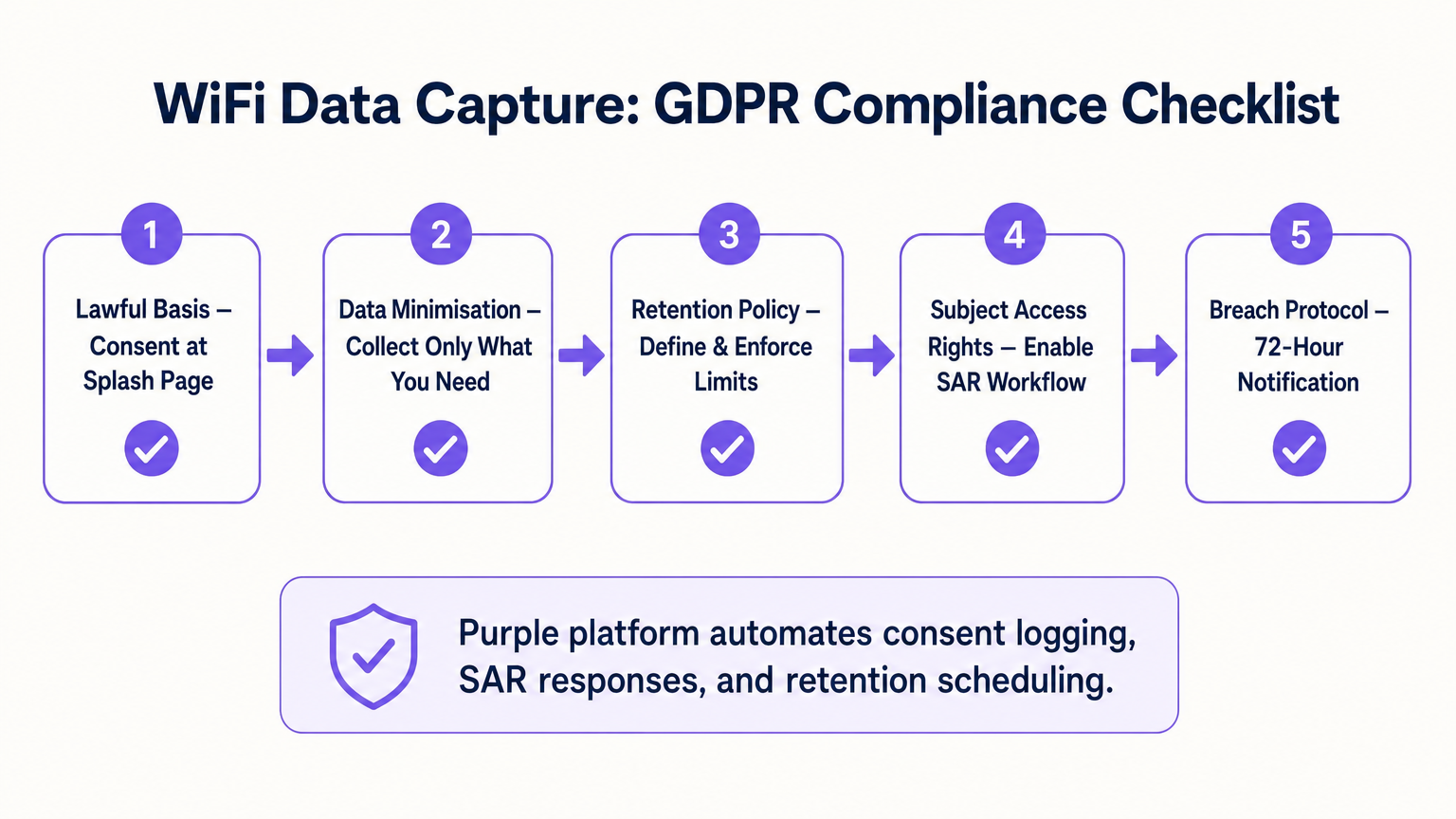
- Rechtsgrundlage & Einwilligung: Stellen Sie sicher, dass das Captive Portal die Annahme der Nutzungsbedingungen explizit von der Marketing-Einwilligung trennt. Vorausgewählte Kästchen sind unter GDPR nicht konform.
- Datenminimierung: Erfassen Sie nur Daten, für die Sie einen kommerziellen Anwendungsfall haben. Wenn Sie keine SMS-Marketingstrategie haben, fordern Sie keine Telefonnummern an.
- Automatisierte Aufbewahrung: Konfigurieren Sie die Plattform so, dass inaktive Profile nach einem definierten Zeitraum (z. B. 24 Monate) automatisch gelöscht werden, um den Grundsätzen der Speicherbegrenzung zu entsprechen.
- Betroffenenanfragen (SAR): Stellen Sie sicher, dass Ihre Plattform über einen automatisierten Workflow verfügt, um die Daten eines Benutzers innerhalb des gesetzlichen 30-Tage-Fensters auf Anfrage zu exportieren oder zu löschen.
ROI & Geschäftsauswirkungen
Der ROI einer WiFi-Analyseplattform wird durch ihre Integration in den breiteren Martech-Stack gemessen. Durch das Übertragen von Identitäts-, Verhaltens- und deklarierten Daten über die API in Plattformen wie Salesforce oder HubSpot können Standorte automatisierte Workflows auslösen. Zum Beispiel kann ein Transport -Knotenpunkt einem Passagier, dessen Verweildauer 45 Minuten überschreitet, automatisch einen Lounge-Rabatt per E-Mail senden. Die letztendliche Geschäftsauswirkung ist die Umwandlung von anonymem Fußgängerverkehr in eine vermarktbare, segmentierte Datenbank.
Schlüsselbegriffe & Definitionen
Captive Portal
A web page that a user of a public-access network is obliged to view and interact with before access is granted. It is the primary mechanism for capturing identity data and consent.
IT teams configure this to balance security, branding, and data capture requirements.
MAC Randomisation
A privacy feature in modern OSs (iOS, Android) where the device generates a temporary, random MAC address for each specific WiFi network it joins, preventing cross-network tracking.
This forces network architects to rely on authenticated user profiles rather than hardware identifiers for repeat visit tracking.
Dwell Time
The total duration a device remains continuously associated with the WiFi network or a specific zone within the network.
Used by operations and marketing to gauge engagement, queue lengths, or intent to purchase.
Progressive Profiling
The practice of collecting user data incrementally over multiple sessions rather than demanding all information during the initial interaction.
Crucial for maintaining high WiFi connection rates while still building rich customer profiles over time.
First-Party Data
Information a company collects directly from its customers and owns entirely, typically gathered via direct interactions like WiFi authentication.
Highly valuable as third-party cookies deprecate; it provides the most accurate and compliant foundation for marketing.
Received Signal Strength Indicator (RSSI)
A measurement of the power present in a received radio signal. Used in WiFi analytics to estimate the distance between a device and an access point.
The technical metric underlying zone-level movement tracking and indoor positioning.
Subject Access Request (SAR)
A mechanism under GDPR allowing individuals to request a copy of their personal data, or request its deletion.
IT must ensure the WiFi platform can easily query and export or purge specific user records to meet the 30-day compliance window.
Data Minimisation
The principle that a data controller should limit the collection of personal information to what is directly relevant and necessary to accomplish a specified purpose.
A core compliance requirement; prevents venues from hoarding unnecessary data that increases breach liability.
Fallstudien
A 200-room hotel needs to increase direct bookings and reduce OTA (Online Travel Agency) commissions. They currently offer open, unauthenticated WiFi.
The hotel deploys a captive portal requiring email or social authentication. They implement progressive profiling: on the first connection, they capture email and marketing consent. On the third connection during the stay, a micro-survey captures the reason for travel (Business/Leisure). Post-checkout, the CRM uses the WiFi identity data to send a targeted 'Book Direct' offer for their next stay, bypassing the OTA.
A large retail chain wants to measure the impact of a new store layout on customer engagement, but their current WiFi only tracks total daily connections.
The IT team upgrades the network to support zone-level analytics by calibrating multiple access points. They define virtual zones within the analytics platform corresponding to key departments. They can now measure not just presence, but 'Zone Dwell Time'. By comparing dwell times in the newly laid-out zones against historical benchmarks, they quantify the layout's impact on engagement.
Szenarioanalyse
Q1. Your marketing team wants to track how often specific customers return to your stadium over a season. The current network uses open access (no portal) and tracks MAC addresses. Why will this fail, and what must you change?
💡 Hinweis:Consider recent changes in mobile operating system privacy features.
Empfohlenen Ansatz anzeigen
It will fail due to MAC randomisation; modern devices present a different MAC address on subsequent visits, breaking the tracking. You must implement a captive portal to force authentication (e.g., via email or ticketing integration) and anchor the repeat visit tracking to that persistent user credential rather than the hardware MAC.
Q2. A venue director requests that the new WiFi splash page collects Name, Email, Phone, Date of Birth, Postcode, and Dietary Preferences to build a comprehensive CRM database immediately. How should the IT architect respond?
💡 Hinweis:Balance data yield against the user experience and connection drop-off rates.
Empfohlenen Ansatz anzeigen
The architect should advise against this due to the Friction vs. Yield trade-off. A 6-field form will cause massive connection abandonment. Instead, recommend progressive profiling: capture Name and Email on the first visit, and use subsequent visits to prompt for Phone or Dietary Preferences. Furthermore, under data minimisation principles, Date of Birth should not be collected unless there is a strict legal requirement (e.g., age-gated venues).
Q3. During a security audit, the compliance team asks how the WiFi platform proves that a user opted into marketing communications. What specific data points must the system be able to produce?
💡 Hinweis:Think about the requirements of GDPR Article 7 regarding the demonstration of consent.
Empfohlenen Ansatz anzeigen
The system must produce a definitive audit trail for that specific user. This includes the timestamp of the consent action, the IP address and MAC address used during the session, the exact version of the Terms & Conditions/Privacy Policy presented at that time, and the specific checkbox (which must have been actively opted-in, not pre-ticked) that the user interacted with.




