
Como configurar um Captive Portal no Starlink: Um guia para locais remotos e marítimos
Este guia detalha como ignorar o hardware nativo do Starlink e integrar um Captive Portal gerenciado na nuvem usando equipamentos de roteamento corporativos. Você aprenderá como superar a limitação de CGNAT, aplicar a segmentação de VLAN, gerenciar restrições de largura de banda de satélite e garantir a conformidade regulatória.
Ouça este guia
Ver transcrição do podcast
Resumo Executivo
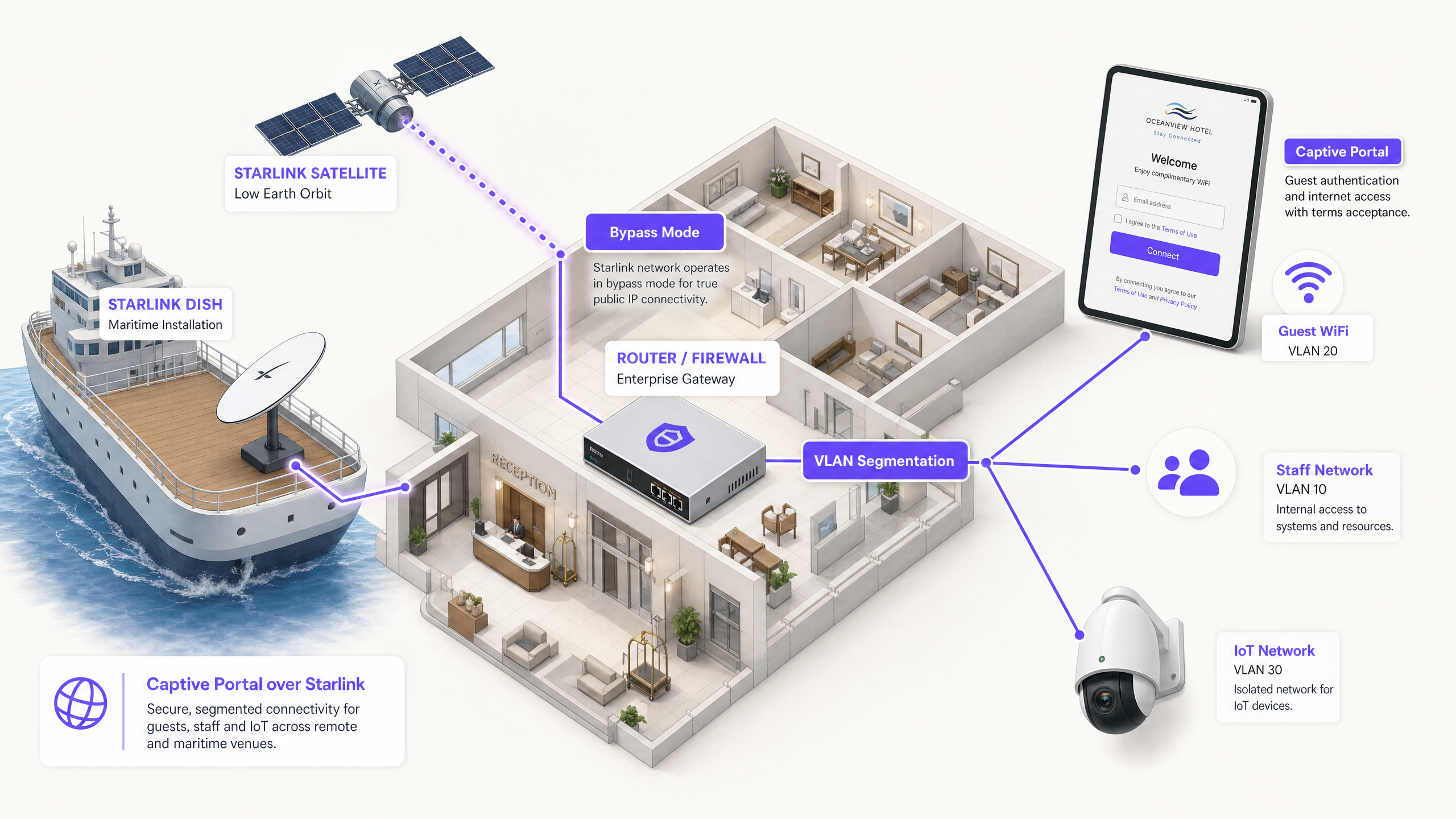
O Starlink oferece conectividade de 220 Mbps para locais onde a fibra não chega, alterando fundamentalmente o cenário de rede para locais remotos e marítimos. No entanto, a conectividade bruta é insuficiente para ambientes voltados ao público. Ao implantar o Starlink para convidados, passageiros ou tripulação, você deve implementar autenticação, controle de acesso, consentimento em conformidade com o GDPR e gerenciamento de largura de banda. O roteador Starlink nativo não oferece nenhum desses recursos.
Este guia detalha como ignorar o hardware nativo do Starlink e integrar um Captive Portal gerenciado na nuvem usando equipamentos de roteamento corporativos. Você aprenderá como superar a limitação de Carrier Grade NAT (CGNAT), aplicar a segmentação de VLAN, gerenciar restrições de largura de banda de satélite e garantir a conformidade regulatória.
Ao implementar essa arquitetura, os operadores de locais convertem um link de internet não gerenciado em uma rede segura e segmentada que captura dados primários (first-party data) e protege a infraestrutura principal de negócios.
Análise Técnica Detalhada
A Restrição do CGNAT
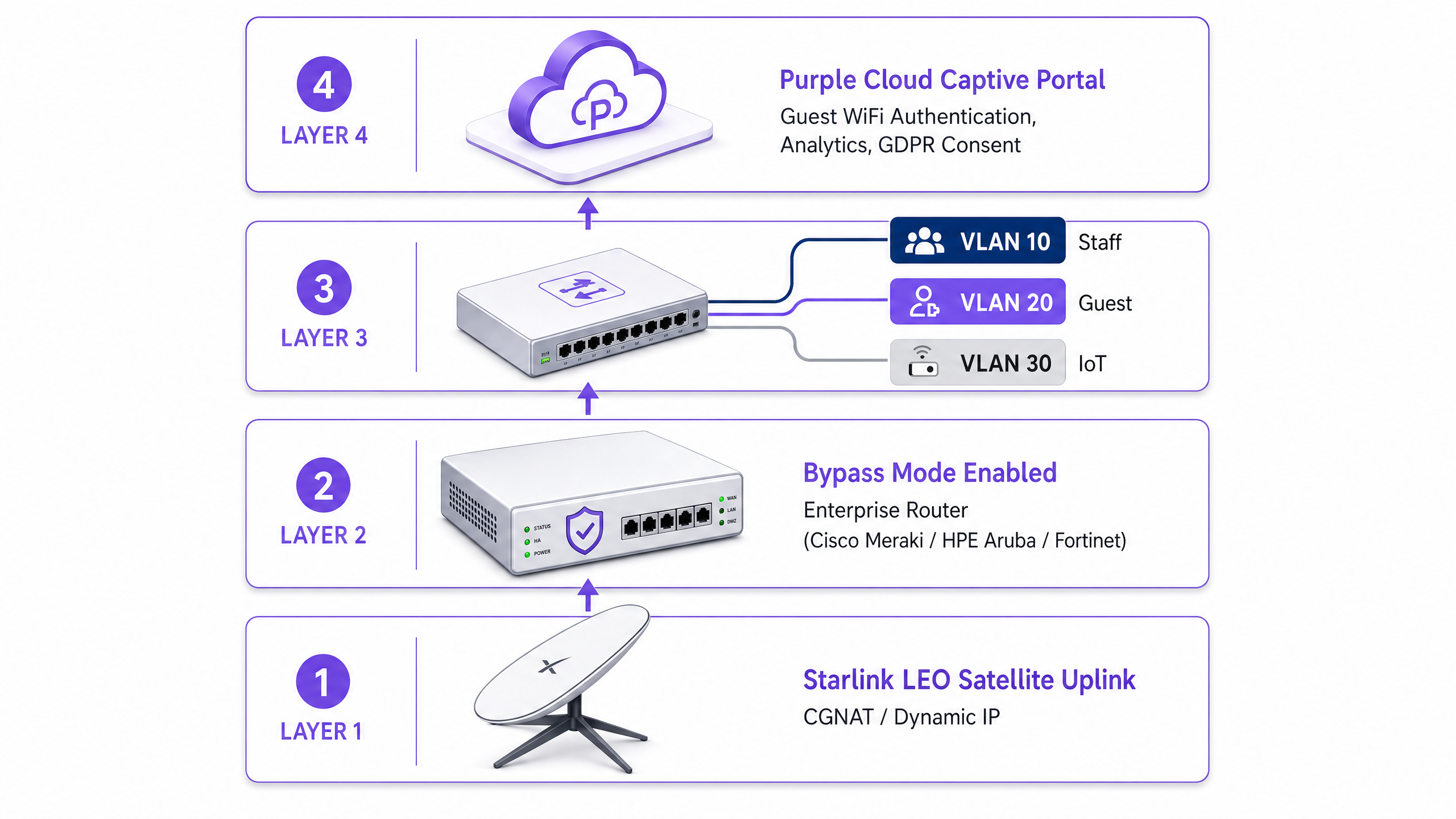
O principal obstáculo técnico ao implantar um Captive Portal no Starlink é o Carrier Grade NAT (CGNAT). A antena padrão do Starlink se conecta a um roteador proprietário que lida com DHCP e NAT. Por padrão, o endereço IP WAN atribuído ao seu equipamento fica dentro da faixa 100.64.0.0/10. Como este não é um endereço IP público, seu roteador não pode receber conexões de entrada da internet.
As arquiteturas padrão de Captive Portal geralmente assumem que o portal na nuvem pode acessar sua rede de volta para autenticar usuários ou atualizar listas de controle de acesso. Com o CGNAT, as conexões de entrada falham.
Para resolver isso, você deve configurar a antena do Starlink no Modo Bypass (geralmente chamado de modo bridge). No Modo Bypass, as funções do roteador Starlink são desativadas e a antena passa o endereço CGNAT diretamente para a porta WAN do seu roteador corporativo. Seu roteador corporativo assume então o controle total da camada de roteamento.
Arquitetura de Túnel Reverso
Com o roteador corporativo lidando com o tráfego, a restrição de entrada do CGNAT permanece. A solução é uma arquitetura de túnel reverso. Seu roteador estabelece uma conexão de saída com o portal na nuvem e a mantém de forma persistente. Todo o tráfego de autenticação flui por esse túnel estabelecido. A infraestrutura de nuvem nunca precisa iniciar uma conexão de entrada.
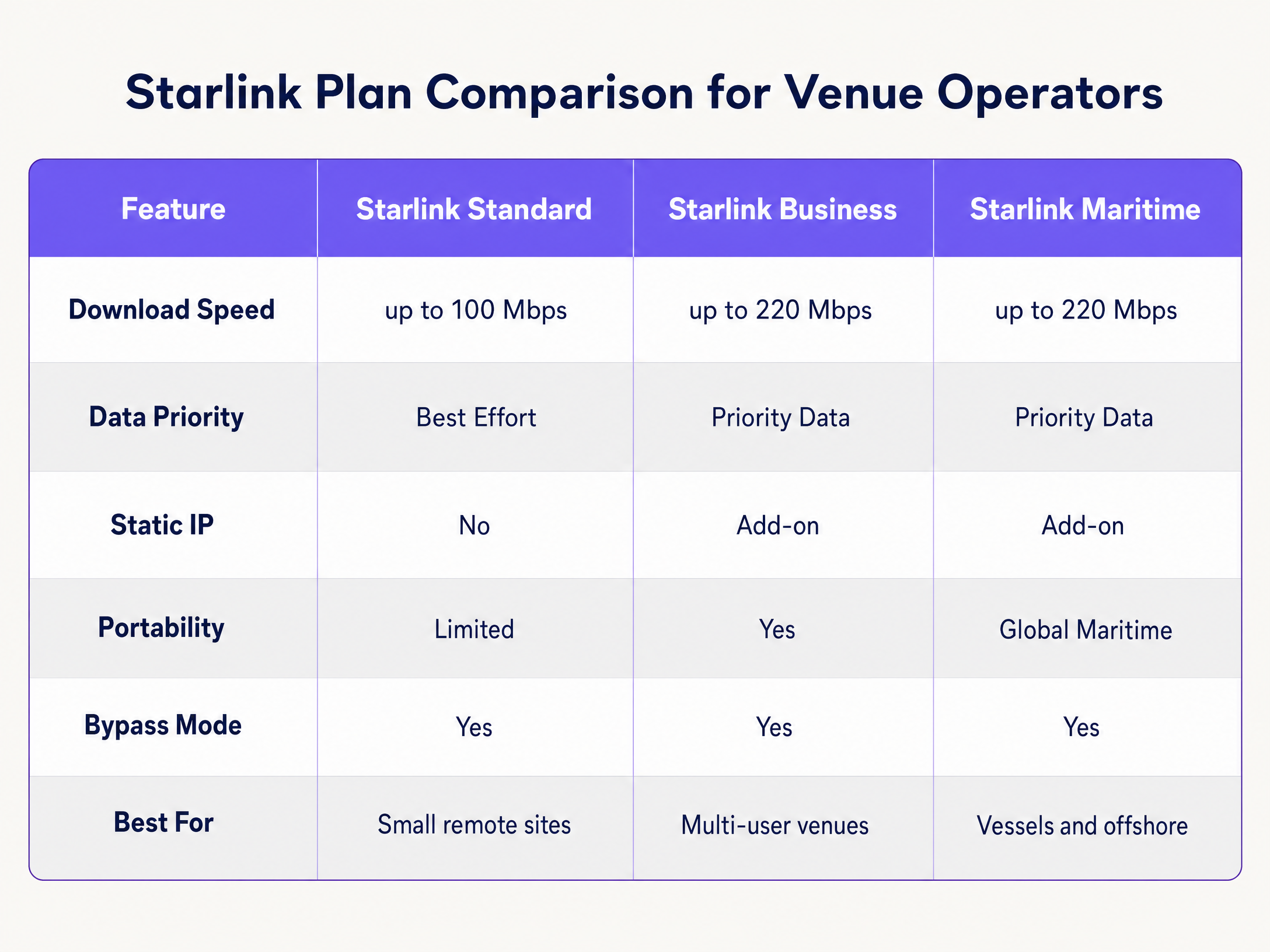
A arquitetura de sobreposição em nuvem da Purple lida com isso nativamente. Você não precisa configurar túneis VPN manuais. Se a sua implantação exigir um IP estático para servidores RADIUS legados locais ou listas de permissões de IP estritas, os planos Starlink Business e Maritime oferecem um IP estático como um complemento pago.
Restrições de Largura de Banda e Traffic Shaping
A largura de banda de satélite é um recurso compartilhado e limitado. Um único usuário transmitindo vídeo em 4K pode consumir 25 Mbps continuamente. Em uma embarcação com 50 passageiros compartilhando uma conexão Starlink de 220 Mbps, um único usuário pode consumir 11% da capacidade total.
Você deve lidar com isso no nível do Captive Portal e do roteador por meio de um traffic shaping agressivo:
- Limites por Dispositivo: Restrinja dispositivos individuais de convidados a 5 Mbps de download e 2 Mbps de upload.
- Políticas de Uso Justo (Fair-Use): Implemente franquias de dados diárias (por exemplo, 2 GB por 24 horas).
- Controle de Aplicativos: Priorize a navegação na web e protocolos de mensagens em detrimento de streaming de vídeo e compartilhamento de arquivos ponto a ponto (peer-to-peer).
- Acesso em Camadas: Ofereça uma camada gratuita para conectividade básica e uma camada premium paga para streaming, convertendo a infraestrutura de WiFi de um centro de custo em uma fonte de receita.
Guia de Implementação
Siga estas etapas para implantar um Captive Portal seguro no Starlink usando hardware corporativo.
Etapa 1: Ativar o Modo Bypass
- Instale o hardware do Starlink e verifique a conectividade usando o roteador nativo.
- Abra o aplicativo móvel do Starlink e navegue até Configurações.
- Selecione Bypass Starlink WiFi router e confirme.
- Conecte o adaptador Ethernet do Starlink à porta WAN do seu roteador corporativo (Cisco Meraki, HPE Aruba, Ruckus, Juniper Mist, Ubiquiti UniFi, Cambium, Extreme ou Fortinet).
Observação: Se a antena do Starlink for redefinida para os padrões de fábrica, o Modo Bypass será desativado automaticamente. Documente isso no runbook do seu site e configure um alerta de monitoramento na interface WAN do seu roteador.
Etapa 2: Configurar a Segmentação de VLAN
Você deve isolar o tráfego de convidados dos seus sistemas de negócios principais. Configure pelo menos três VLANs no seu switch principal e pontos de acesso:
- VLAN 10 (Staff): Transporta sistemas de PDV (POS), aplicativos de back-office e tráfego de gerenciamento.
- VLAN 20 (Guest): O segmento apenas de internet que redireciona para o Captive Portal.
- VLAN 30 (IoT): Rede isolada para câmeras, termostatos inteligentes e sistemas de gerenciamento predial.
Configure regras de firewall para bloquear todo o roteamento inter-VLAN. Um dispositivo de convidado na VLAN 20 nunca deve ser capaz de pingar um terminal de PDV na VLAN 10. Essa segmentação é um requisito rigoroso para a conformidade com o PCI DSS.
Etapa 3: Implantar o Captive Portal na Nuvem
- Configure seus pontos de acesso para transmitir o SSID de Convidados na VLAN 20.
- Defina o método de autenticação para RADIUS externo ou use a integração de API do fornecedor.
- Aponte os servidores de autenticação para a infraestrutura em nuvem da Purple.
- Configure o walled garden (lista de permissões) para permitir o tráfego para os domínios da Purple antes que a autenticação seja concluída.
- Desenhe a splash page no portal da Purple, garantindo a identidade visual esteja alinhada com o seu estabelecimento e os termos de serviço estejam claramente visíveis.
Passo 4: Testar o Fluxo do Usuário
Teste o fluxo de autenticação em dispositivos iOS e Android. O Captive Network Assistant (CNA) da Apple e a sonda de rede do Android se comportam de maneira diferente. Verifique se a splash page carrega em até 10 segundos e se o dispositivo recebe acesso à internet imediatamente após a autenticação.
Melhores Práticas
- Interceptação HTTPS: Certifique-se de que seu roteador lide com a interceptação HTTPS corretamente. Os dispositivos modernos usam HTTPS por padrão. Se o roteador não conseguir redirecionar as solicitações HTTPS de forma limpa, os visitantes encontrarão erros de certificado antes de acessar o portal.
- Session Keepalive: A constelação de Órbita Terrestre Baixa (LEO) da Starlink oferece latência de 20 a 40 milissegundos, mas ocorrem picos breves durante as transições de satélite. Defina os intervalos de session keepalive do seu Captive Portal para 60 segundos ou menos para evitar desconexões prematuras.
- Cache Offline: Configure seu roteador para armazenar em cache as sessões ativas localmente. Se a conexão Starlink cair temporariamente, os visitantes que já estão autenticados permanecerão online quando a conectividade for restaurada, em vez de serem forçados a fazer login novamente.
Solução de Problemas e Mitigação de Riscos
| Modo de Falha | Causa Raiz | Mitigação |
|---|---|---|
| O Captive Portal falha ao carregar | Configuração incorreta do walled garden | Verifique se todos os domínios Purple e endpoints de CDN necessários foram adicionados à lista de permissões de pré-autenticação no roteador. |
| Erros de Double NAT | Modo Bypass desativado | Verifique o aplicativo Starlink para confirmar se o Modo Bypass está ativo. Um pico de energia ou reinicialização manual pode ter revertido a antena para as configurações padrão. |
| Velocidades lentas para visitantes | Largura de banda irrestrita | Imponha limites de largura de banda por dispositivo (ex: 5 Mbps) e bloqueie aplicativos de alta largura de banda, como BitTorrent, no firewall. |
| Falha na auditoria de segurança | Roteamento inter-VLAN ativado | Audite as regras de firewall para garantir que o tráfego da VLAN de Visitantes não possa ser roteado para as VLANs de Funcionários ou Gerenciamento. |
ROI e Impacto nos Negócios
A implantação de um Captive Portal gerenciado na Starlink transforma uma conexão de internet bruta em um ativo de negócios mensurável.
Para um navio de cruzeiro de 120 cabines operando o Starlink Maritime a 220 Mbps, o acesso bruto não oferece retorno comercial. Ao implantar pontos de acesso Cisco Meraki e o Captive Portal da Purple, a operadora pode impor um limite diário de 2 GB para passageiros padrão, enquanto vende um plano premium de 10 GB. A receita de WiFi resultante cobre o custo mensal de assinatura da Starlink de mais de US$ 250. Além disso, o portal coleta dados de e-mail primários (first-party) totalmente em conformidade, expandindo a lista de marketing direto da operadora para futuras viagens.
Em um ambiente de hotel remoto, a implantação de um portal com políticas rígidas de largura de banda reduz as reclamações dos hóspedes sobre WiFi lento em até 60%, pois evita que usuários pesados monopolizem o link de satélite.
Definições principais
Bypass Mode
A configuration setting that disables the native Starlink router's DHCP and NAT functions, passing the WAN IP directly to a third-party enterprise router.
Required when integrating enterprise networking equipment with a Starlink dish to avoid double NAT and routing conflicts.
CGNAT (Carrier Grade NAT)
A method used by ISPs to share a single public IP address among multiple customers. The customer's router receives a private IP address (typically 100.64.0.0/10).
Starlink uses CGNAT by default, which prevents inbound connections from the internet and requires reverse tunnel architectures for cloud management.
VLAN (Virtual Local Area Network)
A logical subnetwork that groups a collection of devices from different physical LANs.
Used to isolate guest WiFi traffic from staff and IoT networks, ensuring security and compliance.
Captive Portal
A web page that a user of a public access network is obliged to view and interact with before access is granted.
Used to enforce terms of service, collect marketing data, and authenticate users on guest WiFi networks.
Walled Garden
A limited environment that controls the user's access to web content and services before they have fully authenticated.
Required to allow guest devices to reach the cloud captive portal and authentication servers before they are granted full internet access.
RADIUS
A networking protocol that provides centralized Authentication, Authorization, and Accounting management for users who connect and use a network service.
The underlying protocol used by enterprise access points to communicate with the cloud captive portal to verify user credentials.
Traffic Shaping
The manipulation and prioritization of network traffic to reduce the impact of heavy users or latency-sensitive applications.
Essential on Starlink networks to prioritize web browsing over high-bandwidth activities like video streaming.
First-Party Data
Information a company collects directly from its customers and owns.
Captured via the captive portal login process (e.g., email addresses) and used for direct marketing and loyalty campaigns.
Exemplos práticos
A 120-cabin cruise vessel running Starlink Maritime at 220 Mbps needs to provide passenger WiFi without degrading ship operations. They require a mechanism to monetise the connection and collect marketing data.
The operator deploys Cisco Meraki access points throughout the vessel with three strict VLANs: crew, passenger, and ship systems. Purple's captive portal handles passenger authentication via email or a cabin number lookup integrated with the PMS. Each passenger receives a 2GB daily allowance. Premium tier passengers can purchase a 10GB allocation. The portal collects first-party email data for post-voyage marketing.
A remote Highland hotel with no fibre infrastructure runs Starlink Business at 150 Mbps. Guests frequently complain about slow speeds during the evening, and the hotel has no visibility into who is using the network.
The hotel deploys HPE Aruba access points across the main building and outbuildings. They configure the Starlink dish in Bypass Mode and connect it to an Aruba gateway. Guests authenticate via email on Purple's portal. The hotel enforces a strict 5 Mbps per-device bandwidth cap and uses Purple's analytics to monitor peak usage times.
Questões práticas
Q1. A remote mining camp has deployed Starlink Business. They have connected a Cisco Meraki MX firewall to the Starlink router. Guests can connect to the WiFi, but the captive portal page times out and fails to load. What is the most likely cause?
Dica: Consider how the Starlink hardware handles routing by default and what the Meraki firewall requires to manage traffic effectively.
Ver resposta modelo
The Starlink dish has not been placed in Bypass Mode. As a result, the network is suffering from double NAT (the Starlink router and the Meraki firewall are both attempting to perform Network Address Translation). The administrator must use the Starlink app to enable Bypass Mode, allowing the Meraki firewall to receive the CGNAT IP directly and manage the routing and captive portal interception.
Q2. You are deploying a captive portal for a hotel using Starlink. You have configured Bypass Mode and VLAN segmentation. During testing, you notice that Apple devices prompt the user to log in immediately, but some Android devices show a certificate error when the user tries to browse to a secure website before authenticating. How do you resolve this?
Dica: Think about how modern browsers handle initial connection requests and what the router must do to intercept them cleanly.
Ver resposta modelo
The enterprise router is not configured to handle HTTPS interception correctly for the captive portal redirect. Modern browsers default to HTTPS. When the user attempts to visit an HTTPS site before authenticating, the router intercepts the traffic and presents its own certificate, which the browser rejects as invalid. You must ensure the router's captive portal settings are configured to use a valid SSL certificate for the redirect, or rely on the OS-level network probes (like Apple's CNA) which use HTTP endpoints to trigger the portal automatically.
Q3. A maritime operator complains that their Starlink Maritime connection (220 Mbps) becomes unusable every evening. They currently provide an open, password-free guest network. What three specific configurations should you implement on the enterprise router and captive portal to resolve this?
Dica: Focus on controlling how much data individual users can consume and prioritising critical traffic types.
Ver resposta modelo
- Implement a captive portal requiring authentication to track and manage individual users. 2. Enforce per-device bandwidth caps (e.g., 5 Mbps down / 2 Mbps up) to prevent a single user from monopolising the connection. 3. Apply traffic shaping rules at the firewall to prioritise web browsing and messaging protocols while throttling or blocking high-bandwidth applications like video streaming and P2P file sharing.
Continue a ler esta série
Gerenciamento de WiFi para Hóspedes de Hotel: Integrando PMS, Portais e Padrões de Marca
Este guia técnico detalha como arquitetar redes WiFi de hotéis de nível empresarial, com foco na segmentação de VLAN, integração de PMS para gerenciamento automatizado de sessões e otimização de Captive Portal para captura de dados em conformidade com a GDPR.
Melhores Práticas de Captive Portal: Projetando para Alta Conversão e Conformidade
Este guia técnico oferece a gerentes de TI, arquitetos de rede e diretores de operações de locais um blueprint completo para implantar captive portals que equilibram a segurança da rede com uma alta conversão de usuários. Ele abrange toda a arquitetura, desde a segmentação de VLAN e autenticação RADIUS até o design de consentimento em conformidade com a GDPR e a seleção do método de autenticação. Extraído da experiência operacional da Purple em mais de 80.000 locais e 440 milhões de logins em 2024, cada recomendação é baseada em dados reais de implantação.
Como otimizar Captive Portals para máxima segurança de rede e conversão de usuários
Este guia fornece um blueprint técnico completo para otimizar captive portals em locais corporativos, cobrindo arquitetura de segmentação de rede, seleção de métodos de autenticação, design de consentimento em conformidade com a GDPR e otimização de conversão. Ele foi escrito para gerentes de TI, arquitetos de rede e CTOs em hotéis, redes de varejo, estádios e organizações do setor público que precisam equilibrar a segurança de rede com a captura de dados primários. A Purple opera a infraestrutura de captive portal em mais de 80.000 locais, com 440 milhões de logins em 2024, e as estruturas apresentadas aqui refletem essa experiência operacional.