
如何在 Starlink 上设置 Captive Portal:偏远地区与海事场所指南
本指南详细介绍了如何绕过原生的 Starlink 硬件,并使用企业级路由设备集成云端托管的 captive portal。您将学习如何克服 CGNAT 限制、实施 VLAN 细分、管理卫星带宽限制并确保合规性。
Video overview
收听本指南
查看播客转录
核心系列的一部分:Captive Portal 指南 →
Starlink maritime and remote captive portal sizer
Model satellite WAN backhaul, calculate per-user bandwidth QoS, prevent metered data quota depletion, and generate bypass mode gateway configurations for Peplink, Cisco Meraki, and Fortinet.
Charter yacht or passenger vessel requiring high-speed dual-dish bonding, maritime bypass mode, crew vs guest VLAN isolation, and PMS folio billing integration.
Satellite data allowance audit
- Monthly Priority pool: 2,000 GB across 2 terminals
- Projected monthly consumption: 1,500 GB (50 GB/day over 30 operating days, about 645 MB per guest per day).
- Estimated overage exposure: Within the Priority pool (no overage)
- What the portal avoids: $5,600/month - the gap between unshaped demand (3.2x this projection) and the 0 GB still billable after a 3.5 Mbps cap and a per-device daily allowance.
- Overage is priced at an assumed $2.00/GB. Starlink rates differ by plan family and region - replace it with your own contract rate before quoting these figures.
QoS bandwidth allocation
Starlink terminal bypass and gateway architecture
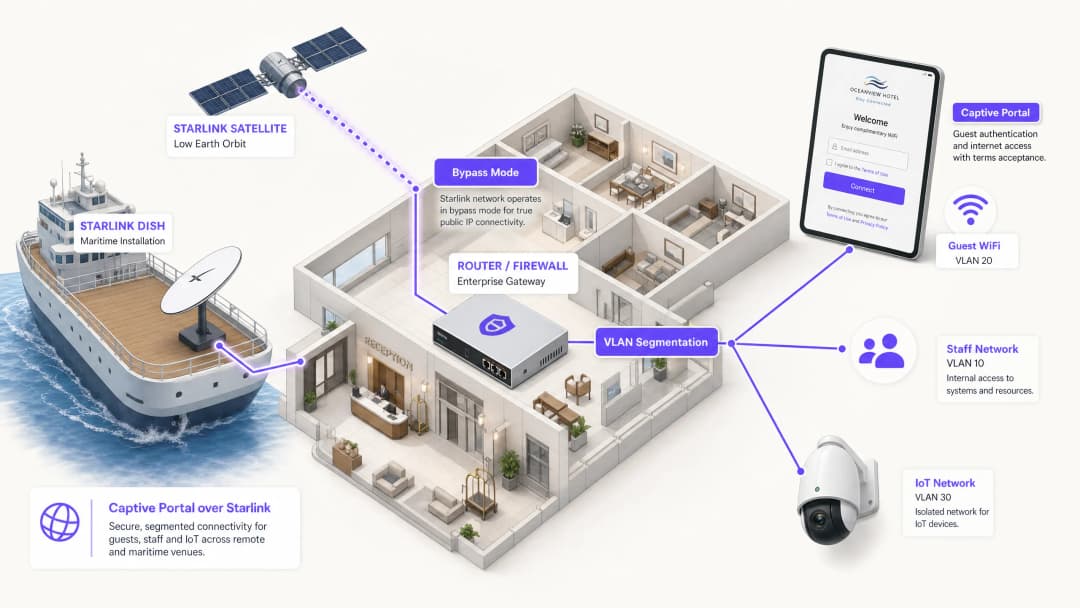
Starlink standard user terminals (Gen 2 Actuated, Gen 3 Standard, and Flat High Performance) include a consumer WiFi router that does not support Layer 2 VLAN tagging, RADIUS authentication, or external captive portal redirection. To deploy Purple:
- Enable Starlink bypass mode: In the Starlink mobile app under Settings > Advanced, toggle Bypass Mode. This disables the built-in router, shutting down native WiFi and NAT to deliver raw Layer 2 bridging to the Ethernet port.
- Ethernet adapter connection: Connect the Starlink Ethernet Adapter (Gen 2) or direct RJ45 WAN port (Gen 3 / Flat High Performance) into the WAN port of your enterprise gateway (Peplink Balance 310X).
- Handle Carrier-Grade NAT (CGNAT): Starlink assigns WAN IPs in the
100.64.0.0/10shared space. Because Purple is cloud-hosted, splash interception occurs locally on your gateway and forwards outbound authentication requests over HTTPS/RADIUS, requiring zero inbound port forwards. - VLAN segmentation: Configure
VLAN 10for vessel operations/corporate POS andVLAN 20(/24 (254 IPs)) for guest WiFi. Apply client isolation so passengers cannot scan fellow guest devices.
Tiered access and monetisation models
- Free basic tier: throttled to 3.5 Mbps down / 1 Mbps up with a 645 MB daily allowance - the same figure the quota projection uses - suitable for email, messaging and basic web access.
- VIP / premium voucher tier: High-priority 10 Mbps Down / 3 Mbps Up with unlimited browsing, billable via Stripe credit card or PMS room folio charge.
- Crew and staff profiles: Dedicated SSID tagged to VLAN 30 with 24/7 unmetered access and DSCP prioritisation for operational communications (VoIP, WhatsApp Calling).
Walled garden and CNA behaviour
- Apple and Android CNA probes: leave
captive.apple.com,connectivitycheck.gstatic.comandmsftconnecttest.comOUT of the walled garden. The gateway intercepting those probes is what tells the device the network is captive and opens the splash. Allow them and the probe succeeds, the device concludes it already has internet, and the guest never sees a login page - the most common cause of a satellite portal that appears not to work. - Purple cloud endpoints: allow
portal.purplewifi.netand*.purple.aion ports 80 and 443, and the OAuth domains if social sign-in is enabled. - Legal terms and data privacy: Collect GDPR / CCPA compliant guest marketing consent, providing visitor footfall analytics even in remote offshore locations.
# =========================================================
# Peplink Balance / MAX HD4 multi-WAN and captive portal setup
# Starlink Bypass WAN + Purple Cloud Splash Integration
# =========================================================

# 1. Starlink WAN configuration (Bypass Mode into WAN 1 & WAN 2)
# Protocol: DHCP Client (Starlink CGNAT 100.64.0.0/10)
# MTU: 1500 (MSS Clamping: 1460)
# Health Check: DNS Lookup to 1.1.1.1 & 8.8.8.8 (Interval: 5s, Timeout: 2s)

# 2. Outbound Policy - Bandwidth & Least-Cost Steering
Rule 10: Destination = Mission_Critical_Ops -> Enforce Starlink_WAN1 (Priority 1)
Rule 20: Destination = Guest_VLAN_20 -> Weighted Balance (Starlink_WAN1: 50, Starlink_WAN2: 50)
Rule 30: When In-Port / Near Shore (Cellular Available) -> Spillover Guest_VLAN_20 to LTE_WAN3

# 3. Captive portal and Purple splash settings
# VLAN 20 guest scope: 10.20.0.0/24 (/24 (254 IPs))
# Gateway 10.20.0.1, DHCP pool 10.20.0.10 - 10.20.0.250
Captive Portal: Enabled
Mode: External Web Portal
Portal URL: https://portal.purplewifi.net/splash
Authentication: RADIUS Server (Purple Cloud AAA)
Primary RADIUS: radius1.purplewifi.net (Port 1812 Auth, Port 1813 Acct)
Secondary RADIUS: radius2.purplewifi.net (Port 1812 Auth, Port 1813 Acct)
RADIUS Secret: [YOUR_PURPLE_RADIUS_SECRET]
Shared Secret Encryption: Enabled (RFC 2865 / RFC 2866)

# 4. Walled garden: pre-auth allowed hosts
# Portal hosts only, plus the OAuth domains if social sign-in is enabled.
# Never allow the OS connectivity probes (captive.apple.com,
# connectivitycheck.gstatic.com, msftconnecttest.com). The gateway must keep
# intercepting them: that redirect is what tells the phone the network is
# captive and opens the splash. Allowed through, the probe succeeds over
# satellite, the device decides it is online and no portal ever appears.
Allowed Domains:
  - *.purplewifi.net
  - *.purple.ai
  - accounts.google.com
  - appleid.apple.com

# 5. Bandwidth QoS & Rate Limiting Per Guest Client
Downlink Limit: 3.5 Mbps
Uplink Limit: 1 Mbps
Session Duration Limit: 1440 mins (24 hours)
Max Daily Data Allowance: 645 MB per device
# That figure is the per-guest daily volume this sizing assumes at a
# 3.5 Mbps cap. Setting it lower than the model assumes
# re-queues guests for voucher re-auth via the Purple API; setting it higher
# invalidates the quota projection on the Bandwidth & quota tab.
执行摘要
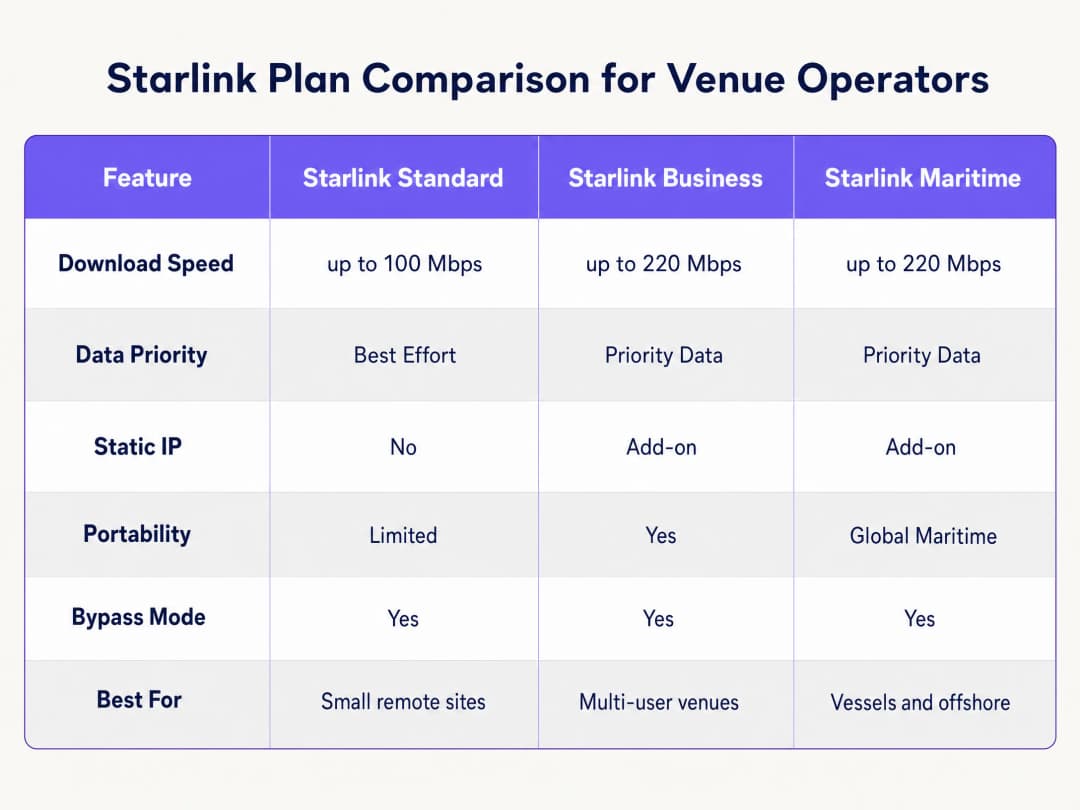
Starlink 在光纤无法覆盖的地区提供 220 Mbps 的连接,彻底改变了偏远和海洋场所的网络格局。然而,对于面向公众的环境,仅有连接性是远远不够的。当您为访客、乘客或船员部署 Starlink 时,您必须实施身份验证、访问控制、符合 GDPR 的同意管理以及带宽管理。而原生的 Starlink 路由器不提供任何这些功能。
本指南将详细介绍如何绕过原生 Starlink 硬件,并使用企业级路由设备集成云端管理的 Captive Portal。您将了解如何克服运营商级 NAT (CGNAT) 的局限性、实施 VLAN 分段、管理卫星带宽限制并确保符合监管要求。
通过实施这种架构,场所运营商可以将无管理的互联网管道转化为安全、分段的网络,从而捕获第一方数据并保护核心业务基础设施。
技术深度剖析
CGNAT 限制
在 Starlink 上部署 Captive Portal 时,首要的技术障碍是运营商级 NAT (CGNAT)。标准的 Starlink 接收器连接到处理 DHCP 和 NAT 的专有路由器。默认情况下,分配给您设备的 WAN IP 地址落在 100.64.0.0/10 范围内。由于这不是一个公网 IP 地址,您的路由器无法接收来自互联网的入站连接。
标准的 Captive Portal 架构通常假设云端门户可以回访您的网络以对用户进行身份验证或更新访问控制列表。在 CGNAT 环境下,入站连接将会失败。
为了解决这个问题,您必须将 Starlink 接收器配置为旁路模式 (Bypass Mode,通常称为桥接模式)。在旁路模式下,Starlink 路由器的功能将被禁用,接收器会将 CGNAT 地址直接发送到您企业路由器的 WAN 端口。然后,您的企业路由器将完全控制路由层。

反向隧道架构
即使由企业路由器处理流量,CGNAT 的入站限制依然存在。解决方案是采用反向隧道架构。您的路由器向云端门户建立一个出站连接并持续保持。所有的身份验证流量都通过这个已建立的隧道传输。云端基础设施永远不需要发起入站连接。
Purple 的云覆盖架构原生处理这一问题。您无需手动配置 VPN 隧道。如果您的部署需要静态 IP 以用于传统本地 RADIUS 服务器或严格的 IP 允许列表,Starlink 商业和海事计划提供静态 IP 作为付费附加服务。
带宽限制和流量整形
卫星带宽是一种共享的有限资源。单个流式传输 4K 视频的用户可能会持续消耗 25 Mbps。在拥有 50 名乘客并共享 220 Mbps Starlink 连接的船只上,一个用户就可能消耗总容量的 11%。
您必须通过激进的流量整形在 Captive Portal 和路由器级别解决此问题:
- 单设备限制: 限制单个访客设备下载速度为 5 Mbps,上传速度为 2 Mbps。
- 公平使用政策: 强制执行每日数据限额(例如,每 24 小时 2GB)。
- 应用控制: 优先处理网页浏览和即时通讯协议,而非视频流和对等网络(P2P)文件共享。
- 分层接入: 为基础连接提供免费层级,并为流媒体提供付费高级层级,将 WiFi 基础设施从成本中心转化为收入来源。
实施指南
请按照以下步骤,使用企业级硬件在 Starlink 上部署安全的 Captive Portal。
步骤 1:启用旁路模式
- 安装 Starlink 硬件并使用原始路由器验证连接性。
- 打开 Starlink 移动应用程序并导航至 Settings(设置)。
- 选择并确认 Bypass Starlink WiFi router(旁路 Starlink WiFi 路由器)。
- 将 Starlink 以太网适配器连接到您的企业级路由器(Cisco Meraki, HPE Aruba, Ruckus, Juniper Mist, Ubiquiti UniFi, Cambium, Extreme 或 Fortinet)的 WAN 端口。
注意:如果 Starlink 卫星天线进行出厂重置,旁路模式将自动禁用。请在您的现场运行手册中记录这一点,并在路由器的 WAN 接口上配置监控告警。
步骤 2:配置 VLAN 分段
您必须将访客流量与您的核心业务系统隔离。在您的核心交换机和接入点上至少配置三个 VLAN:
- VLAN 10(员工): 承载 POS 系统、后台办公应用和管理流量。
- VLAN 20(访客): 仅限互联网访问的分段,重定向到 Captive Portal。
- VLAN 30(物联网): 用于摄像头、智能温控器和楼宇管理系统的隔离网络。
配置防火墙规则以阻止所有 VLAN 间路由。VLAN 20 上的访客设备绝不能对 VLAN 10 上的 POS 终端进行 Ping 操作。此分段是满足 PCI-DSS 合规性的严格要求。
步骤 3:部署云端 Captive Portal
- 配置您的接入点以在 VLAN 20 上广播访客 SSID。
- 将身份验证方法设置为外部 RADIUS 或使用厂商的 API 集成。3. 将认证服务器指向 Purple 的云基础设施。
- 配置围墙花园(白名单),以允许在认证完成之前流向 Purple 域名的流量。
- 在 Purple 门户中设计展示页面,确保品牌形象与您的场馆保持一致,并清晰展示服务条款。
第 4 步:测试用户流程
在 iOS 和 Android 设备上测试认证流程。Apple 的 Captive Network Assistant (CNA) 和 Android 的网络探测行为有所不同。验证展示页面是否在 10 秒内加载,并确保设备在认证后立即获得互联网访问权限。
最佳实践
- HTTPS 拦截: 确保您的路由器正确处理 HTTPS 拦截。现代设备默认使用 HTTPS。如果路由器无法干净地重定向 HTTPS 请求,宾客在到达门户之前将遇到证书错误。
- 会话保持活跃 (Session Keepalive): Starlink 的低地球轨道 (LEO) 星座可提供 20 到 40 毫秒的延迟,但在卫星切换期间会出现短暂的峰值。将您的 Captive Portal 会话保持活跃间隔设置为 60 秒或更短,以防止过早断开连接。
- 离线缓存: 将您的路由器配置为在本地缓存活动会话。如果 Starlink 连接暂时中断,已通过认证的宾客在恢复连接时将保持在线状态,而无需被迫重新登录。
故障排除与风险缓解
| 故障模式 | 根本原因 | 缓解措施 |
|---|---|---|
| Captive Portal 无法加载 | 围墙花园配置不正确 | 验证是否已将所有必需的 Purple 域名和 CDN 端点添加到路由器上的预认证白名单中。 |
| 双重 NAT 错误 | 旁路模式 (Bypass Mode) 已禁用 | 检查 Starlink 应用程序以确认旁路模式已启用。电源波动或手动重置可能已将天线恢复为默认设置。 |
| 宾客网速缓慢 | 未限制带宽 | 应用单设备带宽限制(例如 5 Mbps),并在防火墙上阻止 BitTorrent 等高带宽应用。 |
| 安全审计失败 | VLAN 间路由已启用 | 审计防火墙规则,以确保来自 Guest VLAN 的流量无法路由到 Staff 或 Management VLAN。 |
投资回报率 (ROI) 与业务影响
在 Starlink 上部署托管的 Captive Portal 可以将原始互联网连接转化为可衡量的业务资产。
对于一艘运行 220 Mbps Starlink Maritime 的 120 舱室邮轮来说,原始访问无法产生任何业务回报。通过部署 Cisco Meraki 无线接入点和 Purple 的 Captive Portal,运营商可以向普通乘客强制执行每日 2GB 的额度,同时向上销售 10GB 的高级套餐。由此产生的 WiFi 收入可以覆盖每月 250 美元以上的 Starlink 订阅成本。此外,该门户还可以捕获完全合规的第一方电子邮件数据,从而扩大运营商未来航线的直接营销名单。 在偏远地区的酒店环境中,部署具有严格带宽策略的门户网站可将住客对 WiFi 网速慢的投诉减少高达 60%,因为这能防止重度用户独占卫星链路。
关键定义
Bypass Mode
一种配置设置,可禁用原生 Starlink 路由器的 DHCP 和 NAT 功能,将 WAN IP 直接传递给第三方企业路由器。
将企业级网络设备与 Starlink 接收器集成时需要,以避免双重 NAT 和路由冲突。
CGNAT (Carrier Grade NAT)
ISP 用于在多个客户之间共享单个公网 IP 地址的方法。客户的路由器会收到一个私网 IP 地址(通常为 100.64.0.0/10)。
Starlink 默认使用 CGNAT,这会阻止来自互联网的入站连接,并且需要反向隧道架构进行云端管理。
VLAN (Virtual Local Area Network)
一种逻辑子网,将来自不同物理局域网的设备集合进行分组。
用于将访客 WiFi 流量与员工及物联网网络隔离,确保安全性和合规性。
Captive Portal
公共访问网络用户在获得访问权限之前必须查看并进行交互 commercial 的网页。
用于实施服务条款、收集营销数据并在访客 WiFi 网络上对用户进行身份验证。
Walled Garden
一种受限的环境,在用户完全通过身份验证之前,控制用户对网页内容和服务的访问。
需要允许访客设备在获得完整互联网访问权限之前,能够访问云端 captive portal 和身份验证服务器。
RADIUS
一种网络协议,为连接和使用网络服务的用户提供集中的身份验证、授权和计费管理。
企业级接入点与云端 captive portal 通信以验证用户凭证所使用的底层协议。
Traffic Shaping
对网络流量进行管理和优先级排序,以减少重度用户或对延迟敏感的应用程序带来的影响。
在 Starlink 网络上至关重要,以便将网页浏览的优先级置于视频流等高带宽活动之上。
第一手数据
公司直接从其客户那里收集并拥有的信息。
通过 captive portal 登录流程获取(例如电子邮件地址),并用于直接营销和忠诚度计划。
应用实例
一艘拥有 120 间客舱的邮轮运行速度为 220 Mbps 的 Starlink Maritime,需要提供旅客 WiFi 且不降低船舶运营效率。他们需要一种机制来实现连接变现并收集营销数据。
运营商在整个船只上部署 Cisco Meraki 接入点,并划分三个严格的 VLAN:船员、旅客和船舶系统。Purple 的 captive portal 通过电子邮件或与 PMS 集成的客舱号查询来处理旅客身份验证。每位旅客每天可获得 2GB 的免费额度。高级尊享旅客可以购买 10GB 的配额。该门户收集第一手电子邮件数据,用于航行后的营销活动。
一家没有光纤基础设施的偏远高地酒店运行速度为 150 Mbps 的 Starlink Business。宾客经常抱怨晚间网速慢,且酒店无法获知是谁在使用网络。
该酒店在主楼和配楼中部署了 HPE Aruba 接入点。他们将 Starlink 接收器配置为 Bypass Mode,并将其连接到 Aruba 网关。宾客在 Purple 的门户上通过电子邮件进行身份验证。酒店实施了每台设备 5 Mbps 的严格带宽限制,并利用 Purple 的分析功能来监控高峰使用时间。
练习题
Q1. 一个偏远的矿场部署了 Starlink 商业版。他们将一台 Cisco Meraki MX 防火墙连接到了 Starlink 路由器。访客可以连接到 WiFi,但 captive portal 页面超时且无法加载。最可能的原因是什么?
提示:考虑 Starlink 硬件默认如何处理路由,以及 Meraki 防火墙需要什么来有效管理流量。
查看标准答案
Starlink 接收器未设置为 Bypass Mode。因此,网络正遭受双重 NAT 影响(Starlink 路由器和 Meraki 防火墙都在尝试执行网络地址转换)。管理员必须使用 Starlink 应用启用 Bypass Mode,以允许 Meraki 防火墙直接接收 CGNAT IP 并管理路由和 captive portal 拦截。
Q2. 您正在使用 Starlink 为一家酒店部署 captive portal。您已配置了 Bypass Mode 和 VLAN 隔离。在测试期间,您注意到 iOS 设备会立即提示用户登录,但某些 Android 设备在用户尝试在认证前浏览安全网站时会显示证书错误。您该如何解决这个问题?
提示:思考现代浏览器如何处理初始连接请求,以及路由器必须做什么才能干净地拦截它们。
查看标准答案
企业路由器未正确配置以处理 captive portal 重定向的 HTTPS 拦截。现代浏览器默认为 HTTPS。当用户尝试在认证前访问 HTTPS 网站时,路由器会拦截流量并提供自己的证书,浏览器会将其拒绝为无效证书。您必须确保路由器的 captive portal 设置配置为使用有效的 SSL 证书进行重定向,或者依赖使用 HTTP 终端自动触发门户的系统级网络探测(例如 Apple 的 CNA)。
Q3. 一家海事运营商抱怨他们的 Starlink 海事连接(220 Mbps)每天晚上都会变得无法使用。他们目前提供一个开放且无需密码的访客网络。您应该在企业路由器和 captive portal 上实施哪三种具体配置来解决此问题?
提示:专注于控制单个用户可以消耗的数据量,并优先处理关键流量类型。
查看标准答案
- 实施需要认证的 captive portal,以跟踪和管理单个用户。2. 强制执行单设备带宽限制(例如:下行 5 Mbps / 上行 2 Mbps),以防止单个用户独占连接。3. 在防火墙上应用流量整形规则,优先处理网页浏览和即时消息协议,同时限制或阻止高带宽应用(如视频流媒体和 P2P 文件共享)。
常见问题
Why does Starlink require an external gateway router in bypass mode for enterprise captive portals?
Starlink user terminals (Standard Gen 2, Gen 3, and Flat High Performance Maritime) include a basic residential-grade router without support for external splash page redirection, 802.1Q VLAN tagging, RADIUS AAA (RFC 2865/2866), or walled garden domain whitelisting. Enabling Starlink Bypass Mode disables native NAT and WiFi routing, bridging the Layer 2 WAN handoff directly into an enterprise security gateway - such as Peplink Balance, Cisco Meraki MX, or Fortinet FortiGate - which handles captive portal interception, traffic shaping, and guest isolation.
How does Starlink Carrier-Grade NAT (CGNAT) affect external captive portal redirection?
Standard Starlink satellite plans assign WAN IP addresses from the private CGNAT pool (100.64.0.0/10), which prevents hosting local inbound HTTP/HTTPS listening services without dynamic DNS or port forwarding. Purple operates as a cloud-hosted captive portal, meaning guests resolve the splash page via external HTTPS requests initiated outbound from the gateway. Because client authorization occurs over outbound RADIUS or cloud API webhooks, CGNAT does not impact portal redirection or authentication flows.
How do you prevent guest WiFi users from exhausting Starlink Maritime or Priority satellite data quotas?
Starlink Maritime and Priority plans feature metered priority data pools (such as 50 GB to 5 TB per month), with steep per-gigabyte overage charges or throughput throttling upon exhaustion. To protect satellite quotas, enterprise gateways running Purple enforce strict per-user bandwidth caps (e.g., 3 Mbps downlink / 1 Mbps uplink), session data allowances (e.g., 500 MB per day), Layer 7 application filtering blocking 4K video streaming and torrents, and separate QoS priority queues that reserve 40% of satellite backhaul for mission-critical vessel navigation and staff operations.
Can a captive portal on Starlink integrate with maritime Property Management Systems (PMS)?
Yes. Purple integrates directly with hospitality and maritime PMS platforms - including Oracle Hospitality Opera and FCS - allowing guests on cruise ships, ferries, and luxury charter yachts to authenticate using their cabin number and surname. The gateway passes guest credentials securely to Purple cloud services, which query the vessel PMS to verify active folio reservations, apply billing tiers to the guest account, or unlock complimentary high-speed tiers for VIP passengers.
Which domains must be whitelisted in the Starlink walled garden for seamless smartphone captive portal popups?
Allow the portal and its dependencies, and nothing else: the Purple splash and CDN hosts (*.purplewifi.net, *.purple.ai), the RADIUS endpoints, and the OAuth identity provider domains (Google, Facebook, Apple ID) plus their CRL and OCSP endpoints if social onboarding is enabled. Do not allow the operating system connectivity probes - captive.apple.com, connectivitycheck.gstatic.com, msftconnecttest.com. The gateway has to intercept those probes, because it is the redirect they receive that tells iOS, Android and Windows the network is captive and opens the Captive Network Assistant. Allow them through and the probe succeeds, the device concludes it already has internet access, and the login page never appears.
How does multi-WAN SD-WAN bond Starlink satellite backhaul with coastal 4G/5G cellular connectivity?
Maritime vessels and remote venues frequently combine Starlink with multi-SIM cellular routers (such as Peplink MAX HD4 or Cradlepoint) to minimize satellite data spend. Using SD-WAN bonding and least-cost routing algorithms, the gateway steers high-bandwidth guest traffic onto terrestrial 4G/5G LTE connections when operating within 20 nautical miles of coastline, seamlessly failing over to Starlink satellite backhaul when navigating offshore or beyond cellular range without dropping active guest sessions.
继续阅读本系列
Ubiquiti UniFi 访客门户未重定向:原因与解决方法
本指南通过依次分析访客状态、重定向、预授权路由和控制器授权,解决 UniFi 访客门户重定向失败的问题。它为场所 IT 团队提供了一种行之有效的方法,用以解决访客网络与 Hotspot 混淆、外部门户交接、当前 UniFi OS 帐户要求以及 DNS 隔离测试等问题。
Cisco Meraki splash page无法正常工作:问题排查流程图
本实用指南着重于排查 Cisco Meraki splash 流程失败的环节:客户端授权、HTTP 重定向触发、walled-garden 可达性或 RADIUS 登录。它为场所 IT 团队提供了一条受控的证据排查路径,以便在不对现有网络进行大范围更改的情况下恢复 Guest WiFi。
企业级 Guest WiFi 设置指南:VLAN 隔离、安全与 Captive Portal
本技术指南向 IT 团队展示如何使用 VLAN 隔离、防火墙策略和 Captive Portal,将 Guest WiFi 设置为受控的互联网访问服务。它还解释了 Purple 的注册表单和准入控制如何在不削弱员工、支付和业务系统边界安全的前提下,提供恰到好处的访客体验。
对您的具体配置有疑问吗?
我们的团队与 80,000 多个场所的运营方、IT 经理和网络工程师保持合作。预约 20 分钟的通话,我们将为您展示同行是如何解决类似问题的。