
如何在 Starlink 上設定 Captive Portal:偏遠地區與海洋場域指南
本指南詳細介紹如何繞過 Starlink 原生硬體,並使用企業級路由設備整合雲端管理的 Captive Portal。您將學習如何克服 CGNAT 限制、強制執行 VLAN 區隔、管理衛星頻寬限制並確保符合法規規範。
Video overview
收聽此指南
查看播客逐字稿
核心系列的一部分:Captive Portal 指南 →
Starlink maritime and remote captive portal sizer
Model satellite WAN backhaul, calculate per-user bandwidth QoS, prevent metered data quota depletion, and generate bypass mode gateway configurations for Peplink, Cisco Meraki, and Fortinet.
Charter yacht or passenger vessel requiring high-speed dual-dish bonding, maritime bypass mode, crew vs guest VLAN isolation, and PMS folio billing integration.
Satellite data allowance audit
- Monthly Priority pool: 2,000 GB across 2 terminals
- Projected monthly consumption: 1,500 GB (50 GB/day over 30 operating days, about 645 MB per guest per day).
- Estimated overage exposure: Within the Priority pool (no overage)
- What the portal avoids: $5,600/month - the gap between unshaped demand (3.2x this projection) and the 0 GB still billable after a 3.5 Mbps cap and a per-device daily allowance.
- Overage is priced at an assumed $2.00/GB. Starlink rates differ by plan family and region - replace it with your own contract rate before quoting these figures.
QoS bandwidth allocation
Starlink terminal bypass and gateway architecture
Starlink standard user terminals (Gen 2 Actuated, Gen 3 Standard, and Flat High Performance) include a consumer WiFi router that does not support Layer 2 VLAN tagging, RADIUS authentication, or external captive portal redirection. To deploy Purple:
- Enable Starlink bypass mode: In the Starlink mobile app under Settings > Advanced, toggle Bypass Mode. This disables the built-in router, shutting down native WiFi and NAT to deliver raw Layer 2 bridging to the Ethernet port.
- Ethernet adapter connection: Connect the Starlink Ethernet Adapter (Gen 2) or direct RJ45 WAN port (Gen 3 / Flat High Performance) into the WAN port of your enterprise gateway (Peplink Balance 310X).
- Handle Carrier-Grade NAT (CGNAT): Starlink assigns WAN IPs in the
100.64.0.0/10shared space. Because Purple is cloud-hosted, splash interception occurs locally on your gateway and forwards outbound authentication requests over HTTPS/RADIUS, requiring zero inbound port forwards. - VLAN segmentation: Configure
VLAN 10for vessel operations/corporate POS andVLAN 20(/24 (254 IPs)) for guest WiFi. Apply client isolation so passengers cannot scan fellow guest devices.
Tiered access and monetisation models
- Free basic tier: throttled to 3.5 Mbps down / 1 Mbps up with a 645 MB daily allowance - the same figure the quota projection uses - suitable for email, messaging and basic web access.
- VIP / premium voucher tier: High-priority 10 Mbps Down / 3 Mbps Up with unlimited browsing, billable via Stripe credit card or PMS room folio charge.
- Crew and staff profiles: Dedicated SSID tagged to VLAN 30 with 24/7 unmetered access and DSCP prioritisation for operational communications (VoIP, WhatsApp Calling).
Walled garden and CNA behaviour
- Apple and Android CNA probes: leave
captive.apple.com,connectivitycheck.gstatic.comandmsftconnecttest.comOUT of the walled garden. The gateway intercepting those probes is what tells the device the network is captive and opens the splash. Allow them and the probe succeeds, the device concludes it already has internet, and the guest never sees a login page - the most common cause of a satellite portal that appears not to work. - Purple cloud endpoints: allow
portal.purplewifi.netand*.purple.aion ports 80 and 443, and the OAuth domains if social sign-in is enabled. - Legal terms and data privacy: Collect GDPR / CCPA compliant guest marketing consent, providing visitor footfall analytics even in remote offshore locations.
# =========================================================
# Peplink Balance / MAX HD4 multi-WAN and captive portal setup
# Starlink Bypass WAN + Purple Cloud Splash Integration
# =========================================================

# 1. Starlink WAN configuration (Bypass Mode into WAN 1 & WAN 2)
# Protocol: DHCP Client (Starlink CGNAT 100.64.0.0/10)
# MTU: 1500 (MSS Clamping: 1460)
# Health Check: DNS Lookup to 1.1.1.1 & 8.8.8.8 (Interval: 5s, Timeout: 2s)

# 2. Outbound Policy - Bandwidth & Least-Cost Steering
Rule 10: Destination = Mission_Critical_Ops -> Enforce Starlink_WAN1 (Priority 1)
Rule 20: Destination = Guest_VLAN_20 -> Weighted Balance (Starlink_WAN1: 50, Starlink_WAN2: 50)
Rule 30: When In-Port / Near Shore (Cellular Available) -> Spillover Guest_VLAN_20 to LTE_WAN3

# 3. Captive portal and Purple splash settings
# VLAN 20 guest scope: 10.20.0.0/24 (/24 (254 IPs))
# Gateway 10.20.0.1, DHCP pool 10.20.0.10 - 10.20.0.250
Captive Portal: Enabled
Mode: External Web Portal
Portal URL: https://portal.purplewifi.net/splash
Authentication: RADIUS Server (Purple Cloud AAA)
Primary RADIUS: radius1.purplewifi.net (Port 1812 Auth, Port 1813 Acct)
Secondary RADIUS: radius2.purplewifi.net (Port 1812 Auth, Port 1813 Acct)
RADIUS Secret: [YOUR_PURPLE_RADIUS_SECRET]
Shared Secret Encryption: Enabled (RFC 2865 / RFC 2866)

# 4. Walled garden: pre-auth allowed hosts
# Portal hosts only, plus the OAuth domains if social sign-in is enabled.
# Never allow the OS connectivity probes (captive.apple.com,
# connectivitycheck.gstatic.com, msftconnecttest.com). The gateway must keep
# intercepting them: that redirect is what tells the phone the network is
# captive and opens the splash. Allowed through, the probe succeeds over
# satellite, the device decides it is online and no portal ever appears.
Allowed Domains:
  - *.purplewifi.net
  - *.purple.ai
  - accounts.google.com
  - appleid.apple.com

# 5. Bandwidth QoS & Rate Limiting Per Guest Client
Downlink Limit: 3.5 Mbps
Uplink Limit: 1 Mbps
Session Duration Limit: 1440 mins (24 hours)
Max Daily Data Allowance: 645 MB per device
# That figure is the per-guest daily volume this sizing assumes at a
# 3.5 Mbps cap. Setting it lower than the model assumes
# re-queues guests for voucher re-auth via the Purple API; setting it higher
# invalidates the quota projection on the Bandwidth & quota tab.
執行摘要
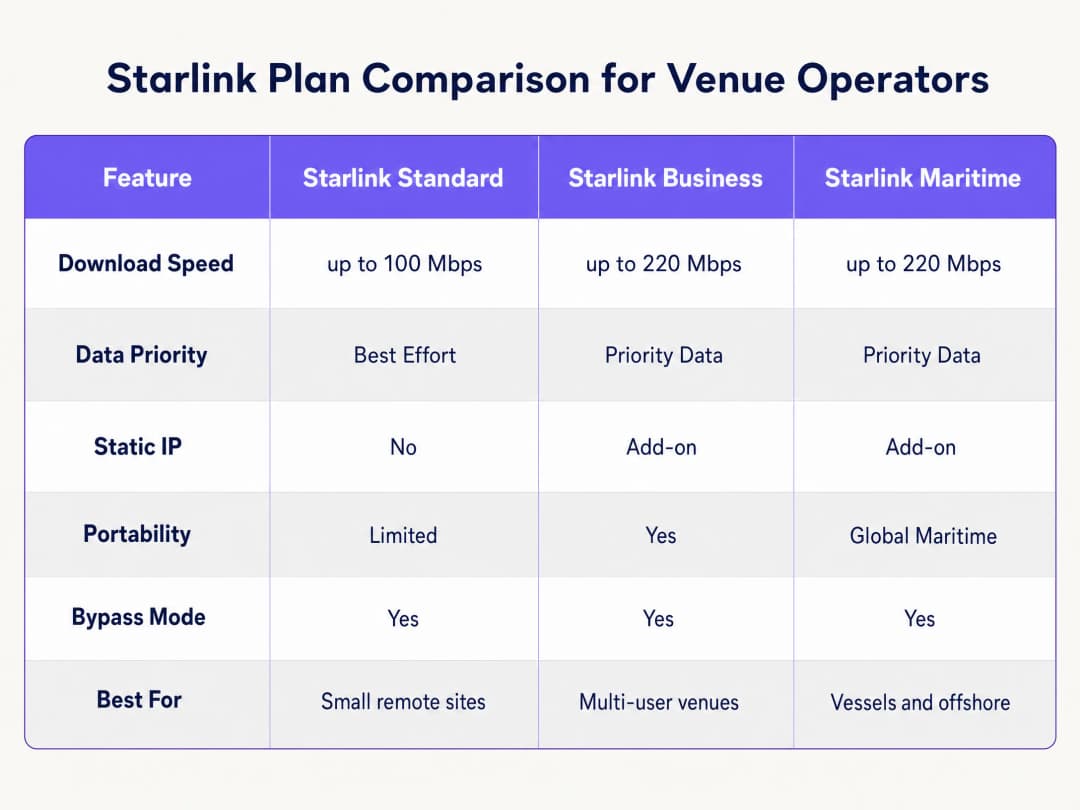
Starlink 在光纖無法抵達的地區提供 220 Mbps 的連線能力,徹底改變了偏遠地區和海事場所的網路環境。然而,對於面向公眾的環境,單靠連線能力是不夠的。當您為訪客、乘客或船員部署 Starlink 時,您必須實施身分驗證、存取控制、符合 GDPR 規範的同意聲明以及頻寬管理。原廠的 Starlink 路由器不提供任何這些功能。
本指南將詳細說明如何繞過原廠的 Starlink 硬體,並使用企業級路由設備整合雲端管理的 Captive Portal。您將學習如何克服電信級 NAT (CGNAT) 的限制、實施 VLAN 區段、管理衛星頻寬限制並確保符合法規。
透過實施此架構,場所營運商可以將未管理的網際網路管道轉換為安全、隔離的網路,從而收集第一方數據並保護核心商業基礎設施。
技術深度剖析
CGNAT 的限制
在 Starlink 上部署 Captive Portal 時,首要的技術障礙是電信級 NAT (CGNAT)。標準的 Starlink 接收器會連接到處理 DHCP 和 NAT 的專有路由器。在預設情況下,分配給您設備的 WAN IP 位址落在 100.64.0.0/10 範圍內。由於這不是公共 IP 位址,您的路由器無法接收來自網際網路的入站連線。
標準的 Captive Portal 架構通常假設雲端入口網站可以連回您的網路,以對使用者進行身分驗證或更新存取控制清單。在 CGNAT 的情況下,入站連線將會失敗。
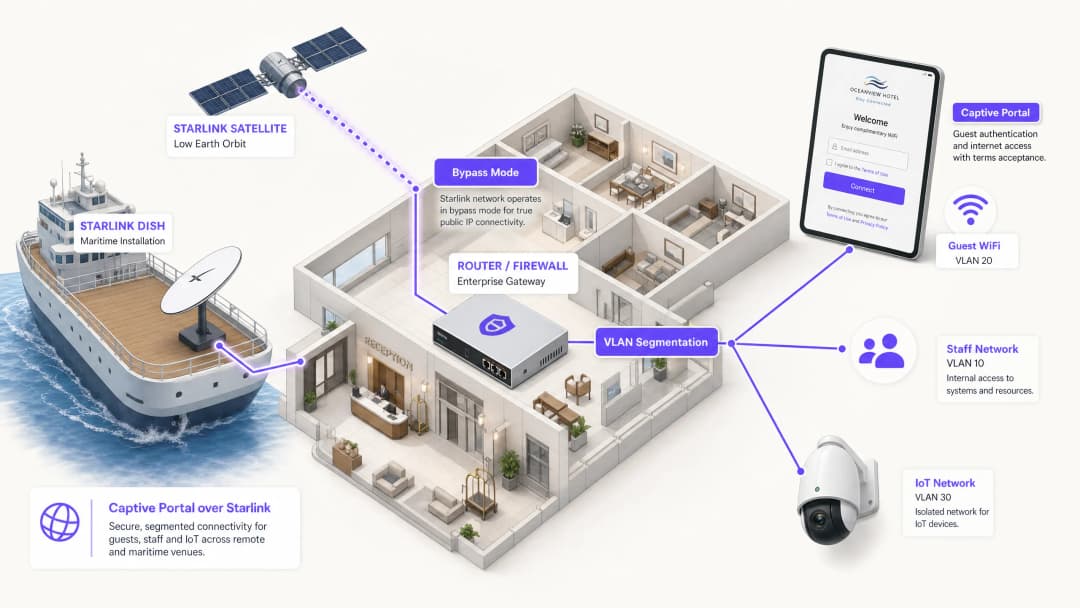
為了解決此問題,您必須將 Starlink 接收器配置為 Bypass 模式(通常稱為橋接模式)。在 Bypass 模式下,Starlink 路由器的功能會被停用,接收器會將 CGNAT 位址直接傳送到企業路由器的 WAN 連接埠。接著,您的企業路由器將完全接管路由層。

反向通道架構
即使由企業路由器處理流量,CGNAT 的入站限制依然存在。解決方案是採用反向通道架構。您的路由器會建立指向雲端入口網站的出站連線並持續維持。所有身分驗證流量都經由這個建立的通道傳輸。雲端基礎設施完全不需要發起入站連線。 Purple 的雲端重疊架構(cloud overlay architecture)原生處理此問題。您不需要手動設定 VPN 隧道。如果您的部署需要靜態 IP 來用於舊版內部部署 RADIUS 伺服器或嚴格的 IP 允許清單,Starlink 商業與海事方案可提供付費附加的靜態 IP。
頻寬限制與流量整形
衛星頻寬是共享且有限的資源。單一使用者串流 4K 影片可能會持續消耗 25 Mbps。在一艘擁有 50 名乘客共享 220 Mbps Starlink 連線的船隻上,一個使用者就可能消耗總容量的 11%。
您必須透過積極的流量整形在 Captive Portal 和路由器層級解決此問題:
- 每台裝置限制: 限制個別訪客裝置的下載速度為 5 Mbps,上傳速度為 2 Mbps。
- 公平使用政策: 強制執行每日資料額度(例如:每 24 小時 2GB)。
- 應用程式控制: 將網頁瀏覽和即時通訊協定的優先順序,設為高於影片串流和對等網路(P2P)檔案共享。
- 分級存取: 提供基本連線的免費層級,以及用於串流的付費進階層級,將 WiFi 基礎設施從成本中心轉變為營收來源。
實作指南
請按照以下步驟,使用企業級硬體在 Starlink 上部署安全的 Captive Portal。
步驟 1:啟用旁路模式 (Bypass Mode)
- 安裝 Starlink 硬體,並使用原始路由器驗證連線能力。
- 開啟 Starlink 行動應用程式並導覽至 Settings(設定)。
- 選擇並確認 Bypass Starlink WiFi router(旁路 Starlink WiFi 路由器)。
- 將 Starlink 乙太網路轉接器連接到您企業級路由器(Cisco Meraki, HPE Aruba, Ruckus, Juniper Mist, Ubiquiti UniFi, Cambium, Extreme Networks 或 Fortinet)的 WAN 連接埠。
注意:如果 Starlink 碟形天線進行工廠重設,旁路模式將會自動停用。請將此記錄在您的現場作業手冊中,並在您的路由器 WAN 介面上設定監控警報。
步驟 2:設定 VLAN 分割
您必須將訪客流量與您的核心業務系統隔離。請在您的核心交換器和存取點上設定至少三個 VLAN:
- VLAN 10 (員工): 傳輸 POS 系統、後台應用程式和管理流量。
- VLAN 20 (訪客): 僅限網際網路的安全區段,會重導向至 Captive Portal。
- VLAN 30 (IoT): 用於攝影機、智慧恆溫器和建築管理系統的隔離網路。
設定防火牆規則以封鎖所有跨 VLAN 路由。VLAN 20 上的訪客裝置絕對不能 Ping 傳送訊號給 VLAN 10 上的 POS 終端機。此分割是符合 PCI-DSS 的嚴格要求。
步驟 3:部署雲端 Captive Portal
- 將您的存取點設定為在 VLAN 20 上廣播訪客 SSID。
- 將驗證方法設定為外部 RADIUS,或使用廠商的 API 整合。3. 將驗證伺服器指向 Purple 的雲端基礎架構。
- 設定 walled garden (白名單),以允許在驗證完成前,流量可到達 Purple 的網域。
- 在 Purple 管理介面中設計登入畫面,確保品牌形象與您的場所一致,並清楚顯示服務條款。
步驟 4:測試使用者流程
在 iOS 與 Android 裝置上測試驗證流程。Apple 的 Captive Network Assistant (CNA) 與 Android 的網路探測行為有所不同。請驗證登入畫面是否在 10 秒內載入,且裝置在驗證後是否能立即連線至網際網路。
最佳實踐
- HTTPS 攔截: 確保您的路由器正確處理 HTTPS 攔截。現代裝置預設使用 HTTPS。如果路由器無法乾淨地重導向 HTTPS 要求,顧客在到達入口網站前將會遇到憑證錯誤。
- 工作階段 Keepalive: Starlink 的低地球軌道 (LEO) 星系提供 20 到 40 毫秒的延遲,但在衛星切換期間會出現短暫的尖峰。請將您的 Captive Portal 工作階段 keepalive 間隔設定為 60 秒或更短,以防止過早斷線。
- 離線快取: 設定您的路由器在本地快取作用中的工作階段。如果 Starlink 連線暫時中斷,已通過驗證的顧客在恢復連線時將保持在線狀態,而不需要被迫重新登入。
疑難排解與風險緩釋
| 故障模式 | 根本原因 | 緩釋措施 |
|---|---|---|
| Captive Portal 無法載入 | Walled garden 設定不正確 | 驗證是否已將所有必要的 Purple 網域與 CDN 端點新增至路由器上的預先驗證白名單中。 |
| 雙重 NAT 錯誤 | 旁路模式 (Bypass Mode) 已停用 | 檢查 Starlink 應用程式以確認旁路模式已啟用。電力波動或手動重設可能會使天線恢復為預設設定。 |
| 顧客網速過慢 | 未限制頻寬 | 套用單一裝置頻寬限制 (例如:5 Mbps),並在防火牆上阻擋 BitTorrent 等高頻寬應用程式。 |
| 安全稽核失敗 | 跨 VLAN 路由已啟用 | 稽核防火牆規則以確保來自 Guest VLAN 的流量無法路由至 Staff 或 Management VLAN。 |
ROI 與商業效益
在 Starlink 上佈署託管型 Captive Portal,能將單純的網路連線轉化為可衡量的企業資產。
以一艘擁有 120 間客艙、運行 220 Mbps Starlink Maritime 的郵輪為例,單純提供網路存取無法帶來商業回報。透過佈署 Cisco Meraki 基地台與 Purple 的 Captive Portal,營運商可以對一般旅客實施每日 2GB 的額度限制,同時加值銷售 10GB 的進階方案。由此產生的 WiFi 收益足夠支付每月 250 美元以上的 Starlink 訂閱成本。此外,該入口網站還能收集完全合規的第一方電子郵件數據,為未來的航程擴大營運商的直接行銷名單。 在偏遠地區的飯店環境中,部署具有嚴格頻寬原則的 portal 頁面,可將房客對 WiFi 慢速的投訴減少高達 60%,因為這能防止高用量使用者獨佔衛星連線。
關鍵定義
Bypass Mode
一種組態設定,可停用 Starlink 原生路由器的 DHCP 和 NAT 功能,將 WAN IP 直接傳遞給第三方企業路由器。
將企業網路設備與 Starlink 碟型天線整合時,需要使用此模式以避免雙重 NAT 和路由衝突。
CGNAT (Carrier Grade NAT)
網際網路服務供應商 (ISP) 用於在多個客戶之間共享單一公用 IP 位址的方法。客戶的路由器會收到一個私人 IP 位址 (通常為 100.64.0.0/10)。
Starlink 預設使用 CGNAT,這會阻止來自網際網路的輸入連線,並需要反向通道架構來進行雲端管理。
VLAN (Virtual Local Area Network)
一種邏輯子網路,可將來自不同實體 LAN 的裝置群組在一起。
用於將訪客 WiFi 流量與員工和 IoT 網路隔離,確保安全與合規性。
Captive Portal
公共存取網路的使用者在獲得存取權限之前,必須瀏覽並進行互動的網頁。
用於強制執行服務條款、收集行銷數據,並在訪客 WiFi 網路上驗證使用者身分。
Walled Garden
一種受限制的環境,在使用者完全通過驗證之前,控制其對網頁內容和服務的存取。
需要允許訪客裝置在獲得完整網際網路存取權限之前,能夠連線到雲端 Captive Portal 和驗證伺服器。
RADIUS
一種網路協定,為連線和使用網路服務的使用者提供集中式的驗證、授權和計費管理。
企業無線基地台用來與雲端 Captive Portal 通訊以驗證使用者認證資料的底層協定。
Traffic Shaping
對網路流量進行操作和優先順序排序,以減少高用量使用者或對延遲敏感的應用程式所造成的影響。
在 Starlink 網路上至關重要,可將網頁瀏覽的優先順序排在視訊串流等高頻寬活動之前。
第一方數據
企業直接自客戶收集並擁有的資訊。
透過 Captive Portal 登入流程(例如電子郵件地址)所收集,並用於直接行銷和忠誠度活動。
範例
一艘運行 Starlink Maritime、頻寬為 220 Mbps 且擁有 120 間客艙的郵輪,需要在不降低船舶營運效能的情況下提供旅客 WiFi。他們需要一種機制來將該連線變現並收集行銷數據。
營運商在整艘船上部署 Cisco Meraki 無線基地台,並劃分三個嚴格的 VLAN:船員、旅客和船舶系統。Purple 的 Captive Portal 透過電子郵件或與 PMS 整合的客艙號碼查詢來處理旅客身分驗證。每位旅客每天可獲得 2GB 的免費額度。尊榮級旅客可以購買 10GB 的配額。該入口網站收集第一方電子郵件數據,以便進行航程後的行銷。
一家位於偏遠高地、無光纖基礎設施的酒店使用 150 Mbps 的 Starlink Business。房客經常抱怨晚上網速慢,且酒店無法掌握是誰在使用網路。
該酒店在主建物和附屬建物中部署 HPE Aruba 無線基地台。他們將 Starlink 碟型天線設定為 Bypass Mode,並將其連接到 Aruba 閘道器。房客在 Purple 的入口網站上透過電子郵件進行驗證。酒店對每台裝置強制執行 5 Mbps 的嚴格頻寬上限,並使用 Purple 的分析功能來監控尖峰使用時間。
練習題
Q1. 某個偏遠礦區營地部署了 Starlink Business。他們將 Cisco Meraki MX 防火牆連接到 Starlink 路由器。訪客可以連線到 WiFi,但 Captive Portal 頁面逾時且無法載入。最可能的原因是什麼?
提示:思考 Starlink 硬體在預設情況下如何處理路由,以及 Cisco Meraki 防火牆需要什麼才能有效管理流量。
查看標準答案
Starlink 碟型天線未切換至 Bypass Mode。這導致網路發生雙重 NAT(Starlink 路由器與 Cisco Meraki 防火牆皆試圖進行網路位址轉換)。管理員必須使用 Starlink 應用程式啟用 Bypass Mode,以允許 Cisco Meraki 防火牆直接接收 CGNAT IP,並管理路由與 Captive Portal 攔截。
Q2. 您正在使用 Starlink 為一家飯店部署 Captive Portal。您已設定 Bypass Mode 與 VLAN 分段。在測試期間,您注意到 iOS 裝置會立即提示使用者登入,但某些 Android 裝置在使用者嘗試於驗證前瀏覽安全網站時,會顯示憑證錯誤。您該如何解決此問題?
提示:思考現代瀏覽器如何處理初始連線請求,以及路由器必須執行什麼操作才能乾淨地攔截這些請求。
查看標準答案
企業路由器未正確設定以處理 Captive Portal 重新導向的 HTTPS 攔截。現代瀏覽器預設使用 HTTPS。當使用者在驗證前嘗試造訪 HTTPS 網站時,路由器會攔截該流量並呈現自己的憑證,瀏覽器會因其無效而拒絕。您必須確保路由器的 Captive Portal 設定已設定為使用有效的 SSL 憑證進行重新導向,或者依賴作業系統層級的網路探測(例如 Apple 的 CNA),這些探測使用 HTTP 端點來自動觸發入口網站。
Q3. 一家海事營運商抱怨他們的 Starlink Maritime 連線(220 Mbps)每天晚上都變得無法使用。他們目前提供一個開放、免密碼的訪客網路。您應該在企業路由器和 Captive Portal 上實施哪三種特定設定來解決此問題?
提示:專注於控制個別使用者可以消耗多少數據量,並為關鍵流量類型排定優先順序。
查看標準答案
- 實施需要驗證的 Captive Portal,以追蹤和管理個別使用者。2. 強制執行每台裝置的頻寬限制(例如:下載 5 Mbps / 上傳 2 Mbps),以防止單一使用者獨佔連線。3. 在防火牆套用流量整形規則,以排定網頁瀏覽和即時通訊協定的優先順序,同時限制或封鎖高頻寬應用程式(如影片串流和 P2P 檔案分享)。
常見問題
Why does Starlink require an external gateway router in bypass mode for enterprise captive portals?
Starlink user terminals (Standard Gen 2, Gen 3, and Flat High Performance Maritime) include a basic residential-grade router without support for external splash page redirection, 802.1Q VLAN tagging, RADIUS AAA (RFC 2865/2866), or walled garden domain whitelisting. Enabling Starlink Bypass Mode disables native NAT and WiFi routing, bridging the Layer 2 WAN handoff directly into an enterprise security gateway - such as Peplink Balance, Cisco Meraki MX, or Fortinet FortiGate - which handles captive portal interception, traffic shaping, and guest isolation.
How does Starlink Carrier-Grade NAT (CGNAT) affect external captive portal redirection?
Standard Starlink satellite plans assign WAN IP addresses from the private CGNAT pool (100.64.0.0/10), which prevents hosting local inbound HTTP/HTTPS listening services without dynamic DNS or port forwarding. Purple operates as a cloud-hosted captive portal, meaning guests resolve the splash page via external HTTPS requests initiated outbound from the gateway. Because client authorization occurs over outbound RADIUS or cloud API webhooks, CGNAT does not impact portal redirection or authentication flows.
How do you prevent guest WiFi users from exhausting Starlink Maritime or Priority satellite data quotas?
Starlink Maritime and Priority plans feature metered priority data pools (such as 50 GB to 5 TB per month), with steep per-gigabyte overage charges or throughput throttling upon exhaustion. To protect satellite quotas, enterprise gateways running Purple enforce strict per-user bandwidth caps (e.g., 3 Mbps downlink / 1 Mbps uplink), session data allowances (e.g., 500 MB per day), Layer 7 application filtering blocking 4K video streaming and torrents, and separate QoS priority queues that reserve 40% of satellite backhaul for mission-critical vessel navigation and staff operations.
Can a captive portal on Starlink integrate with maritime Property Management Systems (PMS)?
Yes. Purple integrates directly with hospitality and maritime PMS platforms - including Oracle Hospitality Opera and FCS - allowing guests on cruise ships, ferries, and luxury charter yachts to authenticate using their cabin number and surname. The gateway passes guest credentials securely to Purple cloud services, which query the vessel PMS to verify active folio reservations, apply billing tiers to the guest account, or unlock complimentary high-speed tiers for VIP passengers.
Which domains must be whitelisted in the Starlink walled garden for seamless smartphone captive portal popups?
Allow the portal and its dependencies, and nothing else: the Purple splash and CDN hosts (*.purplewifi.net, *.purple.ai), the RADIUS endpoints, and the OAuth identity provider domains (Google, Facebook, Apple ID) plus their CRL and OCSP endpoints if social onboarding is enabled. Do not allow the operating system connectivity probes - captive.apple.com, connectivitycheck.gstatic.com, msftconnecttest.com. The gateway has to intercept those probes, because it is the redirect they receive that tells iOS, Android and Windows the network is captive and opens the Captive Network Assistant. Allow them through and the probe succeeds, the device concludes it already has internet access, and the login page never appears.
How does multi-WAN SD-WAN bond Starlink satellite backhaul with coastal 4G/5G cellular connectivity?
Maritime vessels and remote venues frequently combine Starlink with multi-SIM cellular routers (such as Peplink MAX HD4 or Cradlepoint) to minimize satellite data spend. Using SD-WAN bonding and least-cost routing algorithms, the gateway steers high-bandwidth guest traffic onto terrestrial 4G/5G LTE connections when operating within 20 nautical miles of coastline, seamlessly failing over to Starlink satellite backhaul when navigating offshore or beyond cellular range without dropping active guest sessions.
繼續閱讀本系列
Ubiquiti UniFi 訪客入口網站未重定向:原因與解決方法
本指南循序追蹤訪客狀態、重新導向、預先授權路由及控制器授權,藉此釐清 UniFi guest portal 重新導向失敗的原因。它為場域 IT 團隊提供了一套經過實證的方法,用以解決訪客網路與 Hotspot 之間的混淆、外部 portal 轉接、目前的 UniFi OS 帳戶要求,以及 DNS 隔離測試。
Cisco Meraki splash page 無法正常工作:疑難排解流程圖
這份實用的後期維運指南,旨在隔離 Cisco Meraki splash 流程失敗的環節:用戶端授權、HTTP 重新導向啟動、walled-garden 可達性或 RADIUS 登入。它為場域 IT 團隊提供了一條受控的實證路徑,以便在不對營運中系統進行大範圍變更的情況下恢復 Guest WiFi。
企業級 Guest WiFi 設定指南:VLAN 分段、安全性與 Captive Portal
本技術指南向 IT 團隊展示如何將 Guest WiFi 設定為受控的網際網路存取服務,利用 VLAN 分段、防火牆策略及 Captive Portal 進行管理。同時也說明了 Purple 的註冊表單與上網流程控制如何支援適度的訪客體驗,且不削弱員工、支付和營運系統周邊的安全邊界。
對於您的特定設置有任何疑問嗎?
我們的團隊與超過 80,000 個場域的場域營運商、IT 經理和網路工程師合作。立即預約 20 分鐘的通話,我們將向您展示其他與您相似的用戶是如何解決此問題的。