
Integrando a Autenticação do WeChat com Captive Portals de WiFi para Convidados
Este guia explica como integrar a autenticação WeChat OAuth 2.0 em Captive Portals de WiFi corporativos para convidados. Ele aborda os requisitos de registro em dupla plataforma, a seleção de escopo para captura de dados primários, a imposição de rede via RADIUS Change of Authorization e a conformidade com o GDPR e a PIPL da China. Operadores de locais nos setores de hotelaria, varejo e eventos encontrarão etapas concretas de implementação, estudos de caso reais e orientações de reforço de segurança para implantar o login do WeChat em WiFi para convidados em escala.
Ouça este guia
Ver transcrição do podcast
Resumo executivo
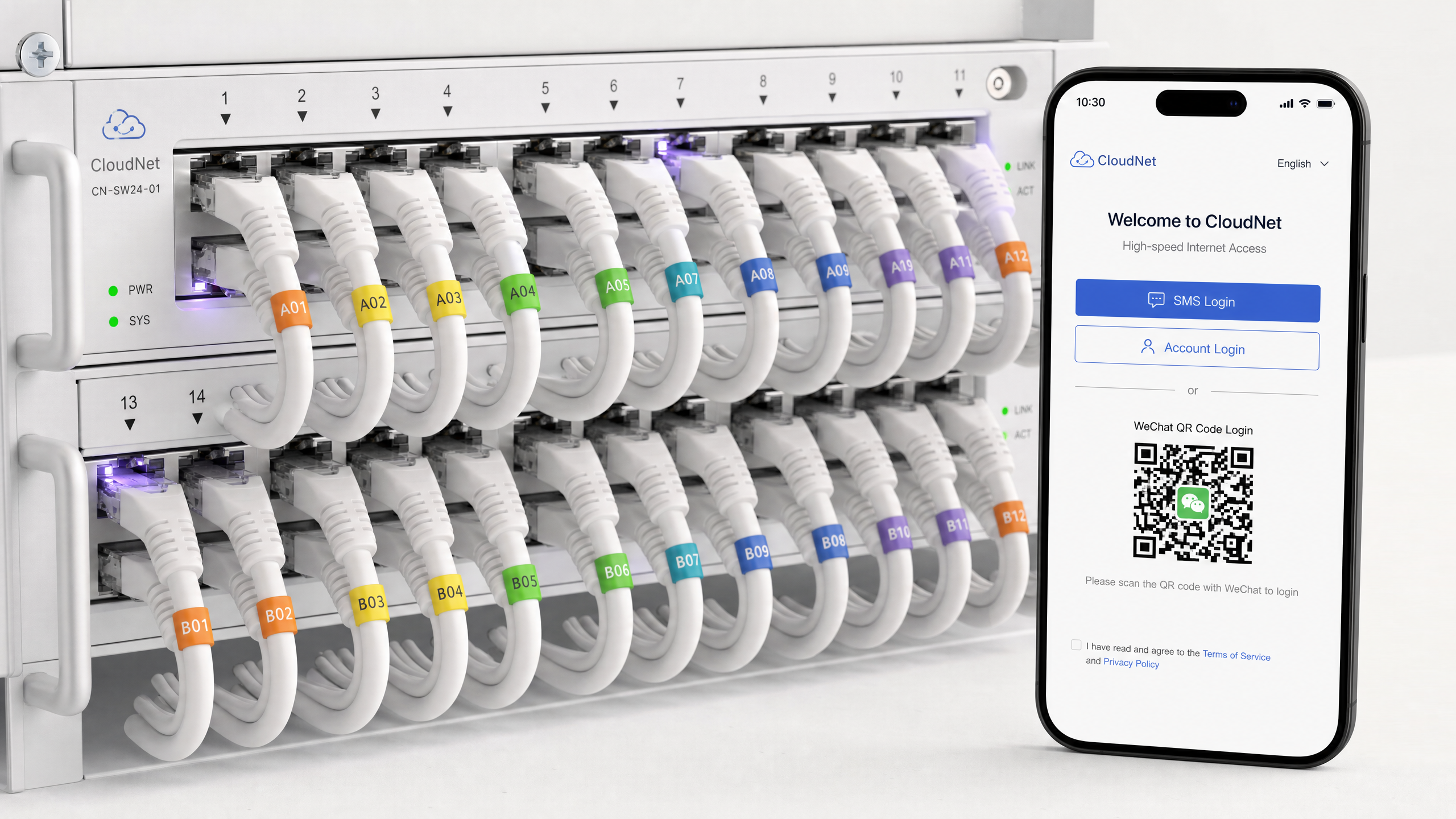
Quando um visitante chinês se conecta à sua rede corporativa e encontra um Captive Portal que oferece apenas e-mail, Facebook ou um código de voucher, você introduz um atrito imediato. O WeChat tem 1,38 bilhão de usuários ativos mensais, de acordo com os dados de 2024 da Tencent. Integrar recursos de login do WeChat em WiFi para convidados não é uma conveniência de hospitalidade — é um requisito técnico para capturar dados primários desse grupo demográfico sem atrito.
Este guia detalha a arquitetura técnica para integrar a autenticação WeChat OAuth 2.0 em Captive Portals. Ele explica o registro em dupla plataforma necessário para suportar tanto navegadores móveis padrão quanto o navegador in-app do WeChat, avalia as compensações entre os escopos snsapi_base e snsapi_userinfo para coleta de dados e descreve como impor o acesso à rede usando RADIUS Change of Authorization (CoA) ou MAC authentication bypass. Também abrange as configurações de segurança e mandatos de conformidade — GDPR e a PIPL da China — necessários para implantar isso em escala nas infraestruturas Cisco Meraki, HPE Aruba, Ruckus, Juniper Mist, Ubiquiti UniFi, Cambium, Extreme e Fortinet.
Análise técnica aprofundada: arquitetura do WeChat OAuth 2.0
Um Captive Portal intercepta o tráfego HTTP de um dispositivo não autenticado e o redireciona para uma página de login hospedada em um servidor de portal. Adicionar a autenticação do WeChat insere um provedor de identidade de terceiros nesse fluxo usando o protocolo OAuth 2.0 — o mesmo padrão usado pelo Google, Microsoft Entra ID e Okta para identidade federada.
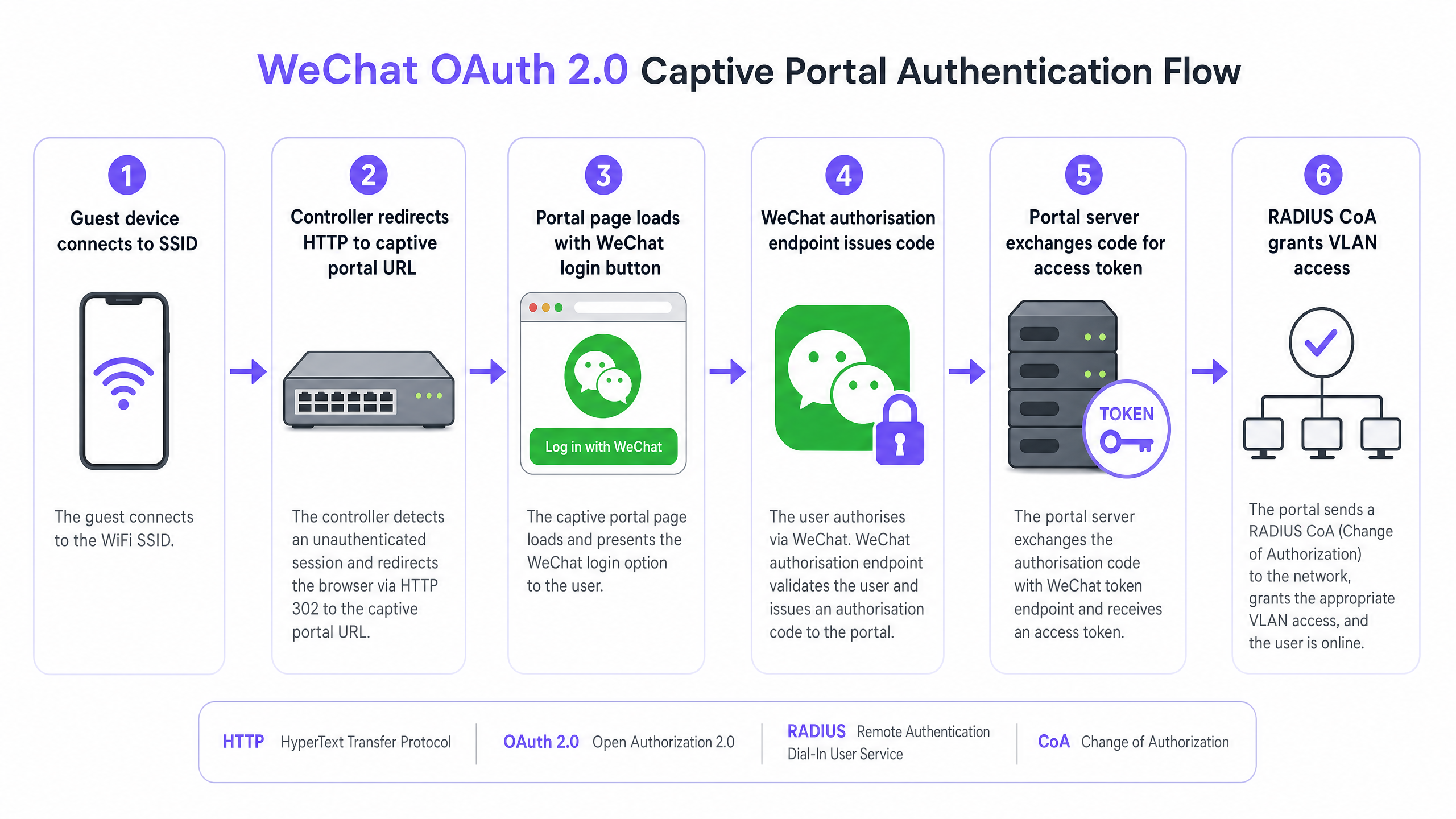
A sequência de autenticação funciona da seguinte forma. O convidado se conecta ao SSID. O ponto de acesso ou controlador sem fio detecta a sessão não autenticada e redireciona o tráfego HTTP para a URL do Captive Portal. O convidado seleciona o login do WeChat na página do portal. O servidor do portal redireciona o navegador para o endpoint de autorização do WeChat em open.weixin.qq.com, passando o AppID, a URI de redirecionamento, o tipo de resposta como code e o escopo solicitado. O WeChat lida com a autenticação em seus próprios servidores. Se o convidado usar o navegador in-app do WeChat com o escopo snsapi_base, a autenticação será silenciosa — nenhum aviso de consentimento será exibido. Se usar snsapi_userinfo, o WeChat apresentará uma tela de consentimento. O WeChat então redireciona de volta para a URI de redirecionamento do portal com um código de autorização temporário. O servidor do portal troca esse código por um token de acesso chamando api.weixin.qq.com/sns/oauth2/access_token, passando o AppID, AppSecret, o código e um tipo de concessão de authorization_code. O WeChat retorna um token de acesso, um token de atualização (refresh token), o OpenID do usuário e o escopo concedido. Se o snsapi_userinfo tiver sido concedido, o servidor fará uma segunda chamada de API para recuperar o apelido, avatar, gênero e cidade do usuário.
O requisito de registro em dupla plataforma
A maioria das implementações falha na etapa de registro. O WeChat opera duas plataformas de desenvolvedores separadas, e as implantações corporativas normalmente exigem ambas.
| Plataforma | URL | Tipo de conta necessário | Escopo suportado | Contexto do navegador |
|---|---|---|---|---|
| Official Accounts Platform | mp.weixin.qq.com | Conta de Serviço | snsapi_base, snsapi_userinfo | Navegador in-app do WeChat |
| Open Platform | open.weixin.qq.com | Website Application | snsapi_login | Navegador móvel padrão |
Para convidados que acessam o portal dentro do navegador in-app do WeChat, você precisa de uma Conta de Serviço na Official Accounts Platform. Uma Conta de Assinatura não funcionará — ela não possui permissões de autorização de página web OAuth. Para convidados que acessam o portal a partir do Chrome no Android ou Safari no iOS, você precisa de uma Website Application na Open Platform, que usa o escopo snsapi_login e apresenta um código QR para o usuário escanear.
Na prática, a maioria das implantações em locais usa ambos. Um hóspede de um hotel pode abrir o portal no Chrome, ver um código QR, escaneá-lo com o WeChat e se autenticar. Ou eles podem seguir um link no próprio WeChat, cair no navegador in-app e se autenticar silenciosamente com o snsapi_base.
Seleção de escopo: captura de dados vs. atrito
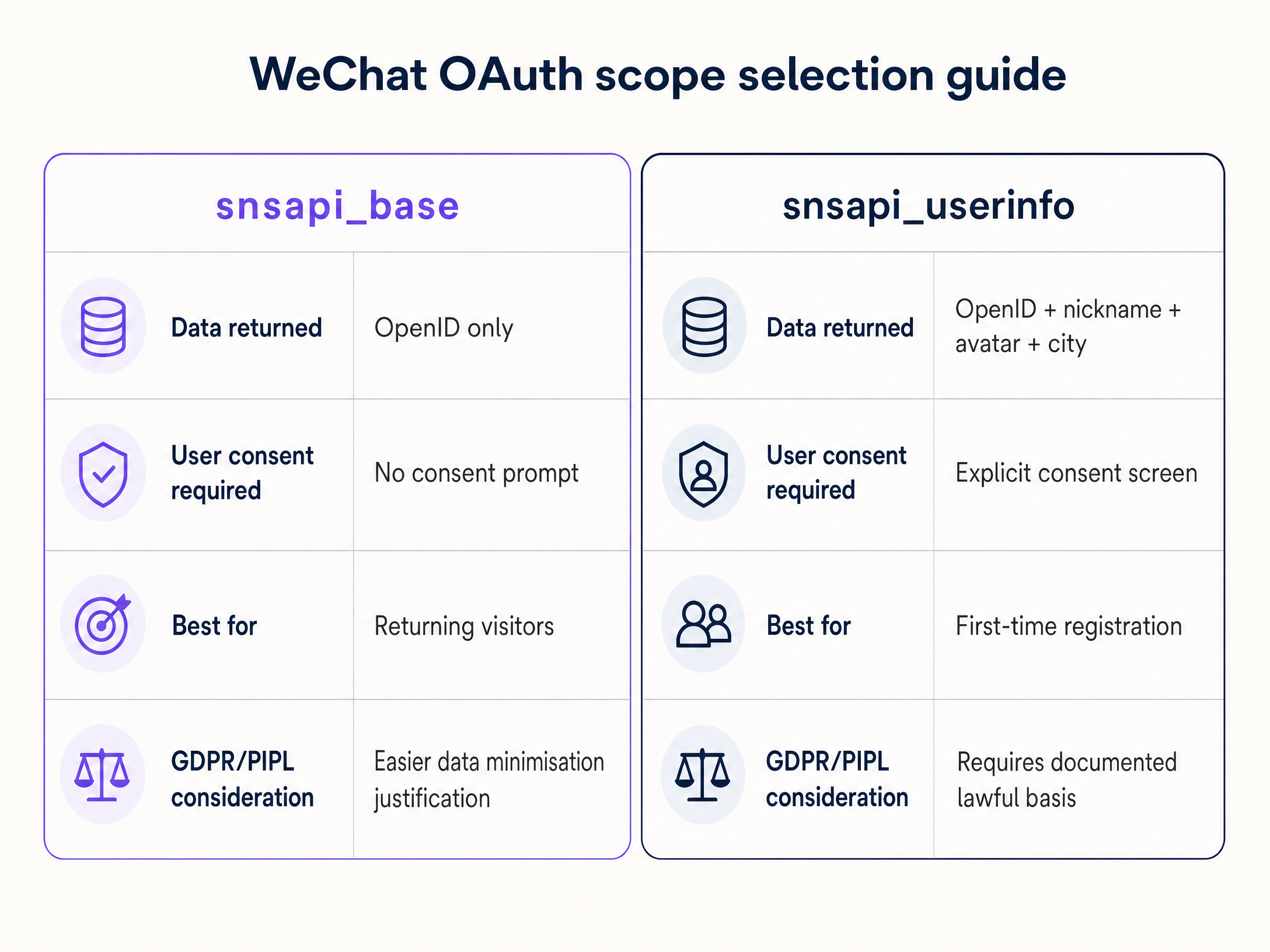
O escopo solicitado determina quais dados você coleta e o atrito que o convidado experimenta. Este é um ponto de decisão real com implicações de conformidade.
snsapi_base retorna apenas o OpenID — um identificador exclusivo para esse usuário em sua Official Account. Não requer nenhum aviso de consentimento do usuário. A autenticação é invisível para o convidado. Use isso para convidados recorrentes cujos perfis você já possui, ou quando priorizar o acesso sem atrito. Sob os princípios de minimização de dados do GDPR e da PIPL, o snsapi_base é mais fácil de justificar.
snsapi_userinfo retorna o OpenID mais o apelido, a foto do perfil, o gênero e a cidade do usuário. Requer uma tela de consentimento explícita. Use isso para o registro de convidados pela primeira vez, onde você precisa criar um perfil, combinado com uma camada de consentimento em conformidade na página do seu portal.
UnionID para implantações em várias propriedades
O OpenID é exclusivo para a combinação de um usuário e uma Official Account específica. Um grupo hoteleiro com 20 propriedades, cada uma com sua própria Official Account, verá 20 OpenIDs diferentes para o mesmo hóspede. O UnionID resolve isso. É um identificador único que representa um usuário em todas as Official Accounts e aplicativos vinculados à mesma conta da Open Platform. Vincule suas Official Accounts à sua conta da Open Platform, e o UnionID será retornado na resposta OAuth. Esta é a base para crreconhecimento de hóspedes oss-property.
Guia de implementação
Mecanismos de aplicação de rede
A obtenção de um token OAuth comprova a identidade. Ela não abre a rede. Você deve sinalizar a controladora para permitir o tráfego.
RADIUS Change of Authorization (CoA), definido na RFC 3576, é a abordagem empresarial recomendada. Após o OAuth bem-sucedido, o servidor do portal envia uma solicitação de CoA para a controladora de rede. A controladora move o dispositivo da VLAN de pré-autenticação para a VLAN de visitantes. Isso funciona com Cisco Meraki, HPE Aruba, Ruckus, Juniper Mist, Ubiquiti UniFi, Cambium, Extreme e Fortinet.
MAC Authentication Bypass (MAB) registra o endereço MAC do dispositivo como um cliente autorizado no banco de dados RADIUS. A controladora permite o acesso com base nesse MAC. O MAB é mais simples de implementar, mas não é confiável: dispositivos iOS e Android modernos randomizam os endereços MAC por padrão, quebrando a associação da sessão ao reconectar.
A plataforma Guest WiFi da Purple automatiza essa tradução. Após a conclusão do WeChat OAuth, a sobreposição de nuvem da Purple envia o sinal CoA ou MAB apropriado para o hardware subjacente, eliminando a configuração manual de VLAN.
Configuração de segurança
Três configurações são inegociáveis.
- Proteja o AppSecret. O
AppSecretnunca deve aparecer no JavaScript do lado do cliente. Ele deve permanecer no seu servidor. Se exposto, invasores podem se passar pelo seu aplicativo e chamar as APIs do WeChat em seu nome. - Implemente proteção CSRF. Gere um valor de
statecriptograficamente aleatório, armazene-o na sessão do usuário e valide-o quando o WeChat redirecionar de volta. Isso evita ataques de falsificação de solicitação entre sites (CSRF), conforme definido na RFC 6749. - Registre todas as variantes de URI de redirecionamento. O WeChat valida a URI de redirecionamento em relação ao seu domínio registrado. Registre cada subdomínio e variante de caminho que você usa, incluindo ambientes de homologação, para evitar o erro 40029 (código inválido).
Detecção de navegador integrado (in-app)
O navegador integrado do WeChat define uma string de user agent contendo MicroMessenger. Seu portal deve detectar essa string e rotear de acordo: fluxo de Conta Oficial para navegador integrado, fluxo de código QR de Plataforma Aberta para navegadores padrão. A falha em detectar isso gera experiências corrompidas ou erros de autenticação.
Melhores práticas e conformidade
Conformidade com o GDPR
Se você atende a visitantes europeus ou opera na Europa, o GDPR se aplica aos dados que você coleta via WeChat OAuth. Você deve estabelecer uma base legal para o processamento — normalmente consentimento ou interesses legítimos. Você deve fornecer um aviso de privacidade claro no Captive Portal antes da autenticação. Você deve respeitar as solicitações de acesso e de exclusão dos titulares dos dados. Para obter um framework de conformidade detalhado, consulte The Compliance Playbook: GDPR and Guest WiFi Data Privacy .
Conformidade com a PIPL
A Lei de Proteção de Informações Pessoais da China (PIPL) se aplica quando você processa dados pessoais de cidadãos chineses. Assim como o GDPR, a PIPL exige limitação clara de finalidade, minimização de dados e uma base legal documentada. O snsapi_base é mais fácil de justificar sob a minimização de dados do que o snsapi_userinfo. Independentemente do que você coletar, documente sua base legal e o período de retenção antes do go-live.
Segmentação de rede
Isole o tráfego de WiFi de visitantes da sua rede corporativa usando segmentação de VLAN. Os visitantes autenticados via WeChat devem ser direcionados para uma VLAN de visitantes dedicada apenas com acesso à internet — sem acesso aos sistemas internos. Isso está alinhado com os requisitos do PCI DSS para isolamento do ambiente de dados do titular do cartão e com as práticas gerais de segurança empresarial. Para saber mais sobre arquitetura de segmentação, consulte Bandwidth Management: A Practical Guide for 2026 .
Autenticação de fallback
Se a API do WeChat estiver indisponível, seu portal deverá redirecionar para um método de login alternativo. Não deixe os visitantes com uma tela em branco. Um fallback para e-mail ou SMS garante a continuidade. Isso é particularmente importante para locais em ambientes de Transporte e Saúde , onde a conectividade é uma obrigação de serviço.
Estudos de caso reais
Hotelaria: grupo de hotéis de luxo
Um hotel de luxo de 400 quartos em Londres atende a uma proporção significativa de hóspedes da China continental. O Captive Portal existente exigia um endereço de e-mail e verificação por SMS. Os números de celular chineses frequentemente não recebem SMS de provedores europeus, e muitos hóspedes não têm um e-mail local configurado em seus dispositivos. O resultado foi uma taxa de abandono de 60% no portal.
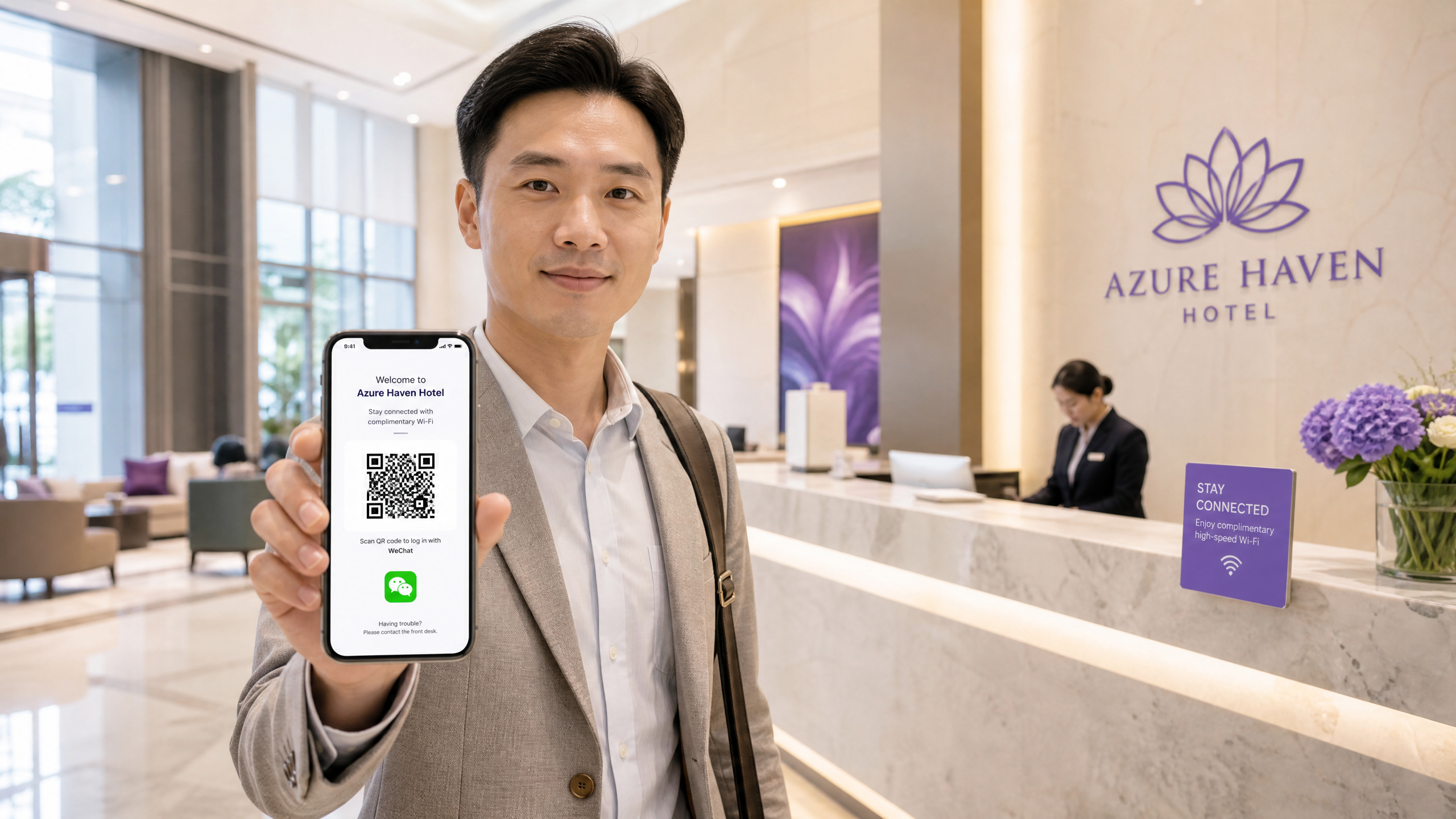
O hotel registrou uma Conta de Serviço na Plataforma de Contas Oficiais e um Aplicativo de Site na Plataforma Aberta. O portal detecta o user agent MicroMessenger e aciona o snsapi_base para usuários de navegadores integrados — conectando-os em menos de três segundos, sem tela de consentimento. Os hóspedes que chegam via Chrome ou Safari veem um código QR. Em estadias subsequentes, o mesmo OpenID é reconhecido e o hóspede é autenticado novamente de forma silenciosa. O CRM do hotel registra a visita de retorno, permitindo comunicações direcionadas antes da chegada. Para saber mais sobre a implantação de WiFi em ambientes de hotelaria, consulte Hospitality .
Varejo: análise de shopping centers
Um grande shopping center deseja capturar dados demográficos de compradores chineses para subsidiar decisões de mix de lojistas e marketing. Eles precisam de cidade de origem, gênero e frequência de visitas. O snsapi_base é insuficiente — eles precisam do snsapi_userinfo. O portal solicita o escopo completo de userinfo. O visitante vê uma tela de consentimento do WeChat e toca em Permitir. A plataforma de análise do shopping, integrada ao WiFi Analytics da Purple, recebe um fluxo de dados demográficos verificados. Nas tardes de sábado, 40% dos usuários de WiFi se originam de uma região específica. Esses dados diretamenty informa quais marcas abordar para eventos pop-up. Para saber mais sobre implantações de WiFi no varejo, consulte Varejo .
Solução de problemas e mitigação de riscos
Os cinco modos de falha mais comuns em implantações de Captive Portal com WeChat OAuth são os seguintes.
Incompatibilidade de URI de redirecionamento (erro 40029). O WeChat valida a URI de redirecionamento em relação ao domínio registrado. Qualquer incompatibilidade de subdomínio, caminho ou protocolo resulta em falha na troca de código. Registre todas as variantes, incluindo ambientes de homologação.
Exposição do AppSecret. Incorporar o AppSecret no código do lado do cliente é o erro de segurança mais grave. Mova toda a lógica de troca de tokens para o servidor.
Falta de proteção CSRF. Omitir a validação do parâmetro state deixa o portal vulnerável a falsificação de solicitação entre sites (cross-site request forgery). Gere um valor criptograficamente aleatório por sessão e valide-o no callback.
Falha na detecção do navegador integrado (in-app). Não detectar o MicroMessenger no user agent significa que os usuários do navegador integrado receberão o fluxo OAuth incorreto, gerando erros.
A randomização de endereços MAC interrompe as sessões MAB. Os sistemas operacionais móveis modernos randomizam os endereços MAC. Os visitantes que usam a aplicação baseada em MAB perderão a sessão ao se reconectarem. Atualize para RADIUS CoA para um gerenciamento de sessão confiável. Para orientações sobre configuração segura de WiFi, consulte O que é WiFi seguro: Guia essencial para empresas 2026 .
ROI e impacto nos negócios
A implantação da funcionalidade de login do WeChat para WiFi de visitantes tem três impactos mensuráveis.
Aumento nas taxas de autenticação. A remoção do ponto de falha de verificação por SMS e da exigência de inserção de e-mail aumenta a porcentagem de visitantes chineses que se conectam com sucesso. Uma taxa de abandono de 60% é uma linha de base realista para portais sem suporte ao WeChat.
Qualidade dos dados primários (first-party). Os perfis autenticados pelo WeChat incluem um OpenID verificado e, com snsapi_userinfo, atributos demográficos obtidos diretamente da plataforma social. Esses dados alimentam plataformas de análise para direcionar o marketing segmentado sem depender de cookies de terceiros.
Redução de custos operacionais de suporte. O login sem atrito reduz as chamadas de suporte à recepção e à TI de visitantes internacionais que tentam resolver problemas de conexão.
A Purple opera em mais de 80.000 locais e processou 440 milhões de logins em 2024 (dados internos da Purple). A plataforma possui certificação ISO 27001, está em conformidade com o GDPR e a CCPA, e mantém 99,999% de tempo de atividade (uptime). Para estabelecimentos em Varejo e Hotelaria , a autenticação do WeChat transforma a rede de um centro de custo em um canal confiável de aquisição de dados primários (first-party).
Definições principais
Captive portal
A web page that intercepts HTTP traffic from an unauthenticated device and requires the user to interact with it before network access is granted.
The primary interface where the WeChat login option is presented to the guest. The portal server hosts this page and orchestrates the OAuth flow.
OAuth 2.0
An industry-standard authorisation protocol (RFC 6749) that allows a third-party application to obtain limited access to an HTTP service on behalf of a user.
The underlying protocol WeChat uses to pass authentication tokens to the portal server without exposing user credentials. The same protocol used by Microsoft Entra ID, Okta, and Google Workspace.
OpenID
A unique alphanumeric identifier assigned to a specific WeChat user for a specific Official Account.
Used as the primary key to identify returning guests in the WiFi analytics database. Changes per Official Account - use UnionID for cross-property recognition.
UnionID
A single WeChat identifier representing a user across all Official Accounts and apps linked to the same Open Platform account.
Essential for hotel groups, retail chains, and stadium operators with multiple venues who need to recognise the same guest across their entire estate.
RADIUS CoA (Change of Authorization)
An extension to the RADIUS protocol (RFC 3576) that allows a RADIUS server to dynamically change the authorisation attributes of an active session.
The secure method used to move a guest device from an isolated pre-authentication VLAN to the active internet VLAN after successful WeChat login. Supported by Cisco Meraki, HPE Aruba, Ruckus, Juniper Mist, Ubiquiti UniFi, Cambium, Extreme, and Fortinet.
snsapi_base
A WeChat OAuth scope that returns only the user's OpenID and requires no consent prompt from the user.
The recommended scope for returning guest re-authentication. Easier to justify under GDPR and PIPL data minimisation principles.
snsapi_userinfo
A WeChat OAuth scope that returns the user's OpenID, nickname, avatar, gender, and city, and requires an explicit consent screen.
Used for first-time guest registration where demographic data is required for analytics. Requires documented lawful basis under GDPR and PIPL.
PIPL (Personal Information Protection Law)
China's comprehensive data privacy legislation, effective November 2021, regulating the processing of personal information of natural persons located in China.
Applies when venues process data from Chinese citizens via WeChat OAuth. Requires clear consent, purpose limitation, data minimisation, and a deletion mechanism.
AppSecret
A confidential cryptographic key issued by WeChat during application registration, used to authenticate API calls from the portal server.
Must be stored exclusively on the server side. Exposure in client-side JavaScript allows attackers to impersonate the application and call WeChat APIs maliciously.
Exemplos práticos
A 400-room luxury hotel in London has a 60% portal drop-off rate among guests from mainland China. The current portal requires email and SMS verification. The IT Director needs to implement WeChat authentication while maintaining GDPR compliance and network security.
Step 1: Register a Service Account on the WeChat Official Accounts Platform (mp.weixin.qq.com) and a Website Application on the WeChat Open Platform (open.weixin.qq.com). Step 2: Configure the portal to detect the MicroMessenger user agent string. If detected, trigger the snsapi_base OAuth flow for silent authentication. If not detected, present the QR code flow. Step 3: Add a GDPR-compliant privacy notice and consent checkbox to the portal page before the WeChat login button becomes active. The notice must state: data collected (OpenID only), purpose (guest WiFi access and return visit recognition), and retention period. Step 4: After successful OAuth token exchange, the portal server issues a RADIUS CoA request to the Cisco Meraki controller, moving the guest device from the pre-auth VLAN to the segmented guest VLAN. Step 5: Store the OpenID against the device MAC address in the guest database. On subsequent visits, the returning OpenID triggers silent re-authentication.
A retail mall wants to capture gender and city data from Chinese shoppers via guest WiFi to feed into their analytics platform. They currently use MAC Authentication Bypass for their existing portal running on HPE Aruba hardware.
Step 1: Register a Service Account on the WeChat Official Accounts Platform. Step 2: Configure the portal to use snsapi_userinfo scope to retrieve gender and city. Step 3: Add a clear consent screen explaining the value exchange: free WiFi in return for profile data access. The consent must be explicit and granular under both GDPR and PIPL. Step 4: After authentication, the portal server registers the device's MAC address in the RADIUS database. The HPE Aruba controller permits access via MAB. Step 5: Document the lawful basis (consent), purpose (venue analytics and marketing), and retention period (24 months) in a data processing register. Provide a data deletion mechanism.
Questões práticas
Q1. You are deploying a captive portal at a stadium. You want returning season ticket holders who have previously authenticated to connect automatically without seeing a login screen on subsequent visits. Which WeChat OAuth scope should you implement for the re-authentication flow, and why?
Dica: Consider which scope allows for silent authentication without prompting the user for consent on each visit.
Ver resposta modelo
Use snsapi_base. This scope returns only the user's OpenID and requires no consent prompt, enabling silent re-authentication. On the first visit, you store the OpenID against the fan's profile. On subsequent visits, the portal detects the returning OpenID via snsapi_base, confirms the match, and issues a RADIUS CoA to grant access - all without the fan seeing a login screen. This also aligns with GDPR data minimisation principles, as you are not collecting additional data beyond what is needed for the authentication function.
Q2. During testing, your portal successfully redirects to WeChat, the user grants consent, and WeChat redirects back to your portal. However, the portal server logs show OAuth error 40029 (invalid code). What is the most likely configuration error, and how do you resolve it?
Dica: WeChat strictly validates the destination it sends the authorisation code to against a registered list.
Ver resposta modelo
The most likely cause is a redirect URI mismatch. WeChat validates the redirect URI in the OAuth request against the authorised domain registered on the platform. If the portal server uses a different subdomain, a different path, or HTTP instead of HTTPS, the code exchange fails with error 40029. Resolution: log into the WeChat developer platform, navigate to your Service Account or Website Application settings, and add every redirect URI variant you use - including staging subdomains, different paths, and HTTPS versions. Ensure the redirect_uri parameter in your OAuth request exactly matches one of the registered URIs, including URL encoding.
Q3. An IT manager proposes embedding the WeChat AppSecret in the captive portal's front-end JavaScript to speed up the token exchange process directly from the client browser. Why must you reject this proposal, and what is the correct architecture?
Dica: Consider the security implications of exposing cryptographic keys in publicly accessible code.
Ver resposta modelo
Reject this proposal. The AppSecret is a confidential cryptographic key. Embedding it in client-side JavaScript exposes it to anyone who views the page source or intercepts network traffic. An attacker can extract the AppSecret and impersonate the application, calling WeChat APIs on the venue's behalf, accessing user data, and potentially compromising the entire Official Account. The correct architecture: the client-side portal page receives the authorisation code from WeChat and forwards it to the portal server via a server-side API call. The portal server holds the AppSecret in a secure environment variable and performs the token exchange with WeChat's API. The AppSecret never leaves the server.
Q4. A hotel group with 15 properties across Europe wants to build a unified guest profile that recognises when the same Chinese guest stays at different properties. Each property has its own WeChat Official Account. What WeChat identifier should they use, and what configuration is required?
Dica: The OpenID is account-specific. There is a different identifier designed for cross-account recognition.
Ver resposta modelo
Use the UnionID. The OpenID changes per Official Account, so the same guest will have 15 different OpenIDs across 15 accounts. The UnionID is a stable identifier representing a user across all Official Accounts and apps linked to the same Open Platform account. Configuration required: link all 15 Official Accounts to a single WeChat Open Platform account. Once linked, the UnionID is returned in the OAuth response when the user has authorised at least one of the linked accounts. Use the UnionID as the primary key in the guest CRM to build cross-property profiles and recognise returning guests regardless of which property they visit.
Continue a ler esta série
Entendendo o Cisco SUDI: Identidade de Dispositivo Baseada em Hardware no Controle de Acesso à Rede
Este guia detalha a arquitetura técnica do Cisco SUDI, explicando como a identidade ancorada em hardware protege o controle de acesso à rede. Ele fornece etapas práticas de implementação para líderes de TI implantarem a autenticação 802.1X EAP-TLS e automatizarem o Zero Touch Provisioning em locais corporativos.
Como Configurar SCEP para BYOD Seguro e Autenticação de Rede 802.1X
Este guia fornece uma referência técnica abrangente para configurar o SCEP para implantar autenticação de rede 802.1X baseada em certificados. Ele aborda a transição arquitetônica de senhas compartilhadas para EAP-TLS, integração com Gerenciamento de Dispositivos Móveis (MDM) e segmentação estrita de rede para acesso BYOD seguro em ambientes corporativos.
Guia de Configuração de WiFi de Visitantes Corporativo: Segmentação de VLAN, Segurança e Captive Portals
Este guia fornece um modelo técnico para a implantação de WiFi de visitantes corporativo, com foco em segmentação de VLAN, protocolos de segurança e arquitetura de captive portal. Ele detalha como isolar o tráfego, aplicar padrões de criptografia e capturar dados primários de forma segura em locais complexos.