跳至主要内容

接入点与路由器:商业网络指南

本综合指南探讨了接入点和路由器之间的技术区别,为商业环境提供了可操作的部署策略。它使 IT 经理和场所运营商掌握了构建可扩展、安全和高性能无线网络所需的知识。

📖 5 分钟阅读📝 1,212 🔧 2 应用实例3 练习题📚 8 关键定义

收听本指南

查看播客转录
欢迎收听 Purple 技术简报。我是主持人,今天我们将深入探讨每位管理商业场所的 IT 领导者都需要了解的基础话题:接入点与路由器之间的技术区别,以及如何为规模进行架构设计。 让我们先了解背景。如果你负责管理一家酒店、一家零售连锁店或一个体育场,你不能依赖家庭办公室中常见的一体化“无线路由器”。企业网络要求严格的职责分离。 那么,我们来剖析一下技术细节。核心区别在于 OSI 模型。路由器是第 3 层设备。它引导 IP 流量,管理网络地址转换,并充当本地网络与互联网之间的网关。接入点,或称 AP,是第 2 层设备。它是一个网桥。它将有线以太网帧转换为无线 802.11 帧。它不路由流量;它依赖上游路由器来完成。 为什么这很重要?可扩展性。消费级路由器可能在 30 个客户端时就崩溃。企业 AP 采用专用无线芯片组设计,可以处理数百个并发客户端。当你在整个场所部署 AP,并由中央控制器管理时,客户端可以从一个 AP 无缝漫游到下一个 AP,而不会断开连接或更改 IP 地址。一堆独立路由器无法做到这一点。 现在,我们来谈谈实施和架构。标准企业设计包括边缘防火墙、核心交换机和为 AP 供电的 PoE 接入交换机。这允许 VLAN 分段。你可以广播一个使用 802.1X 认证的企业 SSID 在 VLAN 10,以及一个使用 captive portal 的访客 SSID 在 VLAN 20。这对于 PCI 合规性和安全性至关重要。 有哪些陷阱?最大的错误是为覆盖而设计,而不是为容量而设计。仅仅有信号并不意味着网络可以处理 500 人同时尝试流式传输视频。你必须规划客户端密度。另一个陷阱是同频干扰。你需要一个能够动态管理信道分配以优化 RF 环境的控制器。 快速问答环节。问题:我可以为我的 200 间客房酒店使用网状路由器系统吗?答案:不能。网状系统依赖无线回程,这会降低性能。你需要有线 AP 以获得企业可靠性。问题:如何确保访客网络的安全?答案:使用 VLAN 隔离,并在 AP 上启用客户端隔离,这样访客就看不到彼此的设备。 总结一下:将路由与无线接入分离。使用控制器管理的 AP 实现规模和漫游。实施严格的 VLAN 分段。强大的 AP 部署不仅仅是 IT 成本;它是支持 Purple 的 Guest WiFi 分析等平台的基础,将你的网络转变为创收资产。感谢收听,我们下期简报再见。

header_image.png

Executive Summary

For CTOs and network architects overseeing commercial venues, the distinction between an access point (AP) and a router is fundamental to scalable infrastructure design. While consumer environments often blur these lines with all-in-one devices, enterprise deployments require strict separation of duties to ensure high availability, security, and performance. A router operates at OSI Layer 3, directing IP traffic and managing network boundaries, whereas an access point functions at Layer 2, serving as a wireless bridge to the wired LAN.

Implementing a robust architecture with dedicated APs enables seamless roaming, advanced VLAN segmentation, and integration with enterprise platforms like Guest WiFi and WiFi Analytics . This guide details the technical specifications, deployment methodologies, and risk mitigation strategies necessary for building resilient wireless networks in Hospitality , Retail , and other high-density environments. We will explore how to transition from legacy setups to controller-based AP deployments that support modern standards such as WPA3 and IEEE 802.1X.

Technical Deep-Dive

OSI Model Operation and Core Functions

The fundamental difference between a router and an access point lies in their operational layer within the OSI model. A router is a Layer 3 (Network Layer) device. Its primary responsibility is to route packets between different IP subnets, typically managing the boundary between the local area network (LAN) and the wide area network (WAN). Routers handle Network Address Translation (NAT), DHCP services, and firewall rules. They maintain routing tables to determine the optimal path for data packets.

Conversely, an access point is a Layer 2 (Data Link Layer) device. It acts as a bridge, converting wired Ethernet frames into wireless 802.11 frames. An AP does not route traffic, assign IP addresses, or manage NAT. It relies on an upstream router or core switch to handle these functions. In an enterprise environment, APs are deployed in a mesh or controller-managed architecture to provide continuous coverage across large areas, allowing clients to roam seamlessly between access points without losing their IP address or dropping connections.

comparison_chart.png

Scalability and Client Density

Consumer-grade wireless routers are designed for low-density environments, typically supporting 15-30 concurrent devices before experiencing performance degradation due to CPU and memory constraints. In commercial settings such as Retail or Transport hubs, client density can easily exceed hundreds of devices per zone. Enterprise APs are engineered with dedicated radio chipsets and high-gain antennas to support 100-500+ concurrent clients per access point. They utilise advanced features like MU-MIMO (Multi-User, Multiple Input, Multiple Output) and OFDMA (Orthogonal Frequency-Division Multiple Access) to manage high-density traffic efficiently.

Network Architecture and Segmentation

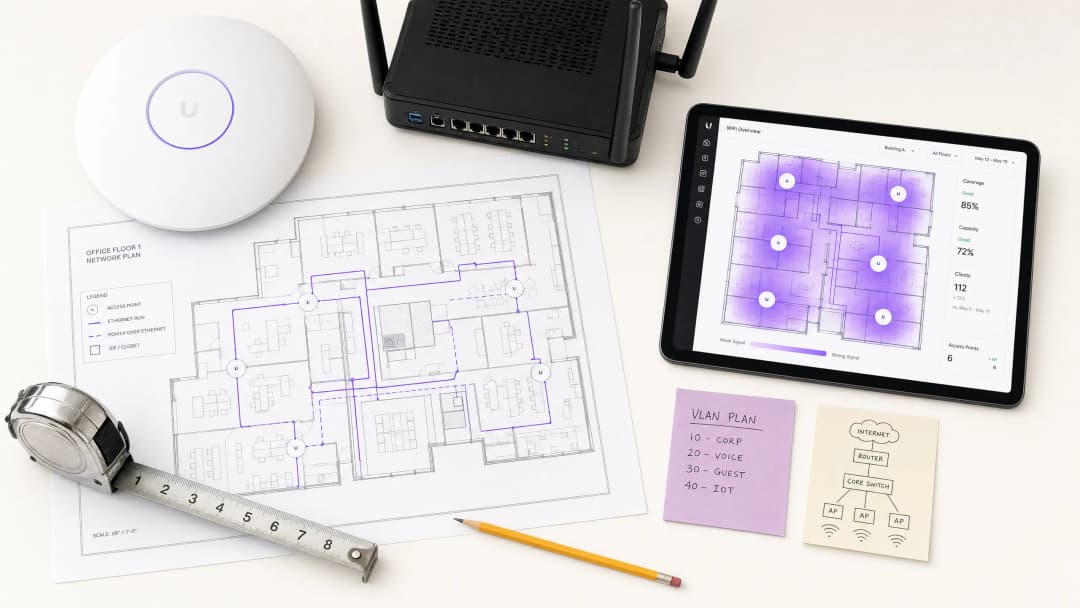
A critical requirement for commercial networks is logical segmentation. A standard architecture involves an edge router handling WAN connectivity, connected to a core Layer 3 switch, which then distributes to PoE (Power over Ethernet) access switches. The APs connect to these PoE switches. This design allows for the implementation of multiple VLANs (Virtual Local Area Networks). For instance, an AP can broadcast multiple SSIDs, mapping a corporate SSID to VLAN 10 (using 802.1X authentication) and a guest SSID to VLAN 20 (using a captive portal). This isolation is crucial for compliance with standards like PCI DSS and GDPR.

architecture_overview.png

Implementation Guide

1. Requirements Gathering and Site Survey

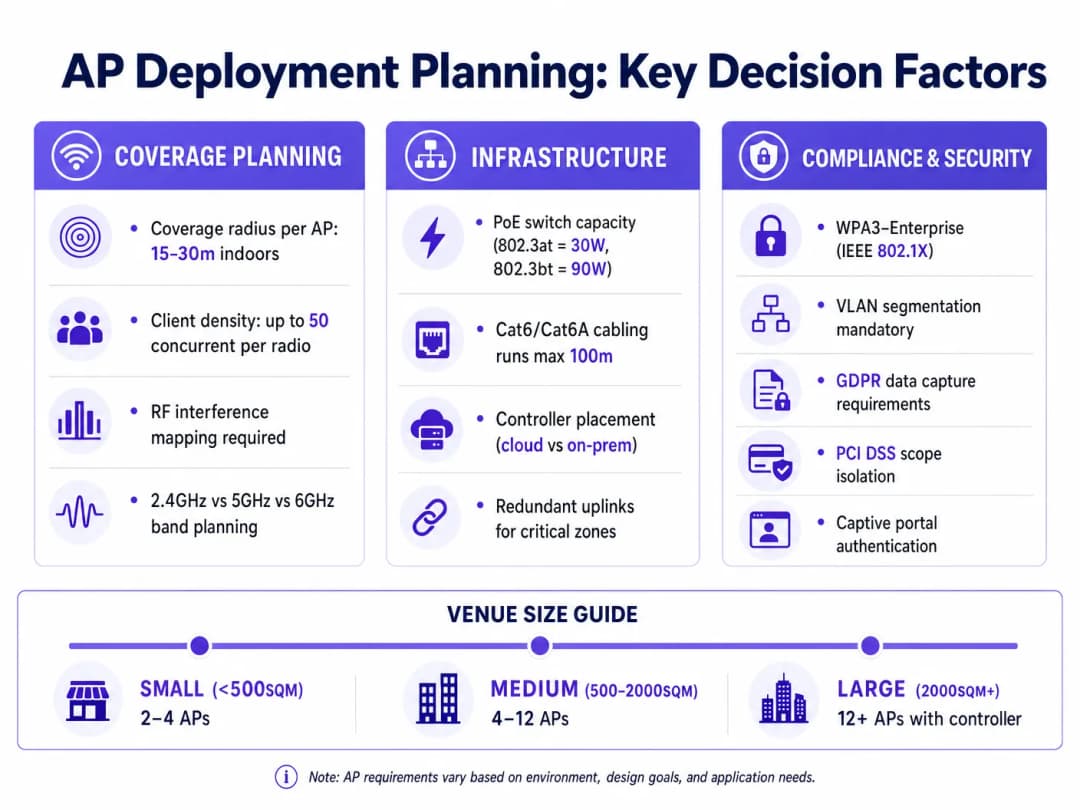
Before deploying APs, a predictive and physical site survey is mandatory. This involves mapping the venue to identify RF (Radio Frequency) obstacles, attenuation zones, and high-density areas. Tools like Ekahau or AirMagnet are standard for this phase. The goal is to determine the optimal placement of APs to ensure a minimum signal strength (typically -65 dBm) across the coverage area, while minimising co-channel interference.

2. Infrastructure Preparation

Enterprise APs require Power over Ethernet (PoE) for both data connectivity and power. Ensure the access switches support the required PoE standard (e.g., 802.3at/PoE+ for standard APs, or 802.3bt/PoE++ for high-performance Wi-Fi 6E/7 APs). Cable runs must use Cat6 or Cat6A cabling to support multi-gigabit throughput, adhering to the 100-metre length limitation.

3. Controller Configuration and Provisioning

Modern enterprise APs are managed via a central controller, which can be hardware-based (on-premises) or cloud-hosted. The controller handles AP provisioning, firmware updates, and Radio Resource Management (RRM). RRM dynamically adjusts AP transmit power and channel assignments to optimise the RF environment. During this phase, configure the necessary SSIDs, VLAN tags, and authentication methods. For guest networks, integrate the controller with a captive portal solution to capture first-party data, as detailed in How To Improve Guest Satisfaction: The Ultimate Playbook .

ap_deployment_guide.png

Best Practices

  • Decouple Routing from Wireless Access: Never rely on a single device to handle both routing and high-density wireless access in a commercial setting. Use dedicated edge routers/firewalls and separate APs.
  • Implement Strict VLAN Segmentation: Isolate corporate traffic, IoT devices, and guest networks onto separate VLANs. Ensure the guest network has client isolation enabled to prevent peer-to-peer communication.
  • Standardise on WPA3 and 802.1X: For internal networks, mandate WPA3-Enterprise with IEEE 802.1X authentication (RADIUS/EAP). For seamless guest access, consider technologies like OpenRoaming, as Purple acts as a free identity provider for these services.
  • Plan for Capacity, Not Just Coverage: Designing solely for coverage often leads to performance issues in high-density areas. Factor in the expected number of concurrent clients and application throughput requirements when determining AP density.

Troubleshooting & Risk Mitigation

Co-Channel Interference (CCI)

CCI occurs when multiple APs in close proximity operate on the same channel, causing them to wait for each other before transmitting (CSMA/CA). Mitigation: Utilise dynamic channel assignment via the wireless controller. In the 2.4GHz band, strictly use non-overlapping channels (1, 6, 11). Prioritise the 5GHz and 6GHz bands for high-capacity deployments due to the availability of more non-overlapping channels.

Rogue Access Points

Employees or malicious actors may plug unauthorised APs into the corporate network, bypassing security controls. Mitigation: Enable Wireless Intrusion Prevention Systems (WIPS) on the enterprise APs to detect and contain rogue devices. Implement port security (802.1X) on all wired switch ports to prevent unauthorised devices from connecting to the LAN.

Captive Portal Failures

Guest users may fail to authenticate or receive the captive portal splash page, leading to poor user experience. Mitigation: Ensure DNS and DHCP services are highly available. Whitelist necessary domains (Walled Garden) required for the captive portal to render, especially if utilising social login or external identity providers. For more insights on seamless authentication, see How a wi fi assistant Enables Passwordless Access in 2026 .

ROI & Business Impact

Investing in a dedicated AP architecture rather than consumer-grade routers yields significant business returns.

Firstly, it mitigates risk. Proper segmentation and enterprise-grade security protocols reduce the likelihood of a data breach, protecting the organisation from severe financial and reputational damage. Compliance with PCI DSS is simplified when POS systems are isolated from guest traffic.

Secondly, it enables data monetisation and enhanced customer engagement. A robust AP deployment is the foundation for advanced platforms like Purple's WiFi Analytics . By providing reliable, high-performance guest Wi-Fi, venues can capture valuable first-party data, analyse footfall patterns, and deliver targeted marketing campaigns. This transforms the network from a cost centre into a revenue-generating asset, driving loyalty and increasing lifetime customer value. For public sector applications, robust infrastructure supports initiatives discussed in Purple Appoints Iain Fox as VP Growth – Public Sector to Drive Digital Inclusion and Smart City Innovation .

关键定义

Access Point (AP)

一种将无线设备桥接到有线局域网 (LAN) 的网络设备,在 OSI 第 2 层运行。

为商业场所提供可扩展无线覆盖的基本构建模块。

Router

一种第 3 层设备,在计算机网络之间转发数据包,管理 IP 地址和 NAT。

用于网络边缘,将场所的 LAN 连接到互联网。

VLAN (Virtual Local Area Network)

一种逻辑分组的网络设备,其行为如同在同一物理网络上,无论物理位置如何。

对于将访客流量与公司系统隔离以保持安全性和 PCI 合规性至关重要。

PoE (Power over Ethernet)

一种通过双绞线以太网电缆同时传输电力和数据的技术。

允许 AP 安装在天花板或墙壁上,无需单独的电源插座。

Captive Portal

公共接入网络的用户在获准访问前必须查看并与之交互的网页。

用于收集第一方数据、执行服务条款并提供定向营销。

SSID (Service Set Identifier)

与 802.11 无线局域网 (WLAN) 关联的主要名称。

用户在设备上搜索可用 Wi-Fi 网络时看到的名称。

Wireless Controller

一种集中管理设备或软件,用于配置、监控和更新多个接入点。

对于管理大型部署、确保无缝漫游和优化 RF 性能至关重要。

802.1X

IEEE 标准,用于基于端口的网络访问控制 (PNAC),为 LAN 和 WLAN 提供经过认证的访问。

保护企业无线网络的黄金标准,与 RADIUS 或 Active Directory 等身份提供商集成。

应用实例

一家拥有 200 间客房的酒店正在升级其网络。当前设置使用 20 台配置为桥接模式的消费级无线路由器,导致宾客不断投诉连接中断和速度缓慢。IT 团队应如何重新设计此基础设施?

  1. 移除所有消费级路由器。2. 部署一台专用的企业边缘防火墙/路由器来处理 WAN 连接和 NAT。3. 在 IDF 配线间安装 PoE+ 接入交换机。4. 进行预测性 RF 勘测以确定 AP 放置位置。5. 在走廊和高密度区域(大堂、会议室)部署企业级吸顶式 AP。6. 配置云托管无线控制器来管理 AP。7. 创建独立的 VLAN:VLAN 10(企业,WPA3-Enterprise)、VLAN 20(访客,带 Captive Portal 的开放式 SSID)、VLAN 30(物联网/门锁)。8. 在访客 VLAN 上启用客户端隔离。
考官评语: 该方法正确指出了核心问题:消费级路由器无法处理企业漫游或密度。通过解耦路由功能并部署控制器管理的 AP,酒店实现了无缝漫游、集中管理和必要的安全分段。

一家大型零售连锁店希望通过其 50 家门店的访客 Wi-Fi 实施基于位置的分析和定向营销。他们目前每家门店仅配备了基本的 ISP 提供的路由器。

  1. 将 ISP 路由器替换为能够进行 SD-WAN 和 VPN 连接回总部的企业分支防火墙。2. 根据面积,每家门店部署 3-5 个企业 AP,由本地 PoE 交换机供电。3. 通过中央云控制器标准化所有门店的 SSID 配置。4. 将访客 SSID 与 Purple 的 Guest WiFi 平台集成。5. 配置 AP 将存在数据(探测请求)转发到分析平台。6. 设置 captive portal 以收集客户统计信息和同意。
考官评语: 该解决方案同时解决了基础设施不足和业务需求。企业 AP 是捕获分析所需的精细存在数据所必需的,而基本路由器无法提供这些数据。集中管理确保了零售网络的一致性。

练习题

Q1. 某体育场的 IT 总监需要为 50,000 个座位提供 Wi-Fi 覆盖。当前方案建议每隔 50 米放置一台高端专业消费级 Wi-Fi 路由器。请评估此方案。

提示:考虑覆盖与容量之间的差异,以及漫游所需的 OSI 层功能。

查看标准答案

该方案存在根本性缺陷。专业消费级路由器并非为高密度环境设计,其 CPU/内存无法处理数千个并发连接。此外,部署多个路由器会产生路由冲突(双重 NAT),并阻止无缝漫游,因为客户端每次在路由器覆盖区域之间移动时都必须获取新的 IP 地址。正确的方法是部署带定向天线的高密度企业接入点,由中央无线控制器管理,全部汇接到强大的核心路由基础设施。

Q2. 一家零售连锁店正在实施 Purple 的 Guest WiFi 平台以收集营销数据。他们需要确保这个新的访客网络不会危及其销售点 (POS) 系统。需要采取何种架构方法?

提示:考虑第 2 层和第 3 层的逻辑分段。

查看标准答案

网络必须利用 VLAN 分段。AP 应广播一个映射到特定 VLAN(例如 VLAN 20)的专用访客 SSID,而 POS 系统在单独的 VLAN(例如 VLAN 30)上运行。边缘防火墙/路由器必须配置访问控制列表 (ACL),严格禁止访客 VLAN 与 POS VLAN 之间的流量路由。此外,应在访客 SSID 上启用客户端隔离,以防止访客设备相互通信。

Q3. 在对新办公室部署进行现场勘测时,工程师注意到 2.4GHz 频段受到邻近企业的严重干扰。应如何配置 AP 部署以缓解此问题?

提示:考虑频段引导和信道规划。

查看标准答案

主要缓解措施是在无线控制器上使用“频段引导”,鼓励双频客户端连接到更干净、容量更高的 5GHz 或 6GHz 频段。对于 2.4GHz 射频,控制器的无线资源管理 (RRM) 应配置为仅使用非重叠信道(1、6、11),并动态调整发射功率以最小化同频干扰。在极端情况下,可以完全关闭某些 AP 上的 2.4GHz 射频以降低底噪。

继续阅读本系列

什么是 WLC(无线局域网控制器)?您现在还需要它吗?

本综合指南探讨了无线局域网控制器 (WLC) 的演变,并为确定 2026 年的正确架构提供了技术框架。它涵盖了传统的硬件、云管理和无控制器模型,详细介绍了它们对合规性、可扩展性和访客体验的影响。

阅读指南 →

以太网供电(PoE)接入点:实施指南

本指南为基础设施技术人员、网络架构师及IT决策者提供了一份权威技术参考,用于在企业场所(包括酒店、零售地产、体育场和公共部门设施)部署以太网供电(PoE)接入点。内容涵盖从802.3af至802.3bt的IEEE标准、功率预算计算、布线要求、VLAN划分及安全合规,并提供具体实施场景和可量化的投资回报基准。理解PoE架构是任何[Guest WiFi](/guest-wifi)或[WiFi Analytics](/guest-wifi-marketing-analytics-platform)部署的基础,因为物理层的可靠性直接决定了数据采集、用户体验和运行时间的质量。

阅读指南 →

网状网络与接入点:大型场馆哪种更优?

本技术指南提供了网状网络与传统有线接入点在大型场馆中的明确比较,涵盖架构、性能权衡和部署策略。它为IT经理、网络架构师和CTO提供了可操作的框架,以便为酒店业、零售、活动和公共部门环境设计高性能、合规的WiFi基础设施。本指南还将这些架构决策映射到Purple的硬件无关的访客WiFi和分析平台,展示正确的基础设施选择如何推动可衡量的业务成果。

阅读指南 →