
How to Configure 802.1X WiFi Authentication: A Step-by-Step Guide
This technical guide provides a step-by-step walkthrough for configuring 802.1X enterprise WiFi authentication. It covers RADIUS server setup, certificate deployment, and practical deployment strategies for IT leaders across high-footfall venues.
Video overview
Listen to this guide
View podcast transcript
Part of our core series: Enterprise WiFi Security Guide →
802.1X deployment & RADIUS policy architect
Select your endpoint fleet, directory service, and segmentation requirements to calculate optimal EAP methods, RADIUS attributes, and MDM provisioning profiles.
Microsoft Entra ID Cloud RADIUS & 802.1X Blueprint
| Attribute | Calculated Value | Engineering Purpose |
|---|---|---|
| Tunnel-Type (RFC 2868) | 13 (VLAN) | Instructs the access point to terminate the tunnel into a Layer 2 virtual LAN. |
| Tunnel-Medium-Type (RFC 2868) | 6 (802 - includes all 802.11 media) | Identifies the physical/data-link transport layer as IEEE 802 standard. |
| Tunnel-Private-Group-ID (RFC 3580) | <Corporate_VLAN_ID_or_Name> | Specifies the targeted VLAN ID (e.g., VLAN 10 for Staff, VLAN 20 for Contractors). |
| Session-Timeout (RFC 2865) | 28800 seconds (8 hours) | Forces periodic silent background re-authentication without disconnecting active sessions. |
| Termination-Action (RFC 2865) | 1 (RADIUS-Request) | Instructs the access point to issue a re-authentication request upon session timeout. |
- Enforce Framed-MTU of 1300 bytes on RADIUS server to prevent EAP-TLS packet fragmentation over WAN/VPN.
- Anchor client supplicants to your private Root CA certificate to prevent Evil Twin / rogue AP spoofing attacks.
- Enable 802.11r (Fast BSS Transition) with Over-the-Air roaming to maintain sub-50ms handoffs for voice/video.
- Configure Dynamic Change of Authorization (CoA / RFC 3576, now RFC 5176) over UDP port 3799 for instant posture re-evaluation.
- Separate guest access onto an isolated captive portal VLAN with client isolation and public DNS filtering.
Deploying 802.1X Across Complex Multi-Vendor Venues?
Purple provides cloud-managed guest WiFi, Passpoint Hotspot 2.0, and centralised captive portals that coexist cleanly with your enterprise 802.1X network. Book an architecture session with our engineering team.
Executive Summary
For enterprise networks, a shared PSK (pre-shared key) is no longer sufficient to protect corporate infrastructure. As organisations face stricter compliance requirements (PCI DSS, GDPR) and an expanding attack surface, transitioning to 802.1X authentication has become a critical security imperative.
This guide provides a practical, vendor-agnostic deployment walkthrough for configuring 802.1X on enterprise access points. We cover the core architecture - supplicant, authenticator, and authentication server - as well as certificate management, RADIUS configuration, and common deployment pitfalls. For IT managers and network architects operating in retail, hospitality, or public sector environments, this reference provides the actionable steps required to implement robust, identity-based network access control while keeping corporate and guest traffic strictly separated.
Listen to our companion podcast briefing below for a 10-minute overview of the architecture and implementation strategies.
Deep Dive: 802.1X Architecture
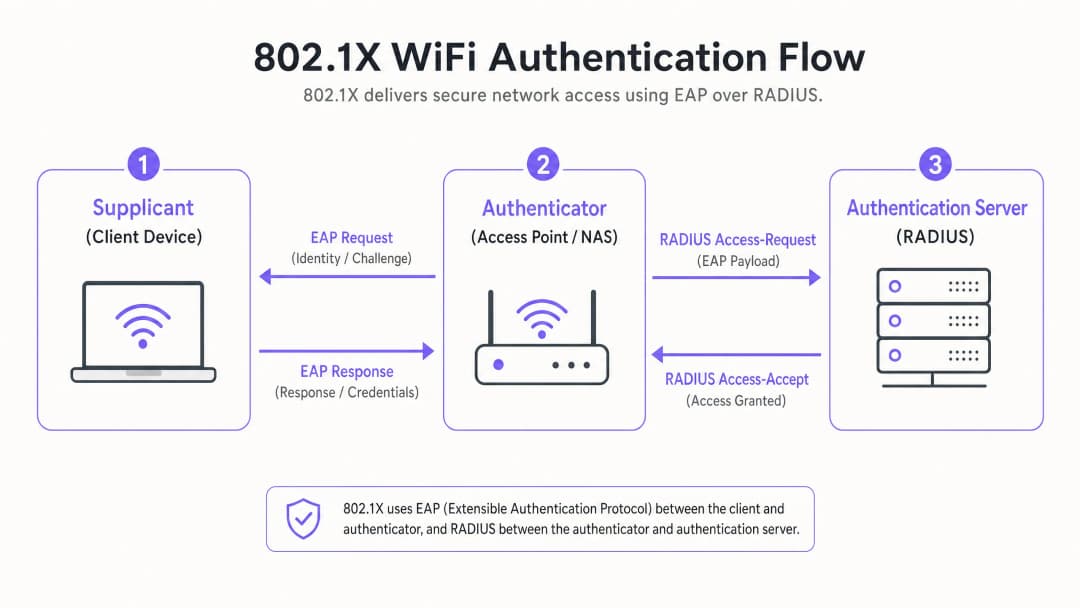
The IEEE 802.1X standard defines port-based network access control. In a wireless environment, it prevents client devices from sending or receiving data traffic until they have successfully authenticated against a central directory.
The Three Core Components
- Supplicant (Client Device): The software on the laptop, smartphone, or IoT device requesting access. It must support the chosen EAP (Extensible Authentication Protocol) method.
- Authenticator (Access Point/WLC): The network device acting as the gatekeeper. It opens a "controlled port" that only permits EAP traffic until authentication is successful.
- Authentication Server (RADIUS): The central server (e.g., Microsoft NPS, FreeRADIUS, Cisco ISE) that validates credentials against an identity store (like Active Directory) and returns an Access-Accept or Access-Reject message.
EAP Methods: Choosing the Right Security Posture
The choice of EAP method determines your level of security and deployment complexity.
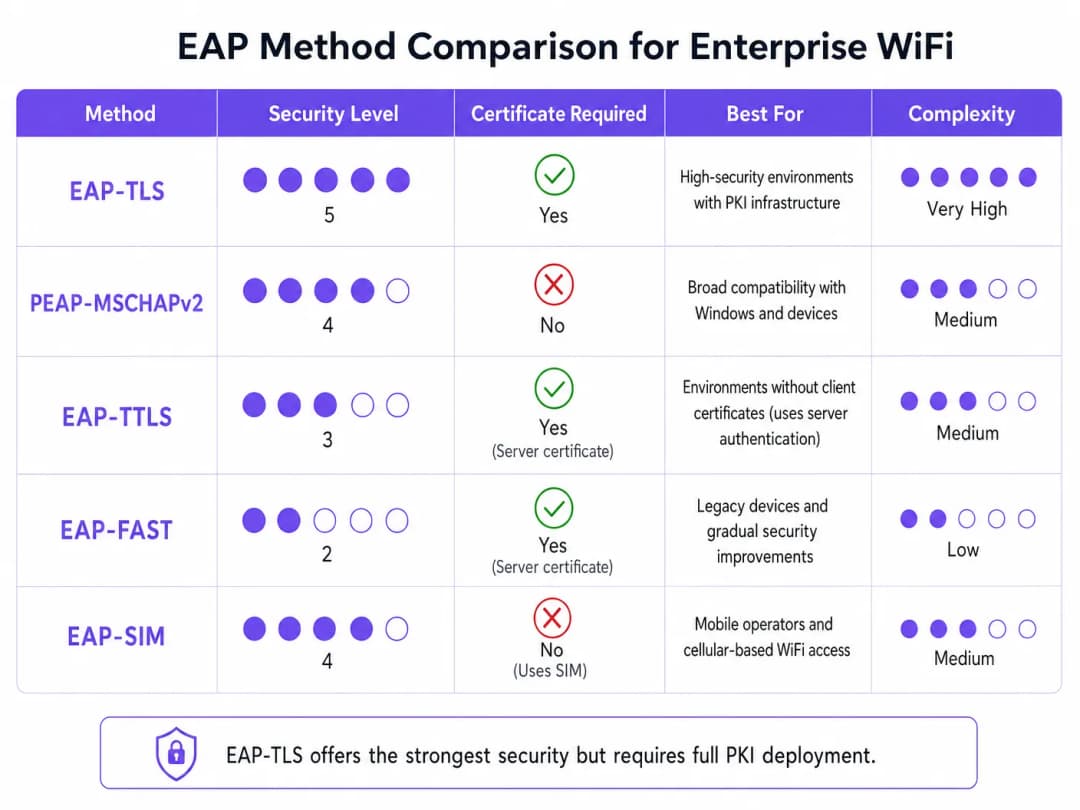
- EAP-TLS (Transport Layer Security): The gold standard. Requires certificates on both the server and client. No passwords are transmitted. Critical for high-security environments, but requires a full Public Key Infrastructure (PKI).
- PEAP-MSCHAPv2 (Protected EAP): The most common enterprise deployment. Uses a server-side certificate to create a secure TLS tunnel within which the client sends a username and password. Simpler to deploy, but vulnerable to credential harvesting if client devices are not configured to strictly validate the server certificate.
- EAP-SIM/AKA: Utilises SIM card credentials for authentication. Increasingly relevant in transport hubs and large public venues for seamless onboarding.
Got questions about your specific setup?
Our team works with venue operators, IT managers, and network engineers across 80,000 venues. Book a 20-minute call and we will show you how others like you solved it.
Implementation Guide: Step-by-Step Configuration
Deploying 802.1X requires coordinated configuration across your RADIUS server, access points, and client devices.
Step 1: RADIUS Server Preparation
Whether you are using Microsoft Network Policy Server (NPS) or an alternative, the core principles remain the same.
- Define RADIUS Clients: Register each access point (or wireless controller) in the RADIUS server. Assign a strong, randomly generated shared secret (at least 22 characters) to secure the communication between the AP and the RADIUS server.
- Install Server Certificate: For PEAP or EAP-TLS, install an X.509 certificate on the RADIUS server. Using a certificate from a trusted public Certificate Authority (CA) simplifies BYOD deployments, as the root certificate is already trusted by client operating systems.
Step 2: Policy Configuration
Configure network policies to dictate access based on identity.
- Connection Request Policies: Define how the RADIUS server handles incoming requests. Typically, this involves matching the NAS-Port-Type (Wireless - IEEE 802.11) and authenticating requests locally.
- Network Policies: Map Active Directory groups to network access privileges. For example, map the "Domain Computers" group to the corporate VLAN. Use RADIUS attributes (
Tunnel-Type=VLAN,Tunnel-Medium-Type=802,Tunnel-Private-Group-ID=[VLAN_ID]) to dynamically assign VLANs upon successful authentication.
Step 3: Access Point Configuration
Configure the SSID on your wireless infrastructure (e.g., Meraki, Aruba, Cisco).
- Create a new SSID and select WPA2-Enterprise or WPA3-Enterprise as the security type.
- Enter the IP addresses of your primary and secondary RADIUS servers.
- Enter the shared secret defined in Step 1.
- Enable Dynamic VLAN Assignment if your RADIUS server is pushing VLAN attributes.
Step 4: Client Supplicant Configuration
This is the most critical and often overlooked step. Do not rely on users to manually configure their devices.
- Corporate Devices: Use Group Policy Objects (GPO) or your Mobile Device Management (MDM) platform to push WiFi profiles. Profiles must specify the trusted root CA and the exact server names of the RADIUS servers to prevent man-in-the-middle (evil twin) attacks.
- BYOD: Implement an onboarding portal or MDM solution to push secure profiles to employee-owned devices.
Best Practices & Industry Standards
To ensure a robust deployment, follow these architectural best practices:
- Enforce Strict Certificate Validation: Never allow clients to blindly accept any server certificate. This is the primary vector for PEAP credential harvesting.
- Isolate Guest Traffic: Your 802.1X infrastructure is for corporate access. Guest traffic must remain completely isolated. Deploy a dedicated Guest WiFi platform, equipped with its own Captive Portal and analytics layer. As discussed in our Securing Your Network: Robust DNS and Security guide, logical isolation is fundamental to network defence.
- Implement Redundancy: RADIUS is a critical path service. Deploy primary and secondary RADIUS servers. In distributed environments, such as large retail chains, consider local RADIUS proxies to maintain survivability if the WAN link drops.
Troubleshooting and Risk Mitigation
When deployments fail, it usually comes down to a few common configuration errors:
- RADIUS Timeout Errors: Usually caused by a shared secret mismatch between the AP and the RADIUS server, or firewall rules blocking UDP ports 1812 (authentication) and 1813 (accounting).
- Client Rejections: Check the RADIUS event logs (e.g., Windows Event Viewer -> Custom Views -> Server Roles -> Network Policy and Access Services). Look for Event ID 6273. Common causes include expired client certificates or the client failing to trust the server's certificate chain.
- VLAN Assignment Failures: If authentication is successful but the client does not get an IP address, verify that the switch port connected to the AP is configured as a trunk port, allowing dynamically assigned VLANs.
ROI and Business Impact
Implementing 802.1X delivers significant operational and security ROI:
- Risk Mitigation: Eliminates the risk of a single compromised PSK jeopardising the entire corporate network, directly supporting PCI DSS and GDPR compliance efforts.
- Operational Efficiency: Centralises access control. When an employee leaves, disabling their Active Directory account immediately revokes their WiFi access. No need to rotate PSKs enterprise-wide.
- Network Visibility: Provides granular visibility into exactly who is on the network and what devices they are using, enabling superior capacity planning and threat hunting.
For high-density, complex environments like sports stadiums or the hospitality sector, managing corporate security whilst providing guest access is a challenge. By securing corporate assets with 802.1X and leveraging a robust WiFi analytics platform to handle guest traffic, IT leaders can deliver secure, scalable connectivity that serves both the enterprise and its customers. For insights on managing high-density environments, consult our Zoo and Theme Park WiFi: Connectivity Guide for High-Footfall Venues.
Key Definitions
802.1X
An IEEE standard for port-based network access control that provides an authentication mechanism to devices wishing to attach to a LAN or WLAN.
The foundational protocol for enterprise WiFi security, replacing vulnerable shared passwords.
Supplicant
The client device or software application requesting access to the network.
IT teams must manage supplicant configuration via MDM to ensure secure connections.
Authenticator
The network device (Access Point or Switch) that facilitates the authentication process by acting as a proxy between the Supplicant and the Authentication Server.
Configured with the RADIUS server IP and a shared secret to securely forward EAP traffic.
RADIUS
Remote Authentication Dial-In User Service; a networking protocol that provides centralised Authentication, Authorisation, and Accounting (AAA) management.
The backend server (like Microsoft NPS) that actually validates the user's credentials against a directory.
EAP (Extensible Authentication Protocol)
An authentication framework frequently used in wireless networks and point-to-point connections, supporting multiple authentication methods.
The 'language' spoken between the Supplicant and the RADIUS server.
EAP-TLS
An EAP method that uses Transport Layer Security, requiring both server and client-side certificates for mutual authentication.
The most secure method available, often mandated for high-security or classified environments.
PEAP
Protected Extensible Authentication Protocol; encapsulates EAP within an encrypted and authenticated TLS tunnel.
The most widely deployed enterprise method, balancing security with ease of deployment by only requiring a server-side certificate.
Dynamic VLAN Assignment
The process where a RADIUS server instructs the Access Point to place an authenticated user onto a specific VLAN based on their directory group membership.
Crucial for segmenting network traffic (e.g., separating HR, Engineering, and IoT devices) while broadcasting only a single corporate SSID.
Worked Examples
A 300-room luxury hotel needs to secure its back-of-house operational network (staff tablets, VoIP phones, management laptops) while keeping it entirely separate from the guest network. They currently use a single PSK for staff.
- Deploy Microsoft NPS linked to the hotel's existing Active Directory.
- Configure PEAP-MSCHAPv2, using a public certificate (e.g., DigiCert) on the NPS server to simplify tablet onboarding.
- Create an 802.1X SSID ('Hotel_Ops') on the APs.
- Use the hotel's MDM platform to push the 'Hotel_Ops' WiFi profile to all staff tablets and laptops, explicitly configuring the profile to trust the DigiCert root CA and validate the NPS server name.
- Maintain the existing open guest SSID, routing it through Purple's captive portal for terms acceptance and analytics, ensuring guest VLANs cannot route to the operational VLANs.
A university campus is migrating to 802.1X and needs to support a massive BYOD environment for 15,000 students across various operating systems.
- Deploy a robust RADIUS cluster (e.g., FreeRADIUS or Cisco ISE) with load balancing.
- Implement PEAP-MSCHAPv2 for broad device compatibility.
- Deploy an onboarding portal (e.g., SecureW2) that automatically configures the student's device supplicant to use the correct EAP settings and trust the university's RADIUS server certificate.
- Use dynamic VLAN assignment via RADIUS attributes to place students into appropriate subnets based on their campus location to manage broadcast domains.
Practice Questions
Q1. Your organisation is deploying 802.1X using PEAP-MSCHAPv2. During testing, users report they are prompted to 'Accept a Certificate' when connecting for the first time. How should you address this?
Hint: Consider the security implications of allowing users to make trust decisions regarding network infrastructure.
View model answer
You must configure the client supplicant profiles (via MDM or Group Policy) to explicitly trust the Root CA that issued the RADIUS server's certificate, and to validate the specific server name. Relying on users to manually accept certificates trains them to ignore security warnings and leaves the network vulnerable to Evil Twin (credential harvesting) attacks.
Q2. You need to secure a fleet of warehouse barcode scanners. They support WPA2-Enterprise but do not have a mechanism to install client certificates or join Active Directory. What is the most secure deployment approach?
Hint: Evaluate the EAP methods that do not require client-side certificates but still provide encrypted authentication.
View model answer
Deploy PEAP-MSCHAPv2. Create a dedicated service account in your directory for the scanners. Configure the RADIUS server with a server certificate to establish the TLS tunnel, and configure the scanners to authenticate using the service account credentials inside the tunnel. Ensure the RADIUS policy restricts this service account to a specific, isolated warehouse VLAN.
Q3. After configuring the APs and the RADIUS server, client devices successfully authenticate (verified in RADIUS logs with an Access-Accept), but they fail to receive an IP address and cannot access the network. What is the most likely infrastructure issue?
Hint: Authentication has succeeded, meaning the 802.1X phase is complete. The issue lies in the subsequent network provisioning phase.
View model answer
The most likely issue is a VLAN misconfiguration on the wired network. If the RADIUS server is using dynamic VLAN assignment to place the client on a specific VLAN (e.g., VLAN 20), the switch port connecting the Access Point must be configured as an 802.1Q trunk port that allows VLAN 20. If the VLAN is not trunked to the AP, the client's DHCP requests will be dropped.
Frequently asked questions
What is the primary difference between EAP-TLS and PEAP-MSCHAPv2 for 802.1X WiFi?
EAP-TLS relies on mutual public key infrastructure (PKI) certificate validation where both the RADIUS server and client endpoint present trusted X.509 digital certificates, eliminating passwords entirely. PEAP-MSCHAPv2 uses a server-side certificate to establish an encrypted TLS tunnel, through which legacy username and password hashes are transmitted, making it vulnerable to credential theft and misconfigured supplicant exploits.
Why is strict server certificate validation critical for 802.1X client supplicants?
Without strict server certificate validation, client devices will connect to any rogue access point broadcasting the enterprise SSID and presenting an arbitrary certificate. An attacker running a rogue RADIUS server can capture MS-CHAPv2 authentication challenges or harvest corporate credentials. Enforcing the trusted Root CA and server domain name prevents man-in-the-middle attacks.
How does dynamic VLAN assignment operate during 802.1X authentication?
When a client authenticates successfully, the RADIUS server includes RFC 2868 and RFC 3580 RADIUS attributes (Tunnel-Type = 13, Tunnel-Medium-Type = 6, Tunnel-Private-Group-ID = VLAN ID or name) in the RADIUS Access-Accept response. The access point or switch receives these attributes and dynamically bridges the client traffic onto the assigned VLAN.
Which firewall ports must be open between access points and the RADIUS server?
Access points communicate with RADIUS servers over UDP. Standard IANA ports are UDP port 1812 for RADIUS Authentication and UDP port 1813 for RADIUS Accounting. Legacy deployments may use UDP ports 1645 (Authentication) and 1646 (Accounting). Additionally, dynamic Change of Authorization (CoA) requires UDP port 3799 to be reachable from RADIUS to the AP.
How does Purple simplify 802.1X and guest WiFi segmentation across multi-vendor networks?
Purple integrates seamlessly with major enterprise wireless hardware (Cisco, HPE Aruba, Ruckus, Meraki, Fortinet, Mist) to cleanly separate corporate 802.1X traffic from visitor networks. Purple delivers enterprise captive portals, automated visitor onboarding, and compliant marketing analytics while allowing IT teams to maintain isolated, high-security 802.1X networks for staff and managed endpoints.
Continue reading in this series
Microsoft Cloud PKI for WiFi: EAP-TLS certificate deployment with Intune and Entra ID
You will be able to decide whether Microsoft Cloud PKI, a Cloud PKI root or bring your own CA (BYOCA) fits your estate. You can then deploy EAP-TLS WiFi certificates to Intune-managed devices without NDES. The guide also covers making RADIUS trust the chain, revoking certificates through the CRL and fixing the eight most common failures.
Configuring 802.1X on Juniper Mist with cloud RADIUS
You will be able to configure a WPA2 or WPA3-Enterprise WLAN on Juniper Mist that authenticates against cloud RADIUS, decide between UDP RADIUS, RadSec and a Mist Edge proxy, and map RADIUS attributes to dynamic VLANs. You will also know where Mist's client insights timeline and Marvis show exactly where a failed authentication broke.
iOS and macOS 802.1X troubleshooting: a deployment checklist for Intune, Jamf and Entra ID
Use this checklist to diagnose why iPhones, iPads and Macs fail 802.1X on Intune or Jamf Pro. Each failure maps to one of four causes: server trust, identity certificate, macOS mode or Entra ID group scoping. You will confirm the cause from eapolclient and RADIUS logs, apply the fix and stage future certificate rotations.
Got questions about your specific setup?
Our team works with venue operators, IT managers, and network engineers across 80,000 venues. Book a 20-minute call and we will show you how others like you solved it.