
What Is PEAP Authentication? How PEAP Secures Your WiFi
This authoritative guide breaks down PEAP authentication for enterprise WiFi networks, detailing its architecture, security limitations compared to EAP-TLS, and practical deployment strategies. Designed for IT managers and network architects, it provides actionable insights on when PEAP-MSCHAPv2 remains appropriate and how to secure it against modern threats.
Listen to this guide
View podcast transcript
Executive Summary
Protected Extensible Authentication Protocol (PEAP) remains the most widely deployed 802.1X authentication method in enterprise environments today. Developed jointly by Cisco, Microsoft, and RSA Security, PEAP was designed to solve a specific operational challenge: how to achieve strong, certificate-based server authentication without the crippling administrative overhead of deploying client certificates to every device on the network.
For IT directors and network architects managing complex estates—whether in Retail , Healthcare , or large corporate offices—PEAP-MSCHAPv2 offers a pragmatic middle ground between the insecurity of Pre-Shared Keys (PSK) and the deployment complexity of EAP-TLS. However, this convenience comes with inherent security trade-offs. As rogue access point attacks become increasingly sophisticated, misconfigured PEAP deployments present a critical vulnerability.
This guide provides a comprehensive technical deep-dive into the PEAP architecture, its operational mechanics, and the mandatory configuration standards required to secure it in modern enterprise networks.
Technical Deep-Dive: The Architecture of PEAP
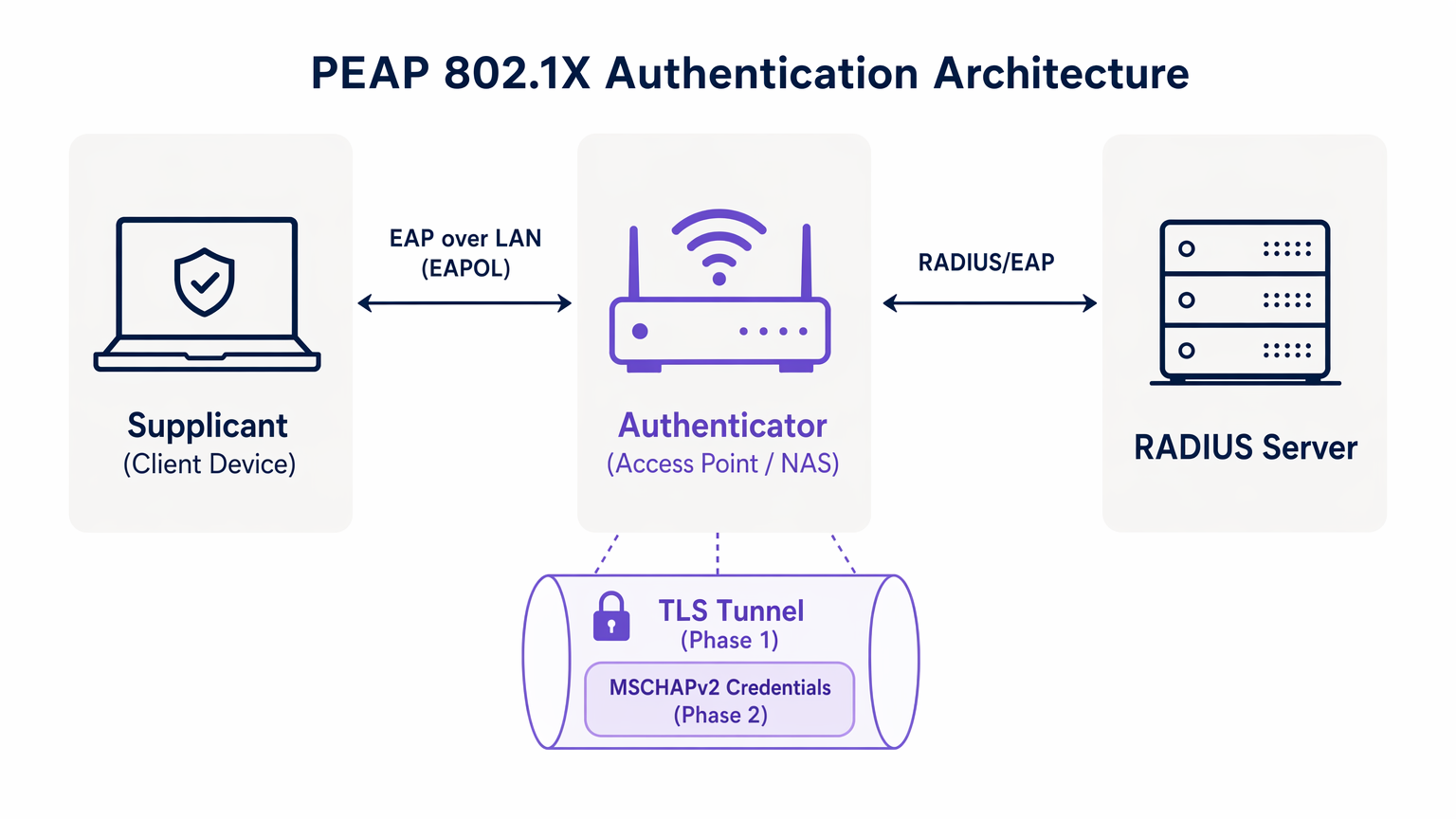
To understand PEAP, we must examine its two-phase authentication process. PEAP operates by establishing a secure outer tunnel before exchanging any sensitive credential data in the inner tunnel.
Phase 1: TLS Tunnel Establishment
When a supplicant (client device) attempts to connect to the network, the authenticator (typically a wireless access point) blocks all traffic except Extensible Authentication Protocol over LAN (EAPOL) frames. The authenticator forwards these frames to the authentication server, usually a RADIUS server. For a broader understanding of this infrastructure, refer to our guide on What Is RADIUS? How RADIUS Servers Secure WiFi Networks .
During Phase 1, the RADIUS server presents its digital certificate to the supplicant. The supplicant validates this certificate against its trusted root Certificate Authorities (CAs). If validation is successful, a TLS (Transport Layer Security) tunnel is established between the supplicant and the RADIUS server. This encrypted tunnel protects all subsequent communication from eavesdropping on the wireless medium.
Phase 2: Inner Authentication
Once the TLS tunnel is established, the actual user authentication takes place inside this secure channel. The most common inner authentication protocol is MSCHAPv2 (Microsoft Challenge Handshake Authentication Protocol version 2).
Inside the tunnel, the supplicant sends the user's credentials (username and password) to the RADIUS server. The server verifies these credentials against an identity store, such as Active Directory or an LDAP directory. If the credentials are valid, the RADIUS server sends an Access-Accept message back to the authenticator, and the client is granted network access.
The critical security premise of PEAP is that the vulnerable MSCHAPv2 exchange is entirely encapsulated within the encrypted TLS tunnel, shielding it from passive interception.
Implementation Guide: Securing PEAP-MSCHAPv2
While PEAP is highly functional, its default configuration on many client operating systems leaves it vulnerable to sophisticated attacks. Implementing PEAP securely requires rigorous adherence to the following deployment standards.
1. Mandatory Server Certificate Validation
The most significant vulnerability in a PEAP deployment is the failure to enforce server certificate validation on the client side. Because PEAP does not require a client certificate, the supplicant must be absolutely certain it is communicating with the legitimate RADIUS server before transmitting credentials.
If a client device is configured to trust any certificate, an attacker can deploy a rogue access point, present a fraudulent certificate, and intercept the MSCHAPv2 handshake. Tools like hostapd-wpe automate this attack.
Implementation Action: IT teams must configure all enterprise devices to strictly validate the server certificate. This involves pinning the specific Root CA that issued the RADIUS server's certificate and explicitly defining the expected Common Name (CN) or Subject Alternative Name (SAN) of the server.
2. MDM-Enforced Wireless Profiles
Relying on end-users to manually configure 802.1X settings is a guaranteed path to failure. Users frequently click through certificate warnings, compromising the integrity of the TLS tunnel.
Implementation Action: Wireless network profiles must be pushed to all corporate devices via Mobile Device Management (MDM) platforms (e.g., Microsoft Intune, Jamf) or Group Policy Objects (GPO). These profiles must lock down the EAP settings, preventing users from altering the certificate validation requirements.
3. Deprecating Legacy Protocols
Older versions of TLS contain known cryptographic vulnerabilities. PEAP deployments must enforce modern encryption standards.
Implementation Action: Configure the RADIUS server to reject TLS 1.0 and TLS 1.1 connections. Enforce TLS 1.2 as the absolute minimum, with TLS 1.3 preferred where supported by the client base.
Best Practices: Strategic Network Segmentation
A common architectural mistake is attempting to use PEAP for all wireless access, including guest and BYOD networks. PEAP is designed for managed enterprise devices authenticating against a central directory.
Isolating Guest Access
For non-corporate devices, PEAP is the wrong tool. Attempting to manage guest credentials in a RADIUS directory creates unnecessary administrative overhead and introduces security risks.
Venues in Hospitality and Transport should implement a dedicated Guest WiFi solution. Platforms like Purple provide secure, captive portal-based onboarding that operates entirely independently of the enterprise 802.1X infrastructure. This ensures that guest traffic is isolated, while simultaneously enabling rich data capture through WiFi Analytics .
The Role of EAP-TLS
When evaluating PEAP, network architects must also consider EAP-TLS. EAP-TLS provides mutual authentication—both the server and the client must present valid certificates. This eliminates the reliance on passwords entirely, rendering credential theft attacks obsolete.
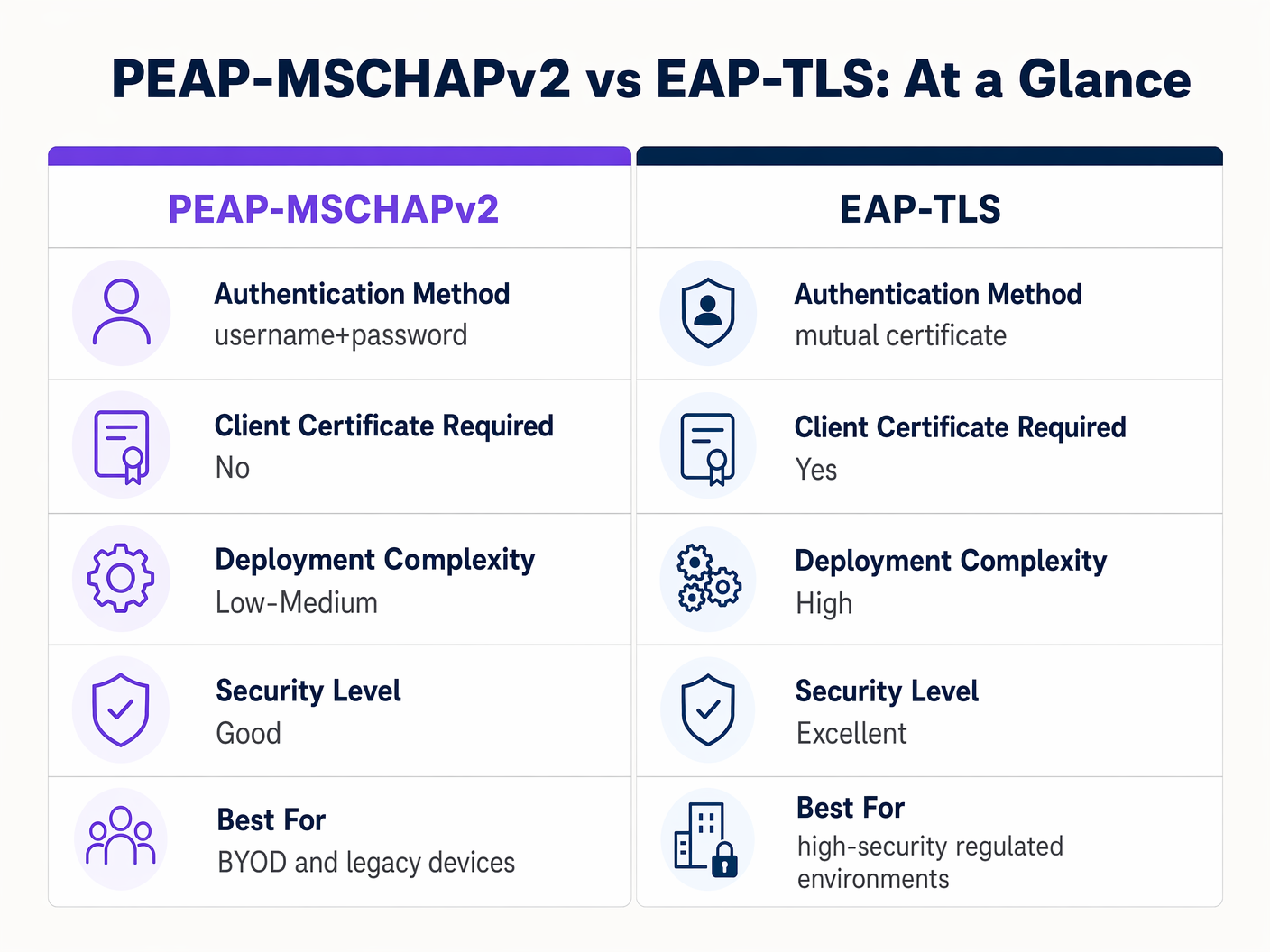
While EAP-TLS offers superior security, it requires a robust Public Key Infrastructure (PKI) to issue and manage client certificates. For highly regulated environments, EAP-TLS is the target architecture. For organisations lacking PKI maturity, a strictly configured PEAP-MSCHAPv2 deployment remains a defensible choice.
Troubleshooting & Risk Mitigation
Even well-architected PEAP deployments can experience operational failures. Understanding the common failure modes is essential for rapid resolution.
The Certificate Expiry Crisis
The most disruptive event in a PEAP environment is the unmanaged expiry of the RADIUS server certificate. When the certificate expires, all clients enforcing validation will immediately drop the connection, resulting in a network-wide outage.
Mitigation: Implement automated monitoring for the RADIUS server certificate. Establish a standard operating procedure to renew and deploy the new certificate at least 30 days prior to expiry. If utilising an internal CA, ensure the CA hierarchy itself is monitored.
Password Policy and Offline Cracking
While the TLS tunnel protects the MSCHAPv2 exchange in transit, if an attacker successfully executes a rogue AP attack due to misconfigured clients, they will capture the challenge-response pairs. Research has demonstrated that MSCHAPv2 hashes can be cracked offline.
Mitigation: The complexity of the underlying user password is the last line of defence. Enforce stringent password policies—minimum length requirements, complexity rules, and regular rotation—to increase the computational cost of offline cracking.
ROI & Business Impact
Transitioning from PSK to a properly managed PEAP 802.1X deployment delivers measurable business value across several dimensions.
- Reduced Administrative Overhead: Integrating WiFi authentication directly with the corporate identity provider (e.g., Active Directory) automates onboarding and offboarding. When an employee departs, disabling their directory account immediately revokes network access, eliminating the need to rotate a shared password.
- Enhanced Auditability: 802.1X provides granular, user-level visibility into network access. IT teams can definitively trace network activity to specific individuals, a critical requirement for compliance frameworks like PCI DSS and GDPR.
- Risk Mitigation: By moving away from shared keys, organisations significantly reduce the risk of unauthorised access by former employees or malicious actors, protecting intellectual property and sensitive corporate data.
For organisations looking to optimise their broader network architecture alongside their wireless security, exploring modern WAN solutions is highly recommended. Learn more about The Core SD WAN Benefits for Modern Businesses .
Key Definitions
PEAP (Protected Extensible Authentication Protocol)
An 802.1X authentication protocol that encapsulates an inner authentication method (usually MSCHAPv2) within a secure TLS tunnel.
The dominant standard for enterprise WiFi authentication due to its balance of security and deployment ease.
802.1X
The IEEE standard for port-based Network Access Control, providing an authentication mechanism to devices wishing to attach to a LAN or WLAN.
The foundational framework that protocols like PEAP and EAP-TLS operate within.
EAPOL (EAP over LAN)
The protocol used to encapsulate EAP messages over a local area network, used during the initial stages of 802.1X authentication.
The mechanism by which the client and access point communicate before the network port is fully opened.
Supplicant
The client device (laptop, smartphone) requesting access to the network.
The endpoint that must be correctly configured to validate the server certificate in a PEAP deployment.
Authenticator
The network device (access point or switch) that facilitates the authentication process between the supplicant and the RADIUS server.
The enforcement point that blocks traffic until authentication is successful.
RADIUS (Remote Authentication Dial-In User Service)
A networking protocol that provides centralised Authentication, Authorisation, and Accounting (AAA) management.
The server that validates the user's credentials and issues the final accept/reject decision.
MSCHAPv2
A challenge-response authentication protocol developed by Microsoft, commonly used as the inner authentication method within PEAP.
The protocol that actually verifies the username and password, but requires the protection of the PEAP TLS tunnel due to cryptographic weaknesses.
EAP-TLS
An EAP method that requires mutual authentication using digital certificates on both the client and the server.
The highly secure alternative to PEAP, requiring a PKI deployment but eliminating password-based vulnerabilities.
Worked Examples
A 300-bed luxury hotel needs to secure its back-of-house staff WiFi network. Currently, they use a single WPA2-Personal password that hasn't been changed in three years due to the operational disruption it would cause to update all point-of-sale terminals and staff tablets. How should they implement PEAP to resolve this?
The hotel should deploy an 802.1X architecture using PEAP-MSCHAPv2, integrating their wireless LAN controller with their central Active Directory via a RADIUS server (e.g., Microsoft NPS). They must use their MDM platform to push a standardised wireless profile to all staff tablets and POS terminals. This profile must explicitly enforce server certificate validation, pinning the CA that issued the NPS server's certificate. Staff will authenticate using their individual AD credentials.
A large retail chain is rolling out corporate laptops to store managers across 500 locations. They want to use PEAP-MSCHAPv2 but are concerned about the administrative burden of managing RADIUS certificates across so many sites.
Instead of deploying local RADIUS servers at each store, the retailer should utilise a cloud-hosted RADIUS solution integrated with their cloud identity provider (e.g., Azure AD or Okta). The access points at all 500 locations point to the cloud RADIUS endpoints. A single, globally trusted public certificate is used on the cloud RADIUS server, and the MDM payload deployed to the laptops pins this specific public certificate.
Practice Questions
Q1. You are auditing a hospital's WiFi network. They use PEAP-MSCHAPv2 for staff devices. During your review, you notice that the MDM profile pushed to iPads does not have 'Validate Server Certificate' checked. What is the immediate risk?
Hint: Consider what happens if an attacker sets up a device broadcasting the hospital's SSID.
View model answer
The immediate risk is a Rogue Access Point (Evil Twin) attack. Because the iPads are not validating the server certificate, they will attempt to authenticate with any AP broadcasting the correct SSID. An attacker can intercept the MSCHAPv2 handshake and attempt to crack the staff passwords offline, leading to credential compromise.
Q2. A university IT department is planning to migrate their student network from a Pre-Shared Key (PSK) to 802.1X. They want to use EAP-TLS for maximum security but are facing resistance from the helpdesk team. Why might PEAP-MSCHAPv2 be a more practical choice in this scenario?
Hint: Consider the device ownership model in a university environment.
View model answer
In a university, the devices are unmanaged (BYOD). Deploying EAP-TLS requires issuing and installing a unique client certificate on every student's personal laptop, phone, and tablet. This presents a massive support burden for the helpdesk. PEAP-MSCHAPv2 only requires the students to enter their existing university username and password, making onboarding significantly easier while still providing a major security upgrade over PSK.
Q3. Your organisation's RADIUS server certificate is expiring in 14 days. It is issued by a public CA. What steps must you take to ensure no disruption to the PEAP-MSCHAPv2 wireless network?
Hint: Think about what the supplicants are currently configured to trust.
View model answer
You must acquire the new certificate from the public CA and install it on the RADIUS server. Crucially, you must review the MDM wireless profiles. If the profiles are pinned to the specific old certificate, they must be updated to trust the new certificate before the old one expires. If the profiles only pin the Root CA, and the new certificate is issued by the same Root CA, the transition should be seamless, but it must be tested.
Continue reading in this series
Per-Device PSK by Vendor: iPSK, DPSK, MPSK and PPSK Compared (and WPA3 Support)
A comprehensive comparison of per-device PSK implementations across Cisco Meraki, HPE Aruba, Ruckus, Juniper Mist, Extreme, Fortinet, and Ubiquiti UniFi. Learn how WPA3-SAE impacts per-device key strategies and when to deploy transition modes versus moving to 802.1X.
Per-Device PSK by Vendor: iPSK, DPSK, MPSK and PPSK Compared (and WPA3 Support)
A comprehensive comparison of per-device PSK implementations across Cisco Meraki, HPE Aruba, Ruckus, Juniper Mist, Extreme, Fortinet, and Ubiquiti UniFi. Learn how WPA3-SAE impacts per-device key strategies and when to deploy transition modes versus moving to 802.1X.
Captive Portal Authentication Methods Compared
This authoritative technical reference guide evaluates the architectural, operational, and compliance trade-offs of five core captive portal authentication methods. It provides network architects, IT directors, and marketing managers with the quantitative data and decision frameworks required to balance guest onboarding friction with data-collection requirements across enterprise venues.