
O Que É Autenticação PEAP? Como o PEAP Protege o Seu WiFi
Este guia autorizado detalha a autenticação PEAP para redes WiFi empresariais, descrevendo a sua arquitetura, limitações de segurança em comparação com EAP-TLS e estratégias práticas de implementação. Concebido para gestores de TI e arquitetos de rede, oferece informações acionáveis sobre quando o PEAP-MSCHAPv2 continua a ser apropriado e como protegê-lo contra ameaças modernas.
Ouça este guia
Ver transcrição do podcast
Resumo Executivo
O Protected Extensible Authentication Protocol (PEAP) continua a ser o método de autenticação 802.1X mais amplamente implementado em ambientes empresariais atualmente. Desenvolvido em conjunto pela Cisco, Microsoft e RSA Security, o PEAP foi concebido para resolver um desafio operacional específico: como alcançar uma autenticação de servidor forte e baseada em certificados sem a sobrecarga administrativa esmagadora de implementar certificados de cliente em cada dispositivo na rede.
Para diretores de TI e arquitetos de rede que gerem infraestruturas complexas — seja no Retalho , Saúde ou grandes escritórios corporativos — o PEAP-MSCHAPv2 oferece um meio-termo pragmático entre a insegurança das Chaves Pré-Partilhadas (PSK) e a complexidade de implementação do EAP-TLS. No entanto, esta conveniência acarreta compromissos de segurança inerentes. À medida que os ataques de pontos de acesso não autorizados se tornam cada vez mais sofisticados, as implementações de PEAP mal configuradas representam uma vulnerabilidade crítica.
Este guia oferece uma análise técnica aprofundada da arquitetura PEAP, dos seus mecanismos operacionais e dos padrões de configuração obrigatórios necessários para o proteger em redes empresariais modernas.
Análise Técnica Aprofundada: A Arquitetura do PEAP
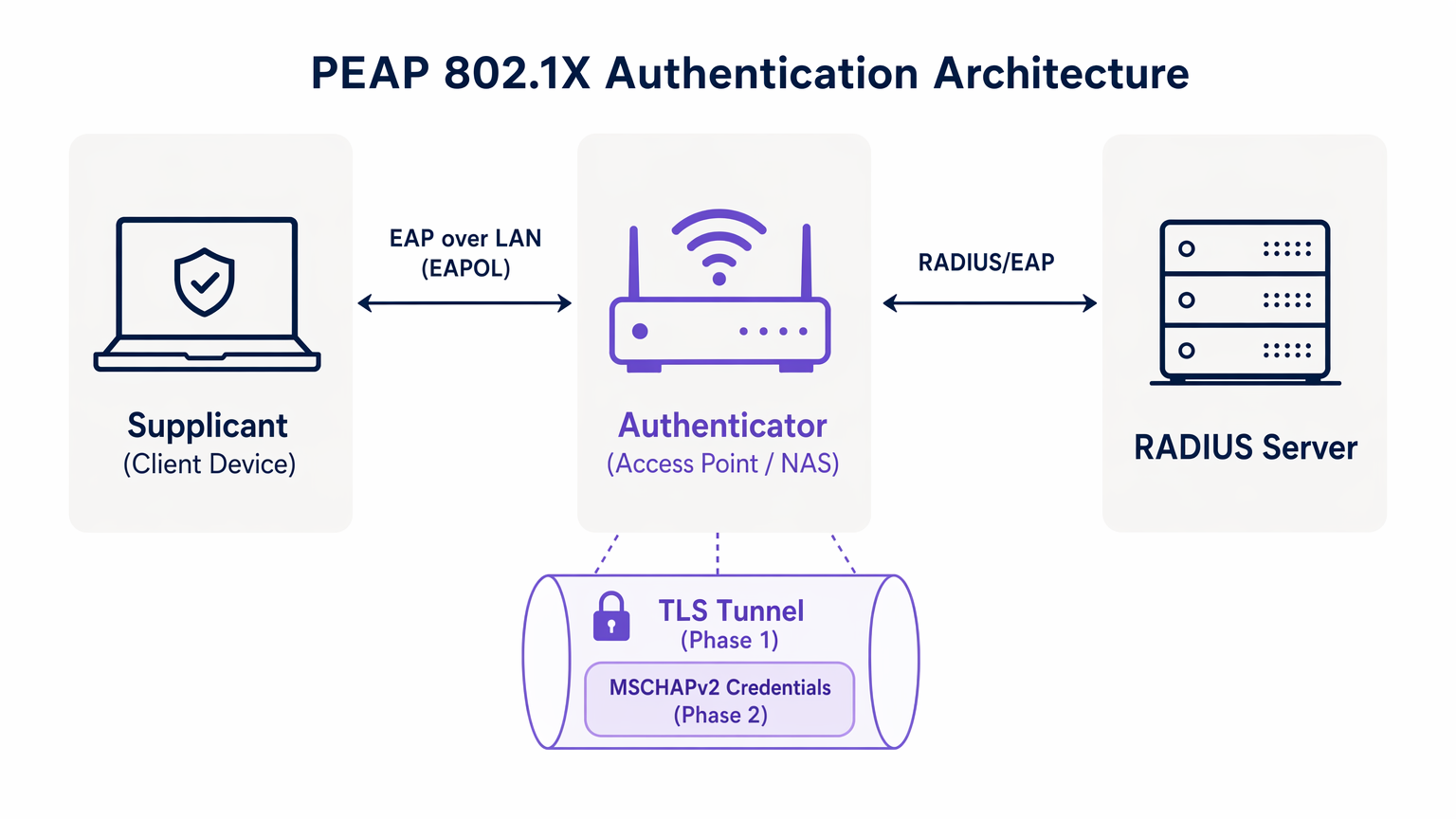
Para compreender o PEAP, devemos examinar o seu processo de autenticação em duas fases. O PEAP opera estabelecendo um túnel externo seguro antes de trocar quaisquer dados de credenciais sensíveis no túnel interno.
Fase 1: Estabelecimento do Túnel TLS
Quando um suplicante (dispositivo cliente) tenta ligar-se à rede, o autenticador (tipicamente um ponto de acesso sem fios) bloqueia todo o tráfego, exceto os frames do Extensible Authentication Protocol over LAN (EAPOL). O autenticador encaminha estes frames para o servidor de autenticação, geralmente um servidor RADIUS. Para uma compreensão mais ampla desta infraestrutura, consulte o nosso guia sobre O Que É RADIUS? Como os Servidores RADIUS Protegem Redes WiFi .
Durante a Fase 1, o servidor RADIUS apresenta o seu certificado digital ao suplicante. O suplicante valida este certificado contra as suas Autoridades de Certificação (CAs) raiz fidedignas. Se a validação for bem-sucedida, é estabelecido um túnel TLS (Transport Layer Security) entre o suplicante e o servidor RADIUS. Este túnel encriptado protege toda a comunicação subsequente contra interceção no meio sem fios.
Fase 2: Autenticação Interna
Uma vez estabelecido o túnel TLS, a autenticação real do utilizador ocorre dentro deste canal seguro. O protocolo de autenticação interna mais comum é o MSCHAPv2 (Microsoft Challenge Handshake Authentication Protocol versão 2).
Dentro do túnel, o suplicante envia as credenciais do utilizador (nome de utilizador e palavra-passe) para o servidor RADIUS. O servidor verifica estas credenciais contra um repositório de identidades, como o Active Directory ou um diretório LDAP. Se as credenciais forem válidas, o servidor RADIUS envia uma mensagem de Access-Accept de volta ao autenticador, e o cliente recebe acesso à rede.
A premissa de segurança crítica do PEAP é que a troca vulnerável de MSCHAPv2 é totalmente encapsulada dentro do túnel TLS encriptado, protegendo-a da interceção passiva.
Guia de Implementação: Proteção do PEAP-MSCHAPv2
Embora o PEAP seja altamente funcional, a sua configuração padrão em muitos sistemas operativos de cliente deixa-o vulnerável a ataques sofisticados. Implementar o PEAP de forma segura requer uma adesão rigorosa aos seguintes padrões de implementação.
1. Validação Obrigatória do Certificado do Servidor
A vulnerabilidade mais significativa numa implementação PEAP é a falha em impor a validação do certificado do servidor no lado do cliente. Como o PEAP não requer um certificado de cliente, o suplicante deve ter a certeza absoluta de que está a comunicar com o servidor RADIUS legítimo antes de transmitir as credenciais.
Se um dispositivo cliente estiver configurado para confiar em qualquer certificado, um atacante pode implementar um ponto de acesso não autorizado, apresentar um certificado fraudulento e intercetar o handshake MSCHAPv2. Ferramentas como hostapd-wpe automatizam este ataque.
Ação de Implementação: As equipas de TI devem configurar todos os dispositivos empresariais para validar rigorosamente o certificado do servidor. Isto envolve fixar a Autoridade de Certificação Raiz (CA Raiz) específica que emitiu o certificado do servidor RADIUS e definir explicitamente o Nome Comum (CN) ou o Nome Alternativo do Assunto (SAN) esperado do servidor.
2. Perfis Sem Fios Impostos por MDM
Confiar nos utilizadores finais para configurar manualmente as definições 802.1X é um caminho garantido para o fracasso. Os utilizadores frequentemente ignoram os avisos de certificado, comprometendo a integridade do túnel TLS.
Ação de Implementação: Os perfis de rede sem fios devem ser enviados para todos os dispositivos corporativos através de plataformas de Gestão de Dispositivos Móveis (MDM) (por exemplo, Microsoft Intune, Jamf) ou Objetos de Política de Grupo (GPO). Estes perfis devem bloquear as definições EAP, impedindo os utilizadores de alterar os requisitos de validação de certificados.
3. Descontinuação de Protocolos Legados
Versões mais antigas do TLS contêm vulnerabilidades criptográficas conhecidas. As implementações PEAP devem impor padrões de encriptação modernos.
Ação de Implementação: Configure o servidor RADIUS para rejeitar ligações TLS 1.0 e TLS 1.1. Imponha o TLS 1.2 como o mínimo absoluto, com o TLS 1.3 preferido onde for suportado pela base de clientes.
Melhores Práticas: Segmentação Estratégica da Rede
Um erro arquitetónico comum é tentar usar o PEAP para todo o acesso sem fios, incluindo redes de convidados e BYOD. O PEAP foi concebido para dispositivos empresariais geridos que autenticam contra um diretório central.
Isolamento do Acesso de Convidados
Para dispositivos não corporativos, o PEAP é a ferramenta errada. Tentar gerir credenciais de convidados num RADIUS de diretório cria uma sobrecarga administrativa desnecessária e introduz riscos de segurança.
Locais em Hospitality e Transport devem implementar uma solução dedicada de Guest WiFi . Plataformas como a Purple fornecem um onboarding seguro baseado em Captive Portal que opera de forma totalmente independente da infraestrutura 802.1X empresarial. Isso garante que o tráfego de convidados seja isolado, ao mesmo tempo que permite uma rica captura de dados através de WiFi Analytics .
O Papel do EAP-TLS
Ao avaliar o PEAP, os arquitetos de rede também devem considerar o EAP-TLS. O EAP-TLS fornece autenticação mútua — tanto o servidor quanto o cliente devem apresentar certificados válidos. Isso elimina completamente a dependência de senhas, tornando os ataques de roubo de credenciais obsoletos.
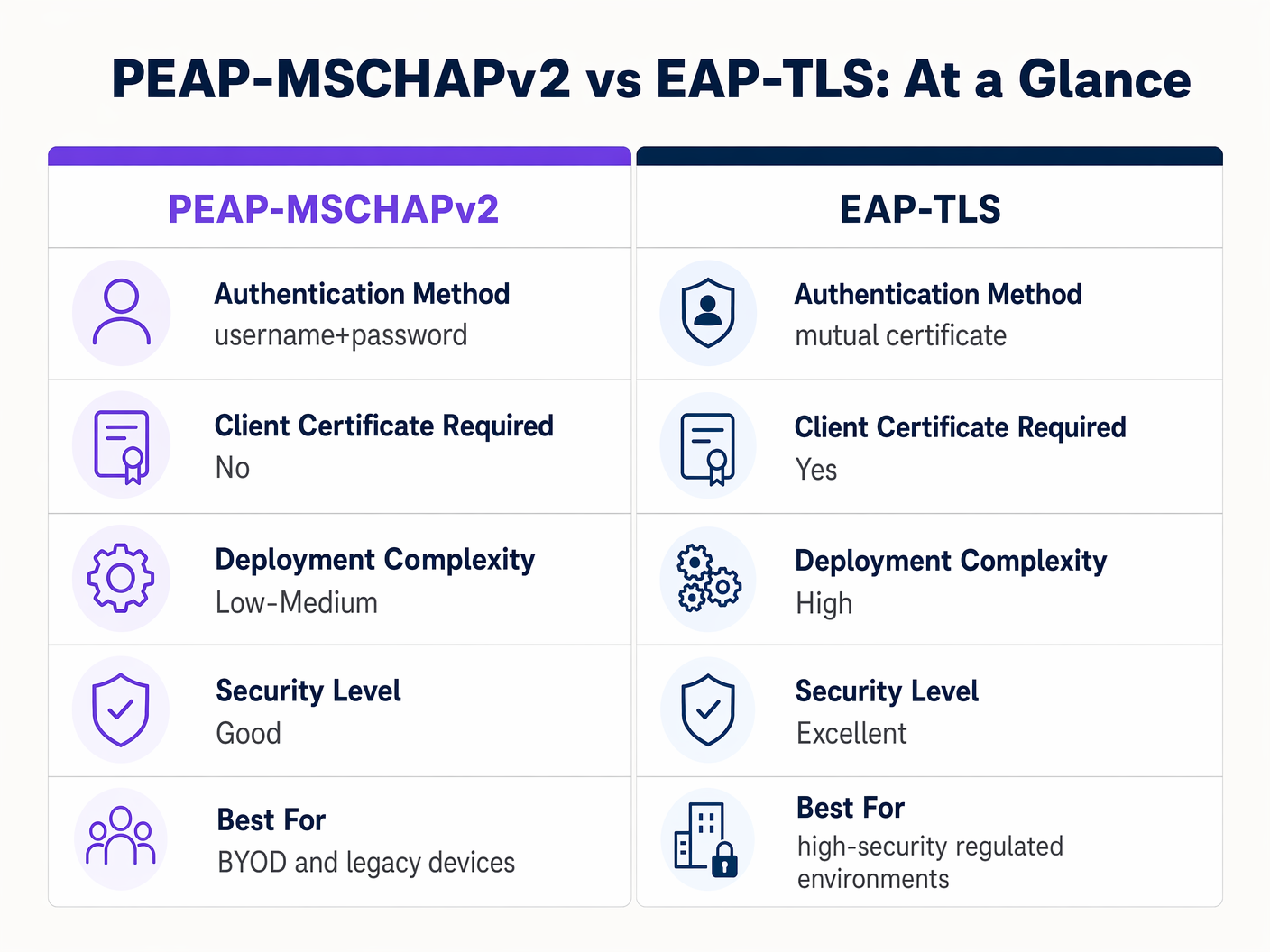
Embora o EAP-TLS ofereça segurança superior, requer uma robusta Infraestrutura de Chave Pública (PKI) para emitir e gerir certificados de cliente. Para ambientes altamente regulamentados, o EAP-TLS é a arquitetura alvo. Para organizações que carecem de maturidade em PKI, uma implementação PEAP-MSCHAPv2 estritamente configurada continua a ser uma escolha defensável.
Resolução de Problemas e Mitigação de Riscos
Mesmo implementações PEAP bem arquitetadas podem sofrer falhas operacionais. Compreender os modos de falha comuns é essencial para uma resolução rápida.
A Crise de Expiração de Certificados
O evento mais disruptivo num ambiente PEAP é a expiração não gerida do certificado do servidor RADIUS. Quando o certificado expira, todos os clientes que impõem a validação perdem imediatamente a ligação, resultando numa interrupção em toda a rede.
Mitigação: Implementar monitorização automatizada para o certificado do servidor RADIUS. Estabelecer um procedimento operacional padrão para renovar e implementar o novo certificado pelo menos 30 dias antes da expiração. Se utilizar uma CA interna, garantir que a própria hierarquia da CA é monitorizada.
Política de Senhas e Quebra Offline
Embora o túnel TLS proteja a troca MSCHAPv2 em trânsito, se um atacante executar com sucesso um ataque de AP malicioso devido a clientes mal configurados, eles capturarão os pares de desafio-resposta. A pesquisa demonstrou que os hashes MSCHAPv2 podem ser quebrados offline.
Mitigação: A complexidade da senha de utilizador subjacente é a última linha de defesa. Impor políticas de senha rigorosas — requisitos de comprimento mínimo, regras de complexidade e rotação regular — para aumentar o custo computacional da quebra offline.
ROI e Impacto no Negócio
A transição de PSK para uma implementação 802.1X PEAP devidamente gerida oferece valor de negócio mensurável em várias dimensões.
- Redução da Sobrecarga Administrativa: A integração da autenticação WiFi diretamente com o fornecedor de identidade corporativa (por exemplo, Active Directory) automatiza o onboarding e o offboarding. Quando um funcionário sai, desativar a sua conta de diretório revoga imediatamente o acesso à rede, eliminando a necessidade de rodar uma senha partilhada.
- Auditabilidade Aprimorada: O 802.1X fornece visibilidade granular ao nível do utilizador para o acesso à rede. As equipas de TI podem rastrear definitivamente a atividade da rede para indivíduos específicos, um requisito crítico para frameworks de conformidade como PCI DSS e GDPR.
- Mitigação de Riscos: Ao afastar-se das chaves partilhadas, as organizações reduzem significativamente o risco de acesso não autorizado por ex-funcionários ou atores maliciosos, protegendo a propriedade intelectual e dados corporativos sensíveis.
Para organizações que procuram otimizar a sua arquitetura de rede mais ampla juntamente com a sua segurança sem fios, explorar soluções WAN modernas é altamente recomendado. Saiba mais sobre The Core SD WAN Benefits for Modern Businesses .
Definições Principais
PEAP (Protected Extensible Authentication Protocol)
An 802.1X authentication protocol that encapsulates an inner authentication method (usually MSCHAPv2) within a secure TLS tunnel.
The dominant standard for enterprise WiFi authentication due to its balance of security and deployment ease.
802.1X
The IEEE standard for port-based Network Access Control, providing an authentication mechanism to devices wishing to attach to a LAN or WLAN.
The foundational framework that protocols like PEAP and EAP-TLS operate within.
EAPOL (EAP over LAN)
The protocol used to encapsulate EAP messages over a local area network, used during the initial stages of 802.1X authentication.
The mechanism by which the client and access point communicate before the network port is fully opened.
Supplicant
The client device (laptop, smartphone) requesting access to the network.
The endpoint that must be correctly configured to validate the server certificate in a PEAP deployment.
Authenticator
The network device (access point or switch) that facilitates the authentication process between the supplicant and the RADIUS server.
The enforcement point that blocks traffic until authentication is successful.
RADIUS (Remote Authentication Dial-In User Service)
A networking protocol that provides centralized Authentication, Authorization, and Accounting (AAA) management.
The server that validates the user's credentials and issues the final accept/reject decision.
MSCHAPv2
A challenge-response authentication protocol developed by Microsoft, commonly used as the inner authentication method within PEAP.
The protocol that actually verifies the username and password, but requires the protection of the PEAP TLS tunnel due to cryptographic weaknesses.
EAP-TLS
An EAP method that requires mutual authentication using digital certificates on both the client and the server.
The highly secure alternative to PEAP, requiring a PKI deployment but eliminating password-based vulnerabilities.
Exemplos Práticos
A 300-bed luxury hotel needs to secure its back-of-house staff WiFi network. Currently, they use a single WPA2-Personal password that hasn't been changed in three years due to the operational disruption it would cause to update all point-of-sale terminals and staff tablets. How should they implement PEAP to resolve this?
The hotel should deploy an 802.1X architecture using PEAP-MSCHAPv2, integrating their wireless LAN controller with their central Active Directory via a RADIUS server (e.g., Microsoft NPS). They must use their MDM platform to push a standardized wireless profile to all staff tablets and POS terminals. This profile must explicitly enforce server certificate validation, pinning the CA that issued the NPS server's certificate. Staff will authenticate using their individual AD credentials.
A large retail chain is rolling out corporate laptops to store managers across 500 locations. They want to use PEAP-MSCHAPv2 but are concerned about the administrative burden of managing RADIUS certificates across so many sites.
Instead of deploying local RADIUS servers at each store, the retailer should utilize a cloud-hosted RADIUS solution integrated with their cloud identity provider (e.g., Azure AD or Okta). The access points at all 500 locations point to the cloud RADIUS endpoints. A single, globally trusted public certificate is used on the cloud RADIUS server, and the MDM payload deployed to the laptops pins this specific public certificate.
Perguntas de Prática
Q1. You are auditing a hospital's WiFi network. They use PEAP-MSCHAPv2 for staff devices. During your review, you notice that the MDM profile pushed to iPads does not have 'Validate Server Certificate' checked. What is the immediate risk?
Dica: Consider what happens if an attacker sets up a device broadcasting the hospital's SSID.
Ver resposta modelo
The immediate risk is a Rogue Access Point (Evil Twin) attack. Because the iPads are not validating the server certificate, they will attempt to authenticate with any AP broadcasting the correct SSID. An attacker can intercept the MSCHAPv2 handshake and attempt to crack the staff passwords offline, leading to credential compromise.
Q2. A university IT department is planning to migrate their student network from a Pre-Shared Key (PSK) to 802.1X. They want to use EAP-TLS for maximum security but are facing resistance from the helpdesk team. Why might PEAP-MSCHAPv2 be a more practical choice in this scenario?
Dica: Consider the device ownership model in a university environment.
Ver resposta modelo
In a university, the devices are unmanaged (BYOD). Deploying EAP-TLS requires issuing and installing a unique client certificate on every student's personal laptop, phone, and tablet. This presents a massive support burden for the helpdesk. PEAP-MSCHAPv2 only requires the students to enter their existing university username and password, making onboarding significantly easier while still providing a major security upgrade over PSK.
Q3. Your organization's RADIUS server certificate is expiring in 14 days. It is issued by a public CA. What steps must you take to ensure no disruption to the PEAP-MSCHAPv2 wireless network?
Dica: Think about what the supplicants are currently configured to trust.
Ver resposta modelo
You must acquire the new certificate from the public CA and install it on the RADIUS server. Crucially, you must review the MDM wireless profiles. If the profiles are pinned to the specific old certificate, they must be updated to trust the new certificate before the old one expires. If the profiles only pin the Root CA, and the new certificate is issued by the same Root CA, the transition should be seamless, but it must be tested.
Continue a ler esta série
O Que É a Autenticação por Endereço MAC? Quando Usá-la e Quando Evitá-la
Este guia de referência técnica abrangente aborda a autenticação por endereço MAC em ambientes WiFi empresariais — como a autenticação MAC baseada em RADIUS funciona na Camada 2, as suas vulnerabilidades de segurança inerentes (incluindo a falsificação de MAC e o impacto da aleatorização de MAC ao nível do SO), e os contextos operacionais precisos onde continua a ser uma ferramenta válida para gerir dispositivos IoT e sem interface. Fornece orientação prática de implementação para gestores de TI e arquitetos de rede em hotelaria, retalho, saúde e locais do setor público, com exemplos práticos do mundo real, estruturas de decisão e contexto de integração para a plataforma de guest WiFi e análise da Purple.
Como Configurar WiFi Empresarial em iOS e macOS com 802.1X
Este guia abrangente fornece aos líderes de TI seniores passos acionáveis para implementar WiFi empresarial 802.1X em dispositivos iOS e macOS. Abrange autenticação baseada em certificados (EAP-TLS), perfis de configuração MDM e integração de arquitetura para proteger redes corporativas, ao mesmo tempo que apoia iniciativas BYOD.
Como Configurar WiFi Empresarial em Dispositivos Android com EAP-TLS
Este guia de referência técnica fornece aos líderes de TI seniores um plano abrangente para implementar a autenticação 802.1X EAP-TLS em dispositivos Android. Abrange a mecânica arquitetónica, estratégias de implementação manual e impulsionadas por MDM, e metodologias de resolução de problemas necessárias para proteger redes sem fios empresariais.