
Cos'è l'Autenticazione PEAP? Come PEAP Protegge il Tuo WiFi
Questa guida autorevole analizza l'autenticazione PEAP per le reti WiFi aziendali, dettagliando la sua architettura, le limitazioni di sicurezza rispetto a EAP-TLS e le strategie di implementazione pratiche. Progettata per responsabili IT e architetti di rete, fornisce approfondimenti utili su quando PEAP-MSCHAPv2 rimane appropriato e come proteggerlo dalle minacce moderne.
Ascolta questa guida
Visualizza trascrizione del podcast
Riepilogo Esecutivo
Il Protected Extensible Authentication Protocol (PEAP) rimane il metodo di autenticazione 802.1X più ampiamente adottato negli ambienti aziendali odierni. Sviluppato congiuntamente da Cisco, Microsoft e RSA Security, PEAP è stato progettato per risolvere una specifica sfida operativa: come ottenere un'autenticazione server robusta basata su certificati senza il gravoso onere amministrativo di distribuire certificati client a ogni dispositivo della rete.
Per i direttori IT e gli architetti di rete che gestiscono infrastrutture complesse — sia nel Retail , nella Sanità o in grandi uffici aziendali — PEAP-MSCHAPv2 offre una soluzione intermedia pragmatica tra l'insicurezza delle Pre-Shared Keys (PSK) e la complessità di implementazione di EAP-TLS. Tuttavia, questa comodità comporta compromessi di sicurezza intrinseci. Poiché gli attacchi da access point non autorizzati diventano sempre più sofisticati, le implementazioni PEAP mal configurate presentano una vulnerabilità critica.
Questa guida fornisce un'analisi tecnica approfondita dell'architettura PEAP, delle sue meccaniche operative e degli standard di configurazione obbligatori necessari per proteggerla nelle moderne reti aziendali.
Analisi Tecnica Approfondita: L'Architettura di PEAP
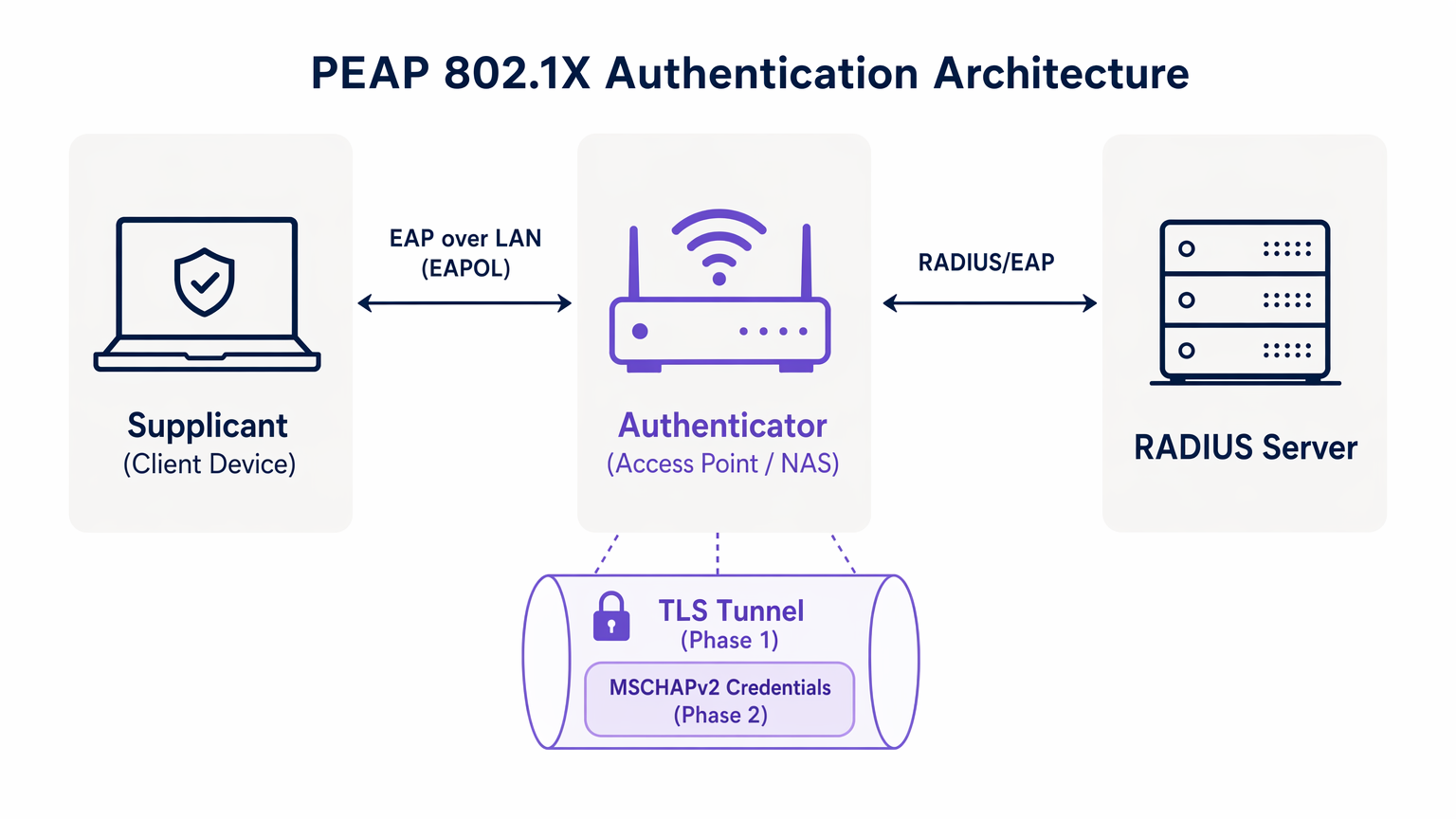
Per comprendere PEAP, dobbiamo esaminare il suo processo di autenticazione a due fasi. PEAP opera stabilendo un tunnel esterno sicuro prima di scambiare qualsiasi dato sensibile delle credenziali nel tunnel interno.
Fase 1: Stabilimento del Tunnel TLS
Quando un supplicante (dispositivo client) tenta di connettersi alla rete, l'autenticatore (tipicamente un access point wireless) blocca tutto il traffico eccetto i frame Extensible Authentication Protocol over LAN (EAPOL). L'autenticatore inoltra questi frame al server di autenticazione, solitamente un server RADIUS. Per una comprensione più ampia di questa infrastruttura, fare riferimento alla nostra guida su Cos'è RADIUS? Come i Server RADIUS Proteggono le Reti WiFi .
Durante la Fase 1, il server RADIUS presenta il suo certificato digitale al supplicante. Il supplicante convalida questo certificato rispetto alle sue Certificate Authorities (CA) radice attendibili. Se la convalida ha successo, viene stabilito un tunnel TLS (Transport Layer Security) tra il supplicante e il server RADIUS. Questo tunnel crittografato protegge tutte le comunicazioni successive dall'intercettazione sul mezzo wireless.
Fase 2: Autenticazione Interna
Una volta stabilito il tunnel TLS, l'autenticazione utente effettiva avviene all'interno di questo canale sicuro. Il protocollo di autenticazione interno più comune è MSCHAPv2 (Microsoft Challenge Handshake Authentication Protocol versione 2).
All'interno del tunnel, il supplicante invia le credenziali dell'utente (nome utente e password) al server RADIUS. Il server verifica queste credenziali rispetto a un archivio di identità, come Active Directory o una directory LDAP. Se le credenziali sono valide, il server RADIUS invia un messaggio Access-Accept all'autenticatore e al client viene concesso l'accesso alla rete.
La premessa di sicurezza critica di PEAP è che lo scambio vulnerabile di MSCHAPv2 è interamente incapsulato all'interno del tunnel TLS crittografato, proteggendolo dall'intercettazione passiva.
Guida all'Implementazione: Proteggere PEAP-MSCHAPv2
Sebbene PEAP sia altamente funzionale, la sua configurazione predefinita su molti sistemi operativi client lo rende vulnerabile ad attacchi sofisticati. L'implementazione sicura di PEAP richiede una rigorosa aderenza ai seguenti standard di distribuzione.
1. Validazione Obbligatoria del Certificato Server
La vulnerabilità più significativa in un'implementazione PEAP è la mancata applicazione della validazione del certificato server lato client. Poiché PEAP non richiede un certificato client, il supplicante deve essere assolutamente certo di comunicare con il server RADIUS legittimo prima di trasmettere le credenziali.
Se un dispositivo client è configurato per fidarsi di qualsiasi certificato, un attaccante può implementare un access point non autorizzato, presentare un certificato fraudolento e intercettare l'handshake MSCHAPv2. Strumenti come hostapd-wpe automatizzano questo attacco.
Azione di Implementazione: I team IT devono configurare tutti i dispositivi aziendali per convalidare rigorosamente il certificato server. Ciò implica il "pinning" della specifica Root CA che ha emesso il certificato del server RADIUS e la definizione esplicita del Common Name (CN) o Subject Alternative Name (SAN) previsto del server.
2. Profili Wireless Applicati tramite MDM
Affidarsi agli utenti finali per configurare manualmente le impostazioni 802.1X è una strada garantita verso il fallimento. Gli utenti spesso ignorano gli avvisi sui certificati, compromettendo l'integrità del tunnel TLS.
Azione di Implementazione: I profili di rete wireless devono essere distribuiti a tutti i dispositivi aziendali tramite piattaforme di Mobile Device Management (MDM) (es. Microsoft Intune, Jamf) o Group Policy Objects (GPO). Questi profili devono bloccare le impostazioni EAP, impedendo agli utenti di modificare i requisiti di validazione del certificato.
3. Deprecazione dei Protocolli Legacy
Le versioni più vecchie di TLS contengono vulnerabilità crittografiche note. Le implementazioni PEAP devono applicare standard di crittografia moderni.
Azione di Implementazione: Configurare il server RADIUS per rifiutare le connessioni TLS 1.0 e TLS 1.1. Applicare TLS 1.2 come minimo assoluto, con TLS 1.3 preferito laddove supportato dalla base client.
Best Practice: Segmentazione Strategica della Rete
Un errore architetturale comune è tentare di utilizzare PEAP per tutti gli accessi wireless, incluse le reti guest e BYOD. PEAP è progettato per dispositivi aziendali gestiti che si autenticano contro una directory centrale.
Isolare l'Accesso Guest
Per i dispositivi non aziendali, PEAP è lo strumento sbagliato. Tentare di gestire le credenziali guest in un RADIUS directory crea un sovraccarico amministrativo non necessario e introduce rischi per la sicurezza.
Le strutture nei settori Ospitalità e Trasporti dovrebbero implementare una soluzione Guest WiFi dedicata. Piattaforme come Purple offrono un onboarding sicuro basato su Captive Portal che opera in modo completamente indipendente dall'infrastruttura 802.1X aziendale. Ciò garantisce che il traffico degli ospiti sia isolato, consentendo al contempo una ricca acquisizione di dati tramite WiFi Analytics .
Il Ruolo di EAP-TLS
Quando valutano PEAP, gli architetti di rete devono considerare anche EAP-TLS. EAP-TLS fornisce autenticazione reciproca: sia il server che il client devono presentare certificati validi. Ciò elimina completamente la dipendenza dalle password, rendendo obsoleti gli attacchi di furto di credenziali.
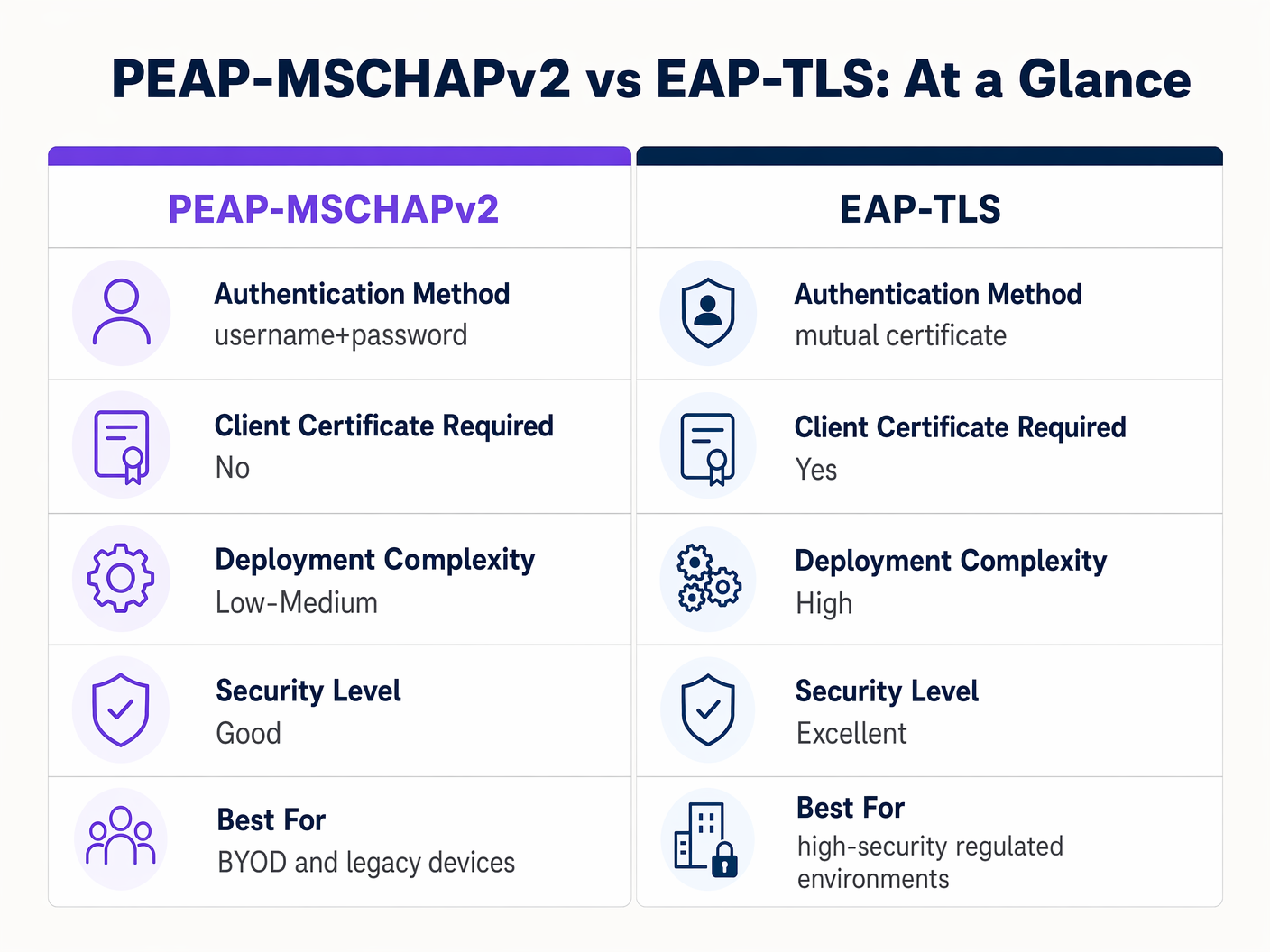
Sebbene EAP-TLS offra una sicurezza superiore, richiede una robusta Infrastruttura a Chiave Pubblica (PKI) per emettere e gestire i certificati client. Per ambienti altamente regolamentati, EAP-TLS è l'architettura di riferimento. Per le organizzazioni che mancano di maturità PKI, una distribuzione PEAP-MSCHAPv2 rigorosamente configurata rimane una scelta difendibile.
Risoluzione dei Problemi e Mitigazione del Rischio
Anche le implementazioni PEAP ben progettate possono subire guasti operativi. Comprendere le modalità di guasto comuni è essenziale per una rapida risoluzione.
La Crisi della Scadenza del Certificato
L'evento più dirompente in un ambiente PEAP è la scadenza non gestita del certificato del server RADIUS. Quando il certificato scade, tutti i client che applicano la convalida interromperanno immediatamente la connessione, causando un'interruzione a livello di rete.
Mitigazione: Implementare il monitoraggio automatizzato per il certificato del server RADIUS. Stabilire una procedura operativa standard per rinnovare e distribuire il nuovo certificato almeno 30 giorni prima della scadenza. Se si utilizza una CA interna, assicurarsi che la gerarchia della CA stessa sia monitorata.
Politica delle Password e Cracking Offline
Mentre il tunnel TLS protegge lo scambio MSCHAPv2 in transito, se un attaccante esegue con successo un attacco AP non autorizzato a causa di client mal configurati, catturerà le coppie sfida-risposta. La ricerca ha dimostrato che gli hash MSCHAPv2 possono essere decifrati offline.
Mitigazione: La complessità della password utente sottostante è l'ultima linea di difesa. Applicare politiche di password rigorose — requisiti di lunghezza minima, regole di complessità e rotazione regolare — per aumentare il costo computazionale del cracking offline.
ROI e Impatto sul Business
Il passaggio da PSK a un'implementazione PEAP 802.1X correttamente gestita offre un valore aziendale misurabile su diverse dimensioni.
- Riduzione del Carico Amministrativo: L'integrazione dell'autenticazione WiFi direttamente con il provider di identità aziendale (ad esempio, Active Directory) automatizza l'onboarding e l'offboarding. Quando un dipendente se ne va, la disabilitazione del suo account di directory revoca immediatamente l'accesso alla rete, eliminando la necessità di ruotare una password condivisa.
- Migliore Auditabilità: 802.1X fornisce una visibilità granulare a livello utente sull'accesso alla rete. I team IT possono tracciare in modo definitivo l'attività di rete a individui specifici, un requisito fondamentale per i framework di conformità come PCI DSS e GDPR.
- Mitigazione del Rischio: Abbandonando le chiavi condivise, le organizzazioni riducono significativamente il rischio di accesso non autorizzato da parte di ex dipendenti o attori malevoli, proteggendo la proprietà intellettuale e i dati aziendali sensibili.
Per le organizzazioni che desiderano ottimizzare la propria architettura di rete più ampia insieme alla sicurezza wireless, è vivamente consigliato esplorare le moderne soluzioni WAN. Scopri di più su I Vantaggi Chiave dell'SD WAN per le Aziende Moderne .
Definizioni chiave
PEAP (Protected Extensible Authentication Protocol)
An 802.1X authentication protocol that encapsulates an inner authentication method (usually MSCHAPv2) within a secure TLS tunnel.
The dominant standard for enterprise WiFi authentication due to its balance of security and deployment ease.
802.1X
The IEEE standard for port-based Network Access Control, providing an authentication mechanism to devices wishing to attach to a LAN or WLAN.
The foundational framework that protocols like PEAP and EAP-TLS operate within.
EAPOL (EAP over LAN)
The protocol used to encapsulate EAP messages over a local area network, used during the initial stages of 802.1X authentication.
The mechanism by which the client and access point communicate before the network port is fully opened.
Supplicant
The client device (laptop, smartphone) requesting access to the network.
The endpoint that must be correctly configured to validate the server certificate in a PEAP deployment.
Authenticator
The network device (access point or switch) that facilitates the authentication process between the supplicant and the RADIUS server.
The enforcement point that blocks traffic until authentication is successful.
RADIUS (Remote Authentication Dial-In User Service)
A networking protocol that provides centralized Authentication, Authorization, and Accounting (AAA) management.
The server that validates the user's credentials and issues the final accept/reject decision.
MSCHAPv2
A challenge-response authentication protocol developed by Microsoft, commonly used as the inner authentication method within PEAP.
The protocol that actually verifies the username and password, but requires the protection of the PEAP TLS tunnel due to cryptographic weaknesses.
EAP-TLS
An EAP method that requires mutual authentication using digital certificates on both the client and the server.
The highly secure alternative to PEAP, requiring a PKI deployment but eliminating password-based vulnerabilities.
Esempi pratici
A 300-bed luxury hotel needs to secure its back-of-house staff WiFi network. Currently, they use a single WPA2-Personal password that hasn't been changed in three years due to the operational disruption it would cause to update all point-of-sale terminals and staff tablets. How should they implement PEAP to resolve this?
The hotel should deploy an 802.1X architecture using PEAP-MSCHAPv2, integrating their wireless LAN controller with their central Active Directory via a RADIUS server (e.g., Microsoft NPS). They must use their MDM platform to push a standardized wireless profile to all staff tablets and POS terminals. This profile must explicitly enforce server certificate validation, pinning the CA that issued the NPS server's certificate. Staff will authenticate using their individual AD credentials.
A large retail chain is rolling out corporate laptops to store managers across 500 locations. They want to use PEAP-MSCHAPv2 but are concerned about the administrative burden of managing RADIUS certificates across so many sites.
Instead of deploying local RADIUS servers at each store, the retailer should utilize a cloud-hosted RADIUS solution integrated with their cloud identity provider (e.g., Azure AD or Okta). The access points at all 500 locations point to the cloud RADIUS endpoints. A single, globally trusted public certificate is used on the cloud RADIUS server, and the MDM payload deployed to the laptops pins this specific public certificate.
Domande di esercitazione
Q1. You are auditing a hospital's WiFi network. They use PEAP-MSCHAPv2 for staff devices. During your review, you notice that the MDM profile pushed to iPads does not have 'Validate Server Certificate' checked. What is the immediate risk?
Suggerimento: Consider what happens if an attacker sets up a device broadcasting the hospital's SSID.
Visualizza risposta modello
The immediate risk is a Rogue Access Point (Evil Twin) attack. Because the iPads are not validating the server certificate, they will attempt to authenticate with any AP broadcasting the correct SSID. An attacker can intercept the MSCHAPv2 handshake and attempt to crack the staff passwords offline, leading to credential compromise.
Q2. A university IT department is planning to migrate their student network from a Pre-Shared Key (PSK) to 802.1X. They want to use EAP-TLS for maximum security but are facing resistance from the helpdesk team. Why might PEAP-MSCHAPv2 be a more practical choice in this scenario?
Suggerimento: Consider the device ownership model in a university environment.
Visualizza risposta modello
In a university, the devices are unmanaged (BYOD). Deploying EAP-TLS requires issuing and installing a unique client certificate on every student's personal laptop, phone, and tablet. This presents a massive support burden for the helpdesk. PEAP-MSCHAPv2 only requires the students to enter their existing university username and password, making onboarding significantly easier while still providing a major security upgrade over PSK.
Q3. Your organization's RADIUS server certificate is expiring in 14 days. It is issued by a public CA. What steps must you take to ensure no disruption to the PEAP-MSCHAPv2 wireless network?
Suggerimento: Think about what the supplicants are currently configured to trust.
Visualizza risposta modello
You must acquire the new certificate from the public CA and install it on the RADIUS server. Crucially, you must review the MDM wireless profiles. If the profiles are pinned to the specific old certificate, they must be updated to trust the new certificate before the old one expires. If the profiles only pin the Root CA, and the new certificate is issued by the same Root CA, the transition should be seamless, but it must be tested.
Continua a leggere questa serie
Cos'è l'autenticazione tramite indirizzo MAC? Quando usarla e quando evitarla
Questa guida tecnica di riferimento autorevole copre l'autenticazione tramite indirizzo MAC negli ambienti WiFi aziendali — come funziona l'autenticazione MAC basata su RADIUS al Livello 2, le sue vulnerabilità di sicurezza intrinseche (inclusi lo spoofing MAC e l'impatto della randomizzazione MAC a livello di OS), e i precisi contesti operativi in cui rimane uno strumento valido per la gestione di dispositivi IoT e headless. Fornisce indicazioni pratiche per l'implementazione a responsabili IT e architetti di rete in strutture ricettive, retail, sanitarie e del settore pubblico, con esempi pratici, framework decisionali e contesto di integrazione per la piattaforma di guest WiFi e analisi di Purple.
Come configurare il WiFi aziendale su iOS e macOS con 802.1X
Questa guida autorevole fornisce ai leader IT senior passaggi pratici per l'implementazione del WiFi aziendale 802.1X su dispositivi iOS e macOS. Copre l'autenticazione basata su certificati (EAP-TLS), i profili di configurazione MDM e l'integrazione dell'architettura per proteggere le reti aziendali supportando al contempo le iniziative BYOD.
Come configurare il WiFi aziendale sui dispositivi Android con EAP-TLS
Questa guida di riferimento tecnico fornisce ai leader IT senior un progetto completo per la distribuzione dell'autenticazione 802.1X EAP-TLS sui dispositivi Android. Copre i meccanismi architetturali, le strategie di implementazione manuale e basate su MDM e le metodologie di risoluzione dei problemi necessarie per proteggere le reti wireless aziendali.