
Was ist PEAP-Authentifizierung? Wie PEAP Ihr WiFi sichert
Dieser maßgebliche Leitfaden erläutert die PEAP-Authentifizierung für Unternehmens-WiFi-Netzwerke, detailliert deren Architektur, Sicherheitsbeschränkungen im Vergleich zu EAP-TLS und praktische Bereitstellungsstrategien. Er wurde für IT-Manager und Netzwerkarchitekten entwickelt und bietet umsetzbare Einblicke, wann PEAP-MSCHAPv2 weiterhin angemessen ist und wie es gegen moderne Bedrohungen gesichert werden kann.
Diesen Leitfaden anhören
Podcast-Transkript ansehen
Zusammenfassung
Das Protected Extensible Authentication Protocol (PEAP) ist auch heute noch die am weitesten verbreitete 802.1X-Authentifizierungsmethode in Unternehmensumgebungen. Gemeinsam von Cisco, Microsoft und RSA Security entwickelt, wurde PEAP entworfen, um eine spezifische betriebliche Herausforderung zu lösen: wie eine starke, zertifikatbasierte Serverauthentifizierung erreicht werden kann, ohne den lähmenden administrativen Aufwand der Bereitstellung von Client-Zertifikaten auf jedem Gerät im Netzwerk.
Für IT-Direktoren und Netzwerkarchitekten, die komplexe Umgebungen verwalten – sei es im Einzelhandel , im Gesundheitswesen oder in großen Unternehmensbüros – bietet PEAP-MSCHAPv2 einen pragmatischen Mittelweg zwischen der Unsicherheit von Pre-Shared Keys (PSK) und der Bereitstellungskomplexität von EAP-TLS. Diese Bequemlichkeit geht jedoch mit inhärenten Sicherheitseinbußen einher. Da Angriffe über Rogue Access Points immer ausgefeilter werden, stellen falsch konfigurierte PEAP-Bereitstellungen eine kritische Schwachstelle dar.
Dieser Leitfaden bietet einen umfassenden technischen Einblick in die PEAP-Architektur, ihre Betriebsmechanismen und die obligatorischen Konfigurationsstandards, die zu ihrer Sicherung in modernen Unternehmensnetzwerken erforderlich sind.
Technischer Einblick: Die Architektur von PEAP
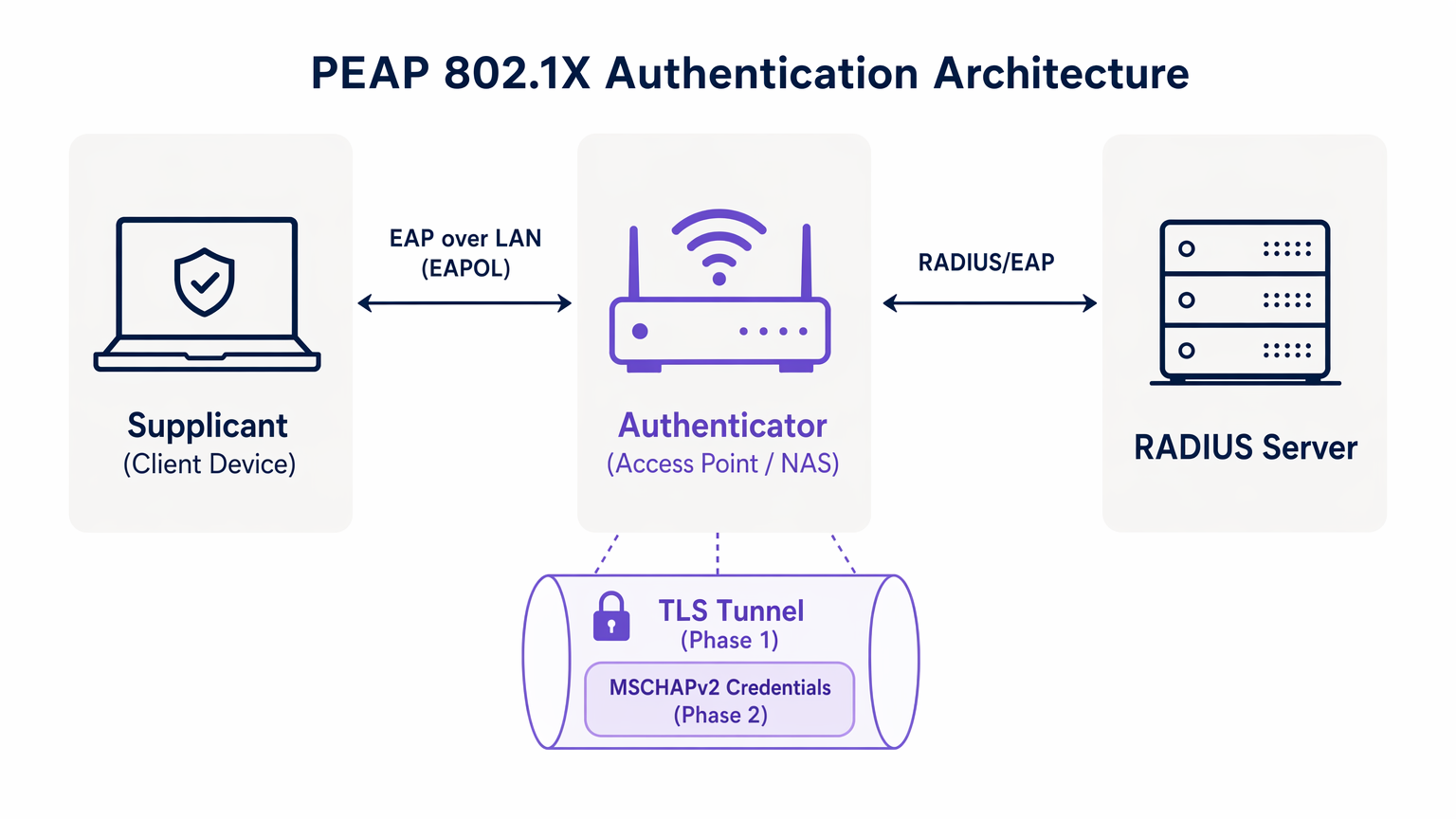
Um PEAP zu verstehen, müssen wir seinen zweistufigen Authentifizierungsprozess untersuchen. PEAP funktioniert, indem es einen sicheren äußeren Tunnel aufbaut, bevor sensible Anmeldeinformationen im inneren Tunnel ausgetauscht werden.
Phase 1: Aufbau des TLS-Tunnels
Wenn ein Supplicant (Client-Gerät) versucht, sich mit dem Netzwerk zu verbinden, blockiert der Authenticator (typischerweise ein Wireless Access Point) den gesamten Datenverkehr außer Extensible Authentication Protocol over LAN (EAPOL)-Frames. Der Authenticator leitet diese Frames an den Authentifizierungsserver weiter, normalerweise einen RADIUS-Server. Für ein umfassenderes Verständnis dieser Infrastruktur verweisen wir auf unseren Leitfaden zu Was ist RADIUS? Wie RADIUS-Server WiFi-Netzwerke sichern .
Während Phase 1 präsentiert der RADIUS-Server dem Supplicant sein digitales Zertifikat. Der Supplicant validiert dieses Zertifikat anhand seiner vertrauenswürdigen Root-Zertifizierungsstellen (CAs). Ist die Validierung erfolgreich, wird ein TLS (Transport Layer Security)-Tunnel zwischen dem Supplicant und dem RADIUS-Server aufgebaut. Dieser verschlüsselte Tunnel schützt die gesamte nachfolgende Kommunikation vor dem Abhören über das Wireless-Medium.
Phase 2: Innere Authentifizierung
Sobald der TLS-Tunnel aufgebaut ist, findet die eigentliche Benutzerauthentifizierung innerhalb dieses sicheren Kanals statt. Das gebräuchlichste innere Authentifizierungsprotokoll ist MSCHAPv2 (Microsoft Challenge Handshake Authentication Protocol Version 2).
Innerhalb des Tunnels sendet der Supplicant die Anmeldeinformationen des Benutzers (Benutzername und Passwort) an den RADIUS-Server. Der Server überprüft diese Anmeldeinformationen anhand eines Identitätsspeichers, wie Active Directory oder eines LDAP-Verzeichnisses. Sind die Anmeldeinformationen gültig, sendet der RADIUS-Server eine Access-Accept-Nachricht an den Authenticator zurück, und dem Client wird der Netzwerkzugriff gewährt.
Die entscheidende Sicherheitsprämisse von PEAP ist, dass der anfällige MSCHAPv2-Austausch vollständig innerhalb des verschlüsselten TLS-Tunnels gekapselt ist, wodurch er vor passiver Abhörung geschützt wird.
Implementierungsleitfaden: PEAP-MSCHAPv2 sichern
Obwohl PEAP hochfunktional ist, macht seine Standardkonfiguration auf vielen Client-Betriebssystemen es anfällig für ausgeklügelte Angriffe. Die sichere Implementierung von PEAP erfordert die strikte Einhaltung der folgenden Bereitstellungsstandards.
1. Obligatorische Serverzertifikatsvalidierung
Die größte Schwachstelle bei einer PEAP-Bereitstellung ist das Versäumnis, die Serverzertifikatsvalidierung auf Client-Seite durchzusetzen. Da PEAP kein Client-Zertifikat erfordert, muss der Supplicant absolut sicher sein, dass er mit dem legitimen RADIUS-Server kommuniziert, bevor er Anmeldeinformationen übermittelt.
Wenn ein Client-Gerät so konfiguriert ist, dass es jedes Zertifikat vertraut, kann ein Angreifer einen Rogue Access Point bereitstellen, ein betrügerisches Zertifikat präsentieren und den MSCHAPv2-Handshake abfangen. Tools wie hostapd-wpe automatisieren diesen Angriff.
Implementierungsmaßnahme: IT-Teams müssen alle Unternehmensgeräte so konfigurieren, dass das Serverzertifikat streng validiert wird. Dies beinhaltet das Anheften der spezifischen Root-CA, die das Zertifikat des RADIUS-Servers ausgestellt hat, und die explizite Definition des erwarteten Common Name (CN) oder Subject Alternative Name (SAN) des Servers.
2. MDM-erzwungene Wireless-Profile
Sich darauf zu verlassen, dass Endbenutzer 802.1X-Einstellungen manuell konfigurieren, ist ein garantierter Weg zum Scheitern. Benutzer klicken häufig durch Zertifikatswarnungen und gefährden so die Integrität des TLS-Tunnels.
Implementierungsmaßnahme: Wireless-Netzwerkprofile müssen über Mobile Device Management (MDM)-Plattformen (z. B. Microsoft Intune, Jamf) oder Gruppenrichtlinienobjekte (GPO) an alle Unternehmensgeräte verteilt werden. Diese Profile müssen die EAP-Einstellungen sperren und Benutzer daran hindern, die Anforderungen an die Zertifikatsvalidierung zu ändern.
3. Veraltete Protokolle ausmustern
Ältere TLS-Versionen enthalten bekannte kryptografische Schwachstellen. PEAP-Bereitstellungen müssen moderne Verschlüsselungsstandards durchsetzen.
Implementierungsmaßnahme: Konfigurieren Sie den RADIUS-Server so, dass er TLS 1.0- und TLS 1.1-Verbindungen ablehnt. Erzwingen Sie TLS 1.2 als absolutes Minimum, wobei TLS 1.3 bevorzugt wird, wo es von der Client-Basis unterstützt wird.
Best Practices: Strategische Netzwerksegmentierung
Ein häufiger Architekturfehler ist der Versuch, PEAP für den gesamten Wireless-Zugriff zu verwenden, einschließlich Gast- und BYOD-Netzwerken. PEAP ist für verwaltete Unternehmensgeräte konzipiert, die sich gegen ein zentrales Verzeichnis authentifizieren.
Gastzugriff isolieren
Für nicht-unternehmenseigene Geräte ist PEAP das falsche Werkzeug. Der Versuch, Gast-Anmeldeinformationen in einem RADIUS Verzeichnis schafft unnötigen Verwaltungsaufwand und birgt Sicherheitsrisiken.
Einrichtungen im Bereich Gastgewerbe und Transport sollten eine dedizierte Guest WiFi -Lösung implementieren. Plattformen wie Purple bieten ein sicheres, Captive Portal-basiertes Onboarding, das völlig unabhängig von der 802.1X-Unternehmensinfrastruktur arbeitet. Dies stellt sicher, dass der Gastdatenverkehr isoliert ist, während gleichzeitig eine umfassende Datenerfassung durch WiFi Analytics ermöglicht wird.
Die Rolle von EAP-TLS
Bei der Bewertung von PEAP müssen Netzwerkarchitekten auch EAP-TLS berücksichtigen. EAP-TLS bietet eine gegenseitige Authentifizierung – sowohl der Server als auch der Client müssen gültige Zertifikate vorlegen. Dies eliminiert die Abhängigkeit von Passwörtern vollständig und macht Angriffe durch Anmeldedatendiebstahl obsolet.
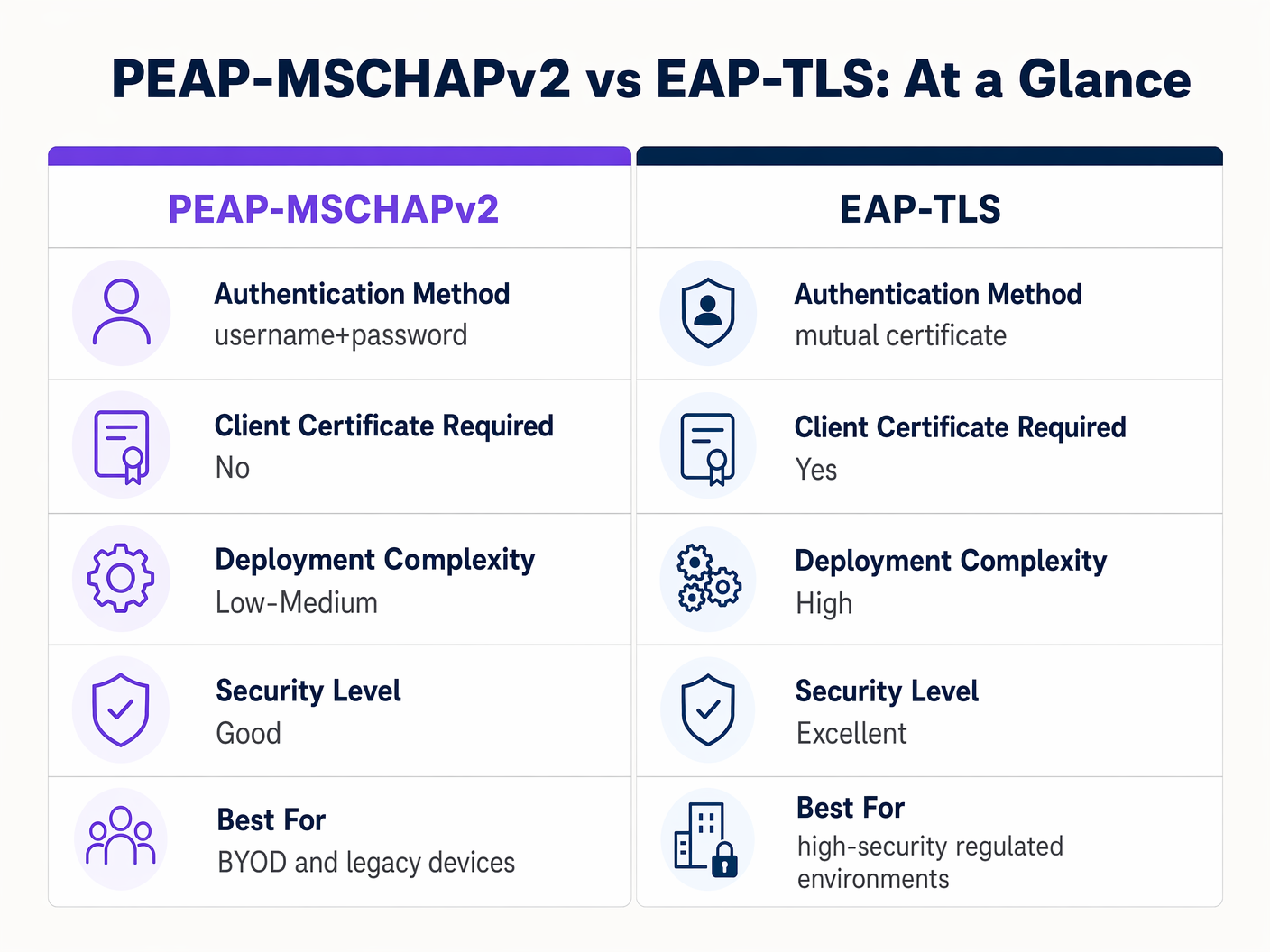
Obwohl EAP-TLS überlegene Sicherheit bietet, erfordert es eine robuste Public Key Infrastructure (PKI) zur Ausstellung und Verwaltung von Client-Zertifikaten. Für stark regulierte Umgebungen ist EAP-TLS die Zielarchitektur. Für Organisationen, denen es an PKI-Reife mangelt, bleibt eine streng konfigurierte PEAP-MSCHAPv2-Bereitstellung eine vertretbare Wahl.
Fehlerbehebung & Risikominderung
Selbst gut konzipierte PEAP-Bereitstellungen können betriebliche Ausfälle aufweisen. Das Verständnis der gängigen Fehlerursachen ist für eine schnelle Lösung unerlässlich.
Die Zertifikatsablaufkrise
Das störendste Ereignis in einer PEAP-Umgebung ist das unkontrollierte Ablaufen des RADIUS-Serverzertifikats. Wenn das Zertifikat abläuft, trennen alle Clients, die die Validierung erzwingen, sofort die Verbindung, was zu einem netzwerkweiten Ausfall führt.
Abhilfe: Implementieren Sie eine automatisierte Überwachung für das RADIUS-Serverzertifikat. Legen Sie eine Standardarbeitsanweisung fest, um das neue Zertifikat mindestens 30 Tage vor Ablauf zu erneuern und bereitzustellen. Wenn eine interne CA verwendet wird, stellen Sie sicher, dass die CA-Hierarchie selbst überwacht wird.
Passwortrichtlinie und Offline-Cracking
Während der TLS-Tunnel den MSCHAPv2-Austausch während der Übertragung schützt, werden Angreifer, die aufgrund falsch konfigurierter Clients erfolgreich einen Rogue AP-Angriff ausführen, die Challenge-Response-Paare erfassen. Forschungsergebnisse haben gezeigt, dass MSCHAPv2-Hashes offline geknackt werden können.
Abhilfe: Die Komplexität des zugrunde liegenden Benutzerpassworts ist die letzte Verteidigungslinie. Setzen Sie strenge Passwortrichtlinien durch – Mindestlängenanforderungen, Komplexitätsregeln und regelmäßige Rotation –, um den Rechenaufwand für das Offline-Cracken zu erhöhen.
ROI & Geschäftlicher Nutzen
Der Übergang von PSK zu einer ordnungsgemäß verwalteten PEAP 802.1X-Bereitstellung liefert messbaren Geschäftswert in mehreren Dimensionen.
- Reduzierter Verwaltungsaufwand: Die direkte Integration der WiFi-Authentifizierung mit dem Unternehmensidentitätsanbieter (z. B. Active Directory) automatisiert das Onboarding und Offboarding. Wenn ein Mitarbeiter ausscheidet, entzieht die Deaktivierung seines Verzeichniskontos sofort den Netzwerkzugriff, wodurch die Notwendigkeit entfällt, ein gemeinsames Passwort zu ändern.
- Verbesserte Auditierbarkeit: 802.1X bietet eine granulare, benutzerbezogene Transparenz des Netzwerkzugriffs. IT-Teams können Netzwerkaktivitäten eindeutig bestimmten Personen zuordnen, eine kritische Anforderung für Compliance-Frameworks wie PCI DSS und GDPR.
- Risikominderung: Durch die Abkehr von gemeinsamen Schlüsseln reduzieren Unternehmen das Risiko eines unbefugten Zugriffs durch ehemalige Mitarbeiter oder böswillige Akteure erheblich und schützen so geistiges Eigentum und sensible Unternehmensdaten.
Für Organisationen, die ihre umfassendere Netzwerkarchitektur zusammen mit ihrer drahtlosen Sicherheit optimieren möchten, wird die Erkundung moderner WAN-Lösungen dringend empfohlen. Erfahren Sie mehr über Die wichtigsten SD WAN-Vorteile für moderne Unternehmen .
Schlüsseldefinitionen
PEAP (Protected Extensible Authentication Protocol)
An 802.1X authentication protocol that encapsulates an inner authentication method (usually MSCHAPv2) within a secure TLS tunnel.
The dominant standard for enterprise WiFi authentication due to its balance of security and deployment ease.
802.1X
The IEEE standard for port-based Network Access Control, providing an authentication mechanism to devices wishing to attach to a LAN or WLAN.
The foundational framework that protocols like PEAP and EAP-TLS operate within.
EAPOL (EAP over LAN)
The protocol used to encapsulate EAP messages over a local area network, used during the initial stages of 802.1X authentication.
The mechanism by which the client and access point communicate before the network port is fully opened.
Supplicant
The client device (laptop, smartphone) requesting access to the network.
The endpoint that must be correctly configured to validate the server certificate in a PEAP deployment.
Authenticator
The network device (access point or switch) that facilitates the authentication process between the supplicant and the RADIUS server.
The enforcement point that blocks traffic until authentication is successful.
RADIUS (Remote Authentication Dial-In User Service)
A networking protocol that provides centralized Authentication, Authorization, and Accounting (AAA) management.
The server that validates the user's credentials and issues the final accept/reject decision.
MSCHAPv2
A challenge-response authentication protocol developed by Microsoft, commonly used as the inner authentication method within PEAP.
The protocol that actually verifies the username and password, but requires the protection of the PEAP TLS tunnel due to cryptographic weaknesses.
EAP-TLS
An EAP method that requires mutual authentication using digital certificates on both the client and the server.
The highly secure alternative to PEAP, requiring a PKI deployment but eliminating password-based vulnerabilities.
Ausgearbeitete Beispiele
A 300-bed luxury hotel needs to secure its back-of-house staff WiFi network. Currently, they use a single WPA2-Personal password that hasn't been changed in three years due to the operational disruption it would cause to update all point-of-sale terminals and staff tablets. How should they implement PEAP to resolve this?
The hotel should deploy an 802.1X architecture using PEAP-MSCHAPv2, integrating their wireless LAN controller with their central Active Directory via a RADIUS server (e.g., Microsoft NPS). They must use their MDM platform to push a standardized wireless profile to all staff tablets and POS terminals. This profile must explicitly enforce server certificate validation, pinning the CA that issued the NPS server's certificate. Staff will authenticate using their individual AD credentials.
A large retail chain is rolling out corporate laptops to store managers across 500 locations. They want to use PEAP-MSCHAPv2 but are concerned about the administrative burden of managing RADIUS certificates across so many sites.
Instead of deploying local RADIUS servers at each store, the retailer should utilize a cloud-hosted RADIUS solution integrated with their cloud identity provider (e.g., Azure AD or Okta). The access points at all 500 locations point to the cloud RADIUS endpoints. A single, globally trusted public certificate is used on the cloud RADIUS server, and the MDM payload deployed to the laptops pins this specific public certificate.
Übungsfragen
Q1. You are auditing a hospital's WiFi network. They use PEAP-MSCHAPv2 for staff devices. During your review, you notice that the MDM profile pushed to iPads does not have 'Validate Server Certificate' checked. What is the immediate risk?
Hinweis: Consider what happens if an attacker sets up a device broadcasting the hospital's SSID.
Musterlösung anzeigen
The immediate risk is a Rogue Access Point (Evil Twin) attack. Because the iPads are not validating the server certificate, they will attempt to authenticate with any AP broadcasting the correct SSID. An attacker can intercept the MSCHAPv2 handshake and attempt to crack the staff passwords offline, leading to credential compromise.
Q2. A university IT department is planning to migrate their student network from a Pre-Shared Key (PSK) to 802.1X. They want to use EAP-TLS for maximum security but are facing resistance from the helpdesk team. Why might PEAP-MSCHAPv2 be a more practical choice in this scenario?
Hinweis: Consider the device ownership model in a university environment.
Musterlösung anzeigen
In a university, the devices are unmanaged (BYOD). Deploying EAP-TLS requires issuing and installing a unique client certificate on every student's personal laptop, phone, and tablet. This presents a massive support burden for the helpdesk. PEAP-MSCHAPv2 only requires the students to enter their existing university username and password, making onboarding significantly easier while still providing a major security upgrade over PSK.
Q3. Your organization's RADIUS server certificate is expiring in 14 days. It is issued by a public CA. What steps must you take to ensure no disruption to the PEAP-MSCHAPv2 wireless network?
Hinweis: Think about what the supplicants are currently configured to trust.
Musterlösung anzeigen
You must acquire the new certificate from the public CA and install it on the RADIUS server. Crucially, you must review the MDM wireless profiles. If the profiles are pinned to the specific old certificate, they must be updated to trust the new certificate before the old one expires. If the profiles only pin the Root CA, and the new certificate is issued by the same Root CA, the transition should be seamless, but it must be tested.
Weiterlesen in dieser Reihe
Per-Device PSK nach Anbieter: iPSK, DPSK, MPSK und PPSK im Vergleich (und WPA3-Unterstützung)
Ein umfassender Vergleich von Per-Device-PSK-Implementierungen bei Cisco Meraki, HPE Aruba, Ruckus, Juniper Mist, Extreme, Fortinet und Ubiquiti UniFi. Erfahren Sie, wie sich WPA3-SAE auf Per-Device-Key-Strategien auswirkt und wann Sie Übergangsmodi implementieren sollten, anstatt auf 802.1X umzusteigen.
Was ist MAC-Adressauthentifizierung? Wann man sie nutzen und wann man sie vermeiden sollte
Dieser maßgebliche technische Leitfaden behandelt die MAC-Adressauthentifizierung in Unternehmens-WiFi-Umgebungen – wie RADIUS-basierte MAC-Authentifizierung auf Layer 2 funktioniert, ihre inhärenten Sicherheitslücken (einschließlich MAC-Spoofing und die Auswirkungen der MAC-Randomisierung auf OS-Ebene) und die genauen operativen Kontexte, in denen sie ein gültiges Werkzeug zur Verwaltung von IoT- und kopflosen Geräten bleibt. Er bietet umsetzbare Bereitstellungsanleitungen für IT-Manager und Netzwerkarchitekten in den Bereichen Gastgewerbe, Einzelhandel, Gesundheitswesen und öffentlicher Sektor, mit realen Fallbeispielen, Entscheidungsrahmen und Integrationskontext für die Gast-WiFi- und Analyseplattform von Purple.
Einrichtung von Enterprise WiFi auf iOS und macOS mit 802.1X
Dieser maßgebliche Leitfaden bietet leitenden IT-Führungskräften umsetzbare Schritte für die Bereitstellung von 802.1X Enterprise WiFi auf iOS- und macOS-Geräten. Er behandelt die zertifikatbasierte Authentifizierung (EAP-TLS), MDM-Konfigurationsprofile und die Architekturintegration zur Sicherung von Unternehmensnetzwerken bei gleichzeitiger Unterstützung von BYOD-Initiativen.