
Qu'est-ce que l'authentification PEAP ? Comment PEAP sécurise votre WiFi
Ce guide faisant autorité décortique l'authentification PEAP pour les réseaux WiFi d'entreprise, détaillant son architecture, ses limitations de sécurité par rapport à EAP-TLS, et ses stratégies de déploiement pratiques. Conçu pour les responsables informatiques et les architectes réseau, il offre des informations exploitables sur les cas où PEAP-MSCHAPv2 reste approprié et comment le sécuriser contre les menaces modernes.
Écouter ce guide
Voir la transcription du podcast
Résumé Exécutif
Le Protocole d'Authentification Extensible Protégé (PEAP) reste la méthode d'authentification 802.1X la plus largement déployée dans les environnements d'entreprise aujourd'hui. Développé conjointement par Cisco, Microsoft et RSA Security, PEAP a été conçu pour résoudre un défi opérationnel spécifique : comment réaliser une authentification serveur forte basée sur des certificats sans la charge administrative écrasante du déploiement de certificats clients sur chaque appareil du réseau.
Pour les directeurs informatiques et les architectes réseau gérant des infrastructures complexes — que ce soit dans le Commerce de détail , la Santé , ou de grands bureaux d'entreprise — PEAP-MSCHAPv2 offre un compromis pragmatique entre l'insécurité des clés pré-partagées (PSK) et la complexité de déploiement d'EAP-TLS. Cependant, cette commodité s'accompagne de compromis de sécurité inhérents. À mesure que les attaques de points d'accès non autorisés deviennent de plus en plus sophistiquées, les déploiements PEAP mal configurés présentent une vulnérabilité critique.
Ce guide offre une analyse technique approfondie de l'architecture PEAP, de ses mécanismes opérationnels et des normes de configuration obligatoires requises pour le sécuriser dans les réseaux d'entreprise modernes.
Analyse Technique Approfondie : L'Architecture de PEAP
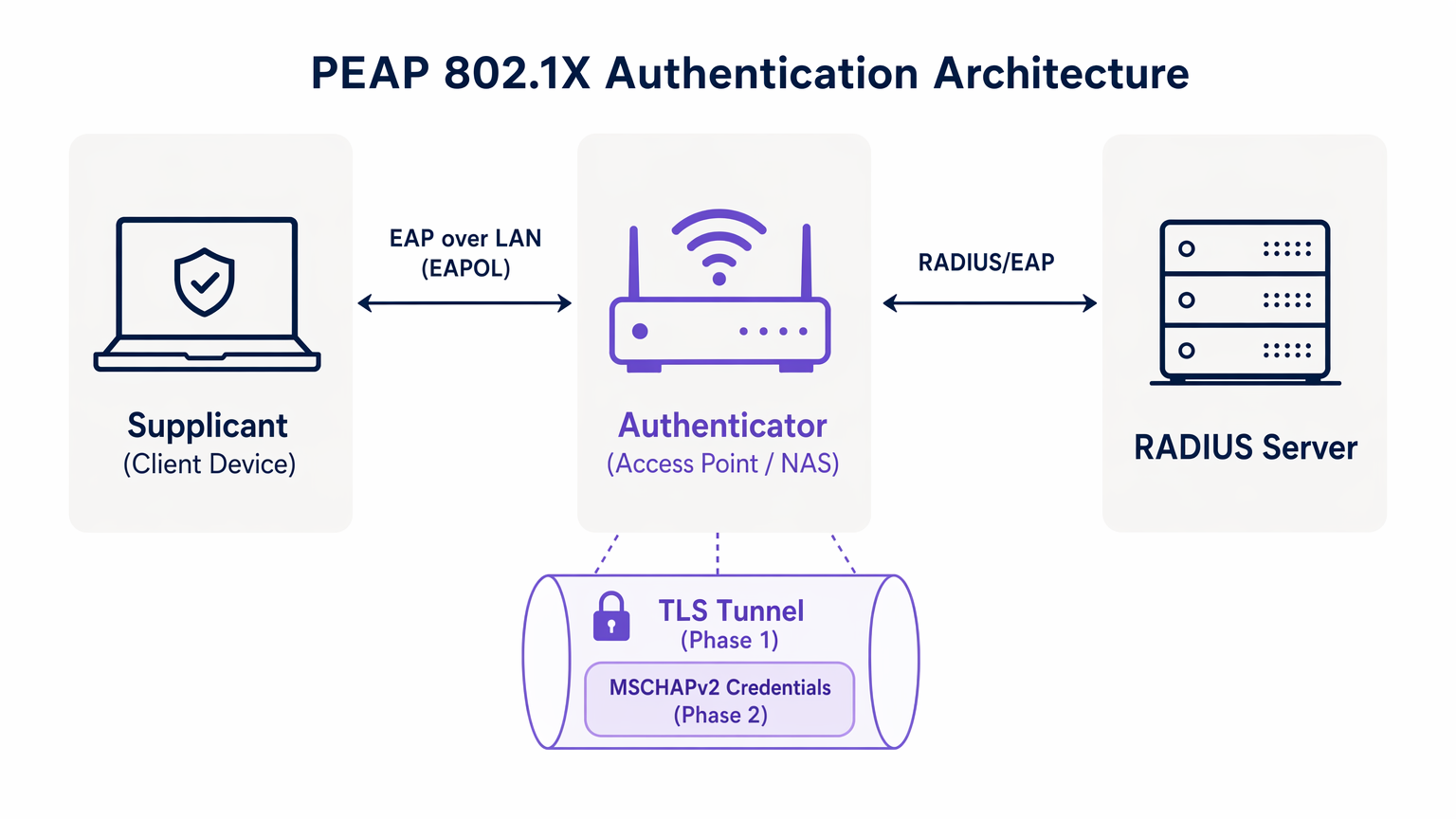
Pour comprendre PEAP, nous devons examiner son processus d'authentification en deux phases. PEAP fonctionne en établissant un tunnel externe sécurisé avant d'échanger des données d'identification sensibles dans le tunnel interne.
Phase 1 : Établissement du Tunnel TLS
Lorsqu'un demandeur (appareil client) tente de se connecter au réseau, l'authentificateur (généralement un point d'accès sans fil) bloque tout le trafic à l'exception des trames du Protocole d'Authentification Extensible sur LAN (EAPOL). L'authentificateur transmet ces trames au serveur d'authentification, généralement un serveur RADIUS. Pour une compréhension plus large de cette infrastructure, consultez notre guide sur Qu'est-ce que RADIUS ? Comment les serveurs RADIUS sécurisent les réseaux WiFi .
Pendant la Phase 1, le serveur RADIUS présente son certificat numérique au demandeur. Le demandeur valide ce certificat par rapport à ses autorités de certification (CA) racine de confiance. Si la validation est réussie, un tunnel TLS (Transport Layer Security) est établi entre le demandeur et le serveur RADIUS. Ce tunnel chiffré protège toutes les communications ultérieures contre l'écoute clandestine sur le support sans fil.
Phase 2 : Authentification Interne
Une fois le tunnel TLS établi, l'authentification réelle de l'utilisateur a lieu à l'intérieur de ce canal sécurisé. Le protocole d'authentification interne le plus courant est MSCHAPv2 (Microsoft Challenge Handshake Authentication Protocol version 2).
À l'intérieur du tunnel, le demandeur envoie les identifiants de l'utilisateur (nom d'utilisateur et mot de passe) au serveur RADIUS. Le serveur vérifie ces identifiants par rapport à un référentiel d'identité, tel qu'Active Directory ou un annuaire LDAP. Si les identifiants sont valides, le serveur RADIUS renvoie un message Access-Accept à l'authentificateur, et le client se voit accorder l'accès au réseau.
La prémisse de sécurité critique de PEAP est que l'échange MSCHAPv2 vulnérable est entièrement encapsulé dans le tunnel TLS chiffré, le protégeant ainsi de l'interception passive.
Guide d'Implémentation : Sécuriser PEAP-MSCHAPv2
Bien que PEAP soit très fonctionnel, sa configuration par défaut sur de nombreux systèmes d'exploitation clients le rend vulnérable aux attaques sophistiquées. La mise en œuvre sécurisée de PEAP exige une adhésion rigoureuse aux normes de déploiement suivantes.
1. Validation Obligatoire du Certificat Serveur
La vulnérabilité la plus importante dans un déploiement PEAP est l'incapacité à imposer la validation du certificat serveur côté client. Étant donné que PEAP ne nécessite pas de certificat client, le demandeur doit être absolument certain de communiquer avec le serveur RADIUS légitime avant de transmettre les identifiants.
Si un appareil client est configuré pour faire confiance à n'importe quel certificat, un attaquant peut déployer un point d'accès non autorisé, présenter un certificat frauduleux et intercepter l'échange MSCHAPv2. Des outils comme hostapd-wpe automatisent cette attaque.
Action d'Implémentation : Les équipes informatiques doivent configurer tous les appareils d'entreprise pour valider strictement le certificat serveur. Cela implique d'épingler l'autorité de certification racine (CA) spécifique qui a émis le certificat du serveur RADIUS et de définir explicitement le nom commun (CN) ou le nom alternatif du sujet (SAN) attendu du serveur.
2. Profils Sans Fil Appliqués par MDM
Compter sur les utilisateurs finaux pour configurer manuellement les paramètres 802.1X est une voie garantie vers l'échec. Les utilisateurs cliquent fréquemment sur les avertissements de certificat, compromettant l'intégrité du tunnel TLS.
Action d'Implémentation : Les profils de réseau sans fil doivent être déployés sur tous les appareils d'entreprise via des plateformes de gestion des appareils mobiles (MDM) (par exemple, Microsoft Intune, Jamf) ou des objets de stratégie de groupe (GPO). Ces profils doivent verrouiller les paramètres EAP, empêchant les utilisateurs de modifier les exigences de validation des certificats.
3. Obsolescence des Protocoles Hérités
Les anciennes versions de TLS contiennent des vulnérabilités cryptographiques connues. Les déploiements PEAP doivent appliquer des normes de chiffrement modernes.
Action d'Implémentation : Configurez le serveur RADIUS pour rejeter les connexions TLS 1.0 et TLS 1.1. Imposez TLS 1.2 comme minimum absolu, avec TLS 1.3 préféré là où il est pris en charge par la base de clients.
Bonnes Pratiques : Segmentation Stratégique du Réseau
Une erreur architecturale courante est de tenter d'utiliser PEAP pour tous les accès sans fil, y compris les réseaux invités et BYOD. PEAP est conçu pour les appareils d'entreprise gérés s'authentifiant auprès d'un annuaire central.
Isolation de l'Accès Invité
Pour les appareils non-d'entreprise, PEAP est le mauvais outil. Tenter de gérer les identifiants invités dans un RADIUS de répertoire crée une surcharge administrative inutile et introduit des risques de sécurité.
Les établissements des secteurs de l' Hôtellerie et du Transport devraient mettre en œuvre une solution dédiée de Guest WiFi . Des plateformes comme Purple offrent un processus d'intégration sécurisé basé sur un Captive Portal, fonctionnant de manière entièrement indépendante de l'infrastructure 802.1X de l'entreprise. Cela garantit l'isolation du trafic invité, tout en permettant la capture de données riches via WiFi Analytics .
Le rôle d'EAP-TLS
Lors de l'évaluation de PEAP, les architectes réseau doivent également considérer EAP-TLS. EAP-TLS offre une authentification mutuelle — le serveur et le client doivent tous deux présenter des certificats valides. Cela élimine entièrement la dépendance aux mots de passe, rendant les attaques de vol d'identifiants obsolètes.
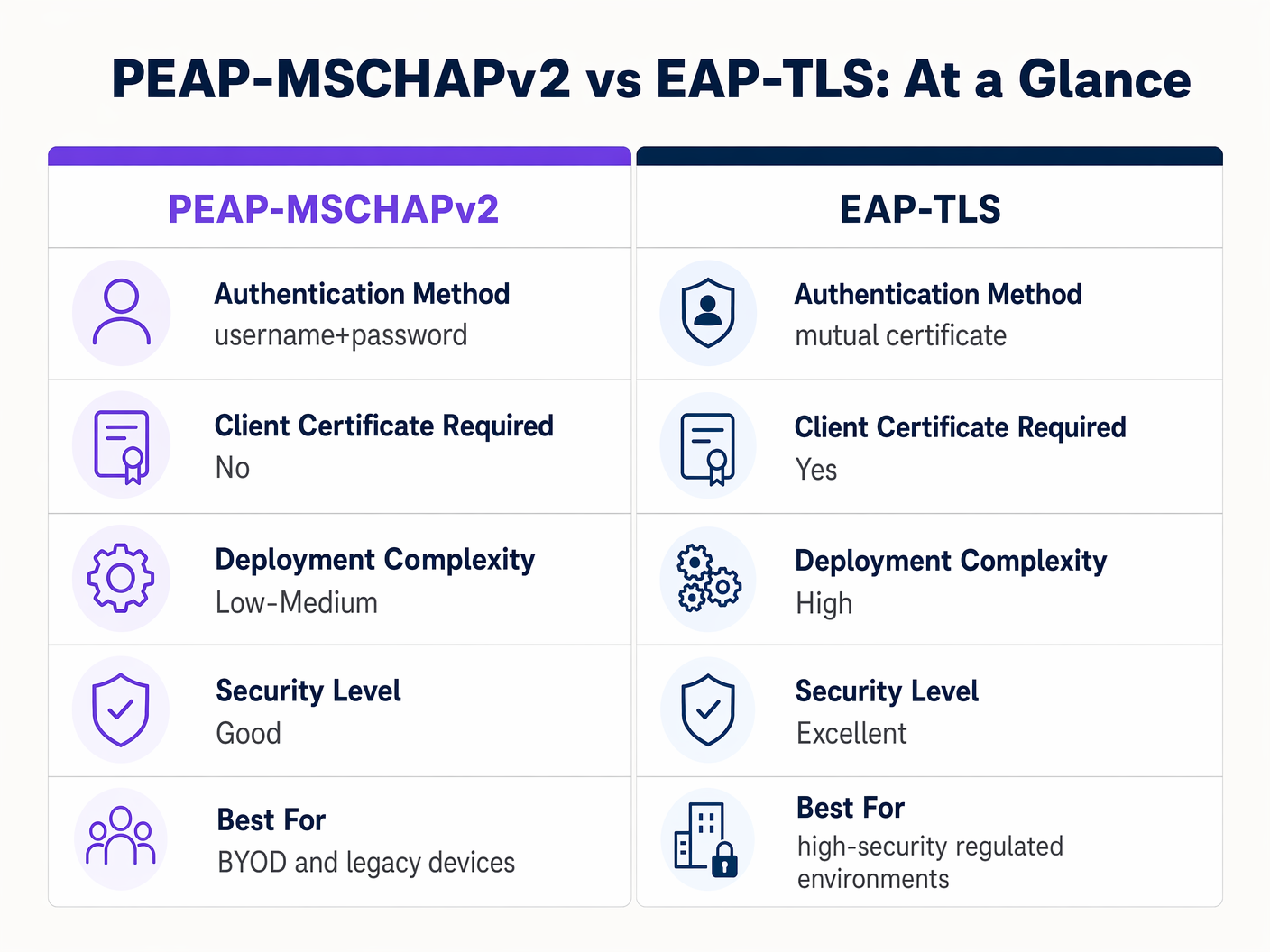
Bien qu'EAP-TLS offre une sécurité supérieure, il nécessite une infrastructure à clé publique (PKI) robuste pour émettre et gérer les certificats clients. Pour les environnements fortement réglementés, EAP-TLS est l'architecture cible. Pour les organisations manquant de maturité PKI, un déploiement PEAP-MSCHAPv2 strictement configuré reste un choix défendable.
Dépannage et atténuation des risques
Même les déploiements PEAP bien conçus peuvent connaître des défaillances opérationnelles. Comprendre les modes de défaillance courants est essentiel pour une résolution rapide.
La crise de l'expiration des certificats
L'événement le plus perturbateur dans un environnement PEAP est l'expiration non gérée du certificat du serveur RADIUS. Lorsque le certificat expire, tous les clients appliquant la validation interrompront immédiatement la connexion, entraînant une panne à l'échelle du réseau.
Atténuation : Mettez en œuvre une surveillance automatisée du certificat du serveur RADIUS. Établissez une procédure opérationnelle standard pour renouveler et déployer le nouveau certificat au moins 30 jours avant son expiration. Si vous utilisez une CA interne, assurez-vous que la hiérarchie de la CA elle-même est surveillée.
Politique de mot de passe et craquage hors ligne
Bien que le tunnel TLS protège l'échange MSCHAPv2 en transit, si un attaquant exécute avec succès une attaque de point d'accès malveillant en raison de clients mal configurés, il capturera les paires défi-réponse. La recherche a démontré que les hachages MSCHAPv2 peuvent être craqués hors ligne.
Atténuation : La complexité du mot de passe utilisateur sous-jacent est la dernière ligne de défense. Appliquez des politiques de mot de passe strictes — exigences de longueur minimale, règles de complexité et rotation régulière — pour augmenter le coût de calcul du craquage hors ligne.
Retour sur investissement et impact commercial
La transition du PSK vers un déploiement PEAP 802.1X correctement géré apporte une valeur commerciale mesurable à travers plusieurs dimensions.
- Réduction de la surcharge administrative : L'intégration de l'authentification WiFi directement avec le fournisseur d'identité d'entreprise (par exemple, Active Directory) automatise l'intégration et la désintégration. Lorsqu'un employé quitte l'entreprise, la désactivation de son compte de répertoire révoque immédiatement l'accès au réseau, éliminant ainsi le besoin de modifier un mot de passe partagé.
- Auditabilité améliorée : Le 802.1X offre une visibilité granulaire au niveau de l'utilisateur sur l'accès au réseau. Les équipes informatiques peuvent tracer de manière définitive l'activité réseau jusqu'à des individus spécifiques, une exigence critique pour les cadres de conformité comme PCI DSS et GDPR.
- Atténuation des risques : En abandonnant les clés partagées, les organisations réduisent considérablement le risque d'accès non autorisé par d'anciens employés ou des acteurs malveillants, protégeant ainsi la propriété intellectuelle et les données d'entreprise sensibles.
Pour les organisations cherchant à optimiser leur architecture réseau globale parallèlement à leur sécurité sans fil, l'exploration de solutions WAN modernes est fortement recommandée. Apprenez-en davantage sur Les avantages clés du SD WAN pour les entreprises modernes .
Définitions clés
PEAP (Protected Extensible Authentication Protocol)
An 802.1X authentication protocol that encapsulates an inner authentication method (usually MSCHAPv2) within a secure TLS tunnel.
The dominant standard for enterprise WiFi authentication due to its balance of security and deployment ease.
802.1X
The IEEE standard for port-based Network Access Control, providing an authentication mechanism to devices wishing to attach to a LAN or WLAN.
The foundational framework that protocols like PEAP and EAP-TLS operate within.
EAPOL (EAP over LAN)
The protocol used to encapsulate EAP messages over a local area network, used during the initial stages of 802.1X authentication.
The mechanism by which the client and access point communicate before the network port is fully opened.
Supplicant
The client device (laptop, smartphone) requesting access to the network.
The endpoint that must be correctly configured to validate the server certificate in a PEAP deployment.
Authenticator
The network device (access point or switch) that facilitates the authentication process between the supplicant and the RADIUS server.
The enforcement point that blocks traffic until authentication is successful.
RADIUS (Remote Authentication Dial-In User Service)
A networking protocol that provides centralized Authentication, Authorization, and Accounting (AAA) management.
The server that validates the user's credentials and issues the final accept/reject decision.
MSCHAPv2
A challenge-response authentication protocol developed by Microsoft, commonly used as the inner authentication method within PEAP.
The protocol that actually verifies the username and password, but requires the protection of the PEAP TLS tunnel due to cryptographic weaknesses.
EAP-TLS
An EAP method that requires mutual authentication using digital certificates on both the client and the server.
The highly secure alternative to PEAP, requiring a PKI deployment but eliminating password-based vulnerabilities.
Exemples concrets
A 300-bed luxury hotel needs to secure its back-of-house staff WiFi network. Currently, they use a single WPA2-Personal password that hasn't been changed in three years due to the operational disruption it would cause to update all point-of-sale terminals and staff tablets. How should they implement PEAP to resolve this?
The hotel should deploy an 802.1X architecture using PEAP-MSCHAPv2, integrating their wireless LAN controller with their central Active Directory via a RADIUS server (e.g., Microsoft NPS). They must use their MDM platform to push a standardized wireless profile to all staff tablets and POS terminals. This profile must explicitly enforce server certificate validation, pinning the CA that issued the NPS server's certificate. Staff will authenticate using their individual AD credentials.
A large retail chain is rolling out corporate laptops to store managers across 500 locations. They want to use PEAP-MSCHAPv2 but are concerned about the administrative burden of managing RADIUS certificates across so many sites.
Instead of deploying local RADIUS servers at each store, the retailer should utilize a cloud-hosted RADIUS solution integrated with their cloud identity provider (e.g., Azure AD or Okta). The access points at all 500 locations point to the cloud RADIUS endpoints. A single, globally trusted public certificate is used on the cloud RADIUS server, and the MDM payload deployed to the laptops pins this specific public certificate.
Questions d'entraînement
Q1. You are auditing a hospital's WiFi network. They use PEAP-MSCHAPv2 for staff devices. During your review, you notice that the MDM profile pushed to iPads does not have 'Validate Server Certificate' checked. What is the immediate risk?
Conseil : Consider what happens if an attacker sets up a device broadcasting the hospital's SSID.
Voir la réponse type
The immediate risk is a Rogue Access Point (Evil Twin) attack. Because the iPads are not validating the server certificate, they will attempt to authenticate with any AP broadcasting the correct SSID. An attacker can intercept the MSCHAPv2 handshake and attempt to crack the staff passwords offline, leading to credential compromise.
Q2. A university IT department is planning to migrate their student network from a Pre-Shared Key (PSK) to 802.1X. They want to use EAP-TLS for maximum security but are facing resistance from the helpdesk team. Why might PEAP-MSCHAPv2 be a more practical choice in this scenario?
Conseil : Consider the device ownership model in a university environment.
Voir la réponse type
In a university, the devices are unmanaged (BYOD). Deploying EAP-TLS requires issuing and installing a unique client certificate on every student's personal laptop, phone, and tablet. This presents a massive support burden for the helpdesk. PEAP-MSCHAPv2 only requires the students to enter their existing university username and password, making onboarding significantly easier while still providing a major security upgrade over PSK.
Q3. Your organization's RADIUS server certificate is expiring in 14 days. It is issued by a public CA. What steps must you take to ensure no disruption to the PEAP-MSCHAPv2 wireless network?
Conseil : Think about what the supplicants are currently configured to trust.
Voir la réponse type
You must acquire the new certificate from the public CA and install it on the RADIUS server. Crucially, you must review the MDM wireless profiles. If the profiles are pinned to the specific old certificate, they must be updated to trust the new certificate before the old one expires. If the profiles only pin the Root CA, and the new certificate is issued by the same Root CA, the transition should be seamless, but it must be tested.
Continuer la lecture de cette série
PSK par appareil par fournisseur : comparaison entre iPSK, DPSK, MPSK et PPSK (et support WPA3)
Une comparaison complète des implémentations PSK par appareil chez Cisco Meraki, HPE Aruba, Ruckus, Juniper Mist, Extreme, Fortinet et Ubiquiti UniFi. Découvrez comment le WPA3-SAE impacte les stratégies de clés par appareil et quand déployer des modes de transition plutôt que de passer au 802.1X.
Qu'est-ce que l'authentification par adresse MAC ? Quand l'utiliser et quand l'éviter
Ce guide de référence technique fait autorité sur l'authentification par adresse MAC dans les environnements WiFi d'entreprise – comment l'authentification MAC basée sur RADIUS fonctionne à la Couche 2, ses vulnérabilités de sécurité inhérentes (y compris l'usurpation d'adresse MAC et l'impact de la randomisation MAC au niveau du système d'exploitation), et les contextes opérationnels précis où elle reste un outil valide pour la gestion des appareils IoT et sans tête. Il fournit des conseils de déploiement exploitables pour les responsables informatiques et les architectes réseau dans les secteurs de l'hôtellerie, du commerce de détail, de la santé et des lieux publics, avec des exemples concrets, des cadres de décision et un contexte d'intégration pour la plateforme de WiFi invité et d'analyse de Purple.
Comment configurer le WiFi d'entreprise sur iOS et macOS avec 802.1X
This authoritative guide provides senior IT leaders with actionable steps for deploying 802.1X enterprise WiFi on iOS and macOS devices. It covers certificate-based authentication (EAP-TLS), MDM configuration profiles, and architecture integration to secure corporate networks while supporting BYOD initiatives.