
¿Qué es la autenticación PEAP? Cómo PEAP asegura su WiFi
Esta guía autorizada desglosa la autenticación PEAP para redes WiFi empresariales, detallando su arquitectura, limitaciones de seguridad en comparación con EAP-TLS y estrategias prácticas de implementación. Diseñada para gerentes de TI y arquitectos de red, proporciona información útil sobre cuándo PEAP-MSCHAPv2 sigue siendo apropiado y cómo protegerlo contra las amenazas modernas.
Escuchar esta guía
Ver transcripción del podcast
Resumen ejecutivo
El Protocolo de Autenticación Extensible Protegido (PEAP) sigue siendo el método de autenticación 802.1X más ampliamente implementado en entornos empresariales hoy en día. Desarrollado conjuntamente por Cisco, Microsoft y RSA Security, PEAP fue diseñado para resolver un desafío operativo específico: cómo lograr una autenticación de servidor sólida basada en certificados sin la abrumadora sobrecarga administrativa de implementar certificados de cliente en cada dispositivo de la red.
Para los directores de TI y arquitectos de red que gestionan entornos complejos, ya sea en Retail , Healthcare o grandes oficinas corporativas, PEAP-MSCHAPv2 ofrece un término medio pragmático entre la inseguridad de las Claves Precompartidas (PSK) y la complejidad de implementación de EAP-TLS. Sin embargo, esta conveniencia conlleva compensaciones de seguridad inherentes. A medida que los ataques de puntos de acceso no autorizados se vuelven cada vez más sofisticados, las implementaciones de PEAP mal configuradas presentan una vulnerabilidad crítica.
Esta guía proporciona un análisis técnico exhaustivo de la arquitectura PEAP, su mecánica operativa y los estándares de configuración obligatorios necesarios para asegurarla en las redes empresariales modernas.
Análisis técnico profundo: La arquitectura de PEAP
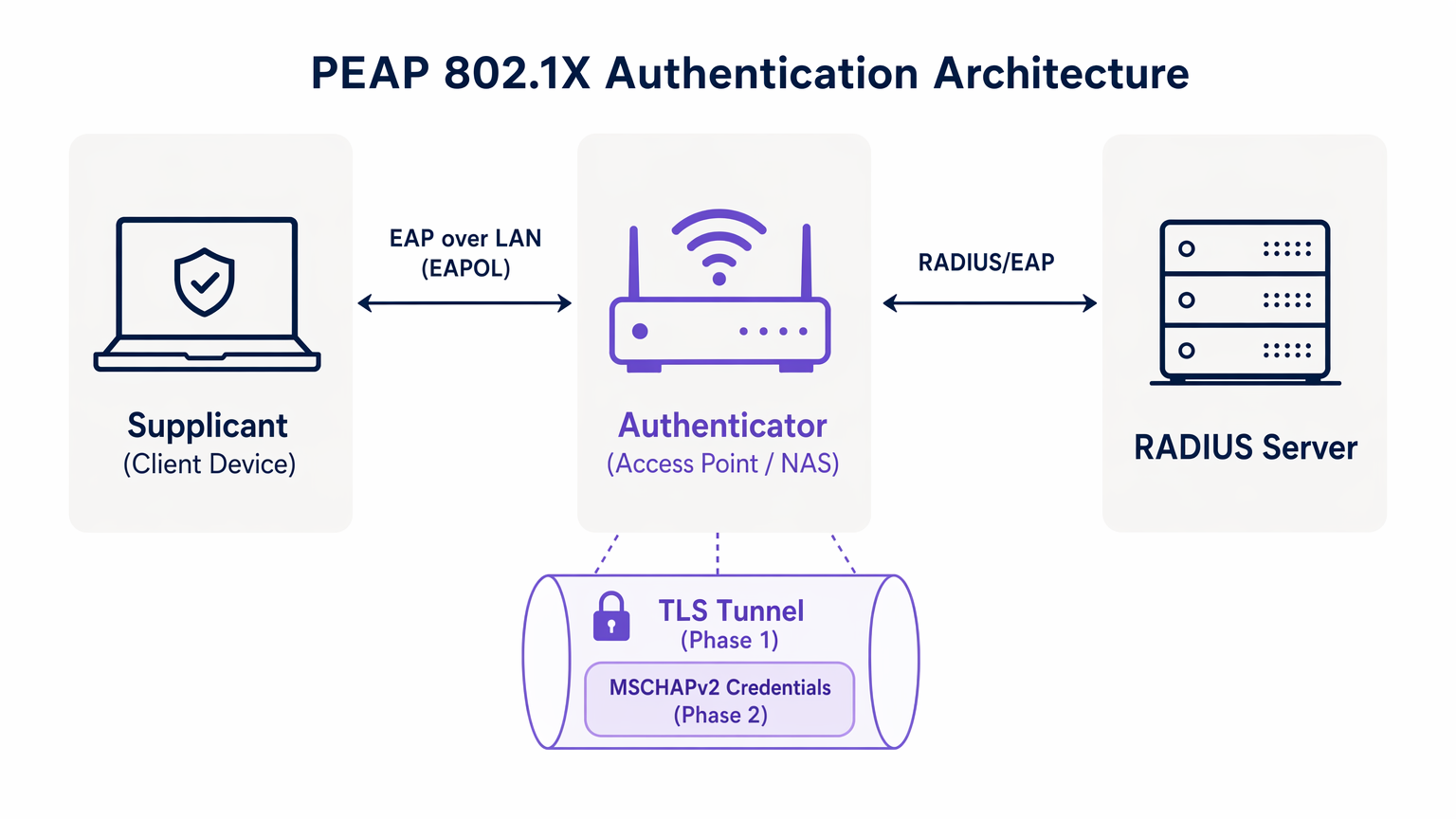
Para entender PEAP, debemos examinar su proceso de autenticación de dos fases. PEAP opera estableciendo un túnel exterior seguro antes de intercambiar cualquier dato de credenciales sensible en el túnel interior.
Fase 1: Establecimiento del túnel TLS
Cuando un suplicante (dispositivo cliente) intenta conectarse a la red, el autenticador (típicamente un punto de acceso inalámbrico) bloquea todo el tráfico excepto los marcos de Extensible Authentication Protocol over LAN (EAPOL). El autenticador reenvía estos marcos al servidor de autenticación, generalmente un servidor RADIUS. Para una comprensión más amplia de esta infraestructura, consulte nuestra guía sobre ¿Qué es RADIUS? Cómo los servidores RADIUS aseguran las redes WiFi .
Durante la Fase 1, el servidor RADIUS presenta su certificado digital al suplicante. El suplicante valida este certificado contra sus Autoridades de Certificación (CA) raíz de confianza. Si la validación es exitosa, se establece un túnel TLS (Transport Layer Security) entre el suplicante y el servidor RADIUS. Este túnel cifrado protege toda la comunicación posterior de la escucha en el medio inalámbrico.
Fase 2: Autenticación interna
Una vez establecido el túnel TLS, la autenticación de usuario real tiene lugar dentro de este canal seguro. El protocolo de autenticación interna más común es MSCHAPv2 (Microsoft Challenge Handshake Authentication Protocol versión 2).
Dentro del túnel, el suplicante envía las credenciales del usuario (nombre de usuario y contraseña) al servidor RADIUS. El servidor verifica estas credenciales contra un almacén de identidades, como Active Directory o un directorio LDAP. Si las credenciales son válidas, el servidor RADIUS envía un mensaje de Access-Accept de vuelta al autenticador, y se concede acceso a la red al cliente.
La premisa de seguridad crítica de PEAP es que el intercambio vulnerable de MSCHAPv2 está completamente encapsulado dentro del túnel TLS cifrado, protegiéndolo de la interceptación pasiva.
Guía de implementación: Asegurando PEAP-MSCHAPv2
Aunque PEAP es altamente funcional, su configuración predeterminada en muchos sistemas operativos cliente lo deja vulnerable a ataques sofisticados. Implementar PEAP de forma segura requiere una adhesión rigurosa a los siguientes estándares de implementación.
1. Validación obligatoria del certificado del servidor
La vulnerabilidad más significativa en una implementación de PEAP es la falta de aplicación de la validación del certificado del servidor en el lado del cliente. Debido a que PEAP no requiere un certificado de cliente, el suplicante debe estar absolutamente seguro de que se está comunicando con el servidor RADIUS legítimo antes de transmitir las credenciales.
Si un dispositivo cliente está configurado para confiar en cualquier certificado, un atacante puede implementar un punto de acceso no autorizado, presentar un certificado fraudulento e interceptar el handshake de MSCHAPv2. Herramientas como hostapd-wpe automatizan este ataque.
Acción de implementación: Los equipos de TI deben configurar todos los dispositivos empresariales para validar estrictamente el certificado del servidor. Esto implica fijar la CA raíz específica que emitió el certificado del servidor RADIUS y definir explícitamente el Common Name (CN) o Subject Alternative Name (SAN) esperado del servidor.
2. Perfiles inalámbricos aplicados por MDM
Confiar en que los usuarios finales configuren manualmente los ajustes 802.1X es un camino garantizado al fracaso. Los usuarios con frecuencia hacen clic en las advertencias de certificados, comprometiendo la integridad del túnel TLS.
Acción de implementación: Los perfiles de red inalámbrica deben ser enviados a todos los dispositivos corporativos a través de plataformas de Mobile Device Management (MDM) (por ejemplo, Microsoft Intune, Jamf) u Objetos de Política de Grupo (GPO). Estos perfiles deben bloquear la configuración de EAP, impidiendo que los usuarios alteren los requisitos de validación de certificados.
3. Desaprobación de protocolos heredados
Las versiones antiguas de TLS contienen vulnerabilidades criptográficas conocidas. Las implementaciones de PEAP deben aplicar estándares de cifrado modernos.
Acción de implementación: Configure el servidor RADIUS para rechazar las conexiones TLS 1.0 y TLS 1.1. Aplique TLS 1.2 como mínimo absoluto, con TLS 1.3 preferido donde sea compatible con la base de clientes.
Mejores prácticas: Segmentación estratégica de la red
Un error arquitectónico común es intentar usar PEAP para todo el acceso inalámbrico, incluidas las redes de invitados y BYOD. PEAP está diseñado para dispositivos empresariales gestionados que se autentican contra un directorio central.
Aislamiento del acceso de invitados
Para dispositivos no corporativos, PEAP es la herramienta equivocada. Intentar gestionar las credenciales de invitados en un RADIUS de directorio crea una sobrecarga administrativa innecesaria e introduce riesgos de seguridad.
Los recintos en Hostelería y Transporte deberían implementar una solución dedicada de Guest WiFi . Plataformas como Purple ofrecen un onboarding seguro basado en Captive Portal que opera de forma totalmente independiente de la infraestructura 802.1X empresarial. Esto asegura que el tráfico de invitados esté aislado, al mismo tiempo que permite una rica captura de datos a través de WiFi Analytics .
El papel de EAP-TLS
Al evaluar PEAP, los arquitectos de red también deben considerar EAP-TLS. EAP-TLS proporciona autenticación mutua: tanto el servidor como el cliente deben presentar certificados válidos. Esto elimina por completo la dependencia de las contraseñas, haciendo obsoletos los ataques de robo de credenciales.
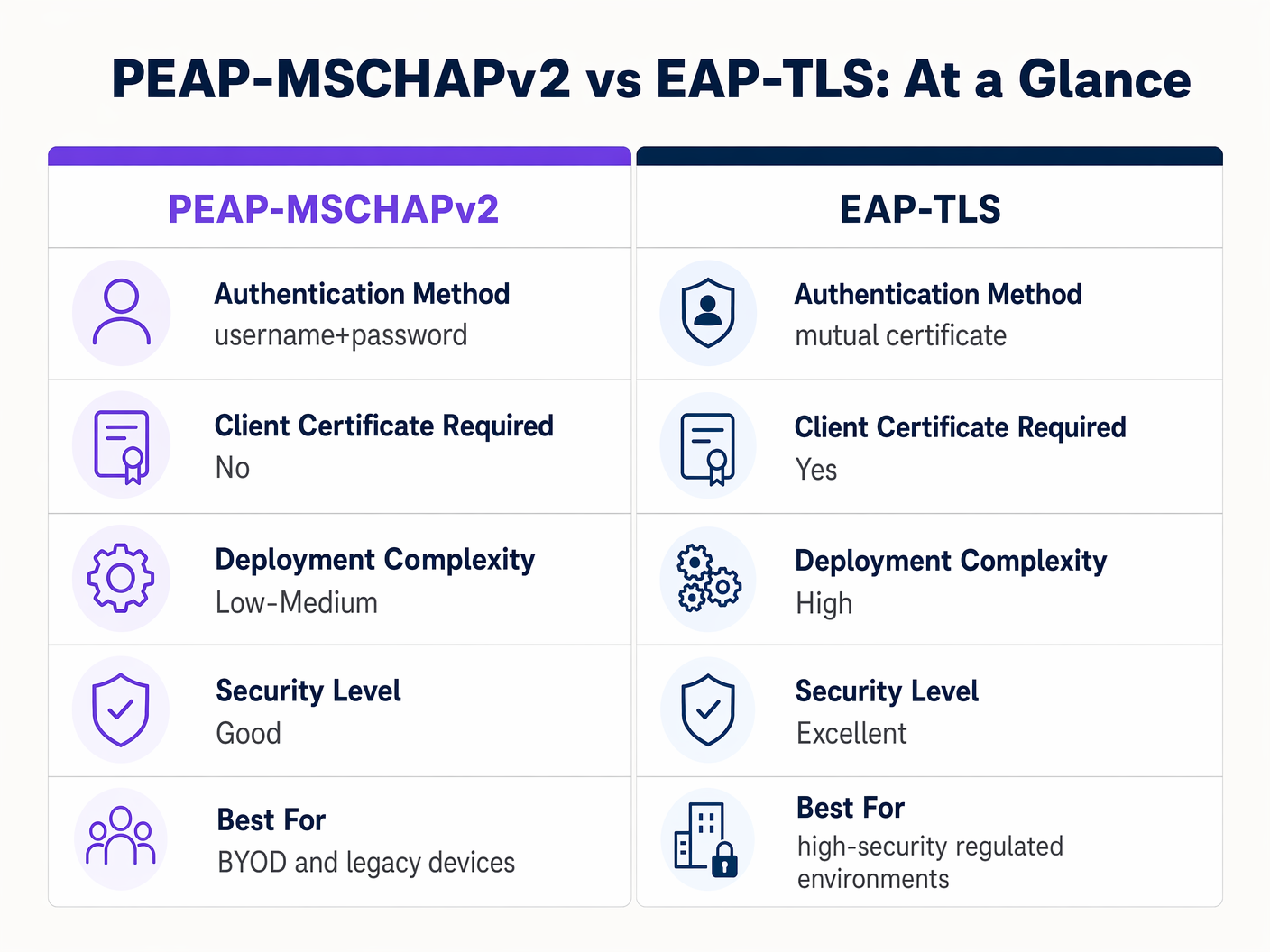
Aunque EAP-TLS ofrece una seguridad superior, requiere una robusta Infraestructura de Clave Pública (PKI) para emitir y gestionar certificados de cliente. Para entornos altamente regulados, EAP-TLS es la arquitectura objetivo. Para organizaciones que carecen de madurez en PKI, una implementación de PEAP-MSCHAPv2 estrictamente configurada sigue siendo una opción defendible.
Resolución de problemas y mitigación de riesgos
Incluso las implementaciones de PEAP bien diseñadas pueden experimentar fallos operativos. Comprender los modos de fallo comunes es esencial para una resolución rápida.
La crisis de caducidad del certificado
El evento más disruptivo en un entorno PEAP es la caducidad no gestionada del certificado del servidor RADIUS. Cuando el certificado caduca, todos los clientes que aplican la validación desconectarán inmediatamente la conexión, lo que resultará en una interrupción de la red a nivel general.
Mitigación: Implementar monitorización automatizada para el certificado del servidor RADIUS. Establecer un procedimiento operativo estándar para renovar y desplegar el nuevo certificado al menos 30 días antes de su caducidad. Si se utiliza una CA interna, asegurarse de que la propia jerarquía de la CA esté monitorizada.
Política de contraseñas y cracking offline
Aunque el túnel TLS protege el intercambio MSCHAPv2 en tránsito, si un atacante ejecuta con éxito un ataque de AP malicioso debido a clientes mal configurados, capturará los pares desafío-respuesta. La investigación ha demostrado que los hashes MSCHAPv2 pueden ser descifrados offline.
Mitigación: La complejidad de la contraseña de usuario subyacente es la última línea de defensa. Aplicar políticas de contraseñas estrictas —requisitos de longitud mínima, reglas de complejidad y rotación regular— para aumentar el coste computacional del cracking offline.
ROI e impacto empresarial
La transición de PSK a una implementación de PEAP 802.1X gestionada correctamente ofrece un valor empresarial medible en varias dimensiones.
- Reducción de la sobrecarga administrativa: La integración de la autenticación WiFi directamente con el proveedor de identidad corporativo (por ejemplo, Active Directory) automatiza el onboarding y el offboarding. Cuando un empleado se marcha, deshabilitar su cuenta de directorio revoca inmediatamente el acceso a la red, eliminando la necesidad de rotar una contraseña compartida.
- Auditabilidad mejorada: 802.1X proporciona visibilidad granular a nivel de usuario sobre el acceso a la red. Los equipos de TI pueden rastrear de forma definitiva la actividad de la red hasta individuos específicos, un requisito crítico para marcos de cumplimiento como PCI DSS y GDPR.
- Mitigación de riesgos: Al dejar de usar claves compartidas, las organizaciones reducen significativamente el riesgo de acceso no autorizado por parte de antiguos empleados o actores maliciosos, protegiendo la propiedad intelectual y los datos corporativos sensibles.
Para las organizaciones que buscan optimizar su arquitectura de red más amplia junto con su seguridad inalámbrica, se recomienda encarecidamente explorar soluciones WAN modernas. Obtenga más información sobre Los beneficios clave de SD WAN para empresas modernas .
Definiciones clave
PEAP (Protected Extensible Authentication Protocol)
An 802.1X authentication protocol that encapsulates an inner authentication method (usually MSCHAPv2) within a secure TLS tunnel.
The dominant standard for enterprise WiFi authentication due to its balance of security and deployment ease.
802.1X
The IEEE standard for port-based Network Access Control, providing an authentication mechanism to devices wishing to attach to a LAN or WLAN.
The foundational framework that protocols like PEAP and EAP-TLS operate within.
EAPOL (EAP over LAN)
The protocol used to encapsulate EAP messages over a local area network, used during the initial stages of 802.1X authentication.
The mechanism by which the client and access point communicate before the network port is fully opened.
Supplicant
The client device (laptop, smartphone) requesting access to the network.
The endpoint that must be correctly configured to validate the server certificate in a PEAP deployment.
Authenticator
The network device (access point or switch) that facilitates the authentication process between the supplicant and the RADIUS server.
The enforcement point that blocks traffic until authentication is successful.
RADIUS (Remote Authentication Dial-In User Service)
A networking protocol that provides centralized Authentication, Authorization, and Accounting (AAA) management.
The server that validates the user's credentials and issues the final accept/reject decision.
MSCHAPv2
A challenge-response authentication protocol developed by Microsoft, commonly used as the inner authentication method within PEAP.
The protocol that actually verifies the username and password, but requires the protection of the PEAP TLS tunnel due to cryptographic weaknesses.
EAP-TLS
An EAP method that requires mutual authentication using digital certificates on both the client and the server.
The highly secure alternative to PEAP, requiring a PKI deployment but eliminating password-based vulnerabilities.
Ejemplos prácticos
A 300-bed luxury hotel needs to secure its back-of-house staff WiFi network. Currently, they use a single WPA2-Personal password that hasn't been changed in three years due to the operational disruption it would cause to update all point-of-sale terminals and staff tablets. How should they implement PEAP to resolve this?
The hotel should deploy an 802.1X architecture using PEAP-MSCHAPv2, integrating their wireless LAN controller with their central Active Directory via a RADIUS server (e.g., Microsoft NPS). They must use their MDM platform to push a standardized wireless profile to all staff tablets and POS terminals. This profile must explicitly enforce server certificate validation, pinning the CA that issued the NPS server's certificate. Staff will authenticate using their individual AD credentials.
A large retail chain is rolling out corporate laptops to store managers across 500 locations. They want to use PEAP-MSCHAPv2 but are concerned about the administrative burden of managing RADIUS certificates across so many sites.
Instead of deploying local RADIUS servers at each store, the retailer should utilize a cloud-hosted RADIUS solution integrated with their cloud identity provider (e.g., Azure AD or Okta). The access points at all 500 locations point to the cloud RADIUS endpoints. A single, globally trusted public certificate is used on the cloud RADIUS server, and the MDM payload deployed to the laptops pins this specific public certificate.
Preguntas de práctica
Q1. You are auditing a hospital's WiFi network. They use PEAP-MSCHAPv2 for staff devices. During your review, you notice that the MDM profile pushed to iPads does not have 'Validate Server Certificate' checked. What is the immediate risk?
Sugerencia: Consider what happens if an attacker sets up a device broadcasting the hospital's SSID.
Ver respuesta modelo
The immediate risk is a Rogue Access Point (Evil Twin) attack. Because the iPads are not validating the server certificate, they will attempt to authenticate with any AP broadcasting the correct SSID. An attacker can intercept the MSCHAPv2 handshake and attempt to crack the staff passwords offline, leading to credential compromise.
Q2. A university IT department is planning to migrate their student network from a Pre-Shared Key (PSK) to 802.1X. They want to use EAP-TLS for maximum security but are facing resistance from the helpdesk team. Why might PEAP-MSCHAPv2 be a more practical choice in this scenario?
Sugerencia: Consider the device ownership model in a university environment.
Ver respuesta modelo
In a university, the devices are unmanaged (BYOD). Deploying EAP-TLS requires issuing and installing a unique client certificate on every student's personal laptop, phone, and tablet. This presents a massive support burden for the helpdesk. PEAP-MSCHAPv2 only requires the students to enter their existing university username and password, making onboarding significantly easier while still providing a major security upgrade over PSK.
Q3. Your organization's RADIUS server certificate is expiring in 14 days. It is issued by a public CA. What steps must you take to ensure no disruption to the PEAP-MSCHAPv2 wireless network?
Sugerencia: Think about what the supplicants are currently configured to trust.
Ver respuesta modelo
You must acquire the new certificate from the public CA and install it on the RADIUS server. Crucially, you must review the MDM wireless profiles. If the profiles are pinned to the specific old certificate, they must be updated to trust the new certificate before the old one expires. If the profiles only pin the Root CA, and the new certificate is issued by the same Root CA, the transition should be seamless, but it must be tested.
Continúe leyendo esta serie
PSK por dispositivo por fabricante: comparación de iPSK, DPSK, MPSK y PPSK (y compatibilidad con WPA3)
Una comparación exhaustiva de las implementaciones de PSK por dispositivo en Cisco Meraki, HPE Aruba, Ruckus, Juniper Mist, Extreme, Fortinet y Ubiquiti UniFi. Descubra cómo afecta WPA3-SAE a las estrategias de claves por dispositivo y cuándo implementar modos de transición en lugar de migrar a 802.1X.
¿Qué es la autenticación de dirección MAC? Cuándo usarla y cuándo evitarla
Esta guía de referencia técnica autorizada cubre la autenticación de dirección MAC en entornos empresariales de WiFi: cómo funciona la autenticación MAC basada en RADIUS en la Capa 2, sus vulnerabilidades de seguridad inherentes (incluyendo la suplantación de MAC y el impacto de la aleatorización de MAC a nivel de SO), y los contextos operativos precisos donde sigue siendo una herramienta válida para gestionar dispositivos IoT y sin interfaz. Proporciona una guía de implementación práctica para gerentes de TI y arquitectos de red en hostelería, comercio minorista, atención médica y recintos del sector público, con ejemplos prácticos del mundo real, marcos de decisión y contexto de integración para la plataforma de WiFi para invitados y análisis de Purple.
Cómo configurar WiFi empresarial en iOS y macOS con 802.1X
Esta guía autorizada proporciona a los líderes de TI sénior pasos prácticos para implementar WiFi empresarial 802.1X en dispositivos iOS y macOS. Cubre la autenticación basada en certificados (EAP-TLS), los perfiles de configuración de MDM y la integración de la arquitectura para proteger las redes corporativas al tiempo que apoya las iniciativas BYOD.