

Is Train WiFi Safe? What Rail Passengers Need to Know
This guide examines the security architecture of passenger rail WiFi networks, dissecting the threat landscape from packet sniffing and Evil Twin attacks to Man-in-the-Middle exploits. It provides actionable deployment guidance for operators and corporate IT teams, covering client isolation, captive portal authentication, DNS filtering, and the path to Hotspot 2.0 — with direct integration points for Purple's Guest WiFi and analytics platform.
🎧 Listen to this Guide
View Transcript
Executive Summary
For IT managers, network architects, and venue operations directors, the question of whether train WiFi is safe is not academic — it has direct implications for corporate device policy, fleet security, and the design of public-facing network infrastructure. The short answer is that most train WiFi networks operate as open, unencrypted networks at the link layer, which creates a measurable attack surface. However, the risk is proportional and manageable with the right controls in place.
This guide covers the full technical picture: how rail WiFi networks are architected, the specific threat vectors that open networks introduce, what operators should be deploying to mitigate those risks, and what corporate IT teams should be enforcing at the endpoint level. We also examine how platforms like Purple's Guest WiFi solution address the authentication, compliance, and analytics requirements of large-scale public transit deployments. Whether you are evaluating a new fleet deployment or hardening your corporate travel policy, this guide gives you the technical framework to make an informed decision.
Technical Deep-Dive: How Train WiFi Actually Works
Understanding the security posture of train WiFi begins with understanding the architecture. Unlike static deployments in Hospitality or Retail environments, train networks are mobile LANs that must continuously manage handoffs between different backhaul connections while maintaining a stable internal network for hundreds of concurrent users.
The Mobile Access Router (MAR)
At the core of every train WiFi deployment is the Mobile Access Router. This hardened device, typically mounted in the train's equipment bay, aggregates multiple WAN links — usually two or more 4G/5G cellular connections from different carriers for redundancy, sometimes supplemented by satellite or trackside WiFi at stations. The MAR presents a single, stable internal network to the passenger-facing access points distributed throughout the carriages. The cellular and satellite backhaul links are encrypted at the carrier layer, which means the internet transit path is generally not the vulnerability. The risk lies in the first hop.
Open System Authentication: The Core Vulnerability
Most train WiFi networks use Open System Authentication (OSA). There is no WPA2 or WPA3 pre-shared key because distributing a password to thousands of transient passengers is operationally impractical. The consequence is that the radio frequency traffic between a passenger's device and the access point is transmitted without link-layer encryption. Any device with a WiFi adapter placed in promiscuous mode can capture those packets.
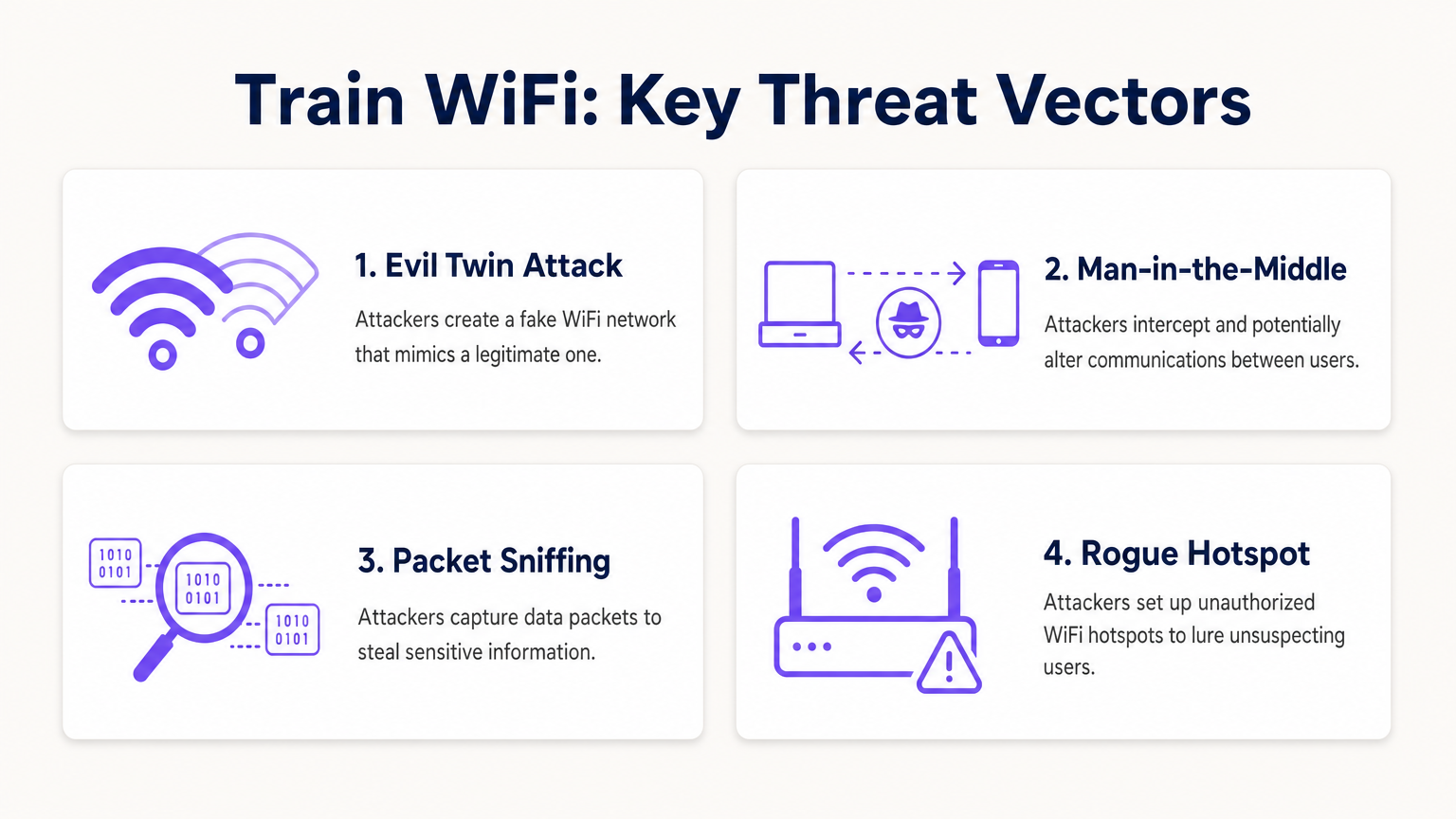
The practical implications depend on what is being transmitted. The widespread adoption of HTTPS means that the payload of most web traffic is protected by TLS encryption at the application layer. An attacker intercepting packets on an open train network can see that a connection was made to a particular domain, but cannot read the content of that connection if it is over HTTPS. However, DNS queries — unless DNS-over-HTTPS (DoH) is configured — are transmitted in the clear, revealing the full list of domains a user is visiting. Legacy HTTP traffic, which still exists on a non-trivial number of sites, exposes its full payload.
Active Attack Vectors
Passive sniffing is the lowest-effort threat. The more dangerous scenarios involve active attacks.
The Evil Twin attack is the most operationally relevant threat on public transit. An attacker deploys a rogue access point broadcasting the same SSID as the legitimate train network. Devices configured to auto-join known networks may connect to the rogue AP instead of the legitimate one. Once connected, the attacker controls the gateway and can intercept traffic, serve fraudulent captive portal pages to harvest credentials, or inject malicious content into unencrypted HTTP responses.
Man-in-the-Middle (MitM) attacks can be executed on the local network through ARP spoofing. An attacker on the same subnet broadcasts false ARP replies, poisoning the ARP cache of other devices and redirecting their traffic through the attacker's machine before it reaches the legitimate gateway. This is effective even against HTTPS traffic if the attacker can present a fraudulent certificate that the victim's device accepts.
Peer-to-peer attacks represent a third vector that is entirely preventable at the infrastructure level. If client isolation is not configured on the access points, every device on the train's WiFi subnet can communicate directly with every other device. A single compromised laptop running a network scanner can identify and probe other passengers' devices for open ports and vulnerabilities.
The Role of Application-Layer Security
Because the link layer is unencrypted on most train networks, the security burden shifts to the application and transport layers. TLS 1.3, enforced via HSTS preloading, provides strong protection for web traffic. However, this assumes the client device has not been induced to trust a fraudulent certificate authority — a risk that is elevated in Evil Twin scenarios. DNS-over-HTTPS and DNS-over-TLS protect query privacy. A VPN or ZTNA client encrypts all traffic at Layer 3, rendering the link-layer vulnerability largely irrelevant.
Implementation Guide: Securing the Rail WiFi Deployment
For operators deploying or upgrading passenger WiFi across a rail fleet, the following represents the current best-practice baseline. This applies equally to other high-density public transit environments and is directly relevant to the Transport sector deployments Purple supports.
Step 1: Enforce Client Isolation
This is the single most impactful configuration change for any public network. Client isolation — sometimes called AP isolation or wireless client isolation — prevents devices connected to the same access point or VLAN from communicating directly with each other. It is a standard feature on all enterprise-grade wireless hardware and requires no additional licensing. Every public-facing SSID must have client isolation enabled. There is no valid operational reason to leave it disabled on a passenger network.
Step 2: Deploy Profile-Based Authentication
Replace basic click-through splash pages with a proper authentication portal that ties the connection to a verified identity. Options include social login (OAuth via Google, Facebook, Apple), loyalty account integration, or SMS verification. Platforms like Purple's Guest WiFi solution handle this authentication flow at scale, providing GDPR-compliant data capture, session management, and a configurable captive portal experience. Profile-based authentication creates an audit trail, deters malicious actors who prefer anonymity, and — critically for operators — generates the first-party passenger data that enables targeted engagement and operational analytics via the WiFi Analytics platform.
Step 3: Implement DNS-Based Content Filtering
Configure DHCP to assign a filtering DNS resolver to all guest network clients. DNS-based filtering blocks known malicious domains, phishing infrastructure, and command-and-control endpoints at the resolution stage — before any connection is established. This is a lightweight, highly effective control that requires no endpoint agent and works across all device types. It also reduces the risk of malware-infected devices using the passenger network to communicate with external C2 servers.
Step 4: Publish and Enforce the Official SSID
Communicate the correct SSID clearly and consistently — on seat-back cards, in the operator's app, on the ticket, and on onboard signage. Some operators are deploying QR codes that trigger a direct network connection, bypassing the SSID selection screen entirely and reducing the opportunity for Evil Twin attacks. Ensure the SSID is consistent across the entire fleet to build passenger familiarity.
Step 5: Plan the Migration to Hotspot 2.0 / OpenRoaming
Hotspot 2.0 (Passpoint) and the OpenRoaming framework represent the next generation of public WiFi security. These standards allow devices to automatically authenticate to public networks using 802.1X, establishing a WPA2 or WPA3-Enterprise encrypted connection without any user interaction. The user experience is seamless — the device connects automatically, as it would to a mobile network — but the security is enterprise-grade, with mutual authentication and per-session encryption keys. Operators should ensure that new hardware procurement includes Passpoint certification and that their identity provider supports the OpenRoaming federation.
For a parallel analysis of secure WiFi deployment in another critical public environment, see our guide on WiFi in Hospitals: A Guide to Secure Clinical Networks and the related Is Hospital WiFi Safe? What Patients and Visitors Should Know .
Best Practices for Corporate IT Teams
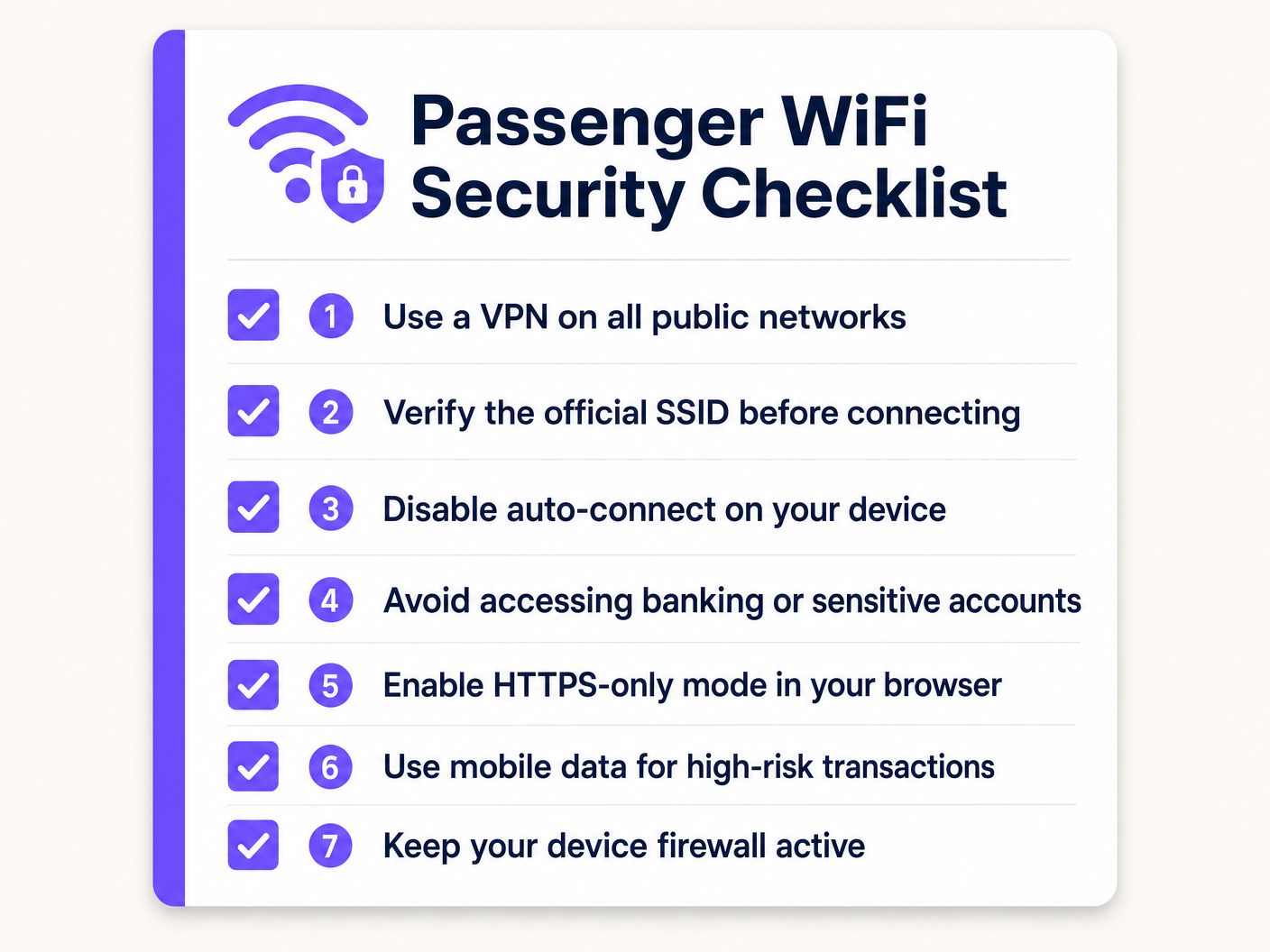
For IT managers responsible for travelling employees, the governing principle is straightforward: treat all public networks as hostile infrastructure. Your security posture must not depend on the quality of the network your employees happen to be using.
Always-On VPN or ZTNA: Deploy a VPN or Zero Trust Network Access client via MDM, configured to fail closed. If the secure tunnel cannot be established, all internet traffic is blocked. This ensures that even if an employee connects to a rogue AP, corporate data is encrypted end-to-end before it reaches the access point. ZTNA is the preferred modern approach — it provides continuous verification of identity and device health, and grants access only to specific applications rather than the full corporate network.
Disable Auto-Join for Open Networks: MDM policies should prevent devices from automatically connecting to open SSIDs. Require explicit user action to join any public network, reducing the risk of silent Evil Twin connections.
Enforce HTTPS-Only Mode: Browser policies should enforce HTTPS-only mode, preventing connections to legacy HTTP sites that would expose traffic in the clear.
Segment High-Risk Activity: Train employees to use their mobile data connection for high-risk transactions — accessing financial systems, authenticating to privileged accounts, or handling sensitive documents. The mobile connection provides its own radio-layer encryption and does not share a local subnet with strangers.
Certificate Pinning Awareness: Ensure corporate applications use certificate pinning where possible, preventing MitM attacks that rely on fraudulent certificates.
Troubleshooting and Risk Mitigation
Several failure modes are common in public transit WiFi deployments. Anticipating them reduces both security risk and operational disruption.
Rogue AP Proliferation: In high-density environments like train stations and platforms, rogue APs broadcasting legitimate-looking SSIDs are a persistent threat. Deploy Wireless Intrusion Prevention Systems (WIPS) at major stations and terminus points to detect and alert on unauthorised APs. Some enterprise wireless platforms include WIPS as a built-in feature.
Captive Portal Bypass via MAC Spoofing: Attackers may observe the MAC address of an authenticated device and spoof it to bypass the captive portal. Mitigate this by implementing short session timeouts, requiring re-authentication after a defined idle period, and using RADIUS-based dynamic authorisation to revoke sessions when anomalous behaviour is detected.
Certificate Errors Conditioning Users: If passengers frequently encounter SSL certificate warnings on the captive portal — typically caused by the portal intercepting HTTPS requests before authentication — they become conditioned to dismiss security warnings. Ensure the captive portal domain uses a valid, publicly trusted SSL certificate and that the portal redirect mechanism is correctly implemented to avoid triggering browser security warnings.
Backhaul Failover Gaps: When a train moves between cellular coverage areas, the MAR may briefly lose connectivity. During this window, DNS resolution may fail or traffic may be dropped. Ensure the captive portal and authentication system handle these gaps gracefully, avoiding situations where users are silently disconnected and reconnect to a different (potentially rogue) network.
GDPR and Data Retention Compliance: Any authentication portal that captures passenger data — email addresses, social profiles, device identifiers — must comply with applicable data protection regulations, including GDPR in the UK and EU. Ensure your platform provides configurable data retention policies, consent management, and the ability to respond to subject access requests. Purple's Guest WiFi platform is built with these compliance requirements as core features, not afterthoughts.
ROI and Business Impact
Secure, intelligent WiFi infrastructure on rail networks is not purely a cost centre. Operators who invest in a properly deployed platform can generate measurable returns across several dimensions.
Passenger Data and First-Party Intelligence: Profile-based authentication generates a verified, consented dataset of passenger demographics, travel patterns, and preferences. This data — accessible via the WiFi Analytics platform — is directly applicable to service planning, targeted communications, and commercial partnerships with station retailers and advertisers. As third-party cookie deprecation accelerates, this first-party data becomes increasingly valuable.
Operational Analytics: Beyond marketing, WiFi connection data provides real-time and historical insight into carriage utilisation, peak demand periods, and passenger flow through stations. This mirrors the indoor positioning and analytics use cases described in our Indoor Positioning System: UWB, BLE, & WiFi Guide , and enables data-driven decisions on timetabling, rolling stock allocation, and station capacity management.
Reduced Support Overhead: A well-configured, reliable passenger WiFi network with a clear authentication flow reduces the volume of passenger complaints and support contacts related to connectivity. Operators with high-quality WiFi consistently report it as a top driver of passenger satisfaction scores.
Compliance Risk Reduction: Properly configured networks with client isolation, content filtering, and GDPR-compliant data handling reduce the operator's exposure to regulatory penalties and reputational damage from security incidents. The cost of a single data breach or regulatory fine typically dwarfs the investment in proper security infrastructure.
For operators in adjacent sectors considering similar deployments, our Your Guide to Enterprise In Car Wi Fi Solutions covers the specific challenges of vehicular WiFi deployments in detail.
Key Terms & Definitions
Client Isolation (AP Isolation)
A wireless network configuration that prevents devices connected to the same access point or VLAN from communicating directly with each other, forcing all traffic through the gateway.
The most critical security configuration for any public WiFi deployment. Prevents lateral movement of malware and peer-to-peer attacks between passengers or guests.
Evil Twin Attack
A rogue access point configured to broadcast the same SSID as a legitimate network, tricking devices into connecting and allowing the attacker to intercept or manipulate traffic.
The primary active attack vector on public transit WiFi. Mitigated by publishing the official SSID clearly, using QR-code-based connection, and enforcing VPN on client devices.
Hotspot 2.0 (Passpoint)
A WiFi Alliance standard that enables devices to automatically discover and connect to public WiFi networks using 802.1X authentication, establishing a WPA2/WPA3-Enterprise encrypted connection without user interaction.
The enterprise-grade solution to the open network problem. Operators investing in new AP hardware should ensure Passpoint certification to future-proof their deployment.
Man-in-the-Middle (MitM) Attack
An attack where a malicious actor secretly intercepts and potentially alters communications between two parties who believe they are communicating directly, typically via ARP spoofing or a rogue access point.
Elevated risk on open networks. Mitigated at the endpoint by VPN/ZTNA and by enforcing certificate validation in applications.
Mobile Access Router (MAR)
A specialised router designed for vehicles that aggregates multiple external WAN connections (cellular, satellite) to provide a stable internal network for onboard WiFi access points.
The core hardware component of any train WiFi deployment. The MAR manages complex handoffs between cell towers at speed and is the point where backhaul security is implemented.
Open System Authentication (OSA)
A WiFi connection method requiring no authentication key or encryption to associate with an access point. The default mode for public WiFi networks that do not use a pre-shared key.
The standard deployment model for most public WiFi, including train networks. Inherently vulnerable to passive packet capture at the link layer.
Zero Trust Network Access (ZTNA)
A security framework that requires continuous verification of identity and device health before granting access to specific applications, regardless of network location. Replaces the implicit trust of traditional VPN architectures.
The modern replacement for perimeter-based VPNs for corporate remote access. Ensures corporate data remains secure even when accessed from untrusted public networks like train WiFi.
Wireless Intrusion Prevention System (WIPS)
A network security system that monitors the radio frequency spectrum for the presence of unauthorised access points and takes automated or manual action to mitigate them.
Deployed at stations and terminus points to detect Evil Twin and rogue AP attacks. Often included as a feature in enterprise wireless management platforms.
DNS-over-HTTPS (DoH)
A protocol that encrypts DNS queries by sending them over an HTTPS connection, preventing third parties from observing which domains a user is resolving.
Addresses the DNS leakage vulnerability on open networks where standard DNS queries are transmitted in the clear, revealing browsing patterns even when HTTPS is used for the actual connections.
Case Studies
A national rail operator is upgrading the passenger WiFi across a fleet of 200 trains. Their current deployment uses open WiFi with a basic click-through splash page. They want to improve security, collect verified passenger demographics for marketing, reduce the risk of malware spreading between passenger devices, and ensure GDPR compliance. What is the recommended architectural approach?
Phase 1 — Immediate Controls (0–30 days): Enable client isolation on all existing access points. This is a configuration change, not a hardware change, and can be deployed via the central wireless controller. Implement DNS-based content filtering by updating DHCP scope options to point to a filtering resolver. These two changes address the most critical peer-to-peer and malware distribution risks without any user-facing impact.
Phase 2 — Authentication Upgrade (30–90 days): Replace the click-through splash page with a profile-based captive portal using a platform like Purple's Guest WiFi. Configure social login and email authentication options. Ensure the portal is GDPR-compliant with explicit consent capture, configurable data retention, and a privacy policy link. This generates verified passenger data and creates an audit trail.
Phase 3 — Future-Proofing (90–180 days): Ensure new AP hardware procured for fleet refreshes is Hotspot 2.0 / Passpoint certified. Evaluate OpenRoaming federation membership for seamless, encrypted roaming across the network.
A corporate IT director is defining the travel security policy for 500 remote employees who frequently commute by train. The company uses cloud-based SaaS applications almost exclusively (Microsoft 365, Salesforce, Workday). Employees use a mix of company-managed Windows laptops and personal iOS devices for work email. How should the IT director secure these endpoints when connecting to train WiFi?
For company-managed Windows laptops: Deploy an Always-On VPN or ZTNA client via MDM (e.g., Microsoft Intune). Configure the client to fail closed — no internet access if the tunnel is down. Apply a Windows Firewall policy that blocks all inbound connections on public network profiles. Disable the 'Connect automatically to open networks' setting via Group Policy. Enforce HTTPS-only mode in Edge/Chrome via browser policy.
For personal iOS devices accessing work email: Enforce a Mobile Device Management profile via an MDM solution that configures the work email account through a managed container. Apply a per-app VPN policy that routes only the work email app's traffic through the corporate VPN. This avoids the user friction of routing all personal traffic through the corporate gateway while protecting corporate data.
Scenario Analysis
Q1. A venue operations director managing WiFi across a network of 15 train stations notices a high volume of DNS queries to known malware domains originating from the public guest network. The network currently has no content filtering. What is the most immediate and effective configuration change to mitigate this risk without disabling the network or requiring new hardware?
💡 Hint:Consider how to stop the resolution of malicious addresses at the network level, using existing DHCP infrastructure.
Show Recommended Approach
Implement DNS-based content filtering by updating the DHCP scope options on the guest network to assign a filtering DNS resolver (such as Cloudflare Gateway, Cisco Umbrella, or similar) instead of the default ISP resolver. DNS queries to known malware, phishing, and C2 domains will be blocked at the resolution stage before any connection is established. This requires no endpoint agent, works across all device types, and can be deployed in minutes via the DHCP server configuration.
Q2. An IT manager is reviewing a vendor proposal for a new train WiFi deployment. The vendor states that because their system uses a captive portal with SMS OTP verification, the network is secure and no additional endpoint controls are needed for corporate devices. Critically evaluate this claim.
💡 Hint:Distinguish carefully between user authentication (who can access the network) and data encryption (whether data in transit is protected).
Show Recommended Approach
The vendor's claim is inaccurate and conflates two distinct security properties. SMS OTP verification on a captive portal provides identity validation and access control — it establishes who is authorised to use the network. It does not provide link-layer encryption. The connection between the client device and the access point remains an Open System Authentication (OSA) connection: data packets are transmitted over the air without encryption and are vulnerable to passive interception by any device in range. For corporate devices, endpoint-enforced controls — specifically an Always-On VPN or ZTNA client — remain necessary regardless of the captive portal authentication method.
Q3. A company requires employees to use an Always-On VPN on public WiFi. An employee boards a train and connects to the passenger WiFi, but the VPN client blocks the captive portal authentication page, preventing them from gaining internet access. The VPN is configured to fail closed. How should the network architect resolve this conflict without compromising the security posture?
💡 Hint:The VPN tunnel must be established after the captive portal grants network access. Consider how to allow the minimum necessary pre-tunnel traffic.
Show Recommended Approach
Configure the VPN client to enable captive portal detection. Most enterprise VPN and ZTNA clients support a 'captive portal exception' mode that temporarily allows HTTP traffic to the local gateway IP range before the tunnel is established. This permits the initial captive portal interaction. Once the portal grants internet access, the VPN client detects the change in connectivity state and immediately establishes the encrypted tunnel, at which point the fail-closed policy resumes. The window of unprotected traffic is limited to the captive portal interaction itself — typically a few seconds — and does not involve any corporate application traffic.




