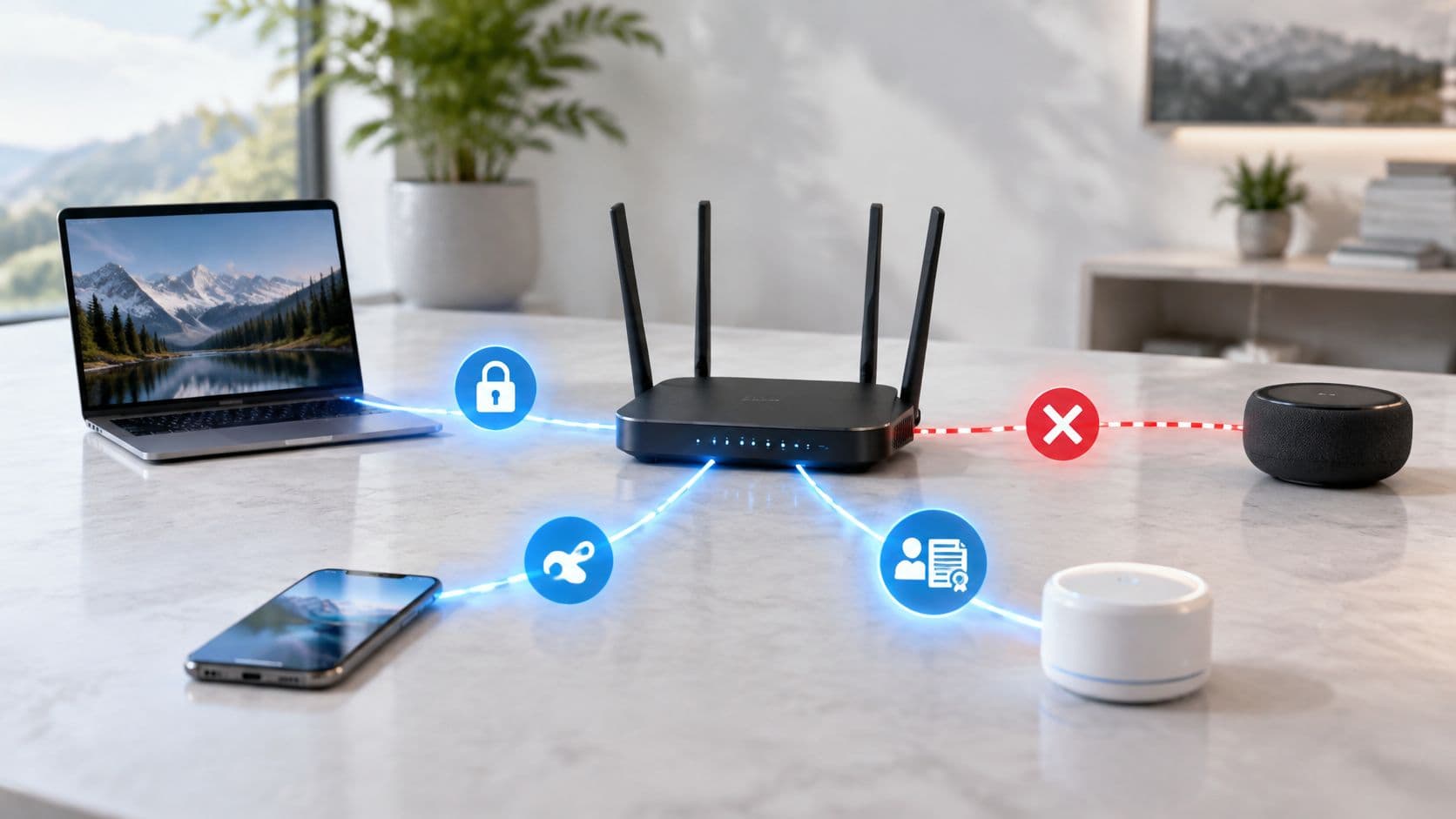
Network best practices start with a basic reality: in 2025, 43% of UK businesses reported experiencing a cyber security breach or attack in the previous 12 months, according to the UK Government's Cyber Security Breaches Survey 2025. For a venue or enterprise, the question isn't whether to secure the network. It's whether access, changes and departures are managed well enough to limit what goes wrong.
A guest network should be convenient, but untrusted by design. Staff, visitors, residents and operational equipment need different kinds of access, and those permissions need to change when people leave, devices become unsafe or infrastructure is updated.
Core Network Best Practices at a Glance
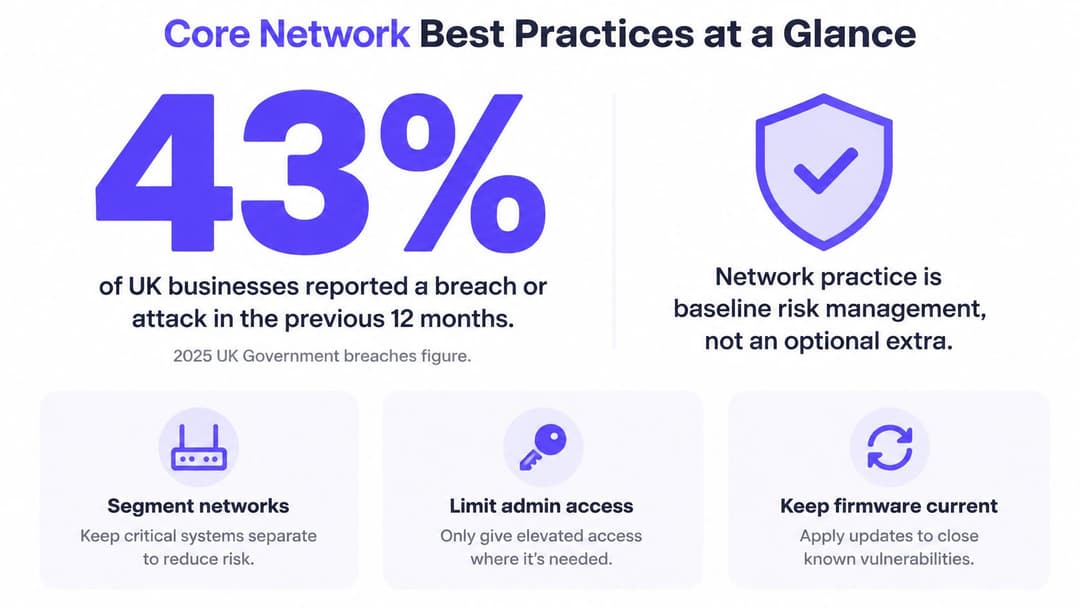
The 43% breach-or-attack figure makes network security a baseline part of risk management, not an optional upgrade. Start with six controls that reduce the chance of unauthorized access and make failures easier to contain.
| Practice | What it prevents | Where it matters most | First check |
|---|---|---|---|
| Segment by audience and purpose | Lateral movement after one device is compromised | Venues where guests and staff share a network | Do guest and staff traffic sit on separate VLANs? |
| Authenticate every user and device | Stolen shared passwords and unmanaged devices | Staff networks and shared-key venues | Is any staff access granted by a shared password? |
| Separate management from user traffic | Attackers reaching controllers and admin consoles | Every multi-site property portfolio | Can a guest device reach a controller address? |
| Control changes with tests and rollback | Self-inflicted outages from configuration changes | Multi-site and 24/7 operations | Does every change have an owner and a rollback step? |
| Monitor authentication and access | Silent failures and slow revocation | Healthcare, hospitality and retail | Are failed logins and revocations reviewed weekly? |
| Revoke access automatically | Ex-staff and expired contractors keeping access | Staff, contractor and tenant networks | How long from a directory change to network removal? |
Good network practice isn't a vendor's default settings applied once and forgotten. It's a set of controls matched to real threats, checked against how people and devices use the network in practice, and maintained as those needs change.
Design for three different audiences
Guests need straightforward connectivity, but they shouldn't be able to reach internal systems. Staff need access to named applications appropriate to their roles, with a reliable way to remove that access. Operational devices, such as registers, sensors and building controls, often need to communicate with only a small number of services and may not support modern sign-in methods.
One shared network fails all three groups at once. A shared password makes it difficult to identify who or what connected, while broad access can let one compromised device reach systems it has no business touching. Even a well-encrypted WiFi connection doesn't solve that access problem.
Use the table as a gap check. If the honest answer to any first-check question is no, treat that row as a candidate for the first fix. The rest of this guide covers how to design zones, choose authentication, maintain service through changes and withdraw access when people or devices no longer need it.
How to Design Network Zones for Venues and Enterprises
A venue network is like a building: each room needs its own lock. A hotel's guest rooms, back office, kitchen POS registers and mechanical room shouldn't share one key. Group devices by who uses them and what they do, not just by floor or switch.
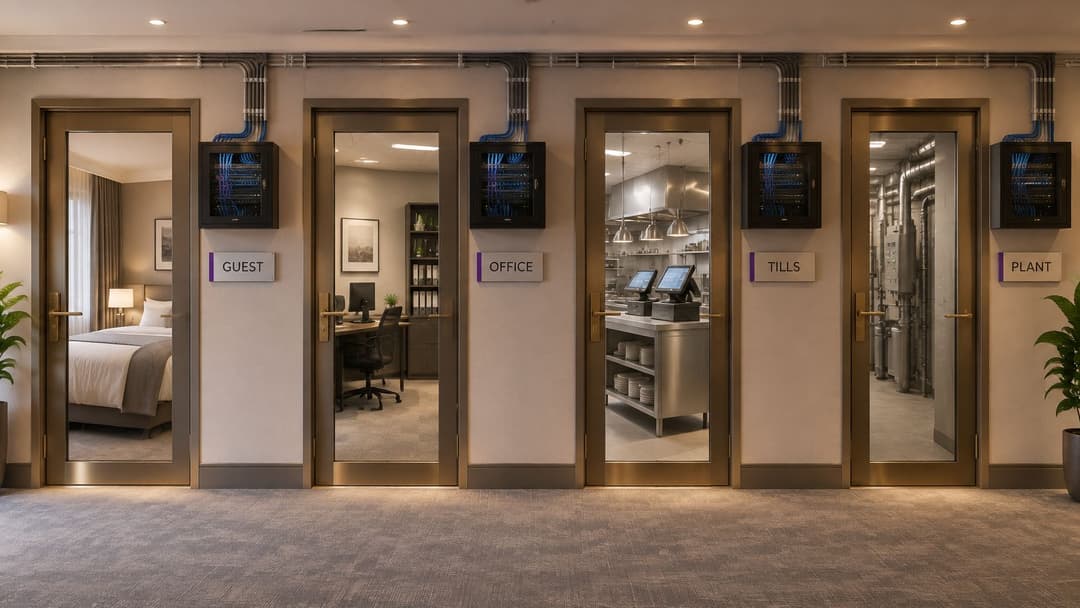
| Zone | Typical users and devices | Allowed access | Key control |
|---|---|---|---|
| Guest | Visitors' cell phones and laptops | Internet only, no internal addresses | Own VLAN, client isolation and session limits |
| Staff | Employees on managed laptops and handhelds | Named internal apps for their role | Certificate or directory sign-in and role-based policy |
| Operational and IoT | Registers, sensors, building controls and printers | Only the vendor service or controller | Separate VLAN and deny-by-default rules |
| Tenant or resident | Each resident's cell phones, consoles and TVs | Their own private network only | Unique key per tenant and isolation between tenants |
| Management | Access points, switches and controllers | Named admins from a managed device | Separate management plane and MFA on admin logins |
Build the zones from actual dependencies
First, list every device class and its owner. Include less visible equipment, such as printers, building controls, payment terminals and access points. An inventory without a named owner is hard to keep accurate when the device is replaced or its purpose changes.
Second, map which zones need to communicate and which services they require. Don't write “registers need network access”; specify the payment service or controller they need to reach. Third, deny communication between zones by default, then allow only the flows in your map. A bar's card terminal may need to reach its payment provider, but it has no reason to reach the staff file share.
This approach does require more planning than putting every device on one network. It also creates work when a genuine business need changes, because someone must update and test the relevant rule. That's a worthwhile trade-off: a clear, narrow policy is easier to review than a collection of broad exceptions that nobody remembers adding.
In 2025, 3% of UK businesses reported experiencing a ransomware breach or attack during the previous 12 months, according to the UK Government's Cyber Security Breaches Survey 2025 technical report. Segmentation helps contain the consequences if a device is compromised. One infected register shouldn't have a route to the office systems.
Guest traffic can sit on its own VLAN. Configure it so a visitor's laptop can access the internet without seeing internal addresses, and check the separation from a guest device rather than relying on the network diagram. A VLAN provides a useful boundary, but it isn't proof that every request inside the network is safe. Access rules still need to decide which services and systems can communicate.
Choosing Authentication for Guests and Staff
Choose authentication by identity and device capability, not by SSID. A guest network should be treated as untrusted even when visitors have authenticated. Staff access needs its own identity checks and a process for removing access when a person or device no longer qualifies.
| Method | Identity per user or device | Revoke one user without touching others | Best fit |
|---|---|---|---|
| Shared pre-shared key | No | No, every device needs the new key | Legacy devices and small private sites |
| Captive portal with email or social login | Per visitor account | Yes, through the portal | Occasional guests in venues |
| Passpoint or OpenRoaming | Per device and account | Yes, through the provider | Repeat guests who want automatic connection |
| Identity PSK (xPSK) | One key per device or person | Yes, revoke that key | IoT and devices that can't run certificates |
| 802.1X with certificates | One certificate per device | Yes, revoke or stop renewing the certificate | Managed staff laptops and handhelds |
| 802.1X with directory sign-in | Per user, linked to the directory | Yes, disable the account | Staff who sign in with corporate accounts |
Match the method to the access pattern
For occasional guests, a captive portal can associate a visitor with an account that the venue can revoke. The portal controls admission, not what an admitted device can reach. Keep guest traffic isolated and restrict access after sign-in. Authentication does not replace network policy.
For repeat guests, Passpoint or OpenRoaming can reduce repeated sign-in by allowing automatic connection once a profile is provisioned. Keep that traffic separate from staff and operational services. Convenience changes how guests connect, not how much access they should receive.
Staff devices need credentials tied to a person or managed device. 802.1X with certificates gives each managed device an individual credential. Directory-based sign-in links access to a corporate account, so disabling that account can remove the user's access. Choose the option that fits the organization's existing identity and device-management processes, and assign ownership for revocation before deployment. Without that owner, departure access can persist after their account or device should have been removed.
xPSK, or an identity pre-shared key, fits sensors, older registers and other equipment that cannot use certificates. A separate key for each device or person lets an operator revoke one identity without replacing credentials across the property. A shared pre-shared key has no individual identity: removing one user may mean distributing a new key to every device, and missed devices can retain access.
Purple's staff WiFi connection methods include Passpoint, xPSK, Certificate WiFi and WiFi via MDM. Staff WiFi runs on the access points a business already owns, with zero PKI to build. For staff requiring enterprise authentication, WPA-Enterprise uses 802.1X rather than a shared password. The operational trade-off is straightforward: stronger individual credentials improve control, but they need a clear process for provisioning, renewal and revocation.
The FTC and state attorneys general warn that unsecured WiFi can expose private files and information. Its WiFi security guidance recommends encryption and turning off automatic connection to unknown networks. Apply those protections, then treat guest access as untrusted: authenticate users or devices where appropriate, isolate traffic and log access decisions.
The NCSC's zero-trust architecture principles focus on identifying users, devices, and services, assessing context, and authorizing each request against policy. In practice, that means authentication is only one part of the decision. Keep guest and staff access separate, make credentials individually revocable where the device supports it, and define who acts when identity or device status changes.
Multi-Family Networks Without Shared Risk
An apartment building shares pipes and a meter, but every apartment locks its own door. A shared WiFi installation can work the same way. Shared access points don't have to mean shared access: the important question is whether each tenant has a separate identity and private network, and whether the design prevents one tenant from reaching another.
Make each resident's access individual
Give every resident, tenant or device a unique key, then isolate each tenant's traffic from everyone else's. With xPSK, a key can be revoked for one identity without changing the credentials of the whole building. That's a better fit for move-in and move-out than a single shared password that must be distributed again whenever a resident leaves.
Browserless devices need particular attention. A television or gaming console may not be able to open a captive portal and complete a web-based sign-in. It needs an identity provisioned before it connects, so it can join the resident's private network without being allowed onto the networks used by neighbors or building management.
Purple's Multi-Tenant WiFi guide describes a private network for each resident across their devices, including consoles and TVs. Its Multi-Tenant WiFi keeps each resident's network isolated from other guests, and its xPSK approach provides a unique pre-shared key with tenant isolation. This lets property teams use shared infrastructure while giving each home a separate access boundary.
Treat a move-out as an access change
When an apartment is vacated, revoke that resident's keys and remove the associated access. Don't rotate one building-wide password and ask every resident to reconnect. The practical benefit is both security and service: one departure shouldn't create a support problem for every other resident.
Multi-tenant designs can use access points already installed in the building, including Meraki, Aruba, Ruckus, and UniFi. That can avoid replacing working hardware just to introduce individual identities, though the identity layer still needs to be configured and operated. Before approving a design, test isolation from one tenant's device to another, measure how quickly a new resident can receive a key, and name the person or team responsible for revocation when an apartment is vacated.
Sign-off test: Give a test device to one tenant, then try to reach another tenant's devices and the building-management network. Both attempts should fail.
Monitoring and Change Control That Prevent Outages
Configuration changes can cause serious customer impact. The FCC reports that network-change activities generated the most serious cases in terms of lost customer hours, while hardware faults accounted for less than one-third of total lost hours. Infrastructure reliability reports make change control a core reliability practice, not paperwork reserved for major upgrades.
Make every change reversible
Use the same short routine for firewall rules, SSID changes, controller updates and authentication-policy edits:
- Test the change on a lab network or one site first.
- Schedule a change window that suits the people relying on the service.
- Record a named owner who can approve and monitor the work.
- Write the rollback step before starting, and confirm that the previous configuration is available.
A change that works in a lab can still fail at a busy site if its devices or dependencies differ. Roll out in stages, check authentication and access after each stage, and stop if the observed behavior doesn't match the expected result. A rollback plan isn't useful if nobody knows how to execute it.
| Signal | What it tells you | Warning sign |
|---|---|---|
| Authentication failure rate | Bad credentials, expired certificates or a broken policy | Sudden rise after a change or renewal date |
| RADIUS response time | Whether the authentication server keeps up at peak | Slow logins at check-in or during busy hours |
| Directory-to-revocation time | How long a leaver keeps network access | Longer than the agreed target, for example one working hour |
| Guest traffic reaching internal ranges | Whether guest segmentation holds | Any count above zero |
| Unticketed configuration changes | Who changed what and when | Any change without an owner or record |
| Client count per zone | Capacity and unusual use | Sustained spikes at quiet hours |
Alert on changes and meaningful trends, not on every failed login. If staff receive a flood of low-value alerts, they'll learn to ignore them. Review authentication failure rates and revocation times regularly, and investigate spikes tied to a change, certificate renewal or busy operating period.
Keep access points, switches, controllers and VPN appliances on a fixed firmware schedule. Record the version running at each site so the team can identify which locations need work and whether a change introduced a new problem. Analytics can help show speed and venue coverage; Connect includes network analytics that monitor both. If a platform reports usage or user demographics, set out the purpose and lawful basis first, then limit collection to what the venue needs. Purple's portal also sends weekly WiFi usage KPIs, including user demographics, so decide what your organization needs to review before using that reporting.
How to Revoke Access When Someone Leaves
A shared key can keep a former employee's device connected after their role ends. Prevent that by tying network access to a clear identity and device lifecycle, with a repeatable revocation process. The NCSC's 2025 network-security guidance emphasizes least privilege, understanding identities and network architecture, and ongoing attention to device health and behavior. It also says VPN software and appliances need maintenance throughout their lifecycle.
Use the same revocation sequence every time
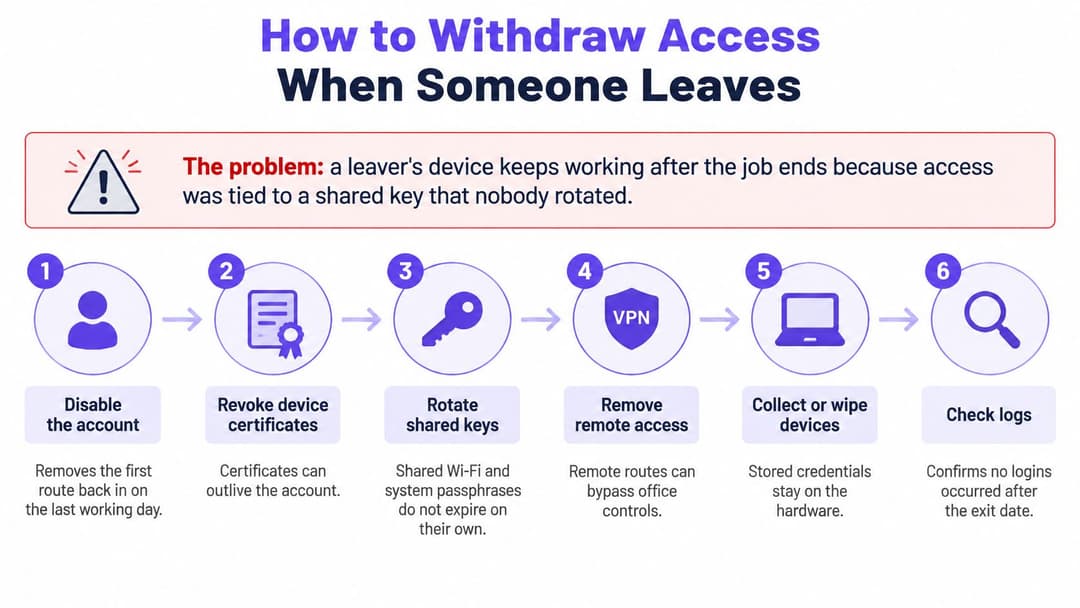
- Disable the directory account or remove the staff group that grants network access. This gives the team a central control point for ending access.
- Revoke or stop renewing device certificates. Check every managed device assigned to the person, since a device credential may remain usable after an account changes.
- Revoke the person's identity key. If they used an individual xPSK, remove that key rather than changing credentials for other users.
- Test that the device can't re-authenticate. Use a test account or the removed device and confirm that a fresh connection attempt fails.
- Review authentication logs for sessions after revocation. A successful login after the access change requires investigation.
- Recover or wipe managed hardware, then record elapsed time. Measure from the directory change until the device is confirmed unable to join the network.
Give contractors an expiration date that removes their access automatically. When a resident leaves, revoke their own key using the same process. If a device is lost, revoke its certificate or identity key promptly rather than waiting for a scheduled review.
The identity path must remain available during revocation. A failure in a single on-premises authentication server can delay access removal, while outdated VPN or appliance software can create additional risk. Purple's staff WiFi lifecycle approach uses cloud RADIUS with a 99.9% uptime SLA. Whatever system is in place, assign an owner to access removal and test the sequence before an urgent departure.
Track time from directory change to network removal and review it monthly against the agreed limit. If access lasts longer than the target, identify the point of delay: directory synchronization, certificate handling, a manual task, or a device missing from the inventory. A clear record makes recurring gaps easier to fix.
Deployment Checklist Before Go-Live
Start with the equipment inventory, not the policy screen. Record every access point, switch and controller, its firmware version and its owner. xPSK and Multi-Tenant WiFi supports Meraki, Aruba, Ruckus and UniFi access points, so check each site's hardware against the supported list before planning the identity work.
Run these checks in order. A pass condition should be something you can test and record, not a verbal assurance.
- Inventory devices. Pass when every access point, switch and controller has a recorded firmware version and named owner.
- Secure admin access. Pass when default admin passwords have been changed and unused management interfaces are disabled.
- Separate management traffic. Pass when management systems sit on a separate network from guest and staff VLANs.
- Test guest isolation. Pass when a guest device gets no response from internal addresses, including the controller address.
- Check staff permissions. Pass when a staff device can reach the applications allowed for its role, and not other internal services.
- Check certificates. Pass when expiration dates are recorded and renewal alerts are active.
- Test RADIUS resilience. Pass when a backup authentication path is available and the documented fallback works.
- Verify logging. Pass when authentication events reach a log store and can be retrieved for review.
- Run a revocation drill. Pass when a directory change removes access and the elapsed time is recorded.
- Save a backup and rollback plan. Pass when the current configuration is backed up and the written rollback steps are available to the change owner.
For checks that involve a live service, test during a controlled window and have the change owner ready to restore the previous configuration. A guest device returning no response from a controller address is a stronger test result than a diagram showing a separate VLAN.
A checklist that sits in a project folder after launch won't keep the network safe. Run it again on a schedule and when a site, device class or access policy changes.
Decide Which Practice to Fix First
Start with the gap that creates the greatest exposure, not the one that's easiest to describe in a project update. If a shared staff password reaches every area of a venue, replace that first: one leaked key can give an unauthorized person broad access. Next, fix the offboarding process, so access doesn't outlive the job. Then separate guest traffic from internal systems.
Put the work on a 90-day path
- Weeks 1 to 2: Build the site and device inventory, name owners, and map the zones and required communication paths.
- Weeks 3 to 6: Separate guest and staff traffic, then move staff to certificate-based or directory sign-in.
- Weeks 7 to 10: Put monitoring and change control into operation, including named owners and tested rollback steps.
- Weeks 11 to 12: Run a full revocation drill, measure the time to network removal, and fix any delay.
Choose early whether to run the identity stack in-house or use a managed platform. Your own RADIUS server and certificate authority give you control, but your team must maintain them, support renewals and plan for failures. A managed platform can reduce the identity work your team has to operate, but review its uptime commitments and data handling before signing.
Purple's Staff WiFi and xPSK solutions are custom priced based on property portfolio size, access point count and identity provider requirements. For guest WiFi, Purple offers a 30-day free trial of its Capture and Engage plans; after the trial, customers can continue with the chosen package or move to the free Connect plan. The choice of provider doesn't change the first operational task: complete the deployment checks against every site's hardware inventory, then size the identity work from what you find.
Purple provides guest WiFi, staff authentication and multi-tenant networking designed to replace shared passwords with identity-based access on supported existing hardware. Visit Purple to explore the options for your sites and start planning a network where access is convenient for legitimate users, restricted by role and straightforward to revoke.