
56% of UK public WiFi users do not check whether a network is encrypted before joining. Smart WiFi addresses that trust gap by making secure authentication automatic, rather than expecting every visitor to understand network security.
For a venue operator, WiFi is no longer just a coverage problem. A strong signal can still connect guests to the wrong network, expose poorly separated systems, or encourage unsafe behavior through shared passwords and open login pages. The practical question is not whether visitors can get online, but whether they can do so safely, with the right access and without creating work for staff.
Why Smart WiFi Matters More Than Coverage
The most important smart WiFi problem in a US venue is often security literacy, not signal strength. YouGov found that 56% of US public WiFi users do not, or rarely, check whether a network is encrypted before joining. That means many guests make a rapid decision based on a network name, a sign on the wall, or a staff member's instruction. They may not know whether the connection protects their traffic or whether a similarly named malicious hotspot is nearby. (YouGov's US public WiFi security findings)
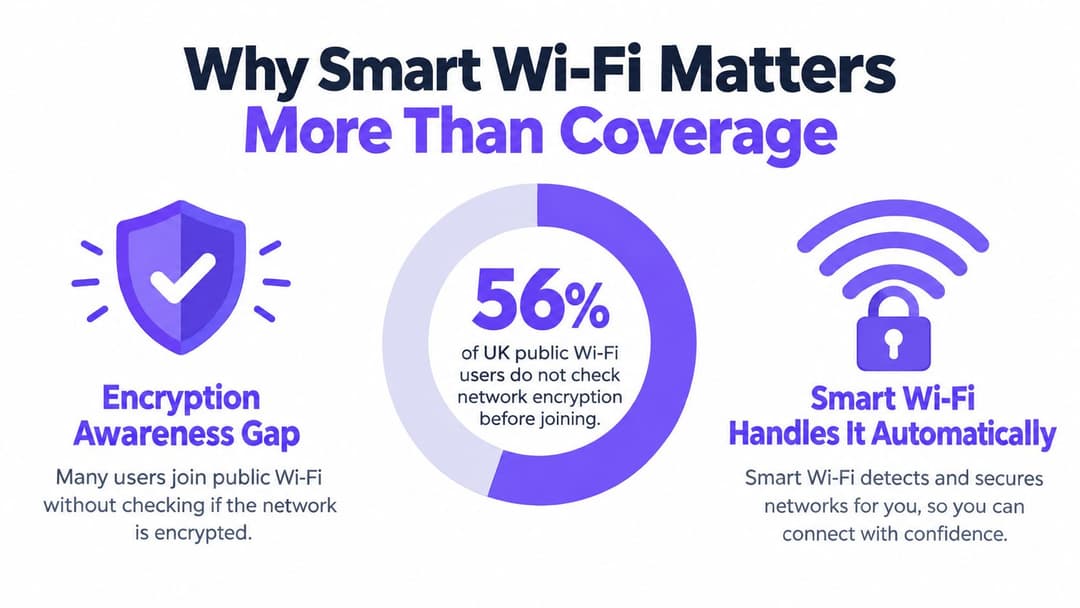
The risk behind convenient access
A shared password feels simple, but it gives the venue little control over who has access, when that access should end, or whether the credential has been copied. An open network with a click-through page can remove one barrier to connection, yet it may leave visitors unclear about encryption, network trust and the treatment of their personal information.
That creates several practical risks:
- Eavesdropping: Visitors may assume that a public connection protects them when it doesn't provide strong encryption from the start.
- Malicious hotspots: An attacker can create a network name that resembles the venue's name and wait for guests to connect.
- Data leakage: Guests may use email, payment services or work applications without understanding the network's security posture.
- Lateral movement: A compromised guest device becomes more dangerous if the guest network can reach staff systems, point-of-sale equipment or building devices.
Norton reported that 64% of people had used public WiFi to log in to personal email, while 45% had entered private information such as passwords or card details on public networks. Those findings make the authentication flow a business safety issue. The venue controls the connection design, so it also controls how much unsafe guesswork it asks from visitors. (Norton's guidance on public WiFi safety)
Practical rule: If a guest must understand network encryption before receiving protection, the design is already asking too much of the guest.
Secure by default, not secure by instruction
Smart WiFi starts with an encrypted identity check, applies a policy to the resulting session, and keeps guest traffic away from sensitive infrastructure. The visitor can still experience fast, simple access, but the venue no longer treats convenience and security as opposing goals.
Coverage remains important. A poor radio design causes dropped connections, congestion and support calls. But a well-covered unsafe network is still unsafe. Operators planning a new venue deployment should involve people who understand both wireless engineering and property constraints, including a guide to hiring local network pros when internal teams need help assessing cabling, access point placement and segmentation.
Smart WiFi therefore means trust designed into the access journey. It protects guests who don't inspect technical details and gives operators a defensible way to manage access, isolate devices, and respond when a user, device, or credential should no longer connect.
What Smart WiFi Actually Means
Traditional guest WiFi usually begins with one of three choices: a password printed at front desk reception, an open network followed by a splash page, or a voucher that staff issue manually. These methods can work for basic access, but they treat every visitor as the same kind of user and make the venue responsible for distributing, changing or explaining credentials.
Smart WiFi separates the person from the device and the device from the permission. A guest proves an identity through an approved method, such as email or a trusted roaming profile. The network then establishes an encrypted connection and assigns the access policy that belongs to that user or device.
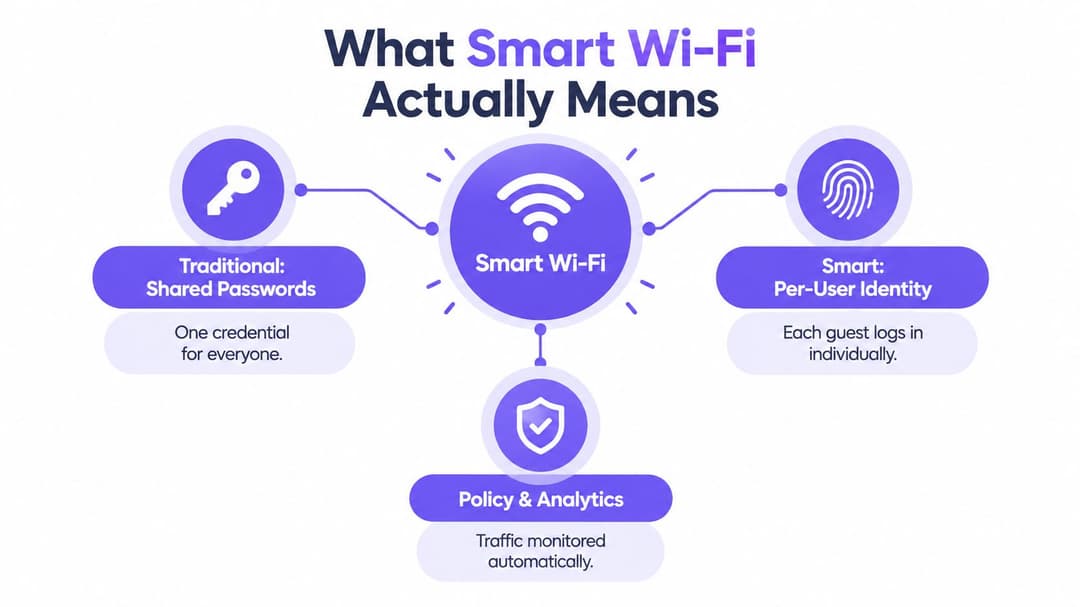
From one key to individual access
Think of a shared password as a key copied for an entire building. If the key is posted publicly, the operator can't tell who used it, revoke it for one person or reliably connect a session to a particular policy. Identity-based access works more like an individually issued pass. Each user receives an approved connection, and the operator can change or remove that access without replacing the credential for everyone else.
The distinction matters for both guests and staff:
- Guests can receive a simple onboarding journey without being handed a credential that may remain active indefinitely.
- Employees can authenticate through an organization's identity provider and receive access based on their role.
- Contractors can be given limited permissions that don't automatically expose internal resources.
- Residents can receive private network access while shared building services remain separately controlled.
The technical components can vary. RADIUS can carry authentication decisions between the identity service and network equipment. Certificates can allow a managed device to authenticate without a user typing a password. iPSK can provide individually assigned pre-shared keys for older devices that cannot support modern certificate methods. The important principle is consistent: the network makes an explicit decision about identity and policy.
Why the experience can still feel instant
Security doesn't have to mean a long form or repeated logins. Passpoint and OpenRoaming can allow compatible devices to recognize a trusted network and connect without the visitor hunting for a network name each time. For readers comparing high-performance home and business connectivity, this fibre WiFi connection explanation for remote work also illustrates an important distinction: the quality of the internet service and the quality of the wireless access experience are related, but they aren't the same thing.
A venue can define what happens after authentication. A guest might receive internet-only access. A staff member might receive access to approved business applications. A building device might receive only the connectivity it needs for its operational function. Guidance on identity-based networking helps show how identity, policy and network access fit together rather than treating WiFi as a single shared pipe.
That is the practical meaning of smart WiFi. It replaces a vague question, “What is the password?”, with a controlled process: who is connecting, what are they allowed to reach, and how should the network treat that session?
Legacy Captive Portals versus Modern Authentication
Captive portals remain common because they're visible, familiar and relatively easy to add to an existing guest network. A visitor joins a network, sees a web page and accepts terms, submits an email address or enters a code. The model can support branding and data collection, but it doesn't automatically provide the same identity assurance or encryption model as modern authentication.
The right choice depends on the venue, the users and the devices involved. A café serving short visits may tolerate a lightweight guest flow. A hospital, office building or residential scheme needs stronger separation and more predictable access for returning users.
| Authentication Model | User Experience | Security Posture | Operational Overhead | Compliance Risk |
|---|---|---|---|---|
| Shared password | Familiar, but every visitor uses the same credential | Difficult to identify users or revoke one session | Staff must distribute and change credentials | Broad access makes investigation and containment harder |
| Open network with click-through portal | Quick initial connection, often with a splash page | The user may not understand whether traffic is protected | Portal content, terms and support issues require maintenance | Consent and data handling need careful governance |
| Email, SMS or voucher portal | More traceable than a shared password | Improves identity context, but protection depends on the underlying network design | Staff and visitors may face failed codes, expired links or repeated logins | Collected data needs a clear purpose and retention policy |
| Identity-based authentication | Smooth after initial enrollment, especially for returning users | Individual identity, encryption and policy can be linked to the session | Requires integration with identity and network systems | Access decisions and logs are easier to govern |
| Certificate-based access | Usually automatic on managed devices | Strong device identity without repeated password entry | Requires device provisioning and lifecycle management | Revocation and role changes must be maintained accurately |
What the portal does not solve
A portal is an application layer. It can collect consent, display terms or ask for an identifier, but it doesn't by itself answer whether guest traffic is encrypted from the first packet or whether the guest network is isolated from corporate systems. Operators should examine the complete path, including authentication, encryption, VLAN assignment, firewall rules and logging.
The captive portal guide is useful when assessing where a portal fits and where it stops. The central question is whether the portal is the final security control or just one part of a wider access design.
For many venues, the sensible answer isn't to eliminate every portal immediately. It is to stop using a portal as a substitute for identity, encryption and segmentation. A modern deployment may retain a branded guest page for consent and communication while using stronger authentication for staff, residents or returning guests.
Deploying Smart WiFi Correctly
A smart WiFi deployment works when the identity system, wireless infrastructure and security policy agree on what should happen at connection time. Installing newer access points without connecting those pieces usually produces a faster version of the old problem.
Start with identity
The first decision is who needs access and how the organization already knows those people. Entra ID, Google Workspace and Okta can act as identity providers for staff and managed users. A venue might map an employee group to a staff network, assign contractors a restricted role and send guests through a separate onboarding path.
RADIUS commonly sits between the identity service and the wireless environment. It passes the authentication decision to compatible network equipment, which can then apply the right policy. The operator should define the outcome before configuring the integration:
- Which users can connect?
- Which devices qualify?
- Which applications or network segments can they reach?
- What happens when a person leaves the organization?
- Which records are retained for troubleshooting and governance?
Account for older devices
Not every device can use certificates or modern identity workflows. Printers, sensors, point-of-sale systems, room controls and other operational equipment may depend on older methods. iPSK provides a practical bridge by assigning different pre-shared keys to devices or groups instead of exposing one password across the whole venue.
That doesn't make a legacy device modern. It limits the blast radius if its credential is disclosed and lets the operator retire one key without replacing every other connection. Place those devices in a tightly restricted segment and allow only the services they need.
Add roaming and segmentation
Passpoint and OpenRoaming can make access feel more like a cell phone service than a one-off guest login. A visitor enrolls once through a trusted method, then compatible networks can recognize the device on later visits. This is particularly useful for hotel groups, transit environments, shopping malls and organizations with multiple sites.
Roaming convenience mustn't override isolation. Use separate policies for guests, staff, residents, IoT devices and network administration. A guest session should not be able to discover a staff laptop just because both devices use the same access point.
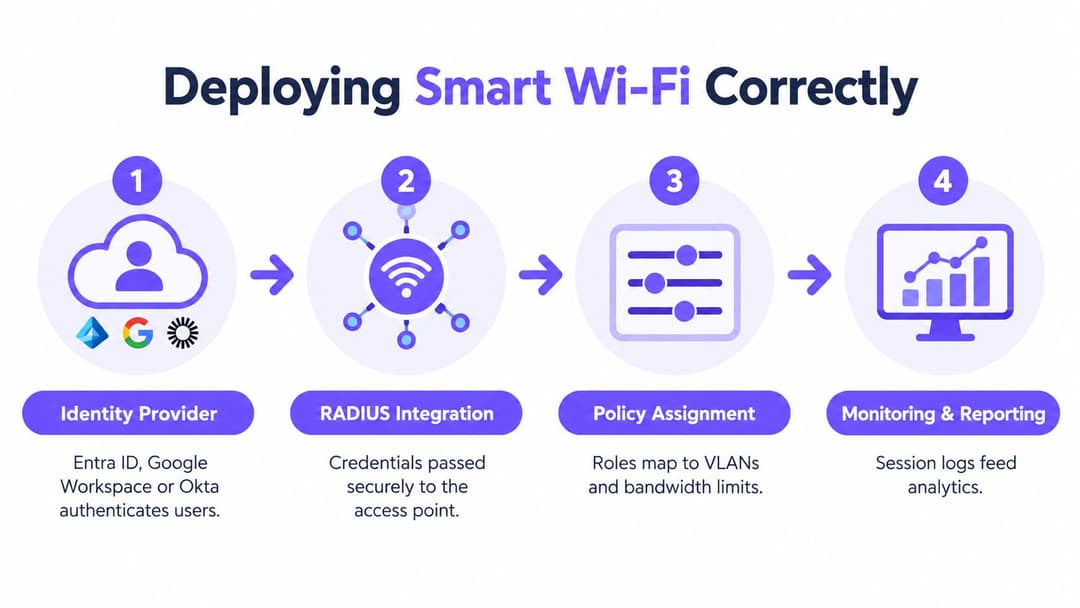
Monitor what the policy produces
Monitoring should show more than whether an access point is online. Track failed authentication, unusual device behavior, policy assignments, roaming problems and changes in session patterns. Automatic provisioning can create access from directory membership, while automatic revocation can remove it when that membership changes.
Deployment test: Connect a guest device, a staff device, and a building device, then verify exactly what each can discover and reach. Don't rely on the configuration screen alone.
Purple is one option for venues that need passwordless guest access, staff authentication, Passpoint and OpenRoaming, with integrations across network environments such as Meraki, Aruba, Ruckus, Mist and UniFi. The same design principles can also be assembled from separate identity, RADIUS, wireless and analytics products. The important outcome is a controlled chain from identity to policy to observable network behavior.
Smart WiFi Across Key Sectors
The same wireless platform serves different purposes in different environments. A hotel prioritizes a low-friction guest journey, while a healthcare provider must be much more cautious about device categories, data flows and internal systems.
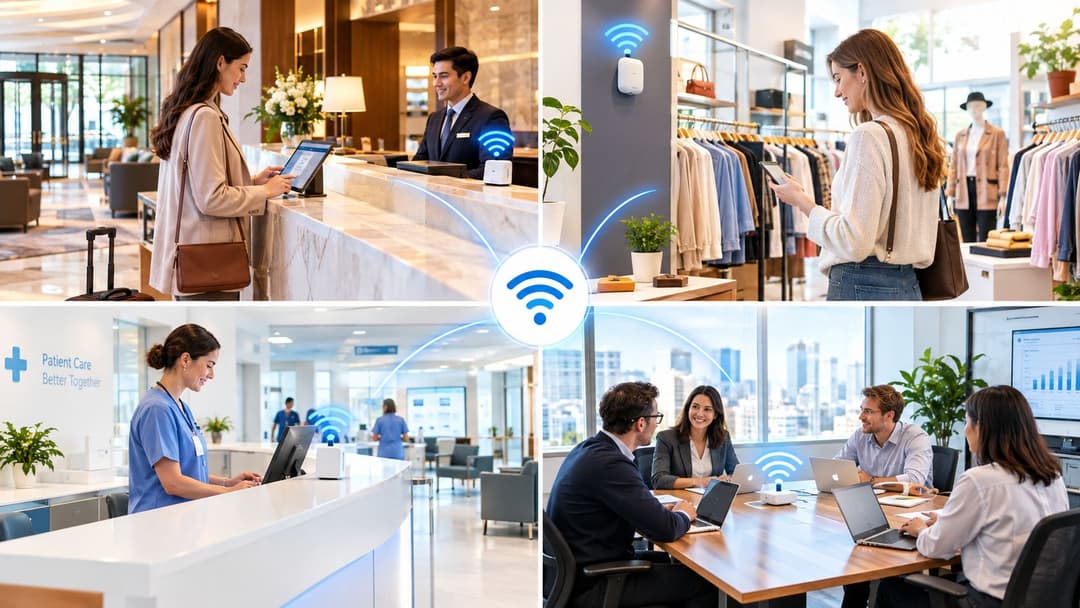
Hospitality
A hotel can use a guest identity flow to avoid printing the same password on every key sleeve. Returning visitors can reconnect through a trusted profile, while staff devices remain on a separate policy. Room controls, payment equipment and building systems should never inherit the same access as a guest phone.
The operational benefit is consistency. Front desk staff don't need to diagnose why a shared password has stopped working, and the network team can investigate a session without treating every guest as one anonymous user.
Retail
A retailer may want customers to connect easily while keeping registers, handheld scanners, and inventory systems isolated. Marketing teams can use consented access data to understand repeat visits or improve the customer journey, but they should separate useful engagement from indiscriminate data collection.
A shopping center also needs to consider roaming between common areas and individual stores. A visitor who moves through the property shouldn't have to repeat an awkward login at every step.
Healthcare
Healthcare environments need clear boundaries between visitor access, staff workflows, clinical equipment and connected building systems. A guest network should be internet-only, while managed staff devices receive access based on role and device condition. Medical and operational devices may require tightly controlled legacy access, with monitoring that helps the support team identify abnormal behavior.
The design should support patient and visitor convenience without allowing convenience to dictate internal reachability.
Residential property
Multi-Family, Student Housing and managed residential buildings need a private experience for each resident, not one password shared across the building. A resident may connect phones, televisions and smart devices, while property staff need a separate management path and shared facilities need their own restrictions.
The operator should define what happens at move-in, transfer, and move-out. Identity-based provisioning makes those lease lifecycle events easier to manage than changing a building-wide password and hoping every old device has forgotten it.
Turning WiFi Data into Measurable ROI
A connection record is not automatically a business insight. A venue creates value when it links consented WiFi data to a useful question, such as whether visitors return, which services they use or where the guest journey creates friction.
Start by separating vanity metrics from decisions. Total connections may look impressive but won't explain why a campaign worked. More useful measures include repeat visits, completed surveys, engagement with a permitted offer, movement between venue areas and the proportion of users who can reconnect without staff assistance.
Build a responsible data path
The process should be explicit:
- Ask for meaningful consent. Explain what information the venue collects and why.
- Create useful segments. Distinguish new visitors, returning visitors, residents, staff and device categories where appropriate.
- Connect approved systems. Send relevant events to a CRM or marketing automation platform.
- Test an action. Use a survey, message or service improvement that addresses a known visitor need.
- Measure the outcome. Compare the action with the business objective, not just the number of logins.
A retail operator might use a survey response to improve a store visit. A hotel could identify repeated support requests around onboarding. A venue group could compare the performance of different welcome journeys without collecting more data than it needs.
The WiFi ROI calculator can help structure the financial discussion around visit frequency, campaign activity, and operational savings. The calculation should include deployment and governance costs, not just hoped-for marketing value.
The best analytics program gives network, marketing, and operations teams a shared view of what access is accomplishing. It also respects the fact that personal data creates responsibility. More collection isn't the same as more value.
Migrating from Legacy WiFi to Smart Access
A venue doesn't need to replace every access point before improving authentication. Start with an inventory of networks, users, devices, current credentials, and routes between guest, staff, and operational systems.
Make the first changes count
Replace open or broadly shared access with encrypted guest onboarding where the equipment supports it. Create a separate guest segment and test that it cannot reach staff, payment, management or IoT networks. Change credentials that have been displayed publicly and remove unused SSIDs that create confusion.
Next, choose one low-risk area for a pilot. A hotel might begin with staff access in a back-office zone. A retailer could test identity-based access on managed handhelds. A residential operator could start with a new building or a common area before changing the resident experience across the whole portfolio.
Move in controlled phases
Run the old and new journeys in parallel only for as long as necessary. Document the support process, train front desk or facilities staff and monitor failed logins, roaming behavior and device compatibility. Migrate legacy equipment to iPSK or a restricted segment rather than allowing it to determine the security standard for every user.
Before expanding, test access removal, device loss, directory changes, and network failure. A smart WiFi design is incomplete if it can grant access but can't reliably revoke it.
This phased approach reduces disruption while producing evidence from the venue itself. It also exposes problems that a lab test may miss, such as poor coverage at the front desk, captive portal behavior on older cell phones, or operational devices that use undocumented credentials.
Building Smarter Networks That Deliver Real Value
Smart WiFi combines secure-by-default authentication, identity-based policy, and useful measurement. Coverage and throughput still matter, but they don't answer who can connect, what that connection can reach, or how quickly the venue can remove access.
Operators who treat WiFi as a strategic service layer can improve guest trust while reducing exposure across staff, resident and device networks. The strongest deployments make safe behavior the easiest behavior, then use responsible analytics to show whether the network is helping the organization.
Purple provides passwordless guest and staff WiFi, identity-based access, network isolation, Passpoint and OpenRoaming capabilities for venues that need secure connectivity without shared credentials. Visit Purple to explore how its authentication, analytics and networking tools can support a safer, more measurable WiFi experience.