
Airport WiFi Security: How to Protect Passengers on Public Networks
This technical reference guide details the specific threat landscape of airport WiFi, covering Evil Twin access points, rogue hardware, and Man-in-the-Middle attacks. It provides IT managers, network architects, and venue operations directors with actionable architectural strategies - including WPA3 implementation, VLAN segmentation, WIPS deployment, and CCPA/CPRA-compliant captive portal design - to protect passengers and enterprise infrastructure at scale. Purple's guest WiFi and analytics platform is mapped concretely to each problem domain throughout.
Video overview
Listen to this guide
View podcast transcript
Part of our core series: Enterprise WiFi Security Guide →
Executive Summary
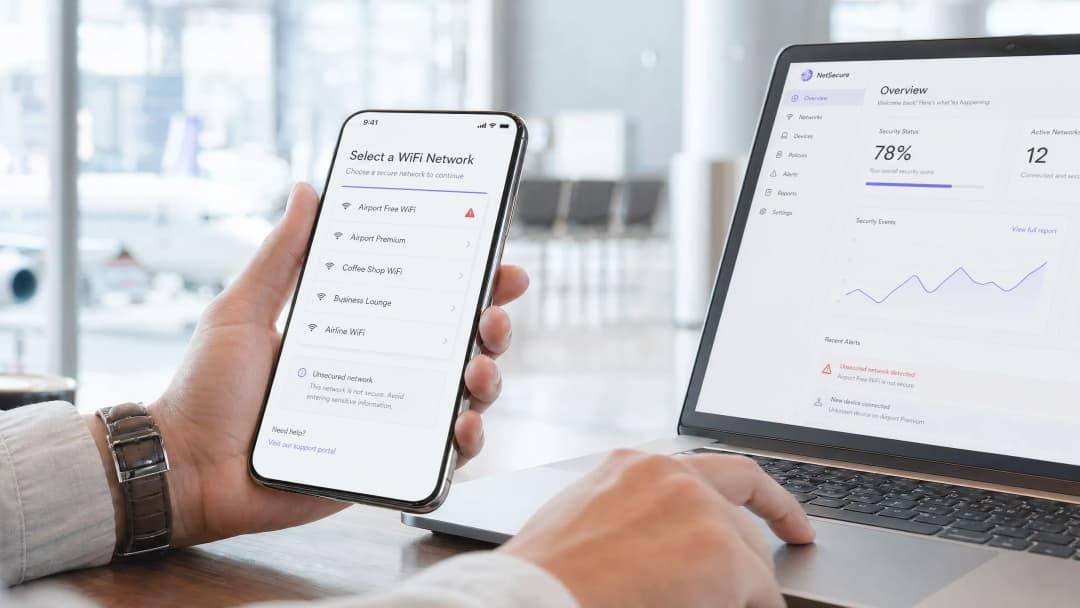
For CTOs and IT directors managing high-density public environments, the question "is airport WiFi safe" is not merely a common consumer query - it is a compliance and infrastructure challenge with direct liability implications. Airport networks present a unique and dynamic attack surface: thousands of transient connections every hour, a diverse range of devices from standard consumer cell phones to enterprise laptops, and a mix of guest, staff, retail tenant, and operational technology traffic occurring on an infrastructure that is often years behind current security standards.
The primary threats - Evil Twin access points (APs) and rogue hardware installations - are low-cost, high-impact attacks requiring minimal technical expertise to execute. Left unaddressed, passengers risk credential theft and financial fraud, while the airport operator faces CCPA/CPRA enforcement actions and reputational damage. By implementing WPA3 with Opportunistic Wireless Encryption, enforcing strict VLAN segmentation, deploying Wireless Intrusion Prevention Systems (WIPS), and integrating a secure, CCPA/CPRA-compliant guest WiFi platform, venue operators can protect passenger data while maintaining seamless connectivity. Purple's WiFi analytics layer adds operational intelligence on top of this security foundation, transforming secure onboarding into measurable commercial ROI.
Technical Deep-Dive: Airport WiFi Threat Landscape
Airport environments are among the most highly targeted public spaces for wireless attacks. The high volume of passengers, transient users who rarely report issues, and corporate travelers transmitting sensitive data - all combine to create an ideal environment for malicious actors. Understanding the specific threat vectors is a prerequisite for designing an effective countermeasure architecture.
Evil Twin Access Points
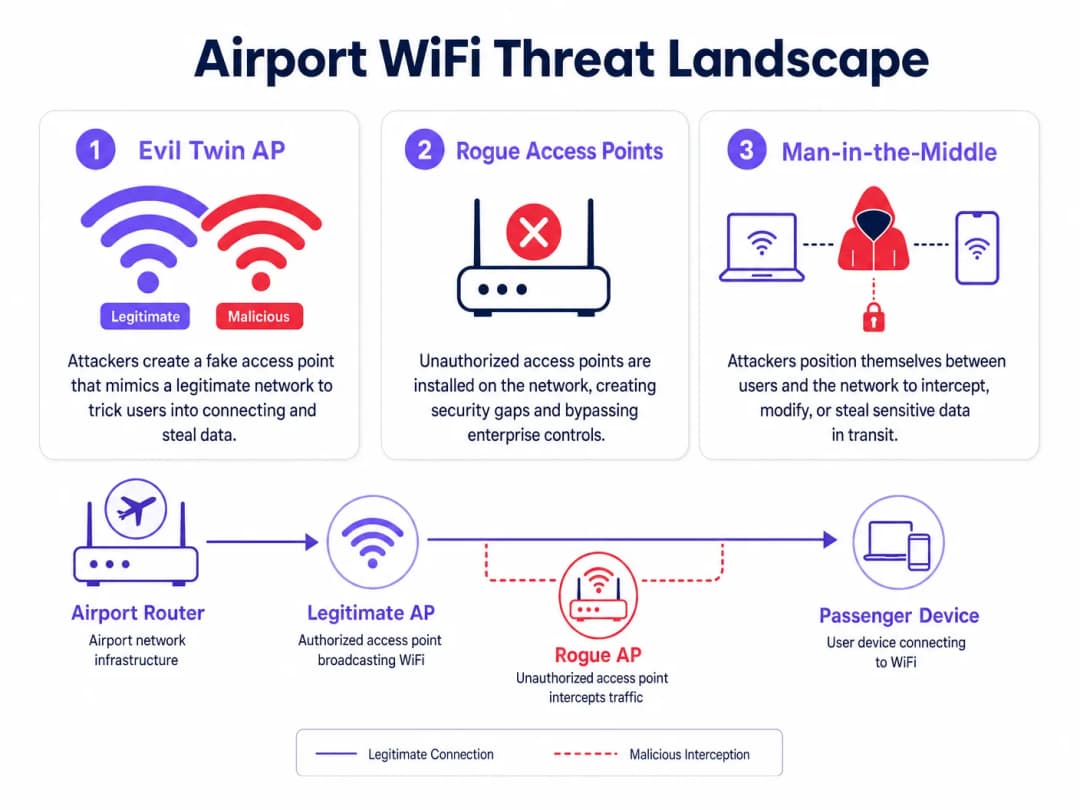
An Evil Twin is a malicious AP configured to broadcast the exact Service Set Identifier (SSID) of the legitimate airport network - for example, "Airport Free WiFi" or "LAX_Passenger_WiFi". Since standard client devices apply automatic network selection based on SSID matching and signal strength, a passenger's device will prefer to connect to the Evil Twin if it provides a stronger signal than the legitimate infrastructure. This is easily achieved: a portable router broadcasting at maximum power from a nearby seat will easily overpower a ceiling-mounted enterprise AP operating at controlled power levels.
Once a client connects to the Evil Twin, the attacker can launch several classes of attack. Passive interception captures unencrypted HTTP traffic, DNS queries, and session cookies. SSL stripping downgrades HTTPS connections to HTTP in real time, exposing credentials on sites that do not enforce HTTP Strict Transport Security (HSTS). DNS spoofing redirects users to phishing pages that mimic banking portals or airline booking systems. The passenger sees a normal connection without any warning indicators, as the Evil Twin provides actual internet access through its own upstream connection - the attack remains completely transparent to the end user.
The operational cost for an attacker is minimal: a consumer-grade travel router, a laptop running open-source tools, and a seat in the departure lounge. This attack requires no physical access to the airport's infrastructure.
Rogue Access Points
Rogue APs are unauthorized devices physically connected to the airport's wired network infrastructure. Unlike Evil Twins, which operate entirely over-the-air, rogue APs represent an insider threat vector - they require physical access to a network port. However, in a large airport environment with hundreds of retail concessions, service contractors, and cleaning staff, gaining physical access to a network port is not difficult.
The most common source of rogue APs is not a malicious actor but well-meaning staff. A retail concessionaire experiencing poor WiFi coverage in Terminal 3 purchases a consumer-grade router and plugs it into the Ethernet port behind their counter. The router broadcasts its own SSID, bypassing the enterprise firewall, Network Access Control (NAC) policies, and WPA3 Enterprise configurations, and creating a direct, unmanaged path from the public internet into the airport's internal network. From that point, any device connected to the rogue AP - whether it is the concessionaire's POS terminal or a passenger who has accidentally connected - gains potential network-level access to systems that should remain completely isolated.
For transport operators and airport IT teams, the rogue AP problem is further complicated by the sheer scale of the environment. In a large international airport, hundreds of network ports may be distributed across terminals, retail units, lounges, and back-office areas. Manual auditing without automated detection tooling is impractical.
Man-in-the-Middle Attacks
Both Evil Twin and rogue AP scenarios enable Man-in-the-Middle (MitM) attacks, where the attacker positions themselves between the client device and the legitimate network. In a MitM scenario, the attacker can intercept, read, and modify traffic in both directions. Modern TLS encryption significantly reduces the impact of MitM attacks on HTTPS traffic, but the attack surface remains significant: unencrypted protocols, misconfigured TLS implementations, and the use of legacy applications that do not enforce certificate validation - all create gaps ripe for exploitation.
For corporate travelers - who represent a significant portion of airport WiFi users - MitM attacks targeting VPN credential capture or corporate email session hijacking represent a high-value attack vector that multiplies the damage far beyond the individual passenger.
Got questions about your specific setup?
Our team works with venue operators, IT managers, and network engineers across 80,000 venues. Book a 20-minute call and we will show you how others like you solved it.
Implementation Guide: Secure Architecture
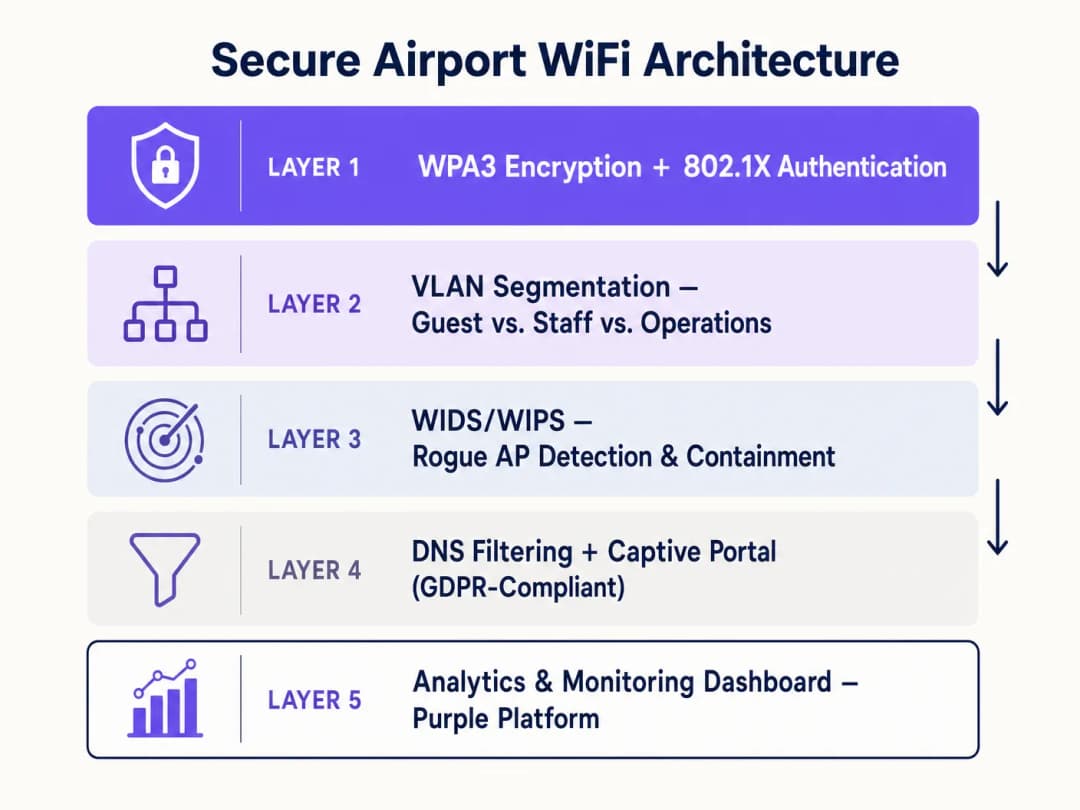
Addressing the airport WiFi threat landscape requires a layered, defense-in-depth architecture. No single control is sufficient; the goal is to make each subsequent layer of attack progressively more difficult and detectable.
Layer 1: Encryption and Authentication Standards
The transition to WPA3 is a primary requirement. For open public networks, WPA3 introduces Opportunistic Wireless Encryption (OWE), defined in IEEE 802.11-2020. OWE provides individualized encryption for each client session without requiring a shared password or pre-shared key. Each client-AP association negotiates a unique Diffie-Hellman key exchange, meaning that even if an attacker captures the raw radio frequency traffic of the entire terminal, they cannot decrypt any specific session. This directly mitigates passive eavesdropping and eliminates the primary attack vector of open network interception.
For authenticated network segments - staff, operations, retail tenants - IEEE 802.1X with RADIUS authentication is the correct standard. 802.1X enforces per-device authentication before granting network access, with each authentication event logged for compliance and auditing purposes. Combined with certificate-based Extensible Authentication Protocol (EAP-TLS), this completely eliminates credential-based attacks against staff networks.
For venues exploring seamless passenger onboarding, OpenRoaming - the Wireless Broadband Alliance's federated identity standard - provides profile-based authentication that automatically connects passengers to verified networks without manual SSID selection. Purple operates as a free identity provider within the OpenRoaming ecosystem under its Connect license, enabling airports to offer seamless, secure connectivity and eliminating the human error element of network selection. This is directly relevant to the Evil Twin threat: if a passenger's device automatically connects via a verified profile, it will not connect to an Evil Twin broadcasting the same SSID.
Layer 2: Network Segmentation and Client Isolation
Strict VLAN tagging at the AP level must be used to keep guest traffic completely isolated from operational technology (OT), staff networks, and retail point-of-sale (POS) systems. A minimum segmentation model for an airport environment should include: a public guest VLAN (internet access only, no internal routing), a staff VLAN (authenticated via 802.1X, access to internal systems), a retail tenant VLAN (isolated from both guest and staff, internet access for POS systems), and an operations VLAN (air-gapped or strictly firewalled, for digital signage, building management, and airside systems).
Client isolation - Layer 2 isolation between devices on the same VLAN - must be enabled on the guest VLAN. Without client isolation, two passengers connected to the same guest network can communicate directly at the IP layer, enabling device-to-device attacks. This is a configuration setting on the wireless controller that is often overlooked in legacy deployments.
For hospitality and retail environments operating within airport terminals, the same segmentation principles apply. Regardless of the commercial relationship with the airport operator, a hotel airside lounge or retail concession must be treated as an untrusted network segment.
Layer 3: Wireless Intrusion Detection and Prevention (WIDS/WIPS)
A Wireless Intrusion Prevention System is the primary automated defense against both Evil Twin and rogue AP threats. WIPS must be configured to continuously scan the radio frequency environment across all channels and bands (2.4 GHz, 5 GHz, and 6 GHz for WiFi 6E deployments) for unauthorized SSIDs, MAC address spoofing, and de-authentication flood attacks.
Upon detecting an Evil Twin - characterized by an SSID match and a BSSID that does not match any authorized AP in the managed infrastructure - the WIPS should automatically deploy containment. Containment involves transmitting targeted IEEE 802.11 de-authentication frames to clients attempting to associate with the malicious AP, preventing successful connection. This is an automated response at machine speed, far faster than any human operator intervention.
For rogue AP detection, WIPS correlates over-the-air observations with the wired network topology. An AP broadcasting over-the-air that also appears as a connected device on the wired network - but is not in the authorized AP inventory - is flagged as a rogue. The system can then trigger an automated port shutdown on the managed switch to physically disconnect the device.
Layer 4: DNS Filtering and Secure Captive Portal Design
Regardless of a device's own security posture, DNS-level filtering provides a critical control to protect users from malicious domains. By routing all DNS queries through a filtering resolver, the network can block the resolution of known phishing domains, command-and-control infrastructure, and malware distribution sites. This is particularly valuable in an airport context where passengers may connect compromised devices that were infected before arrival.
As detailed in our guide on Securing Your Network with Strong DNS and Security, implementing DNS over HTTPS (DoH) or DNS over TLS (DoT) for resolver connections prevents DNS queries from being intercepted or spoofed in transit - a relevant consideration when WIPS containment might not catch every Evil Twin instantly.
The Captive Portal is the passenger's primary onboarding touchpoint and must be designed with security as a first-order requirement, not an afterthought. The portal must be served over HTTPS with a valid certificate from a trusted Certificate Authority. Onboarding forms should collect only the data necessary for the specified purpose (CCPA/CPRA data minimization principle), with clear, granular consent mechanisms for any marketing use. Purple's Captive Portal platform is purpose-built for these compliance requirements, providing seamless integration with CCPA/CPRA-compliant data capture, consent management, and analytics layers. For context on how this scales across multi-terminal airport environments, see Airport WiFi: How Operators Provide Connectivity Across Terminals and its Italian equivalent WiFi Aeroportuale.
Layer 5: Analytics, Monitoring and Continuous Improvement
Security is not a one-time deployment; it requires continuous monitoring and iterative improvement. Purple's WiFi analytics platform provides the operational visibility layer that transforms raw connection data into actionable intelligence. By monitoring device connection patterns, dwell times, and session anomalies, network operations teams can identify indicators of compromise - unusual connection spikes, devices connecting from unexpected physical locations, or authentication failure patterns indicating a scanning attack.
The analytics layer also provides commercial justification for security investments. Higher passenger opt-in rates - driven by a trusted, secure onboarding experience - generate richer first-party data sets. This data enables targeted marketing, retail footfall analytics, and terminal layout optimization, delivering a measurable ROI on infrastructure investment. For healthcare environments managing WiFi in airport medical facilities, the same analytics framework applies with additional CCPA/CPRA special category data controls.
Best Practices and Risk Mitigation
Enforce retail tenant network policies at the technical level. Policy documents are not enough. Retail concessions must be provided with managed, segmented network access - a dedicated VLAN with internet access and no internal routing - and the physical network ports in their units must be configured to reject unauthorized hardware via 802.1X port authentication or MAC address allowlisting. Eliminate the incentive for rogue AP deployment by providing adequate, managed connectivity.
Conduct regular RF site surveys. Quarterly physical and RF site surveys identify unauthorized hardware that WIPS might have missed due to signal attenuation, physical obstructions, or intentional RF shielding. A survey should cover all terminals, lounges, retail units, and back-office areas. Document the authorized AP inventory and compare it with the survey results.
Implement a leased line or dedicated business internet connection for critical infrastructure. As discussed in our guide on What is a Leased Line? Dedicated Business Internet, separating critical operational traffic onto a dedicated, uncontended connection ensures that any DDoS attack or bandwidth exhaustion event on the guest network cannot affect airside operational systems.
Test incident response procedures. Conduct tabletop exercises simulating an Evil Twin detection event. Verify that WIPS containment is functioning, the NOC team knows the escalation procedures, and passenger-facing communication is prepared for a scenario where the guest network may need to be temporarily suspended.
ROI and Business Impact
Securing the network is the foundation of commercial value, not an isolated cost center. A secure, reliable, and trusted guest WiFi network directly increases passenger opt-in rates on the Captive Portal. Higher opt-in rates generate larger, higher-quality first-party data sets. This data enables the airport operator to deliver personalized retail promotions, optimize terminal layouts based on real footfall data, and build loyalty programs that drive repeat engagement.
The cost of a security incident - CCPA/CPRA enforcement actions, reputational damage, and the operational costs of incident response - far exceeds the cost of deploying the security controls outlined in this guide. The FTC and state attorneys general have issued millions of dollars in fines for data protection failures. For a large international airport processing millions of passenger connections annually, the risk exposure is significant.
Purple's platform is designed to align security investments with commercial outcomes. The secure Captive Portal, CCPA/CPRA-compliant data capture, and analytics layer are a single integrated deployment - not three separate procurement exercises. This reduces the total cost of ownership while accelerating time-to-value for both IT and marketing teams.
Key Definitions
Evil Twin Access Point
A malicious wireless access point that masquerades as a legitimate network by broadcasting the same SSID, designed to intercept user data via Man-in-the-Middle attacks.
Common in airport terminals where attackers exploit devices auto-connecting to known SSIDs based on signal strength. Mitigated by OWE encryption and WIPS containment.
Rogue Access Point
An unauthorized wireless access point physically connected to the enterprise wired network, bypassing security controls including firewalls, NAC policies, and enterprise WiFi configurations.
Often installed by retail tenants or staff seeking better coverage. Addressed by 802.1X port authentication on all ethernet ports and automated WIPS detection.
Opportunistic Wireless Encryption (OWE)
A WPA3 feature defined in IEEE 802.11-2020 that provides individualized, session-unique encryption for open networks without requiring a shared password, using Diffie-Hellman key exchange.
The correct encryption standard for public airport guest networks. Eliminates passive eavesdropping without adding authentication friction for passengers.
Wireless Intrusion Prevention System (WIPS)
Network infrastructure that continuously monitors the radio frequency spectrum for unauthorized access points, Evil Twins, and attack signatures, and automatically deploys countermeasures including de-authentication frames.
The primary automated defense against Evil Twin and rogue AP threats in high-density environments. Must be configured to cover all frequency bands including 6 GHz for WiFi 6E deployments.
Client Isolation
A wireless network configuration that prevents devices connected to the same SSID from communicating directly with each other at Layer 2, restricting all traffic to the gateway.
Mandatory on Guest VLANs to prevent device-to-device attacks. A simple configuration setting that is frequently absent in legacy deployments.
VLAN Segmentation
The practice of dividing a physical network into multiple logical networks using IEEE 802.1Q VLAN tags to isolate traffic types and enforce access control boundaries.
Used to separate untrusted guest traffic from secure airport operations, staff systems, and retail POS infrastructure. Eliminates lateral movement risk from compromised guest devices.
IEEE 802.1X
An IEEE standard for port-based Network Access Control that requires devices to authenticate before being granted network access, typically via a RADIUS server.
The authentication standard for staff and operations VLANs, and for port-level enforcement on retail ethernet ports to prevent rogue AP deployment.
OpenRoaming
A Wireless Broadband Alliance federation standard that enables automatic, seamless WiFi authentication across participating networks using pre-provisioned device profiles, without manual SSID selection.
Directly mitigates Evil Twin attacks by removing the manual network selection step. Purple operates as a free identity provider within the OpenRoaming ecosystem under its Connect license.
Man-in-the-Middle (MitM) Attack
An attack where the perpetrator secretly intercepts, relays, and potentially modifies communications between two parties who believe they are communicating directly.
The primary goal of Evil Twin deployments. Mitigated by OWE encryption at the radio layer and HSTS enforcement at the application layer.
Captive Portal
A web page presented to new users of a public network before they are granted internet access, used for authentication, terms acceptance, and data collection.
The primary passenger onboarding touchpoint. Must be served over HTTPS with a valid certificate and designed for CCPA/CPRA compliance including explicit consent mechanisms.
Worked Examples
A major international airport is upgrading Terminal 3. The current network is flat - all devices, including retail POS systems, digital signage, and passenger devices, share the same broadcast domain. Retail vendors frequently complain about poor connectivity, leading them to install their own consumer-grade routers. The IT director needs a redesign that addresses security without disrupting commercial operations during a phased rollout.
Phase 1 - VLAN Architecture: Design four VLANs: Public Guest (internet-only, client isolation enabled), Staff (802.1X authenticated, internal access), Retail Tenant (internet-only, isolated from guest and staff, 802.1X port authentication on all retail ethernet ports), and Operations (air-gapped, for signage and building management). Phase 2 - Rogue AP Elimination: Enable 802.1X port authentication on all retail ethernet ports. Any device without a valid certificate is denied network access, eliminating the ability to plug in unauthorized routers. Simultaneously, provide retail tenants with a managed Retail Tenant SSID with adequate signal coverage, removing the incentive for rogue hardware. Phase 3 - WIPS Deployment: Configure the wireless controller to scan for unauthorized SSIDs and automatically contain Evil Twins. Set up alerting to the NOC for any rogue AP detection events. Phase 4 - Captive Portal and Analytics: Deploy Purple's captive portal on the Guest VLAN with CCPA/CPRA-compliant onboarding, OWE encryption, and analytics integration.
Passengers at a regional airport are receiving browser warnings when connecting to the guest WiFi captive portal, and the marketing team reports that opt-in rates have dropped by 40% over the past six months. The IT team suspects the SSL certificate on the captive portal has expired. How should this be resolved, and what broader improvements should be made to the onboarding architecture?
Immediate remediation: Renew the SSL certificate on the captive portal server and implement automated certificate renewal (e.g., via Let's Encrypt with auto-renewal scripting) to prevent recurrence. Broader improvements: 1) Upgrade the guest SSID to WPA3 with OWE to provide encryption at the radio layer, which modern mobile operating systems surface as a positive trust signal. 2) Implement HSTS on the captive portal domain to prevent SSL stripping attacks. 3) Integrate Purple's captive portal platform, which manages certificate lifecycle, CCPA/CPRA consent flows, and analytics as a managed service, removing the operational burden from the in-house team. 4) Consider OpenRoaming profile-based authentication for returning passengers, eliminating the portal interaction entirely for opted-in users.
Practice Questions
Q1. Your WIPS dashboard alerts you to a new AP broadcasting the airport's official guest SSID from within a retail coffee shop in Terminal 2. The AP's BSSID does not appear in your authorized AP inventory, and it is not connected to your wired network. What type of threat is this, what is the automated WIPS response, and what follow-up action should the NOC team take?
Hint: Consider whether the device is physically attached to your wired infrastructure or operating entirely over the air. The distinction determines both the threat classification and the remediation pathway.
View model answer
This is an Evil Twin AP. Because it is not connected to the wired network, it is attempting to hijack client connections over the air by mimicking the legitimate SSID. The automated WIPS response should be to transmit de-authentication frames to clients attempting to associate with that specific BSSID, preventing successful connection. The NOC team should dispatch physical security to the coffee shop location to identify and remove the device, document the incident for the security log, and review whether any clients successfully connected to the Evil Twin before containment was activated - those sessions should be treated as potentially compromised.
Q2. A new terminal is opening in six months. The operations director wants a completely open network with no captive portal to maximize passenger convenience. The marketing director wants maximum opt-in data collection. The CISO wants CCPA/CPRA compliance and encryption. How do you satisfy all three stakeholders in a single architecture?
Hint: Consider WPA3 OWE for the encryption requirement, OpenRoaming for the seamless authentication requirement, and Purple's platform for the data collection and compliance requirement. These are not mutually exclusive.
View model answer
Deploy WPA3 with OWE on the public SSID - this provides encryption without requiring a password, satisfying the CISO's encryption requirement while maintaining the open, frictionless experience the operations director wants. Implement OpenRoaming via Purple's identity provider capability, so returning passengers with existing profiles connect automatically and securely without any manual interaction. For new passengers, present a lightweight, CCPA/CPRA-compliant captive portal that collects consent and profile data - this satisfies the marketing director's requirement. The net result is a network that is encrypted by default, seamless for returning users, and data-capturing for new users, with full CCPA/CPRA compliance.
Q3. During a quarterly RF site survey, your team discovers an AP in a back-of-house service corridor that is connected to the wired network but does not appear in the authorized AP inventory. It is broadcasting a hidden SSID and has been active for approximately three months based on switch port logs. What is the threat classification, what is the immediate containment action, and what does the three-month window imply for your incident response process?
Hint: This device has wired network access, making it a different threat class from an Evil Twin. The three-month window has specific implications for data breach notification obligations under CCPA/CPRA.
View model answer
This is a Rogue AP with wired network access - a high-severity incident. Immediate containment: shut down the switch port to which the device is connected, physically remove the device, and preserve it as evidence. The three-month active window implies that an unknown actor has had persistent network access for approximately 90 days. Under the TCPA and CAN-SPAM, a personal data breach must be reported to the FTC and state attorneys general within the legally mandated timeframe, if it is likely to result in a risk to individuals' rights and freedoms. The incident response team must immediately assess what data was accessible from that network segment, whether any exfiltration occurred (review NetFlow/IPFIX logs for the switch port), and prepare a breach notification if the assessment indicates risk. This incident also indicates a gap in the WIPS configuration - the system should have detected the rogue AP's wired presence and over-the-air broadcast within hours of installation, not three months later.
Continue reading in this series
CIPA compliance: compliance checklist for venue operators
You will be able to decide whether CIPA binds your WiFi, then segment networks, route DNS through Purple Shield and close bypass routes. You will also know what evidence to keep for Form 486 or Form 479 certification. The checklist assigns every requirement an owner, so your next funding year certification has nothing missing.
WPA3 transition mode connection failures: a deployment checklist for Cisco Meraki, HPE Aruba and Ruckus
Use this checklist to diagnose why devices fail on a WPA3 SAE transition mode SSID and fix it on Cisco Meraki, HPE Aruba or Ruckus. You will match 802.11 status codes to causes, isolate PMF, 802.11r and 6GHz issues, and decide when to move to a WPA3-only SSID.
Best DNS filtering: a comprehensive guide for businesses
This technical reference guide explains how enterprise DNS filtering secures public networks by blocking malicious domains at the resolution layer - before a connection is ever established. It gives IT directors, network architects, and venue operations teams the deployment architecture, firewall configuration, and compliance context they need to protect Guest WiFi across hospitality, retail, and public-sector environments. Purple Shield blocks malware, botnets, and inappropriate content at the DNS level across 80,000+ live venues.
Got questions about your specific setup?
Our team works with venue operators, IT managers, and network engineers across 80,000 venues. Book a 20-minute call and we will show you how others like you solved it.