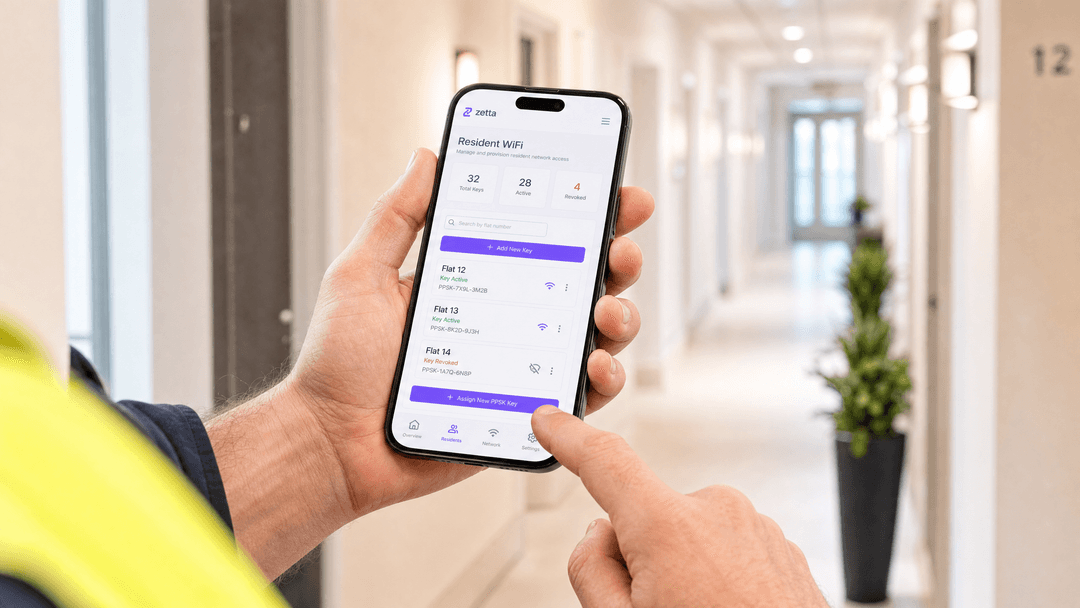
PPSK WiFi: comparing features and deployment models

This technical reference guide compares Private Pre-Shared Key (PPSK) WiFi architecture against traditional 802.1X and standard PSK deployments. It provides network architects and IT managers with vendor-neutral implementation strategies for multi-tenant residential, IoT, and BTR environments.

📖 6 min read📝 1,304 words🔧 2 worked examples3 practice questions📚 8 key definitions

Listen to this guide

View podcast transcript
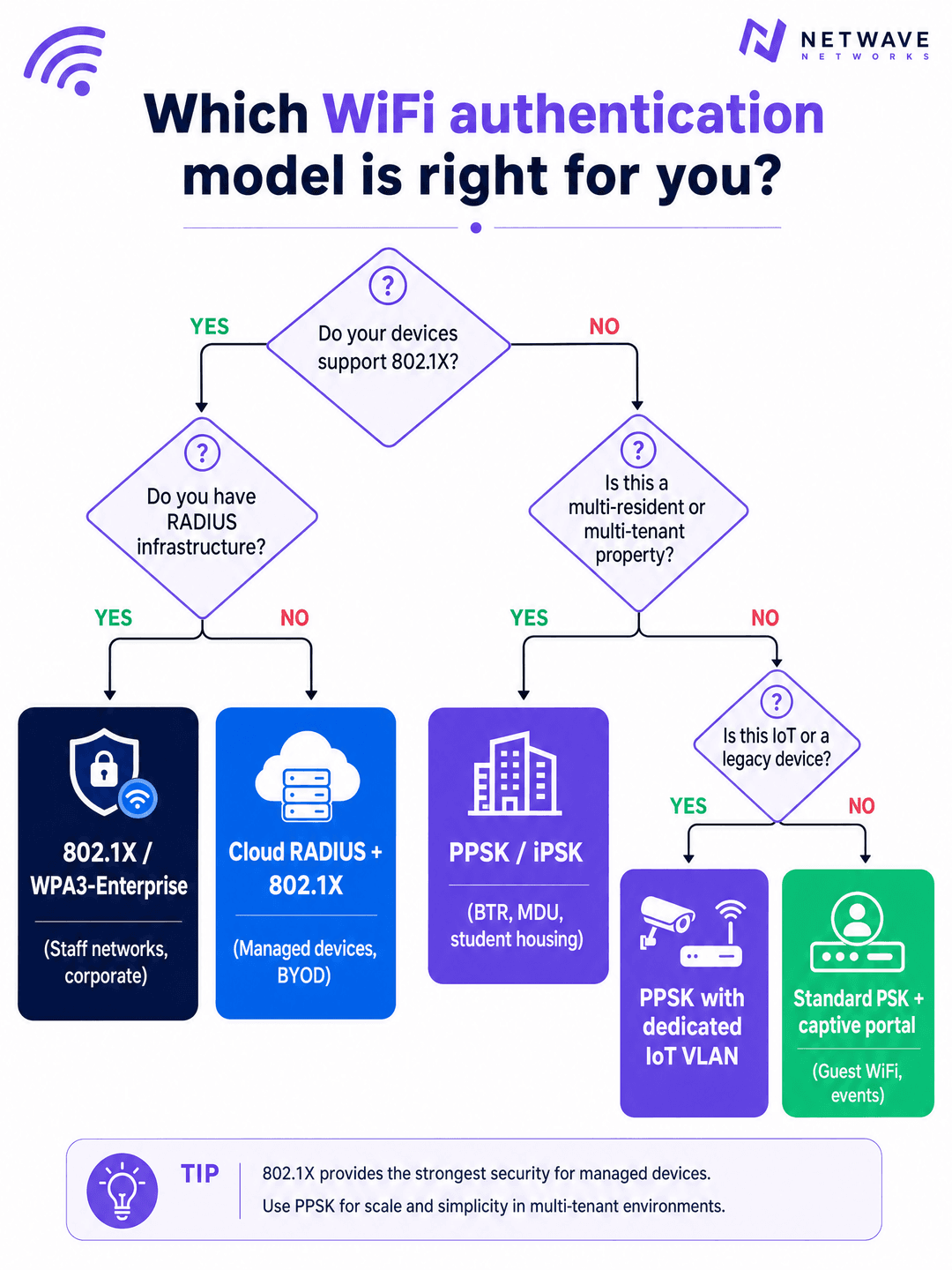
Welcome to the Purple Technical Briefing. Today we're covering PPSK WiFi - Private Pre-Shared Key - what it is, how it compares to the alternatives, and where it actually makes sense to deploy it. [medium pause] Let's start with the problem it solves. In a traditional WPA2 Personal network, every device on the network shares the same password. That's fine for a home. It's a liability for a 200-unit Build to Rent development, a student accommodation block, or a hotel with 300 rooms. When one resident moves out, you either change the password for everyone - breaking every other resident's smart TV, thermostat, and console in the process - or you leave the old resident with access. Neither option is acceptable. [short pause] PPSK solves this by giving each resident, each flat, or each device group its own unique WiFi key. They all connect to the same SSID - the same network name - but each key maps to a separate VLAN. Flat 12 is on VLAN 10. Flat 13 is on VLAN 20. The IoT devices are on VLAN 99. The access point handles the key-to-VLAN mapping automatically. No RADIUS server required. No certificate infrastructure. No 802.1X supplicant on the device. [medium pause] Now let's talk about the terminology, because it varies by vendor and that causes genuine confusion in the market. Aruba calls it PPSK - Private Pre-Shared Key. Cisco Meraki calls it iPSK - Identity PSK, or Personal Private Network. Juniper Mist uses ePSK. Extreme Networks, who originally developed the concept under the Aerohive brand, call it Private PSK. Ubiquiti UniFi simply calls it PPSK. Cambium also uses ePSK. The underlying mechanism is identical across all of them: one SSID, multiple unique keys, each key tied to a VLAN or a policy group. [short pause] Technically, here's what happens at the association layer. When a device connects, it presents its pre-shared key during the WPA2 four-way handshake. The access point - or the cloud controller behind it - looks up that key in the PPSK store, identifies which VLAN it maps to, and tags the device's traffic accordingly from that point forward. The device sees a normal WiFi connection. It has no idea it's been placed in an isolated segment. Its Chromecast works. Its smart speaker pairs. Its console gets the right NAT type. Everything behaves like a home network - because from the device's perspective, it is. [medium pause] This is the key distinction from 802.1X, which is the enterprise standard for staff networks and corporate environments. 802.1X requires a RADIUS server, an identity provider - Microsoft Entra ID, Okta, or Google Workspace - and a supplicant on every device. That supplicant is the software component that handles the EAP authentication exchange. Every managed laptop, every corporate phone, has one. Your resident's smart fridge does not. Your building's HVAC controller does not. Your IoT sensors do not. PPSK works with all of them because it operates at the WPA Personal layer, not the WPA Enterprise layer. [short pause] That said, PPSK is not a replacement for 802.1X in corporate environments. It's a different tool for a different problem. If you're running a staff network where individual accountability matters - where you need to know that a specific person authenticated at a specific time, and you need to revoke their access the moment they leave the organisation - 802.1X is the right answer. If you're running a residential network where you need per-household isolation, IoT support, and operational simplicity at scale, PPSK is the right answer. [medium pause] Let's look at the deployment models. There are three primary patterns in production today. [short pause] The first is the cloud-controller model, which is the most common for new deployments. Your access points - whether that's Cisco Meraki, HPE Aruba, Ruckus, Juniper Mist, Ubiquiti UniFi, Cambium, Extreme, or Fortinet - connect to a cloud management platform. The PPSK key store lives in the cloud controller. When you provision a new resident, you create a key in the portal, assign it to a VLAN, and the controller pushes the policy to every access point in the building. The resident gets their key - via email, SMS, or a QR code in a welcome pack - and connects. When they move out, you delete the key. Their devices stop connecting. Nobody else is affected. [short pause] The second model is PPSK with a local RADIUS backend. Some enterprise deployments use a RADIUS server to store and validate PPSK credentials, which gives you centralised logging, audit trails, and integration with your identity management platform. This adds infrastructure overhead but gives you the accountability of 802.1X with the device compatibility of PPSK. It's the right model for mixed environments - say, a coworking space where you have both managed corporate devices and member-owned IoT equipment. [short pause] The third model is hybrid: PPSK for residents and IoT, 802.1X for staff and management systems. This is the architecture Purple recommends for Build to Rent and multi-dwelling unit deployments. Residents get PPSK. Building management systems, CCTV, and access control get their own IoT VLAN with PPSK. The property management team's devices use 802.1X against Microsoft Entra ID or Okta. Three distinct authentication models, three distinct VLANs, one physical infrastructure. Now let's get into implementation. If you're deploying PPSK for a Build to Rent development or a multi-dwelling unit property, here's the sequence that works. [short pause] Start with your logical design before you touch hardware. Map out your resident count, your IoT device categories, and any staff or management systems. Assign VLANs. A typical BTR deployment looks like this: VLAN 10 through to whatever your unit count requires for residents, one VLAN per flat or one VLAN per floor depending on your density. VLAN 99 for IoT. VLAN 100 for building management. VLAN 200 for guest WiFi in common areas. [short pause] Then document your IP addressing scheme. In a 200-unit building, you're looking at 3,000 to 5,000 devices on the network at any given time. That's the 15 to 25 devices per household figure from British Property Federation research. Your DHCP scopes need to accommodate that. Use RFC 1918 private addressing with sufficient subnet sizes per VLAN. A slash 24 gives you 254 usable addresses. A slash 23 gives you 510. Size accordingly. [medium pause] On hardware selection: PPSK is supported across all major enterprise access point platforms. Cisco Meraki calls it iPSK and manages it through the Meraki dashboard with per-SSID key policies. HPE Aruba implements it natively in ArubaOS and Aruba Central. Ruckus supports it through SmartZone and the Ruckus Cloud platform. Juniper Mist uses ePSK with AI-driven RF management. Ubiquiti UniFi has had PPSK since 2023, though note it's currently WPA2 only and won't work on the 6 gigahertz band. Cambium and Extreme both support it through their respective cloud platforms. [short pause] One critical constraint to flag: UniFi's PPSK implementation is WPA2 only. If you're specifying Wi-Fi 6E access points and want to use the 6 gigahertz band for PPSK clients, you'll need a platform that supports WPA3-SAE with PPSK, or you'll need to restrict PPSK clients to the 2.4 and 5 gigahertz bands. Aruba, Ruckus, and Meraki all support PPSK on WPA3 configurations. [medium pause] Now let's talk about the pitfalls. These are the failure modes I see repeatedly in production deployments. [short pause] The first is SSID proliferation. Every SSID you broadcast consumes airtime for beacon frames. In a dense residential building, if you're broadcasting six or eight SSIDs per access point, you're degrading performance for everyone. Keep it to a maximum of four SSIDs per radio. Use PPSK to serve multiple resident segments from a single SSID rather than creating a separate SSID per flat or per floor. [short pause] The second pitfall is insufficient trunk port configuration. You design a clean VLAN scheme, you deploy the access points, and then traffic silently drops because someone forgot to permit the relevant VLANs on a trunk link between the distribution switch and the access layer. Validate every trunk port during commissioning. Document it. Test it with a device on each VLAN before residents move in. [short pause] The third pitfall is key distribution. Generating keys is easy. Getting them to residents in a way that's secure and operationally manageable is harder. A QR code in the welcome pack works well for move-in day. A resident portal where they can retrieve their key and add new devices is better for ongoing operations. Build the key distribution workflow before you deploy, not after. [short pause] The fourth pitfall, specific to IoT, is putting smart home devices on the resident's PPSK segment without thinking through the implications. A compromised IoT device on a resident's VLAN can potentially attack other devices on that same VLAN. For high-risk IoT categories, consider a separate IoT VLAN with egress filtering, even if it means residents need to configure their smart home apps to use a different network. [medium pause] Let's look at two real-world scenarios. [short pause] Scenario one: a 180-unit Build to Rent development in a city centre. The operator wanted WiFi included in rent as an amenity, with move-in-day activation and full smart home support. They deployed HPE Aruba access points managed through Aruba Central. Each flat gets a unique PPSK key generated at tenancy sign-up. The key is emailed to the resident with a QR code. They scan it, all their devices connect, and their Chromecast, smart speaker, and console all work immediately. When a resident moves out, the property manager deletes the key in the portal. The new resident gets a fresh key at move-in. Zero password rotation drama. The operator reports a 30% reduction in WiFi-related support tickets compared to their previous shared-password deployment. [short pause] Scenario two: a 400-bed purpose-built student accommodation block. The challenge here is cohort move-in week, with hundreds of students arriving simultaneously, all trying to connect dozens of devices at once. The operator used Ruckus access points with SmartZone, deploying PPSK with one key per room. Keys were pre-generated and included in the welcome pack sent before arrival. Students scanned the QR code on arrival and were connected within seconds. The network handled the move-in surge without degradation because each student's traffic was isolated to their own VLAN segment. [medium pause] Now for a rapid-fire Q and A on the questions that come up most often. [short pause] How many PPSK keys can a single access point handle? Most enterprise platforms support thousands of keys per SSID. Cisco Meraki supports up to 5,000 iPSK entries per network. Aruba supports similar scale. Ubiquiti UniFi supports up to 1,000 PPSK entries per network. For a 200-unit building, you're well within limits on any platform. [short pause] Does PPSK work with WPA3? Yes, on most enterprise platforms. WPA3-SAE provides stronger protection against offline dictionary attacks compared to WPA2-PSK, so deploying PPSK on WPA3 where your client devices support it is the right approach. The exception is UniFi, which is currently WPA2 only for PPSK. [short pause] Can I integrate PPSK with my property management system? Yes, through the vendor's API. Aruba Central, Meraki, Ruckus, and Mist all expose REST APIs for PPSK key management. You can automate key creation and revocation as part of your tenancy management workflow. [short pause] What's the security difference between PPSK and 802.1X? The fundamental difference is that PPSK is a shared-secret model. The key is a string of characters that can be shared or intercepted. 802.1X with EAP-TLS uses digital certificates, which cannot be shared in the same way and provide mutual authentication. For residential environments where the threat model is primarily inter-resident isolation, PPSK provides adequate security. For corporate staff networks, 802.1X is the correct choice. [medium pause] To bring this together: PPSK WiFi is the right authentication model for multi-tenant residential deployments, IoT-heavy environments, and any scenario where you need per-user or per-household isolation without the infrastructure overhead of 802.1X. It runs on Cisco Meraki, HPE Aruba, Ruckus, Juniper Mist, Ubiquiti UniFi, Cambium, Extreme, and Fortinet. It integrates with property management systems via API. And it solves the three core operational problems that shared-password networks cannot: move-out without breaking everyone, smart home device support, and per-resident accountability. [short pause] The decision framework is straightforward. If your devices support 802.1X and you have RADIUS infrastructure, use 802.1X for staff and managed devices. If you're running a multi-tenant residential property, use PPSK. If you have IoT devices that can't do 802.1X, use PPSK with a dedicated IoT VLAN. If you need guest WiFi in common areas, use a standard PSK or open network with a captive portal on top. [short pause] For next steps: review the architecture overview diagram in the guide, which shows the full PPSK deployment stack from ISP uplink to resident device. Use the decision flowchart to map your specific environment to the right authentication model. And if you're planning a BTR or MDU deployment and want to understand how Purple's Multi-Tenant WiFi platform sits on top of your existing hardware to provide the key management, resident portal, and analytics layer, the link is in the guide. [medium pause] That's it for today's briefing. Thanks for listening. Let me go deeper on the security model, because this is where I see the most confusion in the market. [short pause] PPSK operates at the WPA Personal layer. Each key is a pre-shared secret. The security guarantee PPSK provides is inter-resident isolation - device A on key A cannot communicate with device B on key B, even when they're associated to the same physical access point. That isolation is enforced at the VLAN layer, not at the encryption layer. The encryption between each device and the access point uses the same WPA2 or WPA3 cipher suite regardless of which PPSK key the device used to authenticate. [short pause] What PPSK does not provide is the mutual authentication that 802.1X delivers. In an 802.1X deployment with EAP-TLS, the client authenticates to the network and the network authenticates to the client. Both sides present certificates. This prevents rogue access point attacks. With PPSK, the client has no way to verify it's connected to the legitimate network rather than a rogue AP broadcasting the same SSID. For a residential building where the threat model is primarily about isolating residents from each other, this is an acceptable trade-off. For a corporate environment handling sensitive data, it is not. [medium pause] Now let's talk about the WPA3 upgrade path. WPA3-SAE, which stands for Simultaneous Authentication of Equals, replaces the WPA2 four-way handshake with a more secure key exchange protocol called Dragonfly. The critical improvement for PPSK deployments is forward secrecy: even if an attacker captures the WiFi traffic and later obtains the pre-shared key, they cannot decrypt the captured traffic. WPA2-PSK does not provide forward secrecy. WPA3-SAE does. If you're deploying new hardware today, specify WPA3-SAE support and enable it for your PPSK SSID. Clients that don't support WPA3 will fall back to WPA2 in transition mode, so you don't need to force a hard cutover. [short pause] The GDPR angle is worth addressing directly. In a multi-tenant residential deployment, you're processing personal data - specifically, the association between a WiFi key and a named resident. That association is personal data under the UK GDPR and the EU GDPR. You need a lawful basis for processing it. In a BTR context, the lawful basis is typically the performance of a contract - the tenancy agreement - or legitimate interests. You need a privacy notice that covers WiFi data processing. You need a data retention policy for connection logs. And you need to be able to respond to subject access requests, which means your PPSK management platform needs to be able to export all data associated with a specific resident's key. [short pause] Purple's Multi-Tenant WiFi platform is built with this in mind. Data is stored in ISO 27001 certified infrastructure. We're GDPR and CCPA compliant. Data residency is selectable - UK, EU, or US - so you can meet your regulatory obligations regardless of where your properties are located. And our platform provides the audit trail and data export capabilities you need for compliance. Let me address the ROI question, because this comes up in every BTR procurement conversation. [short pause] The British Property Federation's research consistently shows WiFi quality as a top-five amenity factor in Build to Rent leasing decisions. Operators who include managed WiFi as an amenity report rent premiums of fifteen to thirty pounds per unit per month compared to equivalent properties without included connectivity. On a 200-unit building, that's between thirty-six thousand and seventy-two thousand pounds per year in additional rental income. Against a typical PPSK deployment cost - hardware amortised over five years plus a software overlay licence - the payback period is typically under 18 months. [short pause] The operational savings are equally significant. A shared-password network in a 200-unit building generates a predictable volume of support tickets: residents who can't connect their Chromecast, residents whose smart speaker won't pair, residents whose console shows NAT type strict. These tickets cost time and money to resolve. A correctly deployed PPSK network eliminates the majority of them. One operator we work with reported a 30% reduction in WiFi-related support contacts in the first six months after migrating from a shared-password to a PPSK deployment. [short pause] Void periods are the other lever. A building where WiFi is active and working on move-in day reduces friction for new residents. A building where a new resident has to wait for a broadband engineer appointment - typically seven to fourteen days in the UK - creates a negative first impression that affects retention. PPSK with move-in-day activation removes that friction entirely. [medium pause] One more area to cover: the coworking and mixed-use application. PPSK isn't only for residential. It's also the right model for coworking spaces where you want per-member or per-company isolation without the overhead of 802.1X. A coworking operator with 200 members can give each member their own PPSK key, map it to a dedicated VLAN, and ensure that member A's devices are invisible to member B. When a membership lapses, the key is revoked. When a new member joins, a new key is generated. The member experience is identical to a home network. [short pause] For coworking, the hybrid model works particularly well. Members get PPSK. Visitors to members - clients attending meetings, for example - get a separate guest WiFi SSID with a captive portal. Building staff get 802.1X against the operator's identity provider. Three authentication models, one physical infrastructure, clean separation between all three user groups. [medium pause] That covers the full picture. PPSK WiFi is a mature, well-supported technology that solves a specific and important problem: per-user or per-household isolation in multi-tenant environments, without the infrastructure overhead of 802.1X. It's hardware-agnostic, API-driven, and deployable today on the access points you already own. The decision criteria are clear. The deployment patterns are proven. And the business case, particularly in Build to Rent and purpose-built student accommodation, is well-evidenced.

header_image.png

Executive Summary

Network architecture for multi-tenant buildings demands a specific balance of isolation, scale, and device compatibility. Traditional WPA2-Personal networks fail at scale because shared passwords compromise resident privacy and break all devices when rotated. Conversely, 802.1X provides excellent security but fails in residential environments because IoT devices, smart speakers, and games consoles lack the supplicants required for RADIUS authentication.

PPSK WiFi solves this structural problem. By issuing a unique pre-shared key to each resident and mapping that key to an isolated VLAN, operators can deliver a secure, home-like WiFi experience across shared enterprise hardware. This guide details the architecture, implementation models, and business impact of deploying PPSK across Cisco Meraki, HPE Aruba, Ruckus, and other leading vendors, specifically targeting Build to Rent (BTR), student accommodation, and multi-dwelling unit (MDU) environments.

Technical Deep-Dive

The Architecture of PPSK

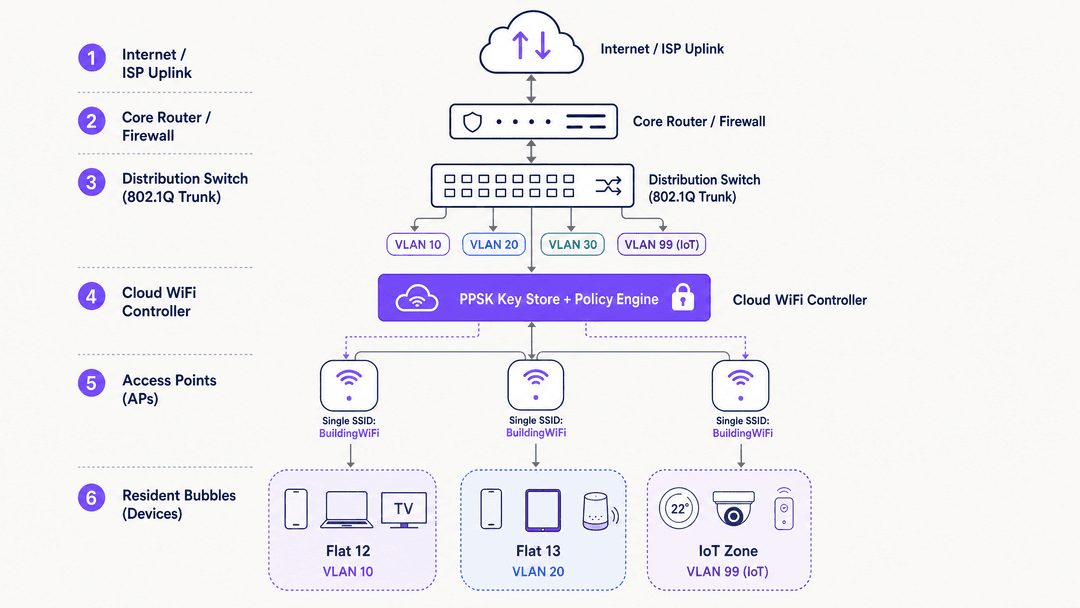
Private Pre-Shared Key (PPSK) operates at the WPA-Personal layer. The fundamental innovation is decoupling the SSID from a single password. Instead of one password for the entire network, the access point or cloud controller maintains a database of thousands of unique keys.

When a device connects, it presents its key during the standard WPA2 or WPA3 four-way handshake. The network validates the key and checks its associated policy. Crucially, this policy includes a VLAN assignment. The access point then tags all traffic from that device with the assigned VLAN ID before passing it to the distribution switch.

This creates a "WiFi bubble" for each resident. Device A and Device B, using the same key, are placed on VLAN 10 and can discover each other via mDNS. Device C, using a different key, is placed on VLAN 20. Device C cannot see or communicate with Devices A or B, even if all three are connected to the exact same physical access point.
architecture_overview.png

PPSK vs 802.1X

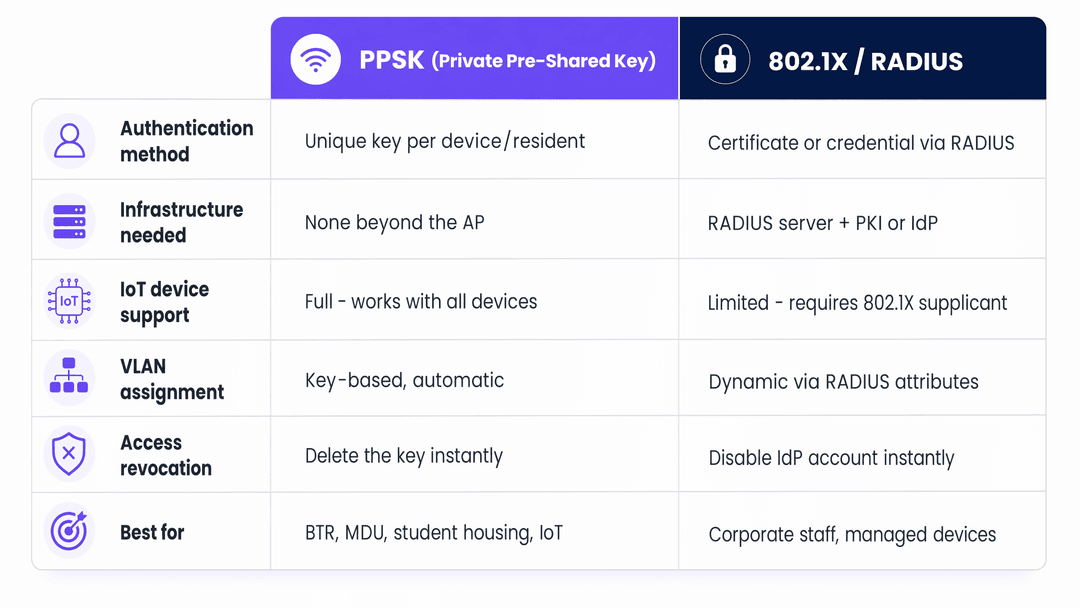
It is a mistake to view PPSK as a direct replacement for 802.1X. They serve different threat models.

802.1X with EAP-TLS provides mutual authentication. The client verifies the network via a server certificate, preventing rogue access point attacks, and the network verifies the client via a client certificate. This is the mandatory standard for corporate staff networks where data exfiltration is the primary risk.

PPSK provides inter-resident isolation. It does not provide mutual authentication. However, it supports 100% of WiFi-enabled devices, including headless IoT hardware. For a BTR operator, the primary risk is Resident A accessing Resident B's smart TV or viewing their local network traffic. PPSK mitigates this risk effectively without the administrative overhead of a Public Key Infrastructure (PKI).
comparison_chart.png

WPA3 and Forward Secrecy

The transition to WPA3 significantly strengthens PPSK deployments. WPA3-Personal replaces the PSK handshake with Simultaneous Authentication of Equals (SAE). SAE uses the Dragonfly key exchange protocol, which provides forward secrecy.

In a WPA2-PSK network, an attacker who captures the initial handshake and later obtains the password can decrypt the captured traffic. In a WPA3-SAE network, this is cryptographically impossible. If your hardware supports it, WPA3-SAE should be the default configuration for new PPSK deployments.

Implementation Guide

Deploying a multi-tenant WiFi architecture requires strict adherence to layer 2 segmentation principles.

1. Logical Segmentation Strategy

Before configuring access points, define the VLAN taxonomy. A standard BTR deployment requires:

  • Resident VLANs: One VLAN per unit (e.g., VLANs 10-210 for a 200-unit building).
  • IoT VLAN: A dedicated segment (e.g., VLAN 99) for building management systems, HVAC, and access control.
  • Management VLAN: A strictly isolated segment for AP and switch management traffic.
  • Guest VLAN: A routed-to-internet segment for common areas.

2. Hardware and Vendor Selection

PPSK is a software feature, not an IEEE standard, which means implementation varies by vendor:

  • Cisco Meraki: Termed iPSK (Identity PSK). Managed via the Meraki dashboard with per-SSID policies. Highly scalable.
  • HPE Aruba: Termed PPSK or MPSK (Multiple PSK). Supported natively in ArubaOS and Aruba Central.
  • Ruckus: Termed DPSK (Dynamic PSK). Managed via SmartZone or Ruckus Cloud.
  • Juniper Mist: Termed ePSK. Integrates tightly with Mist's AI-driven RF management.
  • Ubiquiti UniFi: Termed PPSK. Added in 2023. Note: Currently restricted to WPA2; incompatible with 6GHz bands.

3. Key Lifecycle Management

The operational success of a PPSK deployment depends entirely on key distribution. Generating keys is trivial; securely delivering them to residents is complex.

Integrate key generation with the property management system via API. When a lease is signed, the system should call the WiFi controller API (e.g., Aruba Central or Meraki Dashboard) to generate a key and assign it to the correct VLAN. The key is then delivered to the resident via email or a secure resident app. When the lease terminates, the API call revokes the key instantly.
deployment_decision_guide.png

Best Practices

RF Planning and SSID Consolidation

In a high-density environment, SSID proliferation destroys network performance. Every SSID broadcast by an access point consumes airtime for management frames. Broadcasting eight SSIDs in a dense corridor can consume 25% of available airtime before a single byte of user data is transmitted.

PPSK solves this by allowing hundreds of residents to share a single SSID. Best practice dictates broadcasting no more than three SSIDs per radio:

  1. Building_Resident (PPSK for tenants)
  2. Building_Guest (Open with captive portal for visitors)
  3. Building_IoT (PPSK for infrastructure)

Managing CGNAT and IP Exhaustion

A 200-unit BTR property will host 3,000 to 5,000 concurrent devices. Standard /24 subnets will exhaust rapidly. Deploy /23 or /22 subnets for resident VLANs.

Because IPv4 addresses are limited, operators must deploy Carrier-Grade NAT (CGNAT). Ensure the firewall or core router handling the NAT translation has sufficient state table capacity to track tens of thousands of concurrent connections. Configure NAT policies to allow "Type 2" or "Moderate" NAT for games consoles, as strict NAT will break online multiplayer functionality.

Troubleshooting & Risk Mitigation

The Trunk Port Failure Mode

The most common deployment failure occurs at the switch layer. An AP is configured to map a PPSK key to VLAN 50, but the switch port connecting the AP to the distribution layer is not configured to permit VLAN 50 on the 802.1Q trunk. The AP tags the traffic, the switch drops it, and the resident has no internet access. Meticulously document and audit all trunk port allowed-VLAN lists during commissioning.

IoT Device Isolation

Residents will inevitably connect vulnerable, low-cost IoT devices to their personal VLANs. While PPSK isolates Resident A from Resident B, it does not isolate Resident A's laptop from Resident A's compromised smart bulb.

Implement layer 2 client isolation within the resident VLAN where possible, but use caution: strict client isolation breaks Chromecast and smart speaker pairing. The optimal mitigation is deploying a dedicated IoT VLAN for building infrastructure, while accepting the localized risk within individual resident VLANs.

ROI & Business Impact

Treating WiFi as a managed amenity rather than a tenant responsibility delivers measurable commercial returns for BTR and student accommodation operators.

Rent Premiums: Properties with managed, day-one WiFi command a rent premium of £15 to £30 per unit per month. For a 200-unit building, this generates £36,000 to £72,000 in additional annual NOI.

Operational Efficiency: Shared-password networks generate continuous support tickets regarding device pairing and move-out password rotations. PPSK deployments typically reduce WiFi-related support volume by 30% by mimicking a standard home network environment.

Retention: Move-in friction is a primary driver of early tenant dissatisfaction. By eliminating the 7-to-14 day wait for a broadband engineer and providing immediate connectivity, operators improve the initial resident experience, directly impacting long-term retention metrics.

Internal Linking

For further reading on related architectures, consult our guides on Managed WiFi provider: a comprehensive guide for businesses and Three SSIDs to rule them all: guest, Passpoint, and IoT WiFi . For sector-specific implementations, review our Hospitality and Retail deployment models, or explore the analytics capabilities of WiFi Analytics .

Key Definitions

PPSK (Private Pre-Shared Key)

A WiFi authentication method where multiple unique passwords can be used on a single SSID, with each password assigning the user to a specific VLAN or policy.

Used in multi-tenant environments to provide per-household network isolation without the complexity of 802.1X.

802.1X

An IEEE standard for port-based network access control that provides mutual authentication between a client and a network using a RADIUS server and an identity provider.

The mandatory security standard for corporate staff networks, but unsuitable for residential IoT devices.

VLAN (Virtual Local Area Network)

A logical subnetwork that groups a collection of devices from different physical LANs, isolating their traffic at layer 2.

The mechanism PPSK uses to keep Resident A's traffic separated from Resident B's traffic on shared hardware.

WPA3-SAE

Simultaneous Authentication of Equals. The key exchange protocol used in WPA3-Personal that replaces the WPA2 four-way handshake.

Provides forward secrecy for PPSK deployments, ensuring captured traffic cannot be decrypted later even if the key is compromised.

CGNAT (Carrier-Grade NAT)

A large-scale network address translation mechanism used to share a small pool of public IPv4 addresses among thousands of internal private IP addresses.

Required in large BTR deployments where the sheer volume of resident devices exceeds the available public IP space.

mDNS (Multicast DNS)

A protocol that resolves hostnames to IP addresses within small networks that do not include a local name server.

The protocol that allows a smartphone to discover a Chromecast. It only works if both devices are on the same VLAN, which PPSK facilitates.

RADIUS

Remote Authentication Dial-In User Service. A networking protocol that provides centralized authentication, authorization, and accounting management.

Required for 802.1X deployments, but bypassed entirely in standard cloud-managed PPSK deployments.

Supplicant

The software client on an endpoint device that handles the 802.1X authentication exchange.

Laptops and phones have supplicants; smart TVs and games consoles do not, which is why PPSK is required for residential WiFi.

Worked Examples

A 250-unit Build to Rent operator currently provides WiFi via a single shared password. Residents constantly complain that they can see their neighbours' smart TVs, and when a resident moves out, the password must be changed, breaking connectivity for the entire building. The operator wants to fix this without replacing their existing Cisco Meraki access points.

The operator should transition from a standard WPA2-PSK configuration to Meraki iPSK (Identity PSK).

  1. Configure a single new SSID named 'Resident_WiFi'.
  2. In the Meraki dashboard, configure the SSID for 'Identity PSK without RADIUS'.
  3. Create 250 unique VLANs on the core switch (e.g., VLANs 100-350).
  4. Generate 250 unique iPSK passphrases.
  5. Map each passphrase to a specific VLAN ID in the Meraki dashboard.
  6. Distribute the unique passphrases to each resident.

When a resident connects, Meraki tags their traffic with their specific VLAN, isolating them from neighbours. When a resident moves out, their specific iPSK is deleted from the dashboard, revoking their access without affecting any other resident.

Examiner's Commentary: This is the textbook application of PPSK. It resolves the layer 2 isolation failure (seeing neighbours' devices) and the operational failure (global password rotation) entirely in software, leveraging the existing Meraki hardware investment.

A university IT team is deploying WiFi across a new 400-bed student accommodation block. They require 802.1X (eduroam) for student laptops and phones, but students also bring games consoles and smart speakers that do not support 802.1X. How should the architecture handle this?

The IT team must deploy a hybrid authentication architecture broadcasting two SSIDs.

  1. SSID 1 (eduroam): Configured for 802.1X with RADIUS authentication against the university's identity provider. This handles all laptops, tablets, and smartphones.
  2. SSID 2 (Student_Devices): Configured for PPSK. A unique key is generated for each student room and mapped to a dedicated VLAN for that room.

Students use eduroam for their primary devices. For headless devices (consoles, smart speakers), they use their room's unique PPSK on the second SSID. The core network routes traffic from both the 802.1X VLANs and the PPSK VLANs to the internet, but prevents inter-VLAN routing to maintain security.

Examiner's Commentary: This hybrid approach is mandatory in higher education. Attempting to force IoT devices onto 802.1X via MAC authentication bypass (MAB) is operationally intensive and insecure. Using PPSK for the IoT segment provides isolation and operational simplicity while preserving the strict security of 802.1X for capable devices.

Practice Questions

Q1. A Build to Rent operator wants to deploy WiFi across 150 apartments using Ubiquiti UniFi access points. They want to use the 6GHz band (Wi-Fi 6E) to ensure maximum throughput for residents, and they want to use PPSK to isolate each apartment. What is the architectural flaw in this plan?

Hint: Consider the specific encryption requirements for the 6GHz band and UniFi's current PPSK implementation.

View model answer

The architectural flaw is that the 6GHz band mandates WPA3 security, but Ubiquiti UniFi's current implementation of PPSK only supports WPA2. Therefore, PPSK cannot be deployed on the 6GHz band using UniFi hardware. The operator must either restrict the PPSK SSID to the 2.4GHz and 5GHz bands, or select a different hardware vendor (such as Aruba or Meraki) that supports PPSK with WPA3-SAE.

Q2. A hotel IT manager configures PPSK on their access points, assigning Room 101 to VLAN 101 and Room 102 to VLAN 102. Devices in the rooms connect to the WiFi successfully and receive an IP address, but they cannot reach the internet. What is the most likely configuration error?

Hint: The access point is doing its job, but the traffic isn't making it to the router.

View model answer

The most likely error is a missing 802.1Q trunk configuration on the switch ports connecting the access points to the network. The AP is correctly tagging the traffic with VLAN 101 or 102, but if those VLANs are not explicitly permitted on the switch trunk port, the switch will drop the tagged frames. The IT manager must update the switch configuration to allow all room VLANs on the relevant trunk links.

Q3. A corporate office wants to use PPSK for their employee laptops instead of 802.1X because they do not want to maintain a RADIUS server. They plan to issue a unique PPSK to each employee. Why is this a security risk for a corporate environment?

Hint: Consider what happens if an employee connects to a malicious access point broadcasting the corporate SSID.

View model answer

This is a security risk because PPSK does not provide mutual authentication. An attacker could set up a rogue access point broadcasting the corporate SSID. Because PPSK relies on a pre-shared secret, the employee's laptop would attempt to connect to the rogue AP, potentially exposing the key or allowing a man-in-the-middle attack. 802.1X with EAP-TLS prevents this by requiring the network to present a trusted certificate to the client before the client will connect.