
Why Is My Guest WiFi Not Connecting? Troubleshooting Captive Portal Issues
This authoritative technical reference guide explains the underlying mechanics of captive portal detection and details the six primary failure modes that prevent guest WiFi from connecting. It provides IT managers and network architects with a practical troubleshooting framework to resolve HTTP redirect issues, DNS conflicts, and MAC randomisation challenges.
Listen to this guide
View podcast transcript
Executive Summary
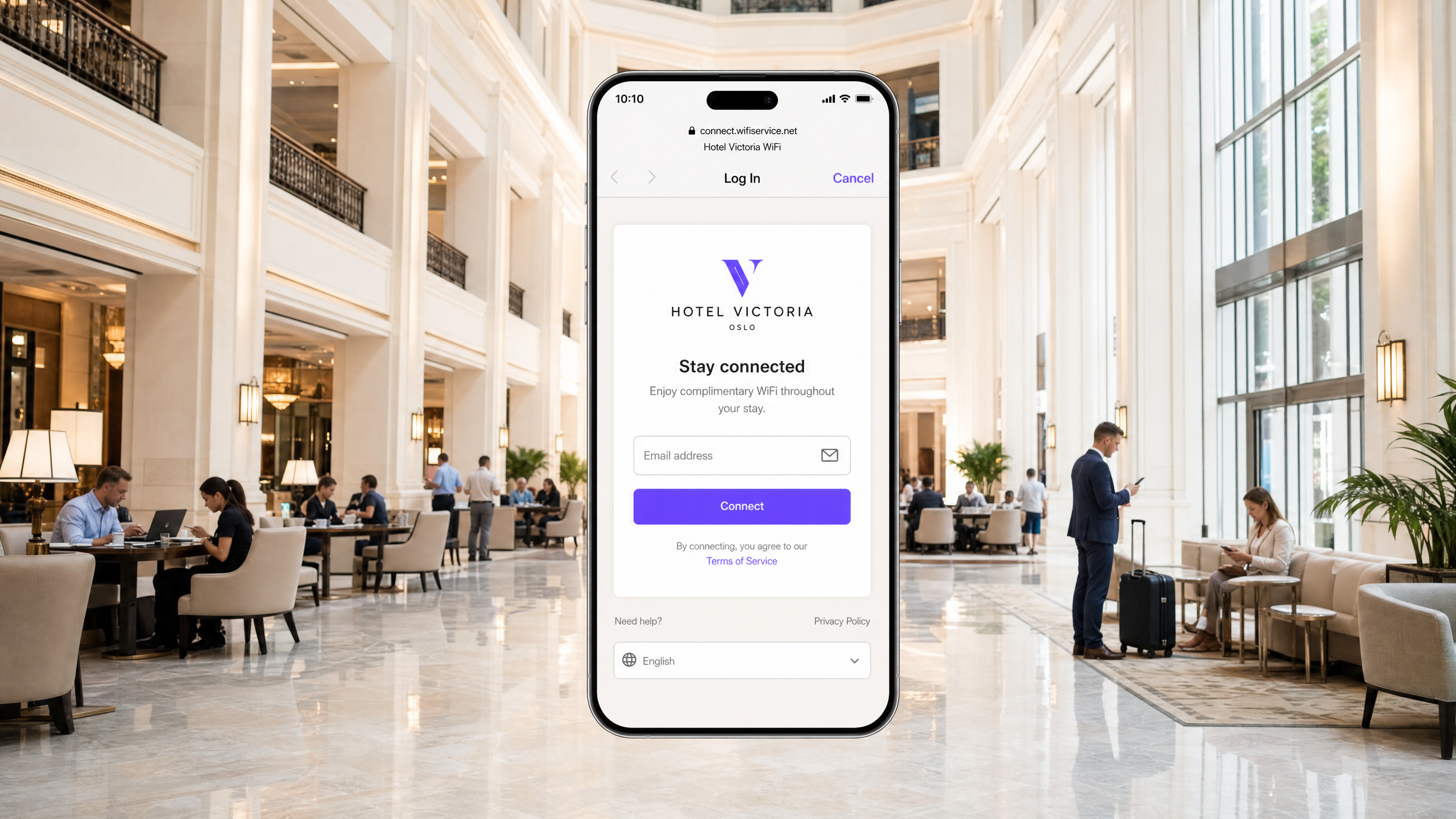
For modern enterprise venues, guest wireless networks are no longer a simple amenity; they represent a critical touchpoint for customer engagement, operational intelligence, and brand positioning. However, the business value of these networks depends entirely on the reliability of the initial connection experience. When a guest connects to a network and the captive portal login page fails to appear, the venue immediately suffers from increased front-of-house friction, a surge in support tickets, and lost opportunities for data capture.
At the core of these failures is a fundamental tension between secure web standards and the network-level interception techniques historically used by captive portals. Modern web browsers and operating systems are designed to detect and block unauthorised traffic redirection to protect users from man-in-the-middle attacks. By understanding the precise HTTP and DNS redirection sequences, the impact of secure protocols like HSTS, and the privacy features of modern mobile devices, IT teams can architect robust wireless access solutions. This guide provides the definitive framework for diagnosing and resolving the root causes behind the "guest wifi not connecting captive portal" failure state.
Listen to the full technical briefing:
Technical Deep-Dive: How Captive Portal Detection Actually Works
To troubleshoot a captive portal problem, you must first understand what a captive portal actually does at the network level. Most people think of it as simply a login page. It is actually a network-level traffic interception mechanism.
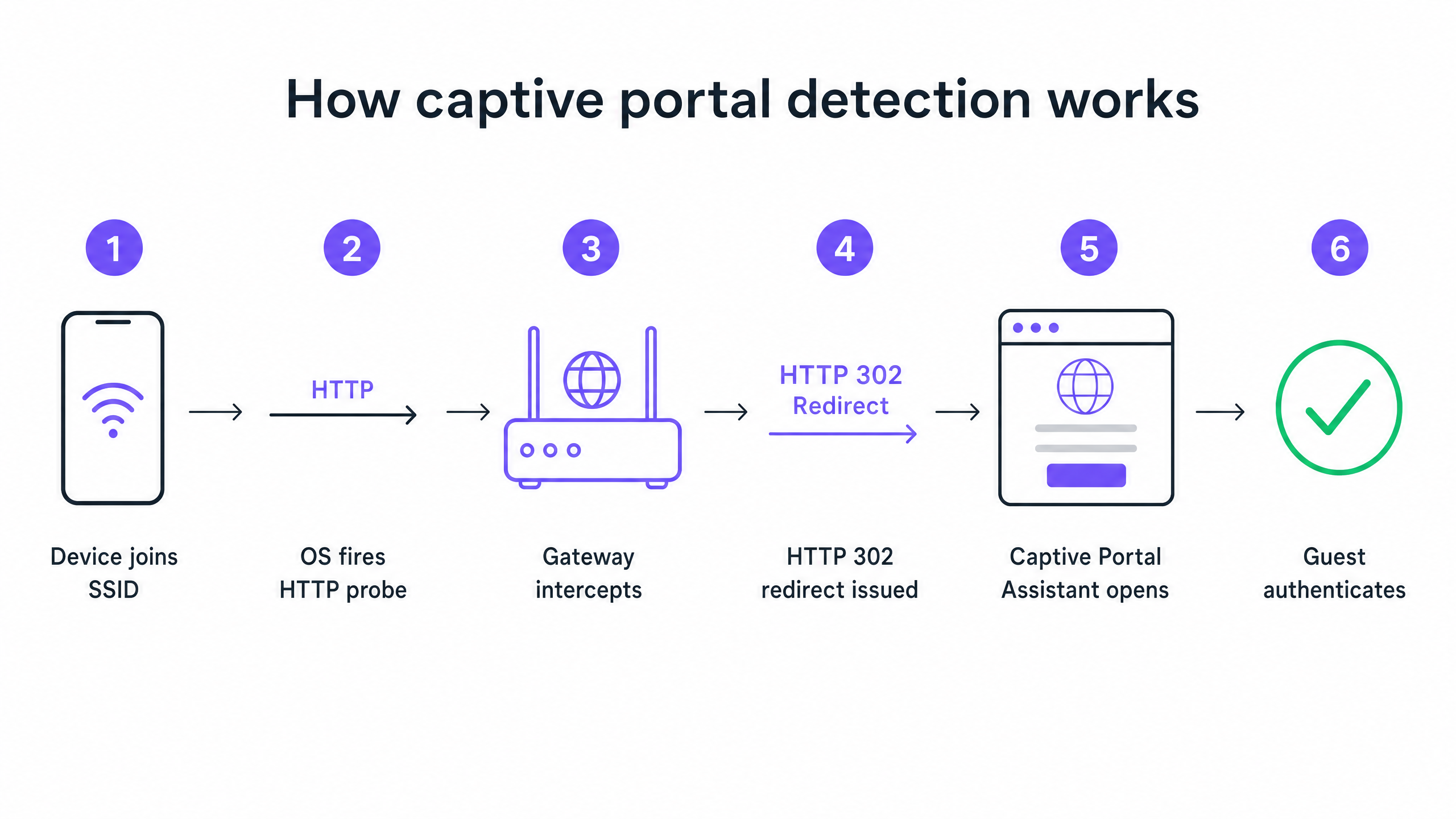
When a device joins your guest SSID and receives an IP address via DHCP, the operating system does not wait for the user to open a browser. In the background, a system service immediately fires off an unencrypted HTTP GET request to a vendor-controlled probe URL. Apple devices query captive.apple.com. Android devices query connectivitycheck.gstatic.com. Windows devices query msftconnecttest.com.
If the network has open internet access, these probes return their expected responses, and the operating system concludes everything is fine. But on a guest network, your wireless gateway or controller intercepts that HTTP probe before it reaches the internet. Instead of the expected response, the gateway returns an HTTP 302 redirect pointing to your captive portal splash page. The operating system detects the unexpected redirect, realises it is behind a captive portal, and opens a sandboxed browser window to display the login page.
The Six Primary Failure Modes
When a guest reports that the WiFi is not connecting, the failure almost always stems from one of six root causes interrupting this sequence.
1. DHCP Pool Exhaustion This is the silent killer at high-density events. If you run a conference with 2,000 attendees on a standard /24 subnet, you have 254 usable IP addresses. If your DHCP lease time is set to the default 24 hours, you will exhaust that pool within minutes of doors opening. Every subsequent connection attempt fails before the captive portal sequence even begins.
2. DNS Interception Failure The captive portal redirect depends on the gateway intercepting the HTTP probe. But the probe requires a DNS lookup first. If your DNS configuration does not permit pre-authenticated clients to resolve external domain names, the probe never fires.
3. Incomplete Walled Garden The walled garden defines which external domains unauthenticated guests can reach. If your portal splash page loads assets from a CDN that is not in the walled garden, the page renders as a blank screen. If you offer social login via Google, Apple, or Facebook, every OAuth domain those providers use must be whitelisted. Social identity providers update their CDN IP ranges regularly. A walled garden that worked perfectly six months ago may be silently broken today.
4. HSTS Blocking the Redirect HTTP Strict Transport Security (HSTS) is a browser security policy that forces connections to specific domains over HTTPS only. If a guest attempts to contact an HSTS-preloaded domain, and your gateway tries to intercept that HTTPS request to redirect to the portal, the browser detects a certificate mismatch. It presents a non-bypassable security warning and blocks the redirect entirely. The correct solution is never to attempt HTTPS interception. Your gateway should only redirect the unencrypted HTTP canary probes.
5. Active VPN on the Guest Device A VPN encrypts all traffic from the device and routes it through an external tunnel before it reaches your gateway. Your gateway never sees the HTTP probe. The captive portal detection sequence never triggers.
6. MAC Address Randomisation Modern iOS and Android devices use randomised MAC addresses by default as a privacy feature. Since captive portal session state is tracked by MAC address, a guest who authenticated an hour ago may be presented with the login page again after their device MAC rotates.
Implementation Guide: Architecting for Reliability
A well-configured captive portal deployment requires careful coordination across your Guest WiFi infrastructure.
Step 1: Optimise DHCP Architecture
For any venue expecting more than 200 concurrent devices, move away from a single /24 subnet. Use /22 or larger, and set lease times to match your venue dwell profile. A hotel sets leases to 8 hours. A stadium sets leases to 3 hours. A shopping centre sets leases to 90 minutes. A conference centre sets leases to 30 minutes.
Step 2: Automate Walled Garden Management
Validate your walled garden before every major event. On Purple's platform, we maintain and update these walled garden entries automatically as part of our cloud-managed service, which removes the manual maintenance burden from your team. We support integrations with Cisco Meraki, HPE Aruba, Ruckus, Juniper Mist, Ubiquiti UniFi, Cambium, Extreme, and Fortinet.
Step 3: Implement RFC 8910 (DHCP Option 114)
The long-term standards-based fix for HSTS conflicts is RFC 8910, which defines DHCP Option 114. This option allows your DHCP server to directly advertise the captive portal URL to the client device, bypassing the need for HTTP redirection entirely. iOS 14 and Android 11 and above support this natively.
Best Practices
Deploy Profile-Based Authentication for Returning Visitors Captive portals are a mature technology, but they carry inherent friction. OpenRoaming, built on Passpoint and 802.1X, allows returning guests to connect automatically and securely without ever seeing a login page. Purple acts as a free identity provider for OpenRoaming under our Connect plan. Venues like Premier Inn and Manchester Airports Group are already deploying this to eliminate re-authentication friction for repeat visitors while maintaining full GDPR compliance and first-party data capture.
Never Test from an Authenticated Device One pitfall that catches many IT teams: testing the portal from a device that has previously authenticated. Your device session is still active, so you bypass the portal entirely and conclude everything is working. Always test from a device in a fresh, unauthenticated state.
Read the Related Guidance For further reading on securing your networks, see our What Is Secure WiFi: Essential Guide for Business 2026 and our Bandwidth Management: A Practical Guide for 2026 .
Troubleshooting & Risk Mitigation
When a guest reports a connection issue, your front-of-house staff need a rapid diagnostic framework.
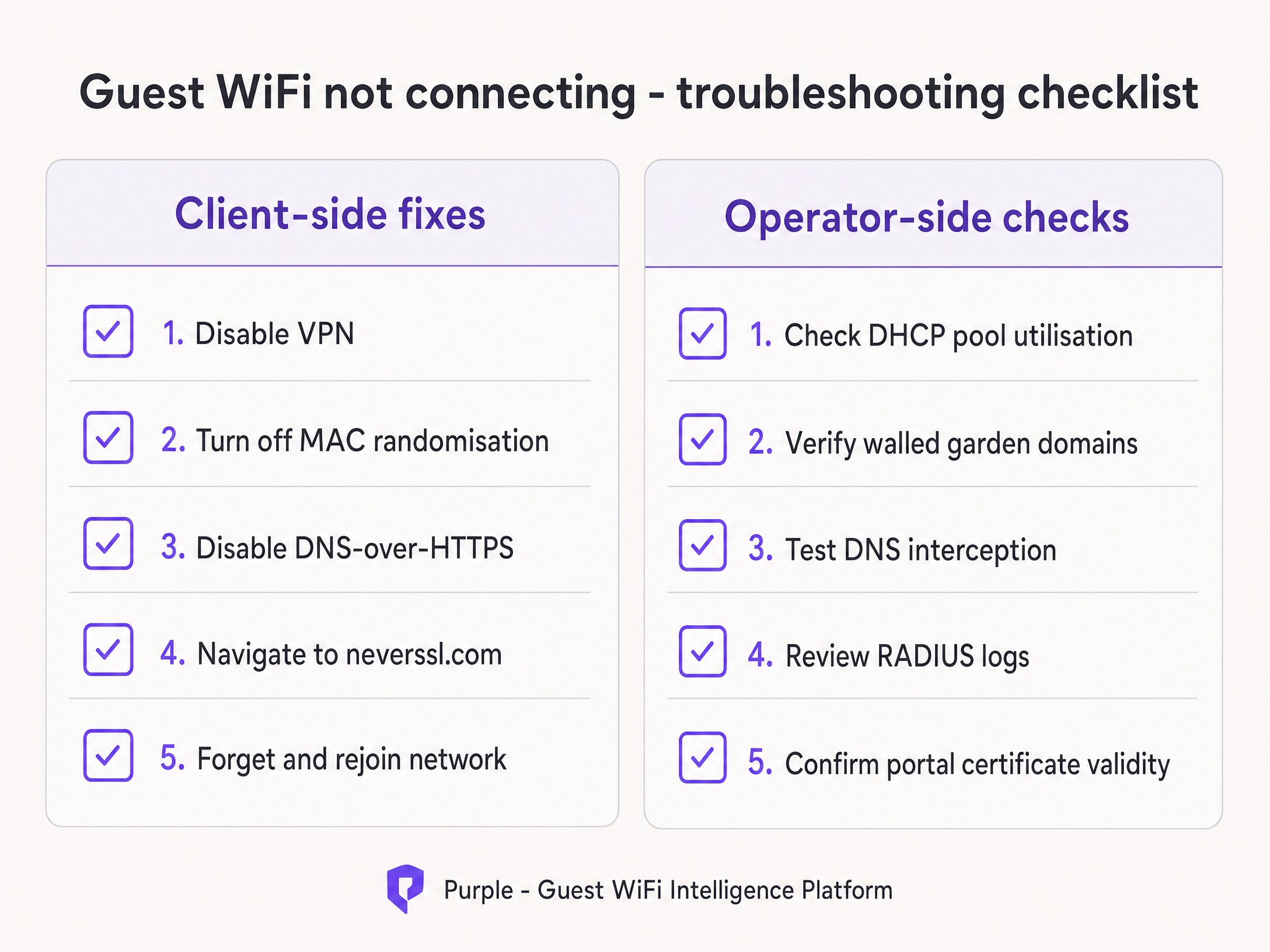
Instruct your staff to run through the client-side fixes first:
- Ask the guest to disable any active VPN.
- Instruct the guest to turn off MAC randomisation (Private Address) for your specific SSID.
- Have the guest open a standard browser and navigate to
http://neverssl.com. Because this site is designed to never use SSL, the gateway can easily intercept the request and trigger the redirect. - If all else fails, ask the guest to forget the network and rejoin.
If the issue persists across multiple guests, escalate to the operator-side checks. Review DHCP pool utilisation immediately, verify the RADIUS logs for Access-Reject messages, and test DNS interception.
ROI & Business Impact
The business impact of a reliable captive portal extends far beyond IT metrics. By eliminating connection failures, venues directly increase their marketing database growth rate.
Consider Harrods, who achieved a 57x marketing ROI by optimising their WiFi Analytics and captive portal flow. Or AGS Airports, who delivered an 842% ROI through seamless tiered bandwidth management. A reliable connection experience is the foundational requirement for gathering the modern feedback collection data detailed in our Modern Feedback Collection: A Playbook for Venues 2026 guide.
Every failed captive portal load is a lost customer profile. By implementing the architectural standards outlined in this guide, IT leaders transform their wireless infrastructure from a cost centre into a reliable, compliant revenue generator.
Key Definitions
Captive Portal
A network-level interception mechanism that forces an unauthenticated user to view and interact with a specific web page before being granted access to the public internet.
When IT teams deploy guest networks, the captive portal is the primary tool for enforcing terms of service and capturing first-party marketing data.
Walled Garden
A pre-authentication access control list (ACL) that defines which external IP addresses or domain names an unauthenticated device is permitted to access.
Crucial for allowing devices to load the captive portal splash page assets and communicate with social identity providers before the user has fully authenticated.
HSTS (HTTP Strict Transport Security)
A web security policy mechanism that helps to protect websites against man-in-the-middle attacks such as protocol downgrade attacks and cookie hijacking.
HSTS is the primary reason why intercepting HTTPS traffic to display a captive portal results in severe browser security warnings rather than a successful redirect.
RFC 8910 (DHCP Option 114)
An IETF standard that allows a DHCP server to directly advertise the URL of the captive portal to the client device during the initial IP address assignment.
This standard eliminates the need for HTTP redirection entirely, solving the HSTS conflict and providing a cleaner connection experience.
MAC Address Randomisation
A privacy feature in modern mobile operating systems that generates a new, random MAC address for each wireless network the device joins, or periodically rotates the address.
This feature breaks traditional captive portal session persistence, forcing returning guests to log in repeatedly unless the venue upgrades to profile-based authentication like OpenRoaming.
OpenRoaming
A global roaming federation built on Passpoint and 802.1X that allows users to connect to public WiFi networks automatically and securely without interacting with a captive portal.
Purple acts as a free identity provider for OpenRoaming under the Connect plan, allowing venues to eliminate re-authentication friction.
HTTP 302 Redirect
An HTTP response status code indicating that the requested resource resides temporarily under a different URI.
This is the specific mechanism the wireless gateway uses to redirect the device's HTTP canary probe to the captive portal splash page.
Canary Probe
An automated, unencrypted HTTP request sent by an operating system immediately after connecting to a network to test for internet connectivity.
Apple uses captive.apple.com; Android uses connectivitycheck.gstatic.com. Intercepting these probes is the foundation of captive portal detection.
Worked Examples
A 2,500-capacity conference centre in London is hosting a major technology summit. Within 45 minutes of the keynote beginning, attendees report that the 'guest wifi not connecting captive portal' issue is widespread. The SSID is visible, but devices either fail to obtain an IP address or receive an IP but see no login screen. The network is configured with a single /23 subnet and 12-hour DHCP leases.
- Identify DHCP Exhaustion: A /23 subnet provides 1,022 usable IP addresses. With 2,500 attendees, the pool is undersized. The 12-hour lease means addresses are not returned to the pool when attendees leave the building for lunch.
- Expand the Subnet: Reconfigure the guest VLAN to use a /21 subnet, providing 4,094 usable IP addresses, comfortably exceeding the venue capacity.
- Reduce Lease Time: Change the DHCP lease time from 12 hours to 30 minutes. This ensures that IP addresses from devices that disconnect (e.g., when an attendee leaves) are quickly reclaimed.
- Clear Leases: Clear the existing DHCP bindings to force active devices to renew under the new parameters.
A retail chain rolls out a new captive portal featuring social login via Google and Facebook. During testing, the IT team finds that the portal splash page loads correctly, but when a user taps 'Log in with Google', the page times out and fails to connect. Standard email registration works perfectly.
- Diagnose Walled Garden Failure: The timeout indicates that the unauthenticated client device cannot reach the Google OAuth servers to complete the authentication handshake.
- Audit Walled Garden Entries: Review the pre-authentication access control list on the wireless controller (e.g., Cisco Meraki or HPE Aruba).
- Add Required Domains: Add the specific Google and Facebook authentication domains (e.g., accounts.google.com) to the walled garden. Crucially, add wildcard entries for the CDNs that serve the login page assets (e.g., *.gstatic.com).
- Implement Automated Updates: Because these providers change their IP ranges frequently, configure the controller to use wildcard domain snooping rather than static IP whitelisting.
Practice Questions
Q1. A retail venue reports that their captive portal works perfectly for guests using standard email registration, but guests attempting to use the 'Log in with Facebook' option experience a blank white screen after tapping the button. What is the most likely architectural cause?
Hint: Consider what network resources the unauthenticated device needs to reach to render the Facebook login prompt.
View model answer
The venue has an incomplete walled garden. The wireless gateway is blocking the unauthenticated device from reaching Facebook's OAuth domains or CDN infrastructure. The IT team must update the pre-authentication access control list to include all required wildcard domains for Facebook authentication.
Q2. You are designing the guest WiFi architecture for a major football stadium. The venue holds 60,000 fans, and matches last approximately 3 hours. The current configuration uses a /16 subnet and 24-hour DHCP lease times. During the first match, thousands of fans report they cannot connect. What changes should you implement?
Hint: Calculate the total available IP addresses in the subnet versus the venue capacity, and evaluate the lifecycle of those addresses.
View model answer
The network is experiencing DHCP pool exhaustion. A /16 subnet provides 65,534 usable IP addresses, which is theoretically enough for 60,000 fans. However, with a 24-hour lease time, any device that connects briefly (e.g., staff, vendors, or fans walking past) consumes an IP address that will not be released until the next day. The solution is to reduce the DHCP lease time to 3 hours to match the venue's dwell profile, ensuring IP addresses are recycled efficiently during the event.
Q3. A hotel guest complains that the captive portal login page does not appear automatically on their laptop. When the front desk staff checks the guest's device, they notice a corporate VPN client is running. Why does the VPN prevent the portal from loading?
Hint: Consider how a VPN routes traffic and how the gateway intercepts the captive portal probe.
View model answer
The VPN encrypts all traffic from the laptop and attempts to route it through a secure tunnel to the corporate server. Because the traffic is encrypted, the local wireless gateway cannot inspect it, cannot identify the unencrypted HTTP canary probe, and therefore cannot issue the HTTP 302 redirect required to trigger the captive portal. The guest must disable the VPN, authenticate via the portal, and then re-enable the VPN.
Continue reading in this series
How to Implement SCEP for Automated WiFi Certificate Enrollment
This guide explains how to implement SCEP (Simple Certificate Enrollment Protocol) for automated WiFi certificate enrollment across enterprise venues. It covers the full architectural blueprint - from PKI design and MDM integration to the mandatory three-step deployment sequence - and shows IT managers and network architects how to eliminate shared credentials, automate certificate lifecycle management, and satisfy PCI DSS and GDPR requirements at scale.
GDPR and Guest WiFi: Compliance Guide for Venue Marketers and IT
This guide provides IT managers and venue operators with a practical framework for ensuring Guest WiFi services are fully GDPR compliant. It covers technical architecture, consent mechanics, data retention, and how to transform compliance into a secure first-party data asset.
Integrating WeChat Authentication with Guest WiFi Captive Portals
This guide explains how to integrate WeChat OAuth 2.0 authentication into enterprise guest WiFi captive portals. It covers the dual-platform registration requirements, scope selection for first-party data capture, network enforcement via RADIUS Change of Authorization, and compliance with GDPR and China's PIPL. Venue operators in hospitality, retail, and events will find concrete implementation steps, real-world case studies, and security hardening guidance to deploy WeChat login guest wifi at scale.