

Améliorer la productivité du personnel en filtrant les publicités et les traqueurs intrusifs
Ce guide de référence technique fournit des stratégies concrètes aux responsables informatiques et aux architectes réseau pour déployer le filtrage au niveau DNS sur les réseaux d'entreprise. Il explore comment le blocage des publicités et des traqueurs intrusifs atténue les risques de sécurité comme le malvertising tout en récupérant considérablement de la bande passante et en augmentant la productivité du personnel.
Écouter ce guide
Voir la transcription du podcast
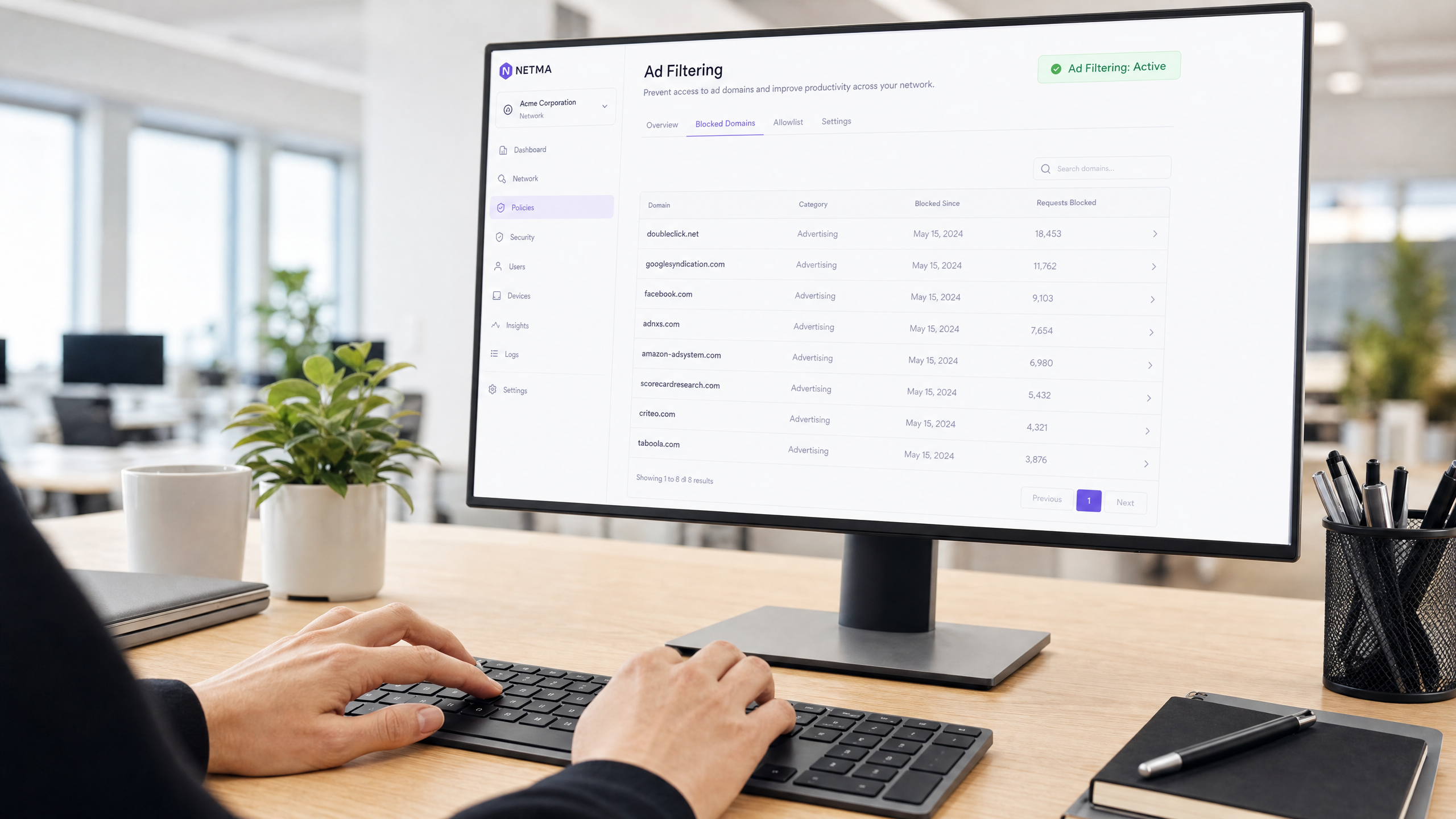
Résumé Exécutif
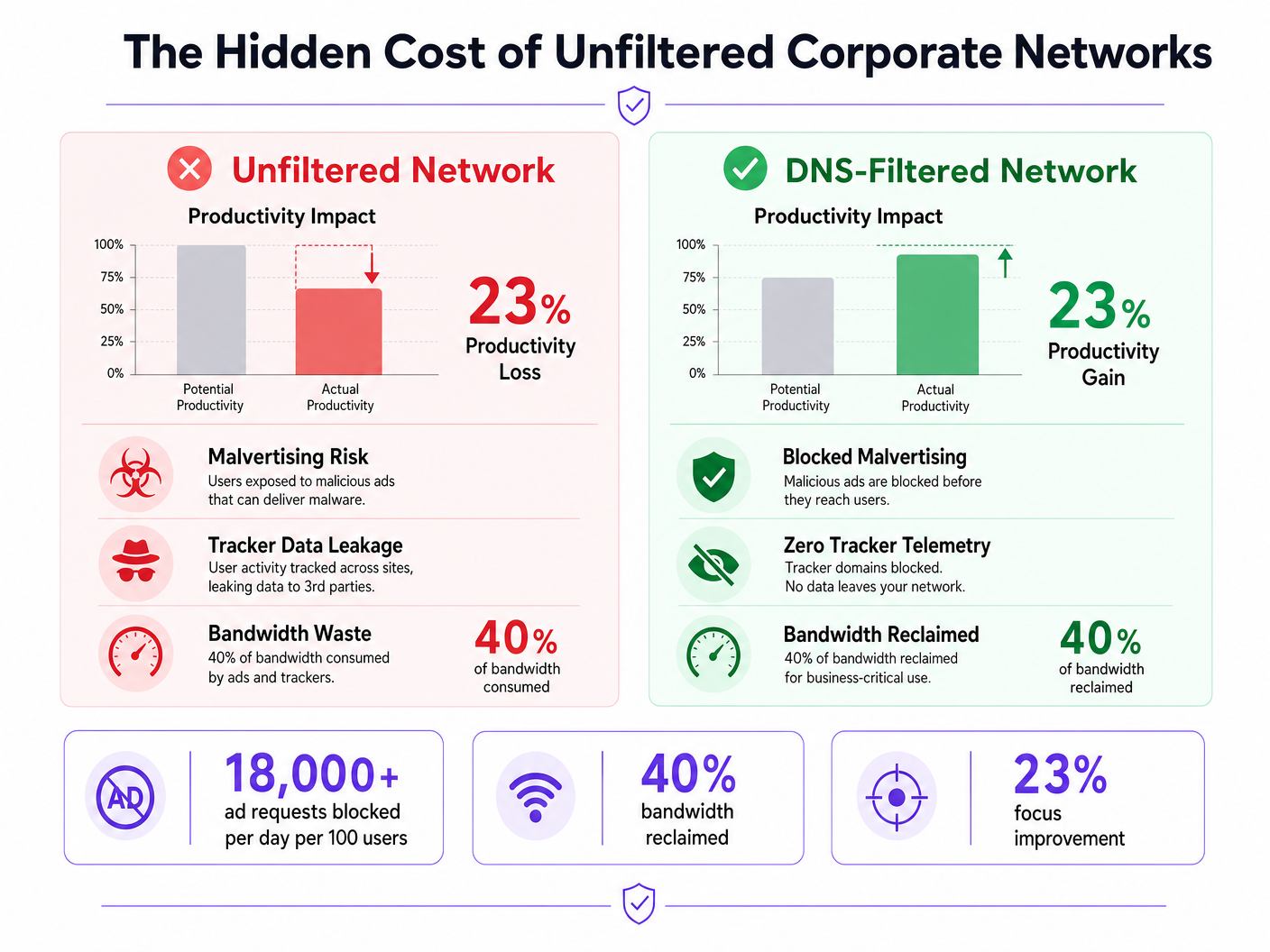
Les réseaux d'entreprise non filtrés exposent les organisations à des vulnérabilités de sécurité importantes et à des pertes de productivité cachées. Lorsque les appareils du personnel se connectent à Internet, jusqu'à 40 % des requêtes DNS peuvent provenir de réseaux publicitaires, de traqueurs tiers et de points de terminaison de télémétrie. Ce trafic de fond consomme non seulement une bande passante précieuse, mais introduit également des vecteurs de malvertising directement dans l'environnement de l'entreprise.
Pour les responsables informatiques et les architectes réseau opérant dans l' Hôtellerie , le Commerce de Détail , la Santé et le Transport , le déploiement d'un filtrage des publicités et des traqueurs au niveau du réseau est une intervention à fort retour sur investissement. En interceptant les requêtes au niveau de la couche DNS, les organisations peuvent empêcher l'exécution de charges utiles malveillantes, assurer la conformité avec les réglementations sur la confidentialité des données comme le GDPR et récupérer la productivité perdue. Ce guide détaille l'architecture technique du filtrage DNS, les stratégies de déploiement indépendantes des fournisseurs et les impacts commerciaux mesurables pour les réseaux d'entreprise modernes.
Approfondissement Technique
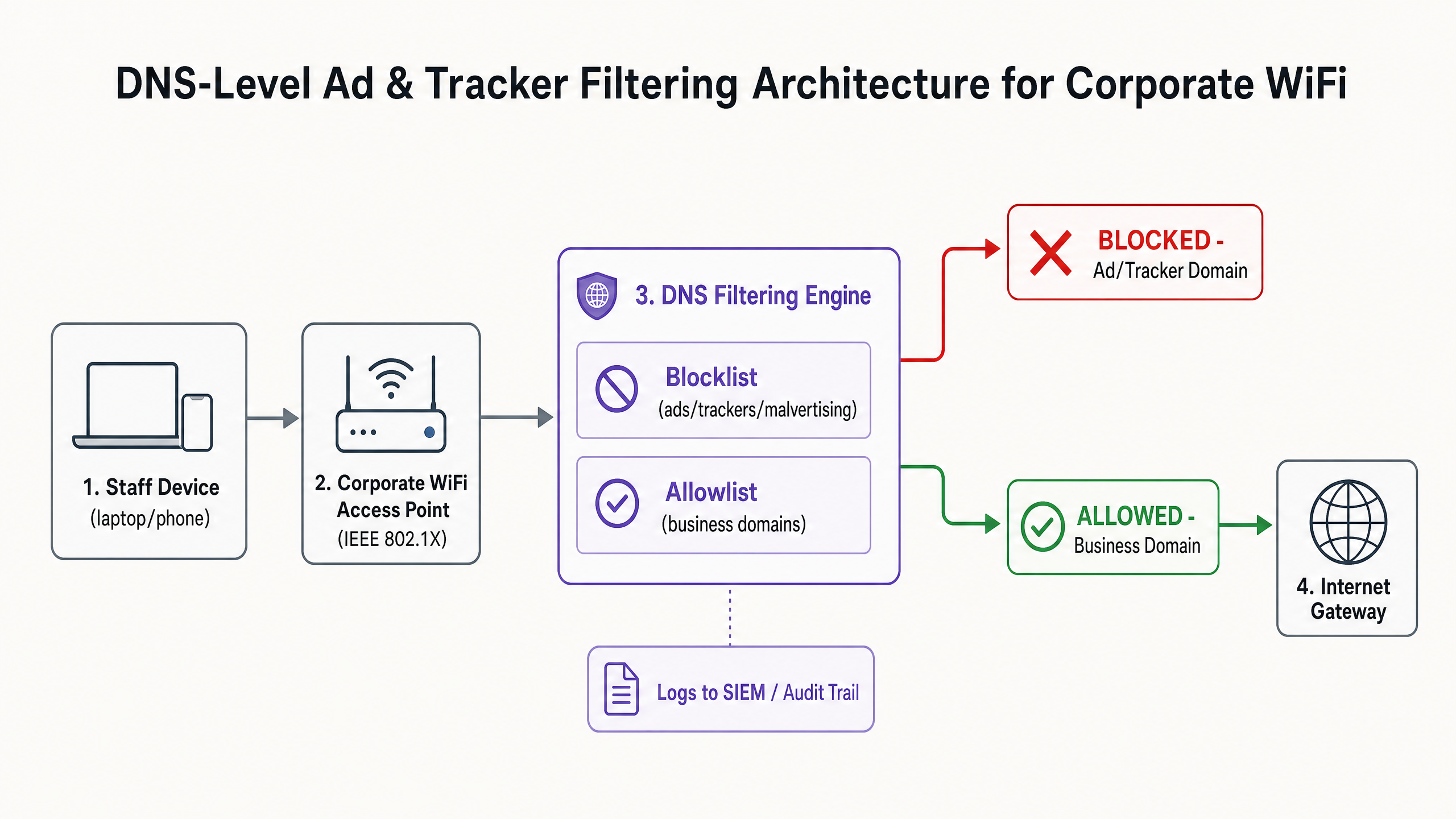
La base d'une atténuation efficace des publicités et des traqueurs est le filtrage au niveau DNS. Contrairement aux extensions de navigateur qui opèrent au niveau de la couche application et nécessitent une gestion individuelle des points de terminaison, le filtrage DNS assure une application à l'échelle de l'infrastructure. Lorsqu'un appareil — qu'il soit géré par l'entreprise ou Bring Your Own Device (BYOD) — tente de résoudre un domaine, le résolveur DNS vérifie la requête par rapport à des listes de blocage de renseignements sur les menaces sélectionnées.
Architecture et Flux
Le moteur de filtrage se situe entre le point d'accès et la passerelle Internet. Si un domaine demandé correspond à un réseau publicitaire connu (par exemple, doubleclick.net) ou à un traqueur, le résolveur renvoie une réponse nulle (0.0.0.0) ou une erreur NXDOMAIN. Le contenu malveillant ou distrayant n'atteint jamais le point de terminaison.
Renseignements sur les Menaces et Listes de Blocage
Une architecture de filtrage robuste repose sur des renseignements dynamiques sur les menaces. Les listes de blocage statiques sont insuffisantes face aux domaines de malvertising qui changent rapidement. Les déploiements d'entreprise agrègent généralement plusieurs sources, y compris des listes open-source (comme EasyList et EasyPrivacy) et des flux de menaces commerciaux. Ces listes doivent catégoriser les domaines avec précision pour éviter les faux positifs qui pourraient perturber les applications critiques pour l'entreprise.
Gestion du DNS Chiffré (DoH/DoT)
Les systèmes d'exploitation et les navigateurs modernes utilisent de plus en plus par défaut le DNS over HTTPS (DoH) ou le DNS over TLS (DoT), chiffrant les requêtes vers des résolveurs externes comme Cloudflare (1.1.1.1) ou Google (8.8.8.8). Cela contourne le filtrage DNS local. Pour maintenir le contrôle, les architectes réseau doivent configurer les pare-feu périphériques pour bloquer le port TCP/UDP 853 sortant (DoT) et intercepter ou bloquer les adresses IP des fournisseurs DoH connus, forçant les clients à revenir au résolveur local fourni.
Guide d'Implémentation
Le déploiement du filtrage DNS nécessite une approche progressive pour éviter de perturber les opérations. Une implémentation soudaine et agressive d'une liste de blocage brisera inévitablement des applications SaaS légitimes et générera des tickets au service d'assistance.
Phase 1 : Segmentation du Réseau et Authentification
Avant de modifier la résolution DNS, assurez-vous que le réseau du personnel est logiquement séparé du WiFi Invité et des environnements IoT à l'aide de VLANs. Implémentez WPA3-Enterprise avec l'authentification IEEE 802.1X. Cela garantit que seuls les utilisateurs authentifiés accèdent au SSID de l'entreprise et permet l'application de politiques par utilisateur. Si vous comptez toujours sur des clés pré-partagées (PSK), la mise à niveau de votre modèle d'authentification est l'étape préalable. Pour plus d'informations sur la modernisation de votre infrastructure, consultez notre guide sur Office Wi Fi : Optimisez votre réseau Wi-Fi de bureau moderne .
Phase 2 : Déploiement du Résolveur
Sélectionnez une architecture de filtrage DNS qui correspond à vos capacités opérationnelles :
- Appareil sur site : Offre la latence la plus faible et garantit que tous les journaux de requêtes restent au sein de votre infrastructure, ce qui est crucial pour les exigences strictes en matière de souveraineté des données.
- Service basé sur le cloud : Délègue la maintenance des renseignements sur les menaces au fournisseur, idéal pour les environnements de vente au détail ou d'hôtellerie distribués.
- Modèle hybride : Utilise un transmetteur local pour la résolution DNS interne tout en acheminant les requêtes externes vers un service cloud filtré.
Phase 3 : Mode Surveillance Uniquement
Déployez le moteur de filtrage en mode surveillance uniquement pendant 14 à 28 jours. Ne bloquez aucun trafic. Au lieu de cela, ingérez les journaux de requêtes dans votre SIEM pour établir une base de référence. Analysez les principaux domaines bloqués par rapport à vos applications métier.
Phase 4 : Configuration et Application de la Liste Blanche
Sur la base de la phase de surveillance, construisez une liste blanche explicite pour les domaines tiers nécessaires utilisés par votre CRM, ERP ou passerelles de paiement. Une fois la liste blanche vérifiée, passez le moteur en mode d'application. Assurez-vous de maintenir une piste d' audit claire de toutes les modifications de configuration et des événements bloqués.
Bonnes Pratiques
Pour assurer un déploiement réussi et maintenir l'intégrité du réseau, respectez les bonnes pratiques suivantes, indépendantes des fournisseurs :
- Communiquez avant d'appliquer : Informez le personnel avant d'activer le filtrage. Présentez-le comme une amélioration de la sécurité et des performances plutôt que comme une mesure de surveillance des RH. Fournissez un processus clair, soutenu par un SLA, permettant aux utilisateurs de demander le déblocage de domaines.
- Appliquez l'attribution DNS DHCP : Empêchez les utilisateurs de configurer manuellement des serveurs DNS alternatifs en imposant l'utilisation du résolveur fourni par DHCP.
- Examinez régulièrement la liste blanche : Les applications métier évoluent. Effectuez des examens trimestriels de votre liste blanche pour supprimer les domaines obsolètes et évaluerrépondre aux nouvelles exigences.
- Intégration avec la protection des terminaux : Le filtrage DNS est une défense périmétrique. Il doit être associé à des solutions robustes de détection et de réponse aux terminaux (EDR) pour se protéger contre les menaces introduites via USB ou les pièces jointes d'e-mail.
Dépannage et atténuation des risques
Le risque le plus important lors du déploiement est le sur-blocage, qui a un impact direct sur les opérations commerciales.
Faux positifs
Lorsqu'un service légitime ne parvient pas à se charger, il s'appuie souvent sur un domaine de suivi en arrière-plan pour l'authentification ou l'analyse.
- Atténuation : Donnez au service d'assistance la possibilité de contourner temporairement les blocages ou un flux de travail simplifié pour la liste blanche. Utilisez les journaux de requêtes pour identifier le domaine bloqué spécifique à l'origine de l'échec.
Contournement DNS chiffré
Les utilisateurs techniquement compétents ou les logiciels malveillants sophistiqués peuvent tenter de contourner le résolveur local en utilisant DoH/DoT.
- Atténuation : Mettez en œuvre des règles de pare-feu strictes bloquant le trafic sortant vers les résolveurs DoH connus. Surveillez les journaux du pare-feu pour détecter les tentatives de connexion répétées au port 853.
Interférence avec le réseau invité
L'application de politiques de filtrage agressives pour le personnel au réseau invité peut dégrader l'expérience des visiteurs.
- Atténuation : Maintenez une isolation VLAN stricte. Appliquez un profil de filtrage plus léger, axé sur la sécurité (bloquant les logiciels malveillants et le contenu pour adultes), au réseau invité, géré via une plateforme dédiée WiFi Analytics .
ROI et impact commercial
L'impact commercial du filtrage au niveau du réseau va au-delà de la sécurité ; c'est un moteur de productivité mesurable.
Récupération de bande passante
En éliminant jusqu'à 40 % des requêtes d'arrière-plan inutiles, les organisations récupèrent une bande passante significative. Cela réduit le besoin de mises à niveau coûteuses des circuits WAN et améliore les performances des applications cloud critiques.
Gains de productivité
Réduire l'exposition aux publicités intrusives et aux malvertising minimise les interruptions cognitives. Bien que les chiffres exacts varient, l'atténuation de ces distractions permet de récupérer des centaines d'heures de travail concentré chaque année à l'échelle de l'entreprise. Pour des stratégies similaires appliquées aux environnements éducatifs, consultez notre guide sur Minimiser les distractions des étudiants avec le blocage des publicités au niveau du réseau et la version espagnole Minimizar las distracciones de los estudiantes con el bloqueo de anuncios a nivel de red .
Conformité et réduction des risques
Le filtrage des traqueurs au niveau du réseau démontre une conformité proactive avec les cadres de protection des données comme GDPR et PCI DSS. En empêchant l'exfiltration de données et en bloquant les charges utiles de malvertising avant qu'elles n'atteignent le terminal, les organisations réduisent considérablement leur exposition aux risques et les coûts potentiels de réponse aux incidents.
Écoutez le briefing
Pour une plongée plus approfondie dans les stratégies de déploiement, écoutez notre briefing audio :
Définitions clés
DNS-Level Filtering
The process of blocking access to specific domains by intercepting DNS queries and returning a null response or redirect, preventing the device from connecting to the target server.
Used by IT teams to enforce security and productivity policies across an entire network without requiring endpoint software.
Malvertising
The use of online advertising to distribute malware. Malicious code is injected into legitimate advertising networks and displayed on trusted websites.
A primary vector for ransomware and spyware, making ad blocking a critical cybersecurity control, not just a productivity tool.
DNS over HTTPS (DoH)
A protocol for performing remote Domain Name System resolution via the HTTPS protocol, encrypting the data between the DoH client and the DoH-based DNS resolver.
While improving user privacy, DoH can bypass corporate DNS filtering policies if not actively managed and blocked at the firewall.
IEEE 802.1X
An IEEE Standard for port-based Network Access Control (PNAC), providing an authentication mechanism to devices wishing to attach to a LAN or WLAN.
Essential for enterprise WiFi security, replacing shared passwords (PSKs) with individual user credentials or certificates.
Telemetry
The automatic recording and transmission of data from remote or inaccessible sources to an IT system in a different location for monitoring and analysis.
Often generated by software and devices tracking user behaviour; blocking unnecessary telemetry reclaims bandwidth and protects privacy.
False Positive
An error in data reporting in which a test result improperly indicates presence of a condition, such as when a legitimate business domain is incorrectly categorised as malware or advertising.
The main cause of operational disruption during DNS filtering rollouts, mitigated by proper allowlisting.
SIEM (Security Information and Event Management)
A solution that provides real-time analysis of security alerts generated by applications and network hardware.
DNS query logs should be exported to the SIEM to identify compromised devices attempting to contact command-and-control servers.
Allowlist
A mechanism that explicitly allows access to specific entities (domains, IP addresses) while denying access to all others by default, or overriding a broader blocklist.
Critical for ensuring third-party integrations (like payment gateways or CRMs) function correctly behind a strict DNS filter.
Exemples concrets
A 200-room hotel needs to secure its staff network (used by reception, housekeeping, and management) against malvertising, while ensuring the property management system (PMS) remains fully operational. The current network uses a single WPA2-PSK SSID for all staff.
- Upgrade the staff network to WPA3-Enterprise using IEEE 802.1X authentication to ensure individual accountability and encryption.
- Segment the staff network onto a dedicated VLAN, isolated from the guest WiFi.
- Deploy a cloud-based DNS filtering service with a local forwarder.
- Run the filter in monitor-only mode for 14 days.
- Analyze logs to identify all domains accessed by the PMS (e.g., third-party booking engine APIs, payment gateways) and add them to the allowlist.
- Enforce blocking for 'Advertising', 'Trackers', and 'Malware' categories.
- Block outbound TCP/UDP port 853 at the firewall to prevent DoT bypass.
A retail chain is experiencing high latency on its point-of-sale (POS) terminals during peak hours. Packet analysis reveals 35% of DNS traffic consists of tracking and telemetry requests from staff BYOD devices connected to the corporate network.
- Implement DNS-level filtering targeting 'Trackers' and 'Advertising' categories.
- Ensure POS terminals are on a strictly isolated VLAN with restricted outbound internet access (PCI DSS Requirement 1.3).
- Route the BYOD staff VLAN through the DNS filtering engine.
- Communicate the change to staff, emphasising the performance benefits for the POS systems.
- Monitor bandwidth utilisation post-enforcement to quantify the reclaimed capacity.
Questions d'entraînement
Q1. Your organisation is implementing DNS filtering. During the monitor-only phase, you notice that a high volume of requests to 'api.segment.io' are being flagged under the 'Trackers' category. This domain is used by your marketing team's analytics dashboard. How should you proceed?
Conseil : Consider the impact of blocking versus the business requirement for the tool.
Voir la réponse type
Add 'api.segment.io' to the explicit allowlist before moving to enforcement mode. While it is technically a tracker, it is a sanctioned business application. Failing to allowlist it will break the marketing dashboard and generate support tickets.
Q2. After deploying DNS filtering, you observe that devices using the latest version of a popular web browser are still loading ads and resolving domains that should be blocked. Older devices are filtered correctly. What is the most likely cause?
Conseil : Modern browsers often try to encrypt their DNS queries.
Voir la réponse type
The modern browser has likely enabled DNS over HTTPS (DoH) by default, bypassing the local DNS resolver and communicating directly with an external provider (like Cloudflare). You must configure the firewall to block or intercept known DoH IP addresses to force the browser to fall back to the local filtered DNS.
Q3. A venue operations director asks if they can use the same aggressive ad-blocking DNS policy on the public Guest WiFi as they do on the corporate Staff WiFi to save bandwidth. What is the architectural recommendation?
Conseil : Consider the user experience and the different risk profiles of staff versus guests.
Voir la réponse type
No. The Staff and Guest networks must remain on isolated VLANs with separate DNS policies. Applying aggressive corporate filtering to the Guest WiFi will likely break captive portals, cause false positives on diverse guest devices, and lead to a poor user experience. Guest networks should use a lighter filtering profile focused strictly on malware and legal compliance.