
Comment créer une page de connexion WiFi : Conception, Contenu et Bonnes Pratiques
Ce guide complet explore l'architecture, les principes de conception et les stratégies de déploiement nécessaires pour créer une page de connexion WiFi efficace. Il fournit des informations exploitables aux responsables informatiques sur l'intégration des Captive Portals avec l'infrastructure réseau, tout en assurant la conformité GDPR et en maximisant la capture de données de première partie.
Écouter ce guide
Voir la transcription du podcast
Résumé Exécutif
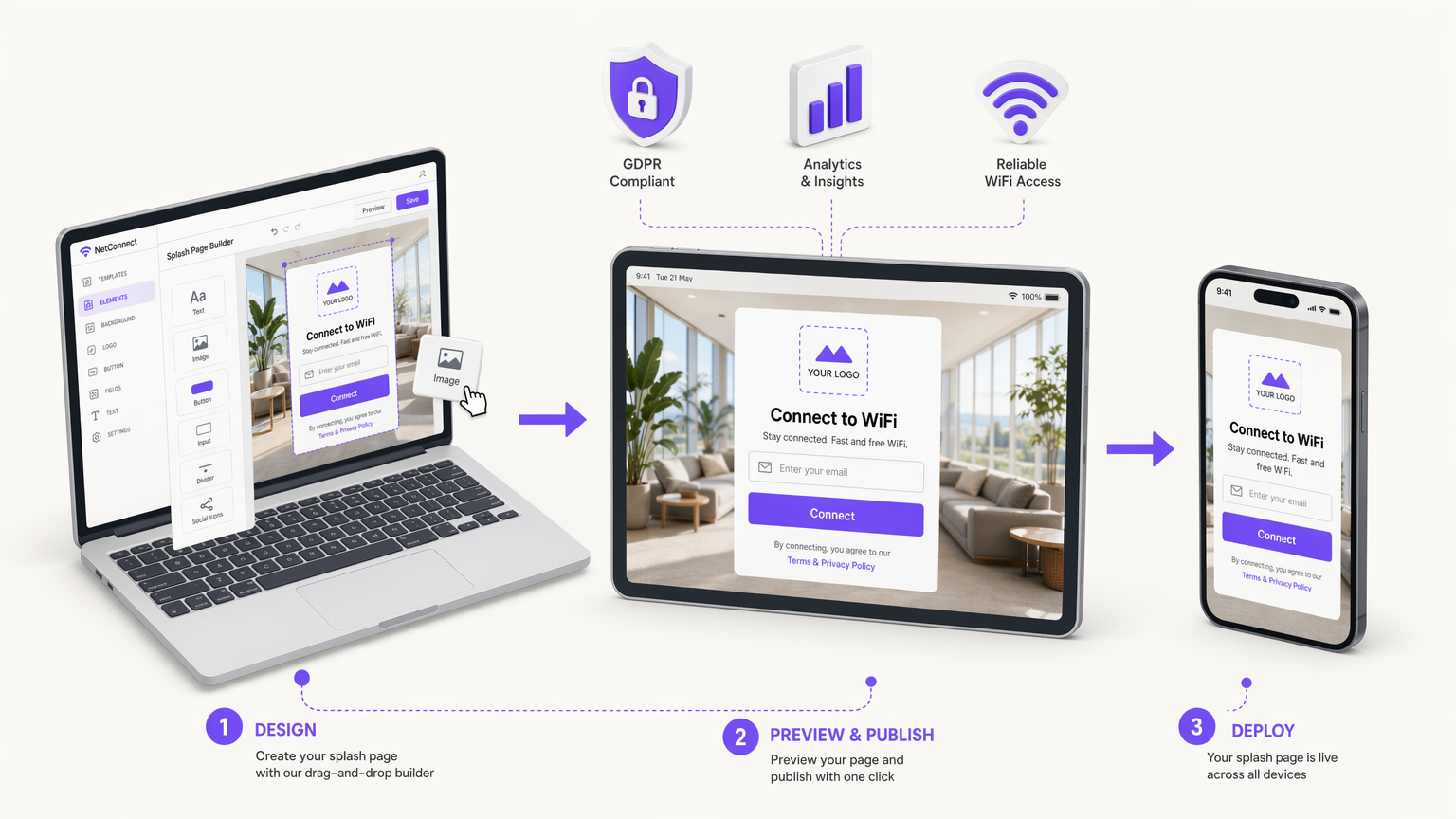
Pour les équipes informatiques d'entreprise et les directeurs d'opérations de sites, le déploiement du WiFi invité ne consiste plus seulement à fournir un accès à Internet – il s'agit d'établir un point de contact numérique sécurisé, conforme et commercialement précieux. La page de connexion WiFi, servie via un Captive Portal, est l'interface critique où cet échange se produit. Une page de connexion bien architecturée transforme le trafic réseau anonyme en données de première partie vérifiées, permettant un engagement ciblé et des analyses opérationnelles.
Ce guide de référence technique détaille comment créer une page de connexion WiFi qui équilibre l'expérience utilisateur avec des exigences strictes de sécurité et de conformité. Nous explorerons l'architecture sous-jacente du Captive Portal, en évaluant les avantages des déploiements hébergés dans le cloud par rapport aux déploiements sur site. Nous définirons également les composants de conception essentiels nécessaires pour minimiser la friction d'authentification, en particulier sur les appareils mobiles, qui représentent la grande majorité des connexions invités.
De plus, ce guide aborde le mandat critique de conformité GDPR, décrivant comment mettre en œuvre des mécanismes de consentement explicite qui résistent à l'examen réglementaire. En intégrant ces principes techniques et de conception, les organisations des secteurs du Commerce de détail , de la Santé , de l' Hôtellerie et du Transport peuvent déployer des solutions WiFi invité robustes qui génèrent un ROI mesurable tout en atténuant les risques liés à la confidentialité des données.
Plongée Technique : Architecture du Captive Portal
Comprendre comment créer une page de connexion WiFi nécessite une solide compréhension de l'architecture sous-jacente du Captive Portal. Un Captive Portal est un mécanisme de contrôle d'accès réseau qui intercepte le trafic HTTP/HTTPS des clients non authentifiés et les redirige vers une page web spécifique – la page de connexion – avant d'accorder l'accès à l'internet plus large.
Mécanismes de Redirection
Le processus d'interception et de redirection repose généralement sur l'une des deux méthodes principales au niveau de la passerelle ou du contrôleur de réseau local sans fil (WLC) :
- Redirection DNS : Lorsqu'un client non authentifié tente de résoudre un nom de domaine, la passerelle intercepte la requête DNS et renvoie l'adresse IP du serveur du Captive Portal au lieu de la destination réelle.
- Redirections HTTP 302 : La passerelle intercepte les requêtes HTTP GET des clients non authentifiés et répond avec un code d'état HTTP 302 Found, dirigeant le navigateur du client vers l'URL du Captive Portal.
Simultanément, l'infrastructure réseau utilise des listes de contrôle d'accès (ACL) de type "jardin clos" ou de pré-authentification. Ces règles de pare-feu bloquent tout trafic sortant, à l'exception des services essentiels (comme DHCP et DNS) et du trafic destiné au serveur du Captive Portal et à tout fournisseur d'identité d'authentification requis (par exemple, les serveurs OAuth de Google ou Facebook).
Modèles de Déploiement : Cloud vs. Sur Site
Lors de l'architecture d'une solution de page de connexion, les responsables informatiques doivent choisir entre deux modèles de déploiement principaux. Pour une comparaison détaillée, consultez notre guide sur Captive Portal Basé sur le Cloud vs. Sur Site : Lequel convient à votre entreprise ? .
- Captive Portal Hébergé dans le Cloud : La page de connexion et le backend d'authentification sont hébergés sur l'infrastructure d'un fournisseur (telle que la plateforme de Purple). Le WLC ou la passerelle locale est configuré(e) pour rediriger les clients vers cette URL externe via RADIUS (Remote Authentication Dial-In User Service). Ce modèle est hautement évolutif, offre une gestion centralisée sur plusieurs sites et assure une haute disponibilité sans dépendre du matériel serveur local.
- Captive Portal Sur Site : Le logiciel du portail s'exécute sur du matériel local ou directement sur le WLC. Bien que cela offre un contrôle local complet et puisse fonctionner même si la liaison WAN est interrompue (bien que l'accès à Internet serait toujours indisponible), cela nécessite une surcharge de maintenance importante et ne dispose pas des capacités d'analyse inter-sites inhérentes aux solutions cloud.
Pour la plupart des déploiements d'entreprise modernes, une architecture hébergée dans le cloud est recommandée pour faciliter la capture centralisée des données et l'intégration transparente avec les plateformes WiFi Analytics .
Guide d'Implémentation : Conception de la Page de Connexion
La conception de la page de connexion a un impact direct sur les taux de connexion et la qualité des données. Une page mal conçue introduit des frictions, entraînant des taux d'abandon élevés. Lorsque vous réfléchissez à la manière de créer une page de connexion, respectez les principes suivants.
Conception Mobile-First et l'Assistant Réseau Captif (CNA)
Plus de 70 % des connexions WiFi invités proviennent de smartphones. Par conséquent, la page de connexion doit être rigoureusement optimisée pour les fenêtres d'affichage mobiles (à partir de 320px de largeur). Cependant, les appareils mobiles utilisent rarement des navigateurs standards pour l'authentification du Captive Portal.
Au lieu de cela, les systèmes d'exploitation utilisent des pseudo-navigateurs, tels que l'Assistant Réseau Captif (CNA) d'Apple ou le Captive Portal Login d'Android. Ces environnements ont des capacités restreintes : ils manquent souvent de support pour les cookies persistants, ont une exécution JavaScript limitée et ne prennent pas en charge plusieurs onglets. Par conséquent, le flux d'authentification doit être rendu côté serveur et minimiser la dépendance aux scripts complexes côté client.
Composants Essentiels de l'Interface Utilisateur
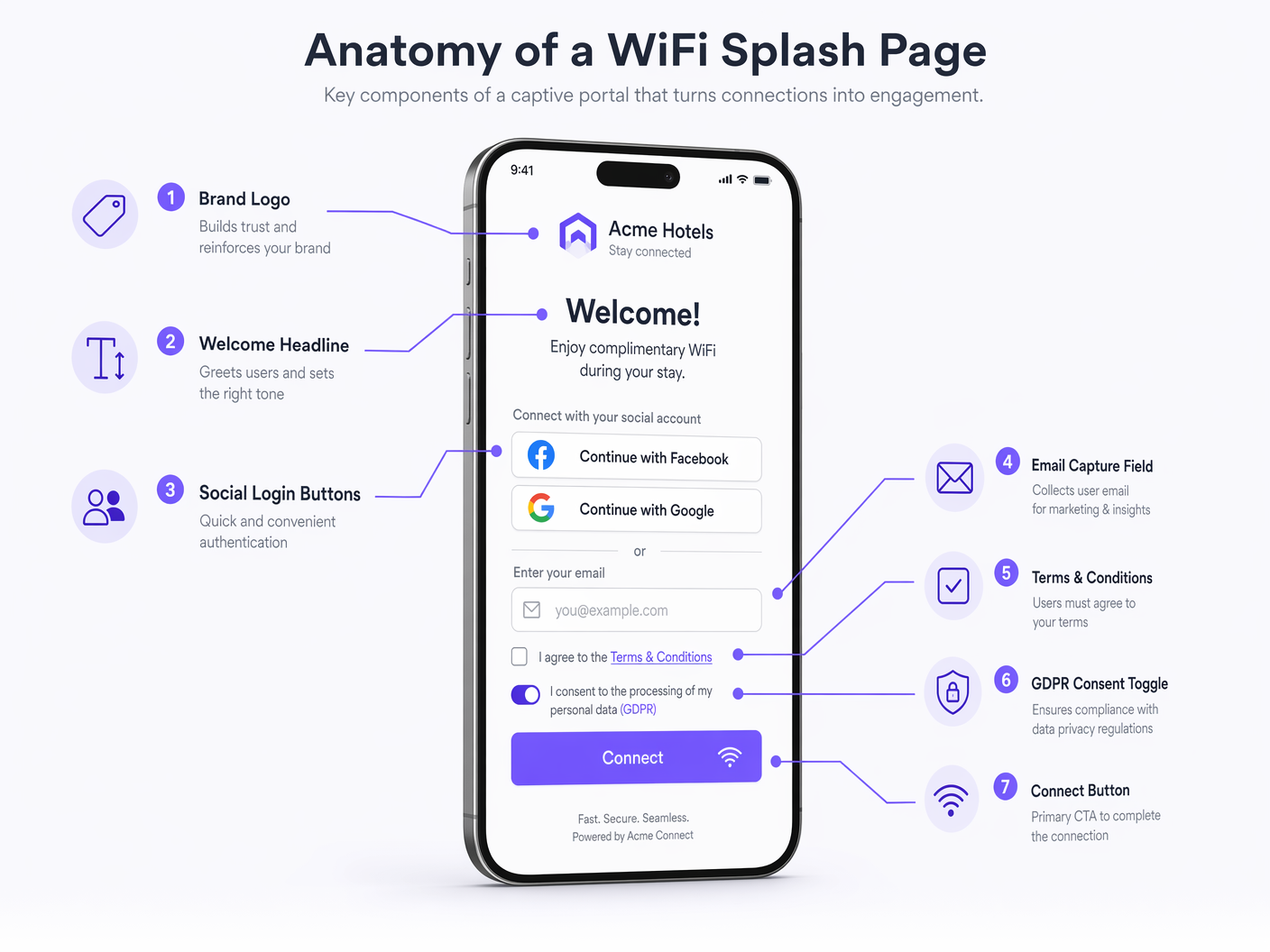
Une page de connexion à fort taux de conversion doit inclure les éléments suivants :
- Identité de Marque : Affichage proéminent du logo de l'entreprise et respect de palettes de couleurs de la marque. Cela établit la confiance et vérifie la légitimité du réseau.
- Proposition de valeur claire : Un titre concis (par exemple, « Connectez-vous au WiFi haut débit gratuit »).
- Méthodes d'authentification : Offrez un équilibre entre la collecte de données et la commodité pour l'utilisateur.
- Capture d'e-mail : La norme pour la création d'une base de données marketing.
- Social OAuth (Google, Facebook) : Réduit les frictions et fournit des données démographiques vérifiées, mais nécessite la configuration d'entrées de jardin clos pour les fournisseurs d'identité respectifs.
- Click-Through : Friction minimale mais ne génère aucune donnée ; généralement déconseillé pour les déploiements commerciaux.
- Appel à l'action (CTA) proéminent : Le bouton « Connecter » doit être très visible et accessible sans défilement (au-dessus du pli) sur les appareils mobiles.
- Redirection post-authentification : Après une authentification réussie, redirigez l'utilisateur vers une page de destination à forte valeur ajoutée, telle qu'une offre promotionnelle, un lien de téléchargement d'application ou un plan du lieu, plutôt que de le laisser sur un écran de succès générique.
Bonnes pratiques : Conformité et sécurité des données
Lors de la détermination de la configuration d'une page de démarrage WiFi, la conformité légale et la sécurité des données sont primordiales. La page de démarrage est l'interface principale pour obtenir le consentement de l'utilisateur dans le cadre de réglementations telles que le Règlement Général sur la Protection des Données (GDPR) et le California Consumer Privacy Act (CCPA).
Mécanismes de consentement conformes au GDPR
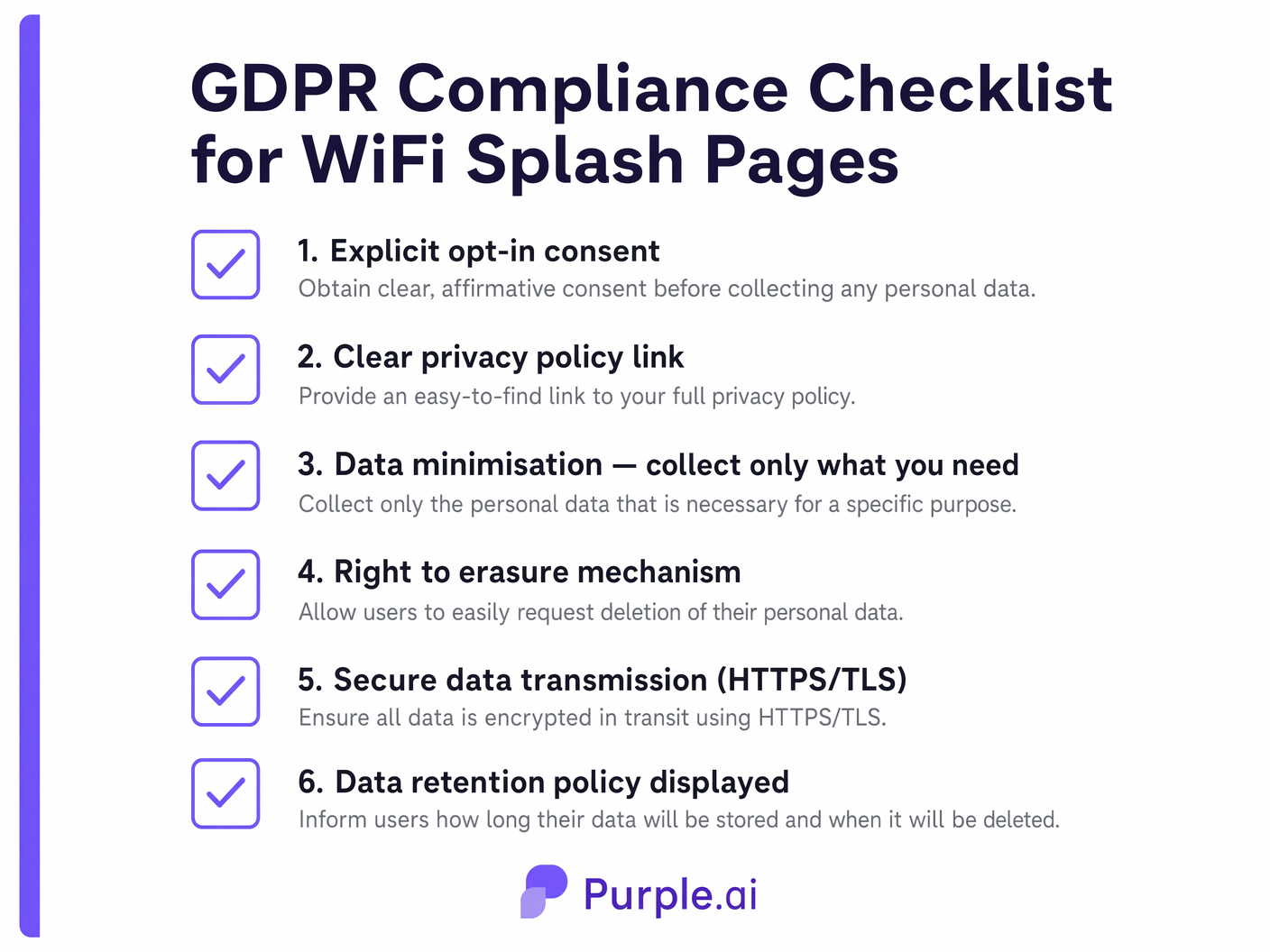
En vertu du GDPR, le consentement au traitement des données personnelles (en particulier à des fins de marketing) doit être donné librement, être spécifique, éclairé et univoque.
- Opt-ins granulaires : Vous ne pouvez pas regrouper l'acceptation des Conditions d'utilisation (qui est requise pour l'accès au réseau) avec le consentement aux communications marketing. Ceux-ci doivent être des cases à cocher distinctes.
- Pas de cases pré-cochées : Les cases à cocher d'opt-in marketing doivent être décochées par défaut. L'utilisateur doit effectuer une action affirmative pour consentir.
- Politique de confidentialité claire : Un lien direct et accessible vers la politique de confidentialité de l'organisation doit être fourni, détaillant quelles données sont collectées, comment elles sont utilisées et combien de temps elles sont conservées.
- Pistes d'audit : Le backend du Captive Portal doit enregistrer l'horodatage, l'adresse IP et la version exacte des conditions acceptées par l'utilisateur afin de fournir une piste d'audit vérifiable du consentement.
Normes de sécurité
- Chiffrement HTTPS/TLS : La page de démarrage doit être servie via HTTPS. Les CNA des systèmes d'exploitation modernes bloqueront souvent ou afficheront des avertissements sévères pour les Captive Portals HTTP. Assurez-vous qu'un certificat TLS valide et fiable est installé sur le serveur du portail.
- Minimisation des données : Ne collectez que les données strictement nécessaires à la finalité déclarée. Si vous n'avez besoin que d'une adresse e-mail pour une newsletter, n'exigez pas la collecte d'un numéro de téléphone ou d'une adresse physique.
Dépannage et atténuation des risques
Même les pages de démarrage bien conçues peuvent rencontrer des problèmes de déploiement. Les équipes informatiques doivent atténuer de manière proactive les modes de défaillance courants suivants :
- Erreurs de certificat : Si la passerelle intercepte le trafic et redirige vers le portail à l'aide d'un certificat auto-signé ou invalide, le navigateur de l'utilisateur affichera un avertissement de sécurité, interrompant ainsi le processus de connexion. Utilisez toujours des certificats provenant d'autorités de certification (CA) fiables.
- Mauvaise configuration du jardin clos : Si les ACL ne permettent pas l'accès aux ressources externes nécessaires (par exemple, les fichiers CSS hébergés sur un CDN, ou les serveurs d'authentification OAuth), la page de démarrage s'affichera incorrectement ou l'authentification échouera. Auditez régulièrement les configurations du jardin clos.
- Défaillances silencieuses des CNA : Étant donné que les CNA ont des fonctionnalités limitées, les pages complexes et riches en JavaScript peuvent simplement ne pas se charger ou ne pas traiter les formulaires sans fournir de message d'erreur à l'utilisateur. Gardez le HTML/CSS léger et comptez sur le traitement côté serveur.
ROI et impact commercial
Le déploiement d'une page de démarrage WiFi stratégique transforme le WiFi invité d'un centre de coûts en un atout générateur de revenus. En capturant des données utilisateur vérifiées, les organisations peuvent alimenter les systèmes CRM et les plateformes d'automatisation marketing.
Par exemple, une chaîne de magasins peut analyser les données de connexion pour mesurer le temps de présence et la fréquence des visites de retour, en corrélant ces métriques avec des campagnes d'e-mail ciblées initiées via la page de démarrage. De même, les établissements hôteliers peuvent utiliser la redirection post-authentification pour générer des revenus auxiliaires immédiats grâce aux réservations de restaurants ou de spas. L'intégration du Captive Portal avec une plateforme complète de WiFi Analytics fournit l'intelligence exploitable nécessaire pour justifier l'investissement dans l'infrastructure et optimiser continuellement l'expérience client.
Définitions clés
Captive Portal
A web page that a user of a public access network is obliged to view and interact with before access is granted.
The fundamental mechanism that intercepts network traffic and serves the splash page.
Splash Page
The specific user interface presented by the captive portal, used for authentication, branding, and data capture.
The digital storefront of the guest WiFi experience; the primary touchpoint for marketing and compliance.
Walled Garden
A restricted environment that controls the user's access to web content and services prior to full network authentication.
Essential for allowing the splash page to load external assets (like logos or CSS) and facilitating social OAuth logins before the user has full internet access.
Captive Network Assistant (CNA)
A limited pseudo-browser built into mobile operating systems (like iOS and Android) that automatically detects captive portals and displays the splash page.
IT teams must design splash pages specifically to function within the restricted capabilities of CNAs to ensure a smooth mobile connection experience.
HTTP 302 Redirect
An HTTP response status code indicating that the requested resource has been temporarily moved to a different URI.
One of the primary technical methods used by network gateways to intercept unauthenticated traffic and route it to the captive portal server.
RADIUS (Remote Authentication Dial-In User Service)
A networking protocol that provides centralized Authentication, Authorization, and Accounting (AAA) management for users who connect and use a network service.
Used to communicate between the local wireless controller and the cloud-hosted captive portal backend to verify user credentials and authorize network access.
MAC Authentication Bypass (MAB)
A mechanism that uses the MAC address of a device as its identity for network access control.
Often used in conjunction with captive portals to allow returning devices to bypass the splash page and connect automatically based on their previously registered MAC address.
First-Party Data
Information a company collects directly from its customers and owns entirely.
The primary business driver for deploying a splash page; capturing verified emails and demographics directly from guests rather than relying on third-party aggregators.
Exemples concrets
A 200-room boutique hotel needs to implement a new guest WiFi solution. The marketing director wants to capture email addresses for a loyalty program, but the IT manager is concerned about GDPR compliance and the impact on the connection experience for international guests using various mobile devices.
The hotel should deploy a cloud-hosted captive portal integrated with their existing WLC. The splash page design must be mobile-first, utilizing server-side rendering to ensure compatibility with all iOS and Android CNAs. For authentication, the page will present a simple form requesting Name and Email Address. Crucially, the form will include two separate, unticked checkboxes: one for accepting the Terms of Service (mandatory for access) and one for opting into the marketing loyalty program (optional). The portal backend will log the timestamp and consent status for audit purposes. Upon connection, users will be redirected to a dynamic landing page offering a discount on room service.
A large stadium with a capacity of 50,000 is upgrading its WiFi infrastructure. They want to use the splash page to encourage fans to download the official team app, but they anticipate massive concurrent connection attempts during the 15-minute half-time interval.
The stadium must prioritize low-friction authentication and high-performance infrastructure. The splash page should offer a 'One-Click Connect' option or social login (e.g., Google/Facebook) to minimize the time spent on the portal. The walled garden must be meticulously configured to allow access to the App Store and Google Play Store prior to full authentication. The splash page itself should be extremely lightweight (minimal high-resolution images, no heavy scripts) to ensure rapid loading even under heavy load. The primary CTA on the splash page, or the immediate post-authentication redirect, should be a direct link to download the team app.
Questions d'entraînement
Q1. A retail client reports that users are seeing a blank screen when attempting to log in via Facebook on their new splash page. Users connecting via standard email capture are unaffected. What is the most likely architectural cause of this issue?
Conseil : Consider what network access is required before the user is fully authenticated.
Voir la réponse type
The most likely cause is a misconfigured walled garden (pre-authentication ACL). The gateway is blocking access to Facebook's OAuth servers prior to full authentication. The IT team must update the walled garden to whitelist the specific IP ranges or domains required by the Facebook authentication API.
Q2. Your marketing team has requested that the WiFi splash page include a mandatory field for 'Mobile Phone Number' alongside 'Email Address' to support an upcoming SMS campaign. How should you advise them regarding GDPR compliance and user experience?
Conseil : Apply the principle of data minimization and consider the impact of friction on conversion rates.
Voir la réponse type
You should advise against making the phone number mandatory. Under GDPR's principle of data minimization, you should only collect data strictly necessary for the service. While an email may be justified for account creation, a phone number is excessive for basic WiFi access. Furthermore, adding mandatory, high-friction fields significantly increases splash page abandonment rates. Recommend keeping the phone number field optional or removing it entirely to prioritize connection rates.
Q3. An enterprise customer wants to deploy a splash page across 50 regional offices. They currently have local Windows Server infrastructure at each site. Should they deploy an on-premise portal on their local servers or utilize a cloud-hosted solution? Justify the architectural decision.
Conseil : Consider scalability, centralized management, and analytics requirements for multi-site deployments.
Voir la réponse type
They should utilize a cloud-hosted solution. While they have local infrastructure, deploying and maintaining portal software across 50 separate servers introduces significant management overhead and inconsistency risks. A cloud-hosted portal provides centralized configuration, unified analytics across all regions, and simplifies updates. It allows the IT team to manage the global WiFi experience from a single dashboard, rather than troubleshooting 50 isolated instances.
Continuer la lecture de cette série
Captive Portal WiFi pour le personnel : intégration et authentification des employés
Une référence technique complète pour les responsables informatiques sur la conception et le déploiement de Captive Portals WiFi pour le personnel. Ce guide couvre l'authentification EAP-TLS, l'intégration BYOD, la segmentation VLAN et la gestion de la bande passante pour améliorer l'efficacité opérationnelle et atténuer les risques de sécurité.
Captive Portal vs Splash Page
Ce guide de référence détaille la distinction cruciale entre les captive portals et les splash pages au sein des réseaux WiFi invités. Il explique comment le mécanisme d'interception réseau sous-jacent fonctionne en synergie avec l'interface visuelle destinée aux invités, aidant ainsi les responsables informatiques et les exploitants de sites à prendre des décisions d'architecture et d'achat éclairées.
Comment configurer un hotspot WiFi pour votre entreprise
Ce guide faisant autorité fournit aux responsables informatiques, aux architectes réseau et aux directeurs des opérations de sites un plan pratique et neutre vis-à-vis des fournisseurs pour le déploiement de hotspots WiFi invités sécurisés, conformes et améliorant l'activité. Il couvre les décisions architecturales critiques – de la segmentation VLAN et la configuration du Captive Portal à la conformité GDPR et la gestion du trafic – et démontre comment transformer l'infrastructure réseau d'un centre de coûts en une plateforme d'analyse génératrice de revenus en utilisant les capacités de Guest WiFi et d'analyse de Purple.