
DNS Over HTTPS (DoH) : implications pour le filtrage du WiFi public
Ce guide de référence technique explique comment le DNS over HTTPS (DoH) contourne le filtrage de contenu traditionnel sur le port 53 des réseaux WiFi publics. Il fournit des stratégies d'atténuation exploitables et neutres vis-à-vis des fournisseurs pour les architectes réseau et les responsables IT afin de retrouver de la visibilité, de garantir la conformité et de sécuriser l'accès des invités dans les environnements d'entreprise.
Video overview
Écouter ce guide
Voir la transcription du podcast
Fait partie de notre série principale : Guide de sécurité WiFi pour les entreprises →
Synthèse décisionnelle
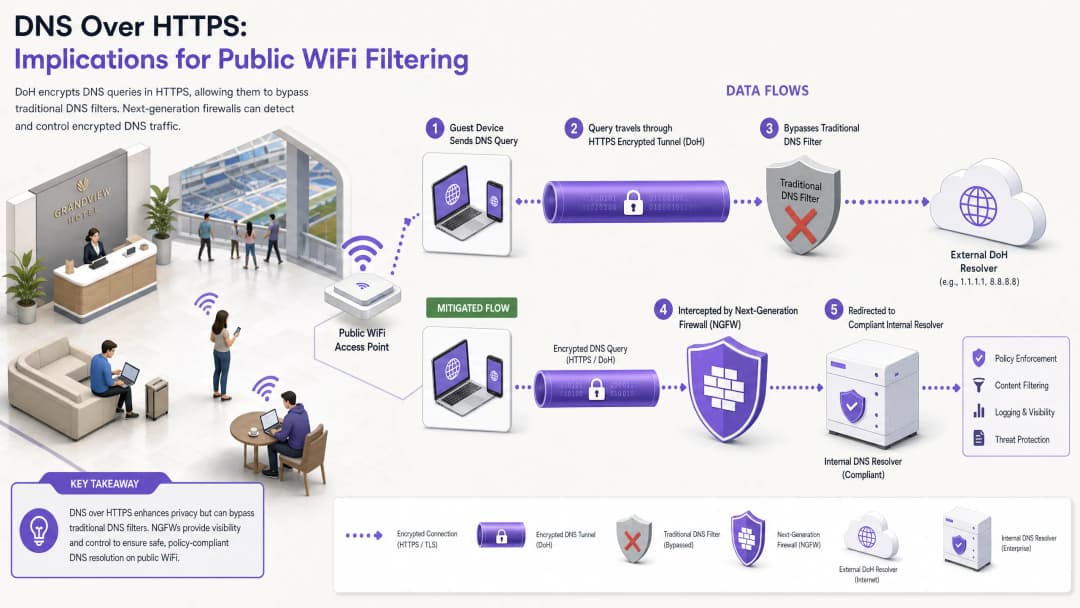
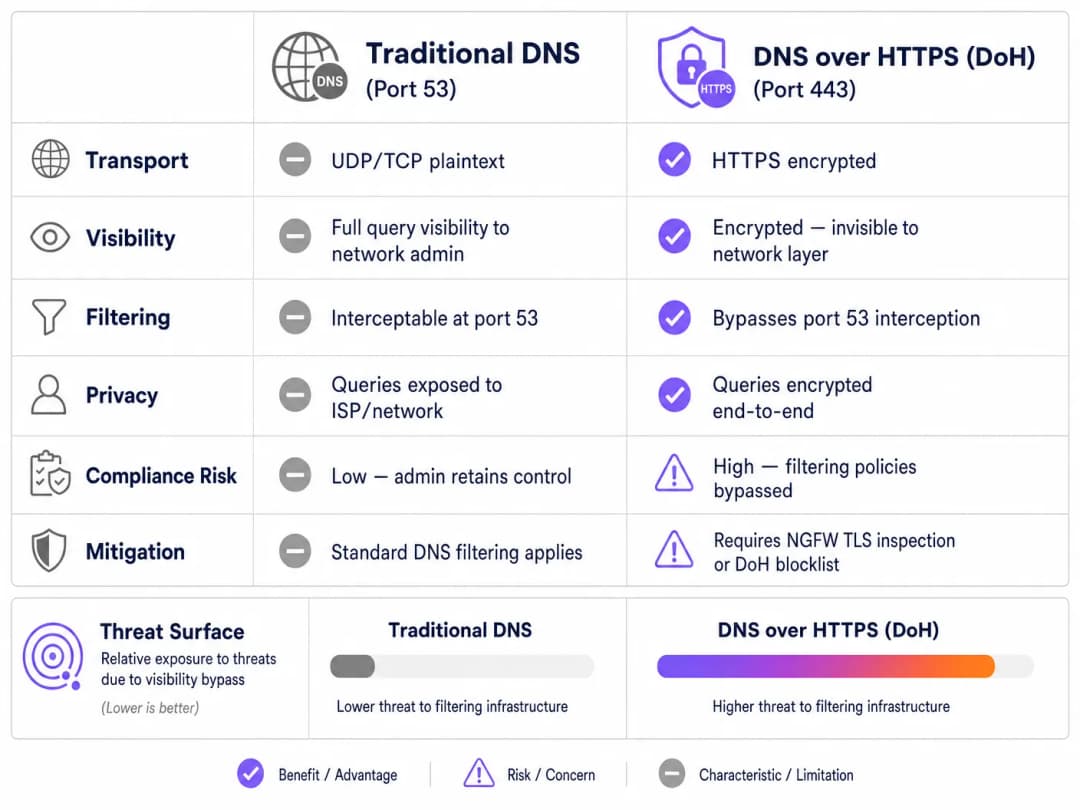
Depuis près d'une décennie, le filtrage DNS traditionnel sur le port 53 est le principal mécanisme appliqué sur les réseaux WiFi publics pour faire respecter les politiques de contenu et atténuer les menaces de logiciels malveillants. Cependant, l'adoption massive de DNS over HTTPS (DoH) par les navigateurs et systèmes d'exploitation grand public perturbe fondamentalement ce modèle. En encapsulant les requêtes DNS dans le trafic HTTPS standard sur le port 443, DoH rend ces requêtes invisibles pour les techniques traditionnelles d'interception réseau.
Pour les responsables informatiques d'entreprise et les architectes réseau qui gèrent le WiFi pour invités dans l'Hôtellerie, le Commerce de détail, les stades et les espaces publics, cela crée une faille de sécurité et de conformité majeure. Lorsque les appareils des invités contournent silencieusement les résolveurs DNS attribués par l'établissement, les politiques d'utilisation acceptable soigneusement élaborées échouent, exposant le réseau au trafic de logiciels malveillants de type commande et contrôle (C2) et à des contenus inappropriés. Ce guide détaille les mécanismes du vecteur de contournement DoH et propose une architecture de défense en profondeur multicouche pour restaurer la visibilité du réseau, garantir la conformité réglementaire et maintenir une sécurité robuste pour le Guest WiFi.
Analyse technique approfondie : Mécanismes de contournement DoH
Pour comprendre le vecteur de menace DoH, il faut d'abord examiner l'architecture de base du filtrage DNS traditionnel. Historiquement, lorsqu'un appareil invité connecté à un réseau public demandait un domaine, la requête était transmise en texte clair via le port UDP ou TCP 53. Les administrateurs réseau pouvaient facilement intercepter ce trafic au niveau du pare-feu ou du contrôleur sans fil et le rediriger vers un résolveur DNS conforme, qui vérifiait le domaine demandé par rapport à des flux de renseignements sur les menaces et des politiques de catégorisation de contenu.
DNS over HTTPS contourne complètement ce plan de contrôle. Par conception, DoH chiffre la requête DNS et la transmet à un résolveur externe (comme le 1.1.1.1 de Cloudflare ou le 8.8.8.8 de Google) en utilisant le chiffrement TLS standard sur le port 443. Du point de vue de l'infrastructure réseau de l'établissement, une requête DoH est indiscernable d'un utilisateur naviguant sur un site web sécurisé ou visionnant une vidéo en streaming.
Modèles d'implémentation : DoH au niveau de l'application vs niveau OS
Le défi pour les administrateurs réseau est encore complexifié par la manière dont DoH est implémenté sur les différentes plateformes. Il existe deux modèles de déploiement principaux :
- DoH au niveau de l'application : dans ce modèle, l'application gère sa propre configuration DoH indépendamment de l'système d'exploitation hôte. Mozilla Firefox en est un exemple type ; lorsque le DoH est activé, Firefox ignore les serveurs DNS attribués par DHCP et redirige toutes les requêtes vers son fournisseur DoH préféré. Les règles d'interception du port 53 du site sont ainsi totalement contournées.
- DoH au niveau de l'OS (opportuniste) : les systèmes d'exploitation modernes, notamment Windows 11 et Android, utilisent le DoH opportuniste. L'OS vérifie si le résolveur DNS attribué par DHCP possède un point de terminaison DoH connu. Si une correspondance est trouvée, l'OS met automatiquement à niveau la connexion vers le DoH. Bien que cela respecte le choix du résolveur de l'administrateur, cela déplace le trafic vers le port 443, ce qui peut contourner les outils de surveillance hérités qui s'attendent à du trafic sur le port 53.
De plus, les administrateurs doivent prendre en compte le DNS over TLS (DoT), qui fonctionne sur le port 853. Bien que le DoT soit plus facile à bloquer en raison de son port dédié, il s'agit de la norme par défaut pour la fonctionnalité "Private DNS" de Android et présente des risques de contournement similaires si le port 853 est ouvert sur le VLAN invité.
Guide d'implémentation : une architecture de défense en profondeur
Reprendre le contrôle de la résolution DNS nécessite une stratégie d'atténuation multicouche. Il ne suffit pas de s'appuyer sur un seul point de contrôle face aux protocoles chiffrés modernes. Pour sécuriser l'accès invité et garantir la conformité avec des cadres tels que PCI-DSS et le GDPR, les architectes réseau doivent mettre en œuvre l'architecture suivante.
Couche 1 : Bloquer les points de terminaison des résolveurs DoH connus
L'atténuation la plus immédiate et la plus efficace consiste à bloquer le trafic HTTPS sortant vers les résolveurs DoH publics connus à la périphérie du réseau. Bien que le trafic DoH se fonde dans le trafic HTTPS standard, les adresses IP de destination et les domaines des principaux fournisseurs DoH sont bien connus.
En configurant un pare-feu de nouvelle génération (NGFW) pour rejeter les connexions vers ces points de terminaison spécifiques (comme dns.google, cloudflare-dns.com), les administrateurs forcent l'échec de la résolution DoH de l'appareil client. Dans la plupart des implémentations, si le DoH échoue, le client revient naturellement au DNS traditionnel non chiffré sur le port 53, qui peut alors être intercepté et filtré.
Note d'implémentation : cette approche nécessite de maintenir une liste de blocage à jour. Les fournisseurs de pare-feu d'entreprise proposent souvent des flux de menaces dynamiques qui mettent à jour automatiquement les points de terminaison DoH connus, ce qui réduit considérablement les coûts opérationnels.
Couche 2 : Appliquer l'interception et la redirection du port 53
Le blocage du DoH n'est efficace que si le trafic de secours est correctement géré. Le réseau doit être configuré pour intercepter tout le trafic UDP et TCP sortant sur le port 53 provenant du VLAN invité. Ce trafic doit être redirigé de force (via des règles de NAT/redirection de port) vers les résolveurs DNS autorisés et conformes du site.
Cette étape est cruciale car de nombreux appareils ou applications malveillantes intègrent en dur des serveurs DNS publics (comme 8.8.8.8) dans leur pile réseau, ignorant ainsi les paramètres fournis par DHCP. Sans interception forcée, même si le DoH est bloqué, ces appareils contourneront avec succès les politiques de filtrage du site.
Couche 3 : Bloquer le port 853 (DNS over TLS)
Pour contrer le vecteur de contournement DoT, les administrateurs doivent explicitement bloquer le trafic sortant sur le port TCP 853 depuis le réseau invité. Tout comme pour l'atténuation du DoH, le blocage du DoT force les appareils Android et autres clients compatibles DoT à se rabattre sur le DNS standard du port 53.

Vous avez des questions sur votre configuration spécifique ?
Notre équipe collabore avec des exploitants de sites, des responsables informatiques et des ingénieurs réseau au sein de 80 000 sites. Réservez un appel de 20 minutes et nous vous montrerons comment d'autres professionnels comme vous ont résolu ce problème.
Bonnes pratiques et considérations de conformité
La mise en œuvre de l'atténuation du DoH n'est pas seulement une tâche technique ; c'est une exigence fondamentale pour maintenir la conformité réglementaire et appliquer les politiques d'utilisation acceptable.
- Documentation des politiques : Assurez-vous que les conditions d'utilisation du Captive Portal du site mentionnent clairement que le filtrage DNS est actif à des fins de sécurité et de conformité. Cela fournit une base juridique sous le GDPR et l'Online Safety Act du Royaume-Uni lors du blocage des protocoles DNS chiffrés.
- Segmentation du réseau : Séparez strictement le WiFi invité des réseaux d'entreprise et de paiement à l'aide de VLAN et de règles de pare-feu. Il s'agit d'une exigence clé de la norme PCI DSS v4.0, qui impose également une surveillance rigoureuse du trafic réseau - ce qui devient impossible si le DoH est autorisé à contourner les contrôles de sécurité.
- Surveillance continue : Exploitez les fonctionnalités de rapport de votre service de filtrage DNS d'entreprise pour surveiller le volume de requêtes et identifier les schémas anormaux. Une baisse soudaine du trafic sur le port 53 provenant d'un sous-réseau spécifique indique souvent que les appareils clients utilisent un nouveau résolveur DoH non bloqué.
- Intégration avec l'analytique : Lors de la mise en œuvre d'un accès invité sécurisé, considérez comment les flux d'authentification s'intègrent aux objectifs commerciaux plus larges. L'utilisation d'un wi fi assistant pour une authentification sécurisée et basée sur le profil garantit que les utilisateurs se connectent en toute sécurité, tout en permettant au site d'utiliser WiFi Analytics pour comprendre l'affluence et le temps de visite, tout comme le Offline Maps Mode améliore l'expérience visiteur.
Dépannage et atténuation des risques
Lors du déploiement de l'atténuation DoH, les équipes réseau rencontrent souvent des modes de défaillance spécifiques. Anticiper ces problèmes permet de réduire les temps d'arrêt et de limiter les désagréments pour les invités.
Règle d'interception incomplète
L'échec de déploiement le plus courant réside dans une interception incomplète du port 53. Les administrateurs configurent parfois le serveur DHCP pour fournir les bonnes adresses IP DNS, mais omettent d'implémenter les règles NAT de pare-feu requises pour capturer les requêtes DNS codées en dur. Atténuation : Testez et validez toujours le déploiement en configurant un appareil client avec un serveur DNS externe statique (par exemple, 9.9.9.9) et vérifiez que les requêtes sont toujours acheminées avec succès vers le service de filtrage du site.
Oubli de l'IPv6
Alors que les réseaux migrent vers des configurations double-pile, les règles de pare-feu sont souvent écrites exclusivement pour l'IPv4. Si les listes de blocage DoH et les règles d'interception du port 53 ne couvrent pas l'IPv6, les appareils modernes contourneront sans effort les contrôles IPv4 en utilisant leur pile IPv6. Atténuation : Assurez-vous que toutes les listes de blocage DoH, les règles de redirection du port 53 et les règles d'abandon du port 853 sont appliquées de manière identique dans les tables de routage IPv4 et IPv6.
Dysfonctionnement des applications
Un blocage DoH trop agressif peut parfois perturber certaines applications mobiles qui s'appuient exclusivement sur leur propre implémentation DoH et refusent de basculer vers le DNS standard. Atténuation : Maintenez un processus d'exception documenté. Si une application critique pour l'entreprise cesse de fonctionner, utilisez l'inspection TLS (si disponible sur votre NGFW) pour autoriser de manière sélective le trafic DoH vers les résolveurs de cette application spécifique, au lieu d'ouvrir globalement le DoH.
ROI et impact commercial
L'analyse de rentabilisation d'une atténuation DoH robuste repose sur l'évitement des risques et la conformité. Un seul incident - tel qu'une enquête réglementaire déclenchée par un invité accédant à du contenu illégal, ou un appareil IoT compromis établissant une connexion C2 via DoH - peut engendrer des coûts bien supérieurs au temps d'ingénierie nécessaire pour mettre en œuvre les contrôles appropriés.
Pour une entreprise gérant plusieurs sites, la standardisation de l'architecture d'atténuation DoH garantit une application cohérente des politiques. Cette standardisation réduit la charge opérationnelle du centre de services IT, car les avis d'abus des FAI tombent à zéro et les performances du réseau sont préservées en bloquant les contenus inappropriés à large bande passante. En fin de compte, la sécurisation de la couche DNS garantit que l'investissement du site dans le Guest WiFi reste un actif sûr et conforme, plutôt qu'une source de responsabilité.
Définitions clés
DNS over HTTPS (DoH)
Un protocole permettant d'effectuer une résolution DNS (Domain Name System) à distance via le protocole HTTPS, chiffrant les données entre le client DoH et le résolveur DNS basé sur DoH.
Lorsque les équipes IT déploient le filtrage de contenu, le DoH agit comme un mécanisme de contournement, masquant les requêtes DNS au sein du trafic web chiffré standard.
DNS over TLS (DoT)
Un protocole de sécurité permettant de chiffrer et d'envelopper les requêtes et réponses DNS via le protocole TLS (Transport Layer Security), fonctionnant sur un port dédié (853).
Souvent activé par défaut sur les appareils Android modernes (DNS privé), le DoT doit être bloqué au niveau du pare-feu pour s'assurer que les requêtes se rabattent sur le DNS filtré de l'établissement.
DoH opportuniste
Un comportement par lequel un système d'exploitation ou un navigateur met automatiquement à niveau les requêtes DNS standard vers le DoH s'il détecte que le résolveur DNS configuré prend en charge le protocole chiffré.
Cette fonctionnalité, courante dans Windows 11 et Chrome, signifie que même si un établissement attribue une IP DNS standard, le trafic peut toujours basculer vers le port chiffré 443, contournant ainsi la surveillance existante.
Interception du port 53
Une configuration de pare-feu réseau qui capture tout le trafic sortant sur le port UDP/TCP 53 et le redirige de force vers un résolveur DNS désigné, quelle que soit l'adresse IP de destination demandée par le client.
Essentiel pour capturer les requêtes DNS des appareils ayant des paramètres DNS codés en dur ou de ceux qui se sont rabattus après l'échec d'une connexion DoH.
Pare-feu de nouvelle génération (NGFW)
Un dispositif de sécurité réseau qui offre des fonctionnalités allant au-delà d'un pare-feu dynamique traditionnel, notamment l'inspection approfondie des paquets, la reconnaissance des applications et le décryptage TLS/SSL.
Les NGFWs sont essentiels pour l'atténuation du DoH car ils peuvent identifier et bloquer le trafic DoH en fonction des signatures d'application plutôt que des simples adresses IP.
Comportement de repli (Fallback)
La réponse programmée d'un appareil client lorsque son protocole DNS chiffré préféré (DoH ou DoT) ne parvient pas à se connecter, ce qui amène généralement l'appareil à revenir au DNS standard non chiffré.
Les architectes réseau s'appuient sur ce comportement ; en interrompant intentionnellement les connexions DoH/DoT, ils forcent l'appareil à utiliser le port 53 qui peut être intercepté.
Commande et contrôle (C2)
L'infrastructure utilisée par les attaquants pour communiquer avec des appareils compromis (logiciels malveillants/botnets) au sein d'un réseau cible.
Les logiciels malveillants modernes utilisent de plus en plus le DoH pour masquer les communications C2 aux outils de surveillance des réseaux d'entreprise, faisant de l'atténuation du DoH une exigence de sécurité critique.
Captive Portal
Une page web que l'utilisateur d'un réseau d'accès public est obligé de consulter et avec laquelle il doit interagir avant que l'accès ne lui soit accordé.
Le Captive Portal est l'emplacement légalement approprié pour informer les utilisateurs que leur trafic DNS est filtré et que les protocoles DNS chiffrés sont bloqués.
Exemples concrets
Un hôtel de 400 chambres a récemment déployé un service de filtrage DNS basé sur le cloud pour se conformer aux normes de la marque concernant les contenus adaptés aux familles. Cependant, le responsable IT constate qu'une grande partie du trafic des invités accède encore à des sites pour adultes, et le tableau de bord de filtrage DNS indique des volumes de requêtes inférieurs aux prévisions. Comment l'architecte réseau doit-il remédier à ce contournement ?
- Auditer les règles du pare-feu : L'architecte doit d'abord vérifier que le trafic sortant TCP/UDP sur le port 53 est intercepté et redirigé par NAT vers le service DNS cloud.
- Bloquer les résolveurs DoH : Implémenter une liste de blocage NGFW pour rejeter le trafic HTTPS sortant (port 443) destiné aux fournisseurs de DoH connus (par exemple, Cloudflare, Google, Quad9).
- Bloquer le DoT : Ajouter une règle de pare-feu pour rejeter tout le trafic TCP sortant sur le port 853 afin d'empêcher le contournement par le DNS privé d'Android.
- Vérifier l'IPv6 : S'assurer que toutes les règles ci-dessus sont appliquées au trafic IPv4 et IPv6.
Une chaîne de magasins comptant 150 points de vente doit mettre en œuvre un filtrage DNS pour bloquer les logiciels malveillants et le phishing sur son WiFi invité. Ils utilisent des pare-feux de succursale de base sans capacités avancées d'inspection TLS. Comment peuvent-ils atténuer efficacement le DoH sans mettre à niveau leur matériel ?
Sans inspection TLS, la chaîne doit s'appuyer sur un routage robuste et des listes de blocage.
- Déployer une liste de blocage IP/domaine DoH dynamique sur les pare-feux des succursales, configurée pour se mettre à jour automatiquement via un flux de menaces externe.
- Mettre en œuvre une redirection NAT stricte du port 53 vers le filtre DNS de l'entreprise.
- Bloquer entièrement le port 853.
- Mettre à jour les conditions d'utilisation du Captive Portal pour stipuler explicitement que les protocoles DNS chiffrés sont bloqués afin de faire respecter les politiques de sécurité du réseau.
Questions d'entraînement
Q1. Un ingénieur réseau de stade configure le serveur DHCP pour fournir l'adresse IP de son service DNS sécurisé et filtré à tous les appareils invités. Cependant, les tests révèlent que les appareils avec des paramètres DNS configurés manuellement (par ex. 8.8.8.8) contournent avec succès le filtre. Quelle est la correction architecturale la plus appropriée ?
Conseil : Pensez à la différence entre suggérer un itinéraire et imposer un itinéraire en périphérie du réseau.
Voir la réponse type
L'ingénieur doit implémenter une règle de redirection de port NAT sur le pare-feu du stade. Cette règle doit intercepter tout le trafic sortant UDP et TCP sur le port 53 provenant du VLAN invité et traduire de force l'IP de destination vers l'adresse IP du service DNS sécurisé. Cela garantit que, quelle que soit la configuration locale du client, le trafic est acheminé via la politique de filtrage.
Q2. Suite à la mise en œuvre d'une liste de blocage DoH stricte, le support informatique d'un centre de conférence reçoit des signalements indiquant qu'une application d'événementiel sur mesure ne parvient pas à se charger pour les participants. La capture de paquets montre que l'application tente d'utiliser son propre résolveur DoH codé en dur, qui est bloqué, et que l'application refuse de se replier sur le DNS standard. Comment résoudre ce problème ?
Conseil : Trouvez un équilibre entre la politique de sécurité et la continuité des activités. Le pare-feu peut-il faire la distinction entre le trafic DoH général et le trafic vers un point de terminaison spécifique et approuvé ?
Voir la réponse type
L'administrateur doit créer une exception dans la politique du NGFW. Plutôt que de désactiver globalement la liste de blocage DoH, il doit identifier l'adresse IP ou le domaine spécifique du résolveur DoH utilisé par l'application d'événementiel et l'ajouter à la liste d'autorisation. Si le pare-feu prend en charge l'inspection au niveau de la couche applicative (Couche 7), une solution plus robuste consiste à créer une politique qui autorise le trafic DoH uniquement si la destination correspond à l'infrastructure de l'application approuvée, garantissant ainsi que les tentatives de contournement DoH générales restent bloquées.
Q3. Une organisation du secteur public audite la conformité de son WiFi invité. Elle a bloqué avec succès le port 853 (DoT) et mis en œuvre l'interception du port 53. Cependant, elle ne dispose pas du budget nécessaire pour un NGFW avec inspection TLS avancée ou listes de blocage DoH dynamiques. Quelle est la stratégie restante la plus efficace pour atténuer le DoH ?
Conseil : Si les listes dynamiques ne sont pas disponibles, comment pouvez-vous traiter la grande majorité du trafic DoH opportuniste ?
Voir la réponse type
L'organisation devrait implémenter une liste de blocage statique sur leur pare-feu existant, ciblant les adresses IP et les domaines des fournisseurs de DoH publics les plus courants (par exemple, Cloudflare, Google, Quad9). Bien que cela nécessite une maintenance manuelle et ne détecte pas les résolveurs DoH obscurs, la recherche montre que la grande majorité du trafic DoH s'oriente par défaut vers une poignée de fournisseurs majeurs. Cela offre une solution "80/20" hautement efficace dans les limites de leur budget.
Continuer la lecture de cette série
Responsabilité liée au WiFi public : pourquoi le filtrage de contenu est obligatoire
Ce guide de référence technique présente les risques juridiques et opérationnels liés à la fourniture d'un WiFi public non filtré, en expliquant pourquoi le filtrage de contenu est une exigence de déploiement obligatoire pour les exploitants de sites. Il fournit des stratégies d'architecture exploitables, des étapes de mise en œuvre et des tactiques d'atténuation des risques pour protéger les réseaux contre les activités illégales, les violations de droits d'auteur et le non-respect des réglementations. Les exploitants de sites et les directeurs de la technologie y trouveront des études de cas concrètes, des cadres de décision et des conseils de configuration pour mettre en œuvre un environnement WiFi invité défendable et conforme.
Bloquer les logiciels malveillants et le phishing en périphérie du réseau
Ce guide de référence technique présente l'architecture, le déploiement et l'impact commercial de la mise en œuvre d'une protection contre les menaces au niveau du réseau afin de sécuriser les appareils invités et IoT non gérés en périphérie du réseau. Il fournit des conseils pratiques aux responsables informatiques pour bloquer proactivement les logiciels malveillants et le phishing.
Conformité IWF pour les réseaux WiFi publics au Royaume-Uni
Ce guide de référence détaille les exigences techniques, l'architecture et les stratégies de déploiement pour la mise en œuvre de réseaux WiFi publics conformes à l'IWF dans les établissements du Royaume-Uni. Il fournit aux responsables informatiques des cadres exploitables pour atténuer les risques juridiques tout en maintenant un accès réseau haute performance.
Vous avez des questions sur votre configuration spécifique ?
Notre équipe collabore avec des exploitants de sites, des responsables informatiques et des ingénieurs réseau au sein de 80 000 sites. Réservez un appel de 20 minutes et nous vous montrerons comment d'autres professionnels comme vous ont résolu ce problème.