
eduroam et 802.1X : authentification WiFi sécurisée pour l'enseignement supérieur
Ce guide de référence technique officiel explique l'architecture, le déploiement et la sécurité de l'authentification eduroam et 802.1X. Conçu pour les directeurs informatiques et les architectes réseau, il couvre les étapes pratiques de mise en œuvre, la sélection de la méthode EAP et la manière dont les gestionnaires de sites peuvent prendre en charge l'itinérance académique de manière sécurisée.
Écouter ce guide
Voir la transcription du podcast
Fait partie de notre série principale : Enterprise WiFi Security Guide →

Résumé opérationnel
Pour les établissements d'enseignement supérieur, ainsi que pour les sites qui accueillent leur personnel et leurs étudiants, fournir une connectivité sans fil sécurisée et fluide n'est plus un luxe - c'est une exigence opérationnelle. La norme pour cette connectivité est eduroam, un service d'itinérance mondial basé sur le framework IEEE 802.1X.
Ce guide fournit aux responsables informatiques, aux architectes réseau et aux directeurs d'exploitation de sites une référence complète et neutre vis-à-vis des fournisseurs pour comprendre, déployer et dépanner le 802.1X et eduroam. Nous allons au-delà des modèles théoriques de base pour examiner comment le WiFi de campus d'entreprise fonctionne réellement en pratique, y compris la gestion des certificats, l'architecture proxy RADIUS et l'intégration avec une stratégie de réseau invité plus large.
Que vous mettiez à niveau un réseau universitaire vieillissant ou que vous configuriez un centre de conférence pour accueillir des visiteurs universitaires, l'implémentation correcte du 802.1X réduit considérablement les risques de sécurité - en particulier le vol d'identifiants - tout en réduisant considérablement les coûts de support. Pour les sites en dehors de l'enseignement supérieur traditionnel, la compréhension de ces normes est essentielle pour évaluer les fédérations d'itinérance commerciale telles que OpenRoaming, qui partagent la même architecture sous-jacente.
Zoom technique : architecture 802.1X et eduroam
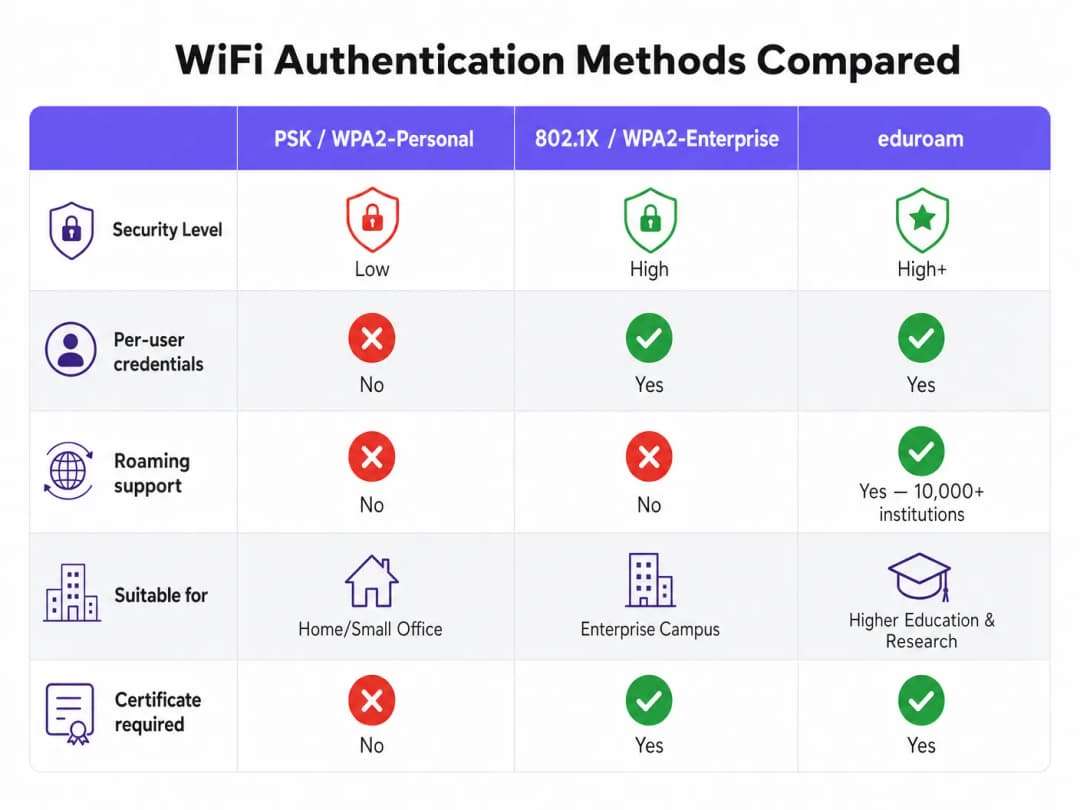
À la base, eduroam est une implémentation de l'IEEE 802.1X, la norme de contrôle d'accès réseau basée sur les ports. Le 802.1X a été conçu à l'origine pour les réseaux filaires, mais il constitue la base de la sécurité WPA2-Enterprise et WPA3-Enterprise.
Le modèle en triangle du 802.1X
Le framework 802.1X repose sur l'interaction de trois composants distincts pour autoriser l'accès :
- Supplicant : L'appareil client qui demande l'accès au réseau (par exemple, l'ordinateur portable ou le smartphone d'un étudiant).
- Authentificateur : L'appareil d'accès réseau (par exemple, un point d'accès sans fil ou un commutateur managé). Il agit comme un gardien, bloquant tout le trafic à l'exception des messages d'authentification jusqu'à ce que l'appareil soit autorisé.
- Serveur d'authentification : Le système back-end qui valide les identifiants, presque universellement un serveur RADIUS (Remote Authentication Dial-In User Service).
Lorsqu'un appareil se connecte, l'authentificateur établit un port contrôlé. Il relaye les messages EAP (Extensible Authentication Protocol) entre le supplicant et le serveur d'authentification. Si les identifiants sont valides, le serveur renvoie un message RADIUS Access-Accept, et l'authentificateur ouvre le port pour permettre le trafic IP standard.
Hiérarchie des proxys RADIUS d'eduroam
Ce qui rend eduroam unique, c'est son architecture fédérée. Elle permet aux utilisateurs de s'authentifier dans n'importe quel établissement participant en utilisant leurs identifiants d'origine, sans que l'établissement d'accueil n'ait jamais accès à une copie de ces identifiants.
Ce résultat est obtenu grâce à une chaîne hiérarchique de proxys RADIUS. Lorsqu'un utilisateur de username@university.ac.uk se connecte au SSID eduroam sur un site d'accueil :
- L'appareil de l'utilisateur envoie une demande d'authentification sous la forme
username@university.ac.uk. - Le serveur RADIUS du site d'accueil inspecte le domaine (la partie située après le symbole
@). Reconnaissant qu'il s'agit d'un domaine externe, il relaye la demande vers le serveur RADIUS national de premier niveau (géré par le réseau national de recherche et d'enseignement, ou NREN). - Le serveur national oriente la demande vers le serveur RADIUS de l'établissement d'origine (
university.ac.uk). - L'établissement d'origine valide les identifiants et renvoie un message
Access-AcceptouAccess-Rejectle long de la chaîne.
L'ensemble du processus prend généralement moins de deux secondes. Élément crucial, le mot de passe de l'utilisateur n'est jamais exposé à l'établissement d'accueil ni aux serveurs proxys intermédiaires ; il est protégé à l'intérieur d'un tunnel EAP chiffré établi directement entre le demandeur et le serveur RADIUS d'origine.
Méthodes EAP : le compromis entre sécurité et simplicité de déploiement
Le choix de la méthode EAP détermine la manière dont le tunnel chiffré est formé et dont les identifiants sont échangés. La définition de la politique de service eduroam limite strictement les méthodes autorisées afin de garantir la sécurité.
- PEAP (Protected EAP) : La méthode de déploiement la plus courante. Elle utilise un certificat côté serveur sur le serveur RADIUS pour établir un tunnel TLS. Le client s'authentifie ensuite à l'intérieur de ce tunnel, généralement à l'aide de MSCHAPv2 (nom d'utilisateur et mot de passe). Elle est relativement facile à déployer, mais elle est vulnérable aux attaques par points d'accès illégitimes si les clients ne sont pas configurés pour valider strictement le certificat du serveur.
- EAP-TLS : La référence absolue en matière de sécurité. Elle nécessite une authentification mutuelle, ce qui signifie que le serveur RADIUS et l'appareil client doivent tous deux présenter des certificats valides. Bien qu'elle soit immunisée contre le hameçonnage d'identifiants, elle nécessite une infrastructure de clés publiques (PKI) robuste pour délivrer et gérer les certificats clients, ce qui rend le déploiement à grande échelle plus complexe.
Vous avez des questions sur votre configuration spécifique ?
Notre équipe collabore avec des exploitants de sites, des responsables informatiques et des ingénieurs réseau au sein de 80 000 sites. Réservez un appel de 20 minutes et nous vous montrerons comment d'autres professionnels comme vous ont résolu ce problème.
Guide de mise en œuvre
Le déploiement de 802.1X et d'eduroam nécessite une coordination minutieuse entre l'infrastructure réseau, la gestion des identités et la configuration des clients.
1. Préparation de l'infrastructure
Assurez-vous que vos points d'accès et contrôleurs sans fil prennent en charge WPA2-Enterprise/WPA3-Enterprise et 802.1X. Tout matériel d'entreprise moderne (Cisco, Aruba, Juniper et autres) répondra à cette exigence. Vous devez également déployer une infrastructure RADIUS robuste (telle que FreeRADIUS, Cisco ISE ou Aruba ClearPass) capable de gérer la charge d'authentification attendue et de relayer les requêtes.
2. Gestion des certificats
Pour les déploiements PEAP, votre serveur RADIUS a besoin d'un certificat TLS délivré par une autorité de certification (CA) approuvée par vos clients. N'utilisez jamais de certificats auto-signés dans un déploiement eduroam en production. Les certificats doivent être renouvelés régulièrement pour éviter les interruptions d'authentification.
3. Configuration client (l'outil CAT)
Le point de défaillance le plus courant dans les déploiements eduroam est une mauvaise configuration du client. Lorsque les utilisateurs se connectent manuellement, ils omettent souvent de configurer la validation des certificats, ce qui les expose à des attaques de collecte d'identifiants.
Pour atténuer ce risque, les institutions doivent utiliser l'outil eduroam Configuration Assistant Tool (CAT) ou une solution MDM pour distribuer des profils préconfigurés. Ces profils configurent automatiquement la bonne méthode EAP, épinglent le certificat du serveur RADIUS attendu et définissent le protocole d'authentification interne approprié.
4. Attribution de VLAN et segmentation
Un déploiement mature utilise les attributs RADIUS pour attribuer dynamiquement les VLANs en fonction de l'identité de l'utilisateur.
- Utilisateurs internes : Attribués à des VLANs internes avec un accès approprié aux ressources du campus.
- Utilisateurs invités : Attribués à un VLAN invité restreint offrant uniquement un accès Internet.
Cette segmentation est essentielle pour la sécurité et la conformité, garantissant que les appareils des visiteurs ne peuvent pas accéder aux réseaux internes sensibles.
Bonnes pratiques et recommandations neutres vis-à-vis des fournisseurs
- Donnez la priorité au WPA3 : Pour les nouveaux déploiements, activez WPA3-Enterprise pour bénéficier d'un chiffrement obligatoire de 192 bits et d'une meilleure protection contre les attaques par dictionnaire hors ligne.
- Imponez la validation des certificats : Exigez l'utilisation de profils de configuration (via CAT ou MDM) pour garantir que le suppliant valide strictement le certificat du serveur RADIUS avant de transmettre les identifiants.
- Utilisez RadSec : Lors de la configuration des connexions proxy RADIUS vers la fédération nationale, utilisez RadSec (RADIUS sur TLS) plutôt que le simple protocole UDP. Cela chiffre le trafic proxy et améliore la fiabilité sur les liaisons longue distance.
- Intégrez une solution pour invités : eduroam ne dessert que les utilisateurs disposant d'identifiants académiques. Vous devez maintenir une solution distincte et sécurisée de Guest WiFi pour les prestataires, le grand public et les participants aux événements.
- Examinez l'infrastructure associée : Assurez-vous que votre réseau sous-jacent est sécurisé. Consultez notre guide Sécuriser votre réseau avec un DNS robuste et la sécurité pour plus de détails. Si vous déployez une infrastructure temporaire pour des événements universitaires, consultez WiFi événementiel : Planifier et déployer des réseaux sans fil temporaires ou la version en langue portugaise Event WiFi: Planeamento e Implementação de Redes Sem Fios Temporárias.
Dépannage et atténuation des risques
Lorsque l'authentification échoue, un dépannage systématique est essentiel.
- Isolez le domaine de défaillance : Déterminez si le problème est local (affectant les utilisateurs sur votre propre réseau), distant (affectant vos utilisateurs ailleurs) ou entrant (affectant les visiteurs sur votre réseau).
- Vérifiez les journaux RADIUS : Les journaux du serveur RADIUS constituent la source de vérité faisant autorité. Recherchez les messages
Access-Reject(indiquant des identifiants incorrects ou des violations de politique) ou les expirations de délai (indiquant des problèmes de connectivité proxy). - Vérifiez la validité du certificat : Assurez-vous que le certificat du serveur RADIUS n'a pas expiré et que la chaîne de certification complète est présentée aux clients.
- Surveillez la latence en amont : Une latence élevée vers le proxy RADIUS national peut provoquer des expirations de délai chez les clients, entraînant des échecs de connexion même lorsque les identifiants sont corrects.
ROI et impact commercial
Pour les établissements d'enseignement supérieur, le retour sur investissement d'un déploiement eduroam correctement configuré se traduit par une baisse spectaculaire des tickets d'assistance. En éliminant les Captive Portals et la saisie manuelle des mots de passe, les centres d'assistance informatique constatent une diminution significative des appels liés à la connectivité. (L'engagement de Purple envers ce secteur est clair ; voir Purple nomme Tim Peers au poste de VP de l'Éducation, soulignant ses ambitions dans l'enseignement supérieur).
Pour les sites commerciaux - tels que l' hôtellerie, le commerce de détail, la santé ou les transports - la prise en charge d'eduroam Visitor Access (eVA) ou de fédérations similaires telles que OpenRoaming offre une expérience fluide à un public à forte valeur ajoutée. Cela garantit que les visiteurs académiques se connectent automatiquement et en toute sécurité, améliorant la satisfaction tout en permettant au site de maintenir une segmentation réseau stricte. Si votre site a besoin d'une bande passante dédiée pour répondre à cette demande, pensez à lire Qu'est-ce qu'une ligne dédiée ? Internet conçu pour les entreprises.
Lors de la planification des mises à niveau du réseau, l'intégration de la fonctionnalité 802.1X garantit que votre infrastructure est prête pour les réseaux modernes basés sur l'identité, posant ainsi les bases d'outils avancés de WiFi Analytics et de services géolocalisés.
Définitions clés
802.1X
Une norme IEEE pour le contrôle d'accès réseau basé sur les ports (PNAC). Elle fournit un mécanisme d'authentification aux appareils souhaitant se connecter à un réseau local ou un WLAN.
Le protocole fondamental pour la sécurité WiFi d'entreprise, remplaçant les mots de passe partagés (PSK) par une authentification individualisée.
RADIUS (Remote Authentication Dial-In User Service)
Un protocole réseau qui fournit une gestion centralisée de l'authentification, de l'autorisation et de la comptabilité (AAA) pour les utilisateurs qui se connectent et utilisent un service réseau.
Le serveur backend dans un déploiement 802.1X qui vérifie réellement les identifiants de l'utilisateur par rapport à un annuaire (comme Active Directory).
EAP (Extensible Authentication Protocol)
Un framework d'authentification fréquemment utilisé dans les réseaux sans fil et les connexions point à point. Il permet le transport et l'utilisation de divers mécanismes d'authentification.
Le langage parlé entre l'appareil client et le serveur RADIUS lors de l'établissement de la liaison 802.1X.
Supplicant
L'appareil client (par exemple, un ordinateur portable, un smartphone) ou le logiciel sur cet appareil qui tente de s'authentifier auprès d'un réseau à l'aide de 802.1X.
L'entité qui demande l'accès. Sa configuration (notamment en ce qui concerne la validation des certificats) est essentielle pour la sécurité.
Authenticator
L'appareil réseau (par exemple, un point d'accès sans fil, un commutateur Ethernet) qui facilite le processus d'authentification 802.1X en transmettant les messages entre le Supplicant et le serveur d'authentification.
Le contrôleur d'accès qui bloque le trafic réseau jusqu'à ce que le serveur RADIUS donne le feu vert.
PEAP (Protected Extensible Authentication Protocol)
Une méthode EAP qui encapsule la transaction EAP dans un tunnel TLS établi à l'aide d'un certificat côté serveur, protégeant l'authentification interne (généralement un mot de passe).
La méthode d'authentification la plus courante pour eduroam, équilibrant la sécurité et la facilité de déploiement.
RadSec
Un protocole de transmission de données RADIUS sur TCP et TLS, plutôt que sur le traditionnel UDP.
Recommandé pour sécuriser les connexions proxy entre les institutions et la fédération nationale eduroam, empêchant l'interception du trafic d'authentification.
Realm
La partie de l'identité d'un utilisateur qui suit le symbole "@" (par exemple, "university.ac.uk" dans "user@university.ac.uk").
Utilisé par les serveurs proxy RADIUS pour déterminer où acheminer la demande d'authentification dans un environnement fédéré comme eduroam.
Exemples concrets
Un hôtel de conférence de 400 chambres adjacent à une grande université accueille fréquemment des colloques universitaires. Le directeur informatique souhaite permettre aux universitaires de passage de se connecter automatiquement sans utiliser le Captive Portal standard de l'hôtel, tout en veillant à ce que ces visiteurs ne puissent pas accéder au réseau d'entreprise de l'hôtel ni au VLAN du réseau d'invités standard.
L'hôtel doit mettre en œuvre eduroam Visitor Access (eVA) ou rejoindre une fédération commerciale comme OpenRoaming.
- L'hôtel configure un nouveau SSID (« eduroam » ou « OpenRoaming ») sur ses points d'accès d'entreprise.
- Les points d'accès sont configurés pour utiliser WPA2-Enterprise/802.1X.
- L'hôtel déploie un serveur RADIUS local configuré pour relayer les demandes d'authentification des domaines externes vers la fédération nationale (pour eduroam) ou le hub OpenRoaming.
- De manière cruciale, le serveur RADIUS local est configuré pour renvoyer un attribut d'ID VLAN spécifique dans le message
Access-Acceptpour toutes les authentifications relayées. - Les points d'accès placent ces utilisateurs authentifiés sur un VLAN isolé, uniquement destiné à Internet, complètement segmenté du trafic d'entreprise et du trafic d'invités standard de l'hôtel.
Une équipe informatique universitaire constate un pic de comptes d'étudiants compromis. L'enquête révèle que les étudiants se connectent à un point d'accès malveillant diffusant le SSID « eduroam » dans un café local. Le point d'accès malveillant utilise un certificat auto-signé pour récupérer les identifiants via PEAP.
L'équipe informatique doit immédiatement imposer une validation stricte des certificats sur tous les appareils clients.
- Elle doit cesser de conseiller aux étudiants de se connecter manuellement au SSID et d'« accepter l'avertissement de certificat ».
- Elle déploie l'outil d'assistance à la configuration eduroam (CAT) pour les appareils personnels (BYOD) et met à jour les profils MDM pour les appareils gérés.
- Ces profils configurent le client pour qu'il fasse uniquement confiance à l'autorité de certification (CA) spécifique ayant émis le certificat du serveur RADIUS de l'université, et pour qu'il vérifie le nom commun (CN) du serveur.
- Une fois configuré, si l'appareil d'un étudiant rencontre le point d'accès malveillant, l'établissement du tunnel EAP échouera car le certificat malveillant ne correspondra pas à la CA/CN définie, empêchant ainsi la transmission des identifiants.
Une chaîne de magasins souhaite proposer OpenRoaming dans 50 points de vente en utilisant son infrastructure de WiFi invité existante, qui repose actuellement sur un SSID ouvert avec un Captive Portal.
La chaîne de magasins doit mettre à niveau son réseau pour prendre en charge le 802.1X et le proxying RADIUS.
- L'équipe réseau active un nouveau SSID diffusant l'identifiant d'organisation (OI) de l'OpenRoaming Consortium.
- Elle configure les points d'accès pour s'authentifier via 802.1X.
- Elle configure son serveur RADIUS central pour relayer les requêtes vers le hub de la fédération OpenRoaming.
- Elle s'assure que sa connexion Internet peut supporter l'augmentation attendue des connexions automatisées, en passant potentiellement à des lignes louées dédiées si nécessaire.
Questions d'entraînement
Q1. Votre université déploie un nouveau réseau sans fil. Le CISO exige que le vol d'identifiants par hameçonnage via des points d'accès malveillants soit mathématiquement impossible. Quelle méthode EAP devez-vous sélectionner ?
Conseil : Réfléchissez à la méthode qui repose sur des mots de passe par rapport à celle qui repose entièrement sur des clés cryptographiques.
Voir la réponse type
Vous devez sélectionner EAP-TLS. Contrairement à PEAP, qui repose sur un mot de passe à l'intérieur d'un tunnel TLS, EAP-TLS nécessite une authentification mutuelle par certificat. Étant donné que l'appareil client s'authentifie à l'aide d'un certificat cryptographique plutôt que d'un mot de passe, il n'y a pas d'identifiants qu'un point d'accès malveillant pourrait hameçonner.
Q2. Un chercheur invité d'une autre université se plaint de ne pas pouvoir se connecter à votre réseau eduroam. Vos utilisateurs locaux se connectent sans problème. Vous vérifiez les journaux de votre serveur RADIUS local et constatez que la demande arrive, mais qu'elle expire avant la réception d'un Access-Accept. Quelle est la cause la plus probable ?
Conseil : Pensez au chemin emprunté par la demande d'authentification pour un utilisateur invité par rapport à un utilisateur local.
Voir la réponse type
La cause la plus probable est un problème de connectivité ou de latence entre votre serveur RADIUS local et le proxy RADIUS national NREN. Comme les utilisateurs locaux s'authentifient directement auprès de votre serveur, ils ne sont pas impactés. La demande de l'utilisateur invité doit être relayée en amont, et une expiration indique que la réponse de l'institution d'origine ne revient pas à temps.
Q3. Vous êtes architecte réseau pour une chaîne de vente au détail située à proximité d'une grande université. Vous souhaitez offrir un WiFi transparent aux étudiants à l'aide d'eduroam Visitor Access (eVA), mais vous devez respecter la norme PCI-DSS pour vos terminaux de point de vente. Comment intégrer eVA en toute sécurité ?
Conseil : Comment le protocole 802.1X permet-il au point d'accès réseau de différencier le trafic après l'authentification ?
Voir la réponse type
Vous intégrez eVA en configurant votre serveur RADIUS pour attribuer toutes les authentifications eVA réussies à un VLAN invité dédié, uniquement connecté à Internet. Le message Access-Accept du serveur RADIUS doit inclure l'ID de VLAN spécifique. Cela garantit que les appareils des étudiants sont complètement segmentés du VLAN conforme aux normes PCI utilisé par les terminaux de point de vente, répondant ainsi aux exigences de conformité.
Continuer la lecture de cette série
Guide de l'administrateur réseau pour la configuration de l'authentification RADIUS pour le WiFi invité
Une référence technique complète pour les administrateurs réseau sur le déploiement de l'authentification RADIUS pour le WiFi invité. Couvre l'architecture, les étapes de configuration indépendantes du constructeur, les meilleures pratiques de sécurité et le dépannage des échecs de déploiement courants.
Mise en œuvre de SCEP pour un accès WiFi 802.1X et BYOD sécurisé dans l'enseignement supérieur
Ce guide technique explique en détail comment les équipes informatiques de l'enseignement supérieur peuvent automatiser l'inscription aux certificats 802.1X pour des milliers d'appareils BYOD à l'aide de SCEP. Il présente l'architecture, les avantages en matière de sécurité et les étapes de déploiement concrètes pour remplacer l'intégration manuelle par un modèle d'accès réseau sécurisé et sans contact.
Configuration de l'authentification RADIUS pour les réseaux WiFi invités et collaborateurs
Ce guide de référence technique présente l'architecture, la configuration et le déploiement de l'authentification RADIUS pour les réseaux WiFi d'entreprise destinés aux invités et aux collaborateurs. Il fournit aux architectes réseau et aux responsables informatiques les protocoles exacts, les normes de sécurité et les méthodologies de dépannage requis pour concevoir des systèmes de contrôle d'accès sans fil sécurisés et évolutifs.
Vous avez des questions sur votre configuration spécifique ?
Notre équipe collabore avec des exploitants de sites, des responsables informatiques et des ingénieurs réseau au sein de 80 000 sites. Réservez un appel de 20 minutes et nous vous montrerons comment d'autres professionnels comme vous ont résolu ce problème.