
Guide de configuration SCEP d'entreprise : Authentification Wi-Fi basée sur les certificats pour l'enseignement supérieur et les grands réseaux
Ce guide fournit un schéma technique complet pour le déploiement de l'authentification WiFi basée sur les certificats à l'aide de SCEP. Il couvre la transition architecturale des clés pré-partagées vers EAP-TLS, les séquences de déploiement sur les plateformes MDM et les stratégies de mitigation des risques critiques pour les réseaux à grande échelle.
Écouter ce guide
Voir la transcription du podcast

Résumé exécutif
Pour les sites d'entreprise — qu'il s'agisse d'un campus d'enseignement supérieur moderne, d'une exploitation de vente au détail multi-sites ou d'un grand groupe hôtelier — s'appuyer sur des clés pré-partagées pour le WiFi du personnel et opérationnel introduit des vulnérabilités de sécurité inacceptables et une surcharge opérationnelle. L'architecture réseau moderne exige une authentification 802.1X utilisant EAP-TLS, garantissant que chaque appareil est vérifié par cryptographie avant d'accéder au réseau.
Le défi réside dans la distribution : déployer des certificats clients uniques sur des milliers d'appareils Windows, iOS et Android sans submerger votre centre d'assistance de tickets de support. Microsoft Intune, Jamf et d'autres plateformes MDM résolvent ce problème grâce à une gestion automatisée du cycle de vie des certificats. En s'appuyant sur SCEP (Simple Certificate Enrollment Protocol), les équipes informatiques peuvent pousser silencieusement des certificats racine et clients approuvés vers les terminaux gérés.
Ce guide fournit un schéma architectural définitif et une stratégie de mise en œuvre étape par étape pour le déploiement de certificats SCEP en entreprise. Nous explorerons la séquence de déploiement requise pour réussir, présenterons des stratégies concrètes de mitigation des risques et détaillerons comment l'approche réseau basée sur l'identité de Purple s'aligne sur ces exigences.
Analyse technique approfondie : Architecture SCEP et 802.1X
Lors de la conception d'une stratégie de déploiement WiFi basée sur les certificats, il est essentiel de comprendre l'interaction des protocoles sous-jacents. SCEP est le mécanisme de distribution ; EAP-TLS est le protocole d'authentification.
SCEP (Simple Certificate Enrollment Protocol)
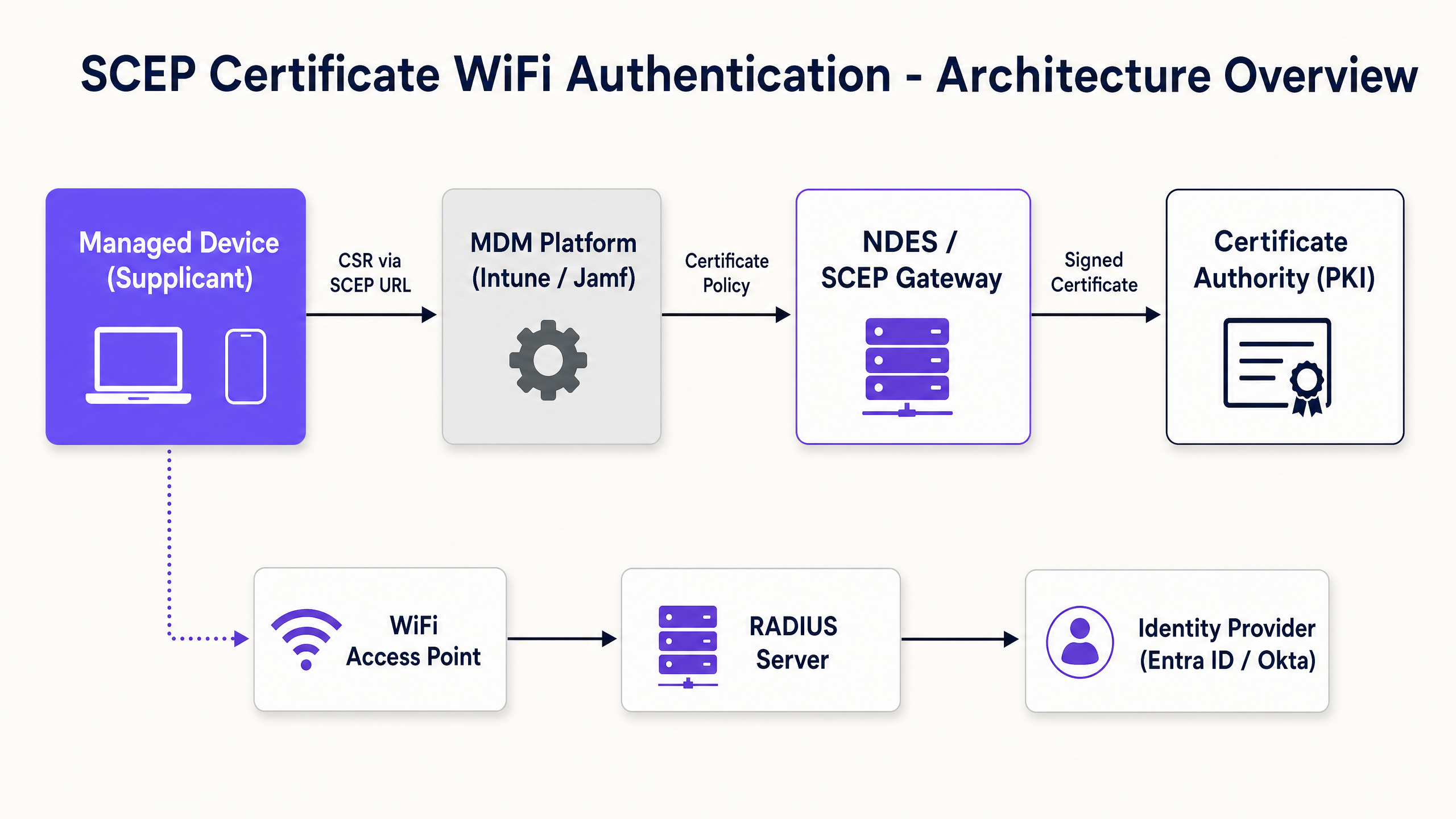
SCEP est la norme de l'industrie pour l'enrôlement des appareils d'entreprise. Dans un flux de travail SCEP, le service MDM demande au terminal de générer sa propre paire de clés privée et publique. L'appareil crée une demande de signature de certificat (CSR) et l'envoie via un serveur NDES (Network Device Enrollment Service) ou une passerelle cloud à votre autorité de certification (CA). La CA signe la demande et renvoie le certificat public à l'appareil.
L'avantage de sécurité critique de SCEP est que la clé privée ne quitte jamais l'appareil. Elle est générée localement, stockée dans l'enclave matérielle sécurisée de l'appareil et n'est jamais transmise sur le réseau. Cela fait de SCEP l'approche fortement recommandée pour l'authentification 802.1X.
EAP-TLS et authentification mutuelle
EAP-TLS (Extensible Authentication Protocol with Transport Layer Security) s'inscrit dans le cadre 802.1X. EAP-TLS est largement considéré comme la méthode d'authentification la plus sécurisée pour les réseaux sans fil d'entreprise car il nécessite une authentification mutuelle. L'appareil client et le serveur RADIUS doivent tous deux présenter des certificats valides. Aucun des deux côtés ne fait confiance à l'autre sans preuve cryptographique. Cette authentification mutuelle protège le réseau contre les points d'accès malveillants et le vol d'identifiants.
Lorsqu'un appareil se connecte à votre SSID WiFi, il présente son certificat au serveur RADIUS. Le serveur RADIUS valide le certificat par rapport à votre chaîne de confiance CA, vérifie la liste de révocation de certificats (CRL) pour confirmer que le certificat n'a pas été révoqué et, en cas de succès, envoie un message d'acceptation au point d'accès.
Guide de mise en œuvre : La séquence de déploiement
La configuration réussie d'un profil WiFi MDM pour le 802.1X nécessite le respect strict d'une séquence de déploiement spécifique. Les dépendances de profil imposent que la confiance soit établie avant que l'authentification puisse être configurée.
Étape 1 : Déployer le profil de certificat racine approuvé
Avant qu'un appareil ne puisse demander un certificat client ou faire confiance à votre serveur RADIUS, il doit faire confiance à l'autorité de certification émettrice.
- Exportez votre certificat CA racine sous forme de fichier .cer.
- Dans votre MDM (par exemple, Intune ou Jamf), créez un profil de certificat approuvé.
- Téléchargez le fichier .cer et déployez ce profil sur vos groupes d'appareils cibles.
Étape 2 : Configurer le profil de certificat SCEP
Une fois la confiance établie, configurez le profil SCEP pour indiquer aux appareils comment obtenir leur certificat client.
- Créez un nouveau profil de configuration et sélectionnez le certificat SCEP.
- Configurez le format du nom de sujet (Subject name). Pour l'authentification basée sur l'utilisateur, utilisez le User Principal Name.
- Définissez l'utilisation de la clé (Key usage) sur Signature numérique et Chiffrement de la clé.
- Sous Utilisation étendue de la clé (Extended key usage), spécifiez Authentification client.
- Liez ce profil au profil de certificat racine approuvé créé à l'étape 1.
- Fournissez l'URL externe de votre serveur NDES ou de votre passerelle SCEP.
Étape 3 : Déployer le profil WiFi 802.1X
La dernière étape consiste à pousser la configuration WiFi qui lie les certificats au SSID du réseau.
- Créez un profil de configuration Wi-Fi.
- Saisissez le nom du réseau (SSID) exactement tel qu'il est diffusé par vos points d'accès.
- Sélectionnez WPA2-Enterprise ou WPA3-Enterprise comme type de sécurité.
- Définissez le type d'EAP sur EAP-TLS.
- Sélectionnez le profil de certificat SCEP créé à l'étape 2 comme certificat d'authentification client.
- Spécifiez le certificat racine approuvé pour la validation du serveur.
Bonnes pratiques et normes de l'industrie
Lors de la mise en œuvre du déploiement de certificats SCEP, respectez ces bonnes pratiques neutres vis-à-vis des fournisseurs pour garantir la conformité et la fiabilité.
Emplacement et sécurité du serveur NDES
Le serveur NDES doit être accessible depuis Internet pour permettre aux appareils distants dpour provisionner des certificats avant d'arriver sur site. Cependant, exposer directement un serveur interne à Internet représente un risque de sécurité important. Publiez l'URL NDES à l'aide d'Azure AD Application Proxy ou utilisez une passerelle SCEP hébergée dans le cloud. Cela permet un accès à distance sécurisé sans ouvrir de ports de pare-feu entrants.
Contrôle RADIUS et CRL
Le déploiement de certificats ne représente que la moitié de l'équation de sécurité ; la révocation est tout aussi essentielle. Si un employé s'en va, la désactivation de son compte Active Directory peut ne pas révoquer immédiatement son accès WiFi si son certificat client reste valide et que le serveur RADIUS ne vérifie pas rigoureusement la liste de révocation de certificats (CRL). Configurez votre serveur RADIUS pour imposer une vérification stricte de la CRL et assurez-vous que vos points de distribution CRL sont hautement disponibles.
Déploiement agnostique du matériel
SCEP et EAP-TLS sont des normes neutres vis-à-vis des fournisseurs. Votre déploiement doit être agnostique du matériel, fonctionnant de manière transparente sur les infrastructures Cisco Meraki, HPE Aruba, Ruckus, Juniper Mist, Ubiquiti UniFi, Cambium, Extreme et Fortinet.
Dépannage et atténuation des risques
Même avec une planification méticuleuse, le déploiement de certificats peut rencontrer des problèmes.
Problème : Échec de l'application du profil WiFi
Cela est presque toujours dû à une mauvaise correspondance dans le ciblage des groupes. Si le profil SCEP est attribué à un groupe d'utilisateurs, mais que le profil WiFi est attribué à un groupe d'appareils, le MDM ne peut pas résoudre la dépendance. Assurez-vous que les profils Trusted Root, SCEP et WiFi sont tous déployés sur le même groupe exact.
Problème : Erreurs NDES 403 Forbidden
Les appareils ne parviennent pas à récupérer le certificat SCEP. Le compte de service Intune Certificate Connector manque probablement des autorisations nécessaires sur le modèle de certificat, ou le filtrage d'URL sur votre pare-feu bloque les paramètres de chaîne de requête spécifiques utilisés par SCEP.
ROI et impact commercial
La transition vers le déploiement de certificats SCEP 802.1X offre des rendements mesurables en matière de sécurité et d'opérations.
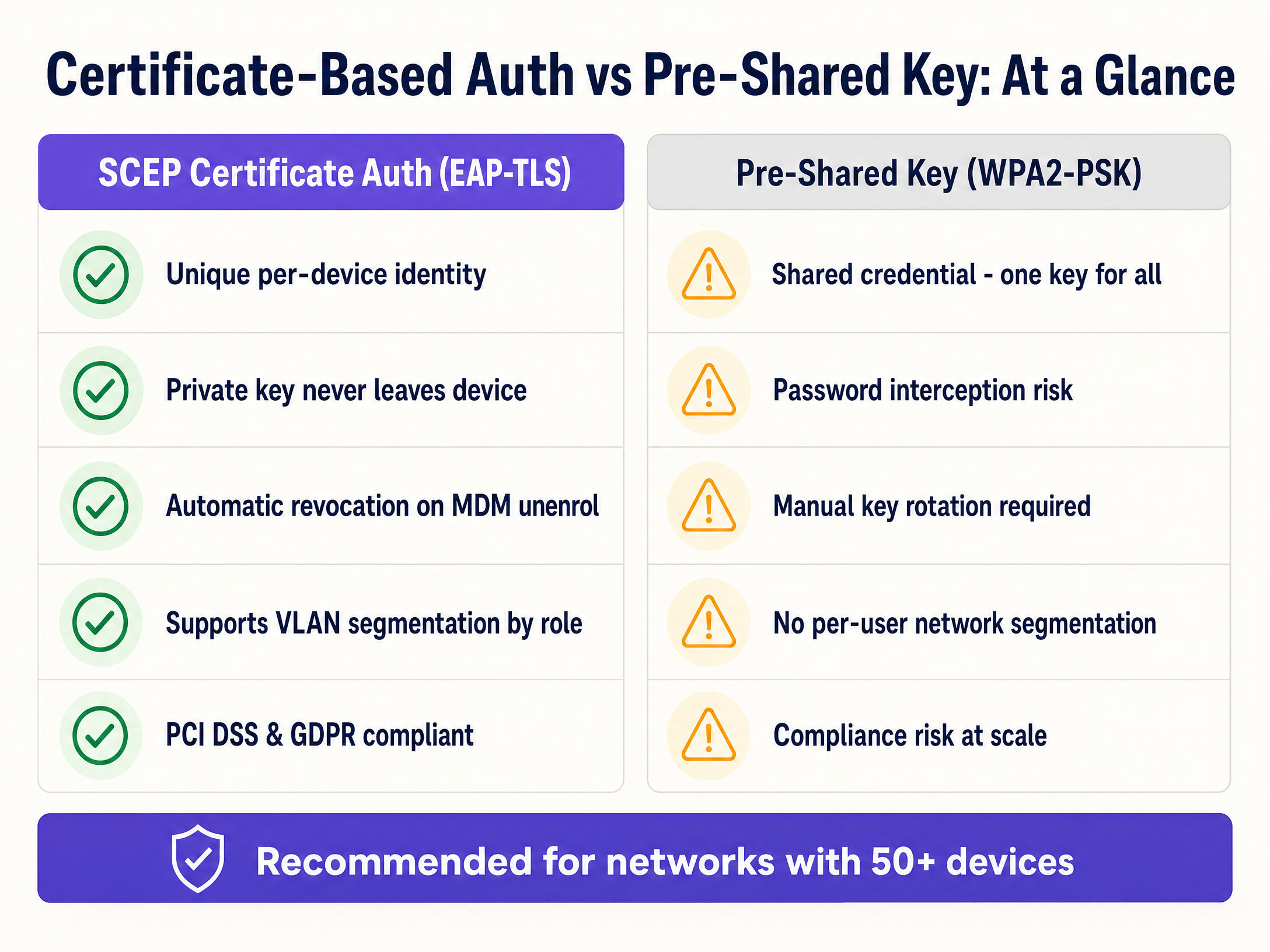
- Réduction des tickets de support : Le WiFi basé sur mot de passe génère un volume important de tickets d'assistance. L'authentification par certificat est invisible pour l'utilisateur, réduisant généralement le volume de support lié au WiFi de 70 %.
- Posture de sécurité renforcée : EAP-TLS élimine le risque de vol d'identifiants et d'attaques de type Man-in-the-Middle. C'est essentiel pour la conformité avec des cadres tels que PCI DSS et le GDPR.
- Intégration fluide : Pour les organisations gérant de grandes flottes d'appareils Apple aux côtés de Windows, l'intégration avec les flux de travail MDM existants garantit une expérience de provisionnement unifiée et sans intervention (zero-touch).
- Segmentation dynamique : Prend en charge l'attribution dynamique de VLAN basée sur l'identité, isolant les appareils IoT des données de l'entreprise sans nécessiter de SSID distincts.
Pour aller plus loin, explorez nos guides connexes sur Sécurité WiFi d'entreprise : un guide complet pour 2026 et Comment révoquer l'accès WiFi lorsqu'un employé s'en va .
Définitions clés
SCEP (Simple Certificate Enrollment Protocol)
A protocol that automates the request and issuance of digital certificates to managed devices without human intervention.
Used by MDM platforms to securely provision unique identities to devices for network authentication.
EAP-TLS (Extensible Authentication Protocol - Transport Layer Security)
The most secure 802.1X authentication method, requiring both the client and the RADIUS server to present valid digital certificates.
The target authentication protocol that SCEP certificates are provisioned to support.
802.1X
An IEEE standard for port-based network access control that provides an authentication mechanism to devices wishing to attach to a LAN or WLAN.
The overarching framework that secures enterprise networks against unauthorized access.
RADIUS
A networking protocol that provides centralized Authentication, Authorization, and Accounting management for users who connect and use a network service.
The server component that validates the client certificate and determines which VLAN the device should join.
CSR (Certificate Signing Request)
A block of encoded text given to a Certificate Authority when applying for an SSL/TLS certificate, containing the public key and identity information.
Generated locally on the device during the SCEP enrollment process.
NDES (Network Device Enrollment Service)
A Microsoft Windows Server role that acts as a bridge, allowing devices to obtain certificates via SCEP.
The gateway that receives the CSR from the device and forwards it to the internal Certificate Authority.
CRL (Certificate Revocation List)
A list published by the Certificate Authority containing the serial numbers of certificates that have been revoked and should no longer be trusted.
Checked by the RADIUS server during authentication to ensure a terminated employee's device cannot connect.
VLAN (Virtual Local Area Network)
A logical subnetwork that groups a collection of devices from different physical LANs.
Used in conjunction with RADIUS to dynamically segment network traffic based on the identity presented in the SCEP certificate.
Exemples concrets
A 400-room hotel needs to deploy secure operational WiFi for 150 staff devices (tablets and laptops) while ensuring strict separation from the Guest WiFi network.
The IT team configures a cloud SCEP gateway integrated with their MDM. They deploy a Trusted Root profile, followed by a SCEP profile targeting the 'Hotel Operations' device group. A WiFi profile for the 'Staff-Secure' SSID is then deployed, configured for WPA3-Enterprise and EAP-TLS. The RADIUS server is configured to assign these authenticated devices to VLAN 40, completely isolating them from the Guest WiFi (VLAN 50).
A large university campus with 25,000 students and 3,000 staff needs to secure its 'Edu-Secure' network. They currently use PEAP with usernames and passwords, resulting in 500+ helpdesk tickets per month due to password expirations.
The university migrates staff and faculty devices to EAP-TLS using Intune and SCEP. They deploy the certificate profiles in the strict sequence (Root -> SCEP -> WiFi) to the staff user groups. For unmanaged student BYOD devices, they deploy a separate onboarding portal that provisions temporary certificates, or utilize Purple's Guest WiFi platform with profile-based authentication for seamless, secure access.
Questions d'entraînement
Q1. Your team is deploying a new SCEP certificate profile to a fleet of 500 Windows laptops. The Trusted Root profile was deployed to the 'All Corporate Devices' group. The SCEP profile was deployed to the 'All Corporate Users' group. The WiFi profile is showing as 'Not Applicable' on the laptops. What is the root cause?
Conseil : Consider the Intune profile dependency rules and group targeting requirements.
Voir la réponse type
The root cause is a mismatch in group targeting. Intune requires that dependent profiles (Root, SCEP, WiFi) be deployed to the exact same group type. Because the Root profile targets devices and the SCEP profile targets users, the dependency chain is broken. All three profiles must target either the same Device group or the same User group.
Q2. A hotel operations director wants to secure the staff WiFi network using EAP-TLS. They suggest using PKCS instead of SCEP because it does not require an NDES server. As the network architect, why should you advise against this for WiFi authentication?
Conseil : Think about where the private key is generated and how it travels.
Voir la réponse type
You should advise against PKCS for WiFi authentication because it requires the private key to be generated centrally by the CA and transmitted over the network to the device. SCEP is significantly more secure because the device generates the private key locally and stores it in a secure hardware enclave; the private key never leaves the device.
Q3. During a network audit, you discover that the RADIUS server is configured to ignore CRL (Certificate Revocation List) checking errors. What specific security risk does this introduce when an employee is terminated?
Conseil : Consider what happens to the validity of the certificate if the MDM unenrols the device but the RADIUS server cannot verify revocation status.
Voir la réponse type
If CRL checking is ignored or fails open, a terminated employee whose device has been unenrolled (and certificate revoked by the CA) may still be able to connect to the WiFi network. The RADIUS server will see a cryptographically valid certificate and, without checking the CRL, will grant access, creating a severe security vulnerability.
Continuer la lecture de cette série
Mesurer le ROI commercial du WiFi invité et des analyses de localisation
Ce guide fournit un cadre technique et opérationnel pour mesurer le ROI commercial du WiFi invité et des analyses de localisation. Il détaille comment calculer la valeur des investissements matériels grâce à l'augmentation du temps de séjour, à l'efficacité opérationnelle et à la capture de données de première partie dans les secteurs du commerce de détail, de l'hôtellerie et des lieux publics. Les responsables informatiques, les architectes réseau, les CTO et les directeurs d'exploitation de sites y trouveront des cadres de mesure concrets, des études de cas réelles et des conseils de conformité pour justifier et maximiser leur investissement WiFi.
Conformité GDPR pour le WiFi : comment collecter en toute sécurité les données des invités via des Captive Portals
Ce guide technique offre aux responsables informatiques, architectes réseau et directeurs d'exploitation de sites un cadre pratique pour assurer la conformité GDPR de leurs déploiements WiFi invités. Il explique comment les captive portals collectent les données personnelles, comment obtenir un consentement explicite et comment mettre en œuvre des politiques automatisées de rétention des données afin de protéger votre organisation contre des amendes réglementaires pouvant atteindre 4 % du chiffre d'affaires mondial. La plateforme WiFi invités de Purple s'aligne directement sur chaque exigence de conformité, de l'enregistrement du consentement à la suppression des données en un clic.
Comment configurer SCEP pour un WiFi d'entreprise sécurisé et le provisionnement BYOD
Ce guide technique explique comment configurer le protocole SCEP (Simple Certificate Enrollment Protocol) pour automatiser l'authentification WiFi d'entreprise 802.1X sécurisée et le provisionnement BYOD. Il fournit aux architectes réseau et aux responsables informatiques une séquence de déploiement définitive, des scénarios de mise en œuvre réels issus de l'hôtellerie et du commerce de détail, ainsi que des stratégies d'atténuation des risques pour éliminer les clés pré-partagées vulnérables et le MAC Authentication Bypass des réseaux d'entreprise.