
Qu'est-ce que l'authentification 802.1X ? Comment ça marche et pourquoi c'est important
Un guide de référence technique complet pour les responsables informatiques et les architectes réseau sur l'authentification IEEE 802.1X. Ce guide couvre l'architecture sous-jacente, les stratégies de mise en œuvre, les avantages en matière de sécurité par rapport au PSK, et comment déployer efficacement un contrôle d'accès de niveau entreprise parallèlement aux solutions WiFi pour invités.
Écouter ce guide
Voir la transcription du podcast

Résumé Exécutif
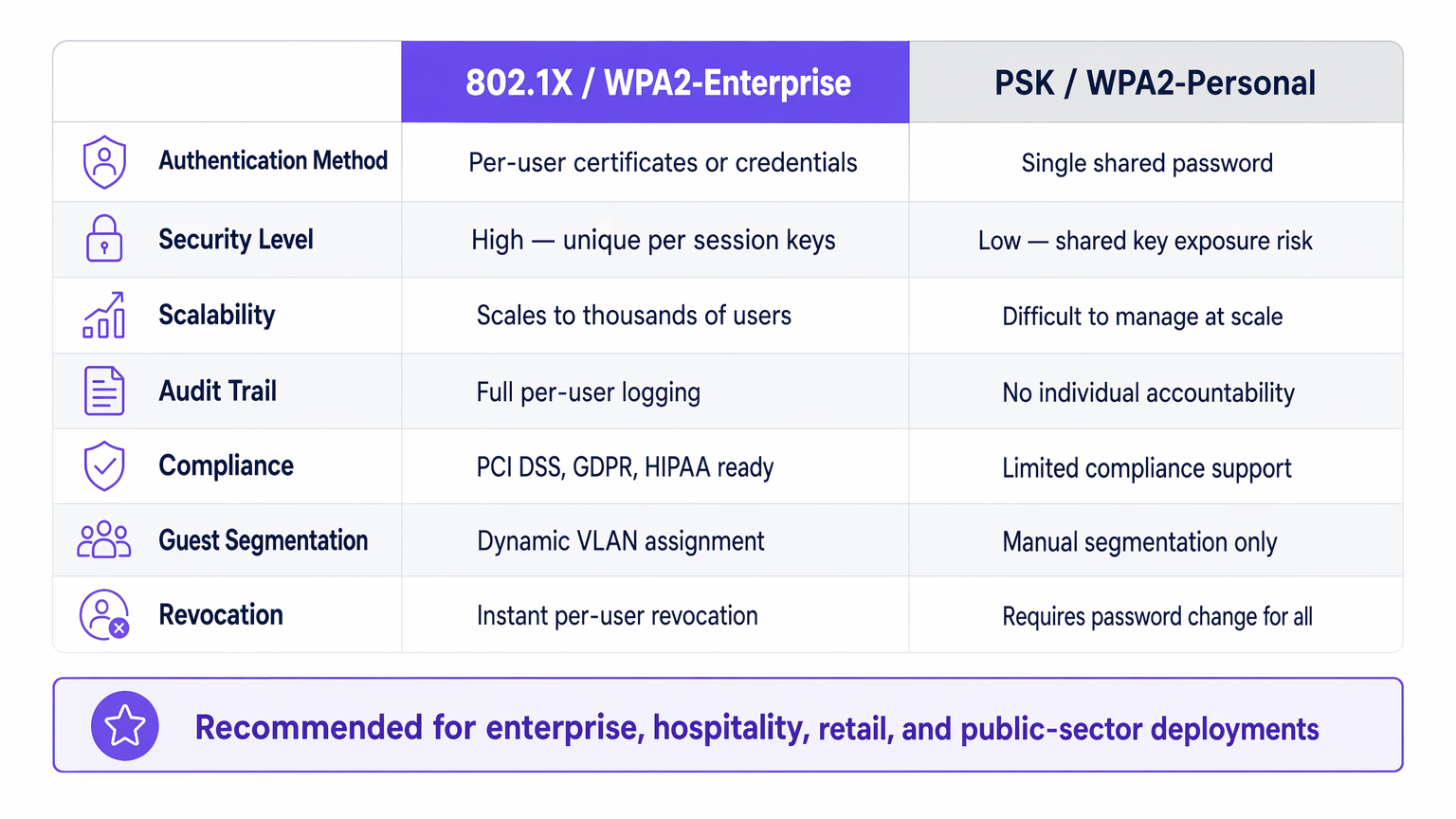
Pour les responsables informatiques d'entreprise gérant des réseaux dans les secteurs de l' Hôtellerie , du Commerce de détail , de la Santé ou des Transports , la sécurisation de l'accès au réseau est une exigence fondamentale. S'appuyer sur des clés pré-partagées (PSK) pour l'accès d'entreprise introduit des risques inacceptables : manque de responsabilité individuelle, processus de révocation complexes et vulnérabilités de chiffrement partagées.
IEEE 802.1X est le cadre standard de l'industrie pour le contrôle d'accès réseau basé sur les ports. Il impose un processus d'authentification rigoureux avant qu'un appareil ne puisse communiquer sur le réseau, permettant la vérification de l'identité par utilisateur, l'application dynamique des politiques et la conformité avec des cadres comme PCI DSS et GDPR. Ce guide explore les mécanismes de 802.1X, les différences entre les méthodes EAP courantes et les stratégies de déploiement pratiques pour les environnements d'entreprise, y compris la manière dont il s'intègre aux solutions Guest WiFi pour fournir une stratégie d'accès holistique.
Plongée Technique : Comment fonctionne le 802.1X
À la base, le 802.1X fonctionne sur un modèle à trois parties conçu pour isoler les appareils non authentifiés du réseau interne.
L'Architecture à Trois Parties
- Demandeur (Supplicant) : L'appareil de l'utilisateur final (ordinateur portable, smartphone, capteur IoT) demandant l'accès au réseau. Il doit exécuter un client logiciel compatible 802.1X.
- Authentificateur : L'appareil réseau (point d'accès sans fil ou commutateur géré) contrôlant le port physique ou logique. Il agit comme un gardien, bloquant tout le trafic sauf EAP (Extensible Authentication Protocol) jusqu'à ce que l'authentification réussisse.
- Serveur d'Authentification : Généralement un serveur RADIUS (Remote Authentication Dial-In User Service). Il valide les identifiants du demandeur (supplicant) par rapport à un magasin d'identité backend (comme Active Directory) et renvoie une décision de politique.
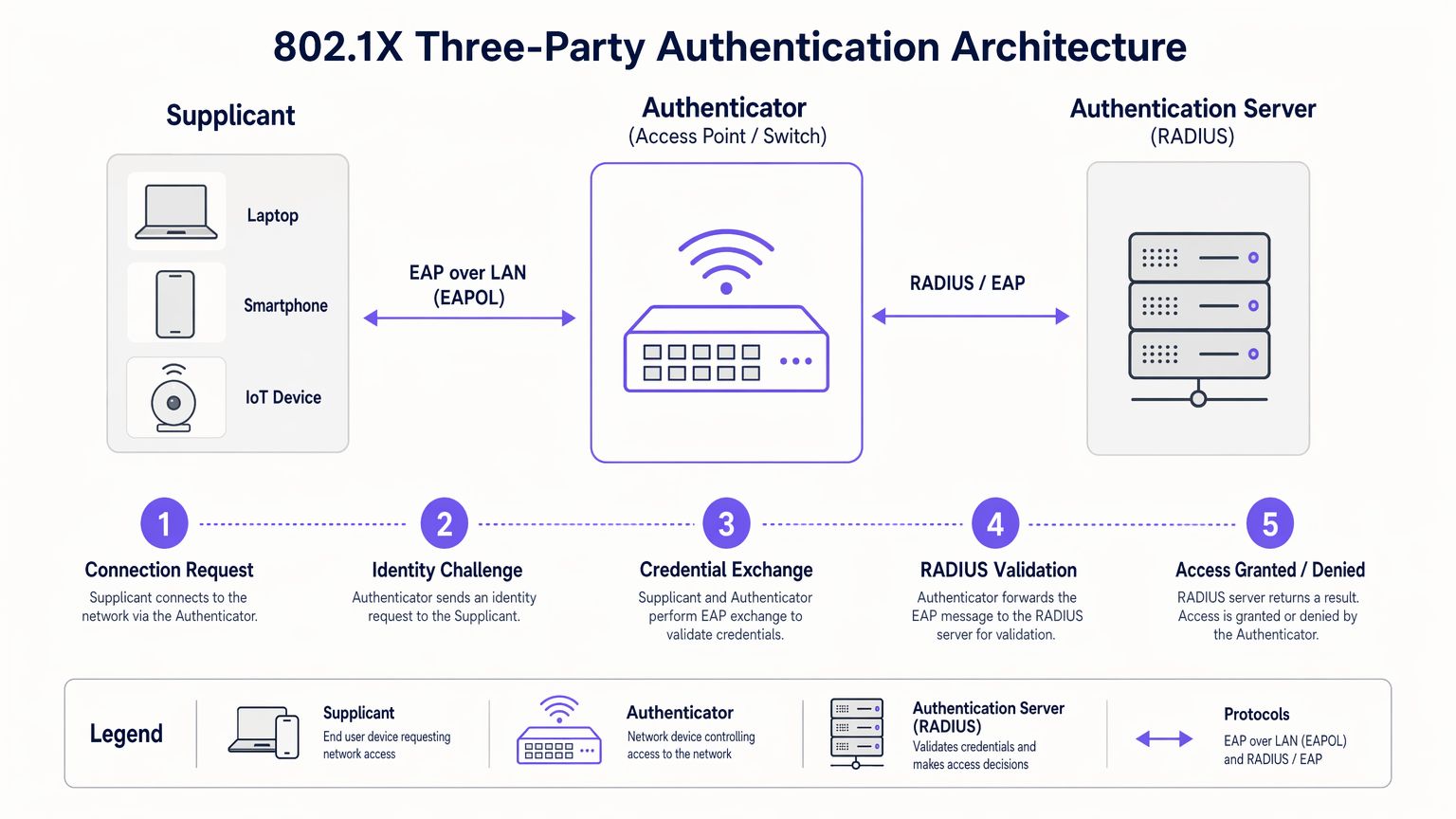
Le Flux d'Authentification
Lorsqu'un demandeur (supplicant) se connecte à un port ou un SSID compatible 802.1X, l'authentificateur place le port dans un état non autorisé. Le flux se déroule comme suit :
- Démarrage EAPOL : Le demandeur (supplicant) envoie une trame EAP over LAN (EAPOL) Start à l'authentificateur.
- Demande d'Identité : L'authentificateur demande l'identité du demandeur (supplicant).
- Réponse d'Identité : Le demandeur (supplicant) fournit son identité, que l'authentificateur transmet au serveur RADIUS via un paquet RADIUS Access-Request.
- Échange EAP : Le serveur RADIUS et le demandeur (supplicant) négocient une méthode EAP et échangent des identifiants en toute sécurité via l'authentificateur.
- Décision d'Accès : Après une validation réussie, le serveur RADIUS envoie un paquet RADIUS Access-Accept à l'authentificateur. Ce paquet inclut souvent des attributs spécifiques au fournisseur (VSAs) pour l'attribution dynamique de VLAN ou les politiques QoS.
- Port Autorisé : L'authentificateur fait passer le port à un état autorisé, permettant le trafic réseau normal.
Méthodes EAP : Choisir le Bon Protocole
Le cadre EAP est extensible. Le choix de la méthode EAP détermine la manière dont les identifiants sont échangés et vérifiés :
- EAP-TLS (Transport Layer Security) : La référence en matière de sécurité. Il nécessite une authentification mutuelle à l'aide de certificats numériques sur le client et le serveur. Bien que très sécurisé, il exige une infrastructure à clé publique (PKI) robuste.
- PEAP-MSCHAPv2 (Protected EAP) : Le déploiement le plus courant dans les environnements d'entreprise. Il utilise un certificat côté serveur pour établir un tunnel TLS sécurisé, à l'intérieur duquel le client s'authentifie à l'aide d'un nom d'utilisateur et d'un mot de passe standard (MSCHAPv2). Il équilibre la sécurité et la simplicité de déploiement.
- EAP-TTLS (Tunneled TLS) : Similaire à PEAP mais prend en charge une gamme plus large de protocoles d'authentification internes, y compris les anciens PAP ou CHAP, souvent utilisés dans des environnements non-Windows.
Guide de Mise en Œuvre
Le déploiement de 802.1X nécessite une planification minutieuse pour éviter toute perturbation pour les utilisateurs. Une approche par phases est essentielle pour réussir.
Phase 1 : Préparation de l'Infrastructure
Avant d'activer le 802.1X en périphérie, assurez-vous que votre infrastructure centrale est prête. Déployez un serveur RADIUS (tel que Microsoft NPS ou FreeRADIUS) et intégrez-le à votre fournisseur d'identité. Configurez la haute disponibilité pour l'infrastructure RADIUS ; si le serveur d'authentification tombe en panne, l'accès au réseau est interrompu.
Phase 2 : Configuration du Demandeur (Supplicant)
Ne comptez pas sur les utilisateurs pour configurer manuellement leurs appareils. Pour les appareils d'entreprise gérés, utilisez des objets de stratégie de groupe (GPO) ou des plateformes de gestion des appareils mobiles (MDM) pour déployer le profil 802.1X correct, y compris la méthode EAP requise et le certificat racine de confiance pour le serveur RADIUS.
Phase 3 : Pilote et Déploiement
Commencez par un petit groupe pilote utilisant un SSID de test dédié ou une pile de commutateurs spécifique. Surveillez les journaux RADIUS pour détecter les échecs d'authentification, en particulier ceux liés aux problèmes de confiance des certificats ou aux identifiants incorrects. Une fois le pilote stable, procédez à un déploiement progressif dans toute l'organisation.
Intégration avec l'Accès Invité
Le 802.1X est conçu pour les utilisateurs d'entreprise avec des identifiants connus. Pour les visiteurs, les sous-traitants et les clients, vous avez besoin d'une stratégie parallèle. C'est là qu'une plateforme Guest WiFi dédiée devient essentielle. Alors que les appareils d'entreprise s'authentifient de manière transparente via 802.1X sur des VLAN sécurisés, les invités s'authentifient via un Captive Portal, fournissant des données de première partie précieuses pour l' Analyse WiFi tout en restant isolés des ressources internes.
La plateforme de Purple peut également agir comme fournisseur d'identité pour des services comme OpenRoaming sous la licence Connect, comblant le fossé entre un accès public transparent et une authentification sécurisée.
Bonnes Pratiques
- Appliquer le Serveur "Validation des certificats: Lors de l'utilisation de PEAP ou EAP-TTLS, vous devez configurer les supplicants pour valider le certificat du serveur RADIUS. Ne pas le faire rend le réseau vulnérable aux attaques de points d'accès non autorisés (Evil Twin).
- Mettre en œuvre l'attribution dynamique de VLAN: Tirez parti des attributs RADIUS pour attribuer les utilisateurs à des VLAN spécifiques en fonction de leur appartenance à un groupe Active Directory. Cela réduit le nombre de SSIDs requis et simplifie la segmentation du réseau.
- Gérer les appareils IoT avec MAB: De nombreux appareils IoT (imprimantes, téléviseurs intelligents) ne prennent pas en charge les supplicants 802.1X. Utilisez le contournement d'authentification MAC (MAB) comme solution de repli. L'authentificateur utilise l'adresse MAC de l'appareil comme nom d'utilisateur et mot de passe. Étant donné que les adresses MAC peuvent être usurpées, limitez strictement les privilèges d'accès des appareils authentifiés par MAB.
Dépannage et atténuation des risques
Lorsque le 802.1X échoue, les journaux du serveur RADIUS sont votre principal outil de diagnostic.
- Erreur : Délai d'attente EAP: L'authentificateur ne reçoit pas de réponse du supplicant. Cela indique souvent que le logiciel du supplicant n'est pas en cours d'exécution, ou que l'appareil n'est pas configuré pour le 802.1X.
- Erreur : Utilisateur inconnu ou mauvais mot de passe: L'utilisateur a saisi des identifiants incorrects, ou le serveur RADIUS ne peut pas communiquer avec le magasin d'identité backend.
- Erreur : Échec de la confiance du certificat: Le supplicant a rejeté le certificat du serveur RADIUS. Assurez-vous que le certificat de l'autorité de certification racine (Root CA) qui a émis le certificat du serveur RADIUS est installé dans le magasin racine de confiance du supplicant.
Pour une perspective plus large sur l'optimisation de l'architecture réseau, examinez comment l'authentification s'intègre aux stratégies WAN modernes, comme abordé dans Les avantages essentiels du SD WAN pour les entreprises modernes .
ROI et impact commercial
La mise en œuvre du 802.1X apporte une valeur commerciale mesurable au-delà de la simple sécurité :
- Réduction des frais généraux opérationnels: Élimine le besoin de faire pivoter manuellement les PSK lorsque les employés partent ou que les contractuels terminent leurs missions. L'accès est révoqué instantanément en désactivant le compte d'annuaire de l'utilisateur.
- Conformité simplifiée: Fournit les pistes d'audit par utilisateur et les contrôles d'accès robustes requis par PCI DSS, HIPAA et GDPR.
- Visibilité réseau améliorée: Intègre l'identité à l'activité réseau, permettant aux équipes informatiques de tracer les événements de sécurité ou les problèmes de performance jusqu'à des utilisateurs spécifiques plutôt que des adresses IP génériques.
En s'éloignant des clés partagées et en adoptant le contrôle d'accès basé sur les ports, les réseaux d'entreprise atteignent la sécurité granulaire requise par les exigences opérationnelles modernes. Pour une comparaison détaillée des normes de sécurité sans fil, consultez notre guide sur WPA, WPA2 et WPA3 : Quelle est la différence et lequel devriez-vous utiliser ? .
Briefing audio
Écoutez notre briefing technique de 10 minutes sur l'authentification 802.1X :
Définitions clés
802.1X
An IEEE standard for port-based network access control that provides an authentication mechanism to devices wishing to attach to a LAN or WLAN.
The foundational standard replacing shared passwords with per-user authentication in enterprise networks.
Supplicant
The software client on an end-user device that requests network access and handles the EAP exchange.
Required on all laptops, phones, and tablets connecting to an 802.1X network.
Authenticator
The network edge device (switch or access point) that controls the physical or logical port, blocking traffic until authentication is complete.
The enforcement point in the network architecture.
RADIUS Server
Remote Authentication Dial-In User Service. The central server that validates credentials against a directory and returns policy decisions.
The brain of the 802.1X deployment, often implemented via Microsoft NPS or Cisco ISE.
EAP (Extensible Authentication Protocol)
An authentication framework frequently used in wireless networks and point-to-point connections, providing transport for various authentication methods.
The language spoken between the supplicant and the RADIUS server.
Dynamic VLAN Assignment
The process where a RADIUS server instructs the authenticator to place a user into a specific VLAN based on their identity or group membership.
Crucial for network segmentation and compliance without broadcasting dozens of SSIDs.
EAP-TLS
An EAP method requiring mutual certificate-based authentication between the client and the server.
The most secure method, ideal for highly regulated environments like healthcare or finance.
PEAP (Protected EAP)
An EAP method that establishes a secure TLS tunnel using a server certificate, protecting the inner credential exchange (usually a username/password).
The most common deployment method due to its balance of security and operational simplicity.
Exemples concrets
A 200-room hotel needs to secure its back-of-house operational network (staff tablets, VoIP phones, management laptops) while maintaining a separate, open guest network. They currently use a single PSK for staff.
- Deploy Microsoft NPS (RADIUS) integrated with the hotel's Active Directory.
- Configure the wireless controller to broadcast a new 'Staff_Secure' SSID using WPA2-Enterprise (802.1X).
- Push a PEAP-MSCHAPv2 profile to all managed staff laptops and tablets via MDM.
- For VoIP phones lacking 802.1X support, configure MAC Authentication Bypass (MAB) on the RADIUS server, assigning them to an isolated Voice VLAN.
- Retain the open guest network, securing it with Purple's captive portal for guest isolation and analytics.
A large retail chain is failing PCI DSS compliance because their Point of Sale (PoS) terminals are on the same logical network segment as store manager laptops, using a shared WPA2-Personal key.
- Implement 802.1X across all corporate access points.
- Configure dynamic VLAN assignment on the RADIUS server.
- Create a policy: If the authenticating device is a PoS terminal (authenticated via machine certificate using EAP-TLS), assign it to the highly restricted PCI-VLAN.
- Create a second policy: If the user is a Store Manager (authenticated via PEAP), assign them to the Corp-VLAN with standard internet and intranet access.
Questions d'entraînement
Q1. Your organization is migrating from WPA2-Personal to WPA2-Enterprise. You have a mix of corporate-owned Windows laptops and employee-owned BYOD smartphones. You do not have a PKI infrastructure. Which EAP method should you deploy?
Conseil : Consider the requirement for client certificates versus server-only certificates.
Voir la réponse type
PEAP-MSCHAPv2. Since you lack a PKI infrastructure, deploying client certificates for EAP-TLS is not feasible. PEAP only requires a server-side certificate on the RADIUS server, allowing users to authenticate with their standard Active Directory username and password.
Q2. After deploying 802.1X using PEAP, several users report they are prompted with a security warning asking them to 'Trust' a certificate when connecting to the network. What configuration step was missed?
Conseil : Think about how the supplicant validates the identity of the RADIUS server.
Voir la réponse type
The supplicant profile pushed to the devices was not configured to explicitly trust the Root CA that issued the RADIUS server's certificate. Without this configuration, the OS prompts the user to manually verify the server's identity, which is a security risk and poor user experience.
Q3. You need to connect 50 smart TVs in hotel conference rooms to the network. These devices do not support 802.1X supplicants. How can you provide them access while maintaining security?
Conseil : Consider alternative authentication methods for headless devices and how to restrict their access.
Voir la réponse type
Implement MAC Authentication Bypass (MAB). The authenticator will use the smart TV's MAC address to authenticate against the RADIUS server. Crucially, the RADIUS server must be configured to assign these devices to a heavily restricted VLAN (e.g., internet-only, no internal access) to mitigate the risk of MAC address spoofing.
Continuer la lecture de cette série
PSK par appareil par fournisseur : comparaison entre iPSK, DPSK, MPSK et PPSK (et support WPA3)
Une comparaison complète des implémentations PSK par appareil chez Cisco Meraki, HPE Aruba, Ruckus, Juniper Mist, Extreme, Fortinet et Ubiquiti UniFi. Découvrez comment le WPA3-SAE impacte les stratégies de clés par appareil et quand déployer des modes de transition plutôt que de passer au 802.1X.
Qu'est-ce que l'authentification par adresse MAC ? Quand l'utiliser et quand l'éviter
Ce guide de référence technique fait autorité sur l'authentification par adresse MAC dans les environnements WiFi d'entreprise – comment l'authentification MAC basée sur RADIUS fonctionne à la Couche 2, ses vulnérabilités de sécurité inhérentes (y compris l'usurpation d'adresse MAC et l'impact de la randomisation MAC au niveau du système d'exploitation), et les contextes opérationnels précis où elle reste un outil valide pour la gestion des appareils IoT et sans tête. Il fournit des conseils de déploiement exploitables pour les responsables informatiques et les architectes réseau dans les secteurs de l'hôtellerie, du commerce de détail, de la santé et des lieux publics, avec des exemples concrets, des cadres de décision et un contexte d'intégration pour la plateforme de WiFi invité et d'analyse de Purple.
Comment configurer le WiFi d'entreprise sur iOS et macOS avec 802.1X
This authoritative guide provides senior IT leaders with actionable steps for deploying 802.1X enterprise WiFi on iOS and macOS devices. It covers certificate-based authentication (EAP-TLS), MDM configuration profiles, and architecture integration to secure corporate networks while supporting BYOD initiatives.