

Extreme Networks e Purple WiFi: Integrazione ExtremeCloud IQ
Questa guida di riferimento tecnico fornisce un progetto completo per l'integrazione di Purple WiFi con la piattaforma ExtremeCloud IQ di Extreme Networks. Descrive il flusso architetturale, i passaggi di configurazione per il reindirizzamento del Captive Portal e l'autenticazione RADIUS, e le migliori pratiche per ottenere un accesso ospite sicuro e ricco di dati in ambienti aziendali.
🎧 Ascolta questa guida
Visualizza trascrizione
Riepilogo Esecutivo
Per le sedi aziendali che si standardizzano sull'infrastruttura Extreme Networks, l'implementazione di una soluzione guest WiFi di livello produttivo richiede una stretta integrazione tra il livello di rete fisico e il livello di intelligenza dell'applicazione. Questa guida di riferimento tecnico descrive l'architettura, la configurazione e l'implementazione operativa di Purple WiFi all'interno di un ambiente ExtremeCloud IQ. Sfruttando il reindirizzamento del Captive Portal e l'autenticazione RADIUS, i team IT possono trasformare il Guest WiFi standard in una risorsa sicura, conforme e ricca di dati. Questa integrazione consente l'assegnazione dinamica di VLAN, una contabilità precisa delle sessioni e WiFi Analytics complete senza introdurre complessità architetturale. Questa guida fornisce strategie di implementazione attuabili per i professionisti IT senior che gestiscono ambienti ad alta densità in Ospitalità , Retail e proprietà del settore pubblico.
Ascolta il nostro podcast di briefing per consulenti qui sotto per una panoramica completa dell'architettura di integrazione e delle migliori pratiche di implementazione.
Approfondimento Tecnico
Panoramica Architetturale
L'integrazione tra ExtremeCloud IQ e la piattaforma Purple WiFi si basa su protocolli standard di settore, principalmente il reindirizzamento HTTP/HTTPS e RADIUS (Remote Authentication Dial-In User Service). Questa architettura garantisce che gli access point (AP) di Extreme Networks gestiscano l'ambiente RF e il piano dati, mentre Purple gestisce la gestione delle identità, l'applicazione delle policy e l'acquisizione dei dati.
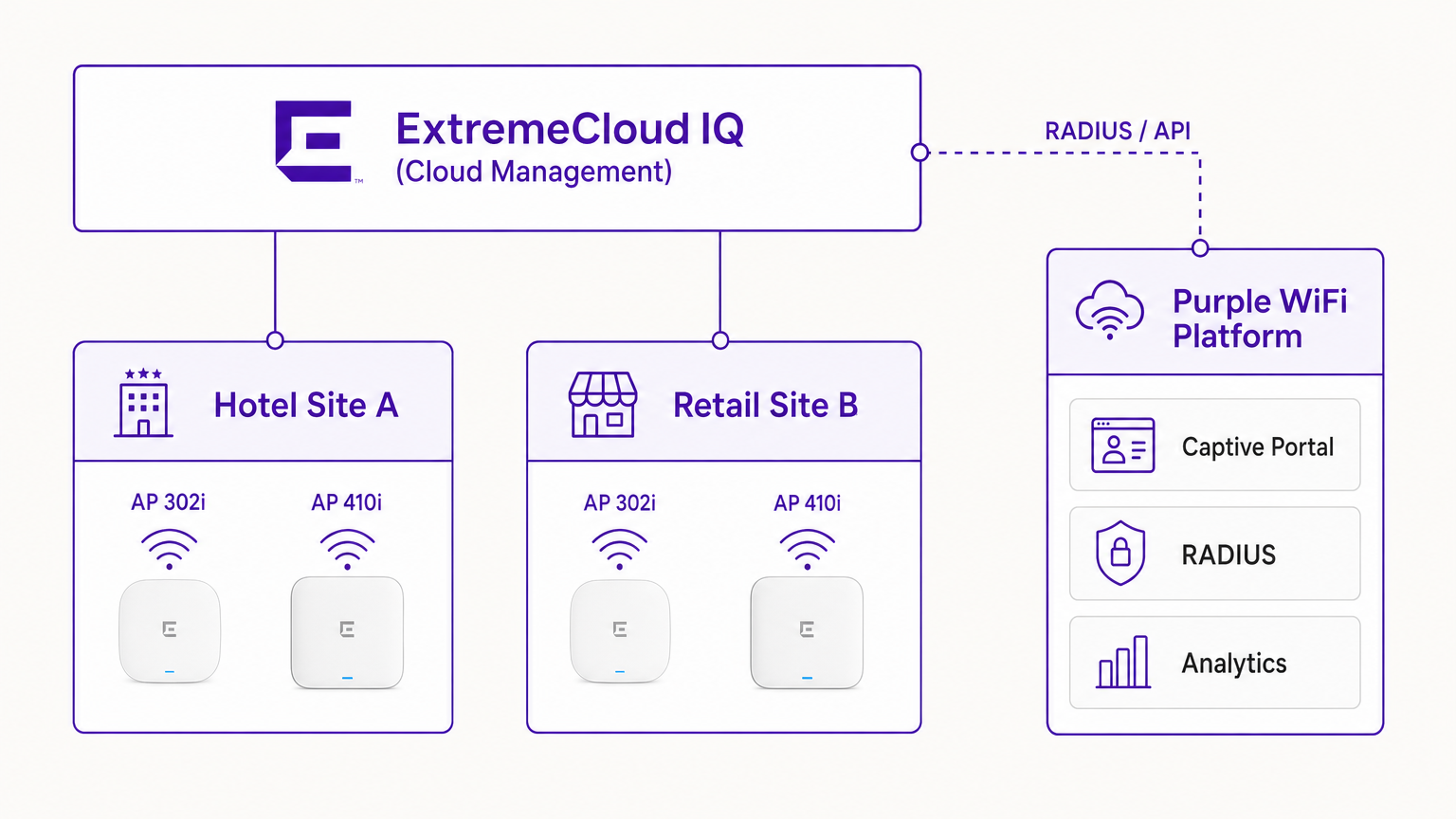
In una distribuzione tipica, il controller ExtremeCloud IQ (o l'AP che opera autonomamente sotto gestione cloud) è configurato con un SSID aperto o WPA3-SAE. Quando un dispositivo ospite si associa, l'AP pone il dispositivo in uno stato di pre-autenticazione. L'AP intercetta le richieste HTTP iniziali e reindirizza il client all'URL del Captive Portal Purple.
Il Flusso di Autenticazione RADIUS
Il cuore della sicurezza e dell'applicazione delle policy è lo scambio RADIUS.
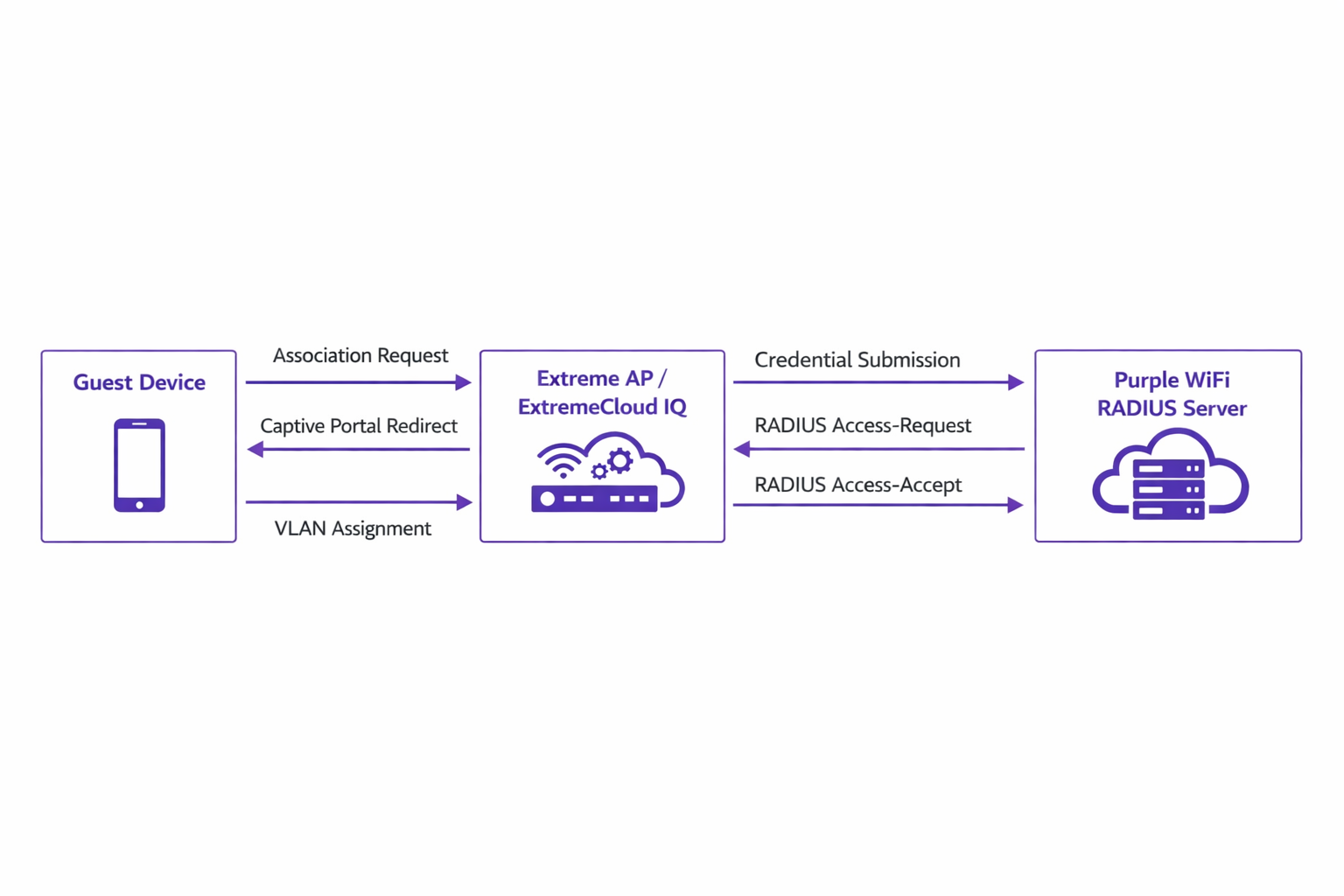
- Associazione: Il dispositivo ospite si associa all'AP Extreme.
- Reindirizzamento: L'AP reindirizza il browser del dispositivo al portale Purple.
- Autenticazione: L'utente completa il flusso di autenticazione (ad es. social login, invio modulo) sulla piattaforma Purple.
- RADIUS Access-Request: Il backend di Purple comunica con l'AP Extreme tramite RADIUS.
- RADIUS Access-Accept: Purple invia un messaggio Access-Accept, spesso contenente attributi specifici come
Tunnel-Private-Group-IDper l'assegnazione di VLAN. - Autorizzazione: L'AP sposta il client nello stato autenticato, applicando la VLAN e le policy QoS designate.
Questo flusso è fondamentale per mantenere la sicurezza della rete e allinearsi a standard come IEEE 802.1X, fornendo un controllo degli accessi basato su porta adattato per ambienti ospiti wireless.
Compatibilità Hardware
L'integrazione è completamente supportata su tutto il portfolio Extreme Networks gestito da ExtremeCloud IQ. Ciò include la serie 302 (ad es. AP302W) conveniente, ideale per le camere d'albergo, le serie 410 e 460 ad alta densità adatte per i centri congressi e gli ultimi AP della serie 630 che supportano Wi-Fi 6E per la massima efficienza dello spettro. Inoltre, le sedi che utilizzano switch ExtremeXOS on-premises possono ottenere risultati simili configurando i profili del server RADIUS e i reindirizzamenti del Captive Portal tramite la CLI o le interfacce di gestione legacy.
Guida all'Implementazione
La distribuzione di Purple all'interno di ExtremeCloud IQ richiede una configurazione precisa delle policy di rete e delle impostazioni AAA.
Passaggio 1: Configurazione di SSID e Captive Portal
Naviga alla Policy di Rete in ExtremeCloud IQ e crea un nuovo SSID per l'accesso ospite. Sotto le impostazioni del Captive Portal, seleziona 'External Captive Portal' e inserisci l'URL specifico fornito dalla tua dashboard Purple.
È fondamentale configurare correttamente il Walled Garden. Il walled garden consente ai dispositivi pre-autenticati di accedere ai domini necessari per caricare il Captive Portal. Devi inserire nella whitelist tutti i domini del portale Purple, le Content Delivery Networks (CDN) associate e qualsiasi provider di autenticazione di terze parti (ad es. Facebook, Google) che intendi supportare. La mancata configurazione accurata del walled garden comporterà il mancato caricamento del portale.
Passaggio 2: Configurazione del Server AAA e RADIUS
All'interno della configurazione dell'SSID, naviga alle impostazioni AAA (Authentication, Authorization, and Accounting). Aggiungi i server RADIUS di Purple come server di autenticazione primario e secondario.
- Porta di Autenticazione: UDP 1812
- Porta di Accounting: UDP 1813
Assicurati che il segreto condiviso corrisponda esattamente a quanto configurato nel portale Purple. Non trascurare il RADIUS Accounting. I pacchetti di accounting forniscono a Purple i dati di sessione, inclusa la durata della connessione e i volumi di trasferimento dati, che sono fondamentali per generare analisi accurate e mantenere i registri di conformità.
Passaggio 3: Assegnazione Dinamica di VLAN (Opzionale ma Raccomandata)
Per una maggiore sicurezza e segmentazione della rete, configura ExtremeCloud IQ per accettare gli attributi RADIUS per l'assegnazione di VLAN. Quando Purple invia il messaggio Access-Accept, può includere l'attributo Tunnel-Private-Group-ID. EsExtremeCloud IQ leggerà queste informazioni e posizionerà il dispositivo client sulla VLAN corrispondente. Ciò consente una segmentazione dinamica, ad esempio, isolando gli ospiti standard dai membri fedeltà o dai dispositivi IoT, in linea con i robusti principi di Architettura dell'Internet delle Cose: Una Guida Completa .
Migliori Pratiche
- Gestione dei Certificati: Assicurarsi che la rete non esegua l'ispezione SSL sul traffico destinato al Captive Portal Purple. I moderni sistemi operativi mobili (in particolare iOS) implementano una rigorosa convalida dei certificati; il traffico intercettato attiverà avvisi di sicurezza e interromperà il flusso del Captive Portal.
- Manutenzione del Walled Garden: Rivedere e aggiornare regolarmente le voci del walled garden. I fornitori di autenticazione di terze parti aggiornano frequentemente i loro intervalli IP e gli endpoint CDN.
- Autenticazione Basata su Profilo: Sfruttare l'autenticazione basata su profilo di Purple per semplificare l'accesso dei visitatori di ritorno, migliorando l'esperienza utente e mantenendo la sicurezza.
- Strategia dei Contenuti: Durante la progettazione del Captive Portal, considerare l'utilizzo di strumenti moderni per ottimizzare la messaggistica. Vedere AI Generativa per Testi e Creatività del Captive Portal per strategie volte a migliorare i tassi di conversione.
Risoluzione dei Problemi e Mitigazione del Rischio
Quando si integra ExtremeCloud IQ con Purple, le modalità di errore più comuni si verificano durante la fase di configurazione iniziale.
Sintomo: Il Captive Portal Non si Carica
- Causa: Configurazione errata del walled garden o errori di risoluzione DNS nello stato di pre-autenticazione.
- Mitigazione: Verificare che il dispositivo client riceva un indirizzo IP e un server DNS validi tramite DHCP. Confermare che tutti i domini Purple e gli endpoint CDN richiesti siano esplicitamente consentiti nella policy del walled garden.
Sintomo: L'Autenticazione Fallisce (Il Client Rimane Non Autenticato)
- Causa: Mancata corrispondenza del segreto condiviso RADIUS o problemi di raggiungibilità della rete tra l'AP Extreme e i server RADIUS di Purple.
- Mitigazione: Verificare il segreto condiviso sia in ExtremeCloud IQ che nella dashboard Purple. Assicurarsi che il traffico UDP in uscita sulle porte 1812 e 1813 sia consentito attraverso i firewall aziendali.
Sintomo: Le Dashboard di Analisi Non Mostrano Dati di Sessione
- Causa: La contabilità RADIUS non è abilitata o configurata in modo errato.
- Mitigazione: Confermare che la porta di contabilità (UDP 1813) sia configurata nel profilo AAA e che l'AP stia trasmettendo correttamente i pacchetti di richiesta di contabilità.
ROI e Impatto Commerciale
L'implementazione di Purple WiFi su un'infrastruttura Extreme Networks trasforma l'accesso degli ospiti da utilità fondamentale a risorsa aziendale strategica.
Per gli ambienti Retail , l'integrazione fornisce approfondimenti granulari su affluenza, tempo di permanenza e tassi di conversione, paragonabili alle analisi e-commerce. Nel settore Hospitality , l'assegnazione dinamica delle VLAN garantisce una segmentazione sicura, mentre l'autenticazione basata su profilo offre un'esperienza senza attriti per gli ospiti di ritorno, influenzando direttamente i punteggi di soddisfazione.
Inoltre, i robusti meccanismi di acquisizione dati garantiscono la conformità alle normative sulla protezione dei dati (come il GDPR) registrando in modo sicuro il consenso dell'utente al punto di accesso. Standardizzando questa architettura, le organizzazioni possono ottenere un rapido ritorno sull'investimento attraverso campagne di marketing mirate, efficienze operative e rischi di sicurezza mitigati.
Termini chiave e definizioni
ExtremeCloud IQ
Extreme Networks' cloud-driven network management platform that provides centralized visibility, control, and analytics for wired and wireless infrastructure.
Used by IT teams to manage the AP configuration, including the SSID, AAA policies, and captive portal redirect settings.
Captive Portal Redirect
A network technique where HTTP/HTTPS traffic from an unauthenticated client is intercepted and forced to a specific web page (the splash page) for authentication.
The primary mechanism used to present the Purple branded login experience to the guest device.
RADIUS (Remote Authentication Dial-In User Service)
A networking protocol that provides centralized Authentication, Authorization, and Accounting (AAA) management for users who connect and use a network service.
The backend communication channel between the Extreme AP and the Purple platform to verify credentials and enforce policies.
Walled Garden
A limited environment that controls the user's access to web content and services before they have fully authenticated to the network.
Crucial for allowing client devices to reach the Purple portal servers, CDNs, and social login providers during the pre-authentication phase.
Dynamic VLAN Assignment
The process of assigning a network client to a specific Virtual LAN based on their identity or profile, rather than the physical port or SSID they connected to.
Enables IT to segment traffic (e.g., separating standard guests from VIPs) using a single SSID, driven by RADIUS attributes from Purple.
RADIUS Accounting
The component of the RADIUS protocol that tracks network resource consumption, such as session duration and data transferred.
Essential for populating the Purple analytics dashboard with accurate user session data.
WPA3-SAE
Wi-Fi Protected Access 3 - Simultaneous Authentication of Equals. The latest wireless security standard providing robust protection even on open networks.
Supported by modern Extreme APs to provide encrypted guest access while still allowing captive portal redirection.
Tunnel-Private-Group-ID
A specific RADIUS attribute (Attribute 81) used to specify the VLAN ID that should be assigned to an authenticated user.
The specific technical parameter Purple sends back to ExtremeCloud IQ to trigger dynamic VLAN assignment.
Casi di studio
A 400-room hotel deploying Extreme AP410i units needs to provide tiered WiFi access: standard guests receive 5 Mbps bandwidth on VLAN 100, while loyalty members receive 20 Mbps on VLAN 101. How is this achieved using ExtremeCloud IQ and Purple?
- Configure a single open guest SSID in ExtremeCloud IQ with captive portal redirection pointing to Purple.
- In the Purple dashboard, create two user profiles: 'Standard Guest' and 'Loyalty Member', assigning the corresponding bandwidth limits and RADIUS return attributes (Tunnel-Private-Group-ID = 100 and 101, respectively).
- In ExtremeCloud IQ, enable dynamic VLAN assignment within the SSID's AAA policy to accept RADIUS attributes.
- When a user authenticates, Purple verifies their loyalty status, applies the bandwidth policy, and sends the VLAN attribute in the RADIUS Access-Accept message, dynamically segmenting the traffic.
A large retail chain is rolling out ExtremeCloud IQ across 50 locations. They require consistent guest analytics but are experiencing issues where returning users are not being tracked accurately across different stores.
- Ensure all 50 locations are configured under a unified venue hierarchy within the Purple platform.
- Verify that RADIUS Accounting (UDP 1813) is explicitly configured and permitted through the firewall at every site.
- Implement Purple's profile-based authentication to recognize returning devices via their MAC address across the entire estate, ensuring seamless roaming and accurate cross-venue analytics.
Analisi degli scenari
Q1. You have configured the captive portal redirect in ExtremeCloud IQ, but when users connect, their devices show a connection timeout instead of the Purple splash page. What is the most likely configuration error?
💡 Suggerimento:Consider what network access is permitted before the user is fully authenticated.
Mostra l'approccio consigliato
The walled garden is misconfigured or too restrictive. The AP is blocking the HTTP/HTTPS traffic required to reach the Purple portal domains and associated CDNs. You must verify and update the walled garden whitelist in the ExtremeCloud IQ policy.
Q2. A venue requires standard guests to be placed on VLAN 20 and staff devices on VLAN 30 using a single SSID. How do you configure ExtremeCloud IQ to support this requirement?
💡 Suggerimento:Look at the AAA policy settings related to RADIUS responses.
Mostra l'approccio consigliato
Enable dynamic VLAN assignment in the AAA policy within ExtremeCloud IQ. Configure the Purple platform to return the 'Tunnel-Private-Group-ID' RADIUS attribute with the value '20' for standard guests and '30' for staff profiles upon successful authentication.
Q3. Users are successfully authenticating and accessing the internet, but the Purple analytics dashboard shows zero data for session duration and data usage. What step was missed during deployment?
💡 Suggerimento:Which protocol component tracks resource consumption?
Mostra l'approccio consigliato
RADIUS Accounting has not been configured. You must configure the AAA profile in ExtremeCloud IQ to send accounting packets to Purple's RADIUS server on UDP port 1813.




