

Extreme Networks and Purple WiFi: ExtremeCloud IQ Integration
This technical reference guide provides a comprehensive blueprint for integrating Purple WiFi with Extreme Networks' ExtremeCloud IQ platform. It details the architectural flow, configuration steps for captive portal redirection and RADIUS authentication, and best practices for achieving secure, data-rich guest access in enterprise environments.
🎧 Listen to this Guide
View Transcript
Executive Summary
For enterprise venues standardising on Extreme Networks infrastructure, deploying a production-grade guest WiFi solution requires tight integration between the physical network layer and the application intelligence layer. This technical reference guide details the architecture, configuration, and operational deployment of Purple WiFi within an ExtremeCloud IQ environment. By leveraging captive portal redirection and RADIUS authentication, IT teams can transform standard Guest WiFi into a secure, compliant, and data-rich asset. This integration enables dynamic VLAN assignment, precise session accounting, and comprehensive WiFi Analytics without introducing architectural complexity. This guide provides actionable deployment strategies for senior IT professionals managing high-density environments across Hospitality , Retail , and public-sector estates.
Listen to our consultant briefing podcast below for a comprehensive overview of the integration architecture and implementation best practices.
Technical Deep-Dive
Architectural Overview
The integration between ExtremeCloud IQ and the Purple WiFi platform relies on industry-standard protocols, primarily HTTP/HTTPS redirection and RADIUS (Remote Authentication Dial-In User Service). This architecture ensures that the Extreme Networks access points (APs) manage the RF environment and data plane, while Purple handles identity management, policy enforcement, and data capture.
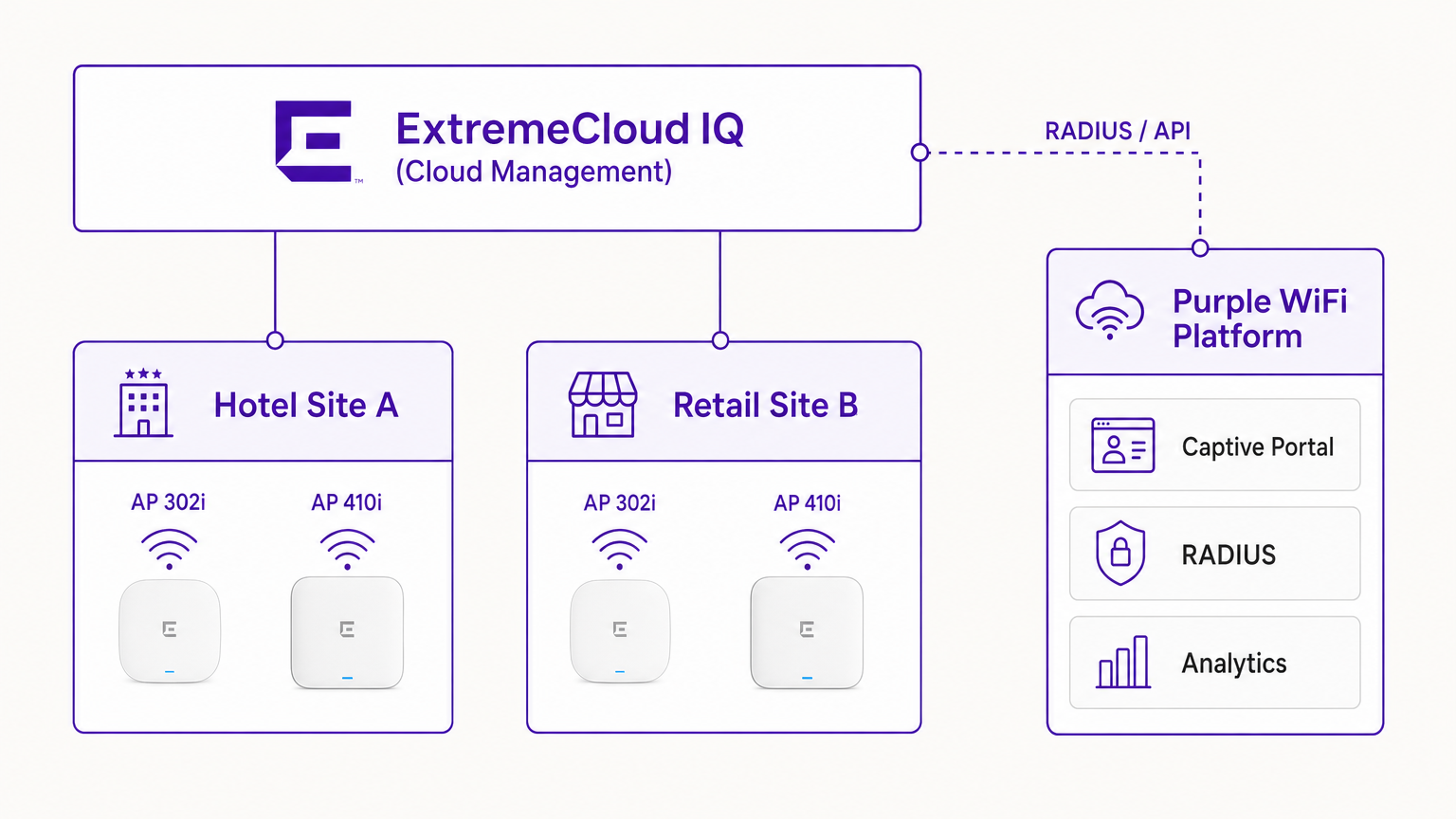
In a typical deployment, the ExtremeCloud IQ controller (or the AP operating autonomously under cloud management) is configured with an open or WPA3-SAE SSID. When a guest device associates, the AP places the device in a pre-authentication state. The AP intercepts initial HTTP requests and redirects the client to the Purple captive portal URL.
The RADIUS Authentication Flow
The core of the security and policy enforcement is the RADIUS exchange.
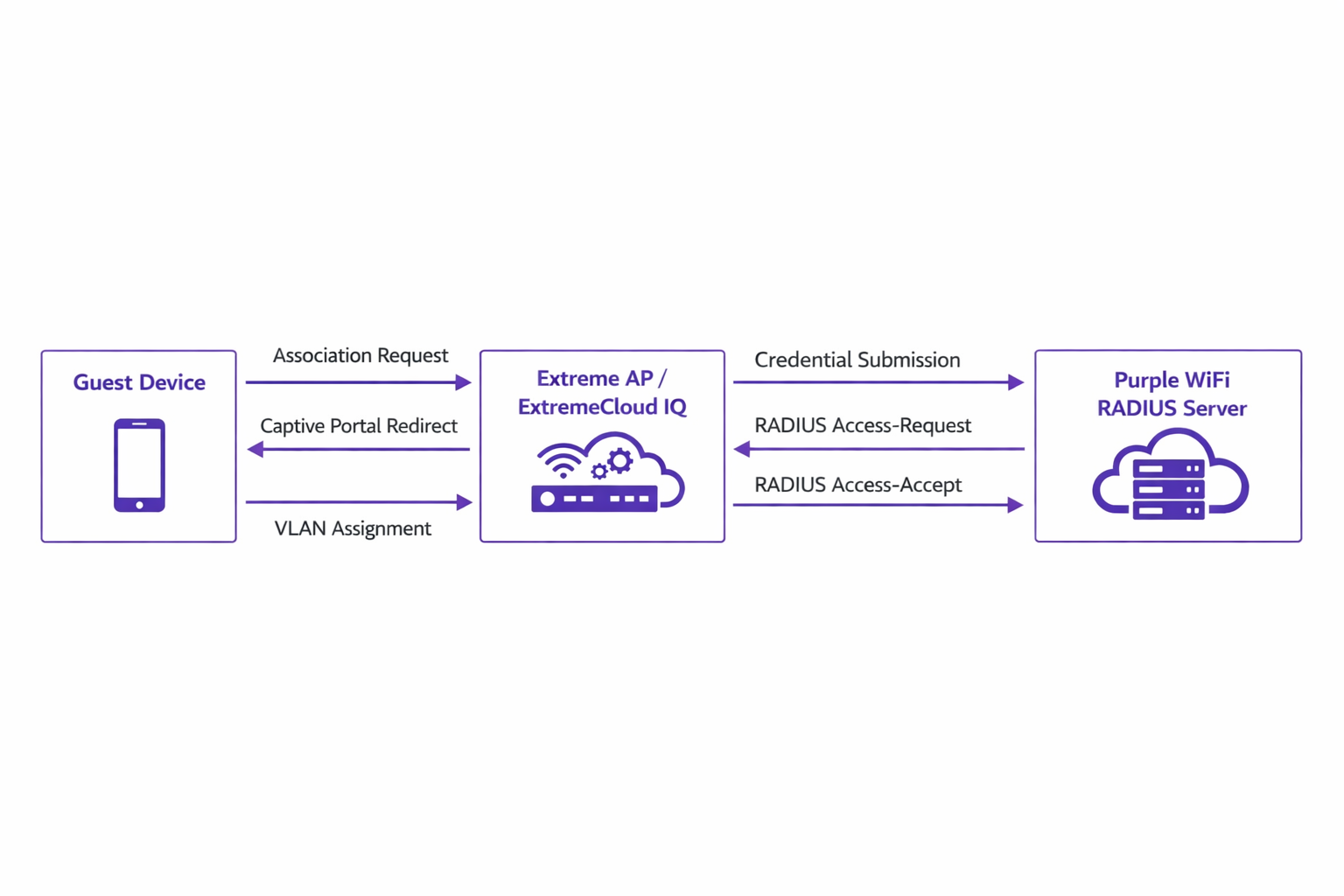
- Association: The guest device associates with the Extreme AP.
- Redirection: The AP redirects the device's browser to the Purple portal.
- Authentication: The user completes the authentication flow (e.g., social login, form submission) on the Purple platform.
- RADIUS Access-Request: Purple's backend communicates with the Extreme AP via RADIUS.
- RADIUS Access-Accept: Purple sends an Access-Accept message, often containing specific attributes such as
Tunnel-Private-Group-IDfor VLAN assignment. - Authorisation: The AP moves the client to the authenticated state, applying the designated VLAN and QoS policies.
This flow is critical for maintaining network security and aligning with standards such as IEEE 802.1X, providing port-based access control adapted for wireless guest environments.
Hardware Compatibility
The integration is fully supported across the Extreme Networks portfolio managed by ExtremeCloud IQ. This includes the cost-effective 302 series (e.g., AP302W) ideal for hotel rooms, the high-density 410 and 460 series suitable for conference centres, and the latest 630 series APs supporting Wi-Fi 6E for maximum spectrum efficiency. Furthermore, venues utilising on-premises ExtremeXOS switches can achieve similar outcomes by configuring the RADIUS server profiles and captive portal redirects via the CLI or legacy management interfaces.
Implementation Guide
Deploying Purple within ExtremeCloud IQ requires precise configuration of network policies and AAA settings.
Step 1: SSID and Captive Portal Configuration
Navigate to the Network Policy in ExtremeCloud IQ and create a new SSID for guest access. Under the captive portal settings, select 'External Captive Portal' and input the specific URL provided by your Purple dashboard.
It is crucial to configure the Walled Garden correctly. The walled garden allows pre-authenticated devices to access the necessary domains to load the captive portal. You must whitelist all Purple portal domains, associated Content Delivery Networks (CDNs), and any third-party authentication providers (e.g., Facebook, Google) you intend to support. Failure to configure the walled garden accurately will result in the portal failing to load.
Step 2: AAA and RADIUS Server Setup
Within the SSID configuration, navigate to the AAA (Authentication, Authorization, and Accounting) settings. Add Purple's RADIUS servers as the primary and secondary authentication servers.
- Authentication Port: UDP 1812
- Accounting Port: UDP 1813
Ensure the shared secret matches exactly what is configured in the Purple portal. Do not neglect RADIUS Accounting. Accounting packets provide Purple with session data, including connection duration and data transfer volumes, which are fundamental for generating accurate analytics and maintaining compliance records.
Step 3: Dynamic VLAN Assignment (Optional but Recommended)
For enhanced security and network segmentation, configure ExtremeCloud IQ to accept RADIUS attributes for VLAN assignment. When Purple sends the Access-Accept message, it can include the Tunnel-Private-Group-ID attribute. ExtremeCloud IQ will read this and place the client device onto the corresponding VLAN. This allows for dynamic segmentation—for example, isolating standard guests from loyalty members or IoT devices, aligning with robust Internet of Things Architecture: A Complete Guide principles.
Best Practices
- Certificate Management: Ensure that your network does not perform SSL inspection on traffic destined for the Purple captive portal. Modern mobile operating systems (particularly iOS) implement strict certificate validation; intercepted traffic will trigger security warnings and break the captive portal flow.
- Walled Garden Maintenance: Regularly review and update walled garden entries. Third-party authentication providers frequently update their IP ranges and CDN endpoints.
- Profile-Based Authentication: Leverage Purple's profile-based authentication to streamline returning visitor access, enhancing the user experience while maintaining security.
- Content Strategy: When designing the captive portal, consider leveraging modern tools to optimise the messaging. See Generative AI for Captive Portal Copy and Creative for strategies on improving conversion rates.
Troubleshooting & Risk Mitigation
When integrating ExtremeCloud IQ with Purple, the most common failure modes occur during the initial configuration phase.
Symptom: Captive Portal Does Not Load
- Cause: Incorrect walled garden configuration or DNS resolution failures in the pre-authentication state.
- Mitigation: Verify that the client device receives a valid IP address and DNS server via DHCP. Confirm that all required Purple domains and CDN endpoints are explicitly permitted in the walled garden policy.
Symptom: Authentication Fails (Client Remains Unauthenticated)
- Cause: RADIUS shared secret mismatch or network reachability issues between the Extreme AP and Purple's RADIUS servers.
- Mitigation: Verify the shared secret in both ExtremeCloud IQ and the Purple dashboard. Ensure outbound UDP traffic on ports 1812 and 1813 is permitted through corporate firewalls.
Symptom: Analytics Dashboards Show No Session Data
- Cause: RADIUS Accounting is not enabled or configured incorrectly.
- Mitigation: Confirm that the accounting port (UDP 1813) is configured in the AAA profile and that the AP is successfully transmitting accounting-request packets.
ROI & Business Impact
Implementing Purple WiFi over an Extreme Networks infrastructure transforms guest access from a fundamental utility into a strategic business asset.
For Retail environments, the integration provides granular insights into footfall, dwell time, and conversion rates, comparable to e-commerce analytics. In Hospitality , dynamic VLAN assignment ensures secure segmentation while profile-based authentication delivers a frictionless experience for returning guests, directly impacting satisfaction scores.
Furthermore, the robust data capture mechanisms ensure compliance with data protection regulations (such as GDPR) by securely logging user consent at the point of access. By standardising on this architecture, organisations can achieve a rapid return on investment through targeted marketing campaigns, operational efficiencies, and mitigated security risks.
Key Terms & Definitions
ExtremeCloud IQ
Extreme Networks' cloud-driven network management platform that provides centralized visibility, control, and analytics for wired and wireless infrastructure.
Used by IT teams to manage the AP configuration, including the SSID, AAA policies, and captive portal redirect settings.
Captive Portal Redirect
A network technique where HTTP/HTTPS traffic from an unauthenticated client is intercepted and forced to a specific web page (the splash page) for authentication.
The primary mechanism used to present the Purple branded login experience to the guest device.
RADIUS (Remote Authentication Dial-In User Service)
A networking protocol that provides centralized Authentication, Authorization, and Accounting (AAA) management for users who connect and use a network service.
The backend communication channel between the Extreme AP and the Purple platform to verify credentials and enforce policies.
Walled Garden
A limited environment that controls the user's access to web content and services before they have fully authenticated to the network.
Crucial for allowing client devices to reach the Purple portal servers, CDNs, and social login providers during the pre-authentication phase.
Dynamic VLAN Assignment
The process of assigning a network client to a specific Virtual LAN based on their identity or profile, rather than the physical port or SSID they connected to.
Enables IT to segment traffic (e.g., separating standard guests from VIPs) using a single SSID, driven by RADIUS attributes from Purple.
RADIUS Accounting
The component of the RADIUS protocol that tracks network resource consumption, such as session duration and data transferred.
Essential for populating the Purple analytics dashboard with accurate user session data.
WPA3-SAE
Wi-Fi Protected Access 3 - Simultaneous Authentication of Equals. The latest wireless security standard providing robust protection even on open networks.
Supported by modern Extreme APs to provide encrypted guest access while still allowing captive portal redirection.
Tunnel-Private-Group-ID
A specific RADIUS attribute (Attribute 81) used to specify the VLAN ID that should be assigned to an authenticated user.
The specific technical parameter Purple sends back to ExtremeCloud IQ to trigger dynamic VLAN assignment.
Case Studies
A 400-room hotel deploying Extreme AP410i units needs to provide tiered WiFi access: standard guests receive 5 Mbps bandwidth on VLAN 100, while loyalty members receive 20 Mbps on VLAN 101. How is this achieved using ExtremeCloud IQ and Purple?
- Configure a single open guest SSID in ExtremeCloud IQ with captive portal redirection pointing to Purple.
- In the Purple dashboard, create two user profiles: 'Standard Guest' and 'Loyalty Member', assigning the corresponding bandwidth limits and RADIUS return attributes (Tunnel-Private-Group-ID = 100 and 101, respectively).
- In ExtremeCloud IQ, enable dynamic VLAN assignment within the SSID's AAA policy to accept RADIUS attributes.
- When a user authenticates, Purple verifies their loyalty status, applies the bandwidth policy, and sends the VLAN attribute in the RADIUS Access-Accept message, dynamically segmenting the traffic.
A large retail chain is rolling out ExtremeCloud IQ across 50 locations. They require consistent guest analytics but are experiencing issues where returning users are not being tracked accurately across different stores.
- Ensure all 50 locations are configured under a unified venue hierarchy within the Purple platform.
- Verify that RADIUS Accounting (UDP 1813) is explicitly configured and permitted through the firewall at every site.
- Implement Purple's profile-based authentication to recognize returning devices via their MAC address across the entire estate, ensuring seamless roaming and accurate cross-venue analytics.
Scenario Analysis
Q1. You have configured the captive portal redirect in ExtremeCloud IQ, but when users connect, their devices show a connection timeout instead of the Purple splash page. What is the most likely configuration error?
💡 Hint:Consider what network access is permitted before the user is fully authenticated.
Show Recommended Approach
The walled garden is misconfigured or too restrictive. The AP is blocking the HTTP/HTTPS traffic required to reach the Purple portal domains and associated CDNs. You must verify and update the walled garden whitelist in the ExtremeCloud IQ policy.
Q2. A venue requires standard guests to be placed on VLAN 20 and staff devices on VLAN 30 using a single SSID. How do you configure ExtremeCloud IQ to support this requirement?
💡 Hint:Look at the AAA policy settings related to RADIUS responses.
Show Recommended Approach
Enable dynamic VLAN assignment in the AAA policy within ExtremeCloud IQ. Configure the Purple platform to return the 'Tunnel-Private-Group-ID' RADIUS attribute with the value '20' for standard guests and '30' for staff profiles upon successful authentication.
Q3. Users are successfully authenticating and accessing the internet, but the Purple analytics dashboard shows zero data for session duration and data usage. What step was missed during deployment?
💡 Hint:Which protocol component tracks resource consumption?
Show Recommended Approach
RADIUS Accounting has not been configured. You must configure the AAA profile in ExtremeCloud IQ to send accounting packets to Purple's RADIUS server on UDP port 1813.




