

Extreme Networks e Purple WiFi: Integração ExtremeCloud IQ
Este guia de referência técnica fornece um plano abrangente para integrar o Purple WiFi com a plataforma ExtremeCloud IQ da Extreme Networks. Detalha o fluxo arquitetónico, os passos de configuração para o redirecionamento do Captive Portal e a autenticação RADIUS, e as melhores práticas para obter acesso de convidado seguro e rico em dados em ambientes empresariais.
🎧 Ouça este Guia
Ver Transcrição
Resumo Executivo
Para locais empresariais que padronizam a infraestrutura Extreme Networks, a implementação de uma solução de WiFi para convidados de nível de produção requer uma integração estreita entre a camada de rede física e a camada de inteligência da aplicação. Este guia de referência técnica detalha a arquitetura, configuração e implementação operacional do Purple WiFi num ambiente ExtremeCloud IQ. Ao aproveitar o redirecionamento do Captive Portal e a autenticação RADIUS, as equipas de TI podem transformar o WiFi para Convidados padrão num ativo seguro, compatível e rico em dados. Esta integração permite a atribuição dinâmica de VLAN, contabilidade de sessão precisa e Análise de WiFi abrangente sem introduzir complexidade arquitetónica. Este guia fornece estratégias de implementação acionáveis para profissionais de TI seniores que gerem ambientes de alta densidade em Hotelaria , Retalho e propriedades do setor público.
Ouça o nosso podcast de briefing do consultor abaixo para uma visão geral abrangente da arquitetura de integração e das melhores práticas de implementação.
Análise Técnica Detalhada
Visão Geral da Arquitetura
A integração entre o ExtremeCloud IQ e a plataforma Purple WiFi baseia-se em protocolos padrão da indústria, principalmente redirecionamento HTTP/HTTPS e RADIUS (Remote Authentication Dial-In User Service). Esta arquitetura garante que os pontos de acesso (APs) da Extreme Networks gerem o ambiente de RF e o plano de dados, enquanto o Purple trata da gestão de identidade, aplicação de políticas e captura de dados.
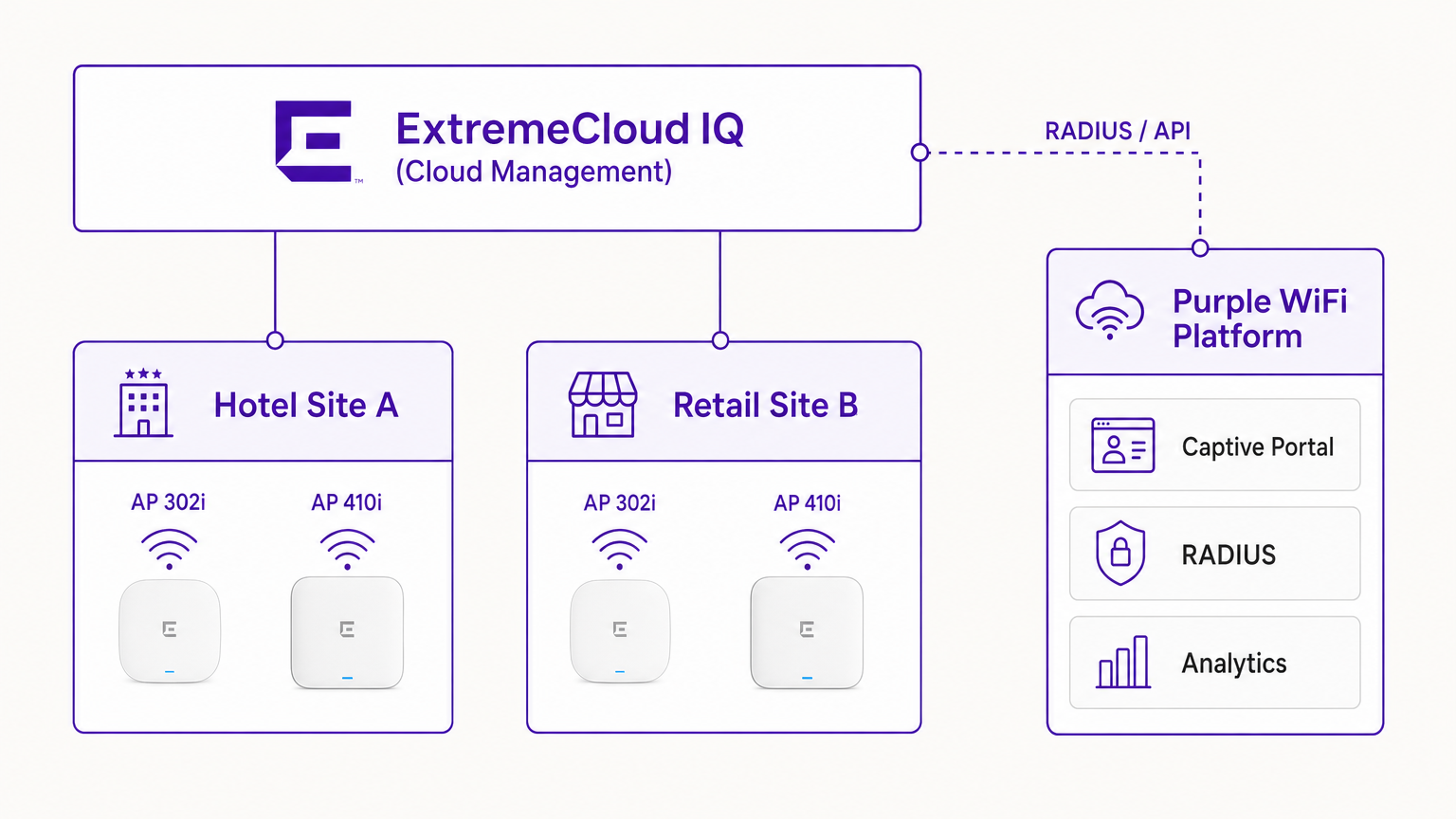
Numa implementação típica, o controlador ExtremeCloud IQ (ou o AP a operar autonomamente sob gestão na cloud) é configurado com um SSID aberto ou WPA3-SAE. Quando um dispositivo de convidado se associa, o AP coloca o dispositivo num estado de pré-autenticação. O AP interceta os pedidos HTTP iniciais e redireciona o cliente para o URL do Captive Portal da Purple.
O Fluxo de Autenticação RADIUS
O cerne da segurança e da aplicação de políticas é a troca RADIUS.
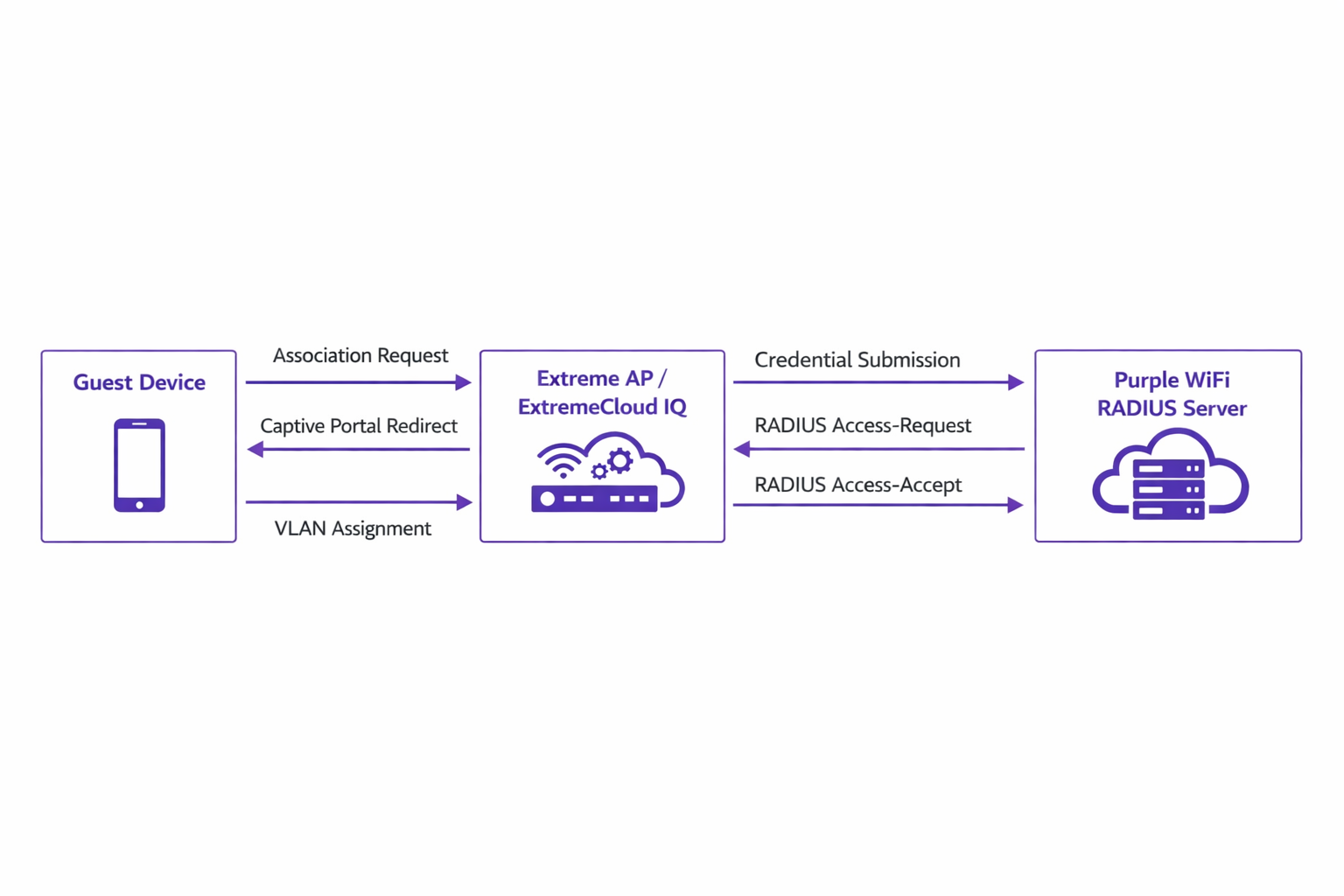
- Associação: O dispositivo de convidado associa-se ao AP Extreme.
- Redirecionamento: O AP redireciona o navegador do dispositivo para o portal Purple.
- Autenticação: O utilizador completa o fluxo de autenticação (por exemplo, login social, envio de formulário) na plataforma Purple.
- RADIUS Access-Request: O backend da Purple comunica com o AP Extreme via RADIUS.
- RADIUS Access-Accept: A Purple envia uma mensagem Access-Accept, muitas vezes contendo atributos específicos como
Tunnel-Private-Group-IDpara atribuição de VLAN. - Autorização: O AP move o cliente para o estado autenticado, aplicando a VLAN e as políticas de QoS designadas.
Este fluxo é crítico para manter a segurança da rede e alinhar com padrões como o IEEE 802.1X, fornecendo controlo de acesso baseado em porta adaptado para ambientes de convidados sem fios.
Compatibilidade de Hardware
A integração é totalmente suportada em todo o portfólio Extreme Networks gerido pelo ExtremeCloud IQ. Isto inclui a série 302 de baixo custo (por exemplo, AP302W) ideal para quartos de hotel, as séries 410 e 460 de alta densidade adequadas para centros de conferências, e os mais recentes APs da série 630 que suportam Wi-Fi 6E para máxima eficiência de espectro. Além disso, locais que utilizam switches ExtremeXOS on-premises podem alcançar resultados semelhantes configurando os perfis do servidor RADIUS e os redirecionamentos do Captive Portal via CLI ou interfaces de gestão legadas.
Guia de Implementação
A implementação do Purple no ExtremeCloud IQ requer uma configuração precisa das políticas de rede e das definições de AAA.
Passo 1: Configuração do SSID e do Captive Portal
Navegue até à Política de Rede no ExtremeCloud IQ e crie um novo SSID para acesso de convidados. Nas definições do Captive Portal, selecione 'External Captive Portal' e insira o URL específico fornecido pelo seu dashboard Purple.
É crucial configurar o Walled Garden corretamente. O walled garden permite que dispositivos pré-autenticados acedam aos domínios necessários para carregar o Captive Portal. Deve adicionar à lista de permissões todos os domínios do portal Purple, as Content Delivery Networks (CDNs) associadas e quaisquer fornecedores de autenticação de terceiros (por exemplo, Facebook, Google) que pretenda suportar. A falha na configuração precisa do walled garden resultará na falha do carregamento do portal.
Passo 2: Configuração do Servidor AAA e RADIUS
Dentro da configuração do SSID, navegue até às definições de AAA (Authentication, Authorization, and Accounting). Adicione os servidores RADIUS da Purple como os servidores de autenticação primário e secundário.
- Porta de Autenticação: UDP 1812
- Porta de Contabilidade: UDP 1813
Certifique-se de que o segredo partilhado corresponde exatamente ao que está configurado no portal Purple. Não negligencie a Contabilidade RADIUS. Os pacotes de contabilidade fornecem à Purple dados de sessão, incluindo a duração da ligação e os volumes de transferência de dados, que são fundamentais para gerar análises precisas e manter registos de conformidade.
Passo 3: Atribuição Dinâmica de VLAN (Opcional, mas Recomendado)
Para segurança aprimorada e segmentação de rede, configure o ExtremeCloud IQ para aceitar atributos RADIUS para atribuição de VLAN. Quando a Purple envia a mensagem Access-Accept, pode incluir o atributo Tunnel-Private-Group-ID. ExO ExtremeCloud IQ lerá isto e colocará o dispositivo cliente na VLAN correspondente. Isto permite uma segmentação dinâmica — por exemplo, isolar convidados padrão de membros de fidelidade ou dispositivos IoT, alinhando-se com princípios robustos de Arquitetura da Internet das Coisas: Um Guia Completo .
Melhores Práticas
- Gestão de Certificados: Certifique-se de que a sua rede não realiza inspeção SSL no tráfego destinado ao Captive Portal da Purple. Sistemas operativos móveis modernos (especialmente iOS) implementam validação rigorosa de certificados; o tráfego intercetado irá acionar avisos de segurança e interromper o fluxo do Captive Portal.
- Manutenção do Walled Garden: Reveja e atualize regularmente as entradas do walled garden. Os fornecedores de autenticação de terceiros atualizam frequentemente os seus intervalos de IP e endpoints CDN.
- Autenticação Baseada em Perfil: Aproveite a autenticação baseada em perfil da Purple para otimizar o acesso de visitantes recorrentes, melhorando a experiência do utilizador e mantendo a segurança.
- Estratégia de Conteúdo: Ao projetar o Captive Portal, considere aproveitar ferramentas modernas para otimizar a mensagem. Consulte IA Generativa para Conteúdo e Criativos de Captive Portal para estratégias de melhoria das taxas de conversão.
Resolução de Problemas e Mitigação de Riscos
Ao integrar o ExtremeCloud IQ com a Purple, os modos de falha mais comuns ocorrem durante a fase de configuração inicial.
Sintoma: O Captive Portal Não Carrega
- Causa: Configuração incorreta do walled garden ou falhas de resolução de DNS no estado de pré-autenticação.
- Mitigação: Verifique se o dispositivo cliente recebe um endereço IP e um servidor DNS válidos via DHCP. Confirme que todos os domínios Purple e endpoints CDN necessários são explicitamente permitidos na política do walled garden.
Sintoma: A Autenticação Falha (Cliente Permanece Não Autenticado)
- Causa: Incompatibilidade do segredo partilhado RADIUS ou problemas de acessibilidade da rede entre o AP Extreme e os servidores RADIUS da Purple.
- Mitigação: Verifique o segredo partilhado tanto no ExtremeCloud IQ como no dashboard da Purple. Certifique-se de que o tráfego UDP de saída nas portas 1812 e 1813 é permitido através das firewalls corporativas.
Sintoma: Os Dashboards de Análise Não Mostram Dados de Sessão
- Causa: O RADIUS Accounting não está ativado ou está configurado incorretamente.
- Mitigação: Confirme que a porta de contabilidade (UDP 1813) está configurada no perfil AAA e que o AP está a transmitir com sucesso pacotes de accounting-request.
ROI e Impacto no Negócio
A implementação de Purple WiFi sobre uma infraestrutura Extreme Networks transforma o acesso de convidados de uma utilidade fundamental num ativo estratégico de negócio.
Para ambientes de Retalho , a integração fornece informações granulares sobre a afluência, tempo de permanência e taxas de conversão, comparáveis à análise de e-commerce. Na Hotelaria , a atribuição dinâmica de VLAN garante uma segmentação segura, enquanto a autenticação baseada em perfil oferece uma experiência sem atritos para convidados recorrentes, impactando diretamente os índices de satisfação.
Além disso, os robustos mecanismos de captura de dados garantem a conformidade com as regulamentações de proteção de dados (como o GDPR), registando de forma segura o consentimento do utilizador no ponto de acesso. Ao padronizar esta arquitetura, as organizações podem alcançar um rápido retorno sobre o investimento através de campanhas de marketing direcionadas, eficiências operacionais e riscos de segurança mitigados.
Termos-Chave e Definições
ExtremeCloud IQ
Extreme Networks' cloud-driven network management platform that provides centralized visibility, control, and analytics for wired and wireless infrastructure.
Used by IT teams to manage the AP configuration, including the SSID, AAA policies, and captive portal redirect settings.
Captive Portal Redirect
A network technique where HTTP/HTTPS traffic from an unauthenticated client is intercepted and forced to a specific web page (the splash page) for authentication.
The primary mechanism used to present the Purple branded login experience to the guest device.
RADIUS (Remote Authentication Dial-In User Service)
A networking protocol that provides centralized Authentication, Authorization, and Accounting (AAA) management for users who connect and use a network service.
The backend communication channel between the Extreme AP and the Purple platform to verify credentials and enforce policies.
Walled Garden
A limited environment that controls the user's access to web content and services before they have fully authenticated to the network.
Crucial for allowing client devices to reach the Purple portal servers, CDNs, and social login providers during the pre-authentication phase.
Dynamic VLAN Assignment
The process of assigning a network client to a specific Virtual LAN based on their identity or profile, rather than the physical port or SSID they connected to.
Enables IT to segment traffic (e.g., separating standard guests from VIPs) using a single SSID, driven by RADIUS attributes from Purple.
RADIUS Accounting
The component of the RADIUS protocol that tracks network resource consumption, such as session duration and data transferred.
Essential for populating the Purple analytics dashboard with accurate user session data.
WPA3-SAE
Wi-Fi Protected Access 3 - Simultaneous Authentication of Equals. The latest wireless security standard providing robust protection even on open networks.
Supported by modern Extreme APs to provide encrypted guest access while still allowing captive portal redirection.
Tunnel-Private-Group-ID
A specific RADIUS attribute (Attribute 81) used to specify the VLAN ID that should be assigned to an authenticated user.
The specific technical parameter Purple sends back to ExtremeCloud IQ to trigger dynamic VLAN assignment.
Estudos de Caso
A 400-room hotel deploying Extreme AP410i units needs to provide tiered WiFi access: standard guests receive 5 Mbps bandwidth on VLAN 100, while loyalty members receive 20 Mbps on VLAN 101. How is this achieved using ExtremeCloud IQ and Purple?
- Configure a single open guest SSID in ExtremeCloud IQ with captive portal redirection pointing to Purple.
- In the Purple dashboard, create two user profiles: 'Standard Guest' and 'Loyalty Member', assigning the corresponding bandwidth limits and RADIUS return attributes (Tunnel-Private-Group-ID = 100 and 101, respectively).
- In ExtremeCloud IQ, enable dynamic VLAN assignment within the SSID's AAA policy to accept RADIUS attributes.
- When a user authenticates, Purple verifies their loyalty status, applies the bandwidth policy, and sends the VLAN attribute in the RADIUS Access-Accept message, dynamically segmenting the traffic.
A large retail chain is rolling out ExtremeCloud IQ across 50 locations. They require consistent guest analytics but are experiencing issues where returning users are not being tracked accurately across different stores.
- Ensure all 50 locations are configured under a unified venue hierarchy within the Purple platform.
- Verify that RADIUS Accounting (UDP 1813) is explicitly configured and permitted through the firewall at every site.
- Implement Purple's profile-based authentication to recognize returning devices via their MAC address across the entire estate, ensuring seamless roaming and accurate cross-venue analytics.
Análise de Cenários
Q1. You have configured the captive portal redirect in ExtremeCloud IQ, but when users connect, their devices show a connection timeout instead of the Purple splash page. What is the most likely configuration error?
💡 Dica:Consider what network access is permitted before the user is fully authenticated.
Mostrar Abordagem Recomendada
The walled garden is misconfigured or too restrictive. The AP is blocking the HTTP/HTTPS traffic required to reach the Purple portal domains and associated CDNs. You must verify and update the walled garden whitelist in the ExtremeCloud IQ policy.
Q2. A venue requires standard guests to be placed on VLAN 20 and staff devices on VLAN 30 using a single SSID. How do you configure ExtremeCloud IQ to support this requirement?
💡 Dica:Look at the AAA policy settings related to RADIUS responses.
Mostrar Abordagem Recomendada
Enable dynamic VLAN assignment in the AAA policy within ExtremeCloud IQ. Configure the Purple platform to return the 'Tunnel-Private-Group-ID' RADIUS attribute with the value '20' for standard guests and '30' for staff profiles upon successful authentication.
Q3. Users are successfully authenticating and accessing the internet, but the Purple analytics dashboard shows zero data for session duration and data usage. What step was missed during deployment?
💡 Dica:Which protocol component tracks resource consumption?
Mostrar Abordagem Recomendada
RADIUS Accounting has not been configured. You must configure the AAA profile in ExtremeCloud IQ to send accounting packets to Purple's RADIUS server on UDP port 1813.




