

Extreme Networks und Purple WiFi: ExtremeCloud IQ Integration
Dieser technische Leitfaden bietet einen umfassenden Plan für die Integration von Purple WiFi mit der Extreme Networks ExtremeCloud IQ Plattform. Er beschreibt den architektonischen Ablauf, die Konfigurationsschritte für die Captive Portal-Weiterleitung und RADIUS-Authentifizierung sowie Best Practices für die Bereitstellung eines sicheren, datenreichen Gastzugangs in Unternehmensumgebungen.
🎧 Diesen Leitfaden anhören
Transkript anzeigen
Executive Summary
Für Unternehmen, die auf Extreme Networks Infrastruktur standardisieren, erfordert die Bereitstellung einer produktionsreifen Gast-WiFi-Lösung eine enge Integration zwischen der physischen Netzwerkschicht und der Anwendungsebene. Dieser technische Leitfaden beschreibt die Architektur, Konfiguration und den operativen Einsatz von Purple WiFi in einer ExtremeCloud IQ Umgebung. Durch die Nutzung von Captive Portal-Weiterleitung und RADIUS-Authentifizierung können IT-Teams standardmäßiges Guest WiFi in ein sicheres, konformes und datenreiches Asset verwandeln. Diese Integration ermöglicht eine dynamische VLAN-Zuweisung, präzise Sitzungsabrechnung und umfassende WiFi Analytics , ohne die architektonische Komplexität zu erhöhen. Dieser Leitfaden bietet umsetzbare Bereitstellungsstrategien für erfahrene IT-Experten, die Umgebungen mit hoher Dichte in den Bereichen Hospitality , Retail und im öffentlichen Sektor verwalten.
Hören Sie sich unten unseren Berater-Briefing-Podcast an, um einen umfassenden Überblick über die Integrationsarchitektur und Best Practices für die Implementierung zu erhalten.
Technical Deep-Dive
Architectural Overview
Die Integration zwischen ExtremeCloud IQ und der Purple WiFi Plattform basiert auf Industriestandardprotokollen, hauptsächlich HTTP/HTTPS-Weiterleitung und RADIUS (Remote Authentication Dial-In User Service). Diese Architektur stellt sicher, dass die Extreme Networks Access Points (APs) die RF-Umgebung und die Datenebene verwalten, während Purple das Identitätsmanagement, die Richtliniendurchsetzung und die Datenerfassung übernimmt.
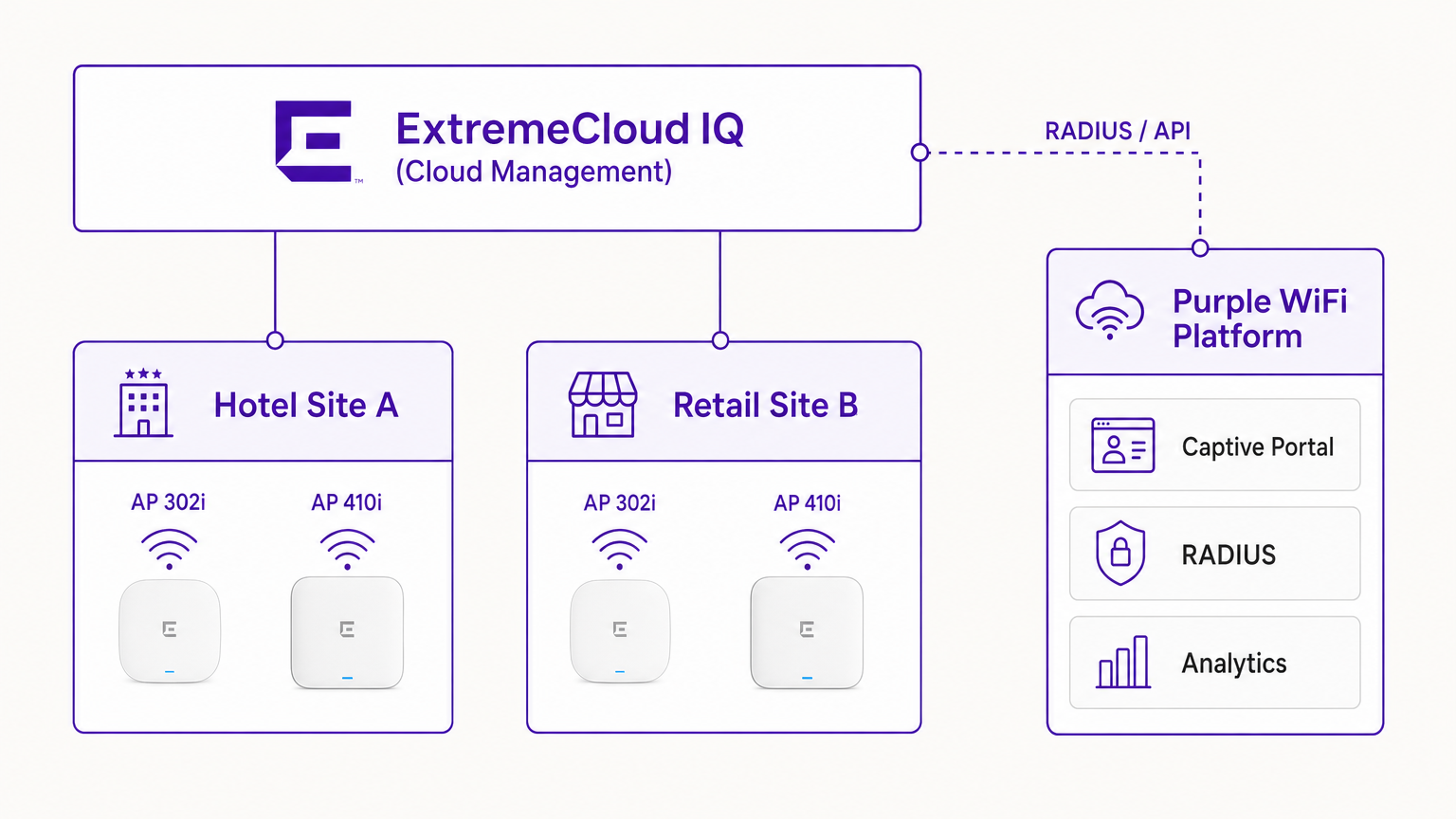
In einer typischen Bereitstellung wird der ExtremeCloud IQ Controller (oder der AP, der autonom unter Cloud-Management arbeitet) mit einer offenen oder WPA3-SAE SSID konfiguriert. Wenn sich ein Gastgerät verbindet, versetzt der AP das Gerät in einen Vorauthentifizierungszustand. Der AP fängt anfängliche HTTP-Anfragen ab und leitet den Client zur Purple captive portal URL um.
The RADIUS Authentication Flow
Der Kern der Sicherheits- und Richtliniendurchsetzung ist der RADIUS-Austausch.
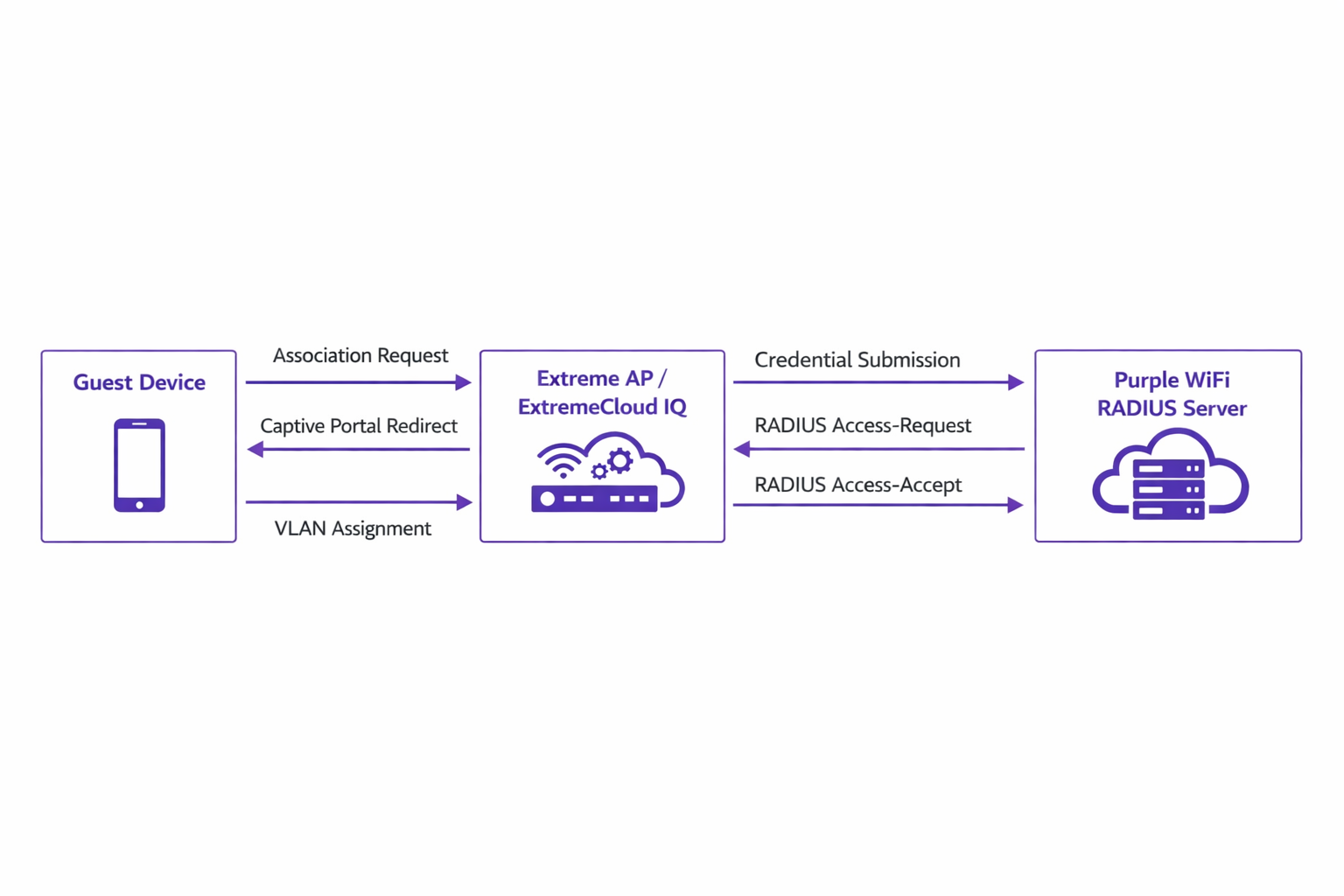
- Association: Das Gastgerät verbindet sich mit dem Extreme AP.
- Redirection: Der AP leitet den Browser des Geräts zum Purple Portal um.
- Authentication: Der Benutzer schließt den Authentifizierungsfluss (z.B. Social Login, Formularübermittlung) auf der Purple Plattform ab.
- RADIUS Access-Request: Das Backend von Purple kommuniziert über RADIUS mit dem Extreme AP.
- RADIUS Access-Accept: Purple sendet eine Access-Accept-Nachricht, die oft spezifische Attribute wie
Tunnel-Private-Group-IDfür die VLAN-Zuweisung enthält. - Authorisation: Der AP versetzt den Client in den authentifizierten Zustand und wendet die zugewiesenen VLAN- und QoS-Richtlinien an.
Dieser Ablauf ist entscheidend für die Aufrechterhaltung der Netzwerksicherheit und die Einhaltung von Standards wie IEEE 802.1X, indem er eine portbasierte Zugriffskontrolle bietet, die an drahtlose Gastumgebungen angepasst ist.
Hardware Compatibility
Die Integration wird im gesamten Extreme Networks Portfolio, das von ExtremeCloud IQ verwaltet wird, vollständig unterstützt. Dies umfasst die kostengünstige 302 series (z.B. AP302W), ideal für Hotelzimmer, die hochdichte 410 und 460 series, geeignet für Konferenzzentren, und die neuesten 630 series APs, die Wi-Fi 6E für maximale Spektrumeffizienz unterstützen. Darüber hinaus können Standorte, die ExtremeXOS-Switches vor Ort verwenden, ähnliche Ergebnisse erzielen, indem sie die RADIUS-Serverprofile und Captive Portal-Weiterleitungen über die CLI oder ältere Verwaltungsoberflächen konfigurieren.
Implementation Guide
Die Bereitstellung von Purple innerhalb von ExtremeCloud IQ erfordert eine präzise Konfiguration von Netzwerkrichtlinien und AAA-Einstellungen.
Step 1: SSID und Captive Portal Configuration
Navigieren Sie in ExtremeCloud IQ zur Netzwerkrichtlinie und erstellen Sie eine neue SSID für den Gastzugang. Wählen Sie unter den Captive Portal-Einstellungen 'External Captive Portal' und geben Sie die spezifische URL ein, die von Ihrem Purple Dashboard bereitgestellt wird.
Es ist entscheidend, den Walled Garden korrekt zu konfigurieren. Der Walled Garden ermöglicht vorauthentifizierten Geräten den Zugriff auf die notwendigen Domains, um das Captive Portal zu laden. Sie müssen alle Purple Portal-Domains, zugehörige Content Delivery Networks (CDNs) und alle Drittanbieter-Authentifizierungsanbieter (z.B. Facebook, Google), die Sie unterstützen möchten, auf die Whitelist setzen. Eine fehlerhafte Konfiguration des Walled Garden führt dazu, dass das Portal nicht geladen werden kann.
Step 2: AAA und RADIUS Server Setup
Innerhalb der SSID-Konfiguration navigieren Sie zu den AAA (Authentication, Authorization, and Accounting)-Einstellungen. Fügen Sie die RADIUS-Server von Purple als primäre und sekundäre Authentifizierungsserver hinzu.
- Authentication Port: UDP 1812
- Accounting Port: UDP 1813
Stellen Sie sicher, dass das Shared Secret genau mit dem im Purple Portal konfigurierten übereinstimmt. Vernachlässigen Sie RADIUS Accounting nicht. Accounting-Pakete liefern Purple Sitzungsdaten, einschließlich Verbindungsdauer und Datenübertragungsvolumen, die für die Generierung präziser Analysen und die Einhaltung von Compliance-Aufzeichnungen unerlässlich sind.
Step 3: Dynamic VLAN Assignment (Optional but Recommended)
Für verbesserte Sicherheit und Netzwerksegmentierung konfigurieren Sie ExtremeCloud IQ so, dass es RADIUS-Attribute für die VLAN-Zuweisung akzeptiert. Wenn Purple die Access-Accept-Nachricht sendet, kann diese das Attribut Tunnel-Private-Group-ID enthalten. ExtremeCloud IQ liest dies und platziert das Client-Gerät im entsprechenden VLAN. Dies ermöglicht eine dynamische Segmentierung – zum Beispiel die Isolierung von Standardgästen von Treuemitgliedern oder IoT-Geräten, im Einklang mit den robusten Prinzipien der Internet of Things Architecture: A Complete Guide .
Best Practices
- Zertifikatsverwaltung: Stellen Sie sicher, dass Ihr Netzwerk keine SSL-Inspektion für den Datenverkehr durchführt, der für das Purple Captive Portal bestimmt ist. Moderne mobile Betriebssysteme (insbesondere iOS) implementieren eine strikte Zertifikatsvalidierung; abgefangener Datenverkehr löst Sicherheitswarnungen aus und unterbricht den Captive Portal-Fluss.
- Walled Garden-Wartung: Überprüfen und aktualisieren Sie regelmäßig die Walled Garden-Einträge. Drittanbieter für Authentifizierung aktualisieren häufig ihre IP-Bereiche und CDN-Endpunkte.
- Profilbasierte Authentifizierung: Nutzen Sie die profilbasierte Authentifizierung von Purple, um den Zugang für wiederkehrende Besucher zu optimieren, das Benutzererlebnis zu verbessern und gleichzeitig die Sicherheit zu gewährleisten.
- Content-Strategie: Berücksichtigen Sie bei der Gestaltung des Captive Portal den Einsatz moderner Tools zur Optimierung der Nachrichtenübermittlung. Strategien zur Verbesserung der Konversionsraten finden Sie unter Generative AI for Captive Portal Copy and Creative .
Fehlerbehebung & Risikominderung
Bei der Integration von ExtremeCloud IQ mit Purple treten die häufigsten Fehler während der anfänglichen Konfigurationsphase auf.
Symptom: Captive Portal lädt nicht
- Ursache: Falsche Walled Garden-Konfiguration oder DNS-Auflösungsfehler im Vorauthentifizierungszustand.
- Abhilfe: Überprüfen Sie, ob das Client-Gerät eine gültige IP-Adresse und einen DNS-Server über DHCP erhält. Bestätigen Sie, dass alle erforderlichen Purple-Domains und CDN-Endpunkte in der Walled Garden-Richtlinie explizit zugelassen sind.
Symptom: Authentifizierung fehlgeschlagen (Client bleibt unauthentifiziert)
- Ursache: RADIUS Shared Secret-Fehler oder Probleme mit der Netzwerkerreichbarkeit zwischen dem Extreme AP und den RADIUS-Servern von Purple.
- Abhilfe: Überprüfen Sie das Shared Secret sowohl in ExtremeCloud IQ als auch im Purple Dashboard. Stellen Sie sicher, dass ausgehender UDP-Verkehr auf den Ports 1812 und 1813 durch Unternehmensfirewalls zugelassen ist.
Symptom: Analyse-Dashboards zeigen keine Sitzungsdaten an
- Ursache: RADIUS Accounting ist nicht aktiviert oder falsch konfiguriert.
- Abhilfe: Bestätigen Sie, dass der Accounting-Port (UDP 1813) im AAA-Profil konfiguriert ist und dass der AP Accounting-Request-Pakete erfolgreich überträgt.
ROI & Geschäftlicher Nutzen
Die Implementierung von Purple WiFi über eine Extreme Networks-Infrastruktur verwandelt den Gastzugang von einem grundlegenden Dienst in ein strategisches Geschäftsgut.
Für Retail -Umgebungen bietet die Integration detaillierte Einblicke in Besucherfrequenz, Verweildauer und Konversionsraten, vergleichbar mit E-Commerce-Analysen. Im Hospitality -Bereich gewährleistet die dynamische VLAN-Zuweisung eine sichere Segmentierung, während die profilbasierte Authentifizierung ein reibungsloses Erlebnis für wiederkehrende Gäste bietet, was sich direkt auf die Zufriedenheitswerte auswirkt.
Darüber hinaus gewährleisten die robusten Datenerfassungsmechanismen die Einhaltung von Datenschutzbestimmungen (wie GDPR), indem die Benutzerzustimmung am Zugangspunkt sicher protokolliert wird. Durch die Standardisierung dieser Architektur können Unternehmen einen schnellen Return on Investment durch gezielte Marketingkampagnen, betriebliche Effizienz und geminderte Sicherheitsrisiken erzielen.
Schlüsselbegriffe & Definitionen
ExtremeCloud IQ
Extreme Networks' cloud-driven network management platform that provides centralized visibility, control, and analytics for wired and wireless infrastructure.
Used by IT teams to manage the AP configuration, including the SSID, AAA policies, and captive portal redirect settings.
Captive Portal Redirect
A network technique where HTTP/HTTPS traffic from an unauthenticated client is intercepted and forced to a specific web page (the splash page) for authentication.
The primary mechanism used to present the Purple branded login experience to the guest device.
RADIUS (Remote Authentication Dial-In User Service)
A networking protocol that provides centralized Authentication, Authorization, and Accounting (AAA) management for users who connect and use a network service.
The backend communication channel between the Extreme AP and the Purple platform to verify credentials and enforce policies.
Walled Garden
A limited environment that controls the user's access to web content and services before they have fully authenticated to the network.
Crucial for allowing client devices to reach the Purple portal servers, CDNs, and social login providers during the pre-authentication phase.
Dynamic VLAN Assignment
The process of assigning a network client to a specific Virtual LAN based on their identity or profile, rather than the physical port or SSID they connected to.
Enables IT to segment traffic (e.g., separating standard guests from VIPs) using a single SSID, driven by RADIUS attributes from Purple.
RADIUS Accounting
The component of the RADIUS protocol that tracks network resource consumption, such as session duration and data transferred.
Essential for populating the Purple analytics dashboard with accurate user session data.
WPA3-SAE
Wi-Fi Protected Access 3 - Simultaneous Authentication of Equals. The latest wireless security standard providing robust protection even on open networks.
Supported by modern Extreme APs to provide encrypted guest access while still allowing captive portal redirection.
Tunnel-Private-Group-ID
A specific RADIUS attribute (Attribute 81) used to specify the VLAN ID that should be assigned to an authenticated user.
The specific technical parameter Purple sends back to ExtremeCloud IQ to trigger dynamic VLAN assignment.
Fallstudien
A 400-room hotel deploying Extreme AP410i units needs to provide tiered WiFi access: standard guests receive 5 Mbps bandwidth on VLAN 100, while loyalty members receive 20 Mbps on VLAN 101. How is this achieved using ExtremeCloud IQ and Purple?
- Configure a single open guest SSID in ExtremeCloud IQ with captive portal redirection pointing to Purple.
- In the Purple dashboard, create two user profiles: 'Standard Guest' and 'Loyalty Member', assigning the corresponding bandwidth limits and RADIUS return attributes (Tunnel-Private-Group-ID = 100 and 101, respectively).
- In ExtremeCloud IQ, enable dynamic VLAN assignment within the SSID's AAA policy to accept RADIUS attributes.
- When a user authenticates, Purple verifies their loyalty status, applies the bandwidth policy, and sends the VLAN attribute in the RADIUS Access-Accept message, dynamically segmenting the traffic.
A large retail chain is rolling out ExtremeCloud IQ across 50 locations. They require consistent guest analytics but are experiencing issues where returning users are not being tracked accurately across different stores.
- Ensure all 50 locations are configured under a unified venue hierarchy within the Purple platform.
- Verify that RADIUS Accounting (UDP 1813) is explicitly configured and permitted through the firewall at every site.
- Implement Purple's profile-based authentication to recognize returning devices via their MAC address across the entire estate, ensuring seamless roaming and accurate cross-venue analytics.
Szenarioanalyse
Q1. You have configured the captive portal redirect in ExtremeCloud IQ, but when users connect, their devices show a connection timeout instead of the Purple splash page. What is the most likely configuration error?
💡 Hinweis:Consider what network access is permitted before the user is fully authenticated.
Empfohlenen Ansatz anzeigen
The walled garden is misconfigured or too restrictive. The AP is blocking the HTTP/HTTPS traffic required to reach the Purple portal domains and associated CDNs. You must verify and update the walled garden whitelist in the ExtremeCloud IQ policy.
Q2. A venue requires standard guests to be placed on VLAN 20 and staff devices on VLAN 30 using a single SSID. How do you configure ExtremeCloud IQ to support this requirement?
💡 Hinweis:Look at the AAA policy settings related to RADIUS responses.
Empfohlenen Ansatz anzeigen
Enable dynamic VLAN assignment in the AAA policy within ExtremeCloud IQ. Configure the Purple platform to return the 'Tunnel-Private-Group-ID' RADIUS attribute with the value '20' for standard guests and '30' for staff profiles upon successful authentication.
Q3. Users are successfully authenticating and accessing the internet, but the Purple analytics dashboard shows zero data for session duration and data usage. What step was missed during deployment?
💡 Hinweis:Which protocol component tracks resource consumption?
Empfohlenen Ansatz anzeigen
RADIUS Accounting has not been configured. You must configure the AAA profile in ExtremeCloud IQ to send accounting packets to Purple's RADIUS server on UDP port 1813.




