

Extreme Networks y Purple WiFi: Integración con ExtremeCloud IQ
Esta guía de referencia técnica proporciona un plan integral para integrar Purple WiFi con la plataforma ExtremeCloud IQ de Extreme Networks. Detalla el flujo arquitectónico, los pasos de configuración para la redirección del Captive Portal y la autenticación RADIUS, y las mejores prácticas para lograr un acceso de invitados seguro y rico en datos en entornos empresariales.
🎧 Escuchar esta guía
Ver transcripción
Resumen Ejecutivo
Para los recintos empresariales que estandarizan la infraestructura de Extreme Networks, el despliegue de una solución WiFi para invitados de grado de producción requiere una estrecha integración entre la capa de red física y la capa de inteligencia de la aplicación. Esta guía de referencia técnica detalla la arquitectura, configuración y despliegue operativo de Purple WiFi dentro de un entorno ExtremeCloud IQ. Al aprovechar la redirección del Captive Portal y la autenticación RADIUS, los equipos de TI pueden transformar el WiFi para invitados estándar en un activo seguro, conforme y rico en datos. Esta integración permite la asignación dinámica de VLAN, la contabilidad precisa de sesiones y un análisis WiFi completo sin introducir complejidad arquitectónica. Esta guía proporciona estrategias de despliegue accionables para profesionales de TI sénior que gestionan entornos de alta densidad en los sectores de Hostelería , Minorista y propiedades del sector público.
Escuche nuestro podcast informativo para consultores a continuación para obtener una visión general completa de la arquitectura de integración y las mejores prácticas de implementación.
Análisis Técnico Detallado
Visión General de la Arquitectura
La integración entre ExtremeCloud IQ y la plataforma Purple WiFi se basa en protocolos estándar de la industria, principalmente la redirección HTTP/HTTPS y RADIUS (Remote Authentication Dial-In User Service). Esta arquitectura asegura que los puntos de acceso (APs) de Extreme Networks gestionen el entorno RF y el plano de datos, mientras que Purple se encarga de la gestión de identidades, la aplicación de políticas y la captura de datos.
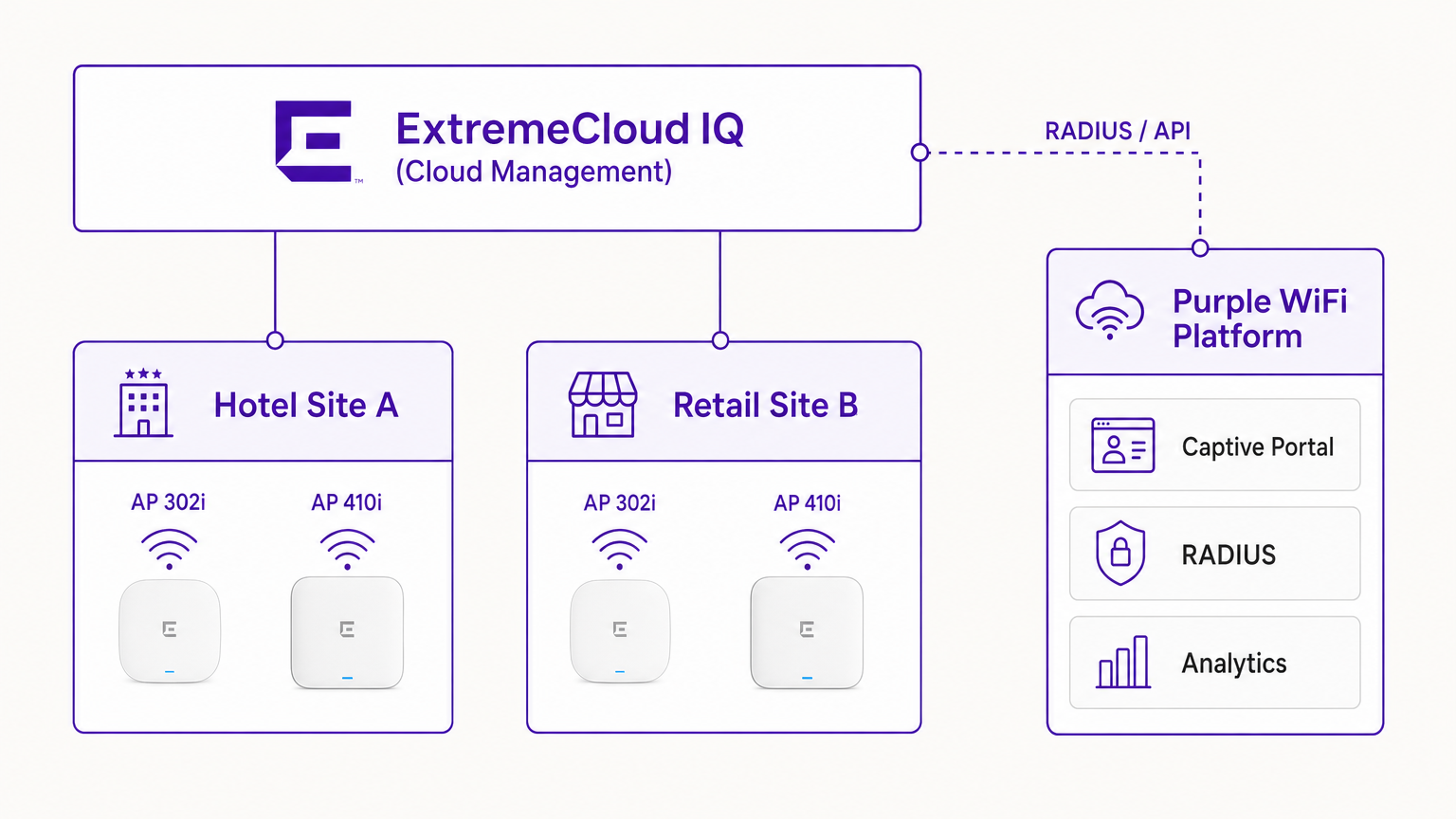
En un despliegue típico, el controlador ExtremeCloud IQ (o el AP que opera de forma autónoma bajo gestión en la nube) se configura con un SSID abierto o WPA3-SAE. Cuando un dispositivo invitado se asocia, el AP coloca el dispositivo en un estado de preautenticación. El AP intercepta las solicitudes HTTP iniciales y redirige al cliente a la URL del Captive Portal de Purple.
El Flujo de Autenticación RADIUS
El núcleo de la seguridad y la aplicación de políticas es el intercambio RADIUS.
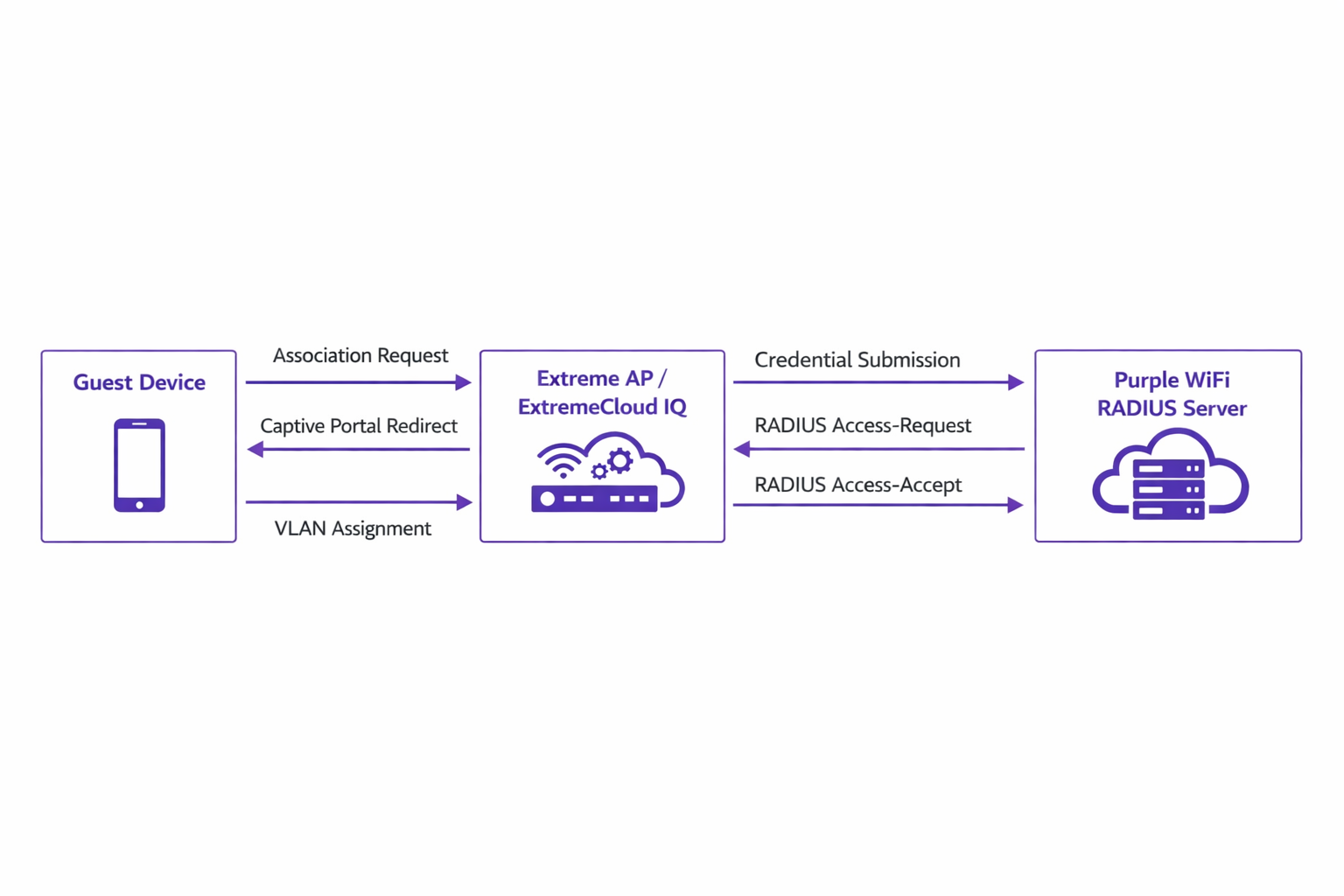
- Asociación: El dispositivo invitado se asocia con el AP de Extreme.
- Redirección: El AP redirige el navegador del dispositivo al portal de Purple.
- Autenticación: El usuario completa el flujo de autenticación (por ejemplo, inicio de sesión social, envío de formulario) en la plataforma de Purple.
- RADIUS Access-Request: El backend de Purple se comunica con el AP de Extreme a través de RADIUS.
- RADIUS Access-Accept: Purple envía un mensaje Access-Accept, a menudo conteniendo atributos específicos como
Tunnel-Private-Group-IDpara la asignación de VLAN. - Autorización: El AP mueve al cliente al estado autenticado, aplicando la VLAN y las políticas de QoS designadas.
Este flujo es crítico para mantener la seguridad de la red y alinearse con estándares como IEEE 802.1X, proporcionando control de acceso basado en puertos adaptado para entornos inalámbricos de invitados.
Compatibilidad de Hardware
La integración es totalmente compatible con toda la cartera de Extreme Networks gestionada por ExtremeCloud IQ. Esto incluye la serie 302 (por ejemplo, AP302W) rentable, ideal para habitaciones de hotel, las series de alta densidad 410 y 460 adecuadas para centros de conferencias, y los últimos AP de la serie 630 que soportan Wi-Fi 6E para una máxima eficiencia del espectro. Además, los recintos que utilizan switches ExtremeXOS locales pueden lograr resultados similares configurando los perfiles del servidor RADIUS y las redirecciones del Captive Portal a través de la CLI o las interfaces de gestión heredadas.
Guía de Implementación
El despliegue de Purple dentro de ExtremeCloud IQ requiere una configuración precisa de las políticas de red y los ajustes de AAA.
Paso 1: Configuración de SSID y Captive Portal
Navegue a la Política de Red en ExtremeCloud IQ y cree un nuevo SSID para el acceso de invitados. En la configuración del Captive Portal, seleccione 'External Captive Portal' e introduzca la URL específica proporcionada por su panel de Purple.
Es crucial configurar correctamente el Walled Garden. El walled garden permite que los dispositivos preautenticados accedan a los dominios necesarios para cargar el Captive Portal. Debe incluir en la lista blanca todos los dominios del portal de Purple, las Redes de Entrega de Contenido (CDNs) asociadas y cualquier proveedor de autenticación de terceros (por ejemplo, Facebook, Google) que pretenda soportar. La falta de configuración precisa del walled garden resultará en que el portal no se cargue.
Paso 2: Configuración de AAA y Servidor RADIUS
Dentro de la configuración del SSID, navegue a los ajustes de AAA (Authentication, Authorization, and Accounting). Añada los servidores RADIUS de Purple como servidores de autenticación primario y secundario.
- Puerto de Autenticación: UDP 1812
- Puerto de Contabilidad: UDP 1813
Asegúrese de que el secreto compartido coincida exactamente con lo configurado en el portal de Purple. No descuide la contabilidad RADIUS. Los paquetes de contabilidad proporcionan a Purple datos de sesión, incluyendo la duración de la conexión y los volúmenes de transferencia de datos, que son fundamentales para generar análisis precisos y mantener registros de cumplimiento.
Paso 3: Asignación Dinámica de VLAN (Opcional pero Recomendado)
Para una seguridad y segmentación de red mejoradas, configure ExtremeCloud IQ para aceptar atributos RADIUS para la asignación de VLAN. Cuando Purple envía el mensaje Access-Accept, puede incluir el atributo Tunnel-Private-Group-ID. ExExtremeCloud IQ leerá esto y colocará el dispositivo cliente en la VLAN correspondiente. Esto permite una segmentación dinámica —por ejemplo, aislar a los invitados estándar de los miembros de fidelidad o de los dispositivos IoT, alineándose con los principios de una sólida Arquitectura de Internet de las Cosas: Guía Completa .
Mejores Prácticas
- Gestión de Certificados: Asegúrese de que su red no realice inspección SSL en el tráfico destinado al Captive Portal de Purple. Los sistemas operativos móviles modernos (particularmente iOS) implementan una validación estricta de certificados; el tráfico interceptado activará advertencias de seguridad e interrumpirá el flujo del Captive Portal.
- Mantenimiento del Walled Garden: Revise y actualice regularmente las entradas del walled garden. Los proveedores de autenticación de terceros actualizan con frecuencia sus rangos de IP y puntos finales de CDN.
- Autenticación Basada en Perfiles: Aproveche la autenticación basada en perfiles de Purple para agilizar el acceso de los visitantes recurrentes, mejorando la experiencia del usuario y manteniendo la seguridad.
- Estrategia de Contenido: Al diseñar el Captive Portal, considere aprovechar herramientas modernas para optimizar la mensajería. Consulte IA Generativa para Textos y Creatividades de Captive Portal para conocer estrategias sobre cómo mejorar las tasas de conversión.
Resolución de Problemas y Mitigación de Riesgos
Al integrar ExtremeCloud IQ con Purple, los modos de fallo más comunes ocurren durante la fase de configuración inicial.
Síntoma: El Captive Portal no carga
- Causa: Configuración incorrecta del walled garden o fallos en la resolución de DNS en el estado de preautenticación.
- Mitigación: Verifique que el dispositivo cliente reciba una dirección IP y un servidor DNS válidos a través de DHCP. Confirme que todos los dominios de Purple y los puntos finales de CDN requeridos están explícitamente permitidos en la política del walled garden.
Síntoma: La autenticación falla (el cliente permanece sin autenticar)
- Causa: Discrepancia en la clave secreta compartida de RADIUS o problemas de accesibilidad de red entre el AP Extreme y los servidores RADIUS de Purple.
- Mitigación: Verifique la clave secreta compartida tanto en ExtremeCloud IQ como en el panel de Purple. Asegúrese de que el tráfico UDP saliente en los puertos 1812 y 1813 esté permitido a través de los firewalls corporativos.
Síntoma: Los paneles de análisis no muestran datos de sesión
- Causa: La contabilidad RADIUS no está habilitada o está configurada incorrectamente.
- Mitigación: Confirme que el puerto de contabilidad (UDP 1813) está configurado en el perfil AAA y que el AP está transmitiendo correctamente los paquetes de solicitud de contabilidad.
ROI e Impacto Empresarial
La implementación de Purple WiFi sobre una infraestructura de Extreme Networks transforma el acceso de invitados de una utilidad fundamental en un activo empresarial estratégico.
Para entornos de Retail , la integración proporciona información granular sobre el tráfico peatonal, el tiempo de permanencia y las tasas de conversión, comparable a los análisis de e-commerce. En Hostelería , la asignación dinámica de VLAN garantiza una segmentación segura, mientras que la autenticación basada en perfiles ofrece una experiencia fluida para los huéspedes recurrentes, impactando directamente en los índices de satisfacción.
Además, los robustos mecanismos de captura de datos garantizan el cumplimiento de las normativas de protección de datos (como GDPR) al registrar de forma segura el consentimiento del usuario en el punto de acceso. Al estandarizar esta arquitectura, las organizaciones pueden lograr un rápido retorno de la inversión a través de campañas de marketing dirigidas, eficiencias operativas y riesgos de seguridad mitigados.
Términos clave y definiciones
ExtremeCloud IQ
Extreme Networks' cloud-driven network management platform that provides centralized visibility, control, and analytics for wired and wireless infrastructure.
Used by IT teams to manage the AP configuration, including the SSID, AAA policies, and captive portal redirect settings.
Captive Portal Redirect
A network technique where HTTP/HTTPS traffic from an unauthenticated client is intercepted and forced to a specific web page (the splash page) for authentication.
The primary mechanism used to present the Purple branded login experience to the guest device.
RADIUS (Remote Authentication Dial-In User Service)
A networking protocol that provides centralized Authentication, Authorization, and Accounting (AAA) management for users who connect and use a network service.
The backend communication channel between the Extreme AP and the Purple platform to verify credentials and enforce policies.
Walled Garden
A limited environment that controls the user's access to web content and services before they have fully authenticated to the network.
Crucial for allowing client devices to reach the Purple portal servers, CDNs, and social login providers during the pre-authentication phase.
Dynamic VLAN Assignment
The process of assigning a network client to a specific Virtual LAN based on their identity or profile, rather than the physical port or SSID they connected to.
Enables IT to segment traffic (e.g., separating standard guests from VIPs) using a single SSID, driven by RADIUS attributes from Purple.
RADIUS Accounting
The component of the RADIUS protocol that tracks network resource consumption, such as session duration and data transferred.
Essential for populating the Purple analytics dashboard with accurate user session data.
WPA3-SAE
Wi-Fi Protected Access 3 - Simultaneous Authentication of Equals. The latest wireless security standard providing robust protection even on open networks.
Supported by modern Extreme APs to provide encrypted guest access while still allowing captive portal redirection.
Tunnel-Private-Group-ID
A specific RADIUS attribute (Attribute 81) used to specify the VLAN ID that should be assigned to an authenticated user.
The specific technical parameter Purple sends back to ExtremeCloud IQ to trigger dynamic VLAN assignment.
Casos de éxito
A 400-room hotel deploying Extreme AP410i units needs to provide tiered WiFi access: standard guests receive 5 Mbps bandwidth on VLAN 100, while loyalty members receive 20 Mbps on VLAN 101. How is this achieved using ExtremeCloud IQ and Purple?
- Configure a single open guest SSID in ExtremeCloud IQ with captive portal redirection pointing to Purple.
- In the Purple dashboard, create two user profiles: 'Standard Guest' and 'Loyalty Member', assigning the corresponding bandwidth limits and RADIUS return attributes (Tunnel-Private-Group-ID = 100 and 101, respectively).
- In ExtremeCloud IQ, enable dynamic VLAN assignment within the SSID's AAA policy to accept RADIUS attributes.
- When a user authenticates, Purple verifies their loyalty status, applies the bandwidth policy, and sends the VLAN attribute in the RADIUS Access-Accept message, dynamically segmenting the traffic.
A large retail chain is rolling out ExtremeCloud IQ across 50 locations. They require consistent guest analytics but are experiencing issues where returning users are not being tracked accurately across different stores.
- Ensure all 50 locations are configured under a unified venue hierarchy within the Purple platform.
- Verify that RADIUS Accounting (UDP 1813) is explicitly configured and permitted through the firewall at every site.
- Implement Purple's profile-based authentication to recognize returning devices via their MAC address across the entire estate, ensuring seamless roaming and accurate cross-venue analytics.
Análisis de escenarios
Q1. You have configured the captive portal redirect in ExtremeCloud IQ, but when users connect, their devices show a connection timeout instead of the Purple splash page. What is the most likely configuration error?
💡 Sugerencia:Consider what network access is permitted before the user is fully authenticated.
Mostrar enfoque recomendado
The walled garden is misconfigured or too restrictive. The AP is blocking the HTTP/HTTPS traffic required to reach the Purple portal domains and associated CDNs. You must verify and update the walled garden whitelist in the ExtremeCloud IQ policy.
Q2. A venue requires standard guests to be placed on VLAN 20 and staff devices on VLAN 30 using a single SSID. How do you configure ExtremeCloud IQ to support this requirement?
💡 Sugerencia:Look at the AAA policy settings related to RADIUS responses.
Mostrar enfoque recomendado
Enable dynamic VLAN assignment in the AAA policy within ExtremeCloud IQ. Configure the Purple platform to return the 'Tunnel-Private-Group-ID' RADIUS attribute with the value '20' for standard guests and '30' for staff profiles upon successful authentication.
Q3. Users are successfully authenticating and accessing the internet, but the Purple analytics dashboard shows zero data for session duration and data usage. What step was missed during deployment?
💡 Sugerencia:Which protocol component tracks resource consumption?
Mostrar enfoque recomendado
RADIUS Accounting has not been configured. You must configure the AAA profile in ExtremeCloud IQ to send accounting packets to Purple's RADIUS server on UDP port 1813.




