

Passwordless WiFi: Cos'è e come implementarlo
Questa guida di riferimento tecnico fornisce ad architetti di rete e responsabili IT un progetto completo per la transizione da password condivise vulnerabili a un'autenticazione WiFi sicura basata su certificati. Copre l'architettura 802.1X, le strategie di implementazione EAP-TLS, la gestione PKI e l'impatto aziendale misurabile della riduzione dei costi di assistenza, migliorando al contempo la postura di sicurezza aziendale e la prontezza alla conformità.
🎧 Ascolta questa guida
Visualizza trascrizione
Sintesi Esecutiva
La transizione dalle Pre-Shared Keys (PSK) condivise all'autenticazione WiFi senza password basata su certificati rappresenta un cambiamento architettonico critico per le reti aziendali. Per i responsabili IT e gli architetti di rete che operano su larga scala — sia in un hotel di 200 camere, una catena di vendita al dettaglio nazionale o un vasto campus del settore pubblico — l'approccio tradizionale di gestire un'unica password per tutti gli accessi guest o BYOD non è più sostenibile. Introduce vulnerabilità di sicurezza inaccettabili, complica la conformità con framework come PCI DSS e GDPR e genera un volume sproporzionato di ticket di assistenza relativi a problemi di connettività e rotazione delle password.
Passwordless WiFi, fondamentalmente basato sullo standard IEEE 802.1X e EAP-TLS (Extensible Authentication Protocol - Transport Layer Security), elimina questi punti di attrito. Emettendo certificati unici e crittograficamente sicuri ai singoli dispositivi, gli amministratori di rete possono applicare un controllo degli accessi granulare e consapevole dell'identità. Questa guida fornisce un riferimento tecnico completo per l'implementazione di Passwordless WiFi, dettagliando l'architettura sottostante, le metodologie di implementazione e il ritorno sull'investimento (ROI) misurabile ottenibile attraverso la riduzione dei costi operativi e la mitigazione del rischio. Inoltre, esploriamo come l'integrazione di una piattaforma come Guest WiFi di Purple possa semplificare questa transizione, agendo come un robusto Identity Provider (IdP) per facilitare un onboarding sicuro e senza interruzioni.
Approfondimento Tecnico: L'Architettura di Passwordless WiFi
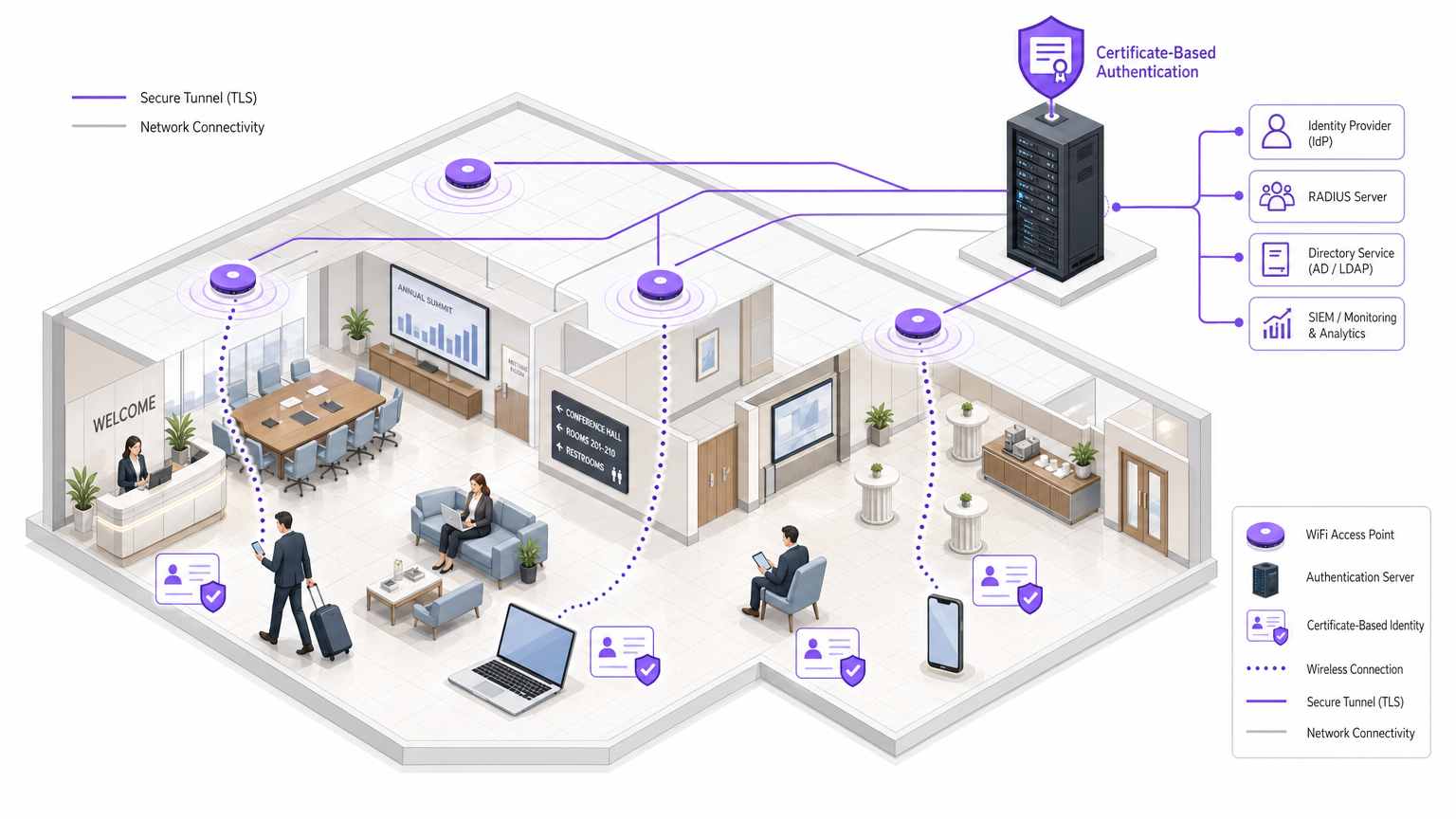
Per comprendere l'implementazione di Passwordless WiFi, è necessario innanzitutto decostruire i componenti principali del framework di autenticazione 802.1X. A differenza di WPA2-Personal, che si basa su un segreto condiviso, 802.1X opera su un modello tripartito: il Supplicant, l'Authenticator e l'Authentication Server.
Il Modello Tripartito 802.1X
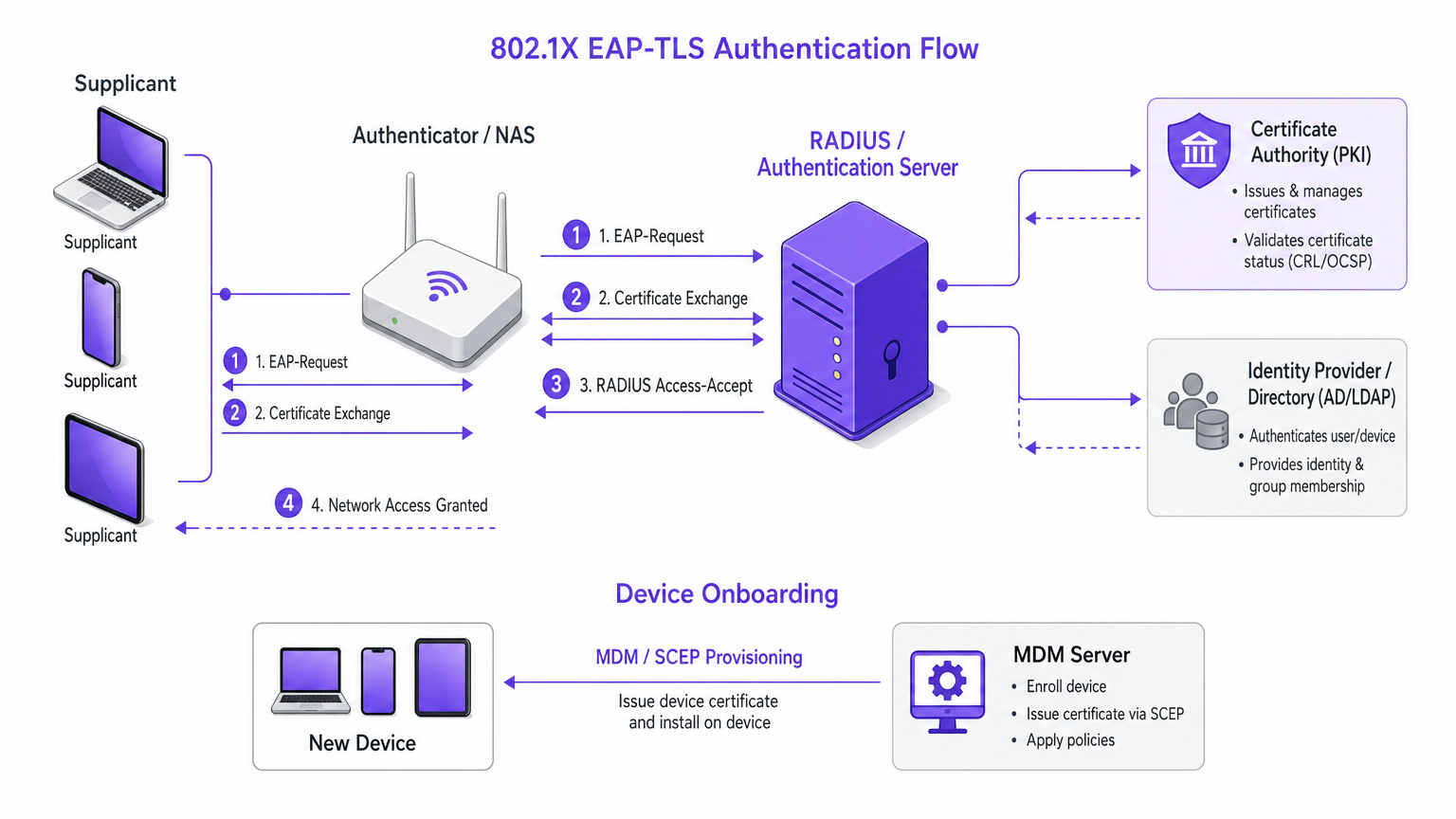
Il Supplicant è il dispositivo client — uno smartphone, un laptop o un sensore IoT — che tenta di connettersi alla rete. In un ambiente senza password, il supplicant deve possedere un certificato digitale valido anziché una password. L'Authenticator è tipicamente il Wireless Access Point (WAP) o il controller LAN wireless. Agisce come un guardiano, non valutando le credenziali autonomamente, ma incapsulando la richiesta del supplicant e inoltrandola al server di autenticazione tramite il protocollo RADIUS. L'Authentication Server è l'autorità centralizzata — spesso un server RADIUS integrato con un Identity Provider (IdP) come Active Directory, LDAP o un servizio di directory cloud-native. Il server convalida il certificato presentato dal supplicant rispetto al suo database e a una Certificate Revocation List (CRL).
EAP-TLS: Lo Standard d'Oro per l'Autenticazione Senza Password
Mentre 802.1X supporta vari metodi Extensible Authentication Protocol (EAP), EAP-TLS è universalmente riconosciuto come lo standard più sicuro per le implementazioni aziendali. EAP-TLS impone l'autenticazione reciproca: il server RADIUS presenta il suo certificato al supplicant, provando che la rete è legittima e prevenendo attacchi evil twin; e il supplicant presenta il suo certificato client unico al server RADIUS, provando la sua identità senza trasmettere hash di password via etere. Questo handshake crittografico reciproco stabilisce un tunnel TLS sicuro attraverso il quale avvengono l'autorizzazione finale e la derivazione della chiave, garantendo la massima integrità e riservatezza dei dati.
Il Ruolo dell'Infrastruttura a Chiave Pubblica (PKI)
L'implementazione di EAP-TLS richiede una robusta Infrastruttura a Chiave Pubblica (PKI). La PKI è responsabile della generazione, emissione e gestione del ciclo di vita dei certificati digitali. Storicamente, la gestione di una Certificate Authority (CA) locale era una barriera significativa all'ingresso. Tuttavia, le moderne soluzioni PKI gestite in cloud e le integrazioni Mobile Device Management (MDM) hanno automatizzato il processo di provisioning, consentendo l'invio silenzioso dei certificati ai dispositivi gestiti tramite protocolli come SCEP (Simple Certificate Enrollment Protocol) o EST (Enrollment over Secure Transport).
Per i dispositivi non gestiti — BYOD o accesso guest — le piattaforme di onboarding forniscono un portale self-service dove gli utenti si autenticano una volta (ad esempio, tramite OAuth o SAML contro una directory aziendale, o tramite un captive portal per gli ospiti) e vengono successivamente forniti di un certificato temporaneo o di un profilo sicuro come Passpoint/Hotspot 2.0.
Guida all'Implementazione: Distribuzione Passo Dopo Passo
La distribuzione di un'architettura Passwordless WiFi richiede un'attenta pianificazione e un'esecuzione a fasi. I seguenti passaggi delineano un approccio vendor-neutral adatto per ambienti aziendali su larga scala, come quelli che si trovano nei settori Healthcare o Transport .
Fase 1: Valutazione e Preparazione dell'Infrastruttura
Prima di modificare i metodi di autenticazione, assicurarsi che l'infrastruttura di rete sottostante supporti i protocolli richiesti. Verificare che tutti i Wireless LAN Controller e gli Access Point supportino 802.1X e WPA3-Enterprise — l'hardware legacy potrebbe richiedere aggiornamenti firmware o la sostituzione. Selezionare una soluzione RADIUS robusta in grado di gestire il carico di autenticazione previsto; le soluzioni cloud-RADIUS offrono alta disponibilità e scalabilità rispetto alle implementazioni on-premises. Determinare la fonte primaria di verità per le identità degli utenti (ad esempio, Azure AD, Okta, Google Workspace) e confermare che il server RADIUSr può comunicare con questa directory.
Fase 2: Configurazione PKI e Gestione dei Certificati
La base dell'accesso senza password è la gestione del ciclo di vita dei certificati. Implementa un'Autorità di Certificazione (CA) fidata: per i dispositivi aziendali interni, una CA interna è sufficiente; per l'accesso degli ospiti o i dispositivi BYOD, considera una CA pubblica o un servizio di onboarding specializzato. Definisci chiare politiche di validità dei certificati — i dispositivi aziendali potrebbero ricevere certificati validi per un anno, mentre i certificati degli ospiti potrebbero scadere dopo 24 ore. Configura meccanismi di revoca, assicurandoti che il server RADIUS controlli le Certificate Revocation Lists (CRLs) o utilizzi OCSP per bloccare immediatamente l'accesso ai dispositivi smarriti o compromessi.
Fase 3: Onboarding e Provisioning dei Dispositivi
L'esperienza di onboarding determina il successo dell'implementazione. Per i dispositivi aziendali gestiti, sfrutta una soluzione MDM (es. Microsoft Intune, Jamf) per distribuire silenziosamente il certificato CA e il certificato client unico utilizzando SCEP o EST. Questo non richiede alcuna interazione da parte dell'utente. Per i dispositivi BYOD non gestiti, implementa un portale di onboarding sicuro dove gli utenti si connettono a un SSID di provisioning aperto, si autenticano tramite credenziali aziendali (SAML/OAuth) e scaricano un profilo di configurazione che installa i certificati necessari e configura l'SSID sicuro. Per l'accesso degli ospiti in ambienti come Ospitalità o Retail , integra con una piattaforma come WiFi Analytics di Purple. Purple può agire come IdP, consentendo agli ospiti di autenticarsi tramite social login o un portale personalizzato, dopodiché vengono trasferiti senza interruzioni a una connessione sicura e crittografata — spesso sfruttando gli standard OpenRoaming o Passpoint — senza mai digitare una password di rete.
Fase 4: Configurazione e Test della Rete
Crea il nuovo SSID configurato per WPA3-Enterprise (o WPA2-Enterprise se è richiesto il supporto legacy) e l'autenticazione 802.1X, puntando l'autenticatore al server RADIUS. Configura il server RADIUS per restituire attributi specifici in caso di autenticazione riuscita — ad esempio, assegnando l'utente a una VLAN specifica in base alla sua appartenenza al gruppo, posizionando il personale su una VLAN aziendale e gli ospiti su una VLAN isolata solo per internet. Distribuisci prima l'SSID sicuro a un piccolo gruppo pilota (il reparto IT è solitamente l'ideale) e monitora meticolosamente i log di autenticazione per identificare eventuali errori di convalida del certificato o timeout RADIUS prima di una distribuzione completa.
Best Practice per Ambienti Enterprise
Applica l'Autenticazione Mutua: Non implementare mai EAP-TLS senza richiedere al supplicant di convalidare il certificato del server. La mancata osservanza espone la rete ad attacchi Man-in-the-Middle (MitM).
Implementa una Rigorosa Convalida dei Certificati: Configura i supplicant per fidarsi esplicitamente solo della CA specifica che ha emesso il certificato del server RADIUS e verifica il Common Name (CN) o il Subject Alternative Name (SAN) del server.
Sfrutta Passpoint (Hotspot 2.0): Per i luoghi pubblici, Passpoint è il futuro della connettività senza password. Consente ai dispositivi di scoprire e connettersi automaticamente in modo sicuro a reti autorizzate utilizzando le credenziali fornite dal loro operatore mobile o da un IdP di terze parti, funzionando in modo molto simile al roaming cellulare. La licenza Connect di Purple facilita questo processo agendo come provider di identità per servizi come OpenRoaming.
Segmenta il Traffico: Utilizza sempre l'assegnazione dinamica di VLAN tramite RADIUS per separare logicamente diverse classi di utenti (terminali POS, personale aziendale, dispositivi IoT, ospiti). Questo limita il raggio d'azione di qualsiasi potenziale compromissione. Per un approfondimento sulla segmentazione delle reti specializzate, consulta la nostra guida su WiFi negli Ospedali: Una Guida alle Reti Cliniche Sicure .
Risoluzione dei Problemi e Mitigazione del Rischio
Anche con una pianificazione meticolosa, possono sorgere problemi. Comprendere le modalità di guasto comuni è fondamentale per una rapida risoluzione.
Clock Skew è la causa più comune di fallimenti nell'autenticazione EAP-TLS. La convalida del certificato si basa su una temporizzazione accurata; se l'ora sul supplicant, sul server RADIUS o sulla CA non è sincronizzata di più di qualche minuto, la convalida fallirà silenziosamente. Assicurati che tutta l'infrastruttura si basi su una fonte NTP affidabile.
Problemi di Catena di Certificati si verificano quando il supplicant non ha installato la catena di fiducia completa — incluse le CA intermedie. Rifiuterà il certificato del server. Assicurati sempre che il server RADIUS sia configurato per inviare la catena di certificati completa durante lo scambio EAP.
Timeout RADIUS possono verificarsi se la latenza tra l'autenticatore (WAP) e il server RADIUS è troppo elevata, causando il timeout dell'handshake EAP. Questo è comune nelle distribuzioni distribuite che utilizzano un RADIUS cloud centralizzato. Regola i valori di timeout sul WLC o considera la distribuzione di proxy RADIUS regionali.
Certificati Scaduti: I dispositivi che tentano di autenticarsi con certificati scaduti verranno rifiutati silenziosamente. Implementa un monitoraggio robusto per avvisare gli amministratori delle imminenti scadenze dei certificati prima che influiscano sugli utenti.
Per la mitigazione del rischio, mantieni temporaneamente la rete PSK legacy durante la transizione, ma limitane la larghezza di banda o i privilegi di accesso per incentivare la migrazione. Inoltra tutti i log di autenticazione RADIUS a una piattaforma SIEM e conduci revisioni periodiche dell'infrastruttura PKI e delle politiche RADIUS per garantire l'allineamento con gli attuali standard di sicurezza.
ROI e Impatto sul Business
La transizione al WiFi senza password è un investimento strategico con un ritorno misurabile su diverse dimensioni.
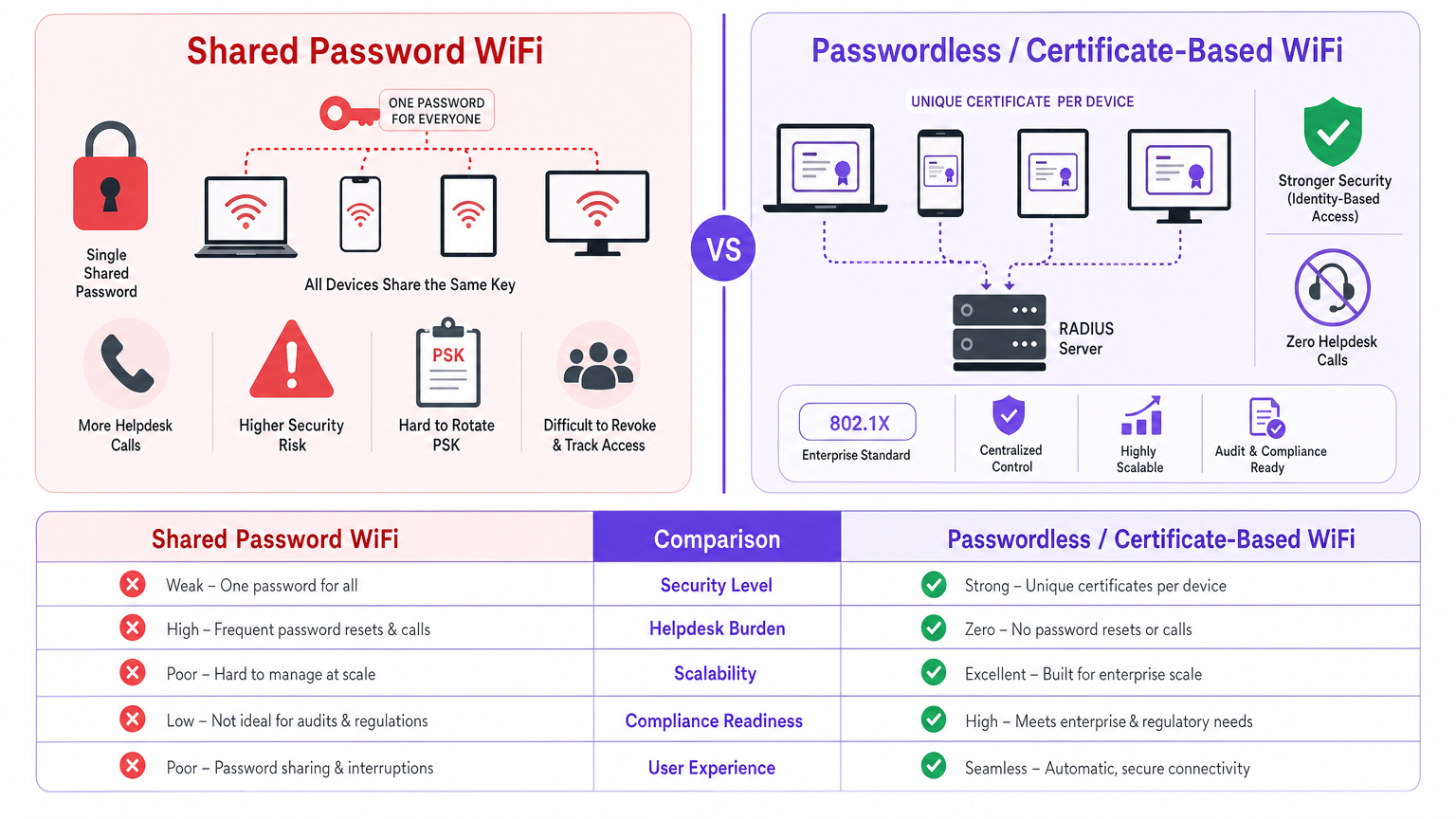
| Metrica | PSK Condivisa | Basato su Certificati (802.1X) |
|---|---|---|
| Ticket Helpdesk (connettività) | Alto — frequenti reset password | Quasi zero — provisioning automatizzato |
| Rischio di sicurezza | Alto — singola credenziale per tutti | Basso — uunica, revocabile per dispositivo |
| Conformità | Scarsa — nessuna responsabilità individuale | Forte — traccia di audit completa per dispositivo |
| Tempo di onboarding (aziendale) | Minuti (manuale) | Secondi (MDM automatizzato) |
| Revoca credenziali | Interruttiva — richiede la rotazione completa del PSK | Istantanea — revoca del singolo certificato |
Riduzione del Carico di Lavoro dell'Helpdesk: La gestione delle password condivise è un notevole dispendio di risorse IT. L'autenticazione senza password, in particolare quando automatizzata tramite MDM o un portale di onboarding self-service, elimina virtualmente i ticket dell'helpdesk relativi alle password.
Miglioramento della Postura di Sicurezza: Eliminando i segreti condivisi, il rischio di furto di credenziali e accesso non autorizzato alla rete è drasticamente ridotto. Ogni dispositivo ha un'identità unica, crittograficamente sicura, che può essere revocata istantaneamente se il dispositivo viene smarrito o compromesso.
Conformità Semplificata: Framework come PCI DSS richiedono controlli di accesso rigorosi e responsabilità individuale. L'autenticazione basata su certificati fornisce una chiara traccia di audit di quale dispositivo ha avuto accesso alla rete e quando, semplificando la rendicontazione della conformità.
Esperienza Utente Migliorata e Acquisizione Dati: Una volta effettuato il provisioning, il processo di connessione è completamente trasparente per l'utente. In ambienti come Retail , questa connettività senza attriti incoraggia gli utenti a unirsi alla rete, consentendo alle sedi di acquisire preziosi dati di prima parte e promuovere un coinvolgimento personalizzato tramite piattaforme come Purple.
Per le organizzazioni che gestiscono ambienti RF complessi, comprendere l'interazione tra autenticazione e infrastruttura fisica è cruciale. Ulteriori letture sulle considerazioni relative all'infrastruttura sono disponibili in La Tua Guida a un Access Point Wireless Ruckus . Inoltre, comprendere come si applicano concetti di networking più ampi può essere utile; consulta la nostra guida su Reti di Area Personale (PAN): Tecnologie, Applicazioni, Sicurezza e Tendenze Future .
Termini chiave e definizioni
802.1X
An IEEE standard for port-based network access control, providing an authentication mechanism to devices wishing to attach to a LAN or WLAN. It is the foundational protocol for enterprise-grade, passwordless WiFi.
The core standard that underpins all enterprise WiFi authentication, replacing the shared PSK model.
EAP-TLS (Extensible Authentication Protocol - Transport Layer Security)
A highly secure EAP method that requires mutual authentication using digital certificates on both the client and the server. No passwords are transmitted over the air.
Considered the gold standard for wireless security. The method of choice for any organisation serious about eliminating credential-based risk.
RADIUS (Remote Authentication Dial-In User Service)
A networking protocol that provides centralised Authentication, Authorisation, and Accounting (AAA) management for users who connect and use a network service.
The engine that processes authentication requests from Access Points and validates them against a directory. A RADIUS server is a mandatory component of any 802.1X deployment.
Supplicant
The client device (e.g., laptop, smartphone, IoT sensor) attempting to access the network. In 802.1X, the supplicant must present a valid certificate or credential to gain access.
The starting point of every authentication request. Understanding the supplicant's capabilities (e.g., whether it supports EAP-TLS) is critical during the planning phase.
PKI (Public Key Infrastructure)
A set of roles, policies, hardware, software, and procedures needed to create, manage, distribute, use, store, and revoke digital certificates and manage public-key encryption.
The underlying system required to issue and manage the certificates used in EAP-TLS. Without a functioning PKI, certificate-based authentication is not possible.
Passpoint (Hotspot 2.0)
A Wi-Fi Alliance standard that streamlines network access, allowing devices to automatically discover and connect to authorised WiFi networks without manual authentication steps.
Enables a seamless, cellular-like roaming experience for users across different venues. Particularly relevant for hospitality, retail, and public-sector deployments.
Dynamic VLAN Assignment
The process where a RADIUS server instructs the Authenticator to place a successfully authenticated user onto a specific Virtual LAN based on their identity or group membership.
Crucial for network segmentation, ensuring that IoT devices, guests, and corporate staff are logically isolated from one another — a key requirement for PCI DSS compliance.
SCEP (Simple Certificate Enrollment Protocol)
A protocol that enables network devices to automatically request and receive digital certificates from a Certificate Authority, typically orchestrated by an MDM solution.
The mechanism that enables zero-touch certificate provisioning for corporate devices, eliminating the need for manual certificate installation.
Casi di studio
A national retail chain with 500 locations is currently using a single WPA2-Personal (PSK) network for both store operations (inventory scanners, POS tablets) and corporate staff laptops. The IT director needs to improve security to meet PCI DSS compliance and reduce the operational burden of rotating the PSK every time an employee leaves. How should they implement passwordless WiFi?
- Deploy a Cloud-RADIUS solution integrated with the central Identity Provider (e.g., Azure AD). 2. For corporate laptops, use the existing MDM (Microsoft Intune) to push a unique client certificate via SCEP, configuring devices to connect to a new 'Corp-Secure' SSID using EAP-TLS. 3. For inventory scanners and POS tablets, utilise an onboarding portal to provision device-specific certificates, binding them to a dedicated 'Ops-Secure' VLAN via RADIUS attributes. 4. Retain the PSK network temporarily, but change the password and restrict it to a quarantine VLAN to identify legacy devices that failed to migrate. 5. Once all devices are verified on the 802.1X network, decommission the PSK SSID.
A large conference centre wants to offer seamless, secure WiFi to attendees without printing passwords on badges or requiring them to re-enter a captive portal every day. They want to leverage their existing Purple analytics platform. How can they achieve this?
- The venue implements a Passpoint (Hotspot 2.0) enabled network infrastructure. 2. They utilise Purple's Connect licence, configuring Purple as the Identity Provider (IdP) for OpenRoaming. 3. When an attendee arrives, if their device already has an OpenRoaming profile (e.g., from their mobile carrier or a previous venue), they connect automatically and securely via EAP-TTLS or EAP-TLS. 4. For users without a profile, they connect to a standard onboarding SSID, authenticate once via the Purple captive portal (providing valuable first-party data), and are prompted to download a secure Passpoint profile. 5. For the remainder of the event, and on subsequent visits, the user connects automatically to the secure network without any passwords.
Analisi degli scenari
Q1. You are deploying EAP-TLS across a university campus. During the pilot phase, several Windows laptops fail to connect, reporting an authentication error. The RADIUS logs show the server rejected the client certificates. The certificates are valid and issued by the correct internal CA. What is the most likely cause, and how do you resolve it?
💡 Suggerimento:Consider the environmental factors that cryptographic certificate validation relies upon, beyond the certificate content itself.
Mostra l'approccio consigliato
The most likely cause is Clock Skew. EAP-TLS certificate validation is highly sensitive to time discrepancies. If the system time on the Windows laptops is significantly out of sync with the RADIUS server or the Certificate Authority, the certificates will be deemed invalid even if they are within their stated validity period. Resolution: ensure all devices and infrastructure components are configured to sync with a reliable NTP server. Verify time synchronisation on the RADIUS server, the CA, and the client devices.
Q2. A hospital IT director wants to implement passwordless WiFi for all clinical devices (infusion pumps, mobile workstations) but is concerned about the administrative overhead of managing certificates for thousands of headless devices that cannot use an onboarding portal. What is the recommended approach?
💡 Suggerimento:Think about automated provisioning protocols used by device management systems, and how certificates can be delivered without user interaction.
Mostra l'approccio consigliato
The recommended approach is to leverage a Mobile Device Management (MDM) or Unified Endpoint Management (UEM) solution integrated with the hospital's PKI. Using protocols like SCEP (Simple Certificate Enrollment Protocol) or EST (Enrollment over Secure Transport), the MDM can silently request and install unique client certificates onto the clinical devices over the air, requiring zero manual intervention from IT staff or clinicians. The MDM should also be configured to automatically renew certificates before they expire.
Q3. Your organisation is transitioning from a shared PSK network to an 802.1X EAP-TLS network. You plan to run both SSIDs concurrently for one month. However, you want to ensure that users who have successfully migrated to the secure network do not accidentally fall back to the less secure PSK network. How can you configure the infrastructure to prevent this?
💡 Suggerimento:Consider how the RADIUS server can be used to control access on the legacy network, and what information is available to it about devices that have already been provisioned.
Mostra l'approccio consigliato
Implement a RADIUS policy on the legacy PSK network that uses MAC Authentication Bypass (MAB) to identify devices. When a device successfully authenticates via EAP-TLS on the new network, its MAC address is recorded in the RADIUS database. The RADIUS policy for the legacy PSK network can then be configured to deny access — or assign to a quarantine VLAN with restricted bandwidth — for any MAC address known to be provisioned for 802.1X. This forces the device to use the secure SSID and prevents accidental fallback.




