
后台应用刷新如何破坏公共 WiFi 性能
本技术指南探讨了后台应用刷新对公共 WiFi 容量和性能的严重影响。它为 IT 经理提供了可操作的网络级缓解策略,以回收空口时间并改善访客体验。
收听本指南
查看播客转录
核心系列的一部分:Guest WiFi Guide →
执行摘要
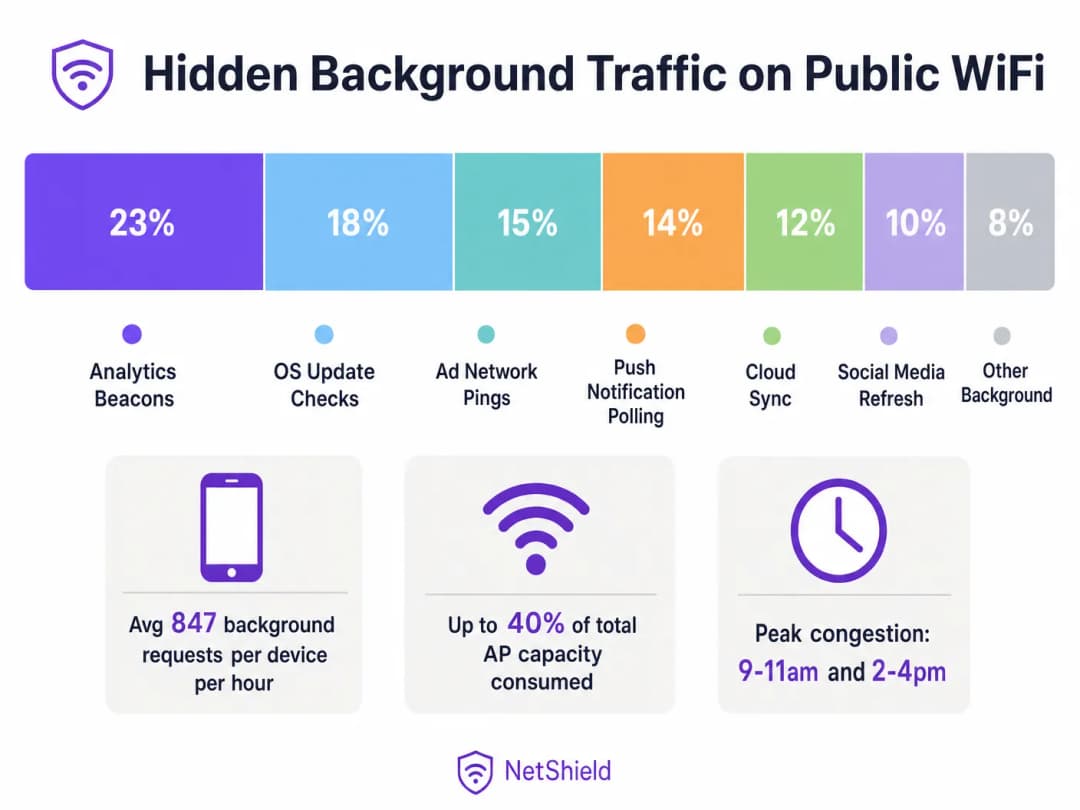
在高密度公共无线环境中,高达 40% 的接入点容量可能会被后台应用刷新流量默默消耗 - 包括分析信标、广告网络 Ping、操作系统更新检查和推送通知轮询。本指南为网络架构师和 IT 经理提供了一个与厂商无关的蓝图,用于在网络层识别、分类和缓解后台流量。通过实施针对性的阻止列表和速率限制策略,场所可以收回大量空口时间,推迟昂贵的硬件升级,并显著提升合法用户流量的连接体验。
技术深度剖析
后台流量的剖析
连接到您的 Guest WiFi 网络的每部智能手机都运行着数十个配置为执行后台刷新周期的应用程序。这些进程独立于用户交互运行,启动与遥测服务器、云同步端点和广告网络的连接。
在无线电层,其影响与有效载荷大小不成比例。在使用 CSMA/CA(载波监听多路访问/冲突避免)的 802.11 网络中,每次交易都需要完整的关联序列。一个 200 字节的分析信标需要探测请求、身份验证、关联和 DHCP 协商。在 Retail 或 Hospitality 等环境中,这种竞争开销会迅速耗尽可用的空口时间。
WiFi 6 缓解迷思
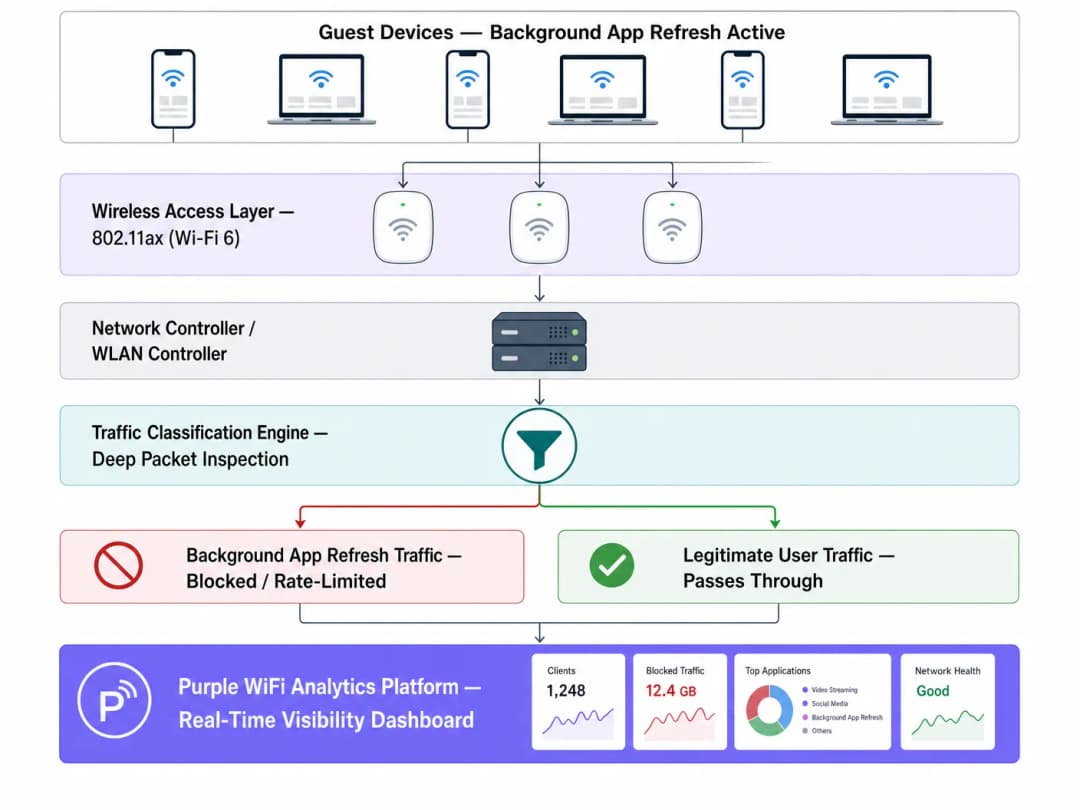
虽然 WiFi 6 (802.11ax) 引入了 OFDMA 和 BSS 着色技术来更有效地管理高密度竞争,但它并没有解决无用载荷传输的根本问题。接入点无法区分正在流式传输演示文稿的用户和默默同步诊断数据的应用程序。通过深度数据包检测 (DPI) 进行网络级干预仍然至关重要。
实施指南
1. 流量分类与基线制定
在实施策略更改之前,请使用您的 WiFi Analytics 平台建立基线。监控流量至少五个工作日,以识别后台活动高峰期和主要目标域名。
2. 制定阻止列表
针对已知的分析和广告网络端点实施 DNS 或 IP 级别的阻止。从社区验证的列表(如 OISD)开始,并用您的基线数据进行补充。 **关键异常:**请勿阻止必要的推送通知服务(例如,TCP 5223 上的 Apple Push Notification Service 或 Google Firebase Cloud Messaging)。阻止这些服务将中断核心设备功能并引发用户投诉。
3. 在控制器层执行策略
在 WLAN 控制器而非单个接入点上应用分类规则,以确保一致的策略执行。
最佳实践
- **对系统更新进行限速:**不要完全阻止系统更新,而是在业务高峰期应用严格的速率限制(例如,每个设备 1 Mbps)。
- **实施 QoS 标记:**使用 DSCP 标记将后台流量的优先级降至最低流量类别,仅在信道空闲时才允许其传输。
- **持续监控:**后台端点在不断变化。请每季度审查并更新您的阻止列表。
故障排除与风险缓解
- **过度阻止:**在未进行测试的情况下进行激进的阻止可能会破坏合法的应用程序功能。在全网部署之前,务必先在单个 AP 组上测试策略。
- **忽略 5GHz/6GHz 分流:**由于传统设备的默认设置,后台流量通常集中在 2.4GHz。确保流量分析覆盖所有频段。WiFi 频段:2026 年 WiFi 频段指南 提供了关于频段管理的更多背景信息。
投资回报率与业务影响
收回 30 - 40% 的浪费空口时间,在功能上相当于以相同的幅度增加物理 AP 的密度。对于面临容量限制的场所,网络级流量管理可以推迟在硬件更新上的重大资本支出,同时立竿见影地提高顾客满意度得分。
听取完整的技术简报:
关键定义
后台应用刷新
一种移动 OS 功能,允许应用在没有用户主动交互的情况下检查更新、同步数据和发送遥测数据。
高密度公共网络上隐藏空口消耗的主要来源。
CSMA/CA
载波侦听多路访问/冲突避免;WiFi 用于管理共享无线介质访问的协议。
解释了为什么由于竞争,即使是极小的后台数据负载也会导致显著的网络开销。
空口时间
设备在特定射频上发送数据的有限可用时间量。
后台流量耗尽的关键资源,在高密度部署中比原始带宽更重要。
深度包检测 (DPI)
高级网络数据包过滤,通过检查数据包的数据部分来对流量类型进行分类。
区分合法用户流量和后台遥测数据所必需的技术。
DSCP 标记
区分服务代码点;一种用于分类和管理网络流量以实现服务质量 (QoS) 的机制。
用于降低后台流量的优先级,使其仅在网络空闲时进行传输。
BSS 着色
一项 WiFi 6 功能,通过识别重叠的基本服务集来提高空间复用率。
提高了效率,但并未消除阻断无用后台数据负载的需求。
OFDMA
正交频分多址;允许单个 AP 同时与多个设备进行通信。
一项 WiFi 6 增强技术,可缓解但无法解决后台流量竞争问题。
速率限制
控制网络接口上发送或接收流量速率的行为。
管理虽重要但沉重的后台流量(如 OS 更新)的推荐方法。
应用实例
一家拥有 340 间客房的四星级酒店在办理入住高峰期(下午 3 点 - 下午 6 点)遇到 WiFi 性能不佳的问题,尽管最近升级了 WiFi 6 硬件。
- 通过 Purple WiFi Analytics 部署流量分析。
- 发现 38% 的空口时间被后台应用刷新占用。
- 针对 847 个已知的分析和广告域名实施针对性的 DNS 阻断列表。
- 在高峰时段对识别出的 OS 更新流量应用 1 Mbps 的速率限制。
一家拥有 60 家门店的区域零售连锁店报告称,数字标牌缓冲与高访客 WiFi 使用率同时发生。
- 对整个区域的流量进行基线化分析。
- 发现访客 SSID 上的 iOS 更新检查正使 WAN 链路饱和。
- 通过 WLAN 控制器部署集中化策略,将每个访客设备的 Apple 更新服务器速率限制为 512 Kbps。
- 通过 QoS 优先处理数字标牌的 MAC 地址。
练习题
Q1. 一家体育馆的 IT 总监希望在重大体育赛事期间阻止流向 Apple 和 Google 服务器的所有流量,以保留带宽。有什么风险?
提示:考虑依赖持久连接的基本设备服务。
查看标准答案
阻止流向 Apple 和 Google 的所有流量将破坏基本的推送通知服务(TCP 5223 上的 APNS 和 Firebase Cloud Messaging)。这将导致合法应用(如数字票务或紧急警报)失效。相反,应该阻止特定的分析子域名并对 OS 更新进行限速。
Q2. 在部署 WiFi 6 升级后,一家会议中心在 2,000 名参会者入场的早间主旨演讲期间仍然遭遇严重的延迟。为什么硬件升级未能解决这个问题?
提示:思考 WiFi 6 擅长处理什么,以及它无法控制什么。
查看标准答案
WiFi 6 提高了效率(通过 OFDMA 和 BSS Colouring),但它无法区分正在查收电子邮件的用户与 2,000 台同时执行后台应用刷新的设备。巨大的竞争开销仍会耗尽空口时间。需要进行网络级流量分类。
Q3. 在为访客网络配置 QoS 时,应如何处理云端照片同步等后台流量?
提示:这不是恶意流量,但也不是紧急流量。
查看标准答案
应将其分类并标记为较低的 DSCP 值(例如,Background/Scavenger 类)。这会降低该流量的优先级,确保其仅在网络空闲时传输,从而保护 VoIP 或 POS 交易等实时流量。
继续阅读本系列
深入理解 RSSI 与信号强度以实现最佳信道规划
本指南对 RSSI、信噪比 (SNR) 和射频 (RF) 传播原理进行了全面的技术深度探讨,以实现最佳信道规划。它为 IT 经理、网络架构师和场所运营总监提供了切实可行的策略,以减轻同频干扰和邻频干扰、优化 AP 部署,并利用分析在酒店、零售和公共部门环境中实现可衡量的业务效益。
WiFi 6 对比 WiFi 5:它能否解决信道干扰问题?
本指南深入探讨了 WiFi 6 (802.11ax) 如何通过 OFDMA 和 BSS Coloring 技术,解决高密度企业环境中的信道干扰问题。它为 IT 经理、网络架构师和 CTO 提供了可操作的部署策略、来自酒店和医疗行业的真实案例研究,以及一套用于评估无线性能至关重要的场所中基础设施升级投资回报率 (ROI) 的框架。
高密度场馆最佳 WiFi 信道选择
在体育场、体育馆和大型公共场所等高密度环境中选择和优化 WiFi 信道的确定性技术参考。它涵盖了射频物理学、5 GHz 和 6 GHz 频段的信道复用策略,以及为 IT 领导者提供的可行部署指南。
对您的具体配置有疑问吗?
我们的团队与 80,000 多个场所的运营方、IT 经理和网络工程师保持合作。预约 20 分钟的通话,我们将为您展示同行是如何解决类似问题的。