
背景 App 重新整理如何破壞大眾 WiFi 效能
本技術指南深入分析背景 App 重新整理對大眾 WiFi 容量與效能造成的嚴重影響。我們為 IT 主管提供具體可行的網路級緩解策略,以收回空口時間(air time)並提升顧客體驗。
收聽此指南
查看播客逐字稿
核心系列的一部分:Guest WiFi Guide →
執行摘要
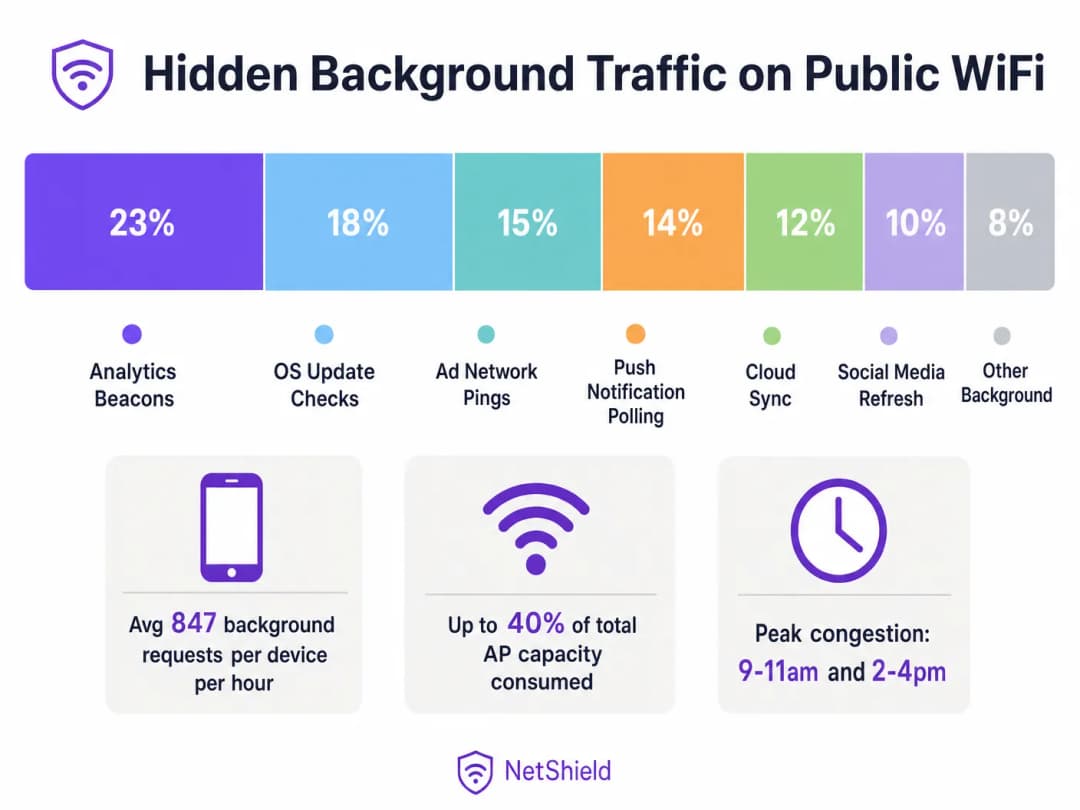
在高密度的公共無線網路環境中,高達 40% 的無線基地台容量會被背景應用程式重新整理流量默默消耗,包括分析信標、廣告網路 ping 值、OS 更新檢查以及推送通知輪詢。本指南為網路架構師和 IT 經理提供了一個與廠商無關的藍圖,用於在網路層識別、分類和減緩背景流量。透過實施具針對性的封鎖清單和速率限制策略,場地可以回收大量的無線電傳輸時間、延後昂貴的硬體升級,並顯著改善合法用戶流量的連線體驗。
技術深度剖析
背景流量的剖析
連接到您 Guest WiFi 網路的每部智慧型手機都運行著數十個設定為執行背景重新整理週期的應用程式。這些程序獨立於使用者互動之外運作,主動啟動與遙測伺服器、雲端同步端點和廣告網路的連線。
在無線電層,其影響與封包大小不成比例。在採用 CSMA/CA(載波偵聽多路存取/衝突預防)的 802.11 網路中,每次交易都需要完整的關聯序列。一個 200 位元組的分析信標需要探測請求、驗證、關聯和 DHCP 協商。在 Retail 或 Hospitality 等環境中,這種競爭開銷會迅速耗盡可用的無線電傳輸時間。
WiFi 6 減緩迷思
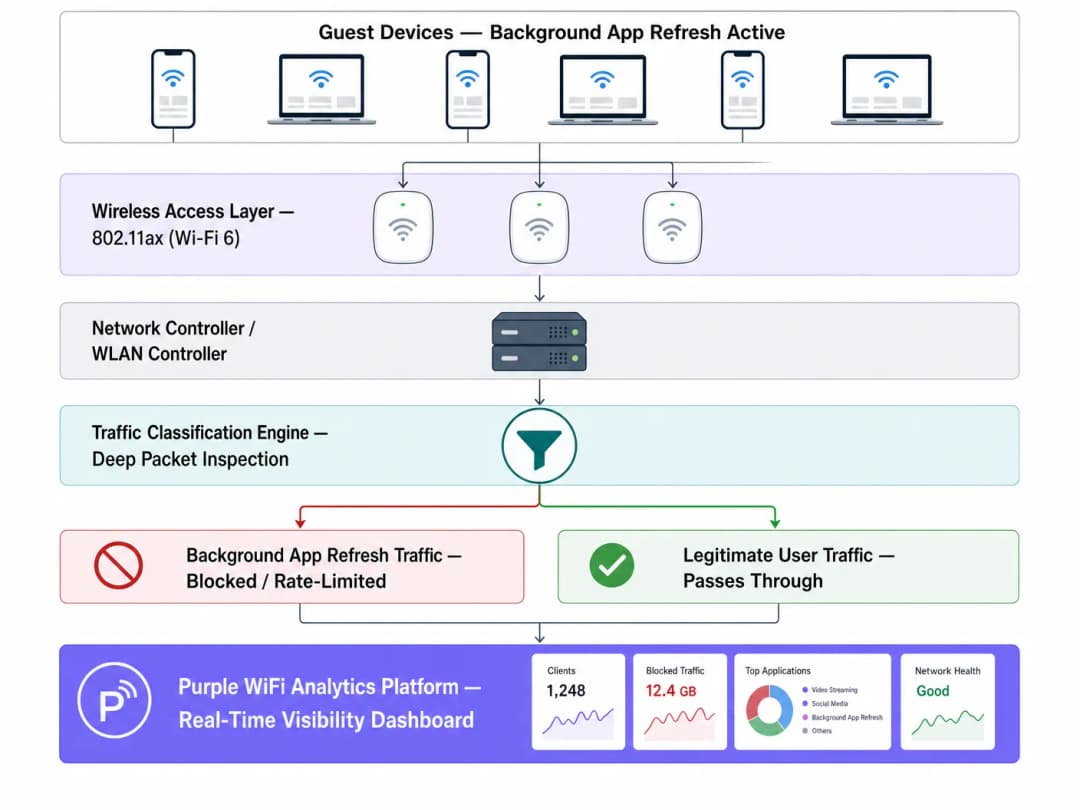
雖然 WiFi 6 (802.11ax) 引入了 OFDMA 和 BSS 色彩技術以更有效地管理高密度競爭,但它並未能解決非必要封包傳輸的根本問題。無線基地台無法區分使用者正在串流播放簡報,還是應用程式正在默默同步診斷數據。透過深層封包檢測 (DPI) 進行網路層級的干預仍然至關重要。
實施指南
1. 流量分類與基準制定
在實施策略變更之前,請使用您的 WiFi Analytics 平台建立基準。監控流量至少五個工作天,以識別背景活動的高峰期和熱門目的地網域。
2. 制定封鎖清單
針對已知的分析和廣告網路端點實施 DNS 或 IP 層級的封鎖。從社群驗證的清單(如 OISD)開始,並使用您的基準制定數據進行補充。 關鍵例外狀況: 切勿阻擋必要的推播通知服務(例如,TCP 5223 上的 Apple Push Notification Service 或 Google Firebase Cloud Messaging)。阻擋這些服務將會破壞裝置的核心功能並引發使用者抱怨。
3. 在控制器層實施原則
請在 WLAN 控制器而非個別基地台套用分類規則,以確保原則實施的一致性。
最佳實踐
- 限制作業系統更新速率: 與其完全阻擋作業系統更新,不如在營運尖峰時段實施嚴格的速率限制(例如,每個裝置 1 Mbps)。
- 實施 QoS 標記: 使用 DSCP 標記將背景流量的優先級降至最低流量類別,僅在通道暢通時才允許傳輸。
- 持續監控: 背景端點會不斷變更。請每季審查並更新您的阻擋清單。
疑難排解與風險緩釋
- 過度阻擋: 在未經測試的情況下進行積極阻擋可能會破壞正常應用程式的功能。在進行全網部署之前,請務必先在單一 AP 群組上測試原則。
- 忽略 5GHz/6GHz 分流: 由於舊型裝置的預設設定,背景流量通常會集中在 2.4GHz。請確保流量分析涵蓋所有頻段。WiFi 頻率:2026 年 WiFi 頻率指南 提供了關於頻段管理的進一步背景資訊。
投資報酬率與商業影響
收回 30% - 40% 被浪費的空閒時間,在功能上相當於以相同的幅度增加實體 AP 的密度。對於面臨容量限制的場域,網路層級的流量管理可以延後在硬體更新上的重大資本支出,同時立即提升顧客滿意度分數。
收聽完整技術簡報:
關鍵定義
背景 App 重新整理
一種行動 OS 功能,允許 App 在沒有使用者主動互動的情況下,檢查更新、同步資料並傳送遙測數據。
高密度大眾網路上隱藏版空口時間消耗的主要來源。
CSMA/CA
載波監聽多路存取/衝突預防;WiFi 用於管理共享無線電介質存取的協定。
解釋了為什麼由於競爭,即使是微小的背景封包也會造成顯著的網路開銷。
空口時間 (Air Time)
裝置在特定無線電頻率上傳輸資料所能使用的有限時間量。
背景流量耗盡的關鍵資源,在高密度部署中,這比單純的頻寬更重要。
深層封包檢測 (DPI)
先進的網路封包篩選技術,藉由檢查封包的資料部分來對流量類型進行分類。
用於區分合法使用者流量與背景遙測數據的必要技術。
DSCP 標記
區分服務代碼點;一種用於分類和管理網路流量以實現服務品質 (QoS) 的機制。
用於降低背景流量的優先級,使其僅在網路空閒時傳輸。
BSS 著色技術 (BSS Colouring)
一項 WiFi 6 功能,可識別重疊的基本服務集以提高空間複用率。
可提高效率,但無法消除封鎖無用背景流量的需求。
OFDMA
正交頻分多址;允許單一 AP 同時與多台裝置進行通訊。
一項 WiFi 6 增強功能,可緩解但無法完全解決背景流量競爭問題。
速率限制 (Rate Limiting)
控制網路介面上傳送或接收流量速率的技術。
管理必要但沉重的背景流量(如 OS 更新)的推薦方法。
範例
一間擁有 340 間客房的四星級飯店,在入住尖峰時段(下午 3 點至 6 點)遇到 WiFi 效能不佳的問題,儘管最近才升級了 WiFi 6 硬體。
- 透過 Purple WiFi Analytics 部署流量分析。
- 識別出有 38% 的空口時間被背景 App 重新整理所消耗。
- 針對 847 個已知的分析與廣告網域實施特定的 DNS 封鎖清單。
- 在尖峰時段對已識別出的 OS 更新流量限制 1 Mbps 的速率。
一家擁有 60 家門市的地區零售連鎖店報告,數位看板的緩衝與高流量的顧客 WiFi 使用同時發生。
- 建立整個連鎖體系的流量基準。
- 發現顧客 SSID 上的 iOS 更新檢查使 WAN 鏈路達到飽和。
- 透過 WLAN 控制器部署集中式策略,限制每台顧客裝置連線 Apple 更新伺服器的速率為 512 Kbps。
- 透過 QoS 優先處理數位看板的 MAC 位址。
練習題
Q1. 體育場 IT 總監希望在大型體育賽事期間封鎖所有流向 Apple 和 Google 伺服器的流量以保留頻寬。這樣做有何風險?
提示:請考慮依賴持續連線的必要裝置服務。
查看標準答案
封鎖所有流向 Apple 和 Google 的流量將會破壞必要的推播通知服務(TCP 5223 上的 APNS 和 Firebase Cloud Messaging)。這會導致合法的 App(如數位票券或緊急警報)失效。相反地,應該封鎖特定的分析子網域,並限制 OS 更新的速率。
Q2. 部署 WiFi 6 升級後,一間會議中心在 2,000 名與會者抵達的上午主題演講期間,仍然遇到嚴重的延遲問題。為什麼硬體升級沒有解決這個問題?
提示:思考 WiFi 6 擅長處理什麼,以及它無法控制什麼。
查看標準答案
WiFi 6 雖然提高了效率(透過 OFDMA 和 BSS 彩色技術),但無法區分使用者正在檢查電子郵件,還是 2,000 台設備同時執行背景應用程式重新整理。龐大的競爭開銷仍然會耗盡空口時間。因此,需要網路層級的流量分類。
Q3. 為訪客網路設定 QoS 時,應如何處理像雲端相片同步這樣的背景流量?
提示:這並非惡意行為,但也不具緊急性。
查看標準答案
應將其分類並標記為低 DSCP 值(例如背景/清除器類別)。這會降低該流量的優先順序,確保其僅在網路空閒時傳輸,從而保護 VoIP 或端點銷售交易等即時流量。
繼續閱讀本系列
深入瞭解 RSSI 與訊號強度以實現最佳頻道規劃
本指南提供有關 RSSI、訊號雜訊比 (SNR) 及射頻 (RF) 傳播原理的全面技術深入剖析,以實現最佳頻道規劃。它為 IT 經理、網路架構師和場所營運總監提供實用策略,以減輕同頻道干擾與相鄰頻道干擾、最佳化 AP 部署,並利用分析工具在旅宿、零售和公共部門環境中產生可衡量的業務影響。
WiFi 6 對決 WiFi 5:它能解決通道干擾嗎?
本指南深入探討 WiFi 6 (802.11ax) 如何透過 OFDMA 與 BSS Coloring 技術,解決高密度企業環境中的通道干擾問題。它為 IT 經理、網路架構師和 CTO 提供了實用的部署策略、來自旅宿業與醫療業的真實案例研究,以及一個用於評估在無線網路效能至關重要的場所中進行基礎設施升級 ROI 的框架。
高密度場域的最佳 WiFi 頻道
為體育館、競技場和大型公共場所等高密度環境選擇和優化 WiFi 頻道的權威技術參考。內容涵蓋射頻(RF)物理學、5 GHz 與 6 GHz 頻段的頻道複用策略,以及為 IT 主管提供的實用部署指南。
對於您的特定設置有任何疑問嗎?
我們的團隊與超過 80,000 個場域的場域營運商、IT 經理和網路工程師合作。立即預約 20 分鐘的通話,我們將向您展示其他與您相似的用戶是如何解決此問題的。