A guest WiFi setup is often treated as a five-minute router task: create an SSID, add a password, and put a sign at reception. That advice is incomplete. A shared password creates weak accountability, an open network exposes users to avoidable risk, and a browser splash page can turn a simple connection into a frustrating form-filling exercise.
Modern venues need to treat connectivity as part of their security architecture, guest experience, and first-party data strategy. The access model should match the venue, the visitor's reason for returning, and the operator's obligations under UK privacy law. In some locations, a captive portal remains useful. In others, encrypted, identity-driven access through Passpoint, OpenRoaming, or iPSK is the more sensible design.
Rethinking the Traditional Guest Network
The traditional guest network assumes that visitors will accept friction in exchange for free internet access. They won't always. A guest may need to find the correct SSID, ask for a password, accept terms, enter an email address, complete a marketing form, and repeat the process on the next visit. Each extra step creates another opportunity for abandonment, support requests, or the use of an unofficial network.
Security suffers when operators reduce the problem to convenience. An open SSID provides no meaningful protection for traffic between the device and the access point, while a shared password gives the venue little control over who has access or when that access should end. Even WPA-protected networks can become difficult to govern when the same credential is printed on menus, displayed at reception, and reused indefinitely.
UK user behaviour has historically exposed the weakness of casual public WiFi. A 2012 UK survey found that 56% of public WiFi users didn't check whether WiFi was encrypted before browsing, while 42% of adults who used public WiFi never or rarely checked whether a network was secure, as reported in Purple's guidance on securing guest WiFi. The same finding recorded people entering sensitive credentials, including email, social media, payment-card, and online-banking details, over public WiFi. That makes encryption and separation basic safeguards, not optional refinements.
Passwords solve less than operators expect
A shared password can keep casual passers-by off the network, but it doesn't establish individual identity. If a credential is copied, the operator can't readily distinguish a legitimate visitor from an unauthorised device. Changing the password creates an operational burden, and failing to change it leaves old access in place.
Captive portals improve control by presenting terms, privacy information, and an authentication step. They can also support lawful, optional marketing consent. They don't automatically encrypt the connection, isolate devices, or protect the underlying LAN. A portal is an application layer, not a substitute for sound network design.
Practical rule: Never use the login page as evidence that the network is secure. Security starts with encryption, segmentation, firewall policy, and client isolation.
The same distinction matters beyond WiFi. Hotels, serviced apartments, and holiday-let operators often collect visitor details for operational and legal reasons, but guest registration and network access shouldn't be treated as one undifferentiated data exercise. Operators reviewing legal rules for registering guests should keep accommodation records, connectivity logs, and optional marketing profiles separate, with a clear purpose for each.
Identity changes the operating model
An identity-driven design gives each person or device a controlled relationship with the network. Passpoint can allow a returning user's device to authenticate automatically through a recognised profile, while OpenRoaming can support access across participating networks. iPSK, also called private or individual pre-shared keys, can provide unique credentials that are easier to revoke than one communal password.
The result is a different definition of guest WiFi setup. The objective isn't merely to get a device online. It is to deliver encrypted access with the least possible friction, while preserving the operator's ability to enforce policy, revoke access, and document what happened.
Architecting Secure Network Segmentation
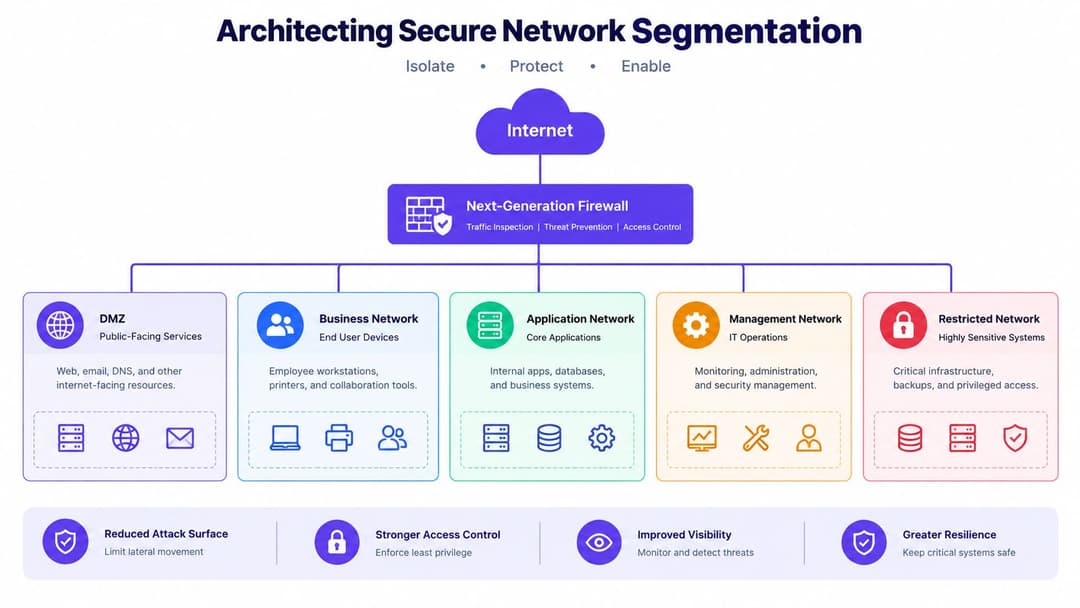
Authentication comes after containment. Before designing a branded portal or selecting a passwordless method, decide exactly what a guest device is allowed to reach. In a well-built venue network, the answer is usually the public internet and nothing else.
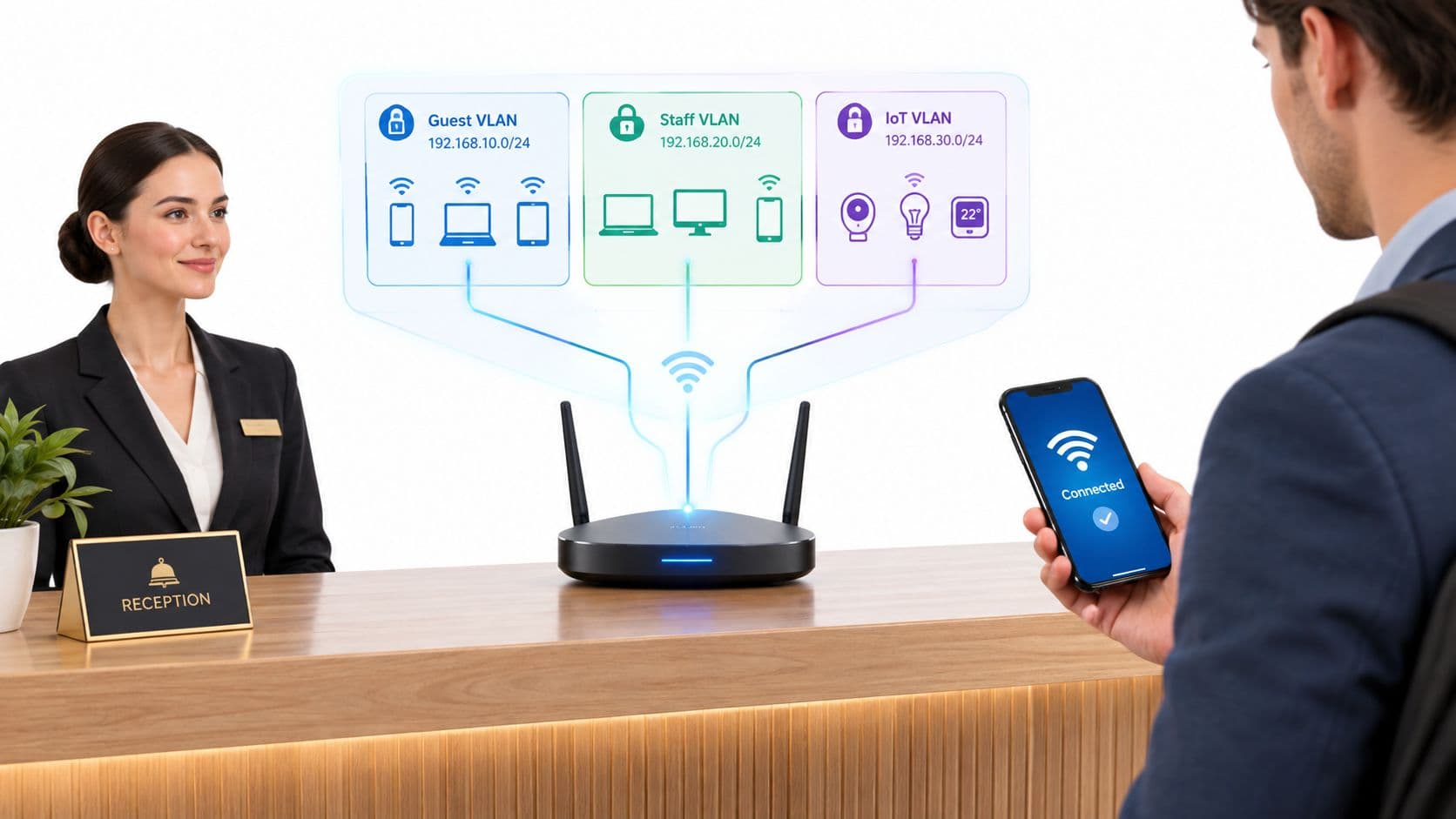
The minimum enterprise pattern is a dedicated guest SSID mapped to a guest VLAN, with its own DHCP scope and a firewall policy that denies routes to corporate, payment, IoT, and management networks. The guest VLAN should not share trusted routing paths because the same switches or access points carry the traffic. Logical separation must be enforced at the network layer.
Build the boundary before the welcome page
Start with the gateway and work inwards. Map the guest SSID to a dedicated VLAN, issue addresses from a separate DHCP scope, and send guest traffic through a firewall policy that permits DNS, DHCP, and internet-bound traffic while denying access to private subnets. Don't rely on the SSID name or a router's “guest” label as proof that isolation works.
Client isolation adds a second boundary. It prevents one guest device from discovering or connecting to another device on the same wireless network. This matters in public venues because visitors don't know each other, and a compromised laptop, phone, or smart device shouldn't be able to probe nearby clients.
A sensible policy sequence looks like this:
- Separate the broadcast domain: Place guest traffic on its own VLAN and DHCP scope rather than leaving it on the staff network.
- Block internal destinations: Deny access to corporate servers, payment systems, printers, cameras, building controls, and network-management interfaces.
- Enable client isolation: Prevent peer-to-peer communication between guest devices at the access-point layer.
- Permit only required services: Allow the services needed for address assignment, name resolution, authentication, and internet access.
- Log policy decisions: Retain enough operational information to investigate abuse and verify that the rules are working.
The practical enterprise WiFi security guide from Purple is useful when translating this design into a managed, multi-site environment. The product selection matters less than whether the platform exposes the controls clearly and applies them consistently across every venue.
Protect operational traffic from guest demand
A guest network can be isolated and still damage the business if it consumes the available uplink. A UK business broadband guide recommends using about 3–5 Mbps of download bandwidth per concurrent guest device for typical browsing and email, a baseline described in this UK guest WiFi capacity guide. Treat that as a planning starting point, not a guarantee. Streaming, software updates, video calls, and venue-specific applications can require a different policy.
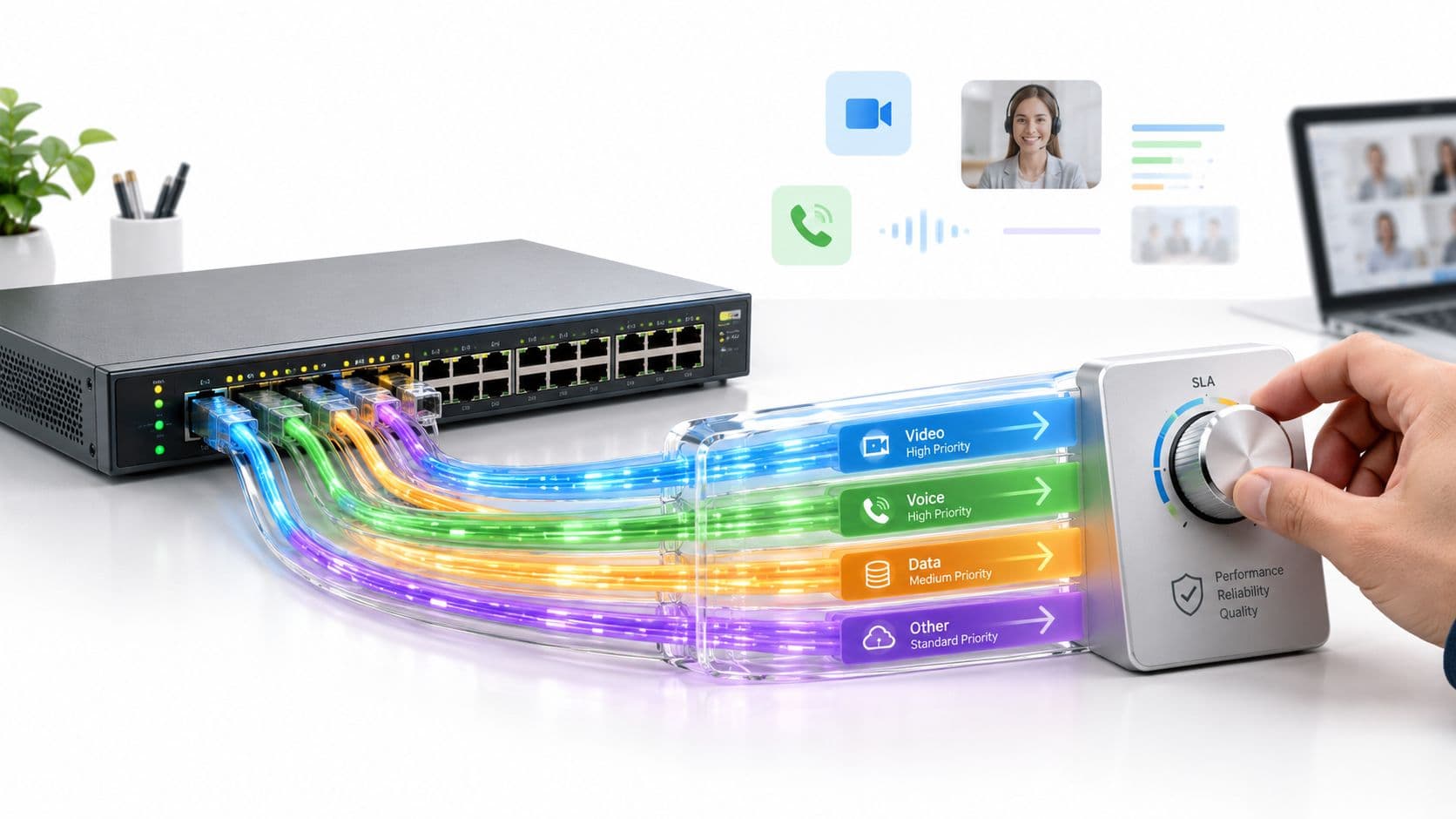
Apply rate limits or quality-of-service rules to the guest class so point-of-sale, staff systems, voice services, and building operations retain predictable performance. Decide whether high-bandwidth services should be restricted, prioritised, or merely monitored. A good design makes this decision before launch, rather than waiting for the front desk to report that card terminals have slowed down.
Consumer routers often expose a simple guest toggle, separate SSID, password, and local-access option. That can be adequate for a small site, but larger venues need central policy, repeatable VLAN definitions, and an audit trail. The architecture should remain understandable to the engineer who inherits it.
Choosing Between Captive Portals and Passwordless Access
There isn't one correct authentication method for every venue. A restaurant serving mostly first-time visitors may value a short portal flow and an optional marketing invitation. A hotel group with loyalty members, a transport hub with regular commuters, or a retail estate with repeat shoppers may lose more value through repeated sign-ins than it gains from collecting the same details again.
A captive portal remains useful when the operator needs to present terms, collect a deliberate opt-in, associate a session with a visitor profile, or apply a venue-specific journey. The portal should be fast, accessible, and proportionate. It shouldn't ask for information that the venue can't explain or use lawfully.
Passpoint and OpenRoaming take a different approach. A device receives or already holds a trusted network profile, then authenticates in the background rather than waiting for a browser redirect. Passpoint deployments can use enterprise-grade authentication and encrypted access, including WPA3-Enterprise where the client and infrastructure support it. OpenRoaming extends the same general idea across participating networks, allowing an identity to work beyond one location.
iPSK sits between a communal password and a full certificate-backed identity system. The venue can keep one SSID while assigning unique keys to users, teams, devices, or service groups. A key can be revoked without changing every other user's credential, which is useful for staff, contractors, and legacy equipment that can't use modern enterprise authentication.
Compare the access models
| Method | Security Level | User Friction | Best Use Case |
|---|---|---|---|
| Shared WPA2 or WPA3 password | Depends on password handling, encryption, and network isolation | Low at first connection, higher when credentials change | Small, low-complexity sites with limited identity requirements |
| Captive portal | Strong only when paired with encrypted WiFi and segmentation | Medium to high, especially on repeat visits | First-time visitors, consent, venue terms, and optional marketing |
| Passpoint | Strong encrypted, profile-based access where supported | Very low after profile provisioning | Hotels, campuses, transport, and repeat visitors |
| OpenRoaming | Encrypted roaming access across participating networks | Very low for eligible users | Multi-site estates and users who move between participating venues |
| iPSK | Individual, revocable keys with a shared SSID | Low to medium, depending on provisioning | Staff, contractors, legacy devices, and controlled device groups |
A portal isn't necessarily outdated. It becomes the wrong tool when the operator uses it for every visitor regardless of visit frequency, device capability, or relationship with the brand. The captive portal guide from Purple provides useful context for venues that still need a managed sign-in and consent journey, but the portal should be one access option rather than the definition of guest WiFi.
Select for the visitor relationship
Use a portal for a first interaction when the information requested has a clear purpose. Offer Passpoint or OpenRoaming for known, returning users who have already completed the necessary setup. Use iPSK where a person or device needs a distinct credential, but a full identity-provider integration would add unnecessary complexity.
Device support requires honest planning. Not every visitor will have a compatible profile, and not every site has the same authentication infrastructure. A practical deployment can offer a secure portal fallback while steering repeat users towards passwordless access. That preserves reach without forcing every visitor through the slowest path.
Navigating Privacy and Legal Compliance
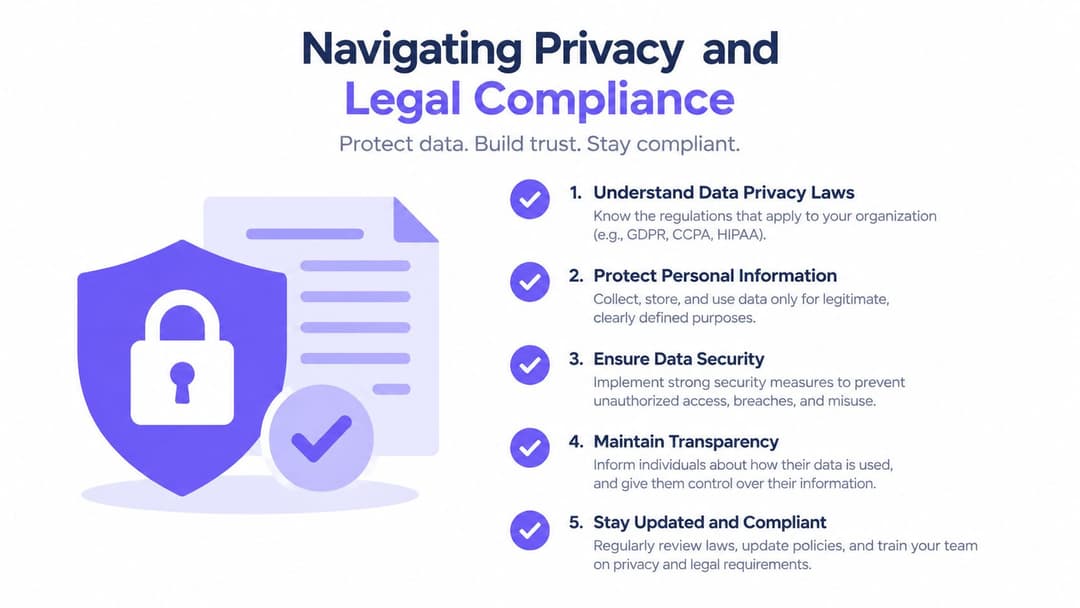
UK guest WiFi sits inside a compliance stack, not a single rulebook. UK GDPR and the Data Protection Act 2018 shape privacy notices, lawful processing, and consent. The PSTI Act 2024 pushes operators away from default passwords and towards stronger network hygiene, including segmentation and patching. The Investigatory Powers Act 2016 can create obligations to retain connection metadata such as MAC addresses, IP assignments, and timestamps, as outlined in Purple's UK guidance on public WiFi.
That combination changes the design brief. A venue needs to know what it collects, why it collects it, who can access it, how long it retains it, and how it deletes it. Those decisions should be documented before the portal goes live.
Separate access from marketing
The most common portal mistake is bundling internet access with marketing acceptance. A guest may need to accept acceptable-use terms and read a privacy notice to use the service. That doesn't mean the venue can require the guest to consent to promotional emails.
Marketing consent must be unticked, freely given, and separate from access. The guest should be able to connect without agreeing to optional marketing. The form should explain what messages will be sent, identify the organisation responsible, and make withdrawal straightforward. If the venue wants analytics, loyalty enrolment, surveys, or CRM enrichment, each purpose needs a defensible basis and an appropriate notice.
Collect the minimum data needed for the chosen access model. An anonymous internet-only service may need less information than a loyalty-linked Passpoint profile. An email address might support a specific authentication journey, but it isn't automatically necessary for every deployment. Avoid collecting date of birth, postal address, phone number, or demographic information just because the CRM can store it.
Consent should describe a real choice. If refusing an optional marketing purpose prevents a visitor from getting online, the choice isn't freely given.
Make retention operational
Connection metadata can be valuable for security investigation, abuse handling, and legal obligations. It also creates personal-data risk when retained without a defined purpose. Create a retention schedule that distinguishes authentication records, security logs, marketing records, and aggregated analytics. Set deletion or anonymisation actions, assign ownership, and test that the controls execute as specified.
Plain-English notices should explain the categories of data captured, the reason for processing, sharing arrangements, retention approach, and contact route for privacy questions. The guest WiFi privacy guidance from Purple can help operators frame the portal as a documented processing workflow rather than a decorative splash page.
Security governance belongs in the same process. Change default credentials, patch gateways and access points, restrict administrative access, and keep guest traffic away from sensitive systems. Compliance doesn't replace engineering controls. It gives those controls a documented purpose and places limits around the data generated by them.
Testing and Rolling Out the Deployment
A guest WiFi design isn't ready because the SSID appears on a phone. The acceptance test must prove both sides of the promise: visitors can reach the internet, and they can't reach anything inside the venue that they shouldn't.
Start in a staging area or a quiet part of the site. Use test accounts that reflect the final authentication paths, including a first-time portal user, a returning profile-based user, and a device using an iPSK credential if that method is part of the design. Don't test only with the administrator's laptop.
Test the controls that matter
Run the following checks from a guest device:
- Internet reachability: Confirm ordinary web access, DNS resolution, HTTPS sites, and the expected portal redirect.
- Internal denial: Attempt to reach corporate services, payment infrastructure, printers, cameras, IoT controllers, and management interfaces. Each should remain unreachable.
- Peer isolation: Test whether one guest device can discover or connect to another. Client isolation should prevent it.
- Authentication recovery: Close and reopen the browser, forget the network, roam between access points, and test an expired or revoked credential.
- Capacity behaviour: Add representative devices and watch latency, packet loss, uplink use, and the effect on operational traffic.
- Failure handling: Disconnect the portal service or upstream link in a controlled test and confirm that the user experience and failover behaviour match the documented policy.
UK-facing setup guidance specifically recommends testing from a guest device to verify internet access while internal hosts remain unreachable, because a guest SSID can be created successfully while still leaking LAN access if isolation or firewall rules are missing.
Test across iOS, Android, and Windows, and include devices with private address features, VPN software, aggressive battery saving, and corporate security profiles. Captive portals can behave differently when a device uses a captive-network assistant, an embedded browser, or a full browser. Passpoint profiles also need testing through provisioning, roaming, certificate or credential expiry, and removal.
Roll out in controlled stages
Begin with one access point, one reception or public area, and a small group of staff testers. Record every support issue, including devices that connect but don't receive an address, portals that fail to open, and users who remain connected without internet access. Fix the underlying cause rather than instructing staff to reboot equipment as a permanent workaround.
Expand by zone and monitor authentication failures, DHCP exhaustion, firewall denies, bandwidth consumption, roaming events, and portal availability. Create a simple runbook for front-of-house teams. It should explain the official SSID, what information staff may request, how to report an outage, and what they must never do, such as handing out an internal password as a workaround.
A deployment is operationally mature when it needs little manual intervention. Alerts should identify a broken uplink, failed portal dependency, overloaded access point, or unexpected internal route before guests report it. Keep a rollback plan that can disable the new service without disrupting staff, payment, safety, or building systems.
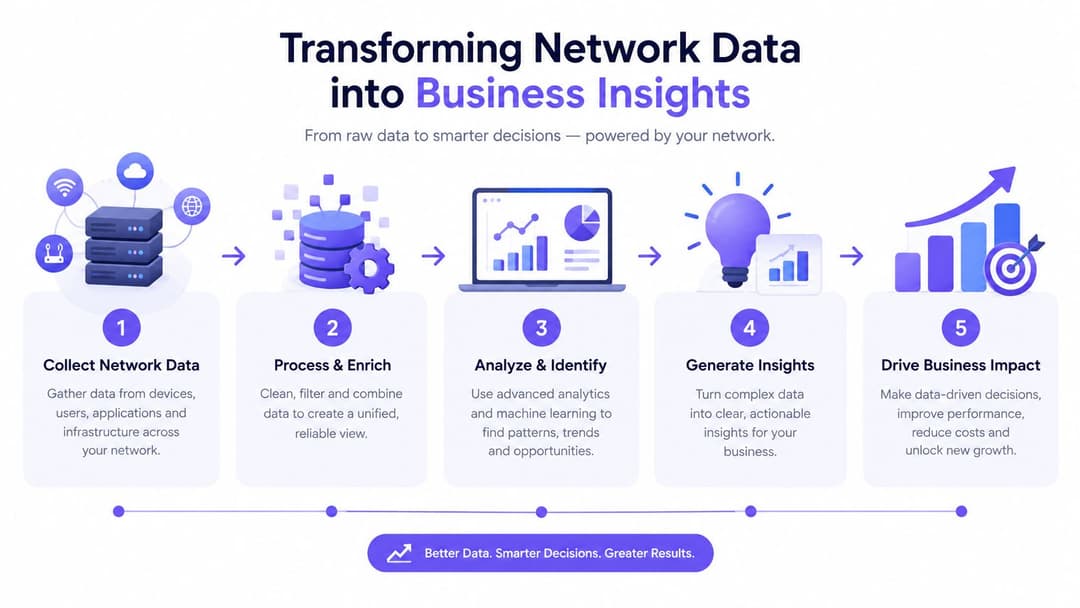
Transforming Network Data into Business Insights
A guest network becomes strategically useful when the operator can connect a legitimate access event to a meaningful business question. The question might be whether visitors return, which areas attract engagement, whether a campaign brought people back, or whether a venue's digital experience supports loyalty. Those questions require careful identity design, not indiscriminate tracking.
The network can provide signals such as authentication history, visit frequency, session duration, location association, and consent status. Those signals should be minimised, protected, and used only for purposes explained to the visitor. Raw connection data isn't automatically a customer insight, and a MAC address isn't a licence to build an unlimited behavioural profile.
Connect identity to useful actions
A practical data flow looks like this:
- Capture the access event: Record only the information required for authentication, security, and the stated business purpose.
- Resolve the relationship: Where the visitor has opted in or already belongs to a loyalty programme, associate the event with the appropriate profile.
- Apply consent rules: Keep marketing eligibility separate from network access and respect withdrawals across connected systems.
- Create an operational signal: Use return visits, area engagement, or session patterns to inform service and campaign decisions.
- Measure the outcome: Compare the action against the original objective, then retain aggregated insight only where identifiable data is no longer needed.
Purple is one platform option for this model. It combines a branded guest portal, authentication and compliance logging with CRM connectors, marketing automation, analytics, and identity-driven access models such as Passpoint, OpenRoaming, and iPSK. The important evaluation point is whether the platform can enforce consent and retention rules while fitting the venue's existing access points, identity provider, CRM, and operational processes.
Prove value without over-collecting
Retail teams might use consented visit signals to refine customer journeys. Hospitality operators might distinguish a one-off connection from a returning guest experience. Property managers might use service patterns to improve resident communications. In each case, the network supports a decision, rather than becoming a justification for collecting everything.
Start with a measurable operational objective and a defined data owner. Document the lawful basis, limit access to the people who need it, and set deletion or aggregation rules before connecting the feed to a CRM. This keeps the guest WiFi setup aligned with both commercial value and UK privacy expectations.
Purple provides branded guest authentication, identity-driven access through Passpoint, OpenRoaming and iPSK, compliance controls, analytics, and CRM integrations for venue operators. Visit Purple to assess how its platform could turn a secure guest WiFi setup into a lower-friction, more measurable visitor experience.