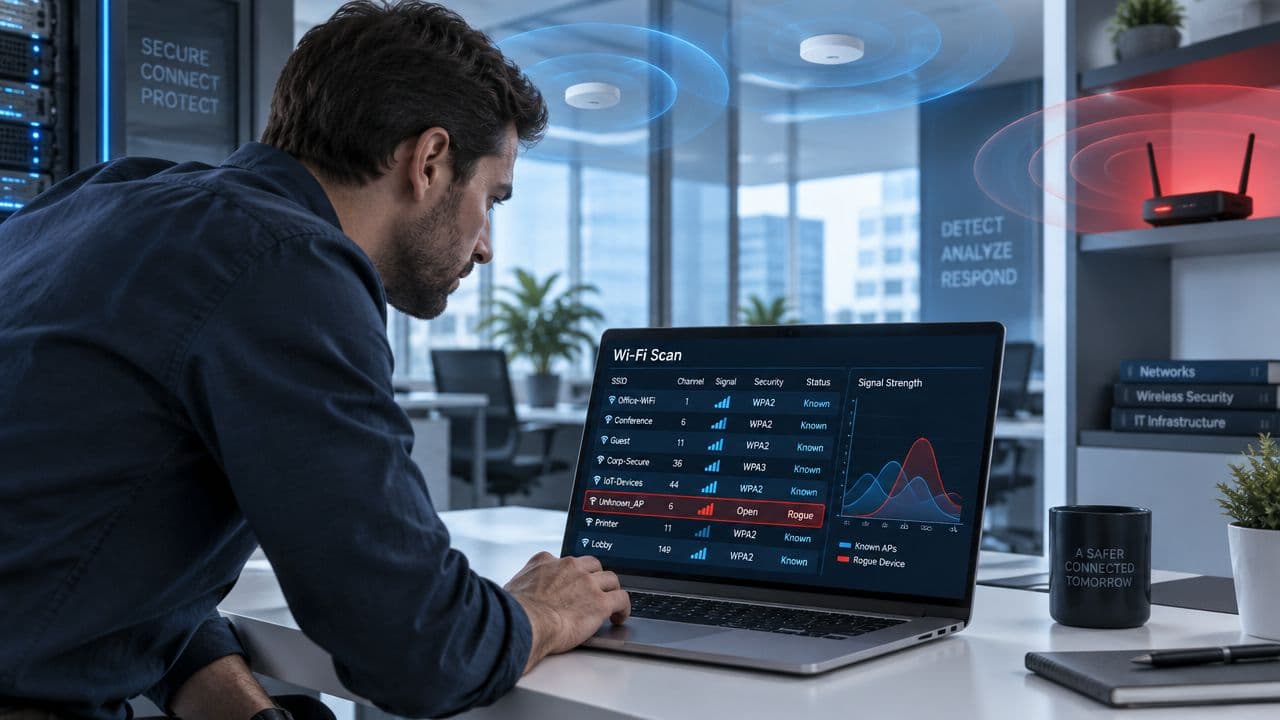
A helpdesk ticket reports an unfamiliar SSID, Free_Venue_WiFi, visible from the office floor. Nobody in IT authorised it, but the signal is strong near a meeting room and several staff laptops have recently complained about unstable connections. The first question isn't whether the name looks suspicious. It's whether the device is merely a nearby network, an unauthorised bridge into your LAN, or an evil twin designed to attract your users.
Rogue access point detection only becomes useful when it leads to a defensible decision and a physical outcome. An alert without classification creates noise. Classification without wired-side validation leaves uncertainty. Even a confirmed device remains a live risk until someone isolates its connection, finds the hardware, removes it, and records why it appeared.
This playbook treats the problem as an incident-response process for offices, hotels, retail estates, hospitals, student accommodation, and multi-tenant buildings. It combines RF observations, controller data, switch telemetry, user behaviour, and on-site investigation because no single signal reliably distinguishes an attack from an innocent neighbouring network.
Why Rogue Access Points Are a Serious Threat
A rogue AP may be an employee's consumer router, a device installed by another department, a misconfigured corporate unit, or an evil twin copying a trusted SSID. The motive changes the investigation, not the first control decision. Any wireless device outside the approved inventory invalidates assumptions about authentication, segmentation, patching, and monitoring.
The highest-risk case is an AP connected to the corporate LAN. An employee might install one to improve coverage in a hotel back office, while a retail team might connect it for a point-of-sale peripheral. Either way, the device can create a wireless path that bypasses normal authentication controls, vulnerability management, and operational ownership.
An attacker can exploit the same gap deliberately. A rogue AP may expose internal services, provide access to poorly protected endpoints, or capture credentials. An evil twin placed near a reception desk, conference venue, or shopping centre can imitate a familiar SSID and wait for phones or laptops to associate.
Operational rule: Treat “not in inventory” as a candidate for investigation, not as proof of malicious intent.
The UK environment makes identification harder than a network diagram suggests. A UK-focused analysis estimated that as many as 20% of enterprise locations already had a rogue access point connected to their systems, showing that this exposure can be material (UK wireless penetration-testing analysis). The same study examined roughly 96,433 access points in a London section, including 24% open networks, 48% WPA/WPA2-protected networks, and 14% WEP-encrypted networks (the London and Belfast Wi-Fi study).
Those figures do not make every open SSID hostile. They show why an SSID or security mode cannot settle the case. In a hotel, guest networks, staff hotspots, building-management equipment, and tenant systems may occupy the same RF space. In a hospital, a transmitter in a car park or adjacent building may be visible without any route into clinical systems.
The operational gap appears after the alert. Teams must distinguish a neighbour from a LAN-connected device, trace a suspected BSSID through controller and switch records, and locate the hardware on site. In a hotel or multi-tenant office, that may mean checking risers, comms rooms, ceiling voids, meeting rooms, and tenant-controlled areas. A dashboard can identify a signal, but it cannot remove a device from a live port.
The business risk has two sides. A rogue AP can create a backdoor, and it can disrupt coverage, roaming, capacity, and troubleshooting. Use an enterprise Wi-Fi security guide as a reference for surrounding controls, then enforce the practical standard: maintain an authorised inventory, monitor the airspace, verify wired connectivity, locate the device, contain it, remove it, and record the outcome.
Understanding Core Detection Techniques
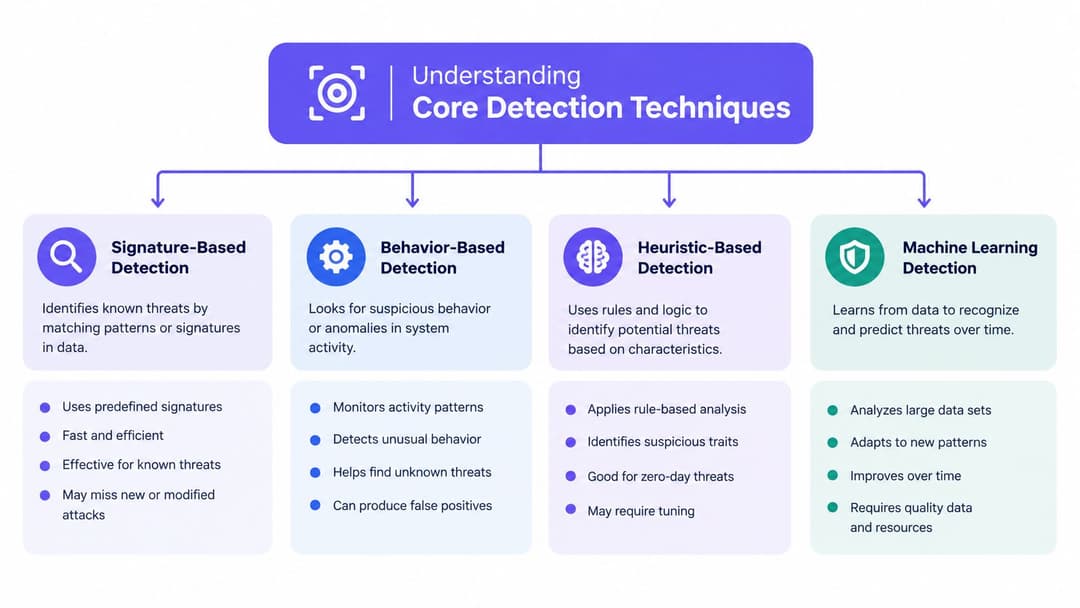
Rogue access point detection works best as a correlation problem. A beacon tells you that a device is transmitting. It doesn't tell you whether that device is connected to your network, whether it is imitating your SSID, or whether it belongs to a neighbouring business.
Passive scanning and active probing
Passive scanning listens for beacon and management frames without transmitting requests. It is quiet, broad, and suitable for continuous monitoring through dedicated sensors or supported infrastructure. Passive collection can capture the BSSID, SSID, channel, security mode, vendor information, signal strength, and timing behaviour of visible devices.
Its limitation is context. A passive sensor may see an AP from a nearby office, street, flat, or vehicle without knowing whether the device has any wired-side reachability. Physical obstructions and sensor placement also affect what appears in the results.
Active probing sends queries and observes responses. It can help identify hidden or intermittently visible networks and can provide more detail than a listening-only approach. The trade-off is that probing changes the environment and may generate extra management traffic, trigger detections, or distort the client-behaviour baseline you're trying to establish.
Don't use either method as a verdict. Use passive monitoring for broad discovery and active checks for controlled investigation.
What WIDS and WIPS actually correlate
A WIDS observes and alerts. A WIPS can add enforcement or containment, depending on the product, configuration, and approval model. Both should compare observed wireless identities with the authorised AP inventory, but a reliable deployment goes further:
- BSSID and MAC matching: Compare the radio identity with controller exports, asset records, and vendor OUI information.
- RF fingerprinting: Examine power, channel, timing, frame characteristics, and location estimates to separate an AP from an ordinary client or a cloned transmission.
- SSID relationship: A matching SSID deserves attention, but an unfamiliar SSID can also be risky when it is attached to the corporate LAN.
- Client behaviour: Excessive probing, unexpected roaming, association patterns, and management-frame anomalies can raise confidence.
- Wired reachability: DHCP, switch tables, NAC events, and controller data can establish whether the device is connected to an internal segment.
A UK university study tested a supervised neural network using delta-time, sequence number, signal strength, and frame subtype. It detected known attacks at 99% to 100% and unknown attacks at 89%, but performance fell to 75% when attacker and victim were in the same location (wireless attack detection study). The result is operationally important. A model can be highly effective under separated radio conditions and still struggle on crowded office floors, hotels, or student housing where legitimate and hostile transmissions overlap.
Client probing also needs restraint. Excessive probe activity can inflate detections, so a high-fidelity system should compare a suspected device with time-series behaviour and nearby RF conditions rather than escalating on probe counts alone. Practitioners who want additional background on wireless monitoring can consult the Wisenet Security WiFi tag, while keeping their own inventory and wired-side evidence as the authority.
Deploying and Tuning Your Detection System
A detection system fails operationally if it produces alerts that nobody can investigate. Build the evidence chain before adjusting sensitivity: authorised inventory, RF observations, controller records, and a clear route to the switch port and physical device.
Export every authorised AP from the wireless controller. Record its approved location, switch relationship, management owner, SSIDs, radio bands, and expected channels. Include temporary equipment used for events, maintenance, demonstrations, and building projects. Otherwise, those devices will return as unexplained exceptions.
Walk the site with the inventory open. A network diagram may place an AP in a conference room, while a spectrum or Wi-Fi survey shows whether its signal is present there. Record nearby networks as external observations where possible, particularly in hotels, retail centres, hospitals, and multi-tenant offices. In these sites, a sensor can identify a suspicious transmitter, but staff still need a practical method for finding the hardware.

Build a baseline before raising sensitivity
A UK study found AP density of about 3,013 APs per km² in London compared with 454 APs per km² in Belfast (UK Wi-Fi penetration-testing findings). Dense environments generate legitimate detections, so alerting on every unknown BSSID will overwhelm analysts and encourage them to dismiss warnings.
Tune rules around combined evidence:
| Signal | Useful question | Typical interpretation |
|---|---|---|
| BSSID and OUI | Is the hardware known and plausible? | Unknown identity requires review |
| Signal strength | Is the source inside the premises or outside? | Strong, localised signal increases priority |
| SSID similarity | Does it imitate a corporate or guest name? | Possible evil twin, not proof |
| Wired telemetry | Does it appear on a switch or DHCP record? | Internal reachability raises risk |
| Client behaviour | Are users associating or probing unusually? | Supports classification when correlated |
Meraki, Aruba, Mist, and UniFi expose different labels and workflows, but the control logic remains consistent. Mark approved APs and known neighbouring devices, route new candidates into a review queue, and send high-priority alerts only when RF evidence combines with a suspicious SSID, client association, or wired-side observation.
Identity data does not replace network evidence. A guest device may be legitimate while producing unusual probes. An unknown device using a familiar SSID may deserve more attention than an obviously odd hotspot. Identity-aware Wi-Fi can help separate staff and guest devices from unknown clients. WPA-Enterprise guidance also explains why managed authentication is preferable to shared wireless credentials.
Tune for investigation, not dashboard cleanliness
Create separate policies for external, internal, and impersonation candidates. Log external devices for periodic review. For internal devices, create a ticket containing the switch port, VLAN, DHCP evidence, nearest sensor, and an owner responsible for physical follow-up. An apparent evil twin should trigger a rapid check of affected clients and authentication events.
Review false positives with the people who investigate them. If a legitimate tenant AP is dismissed repeatedly, add its RF characteristics and ownership details to the baseline. If mobile hotspots appear during events, document the expected area and escalation criteria rather than suppressing the whole category.
The target is not a quiet dashboard. It is a short, repeatable path from a credible alert to evidence, port tracing, device location, and safe remediation.
How to Validate a Suspected Rogue AP
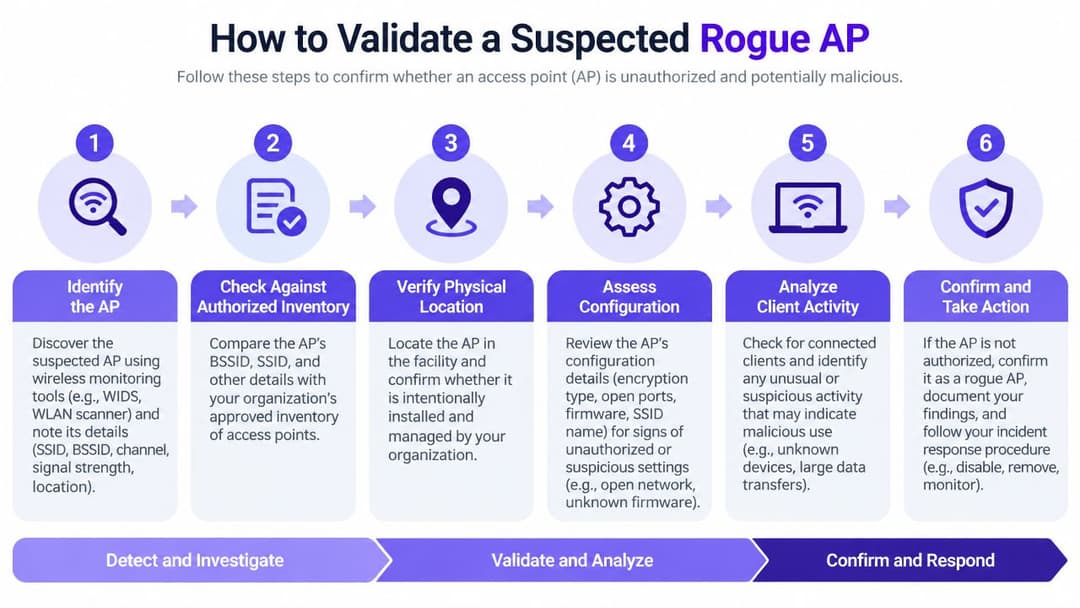
An alert becomes actionable when you can connect three facts: what the device is, where its signal originates, and whether it reaches your wired network. A nearby café, hotel guest hotspot, and unauthorised office router can look similar in a sensor console. Validation must separate those cases before anyone shuts down a legitimate service.
Establish identity and RF evidence
Record the BSSID, SSID, vendor OUI, channel, band, security configuration, signal strength, first-seen and last-seen times, and detecting sensors. Compare the hardware with the authorised inventory. Confirm whether the SSID belongs to a corporate, guest, tenant, or temporary-service network.
An open SSID does not prove that an AP is rogue. Public and tenant networks may be intentionally open, while an unauthorised device may copy a trusted SSID. Compare MAC identity, signal behaviour, channel use, and location estimates before assigning severity. A MAC address lookup resource can provide vendor context during triage, but it cannot establish ownership or safety. Check the result against controller records, asset registers, and the site's network documentation.
Physical validation matters early, particularly in hotels and multi-tenant offices. Walk the suspected coverage area with a Wi-Fi or spectrum analysis tool, compare readings from several positions, and record whether the signal strengthens near a room, riser, reception area, or shared tenant space. A strong signal from an unexpected location may reveal a device that digital records cannot identify.
Prove or disprove wired connectivity
The key question is whether the AP has a path into an internal network. Search switch forwarding tables, DHCP records, NAC events, port-authentication logs, and controller data for the BSSID or associated client identities. If the BSSID is not exposed directly, correlate vendor details, timestamps, observed clients, VLAN activity, and switch-port changes.
Use this sequence:
- Check inventory: Confirm that the BSSID is not an approved, temporary, or recently replaced AP.
- Compare RF evidence: Review sensor location, signal floor, channel, transmit behaviour, and movement over time.
- Inspect wired records: Identify a switch, port, VLAN, lease, or authenticated endpoint linked to the device.
- Review associations: Check whether corporate clients connected, attempted authentication, or accessed internal services.
- Classify the finding: Record an external neighbour, internal unauthorised AP, suspected evil twin, or unresolved candidate.
- Preserve evidence: Export alerts and relevant logs before containment changes the device state.
Evidence standard: Close an alert only when ownership and network reachability are documented.
A device without a wired relationship may still be an evil twin or local nuisance. An AP attached to a corporate switch is an internal incident and requires rapid escalation. The validation record should also identify who will locate the physical device, because a confirmed BSSID without a room, cabinet, or port owner leaves the incident unresolved.
Containment Remediation and Physical Removal
Once an AP is confirmed as internal and unauthorised, contain its network path before starting a long building search. Use NAC, switch controls, or an approved WIPS action to quarantine the port. Preserve the port number, switch name, VLAN, device MAC, and timestamps before shutting anything down, because those details support both investigation and later root-cause analysis.
Containment should be proportionate. A confirmed consumer router bridging into a staff VLAN may justify immediate port shutdown. A suspected evil twin with no wired connection may require wireless client warnings, security escalation, and a controlled sweep rather than an indiscriminate action against neighbouring networks.
Move from port to room
Port tracing narrows the search, but it doesn't always identify the physical object. In a hotel, the switch port may lead to a riser, a back-office cabinet, or a room whose local network outlet is shared with a tenant. In a hospital or multi-floor office, documentation may be incomplete, patching may have changed, and the device may sit behind a small unmanaged switch.
Use a repeatable field process:
- Confirm the endpoint: Check switch LEDs, LLDP information where available, recent link changes, and the patch-panel record.
- Measure the RF signal: Walk the suspected area with a spectrum or Wi-Fi analysis tool and compare signal strength from multiple positions.
- Search non-obvious locations: Inspect cupboards, ceiling voids, meeting rooms, reception desks, retail fixtures, parking areas, and tenant spaces.
- Coordinate access: In occupied premises, involve facilities, reception, security, and the tenant contact. Don't enter restricted areas without authorisation.
- Photograph and label: Record the hardware, power source, cable path, serial information, and surrounding equipment.
- Remove safely: Disconnect the network and power, preserve the device if investigation may be required, and prevent an automatic reconnection.
UK wireless penetration-testing guidance emphasises that teams must sweep premises and parking areas, map an unauthorised device to the nearest port and network segment, and test the process by deliberately placing an authorised rogue AP (UK wireless penetration-testing guidance). That test matters because an alert that nobody can locate is an incomplete control.
Don't rely on RF location alone. Signal reflections, concrete, metal fixtures, neighbouring floors, and changing client traffic can produce misleading peaks. Combine directional movement with switch evidence and a local inspection, then document the final physical location and removal decision.
Your Rogue AP Incident Response Checklist
A reliable response should work at three in the morning, during a conference, and across a site where IT doesn't control every cupboard. Keep the checklist in the SOC runbook and adapt the ownership fields to your operating model. Each alert should have one accountable investigator, one technical containment owner, and one site contact.
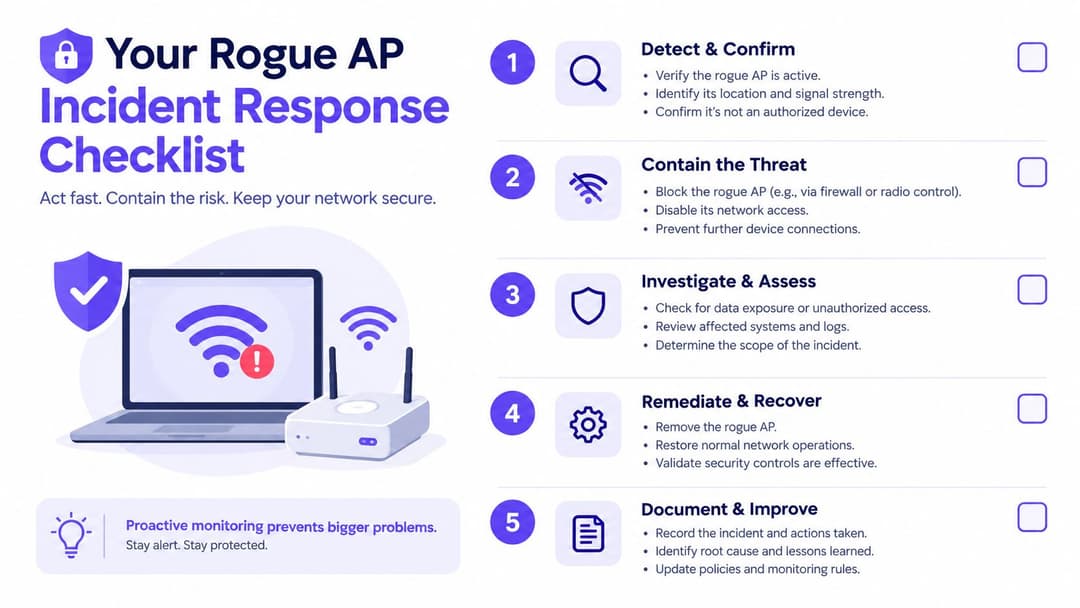
Initial alert
Record the BSSID, SSID, vendor, band, channel, signal strength, detecting sensor, and timestamps. Capture whether the SSID resembles a corporate or guest network and whether any managed clients associated with it.
- Assign ownership: Put one named analyst on the ticket and note the escalation contact.
- Protect evidence: Export the WIDS or WIPS event and preserve relevant controller, DHCP, NAC, and switch records.
- Set priority: Raise urgency for internal reachability, corporate SSID impersonation, unexpected client associations, or a strong signal inside a sensitive area.
Validation
Check the authorised inventory before treating the alert as an incident. Compare the radio identity and RF behaviour with approved APs, temporary equipment, neighbouring networks, and known tenant systems.
- Confirm the BSSID. Check MAC and OUI details against asset records.
- Locate the signal. Compare sensor readings and identify the likely floor or zone.
- Check the wired side. Search switch, DHCP, NAC, and VLAN data for evidence of internal connectivity.
- Review clients. Identify managed devices that associated, probed, or attempted authentication.
- Classify the case. Mark the candidate as external, internal unauthorised, suspected impersonation, or unresolved.
A finding isn't resolved because an analyst believes it is probably a neighbour. Record the evidence and the reason for closure.
Containment
For an internal rogue AP, quarantine or disable the associated switch port using the approved NAC and change-control process. If the device is an apparent evil twin without wired connectivity, protect users through security communications and investigate affected authentication and session activity.
Response principle: Contain the path you can control first, then investigate the device you can see.
Notify the site team when physical access or service interruption may be involved. In hospitality and retail, coordinate with the duty manager so staff don't reconnect the device while trying to restore guest or payment connectivity.
Eradication and physical removal
Trace the switch port through the patching records and use RF measurements to narrow the search. Inspect the likely area, including shared facilities and spaces outside the main IT footprint, then disconnect, remove, quarantine, or hand over the hardware according to your evidence-handling policy.
Record who found the device, where it was installed, how it was powered, which cable and port it used, and whether any clients connected. Rescan the area after removal and verify that the BSSID no longer appears or that the authorised device has been restored.
Review and improvement
Find out why the device could be connected. Review unused ports, NAC enforcement, guest and tenant onboarding, facilities access, wireless policy, and staff awareness. If an employee installed it to solve a coverage or connectivity problem, address that underlying need rather than relying only on disciplinary controls.
The UK's National Cyber Security Centre explicitly advises organisations to “Monitor enterprise wireless networks” and check enterprise AP configurations as part of wireless security hardening (UK wireless security guidance context). Turn that guidance into an operational measure by tracking alert-to-validation time, validation-to-containment time, and containment-to-physical-removal time without inventing targets you can't support.
Retest the process. Place an approved test device under controlled conditions, confirm that monitoring detects it, verify that the alert reaches the right team, trace it to the correct port, and prove that site staff can find it. Update the inventory, runbook, diagrams, and escalation contacts after every exercise.
Purple can support a controlled wireless access model by combining guest and staff authentication with network visibility, and its WIPS capabilities can help identify unauthorised APs for investigation and containment. Review the workflow with your network team, then visit Purple to assess whether its identity-based Wi-Fi and venue networking features fit your rogue AP response process.