

Is Supermarket WiFi Safe? A Shopper's Guide
This authoritative guide examines the technical realities of supermarket WiFi safety, providing actionable architecture and security strategies for IT leaders in the retail sector. It details the threat landscape — from Evil Twin APs to Man-in-the-Middle attacks — alongside the mitigation stack required to protect consumers and enterprise operations. Retailers and venue operators will find concrete implementation guidance covering VLAN segmentation, client isolation, WPA3, PCI DSS compliance, and GDPR-compliant guest onboarding via platforms like Purple.
🎧 Listen to this Guide
View Transcript
Executive Summary
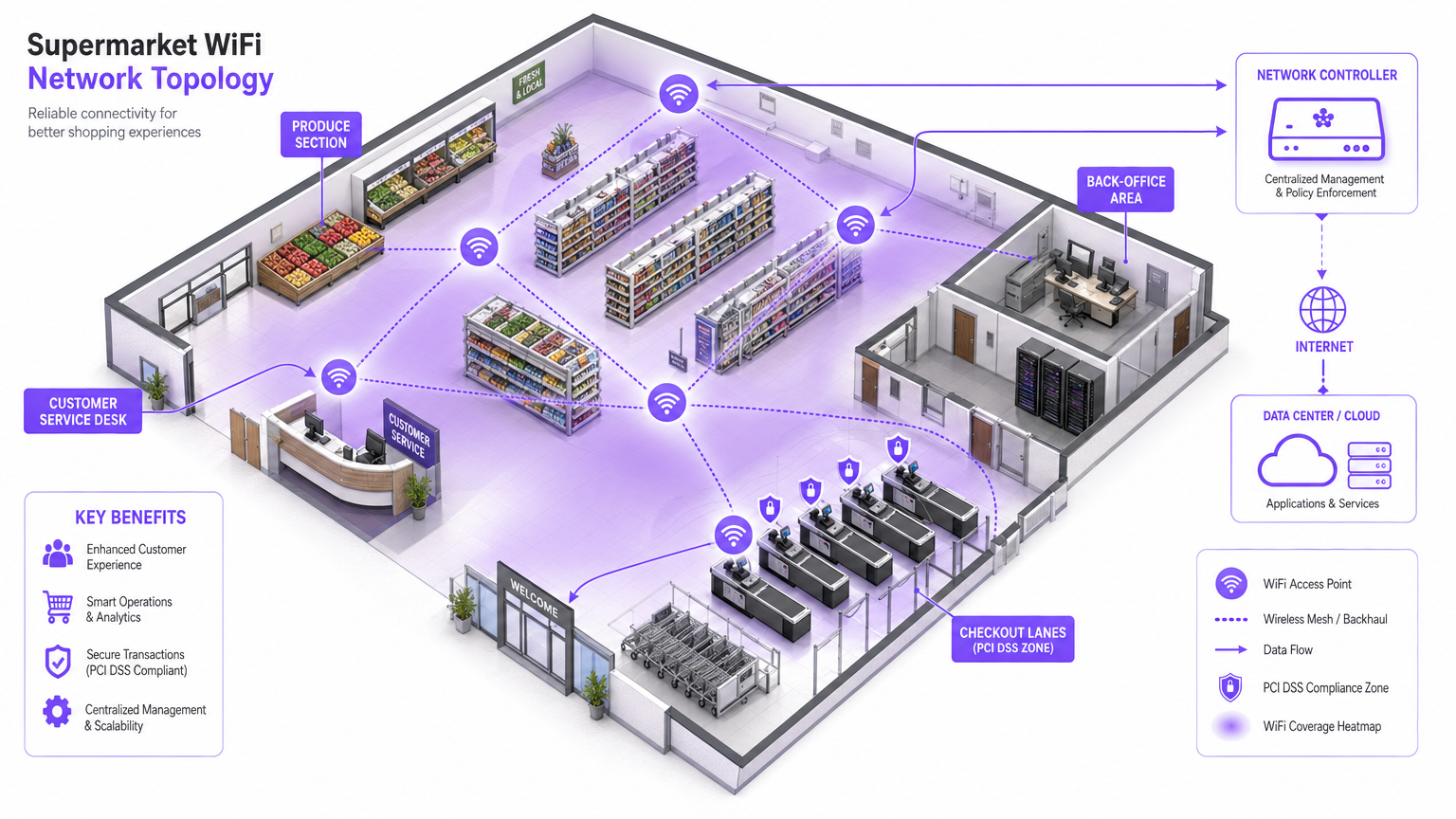
For IT managers, network architects, and venue operations directors, the question of whether supermarket WiFi is safe is not just a consumer concern — it is a critical enterprise risk management issue. As retail environments increasingly rely on digital connectivity for both customer engagement and operational efficiency, the underlying network infrastructure must be robust, secure, and compliant with PCI DSS and GDPR.
This guide provides a technical deep-dive into the architecture required to deliver secure in-store WiFi. The specific threat landscape includes Evil Twin APs, Man-in-the-Middle attacks, and rogue DHCP servers. The necessary mitigation stack spans strict VLAN segmentation, client isolation, WPA3 encryption, and 802.1X authentication. By leveraging platforms like Purple's Guest WiFi for secure onboarding and compliance-grade consent capture, retailers can provide a seamless shopping experience without compromising the integrity of their core networks or violating payment card security standards. The goal is to move beyond basic connectivity and architect a resilient, intelligent edge network that generates measurable business value.
Technical Deep-Dive
The retail WiFi environment is uniquely challenging due to high client density, transient user behaviour, and the critical need to protect point-of-sale (POS) systems from the same physical space occupied by untrusted guest devices. The fundamental technical challenge is providing frictionless access while maintaining absolute logical isolation from corporate assets.
The Threat Landscape
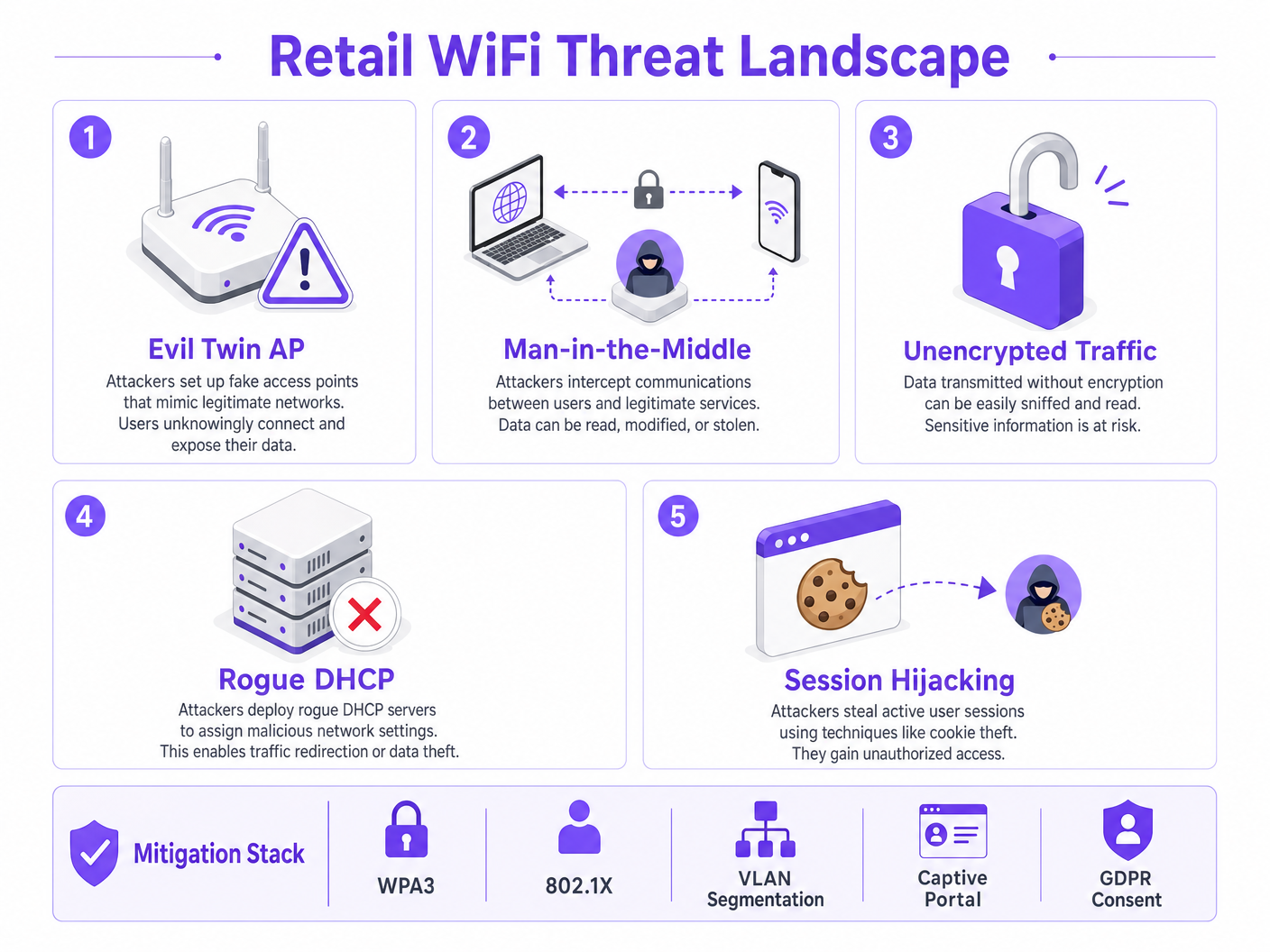
Retail networks face several specific vectors of attack that distinguish them from other enterprise environments.
Evil Twin Access Points represent the most prevalent and dangerous threat. Attackers deploy rogue access points broadcasting the legitimate store SSID — for example, Supermarket_Free_WiFi — with a stronger signal than the legitimate infrastructure. Client devices with saved network profiles automatically associate, allowing the attacker to intercept all traffic. In a high-footfall environment like a supermarket, a single rogue AP can affect hundreds of devices within minutes.
Man-in-the-Middle (MitM) Attacks follow naturally from Evil Twin deployments. On unencrypted open networks, attackers can also use ARP spoofing on the legitimate guest VLAN to position themselves between the client and the gateway, capturing unencrypted payloads including session cookies and credentials.
Rogue DHCP Servers exploit misconfigured port security on access switches. A malicious device introduced onto the guest VLAN can respond to DHCP requests faster than the legitimate server, assigning malicious DNS settings that silently redirect all web traffic through attacker-controlled infrastructure.
Session Hijacking targets services that do not enforce HTTPS throughout the entire session lifecycle. Attackers capture session cookies transmitted in plain text, allowing them to impersonate users on third-party services.
Architecture and Standards
To mitigate these threats, the network architecture must be built on a foundation of zero-trust principles at the wireless edge. The following standards and technologies form the core of a responsible retail WiFi deployment.
| Standard / Technology | Role in Retail WiFi | Compliance Relevance |
|---|---|---|
| WPA3 (SAE) | Encrypts the wireless link; provides forward secrecy | PCI DSS Req. 4 |
| 802.1X (PNAC) | Authenticates staff and POS devices at port level | PCI DSS Req. 8 |
| VLAN Segmentation | Isolates guest, POS, and IoT traffic at Layer 2/3 | PCI DSS Req. 1 |
| Client Isolation | Prevents peer-to-peer attacks on guest VLAN | Risk Mitigation |
| Captive Portal (GDPR) | Enforces ToS; captures lawful consent for data processing | GDPR Art. 6, 7 |
| OpenRoaming / Passpoint | Encrypted, frictionless guest onboarding | Privacy Best Practice |
| WIPS | Detects and contains rogue APs and Evil Twins | PCI DSS Req. 11.2 |
WPA3 introduces Simultaneous Authentication of Equals (SAE), replacing the Pre-Shared Key (PSK) exchange used in WPA2. This provides forward secrecy and protects against offline dictionary attacks, which is critical for any network where the passphrase may be publicly displayed.
802.1X provides port-based Network Access Control (PNAC). It ensures that only authorised devices with valid credentials or certificates can access the secure corporate VLANs. For guest devices, where 802.1X enrolment is impractical, Passpoint (Hotspot 2.0) and OpenRoaming provide a secure, certificate-based alternative. Purple acts as a free identity provider for OpenRoaming under the Connect license, enabling encrypted, seamless onboarding without a Captive Portal interaction.
Implementation Guide
Deploying secure wifi in retail stores requires a systematic approach to configuration and policy enforcement. The following steps represent the minimum viable architecture for a compliant, secure deployment.
Step 1: Design the VLAN Architecture
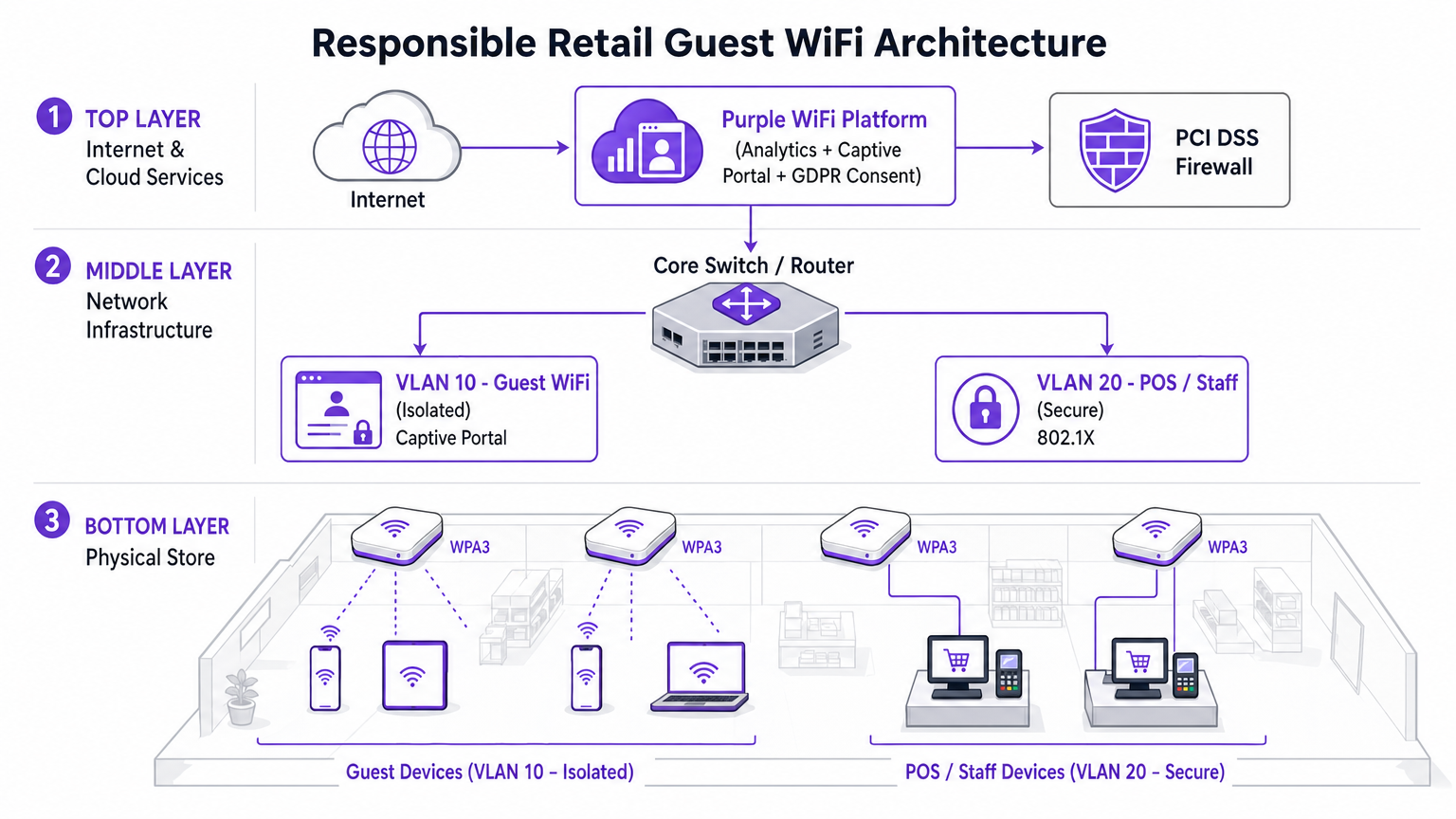
The most critical implementation decision is the physical and logical separation of traffic. Three VLANs are the minimum viable configuration for a modern supermarket.
- VLAN 10 (Guest WiFi): Strictly isolated. Default route to internet gateway only. No routes to any RFC 1918 private address space. Client isolation enabled at the AP level.
- VLAN 20 (POS / Staff): Handles sensitive transactional data. Requires 802.1X authentication. Strict ingress/egress ACLs permitting only necessary traffic to payment gagateways. This VLAN defines the PCI DSS cardholder data environment (CDE) scope.
- VLAN 30 (IoT / Operations): Digital signage, electronic shelf labels (ESLs), temperature sensors. Isolated from both guest and POS VLANs.
Step 2: Enable Client Isolation on the Guest SSID
Client isolation — also referred to as AP Isolation or Station Isolation — prevents devices connected to the same AP or VLAN from communicating directly with each other. This single configuration change, available in every enterprise wireless controller, neutralises most peer-to-peer attacks, ARP spoofing attempts, and lateral movement on the guest network. There is no legitimate use case for guest clients to communicate with each other in a retail environment. It must be enabled.
Step 3: Deploy a Compliant Captive Portal
The Captive Portal is the enforcement point for policy and compliance. It is not merely a splash page. By integrating with the Purple WiFi Analytics platform, the portal handles GDPR-compliant consent capture and Terms of Service enforcement before network access is granted. This layer protects the venue operator from liability associated with user behaviour on the network. The platform also enables bandwidth throttling and session time limits, preventing any single user from degrading the experience for others.
Step 4: Configure Rogue AP Detection
Enable the Wireless Intrusion Prevention System (WIPS) capabilities of your enterprise wireless controller. Configure automatic containment of spoofed SSIDs. Upon detecting an Evil Twin AP, the legitimate infrastructure transmits de-authentication frames spoofing the rogue AP's MAC address, forcing client devices to disconnect. This neutralises the threat automatically while security personnel locate the physical device.
Step 5: Implement DNS Filtering on the Guest VLAN
Apply DNS-layer security on VLAN 10 to block access to known malicious domains, malware command-and-control servers, and content categories that violate the acceptable use policy. This protects users from malicious redirects and reduces the venue's liability for content accessed on its network.
Best Practices
The following industry-standard recommendations apply to any deployment of store WiFi at enterprise scale.
Enforce strict inter-VLAN ACLs at the core. Do not rely solely on VLAN separation. Explicitly deny all traffic from the guest subnet to all private address ranges at the routing layer. A misconfigured route can silently bridge VLANs.
Maintain a disciplined firmware patching schedule. Access points are edge devices exposed to the public airspace. The KRACK (Key Reinstallation Attack) vulnerability demonstrated that even WPA2 could be compromised through firmware-level weaknesses. Patch within 30 days of a critical CVE publication.
Leverage analytics responsibly. The WiFi Analytics platform provides powerful insights into dwell time, footfall patterns, and customer journey mapping. Ensure the analytics pipeline anonymises MAC addresses in compliance with GDPR and the ICO's guidance on device identifiers as personal data.
Treat the guest network as untrusted external traffic. The mental model should be: the guest VLAN is the internet. Any traffic originating from it should be treated with the same suspicion as inbound traffic from an unknown external IP address.
For context on how these principles apply in adjacent sectors, see our guide on WiFi in Hospitals: A Guide to Secure Clinical Networks , which addresses similar segmentation challenges in high-stakes environments.
Troubleshooting & Risk Mitigation
When deploying or auditing in-store WiFi, several common failure modes can compromise security or performance.
Failure Mode: Asymmetric Routing on the Guest VLAN. If the guest VLAN is not properly isolated at the core switch, traffic may inadvertently route through corporate firewalls, causing stateful inspection failures and exposing internal routes to guest devices. Mitigation: Implement a dedicated physical or logical interface for guest traffic at the edge firewall, or use VRF (Virtual Routing and Forwarding) to maintain complete routing table separation.
Failure Mode: Captive Portal Bypass via DNS Tunnelling. Advanced users can bypass the Captive Portal by encoding HTTP traffic within DNS queries to an external resolver they control. Mitigation: Implement strict walled garden configurations. Only allow DNS traffic to approved external resolvers before authentication. Apply deep packet inspection (DPI) to identify and drop tunnelled traffic.
Failure Mode: MAC Address Spoofing. Attackers can clone the MAC address of an authenticated device to bypass the Captive Portal. Mitigation: Implement session binding to both MAC address and IP address. Enable DHCP snooping to detect address conflicts. Set short session timeouts to limit the window of exploitation.
Failure Mode: VLAN Hopping via Double Tagging. On misconfigured trunk ports, an attacker can craft double-tagged 802.1Q frames to inject traffic into a different VLAN. Mitigation: Ensure all access ports are explicitly assigned to a non-native VLAN. Disable DTP (Dynamic Trunking Protocol) on all access-facing switch ports.
ROI & Business Impact
Investing in secure, enterprise-grade WiFi architecture delivers measurable business value that extends well beyond risk mitigation.
PCI DSS Compliance Cost Reduction. Proper VLAN segmentation reduces the scope of the PCI DSS cardholder data environment. A smaller CDE scope means fewer systems to audit, fewer controls to evidence, and significantly reduced QSA (Qualified Security Assessor) fees. For a 200-location retail chain, this can represent savings of tens of thousands of pounds per annual audit cycle.
First-Party Data Acquisition. A secure, branded captive portal drives high opt-in rates for marketing databases. Shoppers who connect to a well-designed, trustworthy guest WiFi experience are significantly more likely to consent to marketing communications. This first-party data is increasingly valuable as third-party cookie deprecation reduces the effectiveness of digital advertising. For more context on the value of location intelligence, see our guide on Indoor Positioning System: UWB, BLE, & WiFi Guide .
Brand Protection. The reputational cost of a high-profile data breach originating from the guest network far outweighs the investment in secure infrastructure. A single incident can result in ICO fines under GDPR (up to 4% of global annual turnover), group litigation, and lasting damage to consumer trust.
Operational Intelligence. WiFi Analytics data from the guest network provides actionable insights into footfall patterns, dwell time by store zone, and peak traffic periods. This data directly informs staffing decisions, store layout optimisation, and promotional timing — delivering measurable ROI from the same infrastructure investment.
Listen: Executive Briefing on Retail WiFi Security
Related Reading: Is University WiFi Safe? A Guide for Students | WiFi in Hospitals: A Guide to Secure Clinical Networks | Your Guide to Enterprise In Car Wi Fi Solutions
References
[1] IEEE 802.11-2020 — IEEE Standard for Information Technology — Wireless LAN Medium Access Control and Physical Layer Specifications. [2] PCI Security Standards Council — PCI DSS v4.0, Requirements 1, 4, 8, and 11. [3] UK Information Commissioner's Office — Guidance on the use of device identifiers as personal data under UK GDPR. [4] Wi-Fi Alliance — WPA3 Specification v3.0.
Key Terms & Definitions
Client Isolation
A wireless network feature that prevents devices connected to the same Access Point or VLAN from communicating directly with each other. All traffic must traverse the AP and be routed through the upstream gateway.
The single most impactful security control for guest networks. Prevents peer-to-peer attacks, ARP spoofing, lateral movement, and malware propagation between shopper devices. Must be enabled on all guest SSIDs.
VLAN Segmentation
The practice of dividing a physical network into multiple logical networks (Virtual LANs) at Layer 2, with routing between them controlled by ACLs at Layer 3.
Essential for separating untrusted guest traffic from sensitive POS and corporate data. The primary mechanism for reducing PCI DSS audit scope in retail environments.
Evil Twin AP
A rogue wireless access point that broadcasts the same SSID as a legitimate network, typically with a stronger signal, to trick client devices into automatically associating with it.
The primary wireless threat in high-footfall retail environments. Mitigated by deploying WIPS capabilities to detect and contain spoofed SSIDs automatically.
Captive Portal
A web page that intercepts all HTTP/HTTPS traffic from a newly connected device and requires the user to complete an action — accepting Terms of Service, authenticating, or providing consent — before granting full network access.
The enforcement point for GDPR compliance, acceptable use policy, and first-party data capture in guest WiFi deployments. Not a security boundary — a policy and compliance layer.
802.1X (PNAC)
An IEEE standard for port-based Network Access Control that provides an authentication mechanism for devices attempting to connect to a LAN or WLAN, using an authentication server (typically RADIUS) to validate credentials or certificates.
The standard for securing staff and POS device access in retail. Ensures only authorized, enrolled devices can access the secure corporate VLANs, regardless of physical port.
OpenRoaming
A Wi-Fi Alliance roaming federation service that allows user devices to automatically and securely authenticate to participating Wi-Fi networks using device certificates, without captive portals or manual password entry.
The emerging standard for frictionless, encrypted guest onboarding. Purple acts as a free identity provider for OpenRoaming under the Connect license, enabling retailers to offer seamless connectivity without sacrificing security.
WPA3 (SAE)
The third generation of Wi-Fi Protected Access, introducing Simultaneous Authentication of Equals (SAE) to replace the Pre-Shared Key (PSK) handshake. Provides forward secrecy and resistance to offline dictionary attacks.
Mandatory for new retail WiFi deployments. Particularly important in environments where the network passphrase may be publicly displayed, as SAE prevents retroactive decryption of captured traffic.
PCI DSS
Payment Card Industry Data Security Standard — a set of security requirements for all organisations that accept, process, store, or transmit payment card data. Defines the Cardholder Data Environment (CDE) and mandates strict network segmentation.
The primary regulatory driver for strict VLAN segmentation in retail. Mixing guest and POS traffic on the same network segment is a direct violation of PCI DSS Requirement 1 and can result in significant fines and loss of card processing privileges.
Dynamic ARP Inspection (DAI)
A security feature on managed switches that validates ARP packets against a DHCP snooping binding database, dropping any ARP reply that does not match the legitimate IP-to-MAC binding.
The Layer 2 control that prevents ARP spoofing attacks on the guest VLAN. Works in conjunction with DHCP Snooping to maintain an accurate binding table.
Case Studies
A national retail chain with 200 locations is upgrading its network infrastructure. They currently operate a single flat network for POS terminals, staff devices, and a WPA2 password-protected guest SSID. The password is printed on customer receipts. They need to achieve PCI DSS v4.0 compliance within the next two quarters while improving the guest experience. How should the architecture be redesigned?
The network must be redesigned around strict VLAN segmentation and a compliant guest onboarding flow.
VLAN Architecture: Create VLAN 10 for Guest Access (isolated, internet-only route), VLAN 20 for POS and payment terminals (802.1X authenticated, strict ACLs to payment gateway IPs only), and VLAN 30 for staff and back-office devices.
Guest SSID: Migrate from WPA2-PSK to an open SSID with a captive portal. Enable client isolation at the AP level immediately. This removes the false security of a publicly displayed password and eliminates peer-to-peer attack vectors.
Captive Portal: Deploy the Purple platform as the captive portal layer. Configure GDPR-compliant consent capture, Terms of Service enforcement, and bandwidth throttling (e.g., 5 Mbps per device, 60-minute session timeout).
POS Segmentation: Migrate all POS terminals to VLAN 20. Implement 802.1X with device certificates. Apply ACLs at the core switch denying all traffic from VLAN 10 to VLAN 20 and VLAN 30.
Monitoring: Enable WIPS on all wireless controllers. Configure automatic containment of spoofed SSIDs. Integrate controller logs with the central SIEM for real-time alerting.
A large supermarket's NOC receives alerts showing a high volume of ARP broadcast traffic and anomalous DNS requests originating from several MAC addresses on the guest VLAN. Guest WiFi performance is degraded. A packet capture shows ARP replies claiming the gateway IP belongs to a device that is not the legitimate gateway. What is the likely attack and the immediate remediation steps?
The symptoms are consistent with an ARP spoofing / Man-in-the-Middle attack on the guest VLAN. The attacker has introduced a device onto the guest network and is broadcasting gratuitous ARP replies claiming ownership of the gateway IP, redirecting guest traffic through their device.
Immediate Remediation:
- Verify that Client Isolation is enabled on the guest SSID. If disabled, enable it immediately — this is the most effective single control.
- Enable Dynamic ARP Inspection (DAI) on the access switches for the guest VLAN. DAI validates ARP packets against the DHCP snooping binding database, dropping any ARP reply that does not match the legitimate IP-to-MAC binding.
- Enable DHCP Snooping on the guest VLAN to build the binding database that DAI relies on.
- Identify and blacklist the attacker's MAC address at the wireless controller level to terminate their connection.
- Force a DHCP lease renewal for all guest clients to flush any poisoned ARP caches.
- Review WIPS logs to determine whether the attacker connected via the legitimate SSID or an Evil Twin.
Scenario Analysis
Q1. You are auditing a newly deployed supermarket network. The configuration shows the guest SSID is on VLAN 50 and POS terminals are on VLAN 60. However, a ping from a device on VLAN 50 successfully reaches a POS terminal on VLAN 60. The network team insists the VLANs are correctly configured. What is the most likely architectural failure and how do you remediate it?
💡 Hint:VLANs separate traffic at Layer 2. Think about where routing between subnets happens and what controls should exist there.
Show Recommended Approach
The VLANs are correctly configured at Layer 2, but inter-VLAN routing is enabled at the core switch or firewall without restrictive ACLs. Traffic is being routed between the subnets because no ACL explicitly denies it. Remediation: Apply an outbound ACL on the VLAN 50 (guest) interface at the routing layer, explicitly denying all traffic destined for any RFC 1918 private address range (10.0.0.0/8, 172.16.0.0/12, 192.168.0.0/16), with a permit statement for the default route to the internet only. Verify with a packet capture that no inter-VLAN traffic traverses the firewall after the ACL is applied.
Q2. A retail client's CTO wants to remove the captive portal entirely to reduce friction for shoppers, proposing a completely open network with no authentication or Terms of Service. What are the three most significant risks you must communicate, and what is the recommended alternative that preserves the frictionless experience?
💡 Hint:Consider technical security, legal liability under UK GDPR, and the commercial value being lost.
Show Recommended Approach
- Legal Liability: Without a Terms of Service, the venue assumes liability for illegal activities (e.g., copyright infringement, accessing prohibited content) performed on their network. The captive portal is the legal instrument that transfers responsibility to the user. 2. GDPR Compliance: Removing the portal eliminates the consent capture mechanism. Any analytics or marketing data derived from network usage without a lawful basis under GDPR Article 6 exposes the organisation to ICO enforcement. 3. Commercial Value: The captive portal is the primary mechanism for first-party data acquisition — email addresses, demographic data, and marketing opt-ins. Removing it destroys this revenue-generating capability. Recommended Alternative: Deploy OpenRoaming via the Purple Connect license. This provides completely frictionless, encrypted onboarding for users with compatible devices, while maintaining a lightweight captive portal for non-OpenRoaming devices that still captures consent.
Q3. Your WIPS alerts you to a rogue AP broadcasting the store's exact SSID with a signal strength 15 dBm stronger than your legitimate APs near the main entrance. Staff report that several customers are complaining their phones 'won't load anything' after connecting to the WiFi. What is happening and what is the correct automated response you should have pre-configured?
💡 Hint:Consider both the attack mechanism and the over-the-air countermeasure available to enterprise wireless controllers.
Show Recommended Approach
An Evil Twin AP has been deployed near the entrance with a boosted signal to force client devices to prefer it over the legitimate infrastructure. The customers experiencing connectivity failures are connected to the rogue AP, which is either not providing internet access (a passive credential harvesting setup) or is actively intercepting and failing to forward traffic. The correct automated response is WIPS-based containment: the legitimate wireless controllers should be configured to automatically transmit de-authentication (deauth) frames spoofing the MAC address of the rogue AP. This forces any device attempting to associate with the Evil Twin to immediately disconnect, effectively neutralising the attack over the air. Simultaneously, the NOC alert should trigger a physical security response to locate and remove the rogue device. Note: automated deauth containment should be carefully scoped to avoid accidentally deauthenticating clients from legitimate neighbouring networks.




